Survey on Security of Virtual Machine
Images in a Cloud Environment
Amrit Alung, Prof. Ashok Verma
Department of Computer Science & Engg, Gyan Ganga Instt. of Tech.& Sciences, Madhya Pradesh, India
Prof. and Head of the Department, Department of Computer Science & Engg, Gyan Ganga Instt. of Tech.& Sciences,
Madhya Pradesh, India
ABSTRACT: Virtualization is a term that refers to the generalization of computer resources. The purpose of virtual computing environment is to get better resource utilization by providing a unified incorporated operating platform for users and applications based on aggregation of diverse and autonomous resources. More recently, virtualization at all levels b e c a m e im p or t an t a g a i n a s a way to get better system security, consistency and ease of use, reduce costs, and provide greater flexibility. This paper explains the basics of system virtualization and addresses pros and cons of virtualization along with taxonomy and challenges.
KEYWORDS: Virtualization; hypervisor; VMM; Security; Threats.
I. INTRODUCTION
Virtualization is commonly defined as a technology that introduces a software abstraction layer between the hardware and the operating system and applications running on top of it. This abstraction layer is called virtual machine monitor (VMM) or hypervisor and basically hides the physical resources of the computing system from the operating system (OS). Since the hardware resources are directly controlled by the VMM and not by the OS, it is possible to run multiple (possibly different) OSs in parallel on the same hardware. As a result, the hardware platform is partitioned into one or more logical units called virtual machines (VMs). ”Virtuality” differs from
”reality” only in the formal world, while possessing a similar essence or effect. In the computer world, a virtual
environment is perceived the same as that of a real environment by application programs and the rest of the world,
though the underlying mechanisms are formally different.
II. BACK GROUND
Virtualization was first developed in 1960’s by IBM Corporation, originally to partition large mainframe computer into several logical instances and to run on single physical mainframe hardware as the host. This feature was invented because maintaining the larger mainframe computers became cumbersome. The scientist realized that this capability of partitioning allows multiple processes and applications to run at the same time, thus increasing the efficiency of the environment and decreasing the maintenance overhead.
Although the main focus of this paper is to provide an overview of security vulnerabilities in a virtual environment. It is worth mentioning some of the security benefits that comes together with virtualization. Two primary benefits offered by any virtualization technology are
• Resource sharing - Unlike in non-virtualized environment where all the resources are dedicated to the running programs, in virtualized environment the VMs shares the physical resources such as memory, disk and network devices of the underlying host.
III. CLASSIFICATION
Virtualization allows abstraction and isolation of lower level functionalities and underlying hardware. This enables portability of higher level functions and sharing and/or aggregation of the physical resources. The different virtualization approaches can be categorized into:
A. Full Virtualization
In this approach, the VMM is also called virtual machine manager and runs on top of a host operating system, commonly as an application in user space. The result is that, in the VMs, the applications and the guest OS run on top of a virtual hardware provided by the VMM.However the virtual machine environment that provides "enough representation of the underlying hardware to allow guest operating systems to run without modification can be considered to provide "Full Virtualization" [2]".In this kind of setup the I/O devices are allotted to the guest machines by imitating the physical devices in the virtual machine monitor; interacting with these devices in the virtual environment are then directed to the real physical devices either by the host operating system driver or by the "VM driver [2]". This architecture can be observed in Figure 1.
The main advantage of this approach is that it very easy to use. A common user can install a software product like VMware Workstation just like any other software product on its OS of choice. Inside VMware Workstation, a guest OS can be installed and used just like it would be running directly on hardware.
Figure 1. Full Virtualization
The main disadvantage of this approach is the poor performance, which can be up to 30% less than when running directly on hardware [2].
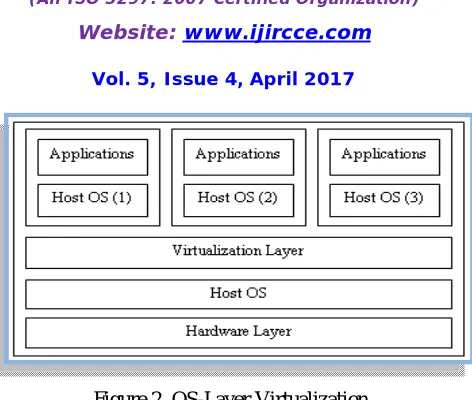
B. OS-Layer Virtualization
Figure 2. OS-Layer Virtualization
Here, the virtualized OS image is called virtualization layer. This thin architecture eases the administration of the system, allowing system administrators to assign resources such as memory, CPU guarantees and disk space both when creating a VM as well as dynamically at runtime. When compared to other server virtualization solutions, OS-layer virtualization tends to be more efficient and fails only by little to provide the same isolation [4].
Yet this approach has one but big drawback: since the VMs use the same kernel as the host OS, the guest OS must be the same as the host OS (and such, it is not possible to run e.g. Windows on top of Linux).
C. Hardware-Layer Virtualization
This approach is commonly used on the server market due to its high virtual machine isolation and performance. Here, the VMM runs directly on hardware, controlling and synchronizing the access of the guest OSs to the hardware resources. Figure 3 depicts this architecture.
Figure 3. Hardware-Layer Virtualization
Para virtualization is the technique used by Xen which provides a virtual machine interface representing a slightly modified copy of the underlying hardware, where the non virtualizable portions of the x86 original instruction set are replaced with their easily virtualized equivalents.
D. Para virtualization
virtualization to achieve performance closer to non virtualized hardware. Device interaction in para virtualized environment is very similar to the device interaction in full virtualized environment; the virtual devices in para virtualized environment also rely on physical device drivers of the underlying host [6].
E. Application virtualization
In Application virtualization, the user is able to run a server application locally using the local resources without needing the complexity of completely installing this application on his/her computer. Such virtualized applications are designed to run in a small virtual environment containing the only the resources needed for the application to execute. Thus in application virtualization each user have an isolated application environment virtually. This small isolated virtual environment acts as a layer between the application and the host operating system [6].
F. Resource virtualization
Virtualizing system specific resources such as "storage volumes, name spaces and the network resources [6]" is known as resource virtualization.There are various approaches to perform resource virtualization. Some of them are
• Aggregating many individual components into larger resource pool.
• Grid computing or computer clusters where multiple discrete computers are combined to form a large
supercomputers with enormous resources.
• Partitioning a single resource such as disk space into number of smaller and easily accessible resources of same type.
G. Storage virtualization
Storage virtualization is a form of Resource virtualization, where a logical storage is created by abstracting all the physical storage resources that are scattered over the network [6]. First the physical storage resources are aggregated to form a storage pool which then forms the logical storage. This logical storage which is the aggregation of scattered physical resources appears to be a single monolithic storage device to the user.
IV. ADVANTAGES & DISADVANTAGES
A. Virtualization advantages
1) Flexibility is given in several ways. It is added because one can run more than one instance of an operating system one a single computer, it is possible to migrate a virtualized instance to another physical computer and the virtual instances can be graceful from the host operating system with features like ’pause’, ’resume’, ’shutdown’ and ’boot’ [7]. It is also possible to change the specifications of virtual computers while they are running, for example the amount of ram, hard disc size and more [8].
2) Availability is added because one can keep the virtualized instances running even though the physical node has to be shut down, i.e. for hardware upgrade or maintenance. This is done by temporarily migrating the virtual instances to another computer,
and migrate them back when the maintenance is
finished and the primary computer is ready to serve. Hardware can be changed, upgraded, maintained and repaired without downtime in the services.
3) Scalability is added because is very easy to add or remove nodes. If the demand for capacity increases over
time, it is very easy to insert a physical node with the basic cluster installation, and it will contribute in running the existing virtual machines that run services. This way, the cluster will scale with the company as it expands.
4) Hardware utilization is most likely increased if more than one operating system is hosted simultaneously. This is because virtual machines utilize hardware resources that are left idle by the host operating system [7].
service is compromised, the other services are unaffected [8]. Using virtualization, the server would contain a minimal install that could host several virtual machines. Each virtual machine consists of a minimal operating system install and one service, for example the web server. Let us say that the web server is being compromised. The web pages hosted will be unreliable, but the break in does not affect the remaining running services - the database server, mail server and the file server.
6) Cost: It is possible to achieve cost reductions by consolidation smaller servers into more powerful servers.Cost reductions stem from hardware cost reductions (economies of scale seen in faster servers), operations cost reductions in terms of personnel, floor space, and software licenses.
7) Adaptability to Workload Variations: Changes in workload intensity levels can be easily taken care of by shifting resources and priority allocations among virtual machines. Autonomic computing-based resource allocation techniques can be used to dynamically move processors from one virtual machine to another.
8) Load Balancing: Since the software state of an entire virtual machine is completely encapsulated by the VMM, it is relatively easy to migrate virtual machines to other platforms in order to improve performance through better load balancing.
9) Legacy Applications: Even if an organization decides to migrate to a different operating system, it is possible to continue to run legacy applications on the old OS running as a guest OS within a VM. This reduces the migration cost.
B. Virtualization disadvantages:
Virtualization obviously has many advantages, but it also has disadvantages:
1) Overhead causing decreased performance has been the biggest con with virtualization. Performance is often being compromised due to flexibility. The developers have worked hard to decrease the overhead, to bring it very close to the performance of
the standalone physical computer.
2) SPOF (Single point of failure) in the hardware is still an issue. Even though the virtual machine is decoupled from the hardware, it is still dependent on the hardware working. Failure in the hardware will most likely lead to failure in the virtual machine, which will force a reboot.
3) The management interface is closely linked to the virtualization platform. This can be a problem as it encumbers consolidation of several platforms into the same environment.
C. Virtualization Challenges
As per Popek and Goldberg, the requirements for a virtualizable architecture [9] are as follows. For any conventional third generation computer, a virtual machine monitor can be constructed if the set of sensitive instructions is a subset of the set of privileged instructions. Formally, the virtual machine monitor (VMM) should exhibit the following three properties [9].
1) Efficiency Property: Provide the ability to execute innocuous instructions directly on hardware by- passing VMM.
2) Resource Control Property: The VMM should be in complete control of the system. When the operating systems (running on top of VMM) try to access resources, the access should be routed through the VMM. 3) Equivalence Property: Any program running on top of VMM should perform in manner indistinguishable
from the case when the VMM doesn’t exist.
V. SECURITY VULNERABILITIES IN VIRTUALIZATION
Most of security flaws identified in a virtual machine environment are very similar to the security flaws associated with any physical system. The following are some general flaws that are unique [9] to the virtual environment.
A. Communication between VMs or Between VMs and host
a threat to the environment. Isolation should be carefully configured and maintained in a virtual environment to ensure that the applications running in one VM do not have access to the applications running in another VM. Isolation should be
strongly maintained that break-in into one virtual machine
should not provide access either to virtual machines in the same environment or to the underlying host machine. Shared clipboard in virtual machine is a useful feature that allows data to be transferred between VMs and the host. But this useful feature can also be treated as a gateway for transferring data between cooperating malicious program in VMs.
In some VM technologies, the VM layer is able to log keystrokes and screen updates across the virtual terminals, provided that the host operating system kernel has given necessary permission. These captured logs are stored out in the host, which creates an opportunity to the host to monitor even the logs of encrypted terminal connections inside the VMs. Some virtualization avoids isolation, in order to support applications designed for one operating system to be operated on another operating system, this solution completely exploits the security bearers in both the operating systems.
This kind of system, where there is no isolation between the host and the VMs gives the virtual machines an unlimited access to the host’s resources, such as file system and networking devices in which case the host’s file system becomes vulnerable [2].
B. VM Escape
Virtual machines are allowed to share the resources of the host machine but still can provide isolation between VMs and between the VMs and the host. That is, the virtual machines are designed in a way that a program running in one virtual machine cannot monitor, or communicate either with programs running in other VMs or with the programs running in the host. But in reality the organizations compromise isolation. They configure flexible isolation to meet their organization needs which exploits the security of the systems.
New software bugs were already introduced to compromise isolation [2]. One such example of this kind of attack is VM escape.VM escape is one of the worst case happens if the isolation between the host and between the VMs is compromised. In VM escape, the program running in a virtual machine is able to completely bypass the virtual layer (hypervisor layer), and get access to the host machine. Since the host machine is the root, the program which gain access to the host machine also gains the root privileges basically escapes from the virtual machine privileges. This result in complete break down in the security framework of the environment [2]. This problem can be solved by properly configuring the host/guest interaction.
C. VM monitoring from the host
Host machine in the virtual environment is considered to be the control point and there are implications that enable the host to monitors and communicate with the VM applications up running. Therefore it is more necessary to strictly protect
the host machines than protecting distinctive VMs. Different virtualization technologies have different implications for the host machine to influence the VMs up running in the system. Following are the possible ways for the host to influence the VMs [2]:
• The host can start shutdown, pause and restart the VMs.
• The host can able to monitor and modify the resources available for the virtual machines.
• The host if given enough rights can monitor the applications running inside the VMs.
• The host can view, copy, and likely to modify the data stored in the virtual disks assigned to the VMs.
D. VM monitoring from another VM
As mentioned several times earlier in Sec. 3 and in Sec. 4 isolation plays a vital role in virtualization. It is considered as a threat when one VM without any difficult may be allowed to monitor resources of another VM. And more over the VMs does not have the possibility to directly access the file system of the host machine, so it’s impossible for a VM to access the virtual disk allocated to another VM on the host. When comes to the network traffic, isolation completely depends on the connection (network) setup of the virtualized environment. If the host machine is connected to the guest machine by means of physical dedicated channel, then its unlikely that the guest machine can sniff packets to the host and vice versa.
However in reality the VMs are linked to the host machine by means "virtual hub" or by a virtual switch. In which case, it enables the guest machines to sniff packets in the network or even worse that the guest machines can use ARP poisoning to redirect the packets going to and coming from another guest .Authenticating the network traffic could be a solution the problem described above.
E. Denial of Service
In virtual machine architecture the guest machines and the underlying host share the physical resources such as CPU, memory disk, and network resource. So it is possible for a guest to impose a denial of service attack to other guests residing in the same system. Denial of service attack in virtual environment can be described as an attack when a guest machine takes all the possible resources of the system. Hence, the system denies the service to other guests that are making request for resources; this is because there is no resource available for other guests. The best approach to prevent a guest consuming all the resources is to limit the resources allocated to the guests. Current virtualization technologies offer a mechanism to limit the resources allocated to each guest machines in the environment. Therefore the underlying virtualization technology should be properly configured, which can then prevent one guest consuming all the available resources, there by preventing the denial of service attack.
F. Guest-to-Guest attack
As mentioned in Sec.C it is important to prevent the host machine than the individual VMs. If an attacker gains the administrator privileges of the hardware then it’s likely that the attacker can break-in into the virtual machines. It is termed as guest-to-guest attack because the attacker can able to hop from one virtual machine to another virtual machine provided that the underlying security framework is already broken.
G. External Modification of a VM
There are some sensitive applications exists which rely on the infrastructure of the VM environment. These applications running inside a virtual machine requires the virtual machine to be a trusted environment to execute that application. If a VM is modified for some reason, the applications can still be able to run on the VM but the trust is broken. A best solution for this problem is to digitally sign the VM and validating the signature prior to the execution of this sensitive application.
H. External modification of the hypervisor
As mentioned earlier in Sec.D hypervisor is responsible for providing isolation between the guest machines. The VMs are said to be completely isolated or "self protected" only if the underlying hypervisor behaves well. A badly behaved hypervsior will break the security model of the system. There are several solutions exists for this problem, one of the recommended solution is to use secure hypervisor like SHype [4] to ensure security in the hypervisor layer. Another solution is to protect the hypervisor from unauthorized modifications or enable the guest machines to validate the hypervisor.
VI. CONCLUSION
REFERENCES
[1] VMware security center.http://www.vmware.com/support/security.html
[2]. J. Kirch. Virtual machine security guidelines. The center for Internet Security, September 2015. http://www.cisecurity.org/tools2/vm/ CIS_VM_Benchmark_v1.0.pdf.
[3] Sugerman, Jeremy; Venkitachalam, Ganesh; Lim, Beng-Hong: Virtualizing I/O Devices on VMware Workstation’s Hosted Virtual Machine Monitor. In: Proceedings of the General Track: 2016 USENIX Annual Technical Conference.USENIX Association. – ISBN 188044609X, 1–14
[4] Soltesz, Stephen; Poetzl, Herbert; Fiuczynski, Marc E.; Bavier, Andy
; Peterson, Larry: Container-based operating system virtualization: a scalable, high-performance alternative to hypervisors. In: EuroSys ’07: Proceedings
of the 2007 conference on EuroSys. ACM Press. – ISSN 0163–5980, 275–287 [5]. Popek, Gerald J.; Goldberg, Robert P.: Formal requirements for virtualizable third generation architectures. In: Commun. ACM 17 (1974),
July, Nr. 7, 412–421. http://dx.doi.org/10.1145/361011.361073. – DOI 10.1145/361011.361073. – ISSN 0001–0782.
[6] A. Mann. The pros and cons of virtualization. BTQ, 2007. http://www.btquarterly.com/?mc=pros-cons-virtualization\&page=virt- view%research.
[7]. Rosenblum M. and Garfinkel T. Virtual machine monitors: current technology and future trends. Computer, 38(5):39–47, May 2005. [8]. Renato J. Figueiredo, Peter A. Dinda, and J. Fortes. A case for grid
computing on virtual machines. In ICDCS ’03: Proceedings of the 23rd International Conference on Distributed Computing Systems, page 550, Washington, DC, USA, 2003. IEEE Computer Society.
[9].G. J. Popek and R. P. Goldberg, “Formal requirements for virtualizable third generation architectures,” Comm. ACM, vol. 17, no. 7, pp. 412–421,1974
[10]Kirch. Virtual machine security guidelines. The center for Internet Security, September 2007. http://www.cisecurity.org/tools2/vm/CIS_VM_Benchmark_v1.0.pdf.