Daily Segregation Confirmation System
Clearing FCMs
Data File Layout and Submission Requirements
Version 1.0.8.2
Contents
Introduction ... 3
Data File Overview ... 5
File Naming Convention ... 5
Empty Data Files ... 5
FCM Identifier (FCM_ID) ... 6
File Format ... 6
SFTP Request Procedure ... 7
File Delivery (SFTP) ... 8
Batch Date/Posting Date ... 8
Processing Schedule ... 9
Escalation Procedures ... 9
Data File Layouts ... 10
Account Balances ... 10
Security Balances ... 11
Introduction
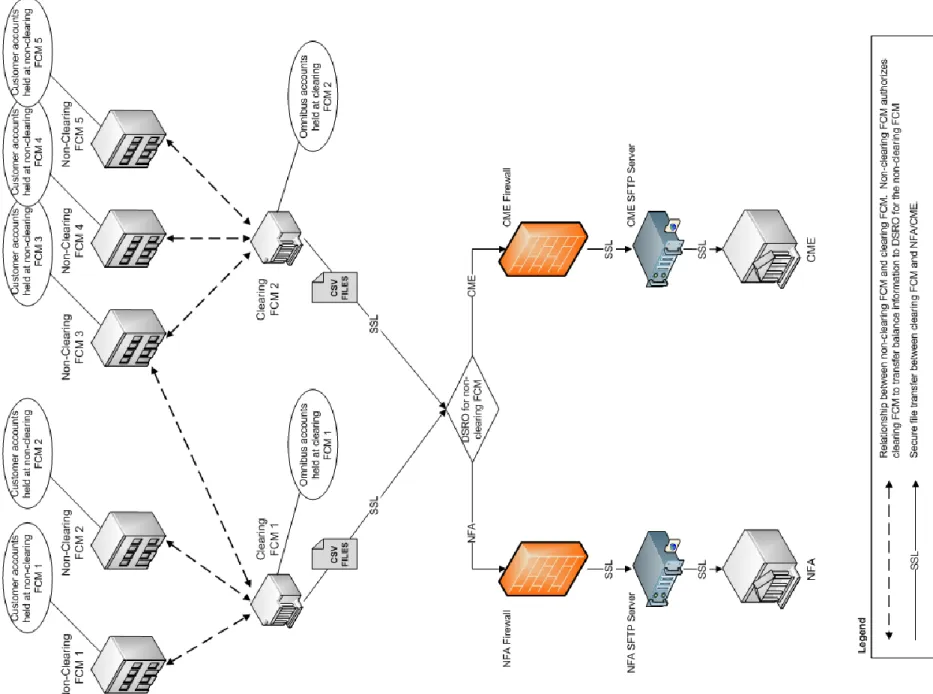
The purpose of this document is to describe the requirements for the data file transfer of customer omnibus funds/balances from clearing FCMs to NFA/CME. This document will discuss the structure and content of the data files as well as the file transfer details.
Note: For purposes of this specification, the term “Clearing FCM” shall denote an FCM or foreign broker that carries a customer omnibus account on behalf of another registered FCM, while the term “Non-Clearing FCM” shall denote an FCM for which a customer omnibus account is carried by another FCM or foreign broker.
Data File Overview
The data file requirements consists of two CSV files that are to be submitted on a daily basis to NFA’s/CME’s SFTP server. NFA and CME will
each independently receive these files, from the clearing FCM, which contain omnibus account balances for the non-clearing FCMs for which
they are the DSRO. In other words, omnibus account balances held for non-clearing FCMs, where NFA is the DSRO for the non-clearing FCM,
should be sent to NFA; omnibus account balances held for non-clearing FCMs, where CME is the DSRO for the non-clearing FCM, should be
sent to CME.
File Naming Convention
Asset Type Filename (CSV Format)
Various balances clearingfcm_YYYYMMDD_NFAID_n.csv Securities clearingfcm_sec_YYYYMMDD_NFAID_n.csv
Table 1: File Naming Convention where
o
NFAID
is the clearing FCM’s 7 character NFA ID.
o
n
is the version of the file. Generally, n should equal 0 for the initial submission. If additional reports are submitted they should be
sequenced with 1, 2, 3, etc. Additional reports may be submitted in their entirety or to report missing balances that were omitted in
the initial submission.
Examples
o
clearingfcm_sec_20130626_9112233_0.csv (Initial submission for securities)
o
clearingfcm_sec_20130626_9112233_1.csv (Resubmission for incorrect security balances or submission of missing security balances)
Empty Data Files
In the event that there are no reportable account balances for one or more of your reports, please submit empty file(s) with a header row. You file(s) will not process without a header row.
FCM Identifier (FCM_ID)
The FCM_ID is a unique identifier used to identify the clearing FCM associated with each reported account balance. Enter the
non-clearing FCM’s 9-digit federal employer identification (EIN) number for domestic non-non-clearing FCMs. Enter the non-non-clearing FCM’s
WinJammer ID for foreign non-clearing FCMs that do not have an EIN.
File Format
File Format:
Comma separated values (CSV)
Time Format:
Time data must be in 24-hour format using MM/DD/YYYY in CST/CDT timezone.
Character Encoding:
Files must adhere to the ASCII character set.
Number Format:
Numbers should not include comma separators. Numbers can optionally be enclosed in double quotes.
String Format:
All string (non-numeric) values may be optionally enclosed in double quotes, but must be enclosed in double quotes if the
value contains a comma.
Data Types:
Each data element in this document has an associated data type and required indicator. Data types generally fall into one of
three categories: STRING, DATE/TIMESTAMP, and NUMERIC.
o
STRING(size)
– Contains alpha-numeric characters, where (size) denotes the maximum number of characters.
o
DATE
– Dates must be reported in the format, MM/DD/YYYY.
o
TIMESTAMP
– Timestamp is a date type with a time portion, MM/DD/YYYY HH:MM:SS.
o
NUMBER(p, s)
– Numeric that can have a fractional part. For example, NUMBER(16, 6) is a number that has 10 digits before the
decimal and 6 digits after the decimal.
o
NUMBER(p)
– Numeric that has no fractional parts. For example, NUMBER(16) is an integer that has up to 16 digits.
Field headers:
All files must contain field headers using the naming convention listed in the layouts below.
Field Order:
Fields must be in the same order specified in the layouts below.
Field delimiter:
All fields are delimited by commas.
Record delimiter:
DOS CRLF
Non-Applicable (Optional) Fields:
Some fields may not be applicable for a given balance record. Fields that are not applicable must be
present in the data file, but the data can be left blank.
Required Data
: Fields designated as required must be present in the data (e.g. BatchDate, FCM_ID). Although a field may not be explicitly
designated as required, under certain circumstances it may be conditionally required.
Each field will be designated as required, conditionally required, or optional under the “Req” column.
o – Required field must be submitted.
o C – Conditionally required fields must be submitted under specified conditions.
o Blank – When Req’d is blank this indicates optional fields. Optional fields should be submitted if the data is available.
SFTP Request Procedure
Each Clearing FCM must establish an SFTP Account with NFA and/or CME depending on which DSRO is responsible for the respective
non-clearing FCM. In order to establish an account, the Clearing FCM must submit the applicable security request forms to the non-non-clearing FCM's
DSRO. Please contact the non-clearing FCM's DSRO for copies of the security request forms.
File Delivery (SFTP)
File Transfer/Schedule:
File must be delivered each morning (Tues-Sat) by 6:00am CST/CDT (T+1) via secure SFTP.
FTP Server Availability:
The SFTP server will be available 24/7.
IP Address:
Each clearing FCM must provide NFA/CME with the IP address of the server/gateway that will be transferring the data files to
allow that server to access NFA's/CME’s secure FTP server. IP addresses for all servers including production, backup and/or hotsite/DR
servers must be specified. FCM must give advanced notice of implementation dates when switching servers that results in IP address
changes on servers involved in sending files to NFA/CME.
PKI:
The FCM will need to supply NFA/CME with RSA public keys. The FCM retains their private key.
NFA/CME Initiated FTP Password Changes:
In the event that FCM’s secure FTP user id or password will be changed, NFA/CME will give
the FCM advanced notice to coordinate the changes.
Note: The CRLF record delimiter is very important in order to be considered a valid file. If submitting file(s) in binary SFTP mode, please ensure that your files are formatted with CFLF before the transfer. Using ASCII SFTP mode should perform the conversion automatically if files are generated with LF only EOD character. Please contact NFA or CME’s IT departments for any additional guidance or questions.
Batch Date/Posting Date
Both the various balances (NLE) report and security report contain two date attributes named BatchDate and PostingDate. Generally these values will be the same. The distinction is that the batch date can contain a combination of posting dates if a balance from a past posting date is submitted in a current batch. To help understand batch date, this is the date of the files that the Daily Confirmation system will seek during a 24 hour batch window. The batch window begins at 4:00PM (CST) on the posting day and is open until 4:00PM (CST) the following business day. Submission of files with past or future batch dates will not be picked up by scheduled processing.
Note that before 4:00PM (CST), amended or missing balances should be reported in an incremental file to the appropriate DSRO. After 4:00PM (CST) the FCM should include missing balances in the next day’s batch file with the appropriate posting date. In either event, the FCM should inform the DSRO of the situation to ensure that files get processed.
Note: The above applies primarily to NFA’s systems. CME’s systems will pick up any data file regardless of the batch date but will generate a CME staff alert for past date submissions.
Processing Schedule
NFA Systems
The Daily Confirmation system is scheduled to execute approximately at 8:00AM (CST) and 12:00PM (CST). The system is looking for initial files during the 8:00AM (CST) process and will pick up any incremental submissions during the 12:00PM (CST) process.
If a balance report is submitted after 12:00PM (CST), please notify your DSRO to ensure that the file gets processed. CME Systems
The Daily Confirmation system polls the server for files and will process the file as soon as new files arrive.
Escalation Procedures
The escalation procedure is in place in the event that your firm is unable to submit the data file or for other technical issues. For NFA related issues, please contact NFA’s Operations Group:
[email protected] (312) 781-1368
For CME related issues, please contact CME’s Financial and Regulatory Surveillance Systems Team: [email protected]
Data File Layouts
Account Balances
Description: Account Balances – Contains nightly closing account balances held in omnibus accounts at clearing FCMs.
Frequency: Daily received along with the nightly batch
Filename: clearingfcm_YYYYMMDD_NFAID_n.csv
Notes: There will be separate records for each omnibus account/currency reported. For example, if an omnibus account has balances in USD and JPY, two records should be reported.
Field Name Req’d Datatype Description Sample Data
BatchDate DATE Date of batch submission (MM/DD/YYYY). 10/31/2012
PostingDate DATE As of date balances were posted (MM/DD/YYYY). 10/31/2012
FCM_ID STRING(20) Enter the non-clearing FCM’s 9-digit federal employer identification (EIN) number for domestic non-clearing FCMs. Enter the clearing FCM’s WinJammer ID for foreign non-clearing FCMs.
999881982
DepositoryName STRING(100) Name of the clearing FCM reporting the account balances.
AcctNum STRING(30) Omnibus account number. 0005343382
AcctType STRING(20) Customer segregated account type. SEG = Cust segregated
SEC = Foreign secured
SEQ = Sequestered
CurrCode STRING(10) Native ISO 4217 currency code in which security is denominated.
USD, JPY
ConvFactor NUMBER(16,8) Closing day conversion factor used to convert from native value to USD. If CurrCode is USD, then set ConvFactor = 1.
0.0125
CASH NUMBER(24,6) Cash balance in native currency. 1000000
OTE NUMBER(24,6) Open trade equity in native currency. Please include any unrealized gain or loss on futures, forwards, or any non-option positions.
1000000
LOV NUMBER(24,6) Long option value in native currency 1000000
SOV NUMBER(24,6) Short option value in native currency 1000000
Security Balances
Description: Security Balances – Contains nightly closing security account balances held in omnibus accounts at clearing FCMs.
Frequency: Daily received along with the nightly batch
Filename: clearingfcm_ sec_YYYYMMDD_NFAID_n.csv
Notes: There will be a separate record for each reported security.
Letters of credit do not need to be reported.
Warehouse receipts are only to be reported in the security report if they have not been included in NLE.
Field Name Req’d Datatype Description Sample Data
BatchDate DATE Date of batch submission (MM/DD/YYYY) 10/31/2012
PostingDate DATE As of date balances were posted (MM/DD/YYYY). 10/31/2012
FCM_ID STRING(20) Enter the non-clearing FCM’s 9-digit federal employer identification (EIN) number for domestic non-clearing FCMs. Enter the clearing FCM’s WinJammer ID for foreign non-clearing FCMs.
999881982
DepositoryName STRING(100) Name of the clearing FCM reporting the security balances.
AcctNum STRING(30) Omnibus account number. 0005343382
AcctType STRING(20) Customer segregated account type. SEG = Cust segregated
SEC = Foreign secured
SEQ = Sequestered
CurrCode STRING(10) Native ISO 4217 currency code in which security is denominated.
USD
ConvFactor NUMBER(16,8) Closing day conversion factor used to convert from native value to USD. If CurrCode is USD, then set ConvFactor = 1.
1
Symbol STRING(30) Primary security Identification number. Identifiers should not contain any extra characters. For example, a cusip should be submitted exactly as a 9 character string. Enter FCM’s internal identifier when reporting warehouse receipts.
008000AA7
SymbolType STRING(10) Type of identification number (e.g. CUSIP, ISIN, SEDOL). Please provide if known. Enter UNK if the symbol type is unknown. All other enumerations should only be used when the SymbolType
CUSIP = 9 character CUSIP (e.g. 437076AQ5) ISIN = 12 character ISIN
UNK = Unknown
Quantity NUMBER(24,6) Security quantity.
For fixed income securities, enter the number of securities.
For stocks, enter the number of shares.
For warehouse receipts, enter the number of receipts.
1050000
WRUnits C NUMBER(24,6) Number of units per warehouse receipt (e.g. 5000 ounces of silver, 100 ounces of gold). Required for warehouse receipts.
ParValue C NUMBER(24,6) Par/face value of security in native currency. Only required for fixed income securities.
1000000
ParValueDisc NUMBER(24,6) Discounted Par/face value of security in native currency (e.g. 90% of par).
990000
MktValue NUMBER(24,6) Market value in native currency. Please provide if available. 995800
BidRate C NUMBER(24,6) Bid rate used to value security in native currency. Required for stock and warehouse receipts. For stocks, enter the price per share. For warehouse receipts, enter the price per unit (e.g. 19.7 for silver ounce). For fixed income securities, please provide if available.
0.9958
ValService STRING(100) Service used to value security. Bloomberg
Description C STRING(200) Description of security. Required for warehouse receipts - enter description of the warehouse receipt. This may optionally be populated for other securities.
Examples
Description Symbol SymbolType Quantity WRUnits ParValue BidRate MktValue Notes
Treasuries
$10,000 T-bill. 9659876L1 CUSIP 2 NA 10000 0.9997 19994Example where par value and
quantity are reported separately.
$10,000 T-bill. 9659876L1 CUSIP 1 NA 20000 0.9997 19994Example where par value and
quantity are reported together in par value. Quantity must = 1.
Warehouse/Commodity Receipts
5 receipts for 100 oz gold. Internal identifier
WR 5 100 NA 1289.59 644795Example where 5 warehouse
receipts are held for gold. The number of receipts is entered under Quantity and the units per receipt (e.g. 100 oz gold) is entered into the WRUnits. The price per ounce of gold is entered into BidRate.
3 receipts NY 5000 oz Silver Internal identifier
WR 3 5000 NA 19.72 295800Example where 3 warehouse
receipts are held for silver. The number of receipts is entered under Quantity and the units per receipt (e.g. 5000 oz silver) is entered into the WRUnits. The price per ounce of silver is entered into BidRate.
114 receipts of 100 oz gold Internal identifier
WR 114 100 1287.83 14681262Example where WRUnits and
BidRate are reported separately. 114 receipts of 100 oz gold Internal
identifier
WR 114 1 128783.00 14681262Example where WRUnits and
BidRate are reported together in BidRate. WRUnits must = 1.