USER INTERFACE DESIGN WITH VISUALIZATION TECHNIQUES
Surya Bahadur* B. Krishna Sagar*
Mahesh Kumar Kondreddy*
ABSTRACT
Proper arrangement of the elements on the user screen have Andhra Pradesh helped the designers to make the screen look good and. Several techniques for visualization emphasize the arrangement and ordering of the screen elements based on particular criteria for best appearance of the screen. This paper investigates few significant visualization techniques in various web user interfaces and showcases the results for better understanding and their presence.
Keywords: Visualization, Equilibrium, Symmetry, Sequence, Unity, Simplicity, Density, Regularity, Economy.
1.
INTRODUCTION
Interface users expect a clear distinction about various elements/controls displayed depending upon their purpose. User Interface designers need to put in effort so as to make user interface
easy to use by reducing visual work & memory use of the users. User Interface designer must also consider or prepare a basic layout for arranging these screen elements depending upon the elements functionality, importance, and other User Interface design properties for a better screen design. Jean Vanderdonckt [1] emphasizes on visual techniques grouped into five categories as a commonly accepted visual principle to guide in the arrangement of the layout frame components.
The five groups are
a) Physical Techniques: Balance, Symmetric, Regularity, Alignment, Proportion and Horizontality.
b) Composition Techniques: Simplicity, Economy, Neutrality, Singularity, Positivity and Transparency.
c) Association and Dissociation Techniques: Unity, Repartition, Grouping and Sparing. d) Ordering Techniques: Consistency, Predictability, Sequentiality and Continuity.
e) Photographic Techniques: Sharpness, Roundness, Stability, Representation, Subtlety,Leveling Realism and Flatness.
In a research by Ngo et.al.[2], have proposed a well-defined mathematical model for the fourteen esthetic characteristics like Balance, Equilibrium, Symmetry, Sequence, Cohesion, Unity, Simplicity, Density, Regularity, Economy, Homogeneity, e.t.c. The result has suggested the importance of these characteristics for designers of the interfaces. In addition to these research studies there have been numerous other studies [5, 6, 7, 8, 9, 10] which
emphasize on various principles for user interface design to be more attractive and aesthetically pleasing.
The current study being reported in this paper has been carried out by my friend circle consisting of 12 members. The investigative form of study has been carried out over five categories of websites, namely, a) Social network website interfaces b) Job site interfaces c) Shopping website interfaces d) Stock trading website interfaces e) E-mail interfaces.
In section 2, the presence of ordering of screen data and content for the investigated web user interfaces is highlighted. In section 3, the results of screen navigation and flow are showcased. Section 4 presents the 7 visual techniques under visually pleasing composition. Section 5 deals with pleasing proportions and finally section 6 concludes the paper. The figures representing the corresponding property or principle are taken from Galitz [3].
2.
SCREEN DATA AND CONTENT
The Screen elements must be arranged in a logically, meaningfully and sensibly so as to enable the user retain the information on the screen in his/ her short term memory with ease. One of the ways of achieving this is by arranging screen elements in a prioritized form according the user’s needs and expectations. Well organized screens help users to find the information they need quickly.
According to Galitz [3], Common ordering schemes include a) Conventional b) Sequence of use c) Frequency of use d) Function or category e) Importance and f) General to specific. The table 1 below presents various ordering schemes and their percent of perceived presence in five different web interfaces studied & investigated by the students of HCI course.
S.No. Ordering
Scheme Social Networking Stock Trading Emailing Online shopping Job site
1 Conventional 70 79 55 55 45
2 Sequence of use 87 85 84 84 87
3 Frequency of use 79 74 77 78 60
4 By Function or Category
77 73 88 92 88
5 By Importance 71 61 73 96 72
6 General to
Specific
83 87 77 78 68
TABLE 1: Screen Data and content ordering
3. SCREEN NAVIGATION AND FLOW
Every user expects the navigation and flow within the screen to be obvious and easy to accomplish. Galitz [3] says Navigation can be made obvious by grouping and aligning screen
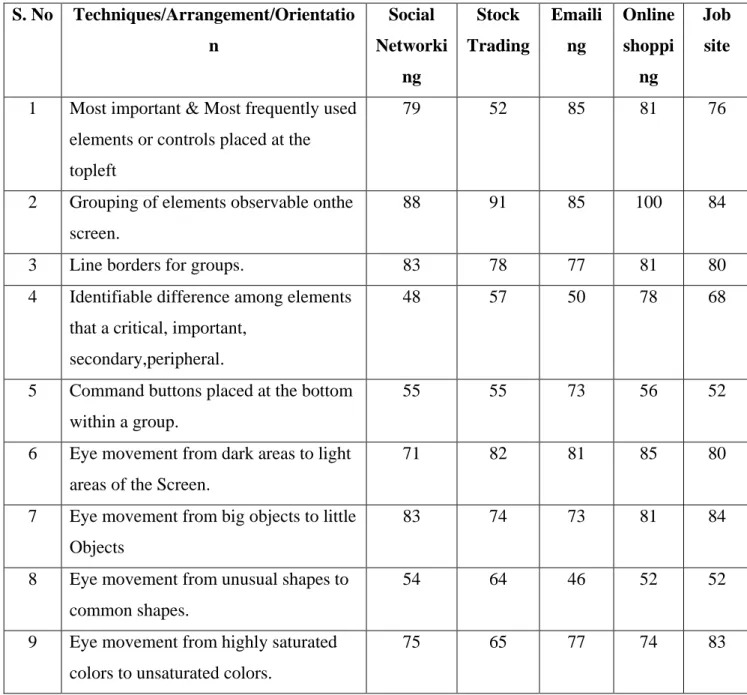
controls, judiciously using line orders to guide the eye. The table 2 below lists out various techniques that can be used to enhance Screen Navigation and flow experience. Also the table 2 shows the perceived presence of these techniques among the investigated five different web user interfaces.
S. No Techniques/Arrangement/Orientatio
n Social Networki ng Stock Trading Emaili ng Online shoppi ng Job site
1 Most important & Most frequently used elements or controls placed at the
topleft
79 52 85 81 76
2 Grouping of elements observable onthe screen.
88 91 85 100 84
3 Line borders for groups. 83 78 77 81 80
4 Identifiable difference among elements that a critical, important,
secondary,peripheral.
48 57 50 78 68
5 Command buttons placed at the bottom within a group.
55 55 73 56 52
6 Eye movement from dark areas to light areas of the Screen.
71 82 81 85 80
7 Eye movement from big objects to little
Objects
83 74 73 81 84
8 Eye movement from unusual shapes to common shapes.
54 64 46 52 52
9 Eye movement from highly saturated colors to unsaturated colors.
75 65 77 74 83
The Screen elements arrangement should reduce the overall number of eye and manual control movements needed to work with a screen. Top-to-bottom presentation of information stood best among other form of presentations in the research [3].
4. VISUAL COMPOSITION
Users are influenced by the symmetrical balance and weight of the titles, graphics, text, when scanning the interfaces initially [3]. Visually pleasing composition draws users’ attention inherently and also makes positive impact on the users mind. The visual techniques like
Figure1: Balance
balance, symmetry, regularity, predictability, sequentiality, economy, unity and grouping will augment visual pleasing composition of user screen.
These above said techniques are investigated in the five different web interfaces for their presence, results of which are given in the following subsections.
4.1 Balance
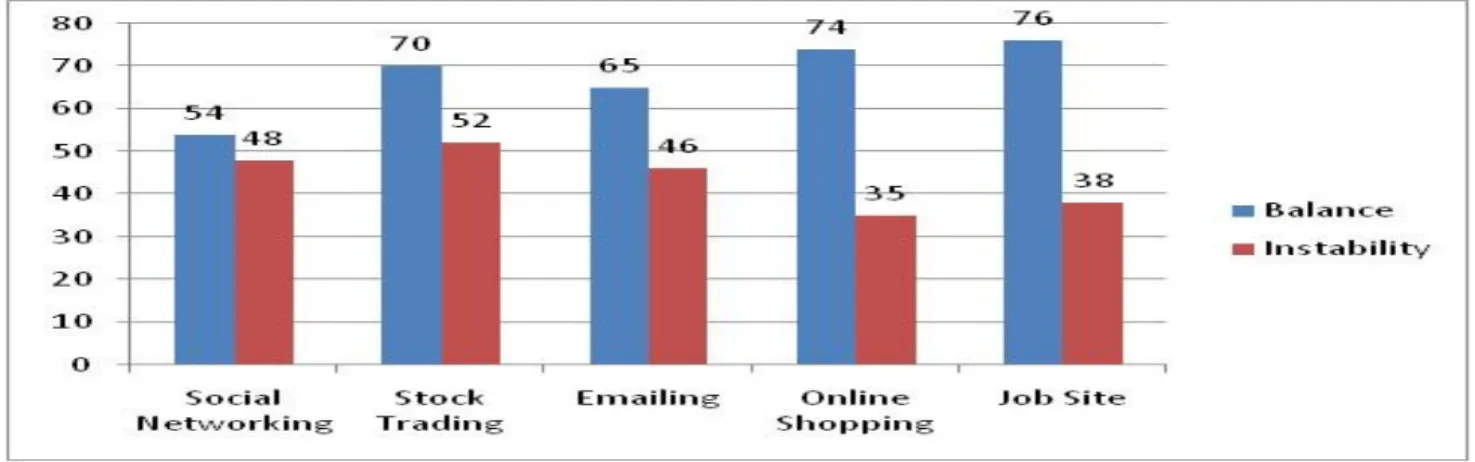
Balance can be achieved by providing an equal weight of screen elements, left and right, top and bottom [3]. Balance on a screen is accomplished through centering the display itself, maintaining an equal weighting of components on each side of the horizontal and vertical axis, and centering titles and illustrations.
FIGURE 2: Balance & Instability
4.2 Symmetry
Symmetry is axial duplication; a unit on one side of the centerline is exactly replicated on the other side [3]. The opposite of Symmetry is Asymmetry. The symmetry brings compactness and Asymmetry lacks compactness in the user interface.
FIGURE 3: Symmetry & Asymmetry
The graph in the figure 4 below provides information about the number of perceived instances of symmetry & asymmetry in the five different web user interfaces investigated. For social networking and stock trading web pages, symmetry and asymmetry seems to coexist where as in the other three categories a significance of symmetry is clearly observable.
4.3 Regularity
Galitz [3] says Regularity as a uniformity of elements based on some principle or plan. And it can be achieved by establishing standard, consistently spaced horizontal and vertical
alignment points. Regularity can also be placed into the screen by using elements or controls of similar size, shape, color and spacing. The reverse of Regularity is Irregularity and is shown in figure 5 below.
FIGURE 5: Regularity & Irregularity
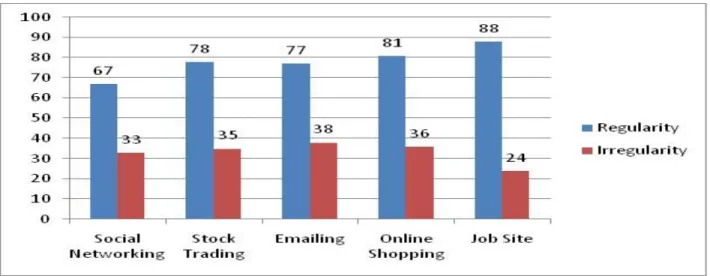
While studying/investing regularity & irregularity in the five different types of web user interfaces, we have identified their presence; whose instances of perceived existence are shown in the graph of figure 6 below. Regularity took very high precedence in all the five categories of websites investigated and peaked in job site user interfaces. Regularity is perceived to be less in social networking interfaces and this may be due to various layouts coming everyday into the design domain of this category.
FIGURE 6: Regularity & Irregularity
4.4 Predictability
predictability is Spontaneity, having no plan or structure for the elements arranged on the user screen.
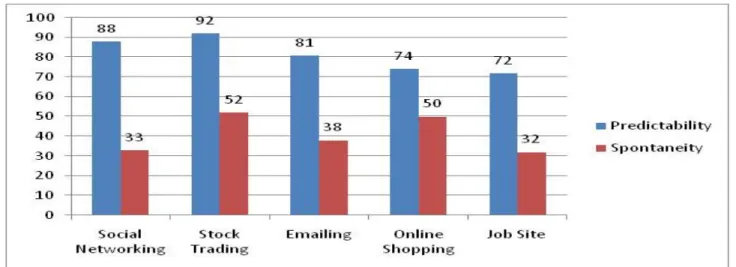
The graph in the figure 7 below displays number of instances of perceived existence of predictability in the five categories of web site user interfaces investigated. Predictability stood high in stock trading user interfaces when compared to other four types. The other four
too have high presence of predictability in their interface layouts. Spontaneity is at moderate levels in stock trading and online shopping user interfaces and this seems to be due to clash between user’s expected content and actual content presented, which will exist in both these types due to their high dynamic nature of the content.
FIGURE 7: Predictability & Spontaneity
4.5 Sequentiality
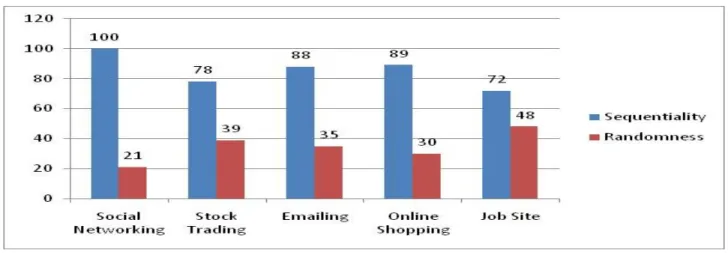
In the words of Galitz [3], sequentiality is a plan of presentation to guide the eye through the screen in a logical, rhythmic order, with the most important information significantly placed. The opposite of sequentiality is randomness which is highly undesirable to present to the user.
FIGURE 8: Sequentility & Randomness
compared to the other four categories. Users still felt presence of Randomness in few of the investigated web pages and a high value of it is goes for job site user interfaces.
FIGURE 9: Sequentially & Randomness.
4.7 Unity
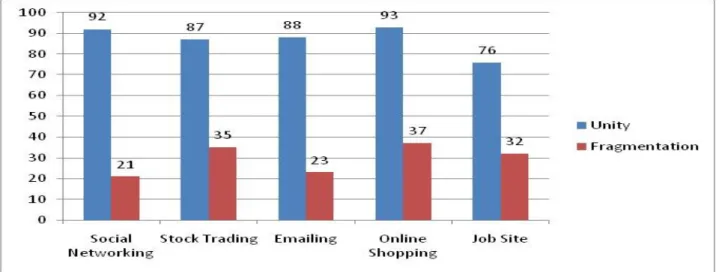
When the elements of the screen are scattered in different directions, the visual appeal goes down and the user gets demotivated to use such interfaces. In the words of Galitz [3], Unity is coherence, a totality of elements that is visually all one piece .With unity; the elements seem to belong together. The opposite of Unity is fragmentation, each piece having its own character. Similar sizes, shapes, colors, promote unity, as does white space and borders at the display boundaries.
FIGURE 10: Unity & Fragmentation
FIGURE 11: Unity & Fragmentation
5. PLEASING PROPORTIONS
For the elements of the screen, to select their size proportions is a challenge for the user interface designer.Since some proportions may be interesting to some users and not for
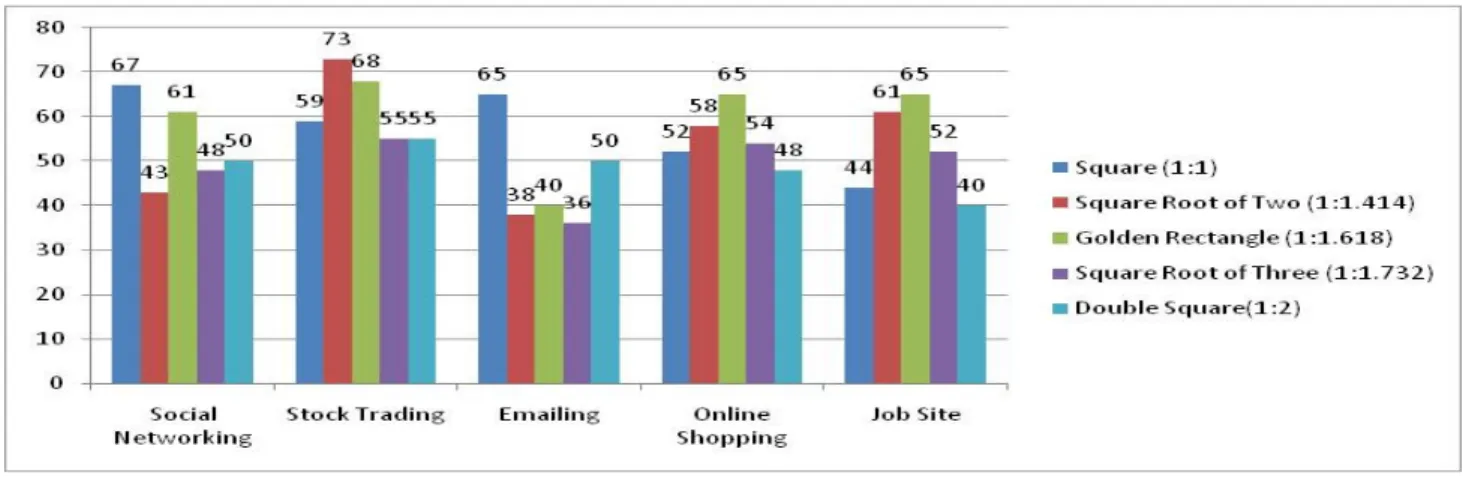
others. Marcus [4] describes the following shapes as aesthetically pleasing proportions. These have stood the test oftime and are commonly used.
FIGURE 12: Pleasing Proportions
FIGURE 13: Pleasing Proportions
Square dominated for social networking site user interfaces with Golden Rectangle following next. For trading sties, Square Root of Two took the top slot in terms of element proportion. Coming to email, it is again square proportion that took first place in presence. Golden Rectangle proportion has peaked top for online shopping and job site user interfaces.
6. CONCLUSION
The results presented in this paper show the presence of different visualization techniques in varied and mixed forms. The variations are bound to surface as the functionalities of the web user interfaces investigated are different and pose a major constraint for user interface designers implementing these standard visual techniques. The variations naturally come out due to the variation in users understanding levels of these techniques. Even though there are variations, the positive sides of these visualization techniques and their presence is clearly felt in all the five categories of web user interfaces investigated, highlighting their validity even for the current times of great changes and advancements.
REFERENCES
[1] Jean Vanderdonckt, Visual Design Methods in Interactive Applications, Contents &Complexity, Information Design in Technical Communication, chapter 7, pp 171-185, 2003.
[2] David Chekling Ngo, Lian Seng Teo and John G Byrne, Evaluating Interface Esthetics,Knowledge and Information Systems (2002), 4, pp 46-79.
[3] Galitz. W.O., The essential Guide to user Interface Design, John Wiley.
[4] Marcus A. (1992), Graphic design for Electronic Documents and user Interfaces, New York: ACM Press.
[6] International Business Machines Corporation (IBM). (1991). Systems Application
Architecture Common User Access Advanced Interface Design Reference
(SC34-4289).
[7] International Business Machines (IBM). (2001). “Cost Justifying Ease of Use.” http://www-3.ibm.com/ibm/easy/eou_ext.nsf/Publish/23.
[8] Mayhew, D.J. (1992). Principles and Guidelines in Software User Interface Design. Englewood Clifs, NJ.Prentice Hall
[9] Microsoft Corporation. (1992). The Windows Interface: An Application Design Guide, Redmond, WA: Microsoft Press.
[10] Microsoft Corporation. (1995). The Windows Interface Guidelines for Software