Inheritance and Polymorphism
Inheritance and Polymorphism
Subjects:
Introduction
Defining one class in terms of another, more fundamental class
Including constructors in an inheritance hierarchy
Invoking the base class constructor specifically
The
sealed
and
protected
keywords
Controlling base class creation
Optimization of constructor hierarchy
Nested type definitions
Polymorphism
Subjects:
Introduction
Defining one class in terms of another, more fundamental class
Including constructors in an inheritance hierarchy
Invoking the base class constructor specifically
The
sealed
and
protected
keywords
Controlling base class creation
Optimization of constructor hierarchy
Nested type definitions
Introduction
Introduction
Object-oriented programming is based on four principles:
the ability to control access (encapsulation),
inherit from other classes,
respond appropriately (polymorphism),
and refer from one object to another indirectly (interfaces).
Inheritance is a common concept. I am a human. I inherit certain properties from the class Human, such as my ability to converse, more or less, and my dependence on air and food. The class Human inherits its dependencies on air, water, and nourishment from the class Mammal, which inherits from the class Animal.
The ability to pass down properties is a powerful one. You can use it to describe items in an economical way.
Class Inheritance
Class Inheritance
Inheritance allows you to define a new class that incorporates and extends an already declared class.
You can use an existing class, called the base class, as the basis for a new class, called the derived class. The members of the derived class consist of the following:
− The members in its own declaration; − The members of the base class.
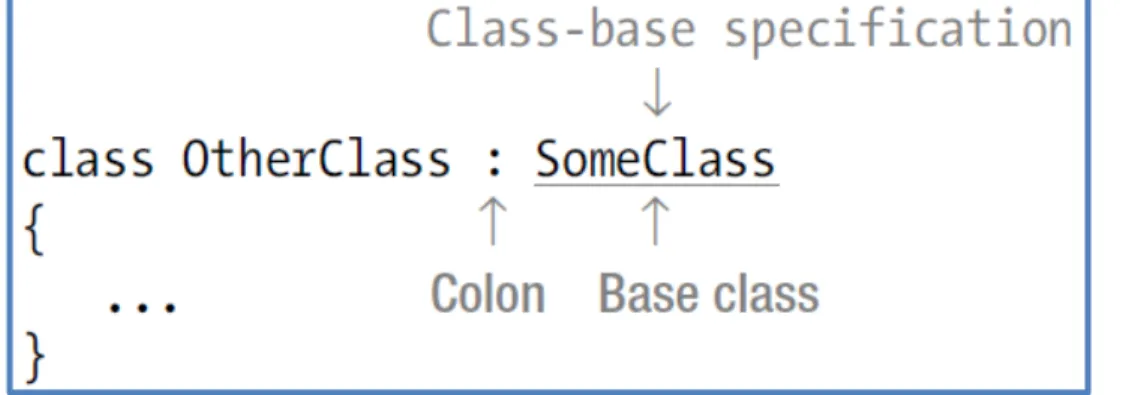
To declare a derived class, you add a class-base specification after the class name. The class-base specification consists of a colon, followed by the name of the class to be used as the base class. The derived class is said to directly inherit from the base class listed.
A derived class is said to extend its base class, because it includes the members of the
base class plus any additional functionality provided in its own declaration.
Class Inheritance
Class Inheritance
For example, the following shows the declaration of a class called OtherClass, which is derived from a class called SomeClass:
Class Inheritance
Class Inheritance
In the following InheritanceExample program, the class SubClass inherits from the class BaseClass:
// InheritanceExample -- Provide the simplest possible demonstration // of inheritance.
using System;
namespace InheritanceExample {
public class BaseClass
{
public int _dataMember; public void SomeMethod() {
Console.WriteLine(“SomeMethod()”); }
}
public class SubClass : BaseClass {
public void SomeOtherMethod() {
Console.WriteLine(“SomeOtherMethod()”); }
Class Inheritance
Class Inheritance
public class Program {
public static void Main(string[] args) {
// Create a base class object.
Console.WriteLine(“Exercising a base class object:”); BaseClass bc = new BaseClass();
bc._dataMember = 1; bc.SomeMethod();
// Now create a subclass object.
Console.WriteLine(“Exercising a subclass object:”); SubClass sc = new SubClass();
sc._dataMember = 2; sc.SomeMethod();
sc.SomeOtherMethod();
// Wait for user to acknowledge the results.
Console.WriteLine(“Press Enter to terminate...”); Console.Read();
} }
Class Inheritance
Class Inheritance
The class BaseClass is defined with a data member and the simple method SomeMethod(). Main() creates and exercises the BaseClass object bc. The class SubClass inherits from that class by placing the name of the class, BaseClass, after a colon in the class definition:
public class SubClass : BaseClass
SubClass gets all members of BaseClass as its own, plus any members it may add to the pile. Main() demonstrates that SubClass now has a data member, _dataMember, and a member method, SomeMethod(), and a little method SomeOtherMethod().
Why You Need Inheritance
Why You Need Inheritance
Inheritance serves several important functions. You may think, for example, that inheritance reduces the amount of typing. In a way, it does. A more important, related issue is the major buzzword reuse. Software scientists have known for some time that starting from scratch with each new project and rebuilding the same software components makes little sense.
Inheritance enables you to tweak existing software components. You can adapt existing classes to new applications without making internal modifications. The existing class is inherited into — or, as programmers often say, extended by — a new subclass that contains the necessary additions and modifications. If someone else wrote the base class, you may not be able to modify it, so inheritance can save the day.
This capability carries with it a third benefit of inheritance. Suppose that you inherit from — extend — an existing class. Later, you find that the base class has a bug you must correct. If you modified the class to reuse it, you must manually check for, correct, and retest the bug in each application separately. If you inherited the class without changes, you can generally stick the updated class into the other application with little hassle.
The object Class
The object Class
Consider these related classes:
public class MyBaseClass {}
public class MySubClass : MyBaseClass {}
The relationship between the two classes enables the programmer to make the following runtime test:
public class Test {
public static void GenericMethod(MyBaseClass mc) {
// If the object truly is a subclass . . . MySubClass msc = mc as MyBaseClass;
if(msc != null) {
// ...then handle as a subclass. // ...continue...
} }
The object Class
The object Class
In this case, the method GenericMethod() differentiates between subclasses of MyBaseClass using the as keyword.
To help you differentiate between seemingly unrelated classes using the same as operator, C# extends all classes from the common base class object. That is, any class that doesn’t specifically inherit from another class inherits from the class object. Thus the following two statements declare classes with the same base class, object, and are equivalent:
class MyClass1 : object {} class MyClass1 {}
Sharing the common base class of object provides for this generic method:
public class Test {
public static void GenericMethod(object o) {
MyClass1 mc1 = o as MyClass1; if(mc1 != null)
{
// Use the converted object mc1. // ...
} }
}
Class Access Modifiers
Class Access Modifiers
A class can be seen and accessed by other classes in the system.
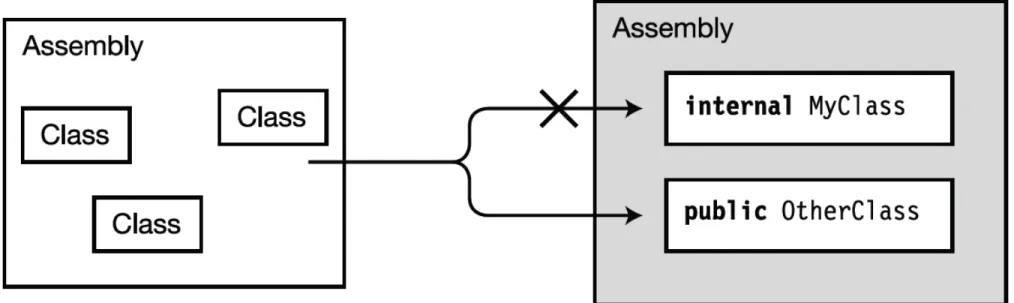
The term visible is sometimes used for the term accessible. They can be used interchangeably. There are two levels of class accessibility: public and internal.
A class marked public can be accessed by code from any assembly in the system.
To make a class visible to other assemblies, use the public access modifier, as shown here:
A class marked internal can only be seen by classes within its own assembly. (An
assembly is either a program or a DLL).
− This is the default accessibility level, so unless you explicitly specify the modifier public in the class declaration, code outside the assembly cannot access the class.
Class Access Modifiers
Class Access Modifiers
Figure illustrates the accessibility of internal and public classes from outside the assembly. Class MyClass is not visible to the classes in the assembly on the left, because MyClass is marked internal. Class OtherClass, however, is visible to the classes on the left, because it’s marked public.
All Classes Are Derived from
Class object
All Classes Are Derived from
Class object
Classes without a class-base specification are implicitly derived directly from class object. Leaving off the class-base specification is just shorthand for specifying that object is the base class. The two forms are semantically equivalent, as shown in Figure.
Figure The class declaration on the left implicitly derives from class object, while the one on the right explicitly derives from object. The two forms are semantically equivalent.
All classes, except the special class object, are derived classes, even if they don’t have a class-base specification. Class object is the only class that is not derived, since it is the base of the inheritance hierarchy.
All Classes Are Derived from
Class object
All Classes Are Derived from
Class object
Other important facts about class derivation are the following:
A class declaration can have only a single class listed in its class-base specification. This
is called single inheritance.
Although a class can directly inherit from only a single base class, there is no limit to the
level of derivation. That is, the class listed as the base class might be derived from another class, which is derived from another class, and so forth, until you eventually reach object.
Base class and derived class are relative terms. All classes are derived classes, either from object or from another class—so generally when we call a class a derived class, we mean that it is immediately derived from some class other than object. Figure shows a simple class hierarchy.
Invoking the default base class constructor
Invoking the default base class constructor
The default base class constructor is invoked any time a subclass is constructed. The constructor for the subclass automatically invokes the constructor for the base class, as this simple program demonstrates:
// InheritingAConstructor -- Demonstrate that the base class // constructor is invoked automatically.
using System;
namespace InheritingAConstructor {
public class Program {
public static void Main(string[] args) {
Console.WriteLine(“Creating a BaseClass object”); BaseClass bc = new BaseClass();
Console.WriteLine(“\nnow creating a SubClass object”); SubClass sc = new SubClass();
// Wait for user to acknowledge.
Console.WriteLine(“Press Enter to terminate...”); Console.Read();
Invoking the default base class constructor
Invoking the default base class constructor
public class BaseClass {
public BaseClass() {
Console.WriteLine(“Constructing BaseClass”); }
}
public class SubClass : BaseClass {
public SubClass() {
Console.WriteLine(“Constructing SubClass”); }
} }
Invoking the default base class constructor
Invoking the default base class constructor
Here’s the output from this program:
A hierarchy of inherited classes is much like the floor layout of a building. Each class is built on the classes it extends, as upper floors build on lower ones, and for a clear reason:
Each class is responsible for itself.
Passing arguments to the base class constructor
Passing arguments to the base class constructor
The subclass invokes the default constructor of the base class, unless specified otherwise — even from a subclass constructor other than the default. The following slightly updated example demonstrates this feature:
using System;
namespace Example {
public class Program {
public static void Main(string[] args) {
Console.WriteLine(“Invoking SubClass() default”); SubClass sc1 = new SubClass();
Console.WriteLine(“\nInvoking SubClass(int)”); SubClass sc2 = new SubClass(0);
// Wait for user to acknowledge.
Console.WriteLine(“Press Enter to terminate...”); Console.Read();
Passing arguments to the base class constructor
Passing arguments to the base class constructor
public class BaseClass {
public BaseClass() {
Console.WriteLine(“Constructing BaseClass (default)”); }
public BaseClass(int i) {
Console.WriteLine(“Constructing BaseClass (int)”); }
}
public class SubClass : BaseClass {
public SubClass() {
Console.WriteLine(“Constructing SubClass (default)”); }
public SubClass(int i) {
Console.WriteLine(“Constructing SubClass (int)”); }
Passing arguments to the base class constructor
Passing arguments to the base class constructor
Executing this program generates the following result:
Getting specific with base
Getting specific with base
A subclass constructor can invoke a specific base class constructor using the keyword base. This feature is similar to the way that one constructor invokes another within the same class by using the this keyword. For example, consider this small program, InvokeBaseConstructor:
// InvokeBaseConstructor -- Demonstrate how a subclass can // invoke the base class constructor of its choice using // the base keyword.
using System;
namespace InvokeBaseConstructor {
public class BaseClass {
public BaseClass() {
Console.WriteLine(“Constructing BaseClass (default)”); }
public BaseClass(int i) {
Console.WriteLine(“Constructing BaseClass({0})”, i); }
Getting specific with base
Getting specific with base
public class SubClass : BaseClass {
public SubClass() {
Console.WriteLine(“Constructing SubClass (default)”); }
public SubClass(int i1, int i2) : base(i1) {
Console.WriteLine(“Constructing SubClass({0}, {1})”, i1, i2);
} }
public class Program {
public static void Main(string[] args) {
Console.WriteLine(“Invoking SubClass()”); SubClass sc1 = new SubClass();
Console.WriteLine(“\ninvoking SubClass(1, 2)”); SubClass sc2 = new SubClass(1, 2);
// Wait for user to acknowledge.
Getting specific with base
Getting specific with base
Console.Read(); }
} }
The output from this program is:
This version begins the same as the previous examples, by creating a default SubClass object using the default constructor of both BaseClass and SubClass.
Garbage collection and the C#
destructor
Garbage collection and the C#
destructor
C# provides a method that’s inverse to the constructor: the destructor. It carries the name of the class with a tilde (~) in front. For example, the ~BaseClass() method is the destructor for BaseClass.
C# invokes the destructor when it is no longer using the object. The default destructor is the only destructor that can be created because the destructor cannot be invoked directly. In addition, the destructor is always virtual.
When an inheritance ladder of classes is involved, destructors are invoked in reverse order of constructors. That is, the destructor for the subclass is invoked before the destructor for the base class.
The memory for an object is borrowed from the heap when the program executes the new command, as in new SubClass(). This block of memory remains reserved as long as any valid references to that memory are used by any running programs. You may have several variables that reference the same object.
Garbage collection and the C# destructor
Garbage collection and the C# destructor
C# doesn’t do anything in particular when a memory block first becomes unreachable. A low-priority system task executes in the background, looking for unreachable memory blocks. To avoid negatively affecting program performance, this “garbage collector” executes when little is happening in your program.
As the garbage collector finds unreachable memory blocks, it returns them to the heap. Normally, the garbage collector operates silently in the background. The garbage collector takes over control of the program for only a short period when heap memory begins to run out.
The Basic Mechanics of Inheritance
The Basic Mechanics of Inheritance
Inheritance is the aspect of OOP that facilitates code reuse.
Specifically speaking, code reuse comes in two flavors: inheritance (the “is-a” relationship) and the containment/delegation model (the “has-a” relationship).
When you establish “is-a” relationships between classes, you are building a dependency between two or more class types. The basic idea behind classical inheritance is that new classes can be created using existing classes as a starting point.
In C#, you make use of the colon operator on the class definition to establish an “is-a” relationship between classes:
// MiniVan 'is-a' Car. class MiniVan : Car {
Regarding Multiple Base Classes
Regarding Multiple Base Classes
Speaking of base classes, it is important to keep in mind that C# demands that a given class have exactly one direct base class. It is not possible to create a class type that directly derives from two or more base classes (this technique [which is supported in unmanaged C++] is known as multiple inheritance, or simply MI). If you attempted to create a class that specifies two direct parent classes as shown in the following code, you will receive compiler errors.
// Illegal! The .NET platform does not allow // multiple inheritance for classes!
class WontWork : BaseClassOne, BaseClassTwo {}
The
sealed
keyword
The
sealed
keyword
C# supplies keyword sealed that prevents inheritance from occurring. When you mark a class as sealed, the compiler will not allow you to derive from this type. For example, assume you have decided that it makes no sense to further extend the MiniVan class:
// The MiniVan class cannot be extended! sealed class MiniVan : Car
{ }
If you were to attempt to derive from this class, you would receive a compile-time error:
// Error! Cannot extend
// a class marked with the sealed keyword! class DeluxeMiniVan : MiniVan
The
sealed
keyword
The
sealed
keyword
Most often, sealing a class makes the best sense when you are designing a utility class. For example, the System namespace defines numerous sealed classes. You can verify this for yourself by opening up the Visual Studio 2010 Object Browser (via the View menu) and selecting the String class within the System namespace of the mscorlib.dll assembly. Notice in Figure 1 the use of the sealed keyword seen within the Summary window.
The
sealed
keyword
The
sealed
keyword
Thus, just like the MiniVan, if you attempted to build a new class that extends System.String, you will receive a compile-time error:
// Another error! Cannot extend // a class marked as sealed! class MyString : String
{ }
Overloading
an Inherited Method
Overloading
an Inherited Method
Two or more methods can have the same name as long as the number or type of arguments differs or as long as both differ. Giving two methods the same name is overloading. The arguments of a method become a part of its extended name, as this example demonstrates:
public class MyClass {
public static void AMethod()
{
// Do something. }
public static void AMethod(int)
{
// Do something else. }
public static void AMethod(double d)
{
// Do something even different. }
public static void Main(string[] args) {
AMethod(); AMethod(1); AMethod(2.0); }
Revising
Visual Studio
Class Diagrams
Revising
Visual Studio
Class Diagrams
Source code of program Cars showing the basics of inheritance:
using System; namespace Cars {
// A simple base class. class Car
{
public readonly int maxSpeed; private int currSpeed;
public Car(int max) {
maxSpeed = max; }
public Car() {
Revising Visual Studio Class Diagrams
Revising Visual Studio Class Diagrams
public int Speed {
get { return currSpeed; } set
{
currSpeed = value;
if (currSpeed > maxSpeed) {
currSpeed = maxSpeed; }
} }
}
// MiniVan 'is-a' Car.
sealed class MiniVan : Car {
public void TestMethod() {
// OK! Can access public members
// of a parent within a derived type. Speed = 10;
Revising Visual Studio Class Diagrams
Revising Visual Studio Class Diagrams
class Program {
static void Main(string[] args) {
Console.WriteLine(“Basic Inheritance\n"); // Make a Car object and set max speed. Car myCar = new Car(80);
// Set the current speed, and print it. myCar.Speed = 50;
Console.WriteLine("My car is going {0} MPH", myCar.Speed);
// Now make a MiniVan object. MiniVan myVan = new MiniVan(); myVan.Speed = 10;
Console.WriteLine("My van is going {0} MPH", myVan.Speed);
Console.ReadLine(); }
Revising Visual Studio Class Diagrams
Revising Visual Studio Class Diagrams
Visual Studio 2010 allows you to establish base/derived class relationships visually at design time. To leverage this aspect, your first step is to include a new class diagram file into your current project. To do so, access the Project Add New Item➤ menu option and select the Class Diagram icon (in Figure 2, ClassDiagram1.cd file renamed to Cars.cd).
Revising Visual Studio Class Diagrams
Revising Visual Studio Class Diagrams
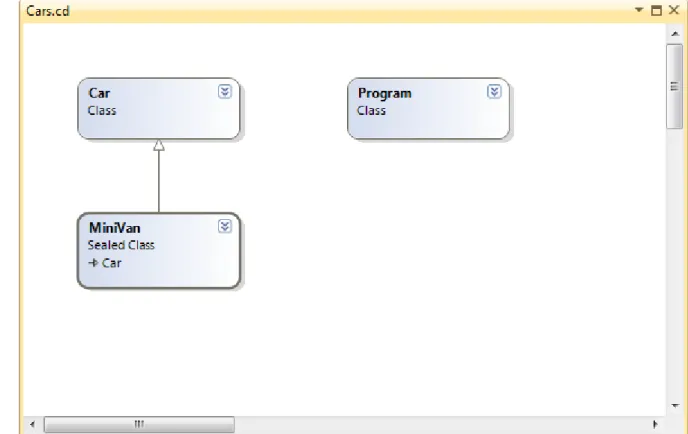
Once you click the Add button, you will be presented with a blank designer surface. To add types to a class designer, simply drag each file from the Solution Explorer window onto the surface. Also recall that if you delete an item from the visual designer (simply by selecting it and pressing the Delete key), this will not destroy the associated source code, but simply removes the item off the designer surface. The current class hierarchy is shown in Figure 3.
Details of Inheritance
Details of Inheritance
Let’s create a more complex example and get to know the details of building class hierarchies.
namespace Employees {
// This class represents an Employee. partial class Employee
{...} }
Details of Inheritance
Details of Inheritance
class Manager : Employee {
private int numberOfOptions; public int StockOptions
{
get { return numberOfOptions; }
set { numberOfOptions = value; }
} }
class SalesPerson : Employee {
private int numberOfSales; public int SalesNumber
{
get { return numberOfSales; } set { numberOfSales = value; } }
Controlling Base Class Creation
Controlling Base Class Creation
SalesPerson and Manager can only be created using the default constructor. With this in mind, assume you have added a new six-argument constructor to the Manager type, which is invoked as follows:
static void Main(string[] args) {
...
// Assume Manager has a constructor matching this signature: // (string fullName, int age, int empID, float
currPay, //string ssn, int numbOfOpts)
Manager chucky = new Manager("Chucky", 50, 92, 100000, "333-23-2322", 9000);
Console.ReadLine(); }
Controlling Base Class Creation
Controlling Base Class Creation
public Manager(string fullName, int age, int empID, float currPay, string ssn, int numbOfOpts)
{
// This field is defined by the Manager class. numberOfOptions = numbOfOpts;
// Assign incoming parameters using the inherited properties // of the parent class.
ID = empID; Age = age;
Name = fullName; Pay = currPay;
// OOPS! This would be a compiler error, as the SSN property // is read-only!
SocialSecurityNumber = ssn; }
Second problem:
inefficient constructor
Optimization of constructor hierarchy
Optimization of constructor hierarchy
To help optimize the creation of a derived class, you will do well to implement your subclass constructors to explicitly call an appropriate custom base class constructor, rather than the default. In this way, you are able to reduce the number of calls to inherited initialization members (which saves processing time).
public Manager(string fullName, int age, int empID, float currPay, string ssn, int numbOfOpts) : base(fullName, age, empID, currPay, ssn) {
// This field is defined by the Manager class. numberOfOptions = numbOfOpts;
}
The base keyword is hanging off the constructor signature, which always indicates a derived constructor is passing data to the immediate parent constructor. In this situation, you are explicitly calling the five-argument constructor defined by Employee and saving yourself unnecessary calls during the creation of the child class.
public SalesPerson(string fullName, int age, int empID, float currPay, string ssn, int numbOfSales) : base(fullName, age, empID, currPay, ssn) {
// This belongs with us!
numberOfSales = numbOfSales; }
The
protected
keyword
The
protected
keyword
When a base class defines protected data or protected members, it establishes a set of items that can be accessed directly by any descendent. If you wish to allow the SalesPerson and Manager child classes to directly access the data sector defined by Employee, you can update the original Employee class definition as follows:
// protected state data. partial class Employee {
// Derived classes can now directly access this information. protected string empName;
protected int empID;
protected float currPay; protected int empAge; protected string empSSN;
protected static string companyName; ...
}
Nested Type Definitions
Nested Type Definitions
In C# (as well as other .NET languages), it is possible to define a type (enum, class, interface, struct, or delegate) directly within the scope of a class or structure. When you have done so, the nested (or “inner”) type is considered a member of the nesting (or “outer”) class, and in the eyes of the runtime can be manipulated like any other member (fields, properties, methods, events, etc.).
public class OuterClass {
// A public nested type can be used by anybody. public class PublicInnerClass {}
// A private nested type can only be used by members // of the containing class.
private class PrivateInnerClass {} }
Although the syntax is clean, understanding why you might do this is not readily apparent. To understand this technique, ponder the following traits of nesting a type:
• nested types allow you to gain complete control over the access level of the inner type,
as they may be declared privately (recall that nonnested classes cannot be declared using the private keyword);
• because a nested type is a member of the containing class, it can access private
members of the containing class;
• oftentimes, a nested type is only useful as a helper for the outer class, and is not
Nested Type Definitions
Nested Type Definitions
When a type nests another class type, it can create member variables of the type, just as it would for any point of data. However, if you wish to make use of a nested type from outside of the containing type, you must qualify it by the scope of the nesting type.
static void Main(string[] args) {
// Create and use the public inner class. OK!
OuterClass.PublicInnerClass inner;
inner = new OuterClass.PublicInnerClass();
// Compiler Error! Cannot access the private class.
OuterClass.PrivateInnerClass inner2;
Polymorphism supporting
Polymorphism supporting
Recall that the Employee base class defined a method named GiveBonus(), which was originally implemented as follows:
public partial class Employee {
public void GiveBonus(float amount) {
currPay += amount; }
... }
Polymorphism supporting
Polymorphism supporting
static void Main(string[] args) {
Console.WriteLine("***** The Employee Class Hierarchy *****\ n");
// Give each employee a bonus?
Manager chucky = new Manager("Chucky", 50, 92, 100000, "333-23-2322", 9000);
chucky.GiveBonus(300); chucky.DisplayStats(); Console.WriteLine();
SalesPerson fran = new SalesPerson("Fran", 43, 93, 3000, "932-32-3232", 31);
fran.GiveBonus(200); fran.DisplayStats(); Console.ReadLine(); }
virtual
and
override
keywords
virtual
and
override
keywords
Polymorphism provides a way for a subclass to define its own version of a method defined by its base class, using the process termed method overriding. To retrofit your current design, you need to understand the meaning of the virtual and override keywords. If a base class wishes to define a method that may be (but does not have to be) overridden by a subclass, it must mark the method with the virtual keyword:
partial class Employee {
// This method can now be 'overridden' by a derived class. public virtual void GiveBonus(float amount)
{
currPay += amount; }
... }
Overriding virtual methods
Overriding virtual methods
class SalesPerson : Employee {
...
// A salesperson's bonus is influenced by the number of sales. public override void GiveBonus(float amount)
{
int salesBonus = 0;
if (numberOfSales >= 0 && numberOfSales <= 100) { salesBonus = 10; }
else {
if (numberOfSales >= 101 && numberOfSales <= 200) salesBonus = 15; else salesBonus = 20;
}
base.GiveBonus(amount * salesBonus); }
}
class Manager : Employee {
...
public override void GiveBonus(float amount) {
base.GiveBonus(amount); Random r = new Random();
numberOfOptions += r.Next(500); }
}
Overriding virtual methods
Overriding virtual methods
Assume that the current DisplayStats() method of the Employee class has been declared virtually. By doing so, each subclass can override this method to account for displaying the number of sales (for salespeople) and current stock options (for managers). For example, consider the Manager’s version of the DisplayStats() method (the SalesPerson class would implement DisplayStats() in a similar manner):
public override void DisplayStats() {
base.DisplayStats();
Console.WriteLine("Number of Stock Options: {0}", numberOfOptions);
}
Overriding virtual methods
Overriding virtual methods
static void Main(string[] args) {
// A better bonus system!
Manager chucky = new Manager(
"Chucky", 50, 92, 100000, "333-23-2322", 9000); chucky.GiveBonus(300);
chucky.DisplayStats(); Console.WriteLine();
SalesPerson fran = new SalesPerson(
"Fran", 43, 93, 3000, "932-32-3232", 31); fran.GiveBonus(200);
fran.DisplayStats();