Faculty of Information and Natural Sciences Department of Computer Science and Engineering
Design, Implementation and Evaluation
of Traffic Shaping Proxies for Power
Saving in Mobile Audio Streaming
Mohammad Ashraful Hoque
Master’s Thesis Espoo, Jan 31, 2010
Supervisor: Professor Antti Ylä-Jääski, Aalto University Instructor: Matti Siekkinen, Ph.D, Aalto University Instructor: Dr. Jukka Nurminen, Nokia Research Center
School of Science and Technology
Faculty of Information and Natural Sciences
Degree Programme of Computer Science and Engineering Author: Mohammad Ashraful Hoque
Title of thesis:
Design, Implementation and Evaluation of Traffic Shaping Proxies for Power Saving in Mobile Audio Streaming.
Date: Jan 31, 2010 Pages: 9+ 71
Professorship: Data Communications Software Code: T-110 Supervisor: Professor Antti Ylä-Jääski
Instructor: Matti Siekkinen, Ph.D Instructor: Dr. Jukka Nurminen
The mobile applications, which depend on network activities, have significant effect on comparative battery lifetime. This thesis performs a study on power consumption for mobile Internet radio application with WLAN and 3G net-works. Then we propose two proxy based solutions to increase power savings: application layer and transparent proxy, where transparent proxy is applicable only for WLAN network condition. Though the proxy approach was not effec-tive in 3G networks, but our experiment results reveal that our implemented proxies can save power maximum 65% and 57% respectively in WLAN condi-tion, depending on the audio streaming rate.
Keywords: PSM, 3G, WLAN, Burst, Proxy, Transparent, TCP, M-TCP, Freeze-TCP, Internet Radio, Power Consumption.
Language: English
I would like to express my gratitude to my instructor, Matti Siekkinen, Ph.D, who has helped me and looked after my work during the project by providing his valuable ideas or thoughts. He also has answered my every queries being patient. Only due to him I have learned some data analysis tools, which I have used in this project to present most results.
I also want to pay my gratitude to my instructor Dr. Jukka Nurminen, from Nokia Research Center, and also want to thank Heikki Waris and Jussi Ruutu for their important feedbacks during the project.
I would also like to thank my supervisor, Professor Antti Ylä-Jääski, for con-sidering me in this project and encouraging me. Special thanks to Professor Sasu Tarkoma for encouraging me by his valuable comments.
In addition, I am very grateful to my collegue, Jani Heikkinen, who has been very helpful, co-operative and patient in numerous miscellaneous incidents. I have been very fortunate by being in touch with such nice persons from both Aalto University and Nokia Research Center.
Espoo, January 31st 2010
Mohammad Ashraful Hoque
3G 3rd Generation
3GPP 3rd Generation Partner Project 802.11 IEEE WLAN Standard
AAC Advanced Audio Coding
AP Access Point
AB-PCM Adaptive-Buffer Power Save Mechanism BER Bit Error Rate
CAM Continuous Active Mode CBR Constant Bit Rate CNAME Canonical Name
CPU Central Processing Unit CWND TCP Congestion Window
DTIM Delivery
FEC Forward Error Correction GET HTTP request method
HTTP Hyper Text Transfer Protocol
IEEE Institute of Electrical and Electronics Engineers I-TCP Indirect Transmission Control Protocol
ICY I Can Yell (SHOUTcast protocol) ICY-Metadata ICY Header
ICY-Metaint ICY Header
MMS Microsoft Media Service
MS-RTSP RTSP windows Media extension NAT Network Address Translator POST HTTP request method PSM Power Saving Mode
PSNA Power Saving Network Architecture PS-TP Power Saving Transport Protocol QoS Quality of Service
RRC Radio Resource Control
RTSP Real Time Streaming Protocol RTSPU RTSP using UDP
RTSPT RTSP using TCP RTP Real Time Protocol
RTCP Real Time Control Protocol
RTT Round Trip Time
RWND TCP Receiving Window SACK Selective Acknowledgement SDP Session Description Protocol STPM Self Tuning Power Management TDMA Time Division Multiple Access TCP Transmission Control Protocol TIM Transfer Indication Map UDP User Datagram Protocol VBR Variable Bit Rate
WLAN Wireless Local Area network WNIC Wireless Network Interface Card
WCDMA Wideband Code Division Multiple Access ZWA Zero Window Advertisement
Abbreviations and Acronyms iv
1 Introduction 1
1.1 Motivation . . . 1
1.2 Thesis Scope . . . 2
1.3 Thesis Structure . . . 3
2 Streaming: Protocols and Techniques 4 2.1 Media Streaming . . . 4
2.2 Streaming Methods . . . 6
2.3 Streaming Protocols . . . 6
2.3.1 Real Time Streaming Protocol . . . 6
2.3.2 HTTP Streaming Protocols . . . 8
2.3.3 Microsoft Media Service . . . 11
2.3.4 Other Streaming Protocols . . . 12
2.4 Streaming Techniques . . . 15
2.4.1 Protocol Rollover . . . 16
2.4.2 Fast Streaming . . . 16
2.4.3 Rate Adaptation . . . 17
2.4.4 Coordinated Streaming . . . 18
3 WNIC Power Consumption in Mobile Devices 19 3.1 IEEE 802.11 WNIC Opertaing Modes . . . 19
3.4 Related Works to Reduce WNIC Power Consumption . . . 21
3.4.1 Web Access . . . 22
3.4.2 Multimedia Streaming . . . 23
3.5 Differences with Previous Works . . . 25
4 Power Consumption: Mobile Internet Radio 27 4.1 Mobile Device Architecture . . . 27
4.2 Mobile Internet Radio Application . . . 29
4.3 Power Measurement Tool . . . 30
4.4 AP and Mobile Device Configuration . . . 31
4.5 Mobile Power Consumption . . . 32
4.5.1 Mobile Internet Radio . . . 32
4.5.2 Reducing Power Consumption . . . 33
4.5.3 Application Layer Proxy . . . 35
4.5.4 Transparent Proxy . . . 36
5 Proxy Performance over WLAN 38 5.1 Local Application Layer Proxy . . . 38
5.1.1 Results . . . 39
5.1.2 Analysis . . . 41
5.2 Remote Application Layer Prxoy . . . 44
5.2.1 Results . . . 44
5.2.2 Analysis . . . 47
5.3 Application Layer Proxy with Cross Traffic . . . 50
5.4 Transparent Proxy . . . 52
6 Proxy Performance over 3G 54 6.1 3G Power Consumption . . . 55
6.2 Mobile Internet Radio and Proxy . . . 56
7 Conclusion 64 7.1 Thesis Contribution . . . 64 7.2 Limitations of the Proxy Approaches . . . 65 7.3 Future Work . . . 66
2.1 RTSP Methods. . . 7
3.1 Power states of the wireless interface card. . . 20
3.2 Limitations of 802.11 power saving mode. . . 22
4.1 Wireless AP Configuration. . . 31
4.2 E-71 Configuration. . . 32
4.3 Power Consumption of Internet Radio Sites . . . 33
5.1 Minimum Power Consumption for Radio Sites . . . 39
5.2 Bursts and Power Consumption (radio.internode.on.net) . . . 42
5.3 Minimum Power Consumption at Different Proxy Locations . 46 5.4 Mobile Power Consumption with different download rates at the Desktop . . . 50
5.5 Retransmission for the Mobile Client . . . 51
5.6 Power Consumption with Transparent Proxy . . . 53
6.1 3G Power Consumption for Internet Radios . . . 56 6.2 RTTs of the mobile client and Transmission of ZWA over 3G . 60
2.1 Streaming Procedure. . . 5
2.2 RTSP Session. . . 8
2.3 RTSP States. . . 8
2.4 QuickTime HTTP Streaming. . . 9
2.5 RTP protocol stack and an RTP Session. . . 13
3.1 IEEE 802.11 Power Management. . . 21
4.1 Symbian Architecture . . . 28
4.2 ICY Request Format . . . 29
4.3 Nokia Energy Profiler Views . . . 30
4.4 Power Comsumption: CAM and PSM . . . 33
4.5 Burst Properties . . . 34
4.6 Proxy Mechanism . . . 36
4.7 Transparent Proxy Mechanism . . . 37
5.1 Local Proxy Scenario . . . 39
5.2 Mobile Device Power Consumption . . . 40
5.3 Power Consumption with Different Buffering Periods . . . 42
5.4 Time Sequence Graph(radio.internode.on.net): 10Sec Buffer-ing Period . . . 43
5.5 ZWAs with Different Buffering Periods . . . 43
5.6 Remote Proxy Scenario . . . 44
5.7 Power Consumption: Remote Proxy Location (USA) . . . 45
5.10 Time Sequence Graph: Scenario One . . . 48
5.11 Time Sequence Graph: Scenario Two . . . 49
5.12 Local Application Layer Proxy Performance with Cross Traffic 51 5.13 Network Configuration for the Transparent proxy . . . 52
6.1 WLAN and 3G Power Consumption . . . 54
6.2 3G(WCDMA) RRC State machine . . . 55
6.3 Proxy in 3G Network . . . 56
6.4 Power Consumption: Scenario One (3G:348kbps) . . . 57
6.5 Power Consumption: Scenario Two (3G:2Mbps) . . . 58
6.6 TCP Throughput Graphs . . . 61
6.7 TCP Time Sequence Graph 3G(384Kbps) . . . 62
6.8 TCP Outstanding Graph: 3G(384Kbps) . . . 62
Introduction
The popularity of mobile phones has gained its peak. While serving the basic purpose of talking or voice communication, mobile phones are also having other a lot of functionalities and applications. These devices are augmented with cameras, high computation and storage capabilities, audio and video applications. Besides, to provide better data communication services, mo-bile phones are also equipped with built-in wireless LAN (WLAN), 3G, IP telephony, audio, video streaming capabilities, etc.
This chapter presents the motivation behind this thesis work. Then also outlines the scope and structure of this thesis introducing the basic ideas required to understand the work.
1.1
Motivation
The integration of wireless network interfaces in mobile phones helped to achieve seamless connectivity but the constraint of limited battery capacity is challenged by this integration. Wireless interface cards consume as much power as an idle mobile phone. In work [47], Sumit Roy et al. reports that WNIC consumes around one third of the total mobile phone’s power consumption and under heavy traffic this consumption jumps to two third. Hence, the reduction of the power consumption of this unit would yield a potential saving in overall power consumption of the mobile phone. This is also true for 3G networks but the scenario is more challenging (Chapter 6). These mobile devices work on limited power source battery. Therefore, the applications developed for these devices must make efficient use of the hard-ware resources to reduce power consumption. But sometimes the standalone
particular application is not enough to reduce the power consumption. It might require the help of other dependent hardware and protocols. For in-stance streaming applications are high power consuming software. Because the continuous delivery of media traffic to the mobile device requires to power up a radio frequency controller. Here, WLAN PSM (Power Saving Mode) is not sufficient enough to reduce the overall power consumption. In case of 3G, besides link layer characteristics, the higher value of the inactivity timers may lead to inefficient power saving. Furthermore, most of the underlying protocols are also not application and energy aware. Then the processing or decoding the media data and then present to the user also require power. Therefore, there is a need of efficient techniques to be deployed from both hardware and software point of view.
In our thesis work we focus on audio streaming application (Mobile Internet Radio) for energy efficient solution for both WLAN and 3G networks. Inter-net Radio application uses TCP based HTTP like ICY streaming protocol, unlike other HTTP streaming protocols used by media services, which uses only one single GET request to deliver the audio stream and then play. Here the Internet radio stations are free and broadcast live or simulated live media streams.
1.2
Thesis Scope
The purpose of this thesis work is to cover the aspects related to the power consumption in mobile audio streaming. Here, audio streaming is dependent on streaming application itself, then different networking technologies, pro-tocols, techniques, Internet architecture, so on and therefore, they have effect on total power consumption in mobile devices.
The very general approach to achieve power efficiency would be to increase the battery capacity. But, the recent researches reveal that, there is very little hope of further battery capacity improvement. Therefore, a lot of works have been continuing to increase the power efficiency from different perspectives. For instance, new operating systems are designed with more focus on power or energy efficiency through reducing power while system is idle, adopting operating system for hard disk management [41]. Strategies have been de-veloped including the MAC layer transmission [58]. From the application perspective, there are some middleware to perform complex and power con-suming computations on behalf of the mobile clients [52], another approach is to compress the data before exchange, for instance lossless compression of e-mail [55].
This thesis work concentrates on application level power consumption and proposes two proxy-based solutions to save the power for Mobile Internet Radio Streaming and evaluates their performance.
Our work begins by outlining the power consumption behavior in presence and absence of 802.11 PSM while running different radio stations at the mobile client. Then we describe two proxy-based schemes and their working mechanism. The proposals are based on shaping the audio traffic at the proxy server, i.e. buffer for a fixed amount of time and then send the buffered traffic in a single burst to the client. We also studied the effect of underlying transport protocol (TCP) and Internet architecture on the application layer bursts and thus mobile power consumption.
Afterwards we present the power consumption status in presence of the proxy server and with several test case scenarios. In addition to the WLAN, we have also verified the feasibility and performance of the application layer proxy server in 3G networks.
1.3
Thesis Structure
This thesis is organized as follows. Chapter two begins by presenting the steps involved in audio/video streaming. Afterwards we present key application layer streaming protocols and then various streaming techniques followed by the streaming servers to cope with the network and client situation. Next, chapter three introduces IEEE 802.11 power management technique and a quite through review of past works related to WLAN power management. In chapter four we present our power measurement framework, where we explain detail about our target architecture and application. In addition, we also describe two different proxy-based solutions to reduce the power consumption for the target application. Chapter five demonstrates our experiment results for different perspectives in WLAN condition and further analysis. In chapter six, we present our proxy performance in 3G networks. Finally we wrap up our study by presenting the outline of our future work in the conclusion.
Streaming: Protocols and
Techniques
Media streaming is the process of playing audio or video while being down-loaded from Internet. It enables users to play media without having the media file locally stored. In the process, web servers contain the references of the media stream files hosted on different media servers or networks. When a user clicks on the link, a media server or network streams the content directly to the user. Here, media contents are stored on a different host or network, therefore, streaming does not have any impact on the web servers.
In this chapter, we present our detail study about media streaming. We begin with the steps involved in audio/vedio streaming process. Then we describe important streaming protocols and after that different kind of streaming techniques followed by media streaming servers to provide to support better stream quality and maximize user connection capacity.
2.1
Media Streaming
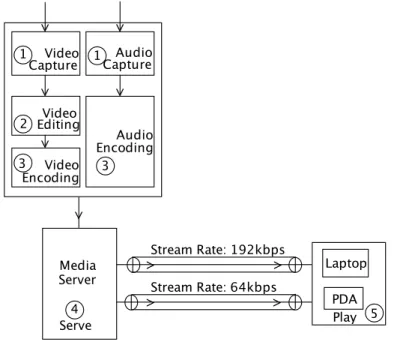
A complete media streaming system works by creating, delivering and at the end playing the media at the client player. The key elements involved to accomplish the whole process are: capturing, encoding, editing, serving and
playing (Figure 2.1).
Capturing: The very first approach to create streaming media is to capture audio or video from an analog source like camcorder or tape. Then digitize and store the media on the disk. This is done with special analog-capture card and software. The capture card may also support the live delivery of
the digitized media while storing on the disk. However, with newer digital camcorder, the media does not require to be digitized and can be stored directly on the disk.
Figure 2.1: Streaming Procedure.
Editing: When a media stream is stored, it can be edited with various tools to include media metadata or to integrate other audio/video to create multimedia presentation for entertainment or training.
Encoding: Once the audio or video is edited it can be encoded to the appropriate streaming file format with the specified resolution, frame rate and data rate. It may require creating separate files for the same media content with different data rate, to support clients with different Internet connections or to deal with bandwidth fluctuation.
Serving: As the media is encoded, it is ready to be delivered to the clients. The media server delivers the media content using appropriate transport protocols. Here, the server is optimally configured or licensed to deliver the media to a fixed number of stream connections.
Playing: After requesting to the server, client player starts receiving the media stream, buffers and plays. The players can pause, play, stop, fast forward depending on the kind of stream or streaming methods (Section 2.2).
2.2
Streaming Methods
Media streaming can be classified based on the media creation time and the mode of request into on demand and live streaming.
In case of on demand streaming, a media content is available for users all the time and delivered or streamed upon request. Here, the media contents are pre-recorded, preassembled and users can have control over playing the stream like stop, pause, fast-forward or even can jump to future frames.
Live streaming makes it possible to deliver the media data to the users within the seconds of the incident. It also enables multiple clients to access the same media contents at the same time just like TV channel broadcasting. But users cannot fast forward or rewind the stream because the incident is happening in real time and the server is also delivering the media files as a unique data flow. Similar kind of media stream, called simulated live, is also delivered like live streaming. The only difference with live streaming is that simulated live events are pre-recorded.
Live orSimulated live streaming requires a small buffer at the client to store a small portion of the stream before playing. Clients discard the buffered stream after it has been processed or presented to the user.
2.3
Streaming Protocols
The delivery of media stream is eased with the use of specific application layer protocols, where the protocols are responsible to control the media session, to encapsulate media information, and to control the delivery of the media data. The prevailing application layer streaming protocols are Real Time Streaming Protocol (RTSP), Microsoft Media Service (MMS), and Hyper-Text Transfer Protocol (HTTP). Other streaming protocols like Real Time Protocol (RTP), RTP Control Protocol (RTCP) and Session Description Protocol (SDP) are used in conjunction with other key streaming protocols like RTSP.
2.3.1
Real Time Streaming Protocol
RTSP [48] is an application layer protocol to establish and control multiple media delivery sessions. It provides an extended framework to choose media delivery channels such as UDP, multicast UDP and TCP, and RTP [36] based delivery mechanism. Here, the set of media streams or sessions to be
Method Description
DESCRIBE Retrieves the description of a media object mentioned in the rtsp URI.
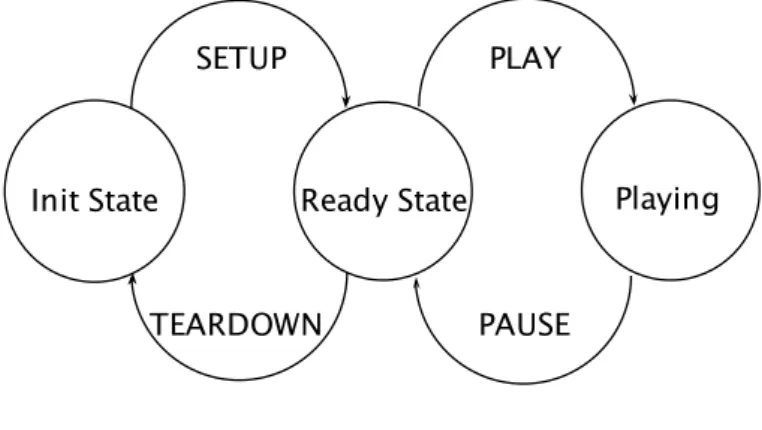
SETUP Specifies the transport mechanism to be used to deliver the media.
PLAY Tells the server to send the media traffic as mentioned in the SETUP.
PAUSE Informs the server to halts the media transmission tem-porarily.
TEARDOWN Stops the media transmission for the given rtsp URI.
REDIRECT Tells the client to connect to the another server. Table 2.1: RTSP Methods.
controlled is presented using a media description protocol like SDP [39]. An RTSP session starts by requesting a presentation or media to be started at the server. Server labels each session with an identifier. This session identifier represents the shared state between the server and client and is used in all subsequent controls. If the state is lost, RTSP stops the transmission of media through not receiving the RTCP [19] messages while using RTP. An RTSP session is not bound to any specific underlying transport layer protocol. During an RTSP session a client may use UDP to send and receive control requests or may establish and tear down a number of TCP connec-tions. Since the order of these control commands matters, it is most likely that RTSP uses TCP to transmit them. The Table 2.1 summarizes some required and recommended RTSP commands.
During a media session using RTSP, media packets are delivered via RTP over UDP and control packets are via RTCP. Figure 2.2 illustrates the number of connections associated with a RTSP streaming session and how RTSP works with other protocols.
However, RTSP and HTTP both are text based protocol and similar in syn-tax. It was done intentionally and therefore, any extension to the HTTP can also be added with RTSP. But, RTSP presents some basic differences with HTTP:
1. RTSP is independent of underlying transport layer protocols.
2. RTSP server has to maintain states by default. Figure 2.3 illustrates RTSP sate-machine diagram.
Figure 2.2: RTSP Session.
3. Both client and server can issue RTSP requests.
4. Media Data can be carried by an out-of-bound protocol like RTP. 5. RTSP request URI always contains the absolute URI.
Figure 2.3: RTSP States.
2.3.2
HTTP Streaming Protocols
Many existing streaming services require specialized servers and protocols to provide media contents to the end users. For instance, RTSP requires the assistance of two other protocols like RTP, RTCP and SDP. In addition, Windows Media, Real Media require their own extension of RTSP protocol.
Besides, if the underlying protocol is UDP, the streaming can be blocked by the router firewall or NAT.
However, HTTP based streaming works on the top of TCP and requires a simple web server. Streaming works with some HTTP requests and resonses. For this reason, HTTP streaming owes the largest penetration and it con-stitutes a large fraction of Internet bandwidth used for streaming. It uses pseudo streaming, where a file can be played while it is being downloaded. The stream is accessed via a direct HTTP link or embedded into a HTML web page.
HTTP streaming includes different media formats like, Windows Media, Flash Video, MP3, etc. It may also include various streaming services like QuickTime [3], Windows Media [7], Real Media [14], SHOUTcast [15] media streaming.
QuickTime HTTP Streaming Protocol
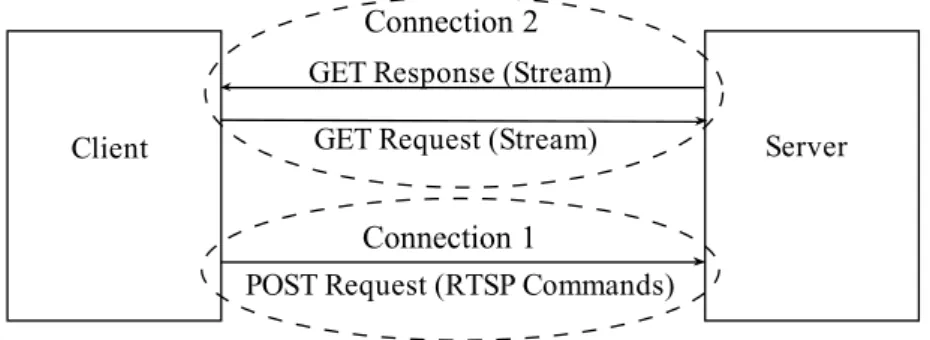
QuickTime HTTP Streaming [2] uses RTSP and exploits the use of HTTP GET and POST methods. Client sends one GET request to the server to open a server-to-client connection and a POST request to open a client-to-server connection. The GET connection is used to send the media data to the client and POST connection is used to receive the RTSP requests from the client.
Figure 2.4: QuickTime HTTP Streaming.
Client continues to send the RTSP commands as the message body of the POST request but the server does not reply to these requests (Figure 2.4). RTSP methods sent over POST connection are encoded usingbase64 method. This prevents intermediate HTTP proxy servers from deciding that an em-bedded RTSP request is a malformed HTTP request. The client may stop
POST connection at any time to free the resources at the server. But, the best time is to release the POST connection after sending the RTSP PLAY request.
Microsoft Media HTTP Streaming
Microsoft Media HTTP streaming protocol [5] can be thought as the HTTP tunnelled version of the MMS protocol. The MMS control requests are sent via HTTP GET request and for each requrest one separate TCP connection is established. This protocol works in two operating modes:
Simple mode requires at least two TCP connections initially. In addition, one separate TCP connection each time client pauses, resumes, seeks, etc. If the traffic load blancer is used at the server side, simple mode can suffer, beacuse control request connections can be established with different server and may incur streaming errors.
HTTP Pipelining,like QuickTime HTTP Streaming (Section 2.3.2) uses single HTTP connection to send all the MMS stream requests over a single TCP connection. Even though, pipelining greatly reduces the problem of the load balancer but may suffer if the intermediate HTTP proxy servers do not support pipelining.
Apple HTTP Streaming Protocol
Apple [27] uses a modified version of HTTP to deliver stored or live au-dio/video stream from iPhone, iPod, etc. They name it HTTP Live Stream-ing and tryStream-ing to standardize it as an IETF protocol. AccordStream-ing to the proposed draft [46], HTTP Live Streaming consists of three components: server component, distribution component and the client software.
Server Components include the media encoder and the segmenter. The
encoder receives real-time signal from the audio-video device, encodes and encapsulates for delivery. Currently supported video encoding format is MPEG-2 and AAC or MP3 for audio. However the encoder does not do any transcoding.
Thesegmenter reads the encoded Stream and splits into a series of media files of equal duration. In addition,segmenter generates a index file containing the references of the segmented media files and updates the index file. segmenter
updates this index file whenever it creates a new file. The purpose of the index file is to track the media file segments. The extension of the media
segments is.ts and index file format is an extension of.m3u.
Distribution Components are generally the web servers which deliver the index and media file segments over HTTP to the clients.
AClient Component is the client software and works by fetching the index file. Then starts downloading the media files in sequence specified in the index file. The client presents the stream to user only when a sufficient amount of stream is buffered.
SHOUTcast Streaming Protocol
Most popular Internet Radio Streaming engine SHOUTcast [15] uses their own extension of HTTP, called ICY protocol [18] to stream MP3 or AAC to the listeners. The client player sends simple HTTP request to the SHOUT-cast server including a ICY Header ICY-Metadata. In reply server sends a ICY response header which contains metadata, like address, stream rate, etc, of a particular radio site and immediately followed by endless MP3 or AAC stream. ICY responses are same as HTTP, except HTTP is replaced with ICY and having different headers.
Since a SHOUTcast Server has to continue streaming songs to the clients as long as they are connected, it is required to provide a source of stream to draw on indefinitely. Like HTTP Streaming (Section 2.3.2) in web based applications, each connected client is provided a play list with .pls or .m3u
extension. The play list file contains the URI of the radio streaming server. In order to display the title of a song the client must include a special ICY-Metadata header in the original request. In response server embeds chunks of self-delimiting metadata and sends back a headerICY-Metaint which speci-fies the number of bytes of MP3 data that will be sent between each chunk of metadata.
2.3.3
Microsoft Media Service
MMS is Microsoft’s proprietary protocol to transport unicast media streams from Windows Media Service to Windows Media Player or other Windows Media Service. The client can transport MMS Protocol control requests to the server to perform actions such as starting and stoppping a media session. The media data can follow the same TCP connection or can be transmitted as flow of UDP packets.
to change the data rate of the stream being transmitted. In addition, if the data flow is UDP, client can request server to resend a UDP packet, in case of a packet loss.
MMS protocol functions in similar way of the RTSP Windows Media Ex-tensions (MS-RTSP). It does not support server-side playlist seeking and advanecd fast start. However, it is proper to this MMS protocol when a streaming server does not support MS-RTSP or Windows Media HTTP streaming.
2.3.4
Other Streaming Protocols
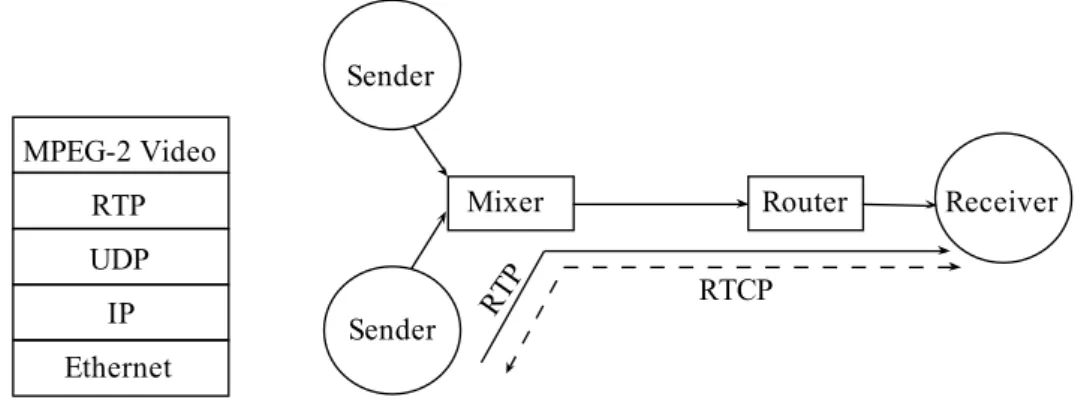
Real-Time Transport Protocol (RTP)RTP provides end-to-end delivery for real time audio/video data for stream-ing or other services. Applications run RTP on the top of UDP to make proper utilization of its multiplexing and checksum capabilities. RTP itself does not have own mechanism to ensure timely or in-order packet delivery or QoS. The sequence number contained in the RTP packet only allows the receiver to reconstruct the senders sequence number. Here, the sequence number can also be used to determine the location of the packets.
An RTP session consists of number of application participants, where each of the applicants can send or receive media data. A network address and two port numbers identify the participants. One port number is for media data and the other one is for RTCP. The number of media sessions depends on the media types, which enables the participants to choose the media types they really want to reciece. For instance. one participant may just want to receive only the audio part of a media streaming video.
RTCP checks the quality of the connection and the stream and sends feedback to both sender and receiver. This helps both sender and receiver to negotiate the best transmission rate. RTCP also provides identification and control mechanism for RTP transmission. Figure 2.5 illustrates an RTP session. Even though, RTP was primarily designed to work on multicast to support multiple participants of a multimedia conference or interested in the same stream media, but, it also supports unicasting and various application needs.
Figure 2.5: RTP protocol stack and an RTP Session.
RTP Control Protocol (RTCP)
Real Time Control protocol is used with RTP. It is based on periodic trans-mission of control packets to the all participants of an RTP session. There-fore, the main purpose of this protocol is to maintain the QoS by providing the feedback information such as packet loss, jitter, etc to all the participant but RTCP itself does not carry any media data packetss. As the control packts are important and can not be lost, RTCP works on TCP.
The feedback regarding flow-control and congestion control help to negotiate the best media transfer rate. However, feedback from the receiver also helps to diagnosis the problem in a distribution. For Instance, reports from all other participants help the one who is facing problem to identify whether the problems are local or global. In addition RTCP helps third-party to monitor networks status and determine the problem occurred when an IP multicasting mechanism is being deployed.
RTCP packet format specifies following five kinds of feedback messages: 1. Sender Reports (SR), includes cumulative frame and byte counts. 2. Receiver Reports (RR), includes frame loss or delivery report.
3. Source Description (SDE), contains the user and hostname of a partic-ipant.
4. Bye Message finalizes an established connection.
5. Other application specific messagese which do not include the informa-tion enumerated above.
During a RTCP session both the sender and receivers continuously monitor the RTP transmission quality by measuring the transmission delay, jitter and packet loss. Sender calculates the transmission delay from the timestamp specified in the RR. Sender also calculates the total number of packets and bytes sent and specifies in the SR. The receivers measure the packet loss by calculating the gap in the sequence number space:
1. It finds the lowest the sequence number.
2. Calculates the expected number of packets = current - lowest.
3. Then counts the received number of packets which may include dupli-cates, out-of-order and late arrived packets.
4. Number of lost packets = expected - received. This value can be neg-ative also.
In order to collect the jitter information, receiver relates the local real-time clock with the sender’s packet time stamp at the very beginning when the first packet arrives. After that receveer derives the next packet reception and calculates the deviation upon packet arrival. Jitter is derived for each pair of successive received packet.
After collecting the transmission quality information both the sender and receiver exchange the reports. Here the sender report include the timing information to measure the RTT, to perform the playout adjustment by the receiver. SR also contains the number of packets and bytes transmitted to help the receiver to do proper packet loss calculation. On the other hand, receivers report contains the feedback timing for the RTT estimation, to-tal number of packets lost, fraction of packets lost (in the units of 1/256), the highest packet sequence number and the jitter of the received packets. Based on these reports all the participants adapt the current QoS of the transmission.
RTCP reports are to be sent by all the participants. In case of multicast-ing the RTCP reports my cause congestion in the network. Therefore, the protocol must include some bandwidth management to reduce congestion. This is obtained by controlling the reports dynamically but scalable RTCP message or report interval depends on the group size, RTCP data rate and the average RTCP packet size. However, bandwidth usage by RTCP should not exceed 5%.
Session Description Protocol
While Streaming audio or video, it is necessary to carry media details, trans-port addresses and other session description metadata to other participants. SDP is here to provide such information irrespective of the transportation method. SDP provides the description of a multimedia session for the pur-pose of session announcement, session invitation or other form of multimedia session initiation. It does not incorporate any transportation protocol and eligible to use with other protocols like RTSP (for media streaming). In addition, it is not intended to use for the negotiation of session content or media encoding.
An SDP session description consists the following information: 1. Name and purpose of the session.
2. Time duration of an active session.
3. The type of media comprising the session.
4. Information like address, port, format, etc to receive media data.
2.4
Streaming Techniques
Despite the existence of some good streaming protocols, streaming long du-ration media objects on Internet is still challenging. If the server supports UDP and the client player is shielded by a NAT, the incoming UDP media traffic may not be able to pass through NAT. In addition, the media object delivery between client and server usually require high and stable bandwidth. But, the bandwidth fluctuation during a media session can degrade the qual-ity of stream significantly. Besides, user connections can vary from dial-up to high speed Internet. Therefore, it is not desirable to have a fixed en-coding or data rate for a particular media object. Furthermore, user can experience prolonged start-up delay due to the network bandwidth fluctu-ation, server load and client play-out buffer. Therefore, various techniques have been adopted by different streaming services (Windows, RealNetworks Media Services) to address above problems or challenges.
2.4.1
Protocol Rollover
Even though UDP is considered to be the default media streaming protocol, it is often blocked at the client side. Therefore, streaming media is often delivered over TCP or HTTP. At the beginning of the client request, UDP is tried. But if the UDP is not supported due to the client or server reasons TCP or HTTP can be used. This process is known as protocol rollover. However, protocol rollover plays an important role in media streaming due to the wide deployment of NAT routers/ firewalls in home or small business office networks.
While using RTSP, client specifies the transport protocol in the SETUP message. If UDP is supported, the port numbers for data receiving and sending feedback are also specified. In SETUP reply message the stream-ing server also specifies the transport protocol. If it selects UDP then also specifies two ports for data sending and receiving feedback, otherwise se-lects TCP. But if the server supports UDP and the client player is behind a NAT router/firewall, after a timeout period client terminates current RTSP connection and sends e new SETUP request with transport protocol TCP. MMS with the latest Windows media player, iffast cache is activated (Sec-tion 2.4.2), server tries to deliver the media data with TCP based protocol RTSPT. If the player does not support TCP then server selects UDP based RTSPU. If the UDP based connection also not successful then the server tries to deliver the media over HTTP. Iffast cache is not enabled, the server tries to send in a different order, first RTSPU, then RTSPT and finally HTTP [10].
2.4.2
Fast Streaming
In general a media object is streamed at its encoding rate and a small amount of buffer is used to smooth the streaming jitter. But the bandwidth between client and server may fluctuate and the play-out buffer may be exhausted. Window Media services use a group techniques called fast streaming in order to provide high quality of stream, which includesFast Start,Fast Cache,Fast Recover,Fast Reconnect and Advanced Fast Streaming [8].
Fast Start helps client to buffer media data at a higher rate than the media encoding rate until the play-out buffer is filled. It also enables the client to reduce the startup buffering time. In addition, users can fast forward, rewind without any additional delay and rebuffering. However, the bandwidth ini-tially used byfast start to send data can increase the congestion. Therefore,
in order to reduce the risk of congestion users can limit the amount of band-width to be used to stream to each player. Fast start only works with unicast TCP or UDP stream.
Fast Cache is used immediate afterfast start to stream the entire media object or the media session is terminated by the user. It also streams media data at a higher rate than the encoding rate. While fast cache is running, client player also maintains a growing buffer for the early arrived data. The purpose of fast caching is to guard against network bandwidth fluctuations. But, fast cache works only run with TCP.
Fast Recovery is used by the windows media player to recover the lost or damaged media without again requesting to the Windows Media server. It is accomplished by using Forward Error Correction (FEC) on a Windows Media Services publishing point.
Fast Reconnect reduces the impact of a temporary stream disconnection period, by enabling the client to reconnect to the server automatically and resume the streaming. In case of on demand the stream is resumed from where it was interrupted. But for live or simulated live stream clients may experience gap.
Advanced Fast Streaming enables client to play a media stream before its play-out buffer is full and the content is also being streamed at a higher speed at the same time. The acceleration is stopped when the client buffer is full.
2.4.3
Rate Adaptation
In addition to thefast caching popular media services like RealNetworks and Windows Media supports three kind of rate adaptation techniques in order to adapt bandwidth fluctuation.
Stream Switch makes a media server to switch dynamically among several streams with different encoding rates of the same media object and allows to select a stream based on the available bandwidth between the client and the server. In order to enable stream switch, the media object must be encoded with multiple bit rates.
Using RTSP, when a media session is established, the client media player sends a DESCRIBE message to the server. In DESCRIBE response message server includes the description of each media stream encapsulated in the media object. Then client selects the desired media object and specifies in the SETUP command.
Now, during playback, if the available bandwidth drops down to the selected media encoding rate, the client play may generate a request to the server to switch to a lower stream rate. In Windows media service it is known as Intelligent Streaming [9] and Sure Streaming [6] in RealNetworks media service.
Stream Thinning can be thought similar as Stream Switch. If enough bandwidth is not available, the quality of video stream is degraded as only key frames are delivered to the client.
Video Cancellationis enabled only when the bandwidth is not even enough to send the key video frames and only audio stream is maintained. The client may send a RTSP TEARDOWN command to cancel the video and may again setup and request video stream later again only if the bandwidth increases. However, Stream Thinning and Video Cancellation are applicable only for video media streaming.
2.4.4
Coordinated Streaming
Coordinated Streaming [38] works with the cooperation of fast caching and
rate adaptation. A range is maintained for the client’s play-out buffer. The lower bound of the buffer range helps to eliminate the latency for stream switching and the upper bound to prevent aggressive buffering. When a stream session starts, server starts sending data as fast as possible until the lower bound is reached. Immediate after that, client begins to play and buffer media data at the highest rate until the client’s play-out buffer reaches the upper bound. At this point, client buffers at the media encoding rate and keeps the buffer always full.
When the transmission rate falls down due to bandwidth fluctuation, play-out buffer drains off and if the play-play-out buffer touches the lower bound, client requests the lower stream rate. But, current bandwidth must be able to maintain normal playback for the new lower streaming rate and transmit extra data to fill out the play-out buffer to its upper bound. If the bandwidth again increases before the play-out buffer reaches the lower bound, client can request higher stream rate until the buffer is full again.
WNIC Power Consumption in
Mobile Devices
This chapter describes IEEE 802.11 basic power saving mechanism and its performance with different kind of applications. After that we present brief reviews of previous works for power saving; that had been done for simple web access and media streaming over WLAN. Finally we explain, how our works differ from the other previous works.
3.1
IEEE 802.11 WNIC Opertaing Modes
An wireless network interface card has four states of operation:active (trans-mit and receive), waiting, sleep and off state. Each of these states has dif-ferent power requirements. Active state is the most power demanding state. In this state, the interface usually sends and receives data and majority of the power is consumed to power the radio subsystem. During waiting state card does not send or receive any data, but radio’s receiver is turned on to watch the medium. When the radio is turned off, the card enters into sleep
state. In off state power is completely removed from the card. Hence, the descending order of the states in case of power consumption: active, waiting and sleep state.
Therefore, the transition from one state to another state also requires addi-tional power; lower the power state of the card, more power is required to switch from current state to higher state. Inidle state the card periodically alternates between waiting and sleep states. The table 3.1 describes the operating states of the wireless network interface card.
State Description
Active Sending and receiving data.
Waiting No data transmission or reception. But the radio is pow-ered up.
Sleep Card is turned off.
Off The power to the entire card is removed
Idle Periodic alternate switching between Idle and Sleep states. No data is exchanged.
Table 3.1: Power states of the wireless interface card.
3.2
IEEE 802.11 Power Management
The power saving mode (PSM) defined by the 802.11 standard works by the cooperation of the access point(AP) and the mobile clients. A mobile client sends it’s intention to the access point to switch to the power saving mode. While being in power saving mode, a mobile client switches its WNIC to
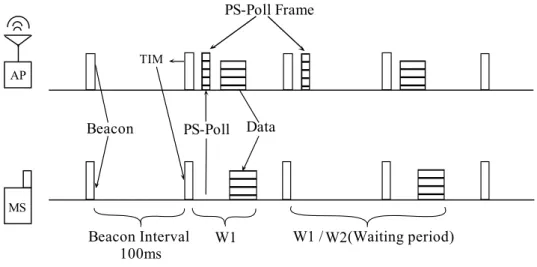
sleep state, and periodically wakes up to receive traffic indication map(TIM) frames (also known asbeacons) from the access point. In response, the mobile client sendsPS-Pollframes to the access point only if the previous TIM frame contains an indication that AP has buffered data for the client. The AP sends the buffered data directed to the client only if it receivesPS-Poll frame from that mobile client.
For multicast and broadcast data packets access point transmits delivery traffic indication message (DTIM) frames; immediately followed by the ac-tual data packets. In this case, noPS-Poll frame is required from the client. DTIM is configurable at the access point and can be any multiple of the
beacon interval. Figure 3.1 illustrates IEEE 802.11 basic power saving tech-nique.
3.3
Performance of 802.11 PSM
802.11 power management enables an AP to perform two tasks. First is to determine whether AP should deliver the frames to the wireless network or to buffer the frames because the mobile clients might be in sleeping mode. The second task is to periodically announce the mobile clients, which have buffered frames waiting for them. Mobile clients can choose to sleep for more extended period of time to avoid using of the wireless interface card. But
Figure 3.1: IEEE 802.11 Power Management.
this requires more buffering capacity at the access point.
It would seem that 802.11 power saving mode allows the mobile stations to save power by allowing them frequently to switch to the lower power consuming sleep mode or sleeping longer period. But, the potential power saving depends on the minimal waiting time interval, i.e. the time between the transmission of thePS-Poll packet and the reception of the data packets. However, 802.11 standard does not specify any bound for thiswaiting period. In [32],Chandra et al. indentified several limiting factors of the 802.11power saving mode. Table 3.2 few of them regarding streaming.
3.4
Related Works to Reduce WNIC Power
Con-sumption
Along with other mobile Internet services, different kinds of multimedia streaming services are also getting popular. And a lot of works have been done to reduce the power consumption for these Internet dependent appli-cations. In this section we classify the related previous works based on the application type; whether the user application is requires simple random web access or it is a multimedia streaming application.
Limitation Explanation Poor support for
multiple clients
While multiple clients are accessing multimedia streams, even though all the clients send PS-poll requests at the same time, any of the clients might have to wait for the whole time needed to transmit the packets for all other clients.
PSM is not ap-plication aware
802.11 PSM behaves well if the distribution of traffic is periodic or regular as the client WNIC wakes up period-ically. But the multimedia traffic tends to be very con-tinuous and irregular. For instance, real media service sends smaller packets at very close intervals, therefore WNIC is always in active sate or spend very less time in sleep state.
Table 3.2: Limitations of 802.11 power saving mode.
3.4.1
Web Access
Wireless network is prone to the packet loss by its nature. This packet loss unnecessarily triggers TCP congestion control mechanism. Therefore, the throughput is degraded, as the total transmission delay is increased.
Stemm et al., in [44], found that this behavior increases the total energy cost. Besides, the dominant energy cost of any transport protocol is not the number of packets sent or received but the amount of time it takes to complete the transmission.
The very beginning work to reduce power consumption of WNIC was to improve the throughput at the transport layer. The work in [28], proposed Indirect TCP(TCP) architecture as an alternative to the classical TCP. I-TCP splits one I-TCP connection into two I-TCP connections. One connection is between the mobile client and access point, and the other connection is between the access point and the fixed host in the Internet. The access point relays the data between the fixed host and the mobile station. I-TCP avoids the throughput degradation caused by the combined effect of the packet loss in the wireless network and the congestion control mechanism. This basically reduces the total transfer delay and WNIC power consumption.
A few other solutions [26, 24, 23, 43] also use I-TCP scheme and turns off the WNIC during idle period. The work proposed in [26], defines new network architecture, named Power-Saving Network Architecture (PSNA) for access-ing the Internet from the mobile client. Here, the connection between the
mobile client and the access point is based on a new protocol Power Saving Transport Protocol (PS-TP), whereas the communication between the access point and the fixed host is classical TCP. PS-TP is a reliable connectionless protocol. The main purpose of using connectionless approach is to reduce the amount of work performed by the mobile client and the energy cost as-sociated with the set-up and tear down of a connection. In their next work [23], Anastasi et al. introduced an application independent approach, which is able to save energy around 70% without a significant degradation in the QoS perceived by the user.
However, potential energy is consumed when the WNIC is waiting for the data after sending the PS-poll packet to access point, as shown in [44, 32]. During this period no data is transmitted or received but drains a large amount of energy. The work in [22], proposes Self Tuning Power Manage-ment (STPM) protocol. It observes the network access pattern for different applications to predict the application behavior. Based on this prediction STPM decides whether to use PSM or CAM (Continuous Active Mode) and reduces power consumption.
3.4.2
Multimedia Streaming
However, the web access solutions are not suitable for power saving in multi-media applications due to the time constraints imposed by the applications and the quality of the stream. In addition, multimedia applications are con-sidered to be resource hungry and most of solutions described below did not consider basic PSM.
Chandra et al. in their earlier work [31], explored WNIC power consumption implications for popular multimedia formats like Windows Media, Real Me-dia and Quick Time. They also developed history based client side strategy to reduce the power consumption of the WNIC and techniques to switch the WNIC to thesleeping mode during the predictedidle period. Theidle period
is predicted by averaging the previous idle periods. In case of too conserva-tive idle period there is no energy saving, whereas too aggressive idle period
leads to packet loss. Using this approach it is possible to save 80% power for 28.8Kbps Windows Media stream and for higher stream rate it is 57%, where the packet loss is 2% and 0.3% respectively. The outcome seems positive, as windows media packets tend to arrive at regular intervals. However, this approach was not successful for Quick Time media streams, as the packet interval was irregular and such packets are harder to predict.
is not suitable for multimedia streaming as the multimedia traffic tends to be irregular. Therefore, they proposed a server side proxy for shaping media streams. They showed that server-side application specific traffic shaping along with client-side history based prediction could save up-to 80% energy required for network reception.
In [53], Chandra et al. proposed a refinement to their earlier works [32, 31] by developing a statistical policy, where they found that idle periods have statistical correlation with the previously observed idle periods. In order to ensure that WNIC wakes up before the next packet arrival, a relatively smallnegative bias is added to thesleep interval. This approach yields lower packet loss and power consumption compared to the history-based prediction. Besides, it seems to be more robust to predict theidle periods for three media stream formats, namely Microsoft Media, Apple QuickTime and Real.
Shenoy et al. in their work [49] proposed a proxy-based solution. Proxy has two main functionalities: power friendly transcoding of media streams and an intelligent transmission technique to reduce the power consumption of the clients WNIC. The main goal is to reduce the energy consumption at the CPU and the wireless network interface card. The client sends its energy budget for stream decoding, network reception and the maximum spatial resolution it supports along with the request. In addition, client also specifies the type of its CPU and network interface. The proxy does transcoding based on these information received from the client.
For power friendly transmission Shenoy present two techniques: i) client-side history based prediction and ii) proxy-assisted prediction. For the for-mer case, proxy does traffic shaping by converting VBR (Variable Bit Rate) stream to Constant Bit Rate, which helps the client to predict the idle inter-val to switch to the sleep mode. In case of proxy-assisted prediction, proxy sends a control packet to the client to indicate the arrival of the next set of frames and client WNIC goes to thesleep mode until that specified time. The researchers proved that their proposed solution saves 65-98% power during network reception.
In their latest work [25],Anastasi et al introduced a power saving streaming protocol to reduce the power consumption at the Wi-Fi interface of the mobile device, named Real Time Power Saving Protocol (RT_PS). Its works on the top of UDP and requires a proxy-based architecture. RT_PS enables proxy to schedule packet transmission by following an ON/OFF scheme. During ON period proxy transmits packets to the client with the highest possible rate allowed by the wireless link. Proxy decides the duration of the ON period by the current available bandwidth. Client switches off the WNIC during
the OFF period. The duration of the OFF period depends on the clientś buffer level. When the buffer level falls down a dynamic level, client warns the proxy about the risk of the playback starvation and OFF period ends. In addition to the audio/video length, client buffer size, current available bandwidth, RT_PS power management policy also depends on the initial playback delay. Their implemented prototype shows that, this solution makes an energy saving ranging from 76% to 91% while maintaining the quality of the stream.
Two similar works [51, 56] focus on TCP based streams. They use server-side traffic shaping, which is implemented by exploiting TCP’s flow control mechanism at the client side. At the beginning client sends the request with TCP receiving window size zero and later sends the request with appropriate window size to make the server to send the packets in a burst. Accordingly, client can predict the arrival and termination of a packet burst and turn off WNIC.
Gundlach et al. [37] proposed a technique to save energy for multiple clients by using a transparent proxy. Here, proxy schedules the packets to multiple clients on a TDMA approach and broadcasts a schedule message (a UDP packet). Theschedule message defines the length of the burst for each client and the order of the burst. At the same time proxy transmits data to the clients according the order defined in the broadcast message. The proxy also sets the ¨type of service¨bit of the IP header of the last packet of the data burst, so that the mobile client can make the transition of the WNIC to the
sleep mode on time, therefore can save energy.
Janet at el. in [20] introduces a server side traffic shaping mechanism, called Adaptive-Buffer Power Save Mechanism (AB-PSM). Here, traffic is buffered at the server for certain period of time. This buffering period is selected as the multiples of the AP beacon interval. Unlike other techniques discussed above, PSM assumes that basic PSM is active at the client side. However, AB-PSM is able to save a significant amount of energy by controlling the traffic transmitted over WLAN.
3.5
Differences with Previous Works
In Section 3.4 we have discussed existing solutions for normal web access (Section 3.4.1) and multimedia streaming(Section 3.4.2). Most of the energy management solutions for multimedia streaming based on the following ap-proaches: i) switching the WNIC to the sleep mode during the idle periods,
and ii) reducing the total transfer delay. Client-side and proxy-assisted pre-diction or feedback was used to switch the WNIC to thesleepmode and total transfer delay of a multimedia session was reduced through the reduction of the stream fidelity.
However, prediction based solutions can suffer from packet loss if the pre-diction is not correct, thus the quality of the stream. In addition, they are client centric and require one client module, which causes extra energy cost. Transcoding techniques can reduce transfer delay by introducing shorten au-dio/video size. However, while saving little energy, transcoding may cause degradation in the quality of the stream. In addition, only video streaming can be benefited from transcoding.
Besides, most of solutions are for RTSP-based Windows Media, RealNet-works and QuckTime streaming services. These services have their own ex-tensions for RTSP protocol [38], which have to be implemented individually for a general purpose RTSP proxy.
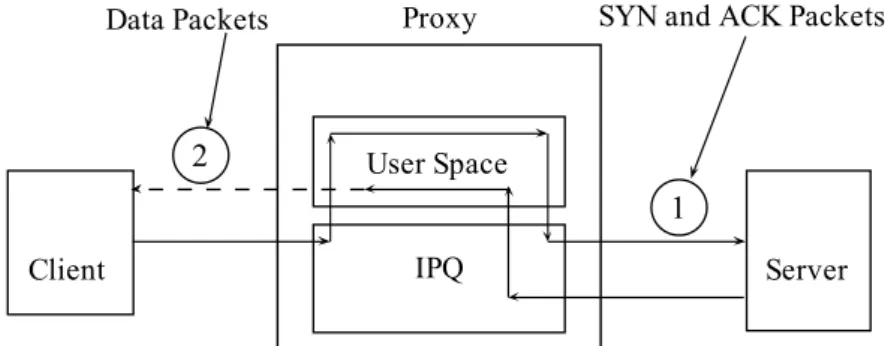
In this thesis work, we propose a proxy-based solution for Internet radio streaming. The proxy works at the application layer and based on pure I-TCP. It is also independent of client and server. It receives stream traffic from the server on behalf of the client and relays the traffic to the mobile client at periodic intervals. Here, we assume that 802.11 PSM active at the client. Energy efficiency is achieved by increasing the periodic intervals while maintaining the stream encoding rate and quality of the stream perceived by the user. Our solutions do not require any modification to underlying protocol suite, 802.11b/g device driver or the AP.
We perform a complete study of this energy consumption behavior by increas-ing the periodic intervals while implementincreas-ing the proxy locally and remotely. In our work, we also implement a transparent proxy locally and compare the performance with the application layer proxy. Furthermore, we analyze the 3G power consumption behavior with the application layer proxy.
Power Consumption: Mobile
Internet Radio
High profile mobile devices include WLAN, 3G interfaces to provide data ser-vices to the applications requiring high bandwidth. This integration pushed up the popularity of the Internet Radio streaming in mobile devices where the radio stations provide continuous broadcasting of simulated live or live streams to the users at different encoding rates.
This chapter describes our target architecture, application and power mea-surement tool. It also presents the mobile power consumption behavior while playing radio stations in WLAN condition with different stream rates. Fi-nally we present our proxy mechanisms to save power for Internet radio streaming.
4.1
Mobile Device Architecture
Throughout our experiment we played and listened Internet Radio on Nokia E-71 [12] running Symbian OS S60 3rd Edition [16]. It is equipped with WLAN and 3G (up to 3.6Mbps) interfaces support to provide seamless data connectivity for applications like Mobile YouTube, Internet Radio, etc. Its key specifications are:
1. Operating System, Symbian S60 3rd Edition. 2. CPU, 369MHz ARM 11 Processor.
3. RAM, 128MB.
4. WLAN, 802.11b/g. 5. 3G, 3.6 Mbps. 6. Battery, 1500mAh.
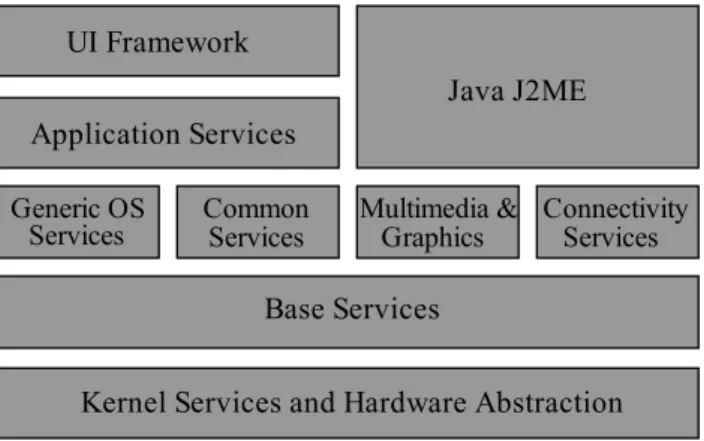
Symbian is a mobile OS for ARM processors. The system includes a multi tasking microkernel OS, associated libraries, user interface and the reference implementation of common tools. The microkernel works in a server-based fashion where the access to the server is asynchronous and based on event passing. The selection of the server is limited to the four services: Generic OS Services, Common Services, Multimedia and Graphics, and Connectivity [52]. Figure 4.1 illustrates the layers of the Symbian OS System Model.
Figure 4.1: Symbian Architecture
The Base Services layer is the lowest reachable layer by an application that includes the File Server, User Library, cryptographic services, etc. It is also responsible for the basic network connectivity. The communication infras-tructure is developed on this layer and two other protocol stacks: TCP and WAP. Besides, some other narrow band protocols, infrared and bluetooth are also supported.
The WLAN package comes with Symbian is hardware independent and im-plements the basic functionalities like access point selection and roaming, scanning logic, association state machine, admission control, etc. The WLAN chip vendors implements a hardware specific driver below the WLAN Hard-ware Abstraction Layer (HAL) API defined in the WLAN package [17].
4.2
Mobile Internet Radio Application
Internet Radio applications on mobile phones may use different streaming protocols and services. The application comes with Nokia E-71 uses SHOUT-cast ICY HTTP streaming protocol (Section 2.3.2). When a user selects a radio station to play initially it takes five to ten seconds to fill out the appli-cation’s play-out buffer and then starts playing. The application continues to play the stream until the user quits or stops the application. Figure 4.2 shows the format of a ICY radio stream request sent from E-71.
Figure 4.2: ICY Request Format
At the beginning of the connection, the streaming stations use fast stream-ing ( Section 2.4.2) to fill out the client application play-out buffer. Soon after the buffer is filled, server sends traffic at the stream-encoding rate. Here, the radio streaming stations support multiple encoding rates to enable users to listen with different bandwidth Internet connections. For instance,
radio.internode.on.net radio station supports streaming at 32, 64 and 128 kBps.
In contrast to the stream switching (Section 2.4.3) for Windows media or QuickTime media services, it is not possible to switch to another encoding rate over the same TCP connection while listening radio. It requires closing the current connection and then establishing a new TCP connection to an-other port for a different streaming rate. For this reason, the streaming rate is generally decided by the application at the moment of the connection es-tablishment based on the available bandwidth or the user can select to listen a particular streaming rate supported by the radio station.
4.3
Power Measurement Tool
(a) Power Consumption View (b) Current View
(c) Data Traffic Acitiviy (d) WLAN Signal Strength
Figure 4.3: Nokia Energy Profiler Views
In order to measure the power consumption we used Nokia Energy Profiler (NEP) [13] in our work. It is an application for Symbian S60 3rd Edition and later Nokia devices. It enables to measure the power being consumed by an S60 device and provides information on key power consuming tasks like CPU, WLAN, IP traffic activity, etc.
1. Power, current, voltage consumption 2. WLAN signal strength
3. 3G Timers
4. Data transmission speed 5. Memory usage
6. Processor activity.
While running an application, energy profiler can be run in the background to profile every power consuming events. NEP makes easy identification of the power consumption by screen shot or generating CSV output.
The figure 4.3(a) shows the average power consumption over a period of more than one minute. The timer at the upper right corner indicates the estimated lifetime of the battery before it discharges completely. The next picture 4.3(b) illustrates the average current consumption. As the battery drains out with time, the voltage decrease but the current increases and the power level remains constant. Figure 4.3(c) shows the upload and download link speed in kbps. The orange line indicates upload and green indicates download link. The last figure 4.3(d) indicates the WLAN received-signal strength when the device is connected to a access point and values are typically within the range of -25 to -90dBm, where the values closer to -40 is considered to be very good condition.
4.4
AP and Mobile Device Configuration
In our experiment, we have used one D-LINK DIR-301 [4] access point to support WLAN connectivity for devices with 802.11b/g interface. The access was restricted through the use of WPA enhanced security feature. Table 4.1 lists the parameters configured in the access point.
Parameters to Set Values
TX Rates 54Mbps (Maximum). Transmit Power 100%. Beacon Interval 100ms. RTS Threshold 2346 bytes. Fragmentation 2346 bytes. DTIM Interval 1. CTS Mode Auto. WMM Function Disable. RF Channel Auto.
Table 4.1: Wireless AP Configuration.
WMM (Wi-Fi Multimedia) [21] is an Wi-Fi Alliance interoperability certifi-cation based on 802.11e [50] standard to provide QoS ( Quality of Service)
to 802.11 networks. It works by prioritizing the traffic according to four Access Categories: voice, video, best effort and background. It is suitable for applications like audio and video telephony over IP. However, it does not guarantee the required throughput.
In addition to the AP, Nokia E-71 was also configured. 3G, Bluetooth in-terfaces were turned off while using WLAN. The phone speaker volume was mute while running the Internet radio. The device WNIC was in PSM mode most of the time and the Energy Profiler was always running at the back-ground.
Parameters to Set Values
3G Disabled.
Speaker Volume Muted.
WNIC PSM disabled - enabled.
Nokia Energy Profiler Running. Table 4.2: E-71 Configuration.
4.5
Mobile Power Consumption
In handheld devices, WNIC is the most power hungry component and stream-ing applications are the most power consumstream-ing applications. 802.11 PSM helps to reduce the power consumption by switching the WNIC into sleeping mode during the idle periods. Chandra et al. [32] showed that PSM is effec-tive only when traffic is regular or periodic. Since most of the media traffic is irregular in nature, it is not suitable to use 802.11 PSM with streaming applications. Therefore, we have noticed that most of the solutions described in the previous chapter (Section 3.4) assumed that PSM is not active.
4.5.1
Mobile Internet Radio
We have worked with three different Internet Radio Stations with different media encoding rates from the different parts of the world. While listening to these radios on E-71 over WLAN we have noticed that battery drains out very quickly.
From Table 4.3 we can see that if WNIC is in continuous active mode (CAM) at the mobile client, the power consumption is almost same for all radio
Radio Stations Data Rate Power(PSM) Power(CAM)
stream.rawfm.com.au:8004 8kBps 0.53W 1.06W
radio.internode.on.net:8100 16kBps 0.99W 1.07W
83.145.201.209:8000 24kbps 1.04W 1.07W
Table 4.3: Power Consumption of Internet Radio Sites
stations. It does not make any difference whether the media-encoding rate is lower or higher, because the WNIC is always on. On the contrary, we find that mobile power consumption is less with the lower encoding rates while PSM is active. But the effect is not significant for higher data rate radio streaming. The power consumption behavior is more clarified in figure 4.4
0 3 6 9 12 16 20 24 28 32 36 40 44 48 52 56 60
0.0 0.5 1.0 1.5
Power Consumption: PSM and CAM
Time (Sec) P o w er(W att) CAM PSM
Figure 4.4: Power Comsumption: CAM and PSM
4.5.2
Reducing Power Consumption
In order to make PSM more effective while listening to a Internet radio station, we need to shape the traffic at the server end or somewhere else in between the radio station and the client. Instead of the server we have two separate proxy server implementations to shape the traffic, i.e. to generate
the periodic bursts. One of the proxies is transparent and the other one works at the application layer. Here, the proxy servers buffer the media stream, generate bursts periodically, and reduces the number of bursts by increasing thebuffering period in order to reduce the power consumption by the mobile client. The properties of the bursts generated by the proxy after a buffering period:
Figure 4.5: Burst Properties
1. Burst: The media data buffered by the proxy server for a period of time to sent to the mobile client.
2. Burst Size: The size of the buffered data in kilo bytes.
3. Burst Duration: Time required to complete a single burst i.e. to send the buffered data from the proxy server to the client for one time. 4. Burst Interval: The time period between two consecutive bursts. Most
of the time during this period Proxy usually buffers media stream. It is the difference between the buffering period and the burst duration.
Figure 4.5 illustrates the burst properties in detail. There are three bursts. The duration of the second burst is 800ms and the burst size is 35kBytes. The burst interval or buffering period between the first and the second burst is around 1300ms.
4.5.3
Application Layer Proxy
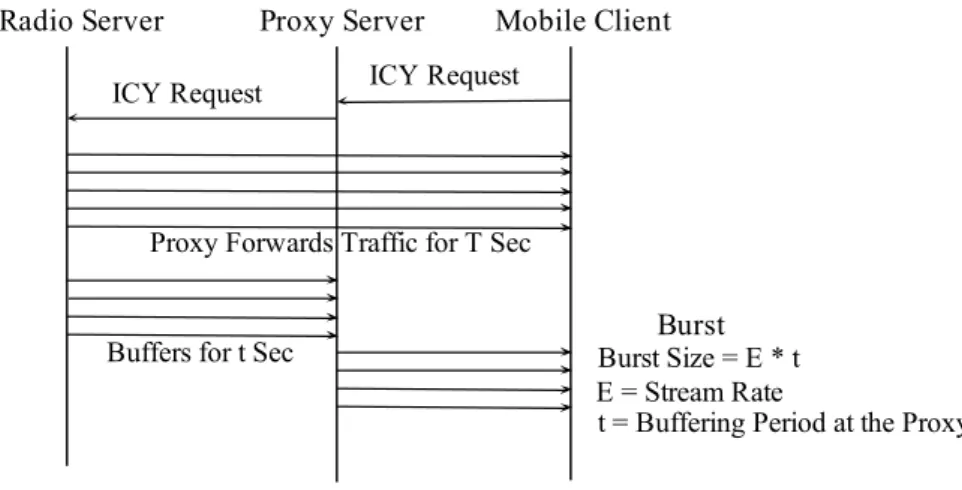
This application layer proxy is based on I-TCP scheme. Client sends the radio-playing request to the proxy server using ICY protocol; proxy makes another TCP connection with the Radio Streaming server and relays the ICY response containing the radio server information followed by continues flow of MP3 or AAC media stream to the client player.
I-TCP mechanism is implemented using TCP server and client stream sockets at the proxy. Clients connect to the server socket and proxy connects to the radio server using the client socket. Afterward media data is simply forwarded from one socket to another socket. We used simple process forking mechanism to handle multiple clients connecting to the same radio server. We introduce two timers for each client: start-up and buffering period. The first timer starts only when the proxy forwards the stream request to the server. Consequently, the streaming server sends traffic to the client using
fast streaming to fill the play-out buffer. Here we used a fixed timer of ten to twenty seconds. During this period proxy simply forwards the traffic to the client and measures the amount of data transmitted to the client. Proxy also calculates the maximum amount of time that the client player can play, if the connection is disturbed or broken.
Immediate next the second timer is activated and proxy buffers until the timer expires. Then, proxy sends the buffered traffic in a single burst to the mobile client. Then again the second timer is initialized and this process continues until the connection is closed. In this case, we assume that proxy knows the media encoding rate of the radio stream from the server ICY’s response. The values of the timers are constant throughout a connection. If the encoding rate is E bytes per second and K bytes are transferred to the client during the initial start-up time T, then the maximum amount of time the proxy can buffer without affecting the stream quality and smooth playback:
n = K