!()+
OS 2200
Distributed Data
Processing (DDP-PPC)
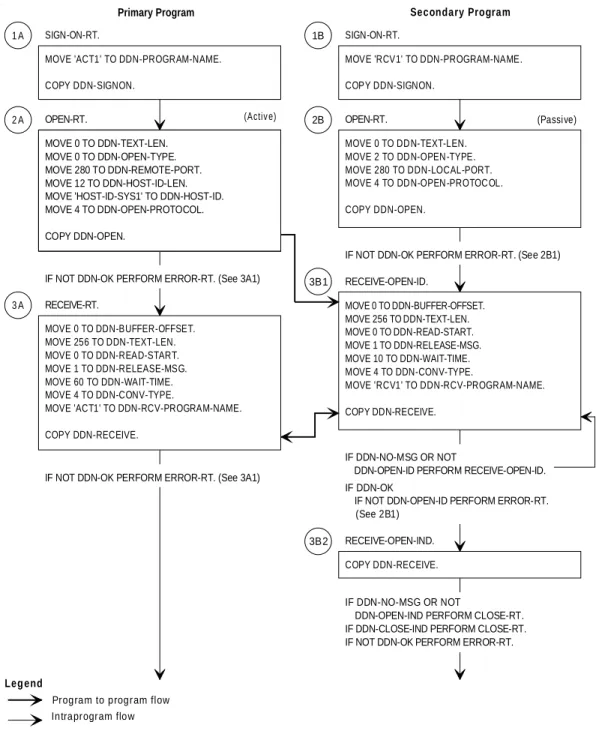
TCP/IP Interface COBOL
Programming
Guide
Copyright(1997 Unisys Corporation. All rights reserved.
The names, places, and/or events used in this publication are not intended to correspond to any individual, group, or association existing, living, or otherwise. Any similarity or likeness of the names, places, and/or events with the names of any individual, living or otherwise, or that of any group or association is purely coincidental and unintentional.
NO WARRANTIES OF ANY NATURE ARE EXTENDED BY THE DOCUMENT. Any product and related material disclosed herein are only furnished pursuant and subject to the terms and conditions of a duly executed Program Product License or Agreement to purchase or lease equipment. The only warranties made by Unisys, if any, with respect to the products described in this document are set forth in such License or Agreement. Unisys cannot accept any financial or other responsibility that may be the result of your use of the information in this document or software material, including direct, indirect, special, or consequential damages.
You should be very careful to ensure that the use of this information and/or software material complies with the laws, rules, and regulations of the jurisdictions with respect to which it is used.
The information contained herein is subject to change without notice. Revisions may be issued to advise of such changes and/or additions.
RESTRICTED - Use, reproduction, or disclosure is subject to the restrictions set forth in DFARS 252.227-7013 and 252.11-15/FAR 52.227-14 and 52.227-19 for commercial computer software. Correspondence regarding this publication should be forwarded to Unisys Corporation either by using the Business Reply Mail form included with this document, or by addressing remarks to Unisys Corporation, Tredyffrin/Malvern Product Information, Malvern Development Center, P.O. Box 203, Paoli, PA, 19301, U.S.A. Comments about documentation can also be sent through e-mail to
Contents
About This Guide
:::::::::::::::::::::::::::::::::::::::::::::: xiiiSection 1.
Introduction
1.1. DDP-PPC and the COBOL Interface ::::::::::::: 1-1
1.2. The TCP/IP Interface ::::::::::::::::::::::::: 1-2
1.3. Overview of Program-to-Program Applications ::: 1-3
1.4. Migration from DDN 1100 4R1 to DDP-PPC 6R1 and
Higher ::::::::::::::::::::::::::::::::::: 1-4
Section 2.
Procedural Overview
2.1. DDP-PPC COBOL Program Structure ::::::::::: 2-1
2.2. Copying Information Packets ::::::::::::::::::: 2-3 2.2.1. Using the COBOL COPY DDN-PKTS Statement ::: 2-3 2.2.2. Sample Information Packets Produced from Copy
Verbs :::::::::::::::::::::::::::::::: 2-3 2.2.3. Sample Initialization Packets ::::::::::::::::: 2-3 2.2.4. Additional Working-Storage Items ::::::::::::: 2-6
2.3. COBOL Verbs and Function Calls ::::::::::::::: 2-7 2.3.1. Function Calls ::::::::::::::::::::::::::::: 2-7 2.3.2. COPY Verbs :::::::::::::::::::::::::::::: 2-9 2.3.3. Initializing Packet Field Values :::::::::::::::: 2-9
Section 3.
Using DDP-PPC TCP/IP Function Calls
3.1. COBOL COPY Verbs and Function Calls :::::::::: 3-1
3.2. Terminating a Conversation (DDN-ABORT) ::::::: 3-3
3.3. Closing a Conversation (DDN-CLOSE) ::::::::::: 3-7
3.4. Interrupting Current Processing without Closing
(DDN-INT-PROCESS) ::::::::::::::::::::::: 3-9
3.5. Opening a Conversation (DDN-OPEN) ::::::::::: 3-11
3.6. Replacing a Program in a Conversation
Contents
3.7. Receiving a Message from a Host (DDN-RECEIVE) 3-20
3.8. Sending a Message (DDN-SEND) ::::::::::::::: 3-24
3.9. Detaching an Application Program from DDP-PPC
(DDN-SIGNOFF) ::::::::::::::::::::::::::: 3-26
3.10. Attaching an Application Program to DDP-PPC
(DDN-SIGNON) :::::::::::::::::::::::::::: 3-27
Section 4.
Designing and Writing the Application
4.1. Using a Block Diagram :::::::::::::::::::::::: 4-1
4.2. Creating a Flow Diagram :::::::::::::::::::::: 4-4
4.3. Using the Message Buffer Area ::::::::::::::::: 4-7 4.3.1. Formatting and Defining the Buffer Area :::::::: 4-7 4.3.2. Referencing the Buffer Area :::::::::::::::::: 4-7
4.4. Writing a Program-to-Program Application ::::::: 4-9 4.4.1. General Considerations ::::::::::::::::::::: 4-9 4.4.2. Receiving Data from a Remote Host ::::::::::: 4-9 Method 1 :::::::::::::::::::::::::::::: 4-10 Method 2 :::::::::::::::::::::::::::::: 4-10 4.4.3. Closing a Conversation ::::::::::::::::::::: 4-12
Section 5.
Compiling and Executing Programs
5.1. Preparing Programs for Execution :::::::::::::: 5-1 5.1.1. Calling TCP/IP functions only ::::::::::::::::: 5-1 5.1.2. Calling TCP/IP and TAS Program
Callable-Functions :::::::::::::::::::::: 5-1
5.2. Run Streams for DDP-PPC COBOL Programs ::::: 5-2
5.3. Banking Considerations ::::::::::::::::::::::: 5-4 5.3.1. UCS COBOL :::::::::::::::::::::::::::::: 5-4 5.3.2. ASCII COBOL ::::::::::::::::::::::::::::: 5-5
Appendix A. Conventions for Naming Hosts
A.1. Introduction ::::::::::::::::::::::::::::::::: A-1
A.2. Host Identifiers ::::::::::::::::::::::::::::::: A-1
Appendix B. Program-to-Program Example
B.1. Sample Program Run Streams ::::::::::::::::: B-1
Contents
B.3. Secondary (Receiving) Program Example :::::::: B-7
Glossary
Bibliography
Figures
1-1. Capabilities of the Program-to-Program Facility ::::::::::::::::::::: 1-3 2-1. COBOL Verbs and Function Calls :::::::::::::::::::::::::::::::: 2-7 2-2. Referencing Information Packets through Function Call USING Clauses :: 2-8 3-1. Typical Block Diagram for Program-to-Program Passoff Succession :::: 3-17 4-1. Typical Program-to-Program Block Diagram ::::::::::::::::::::::: 4-2 4-2. Typical Procedure Division Program-to-Program Flow Diagram (Part 1) :: 4-5 4-3. Typical Procedure Division Program-to-Program Flow Diagram (Part 2) :: 4-6 5-1. Compile, Collect, and Execute Stream for an ASCII COBOL Application
Program :::::::::::::::::::::::::::::::::::::::::::::::: 5-3 5-2. Compile, Link, and Execute Stream for a UCS COBOL Application
Tables
1-1. Comparison of the DDN 1100 4R1 and DDP-PPC 6R1 TCP/IP Interface :: 1-4 3-1. Copy Verbs and Associated Function Calls and Information Packets ::::: 3-1 3-2. Copy Verbs and Associated Error Codes :::::::::::::::::::::::::: 3-4
Examples
B-1. ASCII COBOL Compile and Collect Stream for Primary Program :::::::: B-1 B-2. UCS COBOL Compile and Link Stream for Primary Program ::::::::::: B-2
About This Guide
Purpose
This guide is designed to instruct and guide you in using the Unisys OS2200 Distributed Data Processing Program-to-Program Communications (DDP-PPC) TCP/IP COBOL interface. It tells you how to write COBOL application programs that let you exchange data between programs on the host or on remote hosts. The DDP-PPC TCP/IP COBOL interface was previously part of the DDN 1100 product.
This guide instructs an applications programmer how to:
$ Use a Unisys-supplied COBOL copy library to insert pre-written information packets and function calls into an ASCII or Universal Compiling System (UCS) COBOL program $ Write a COBOL application program using the COBOL information packets and
function calls $ Compile the program $ Execute the program
Scope
This guide provides detailed information on COBOL function calls and information packets. It describes how to organize the calls and packets to enable users to write customized COBOL applications that can exchange data between programs in a multihost network. The material covered in this Guide was previously contained in theOS1100 Defense Data Network (DDN 1100) COBOL Programming Guide.
Audience
The primary audience for this programming guide is the applications programmer. This person is typically a COBOL programmer with several years of experience. The person might have a limited knowledge of communications and is dependent on reading this documentation to be able to write a COBOL application with program-to-program communications.
About This Guide
This person typically has network and data base management experience. The site administrator is responsible for installing and implementing new hardware and software, network management, data bases, and security.
Prerequisites
To use this manual, you must understand distributed data processing concepts and know how to write standard COBOL programs.
How to Use This Guide
Programmers should use this guide to learn how to design and construct
program-to-program applications. The guide shows you how to use COBOL COPY verbs and function calls to insert and set information packets in your program. Use this guide also to learn how to compile, link, and execute your application program.
Organization
Section 1. Introduction
Gives an overview of DDP-PPC, TCP/IP, and features of the COBOL interface. Also gives a brief overview of program-to-program applications and how to migrate programs written for the DDN 1100 4R1 interface to the DDP_PPC 6R1 (and higher) TCP/IP interface.
Section 2. Procedural Overview
Discusses conventional COBOL versus DDP-PPC COBOL program structure. Describes how you use the working storage section and the procedure division in
program-to-program applications.
Section 3. Using DDP-PPC TCP/IP Function Calls
Describes the COBOL function calls and the information packets that let you transfer data between COBOL programs in the same or remote hosts. Tells how to sign on and off; open, close, or abort a conversation; and interrupt a process without closing the conversation.
Section 4. Designing and Writing the Application
Discusses how to design the application and construct a basic program-to-program application.
Section 5. Compiling and Executing Programs
Describes the executive control language run stream used to compile, collect or link, and execute the programs.
About This Guide
Appendix A. Conventions for Naming Hosts
Discusses how to name hosts and OS 2200 elements.
Appendix B. Program-to-Program Example
Contains a working example of a DDP-PPC TCP/IP COBOL program-to-program application.
Related Product Information
Note:For all manuals, use the version that corresponds to the release level of the product software in use on the system.
The following manuals provide related information you may find helpful:
OS 1100 Communications Management System (CMS 1100) Configuration Reference Manual(7830 9853)
An alphabetical reference manual that describes the network definition statements you use to configure CMS 1100.
OS 1100 Communications Management System (CMS 1100) Installation and Configuration Guide(7830 9846)
Describes the installation and configuration process to install and configure CMS 1100. Explains the concepts, the tasks that form the process, and the key requirements for configuring protocols and features.
OS 2200 Distributed Data Processing (DDP-PPC/DDP-FJT) DCA Interface COBOL Programming Guide(3787 3510)
Describes how to structure COBOL programs that run on the OS 2200 system and interface with the DDP-PPC software via the Distributed Communications Architecture (DCA) interface.
OS 2200 Distributed Data Processing (DDP-PPC/DDP-FJT) Messages Reference Manual(3787 3528)
Describes the status codes, error messages, and informational messages for DDP-PPC and DDP-FJT.
OS 2200 Distributed Data Processing (DDP-PPC) OSI Interface COBOL Programming Guide(3787 3296)
Describes how to write DDP-PPC/OSI application programs in COBOL to exchange data in a network that adheres to open systems interconnection standards.
About This Guide
OS 2200 Distributed Data Processing (DDP-PPC) TCP/IP Interface C Language Programming Guide(4173 5127)
Describes how to write customized C language applications that can exchange data with other programs in the same or remote computers in a multihost TCP/IP network.
OS 2200 Distributed Data Processing (DDP-PPC) TCP/IP Interface FORTRAN Programming Guide(3789 6669)
Describes how to write customized FORTRAN applications that can exchange data with other programs in the same or remote computers in a multihost TCP/IP network.
OS 2200 Distributed Data Processing Program-to-Program Communications (DDP-PPC) Implementation and Administration Guide(3787 3270)
Describes procedures for configuring and operating in a DDP environment on OS 2200 systems. It lists the hardware and software requirements and tells how to:
$ Initialize and terminate the DDP-PPC environment $ Manage normal DDP-PPC activity
$ Perform error recovery and diagnostic procedures
OS 2200 TCP/IP Application Services (TAS) COBOL Programming Guide(3787 3205)
Previous title: OS 1100 Defense Data Network (DDN 1100) COBOL Programming Guide. Describes how to write customized COBOL applications that can transfer files or process mail in a multihost TCP/IP network.
OS 2200 TCP/IP Application Services (TAS) FORTRAN Programming Guide
(3787 3247)
Previous title: OS 1100 Defense Data Network (DDN 1100) FORTRAN Programming Guide. Describes how to write customized FORTRAN applications that can transfer files or process mail in a multihost TCP/IP network.
Section 1
Introduction
1.1.
DDP-PPC and the COBOL Interface
Distributed Data Processing Program to Program Communications (DDP-PPC) is a systems software product used to handle and control data throughout a distributed data communications network. The DDP-PPC COBOL interface accepts function calls from a COBOL program to:
$ Communicate with other application programs $ Update records on the same or a remote host $ Pass data between programs quickly and easily
The DDP-PPC COBOL interface uses either ASCII COBOL or Universal Compiling System (UCS) COBOL. The interface provides COPY verbs that are used in your application program to provide information packets and issue requests (function calls) to DDP-PPC. Application programs compiled with the COBOL program-to-program interface:
$ Run on OS 2200 systems
$ Communicate with peer programs written in COBOL or other languages $ Communicate with peer programs residing on local or remote hosts or nodes The DDP-PPC COBOL interface described in this guide uses the TCP/IP protocol for program-to-program communications. DDP-PPC also provides COBOL interfaces that use:
$ Unisys Distributed Communications Architecture (DCA) protocol $ Open Systems Interconnection (OSI) protocol
Those interfaces are described in theDDP-PPC/DDP-FJT DCA Interface COBOL Programming Guideand theDDP-PPC OSI Interface COBOL Programming Guide. DDP-PPC also provides FORTRAN and C language interfaces for program-to-program communications in a TCP/IP network. These interfaces are described in theDDP-PPC TCP/IP Interface FORTRAN Programming Guideand theDDP-PPC TCP/IP C Language Programming Guiderespectively.
The TCP/IP Interface
1.2.
The TCP/IP Interface
TCP/IP is a set of layered communications protocols originally defined by the Advanced Research Project Agencies (ARPA) of the United States Department of Defense (DoD). The Transmission Control Protocol/Internet Protocol (TCP/IP) element provides reliable communication between pairs of processes (applications). Thus, TCP/IP serves as the basis for the DoD concept of interprocess communications in communications systems. TCP/IP implements the transport layer in the hierarchy of layered protocols. It provides reliable connection-oriented, ordered, full-duplex data transfer, with capabilities for flow control. TCP/IP, therefore, compensates for environments in which loss, damage, duplicated, or out-of-sequence data, and network congestion might otherwise occur. Consequently, it is well-suited to support military, governmental, and commercial applications.
Overview of Program-to-Program Applications
1.3.
Overview of Program-to-Program Applications
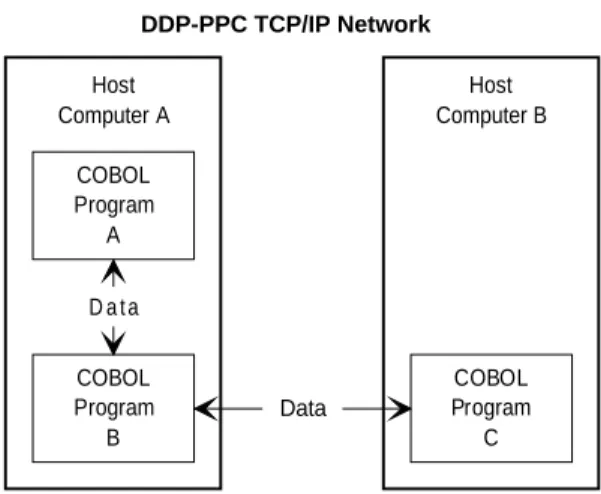
The DDP-PPC TCP/IP program-to-program facility allows COBOL language application programs to pass data between programs in the same host or remote hosts in the network. For example, data may be status or informational messages, control information, or records from a file. This permits multiple message switching, status monitoring, or access to individual records of multiple files. Figure 1-1 shows the capabilities of the
program-to-program facility. Host Computer A COBOL Program A DDP-PPC TCP/IP Network COBOL Program B COBOL Program C Host Computer B D a t a Data
Figure 1-1. Capabilities of the Program-to-Program Facility
Program-to-program facilities allow you to reconstruct files on the local host by using data gathered from many records, elements, or files on remote hosts. This eliminates
duplication of large amounts of unnecessary and unwanted data. It also eliminates the need to use transportable mass storage devices, such as tapes or disks, to transfer data between hosts.
The program-to-program facility lets you:
$ Open, close, and terminate conversations $ Send and receive messages
$ Access records at multiple sites to form a master file
$ Access data bases at multiple sites for simultaneous real-time updates $ Attach and detach applications to DDP-PPC
$ Interrupt current processing
Migration from DDN 1100 4R1 to DDP-PPC 6R1 and Higher
1.4.
Migration from DDN 1100 4R1 to DDP-PPC
6R1 and Higher
The DDP-PPC TCP/IP COBOL Programming interface was previously a component of DDN 1100. DDN 1100 4R1 and DDP-PPC 5R1 used the GASIF interface to CMS. The GASIF interface is replaced by TSAM for DDP-PPC 6R1and higher. As a result, you may need to make certain changes in your TCP/IP programming application. (You must at least recompile current applications to pick up the new data and open packet sizes.) Table 1-1 summarizes the differences in the TCP/IP COBOL interface between DDN 1100 4R1 and DDP-PPC 6R1and higher and describes the changes required in your application.
Table 1-1. Comparison of the DDN 1100 4R1 and DDP-PPC 6R1 TCP/IP Interface
DDN 1100 4R1 DDP-PPC 6R1
TCP/IP passes an open-id indication to the application after a passive open is issued. The application then loops, waiting for an open- indication to be returned.
The open-id is now returned to the user when an open indication arrives for the TSU. Therefore, the
application must now loop waiting for the open-id after issuing a passive open.
The host name field in the open packet is 24 characters long.
The host name field in the open packet has been increased to 255 characters to support domain names. (A domain name specifies the logical internet name whereas the host name is specified in internet physical address format.)
Two fields have been added to the data packet: DDN-DOMAIN-HOST-INFO (contains the domain name) DDN-DOMAIN-HOST-LENGTH (contains the length of the domain name)
DDP-PPC requests the domain name resolver to determine if the local or remote internet address has an associated domain name.
An ASCII dotted-decimal local internet address is returned on an open-id.
If there is an associated domain name and the receive-event is an open-id, the user receives the local internet address and the local domain name.
An ASCII dotted-decimal remote internet address is returned on an open-indication.
If there is an associated domain name and the receive-event is an open-indication, the user receives the remote internet address and the remote domain name.
Current applications can therefore continue to function, and new ones can opt to use the associated domain name. (Current applications must recompile their programs to pick up the new data and open packet sizes.)
Migration from DDN 1100 4R1 to DDP-PPC 6R1 and Higher
Table 1-1. Comparison of the DDN 1100 4R1 and DDP-PPC 6R1 TCP/IP Interface (cont.)
DDN 1100 4R1 DDP-PPC 6R1
Since the GASIF interface sends TCP/IP data over a DCA session, errors are returned as data on a subsequent receive function.
Errors are returned both when the function is issued and on the subsequent receive function.
There are also additional error codes and some error codes are different than before. These are
documented in the DDP-PPC/DDP-FJT Messages Reference Manual and returned to the application as received by DDP-PPC.
Section 2
Procedural Overview
2.1.
DDP-PPC COBOL Program Structure
Though DDP-PPC COBOL programs are similar to conventional programs, certain additional features are required. For example, you must:
$ Include information packets and any other necessary working-storage areas in the data division of your program
$ Use the COBOL COPY verb to copy verbs and function calls into the procedure division The following example shows the DDP-PPC COBOL program structure. The
WORKING-STORAGE SECTION and PROCEDURE DIVISION in the example are unique to a DDP-PPC program.
DDP Cobol Program Structure
IDENTIFICATION DIVISION.
PROGRAM-ID. (Any optional entry) ENVIRONMENT DIVISION.
CONFIGURATION SECTION. SOURCE-COMPUTER. UNISYS-2200. OBJECT-COMPUTER. UNISYS-2200. (Optional special names) (Optional input-output section) DATA DIVISION.
(Optional file section)
WORKING-STORAGE SECTION. WORKING-STORAGE SECTION. 01 DDN-MSG-BUFFER. 01 DDN-MSG-BUFFER. .. .. .. 01 DDN-STATUS-PKT. 01 DDN-STATUS-PKT. .. .. .. 01 DDN-SIGNON-PKT. 01 DDN-SIGNON-PKT. .. .. .. 01 DDN-OPEN-PKT. 01 DDN-OPEN-PKT. .. .. .. 01 DDN-RECEIVE-PKT. 01 DDN-RECEIVE-PKT.
DDP-PPC COBOL Program Structure
.. .. .. 01 DDN-DATA-PKT. 01 DDN-DATA-PKT. .. .. .. .. .. .. .. .. .. .. .. .. PROCEDURE DIVISION. PROCEDURE DIVISION. .. ..CALL 'DDN$SIGNON' USING DDN-STATUS-PKT CALL 'DDN$SIGNON' USING DDN-STATUS-PKT DDN-SIGNON-PKT. DDN-SIGNON-PKT. ..
..
CALL 'DDN$OPEN' USING DDN-STATUS-PKT CALL 'DDN$OPEN' USING DDN-STATUS-PKT DDN-MSG-BUFFER DDN-MSG-BUFFER DDN-DATA-PKT DDN-DATA-PKT DDN-OPEN-PKT. DDN-OPEN-PKT. .. ..
CALL 'DDN$RECEIVE' USING DDN-STATUS-PKT CALL 'DDN$RECEIVE' USING DDN-STATUS-PKT DDN-MSG-BUFFER DDN-MSG-BUFFER DDN-DATA-PKT DDN-DATA-PKT DDN-RECEIVE-PKT. DDN-RECEIVE-PKT. .. ..
CALL 'DDN$SEND' USING DDN-STATUS-PKT CALL 'DDN$SEND' USING DDN-STATUS-PKT DDN-MSG-BUFFER DDN-MSG-BUFFER DDN-DATA-PKT. DDN-DATA-PKT. .. ..
CALL 'DDN$ABORT' USING DDN-STATUS-PKT CALL 'DDN$ABORT' USING DDN-STATUS-PKT DDN-MSG-BUFFER DDN-MSG-BUFFER DDN-DATA-PKT. DDN-DATA-PKT. .. ..
CALL 'DDN$INTPROC' USING DDN-STATUS-PKT CALL 'DDN$INTPROC' USING DDN-STATUS-PKT DDN-MSG-BUFFER DDN-MSG-BUFFER DDN-DATA-PKT. DDN-DATA-PKT. .. ..
CALL 'DDN$PASSOFF' USING DDN-STATUS-PKT CALL 'DDN$PASSOFF' USING DDN-STATUS-PKT DDN-DATA-PKT. DDN-DATA-PKT. ..
..
CALL 'DDN$CLOSE' USING DDN-STATUS-PKT CALL 'DDN$CLOSE' USING DDN-STATUS-PKT DDN-MSG-BUFFER DDN-MSG-BUFFER DDN-DATA-PKT. DDN-DATA-PKT. .. ..
CALL 'DDN$SIGNOFF' USING DDN-STATUS-PKT. CALL 'DDN$SIGNOFF' USING DDN-STATUS-PKT.
.. ..
Copying Information Packets
2.2.
Copying Information Packets
The working-storage section of the data division supplies DDP-PPC with the information needed to control data transfer between programs. This section contains 01-, 02-, 04-, and 88-level data description items in information packet formats. These packets correspond to the USING clause parameters of the DDP-PPC function calls discussed in Section 3.
2.2.1.
Using the COBOL COPY DDN-PKTS Statement
You use information packets to supply the data transfer control information. These packets are constructed for you using standard data descriptions. Copy these packets into your working-storage section from the COBOL copy library using the COPY DDN-PKTS statement in the procedure division of the program. (See 2.3.)
The COPY statements place all the necessary data descriptions into your working-storage section when the program is compiled.
2.2.2.
Sample Information Packets Produced from Copy Verbs
The following example shows the information packets produced by copying DDN-PKTS into the working-storage section of a DDP-PPC application program. All the fields and parameters forming the information packets are described in detail with the related function calls in Section 3.
2.2.3.
Sample Initialization Packets
The DDP-PPC TCP/IP packets contain several fields that are not required each time that you issue a function. Each command packet has an associated initialization packet that you can use to clear unused fields before specifying any parameters and issuing a function call. You can tell DDP-PPC TCP/IP to ignore specific fields by:
$ Setting them to a value, usually spaces or zeroes, on a field-by-field basis
$ Initializing the entire packet and then resetting specific fields to the desired values These initialization packets are shown in the following example.
Initialization Packets WORKING-STORAGE SECTION. COPY DDN-PKTS. * Produces * 01 DDN-STATUS-PKT. 02 DDN-PKT-ID PIC X(4).
02 DDN-ERR-FUNCTION REDEFINES DDN-PKT-ID PIC 9(8) COMP. 02 DDN-STATUS-GROUP.
Copying Information Packets
04 DDN-CLASS-CODE PIC 9(3) COMP.
88 DDN-OK VALUE IS 1.
88 DDN-ERROR VALUE IS 2 THRU 199. 04 DDN-DETAIL-STATUS PIC 9(5) COMP.
02 DDN-STATUS-REDEF REDEFINES DDN-STATUS-GROUP PIC 9(8) COMP. 88 DDN-NO-MSG VALUE IS 786445. 02 DDN-SPECIFIC-ERROR PIC 1(18). 02 DDN-SIGNON-ID PIC 1(18). 02 FILLER PIC X(24). * 01 DDN-SIGNON-PKT. 02 DDN-PROGRAM-NAME PIC X(12). * 01 DDN-DATA-PKT. 02 DDN-CONV-ID PIC 1(36). 02 DDN-DATA-PKT-INFO. 04 DDN-SUCC-ID PIC 1(36).
04 DDN-BUFFER-OFFSET PIC 9(5) COMP.
04 DDN-TEXT-LEN PIC 9(5) COMP.
04 FILLER PIC X(4). 04 DDN-READ-START PIC 1(18). 04 FILLER PIC 1(6). 04 DDN-RELEASE-MSG PIC 1(6). 88 DDN-HOLD-MSG VALUE IS 0. 88 DDN-REL-MSG VALUE IS 1. 04 FILLER PIC 1(6). 04 FILLER PIC X(8).
02 DDN-LOCAL-HOST-NAME REDEFINES DDN-DATA-PKT-INFO PIC X(24).
02 DDN-REMOTE-HOST-NAME REDEFINES DDN-DATA-PKT-INFO PIC X(24). 02 DDN-DOMAIN-HOST-INFO. 04 FILLER PIC X(255). 02 DDN-LOCAL-DOMAIN-HOST-NAME REDEFINES DDN-DOMAIN-HOST-INFO PIC X(255). 02 DDN-REMOTE-DOMAIN-HOST-NAME REDEFINES DDN-DOMAIN-HOST-INFO PIC X(255). 02 DDN-DOMAIN-HOST-LENGTH 04 FILLER PIC X(1). 02 DDN-LOCAL-DOMAIN-HOST-LENGTH REDEFINES DDN-DOMAIN-HOST-LENGTH PIC 9(2) COMP. 02 DDN-REMOTE-DOMAIN-HOST-LENGTH REDEFINES DDN-DOMAIN-HOST-LENGTH PIC 9(2) COMP. * 01 DDN-OPEN-PKT. 02 FILLER PIC 1(12). 02 DDN-OPEN-TYPE PIC 1(6).
02 DDN-LOCAL-PORT PIC 9(4) COMP.
02 DDN-REMOTE-PORT PIC 9(4) COMP.
02 DDN-HOST-ID-LEN PIC 9(4) COMP.
02 DDN-HOST-ID PIC X(255).
02 DDN-OPEN-PROTOCOL PIC 1(6).
02 FILLER PIC 1(30).
*
Copying Information Packets
02 DDN-WAIT-TIME PIC 9(5) COMP.
02 DDN-RCV-REASON PIC 1(6). 02 DDN-CONV-TYPE PIC 1(6). 02 DDN-RCV-EVENT PIC 1(6). 88 DDN-RCV-ERROR VALUE IS 0. 88 DDN-OPEN-IND VALUE IS 1. 88 DDN-OPEN-ID VALUE IS 2. 88 DDN-DATA-IND VALUE IS 3. 88 DDN-DELIVERED VALUE IS 4. 88 DDN-CLOSE-IND VALUE IS 5. 88 DDN-ABORT-IND VALUE IS 6. 88 DDN-STATUS-IND VALUE IS 7. 88 DDN-TELNET-IND VALUE IS 12. 88 DDN-CLOSE-CONF VALUE IS 13. 88 DDN-ABORT-CONF VALUE IS 14. 02 DDN-RCV-REMOTE-PORT PIC 9(4) COMP. 02 DDN-RCV-LOCAL-PORT PIC 9(4) COMP. 02 DDN-TOTAL-MSG-LEN PIC 9(5) COMP. 02 DDN-RCV-TELNET-IND. 04 FILLER PIC 1(1). 04 DDN-STOP-IND PIC 1(1). 04 DDN-INT-IND PIC 1(1). 88 DDN-INT-PROC VALUE IS 1. 04 DDN-BREAK-IND PIC 1(1). 04 DDN-OPT-NEG-IND PIC 1(1). 88 DDN-NEGOT VALUE IS 1. 04 DDN-PROBE-RESP PIC 1(1). 04 DDN-GO-AHEAD-IND PIC 1(1). 88 DDN-RCV-GO-AHEAD VALUE IS 1. 04 FILLER PIC 1(2). 02 FILLER PIC X(1). 02 DDN-RCV-PROGRAM-NAME PIC X(12). * 01 INIT-STATUS-PKT.
02 INIT-PKT-ID PIC X(4) VALUE IS SPACES.
02 INIT-ERR-FUNCTION REDEFINES INIT-PKT-ID
PIC 9(8) COMP VALUE IS ZEROS. 02 INIT-STATUS-GROUP.
04 INIT-CLASS-CODE PIC 9(3) COMP VALUE IS ZEROS. 04 INIT-DETAIL-STATUS PIC 9(5) COMP VALUE IS ZEROS. 02 INIT-STATUS-REDEF REDEFINES INIT-STATUS-GROUP
PIC 9(8) COMP VALUE IS ZEROS. 02 INIT-SPECIFIC-ERROR PIC 1(18) VALUE IS ZEROS. 02 INIT-SIGNON-ID PIC 1(18) VALUE IS ZEROS.
02 FILLER PIC X(24) VALUE IS SPACES.
*
01 INIT-SIGNON-PKT.
02 INIT-PROGRAM-NAME PIC X(12) VALUE IS SPACES. *
01 INIT-DATA-PKT.
02 INIT-CONV-ID PIC 1(36) VALUE IS 0.
02 INIT-DATA-PKT-INFO.
04 INIT-SUCC-ID PIC 1(36) VALUE IS 0. 04 INIT-BUFFER-OFFSET PIC 9(5) COMP VALUE IS 0. 04 INIT-TEXT-LEN PIC 9(5) COMP VALUE IS 0.
04 FILLER PIC X(4) VALUE IS SPACES.
04 INIT-READ-START PIC 1(18) VALUE IS 0.
04 FILLER PIC 1(6) VALUE IS 0.
04 INIT-RELEASE-MSG PIC 1(6) VALUE IS 0.
Copying Information Packets
04 FILLER PIC X(264) VALUE IS SPACES.
*
01 INIT-OPEN-PKT.
02 FILLER PIC 1(12) VALUE IS 0.
02 INIT-OPEN-TYPE PIC 1(6) VALUE IS 0. 02 INIT-LOCAL-PORT PIC 9(4) COMP VALUE IS 0. 02 INIT-REMOTE-PORT PIC 9(4) COMP VALUE IS 0. 02 INIT-HOST-ID-LEN PIC 9(4) COMP VALUE IS 0. 02 INIT-HOST-ID PIC X(255) VALUE IS SPACES. 02 INIT-OPEN-PROTOCOL PIC 1(6) VALUE IS 0.
02 FILLER PIC 1(30) VALUE IS 0.
*
01 INIT-RECEIVE-PKT.
02 INIT-WAIT-TIME PIC 9(5) COMP VALUE IS 0. 02 INIT-RCV-REASON PIC 1(6) VALUE IS 0. 02 INIT-CONV-TYPE PIC 1(6) VALUE IS 0. 02 INIT-RCV-EVENT PIC 1(6) VALUE IS 0. 02 INIT-RCV-REMOTE-PORT PIC 9(4) COMP VALUE IS 0. 02 INIT-RCV-LOCAL-PORT PIC 9(4) COMP VALUE IS 0. 02 INIT-TOTAL-MSG-LEN PIC 9(5) COMP VALUE IS 0. 02 INIT-RCV-TELNET-IND.
04 FILLER PIC 1(1) VALUE IS 0.
04 INIT-STOP-IND PIC 1(1) VALUE IS 0. 04 INIT-INT-IND PIC 1(1) VALUE IS 0. 04 INIT-BREAK-IND PIC 1(1) VALUE IS 0. 04 INIT-OPT-NEG-IND PIC 1(1) VALUE IS 0. 04 INIT-PROBE-RESP PIC 1(1) VALUE IS 0. 04 INIT-GO-AHEAD-IND PIC 1(1) VALUE IS 0.
04 FILLER PIC 1(2) VALUE IS 0.
02 FILLER PIC X(1) VALUE IS SPACES.
02 INIT-RCV-PROGRAM-NAME PIC X(12) VALUE IS SPACES.
2.2.4.
Additional Working-Storage Items
You also use the working-storage section to define message areas and to store error messages. These areas and values are specific to your program and are not supplied through COPY verb statements.
You must define a message buffer area. All program-to-program commands reference this area to transfer data. The maximum buffer size is 8232 characters. See 4.3 for a discussion on alternative ways to define this area.
Example:
01 DDN-MSG-BUFFER PIC X(255).
Depending on your application, optionally include:
$ Storage areas to hold conversation-id and status information supplied by DDP-PPC $ The name of the destination host computer on which the destination program resides
(the program with which you are going to have a conversation) $ Offset and text length values to define your data messages $ Data messages and error messages
COBOL Verbs and Function Calls
2.3.
COBOL Verbs and Function Calls
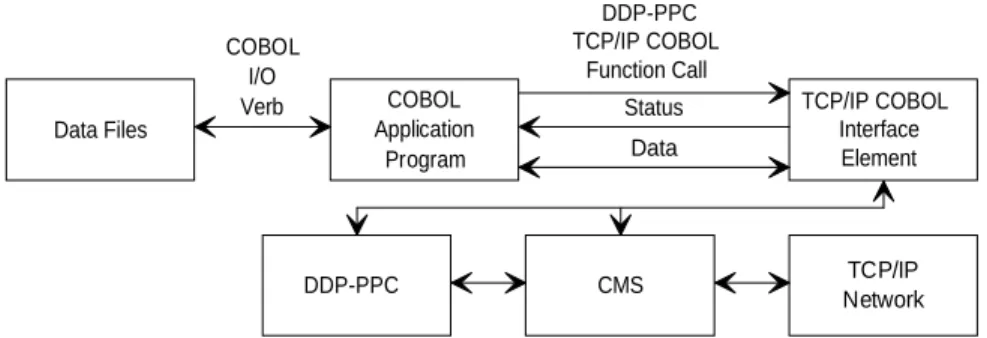
Application programs use conventional COBOL verbs for input/output data transfers and procedure division manipulations. They also use conventional verbs to set information fields in the working-storage section information packets. See Figure 2-1.
Data Files COBOL I/O Verb COBOL Application Program Status Data TCP/IP COBOL Interface Element CMS TCP/IP Network DDP-PPC DDP-PPC TCP/IP COBOL Function Call
Figure 2-1. COBOL Verbs and Function Calls
2.3.1.
Function Calls
Special function calls are used for DDP-PPC applications. Use these function calls to:
$ Enter the COBOL applications interface element $ Pass control information that is in your program $ Issue requests to DDP-PPC.
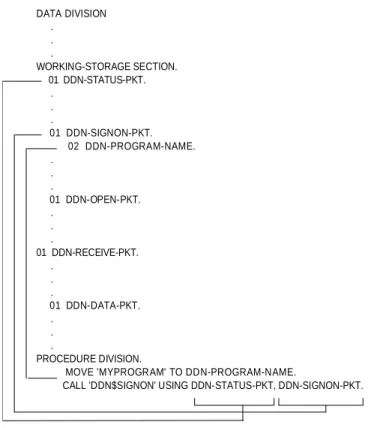
Figure 2-2 shows how a function call references information packets. In this case, it shows how to use a standard COBOL MOVE verb to set an information packet field before issuing the call.
COBOL Verbs and Function Calls
DATA DIVISION . . . WORKING-STORAGE SECTION. 01 DDN-STATUS-PKT. . . . 01 DDN-SIGNON-PKT. 02 DDN-PROGRAM-NAME. . . . 01 DDN-OPEN-PKT. . . . 01 DDN-RECEIVE-PKT. . . . 01 DDN-DATA-PKT. . . . PROCEDURE DIVISION.MOVE 'MYPROGRAM' TO DDN-PROGRAM-NAME.
CALL 'DDN$SIGNON' USING DDN-STATUS-PKT, DDN-SIGNON-PKT.
Figure 2-2. Referencing Information Packets through Function Call USING Clauses
The format for a function call is:
CALL 'function' USING param-1,...,param-n.
where: function
Is the name of the DDP-PPC function call requested by your application program. USING
Is the clause that references information packets or buffer areas in your working-storage section.
Parameters in the USING list are positional. You must code them in the order shown in each function call.
param
Is the name of the information packet or buffer area in your working-storage section. Function call statements always contain USING clauses that reference information packets or buffer areas contained in your working-storage section. (See Table 3-1.) The information packets consist of control information and data needed for program communications. The buffer areas are used to pass data between DDP-PPC and your program.
COBOL Verbs and Function Calls
After processing a function call, DDP-PPC returns both a general, a detailed status code, and a specific error code. The general status code, or class code, gives a classification value. The detailed status code gives an expanded description of the error that occurred. The specific error code provides additional error information, such as the error code DDP-PPC received from CMS. These codes are explained in theDDP-PPC/DDP-FJT Messages Reference Manual.
2.3.2.
COPY Verbs
Use the COPY verb in the procedure division of the application program whenever you want to issue a function call. The expansion in your program ensures the correct order of the operands in the call. The format for a COPY statement is:
COPY text-name.
where: text-name
Is the name of the function or information packet.
This is an example of a COPY verb used to produce a DDP-PPC function call with its information packets referenced:
COPY DDN-SIGNON.
This produces:
Function
Call Information Packets
ZDDDDDDDDDD? ZDDDDDDDDDDDDDDDDDDDDDDDDDDDDDDDDDD?
CALL 'DDN$SIGNON' USING DDN-STATUS-PKT, DDN-SIGNON-PKT. Packet Contains: Packet Contains:
@DDDDDDDDDDDDDDDDDY@DDDDDDDDDDDDDDDDDY
DDN-CLASS-CODE DDN-PROGRAM-NAME DDN-DETAIL-STATUS
DDN-SPECIFIC-ERROR DDN-PKT-ID
2.3.3.
Initializing Packet Field Values
The DDP-PPC packets contain several fields that you do not require each time that you issue a function. You can tell DDP-PPC to ignore specific fields by:
$ Setting them to a value, usually spaces or zeros, on a field-by-field basis
$ Initializing the entire packet and then resetting specific fields to the desired values To initialize the packet and reset specific fields, perform the following steps:
1. Initialize or reinitialize all the allocated packets using a supplied set of packets that are pre-set to the required DDPvPPC initialization values. You can include this set of packets in you program by issuing the following statement:
COBOL Verbs and Function Calls
2. Set the default values for the DDP-PPC control packets by initializing individual packets:
MOVE DDN-INIT-(packet-name) TO DDN-(packet-name)
3. The packet to be used in the function can then be initialized by assigning the initialization packet to it.
For example, the DDN-OPEN-PKT can be initialized by coding the following in the main program: WORKING-STORAGE SECTION. 01 DDN-OPEN-PKT. 01 INIT-OPEN-PKT. PROCEDURE DIVISION. MAIN.
MOVE INIT-OPEN-PKT TO DDN-OPEN-PKT. MOVE 192-2-44-233 TO DDN-TO-HOST-ID. (additional user specified values) COPY DDN-OPEN.
As a general practice, after you have moved the desired values into their respective fields, issued a command, and control has returned for the next operation, you should reinitialize all unused fields before issuing a different command. Without reinitialization, the
Section 3
Using DDP-PPC TCP/IP Function Calls
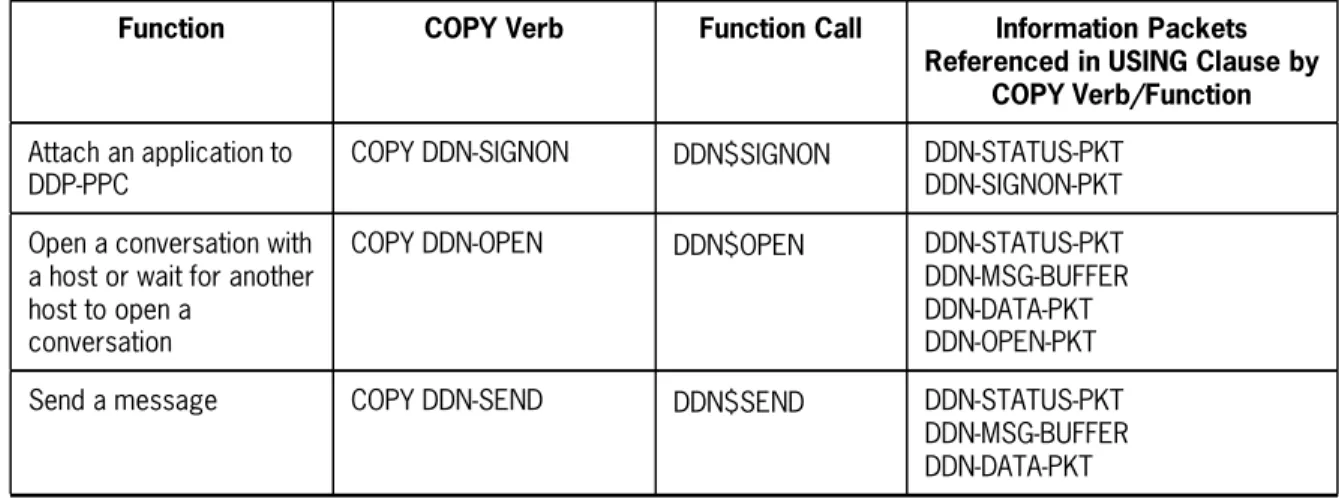
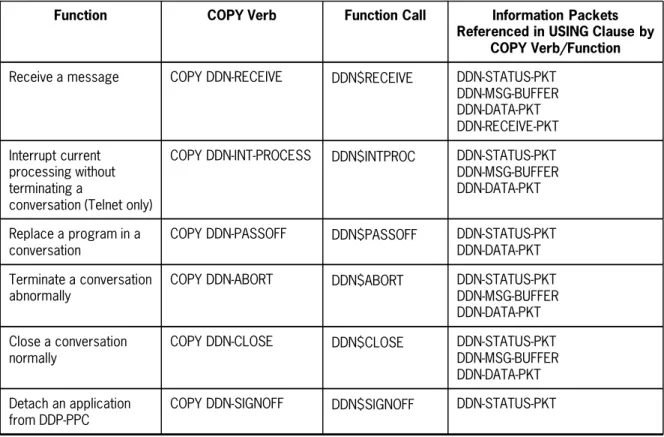
This section describes the usage of each COBOL COPY verb with its associated information packets. Table 3-1 lists the COPY verbs, function calls, and information packets in the order you would use the commands in a typical program.3.1.
COBOL COPY Verbs and Function Calls
You can use COBOL COPY verbs or code your own COBOL function calls to issue program-to-program commands from your COBOL program. You can direct these commands to the same host or to any remote host defined in the network.
When you use a COBOL COPY verbs, the associated function call referencing the required information packets replaces the COPY verb when the program is compiled.
You can code the function call yourself, but you must then supply the information packet names in the correct sequential order shown in Table 3-1. See 2.2 and 2.3 for a discussion on how to use function calls, information packets, and COPY verbs.
Unused fields should be cleared before specifying any parameters and issuing a function call. You can use the initialization packets provided by DDP-PPC to initialize the fields.
Table 3-1. Copy Verbs and Associated Function Calls and Information Packets
Function COPY Verb Function Call Information Packets Referenced in USING Clause by
COPY Verb/Function
Attach an application to DDP-PPC
COPY DDN-SIGNON DDN$SIGNON DDN-STATUS-PKT DDN-SIGNON-PKT Open a conversation with
a host or wait for another host to open a
conversation
COPY DDN-OPEN DDN$OPEN DDN-STATUS-PKT DDN-MSG-BUFFER DDN-DATA-PKT DDN-OPEN-PKT Send a message COPY DDN-SEND DDN$SEND DDN-STATUS-PKT
DDN-MSG-BUFFER DDN-DATA-PKT
COBOL COPY Verbs and Function Calls
Table 3-1. Copy Verbs and Associated Function Calls and Information Packets (cont.)
Function COPY Verb Function Call Information Packets Referenced in USING Clause by
COPY Verb/Function
Receive a message COPY DDN-RECEIVE DDN$RECEIVE DDN-STATUS-PKT DDN-MSG-BUFFER DDN-DATA-PKT DDN-RECEIVE-PKT Interrupt current processing without terminating a
conversation (Telnet only)
COPY DDN-INT-PROCESS DDN$INTPROC DDN-STATUS-PKT DDN-MSG-BUFFER DDN-DATA-PKT
Replace a program in a conversation
COPY DDN-PASSOFF DDN$PASSOFF DDN-STATUS-PKT DDN-DATA-PKT Terminate a conversation
abnormally
COPY DDN-ABORT DDN$ABORT DDN-STATUS-PKT DDN-MSG-BUFFER DDN-DATA-PKT Close a conversation
normally
COPY DDN-CLOSE DDN$CLOSE DDN-STATUS-PKT DDN-MSG-BUFFER DDN-DATA-PKT Detach an application
from DDP-PPC
COPY DDN-SIGNOFF DDN$SIGNOFF DDN-STATUS-PKT
Note: In the following subsections, the formats of the DDN-STATUS-PKT and DDN-DATA-PKT packets are the same for each COPY verb/function call. For each COPY verb, the field definitions for those packets only describe the fields used for that particular COPY verb/function call.
Terminating a Conversation (DDN-ABORT)
3.2.
Terminating a Conversation (DDN-ABORT)
Function
Use the DDN-ABORT copy verb to abnormally terminate a conversation in progress. The associated function call references the DDN-STATUS-PKT and DDN-DATA-PKT information packets. It also references the DDN-MSG-BUFFER working-storage area.
Format
COPY DDN-ABORT.
or
CALL 'DDN$ABORT' USING DDN-STATUS-PKT DDN-MSG-BUFFER DDN-DATA-PKT.
DDN-STATUS-PKT Packet
01 DDN-STATUS-PKT.
02 DDN-PKT-ID PIC X(4).
02 DDN-ERR-FUNCTION REDEFINES DDN-PKT-ID PIC 9(8) COMP. 02 DDN-STATUS-GROUP.
04 DDN-CLASS-CODE PIC 9(3) COMP.
88 DDN-OK VALUE IS 1.
88 DDN-ERROR VALUE IS 2 THRU 199. 04 DDN-DETAIL-STATUS PIC 9(3) COMP.
02 DDN-STATUS-REDEF REDEFINES DDN-STATUS-GROUP PIC 9(8) COMP.
88 DDN-NO-MSG VALUE IS 786445. 02 DDN-SPECIFIC-ERROR PIC 1(18).
02 DDN-SIGNON-ID PIC 1(18).
02 FILLER PIC X(24).
Field definitions returned by DDP-PPC:
DDN-PKT-ID DDP-PPC places ’DDN$’ in this field after a successful function call. DDN-ERR-FUNCTION Redefines DDN-PKT-ID. When an error is encountered, an error
code value is placed in this field. The value indicates which copy verb/function call had the error (see Table 3-2).
DDN-CLASS-CODE DDP-PPC returns a general status code in this field to classify the status of error found. The error codes are described in the DDP-PPC/DDP-FJT Messages Reference Manual.
DDN-DETAIL-STATUS DDP-PPC returns a detailed status code in this field to identify the specific status or error encountered. The error codes are described in theDDP-PPC/DDP-FJT Messages Reference Manual.
Terminating a Conversation (DDN-ABORT)
continued
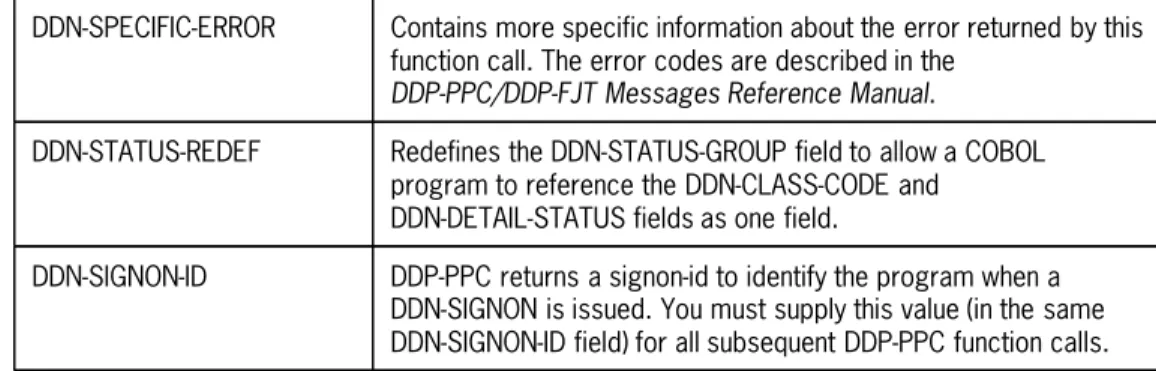
DDN-SPECIFIC-ERROR Contains more specific information about the error returned by this function call. The error codes are described in the
DDP-PPC/DDP-FJT Messages Reference Manual.
DDN-STATUS-REDEF Redefines the DDN-STATUS-GROUP field to allow a COBOL program to reference the DDN-CLASS-CODE and
DDN-DETAIL-STATUS fields as one field.
DDN-SIGNON-ID DDP-PPC returns a signon-id to identify the program when a DDN-SIGNON is issued. You must supply this value (in the same DDN-SIGNON-ID field) for all subsequent DDP-PPC function calls.
Table 3-2. Copy Verbs and Associated Error Codes
COPY Verb Error Code
DDN-OPEN 0 DDN-SEND 1 DDN-CLOSE 2 DDN-ABORT 7 DDN-RECEIVE 16 DDN-SIGNON 17 DDN-SIGNOFF 18 DDN-PASSOFF 20 DDN-INT-PROCESS 25 DDN-MSG-BUFFER
This is a required storage area for messages. The DDN-ABORT copy verb and associated function call reference this area. You must code this area in the working-storage section of the application program. See subsection 4.3 for details on specifying the size of this message buffer area.
Terminating a Conversation (DDN-ABORT)
DDN-DATA-PKT Packet 01 DDN-DATA-PKT. 02 DDN-CONV-ID PIC 1(36). 02 DDN-DATA-PKT-INFO. 04 DDN-SUCC-ID PIC 1(36).04 DDN-BUFFER-OFFSET PIC 9(5) COMP.
04 DDN-TEXT-LEN PIC 9(5) COMP.
04 FILLER PIC X(4). 04 DDN-READ-START PIC 1(18). 04 FILLER PIC 1(6). 04 DDN-RELEASE-MSG PIC 1(6). 88 DDN-HOLD-MSG VALUE IS 0. 88 DDN-REL-MSG VALUE IS 1. 04 FILLER PIC 1(6). 04 FILLER PIC X(8).
02 DDN-LOCAL-HOST-NAME REDEFINES DDN-DATA-PKT-INFO PIC X(24).
02 DDN-REMOTE-HOST-NAME REDEFINES DDN-DATA-PKT-INFO PIC X(24). 02 DDN-DOMAIN-HOST-INFO. 04 FILLER PIC X(255). 02 DDN-LOCAL-DOMAIN-HOST-NAME REDEFINES DDN-DOMAIN-HOST-INFO PIC X(255). 02 DDN-REMOTE-DOMAIN-HOST-NAME REDEFINES DDN-DOMAIN-HOST-INFO PIC X(255). 02 DDN-DOMAIN-HOST-LENGTH 04 FILLER PIC X(1). 02 DDN-LOCAL-DOMAIN-HOST-LENGTH REDEFINES DDN-DOMAIN-HOST-LENGTH PIC 9(2) COMP. 02 DDN-REMOTE-DOMAIN-HOST-LENGTH REDEFINES DDN-DOMAIN-HOST-LENGTH PIC 9(2) COMP.
Field definitions set by user:
DDN-CONV-ID Conversation-id. Required. Specify the same conversation-id value returned in this field by DDP-PPC on DDN-OPEN call completion. You do not have to set this field unless you have modified it since DDN-OPEN call completion.
Terminating a Conversation (DDN-ABORT)
Example
The following example shows the lines of code you insert in the procedure division:
Procedure Typical Procedure Division Statements
1. Set text length. MOVE 0 TO DDN-TEXT-LEN. 2. Issue the function call. COPY DDN-ABORT.
Closing a Conversation (DDN-CLOSE)
3.3.
Closing a Conversation (DDN-CLOSE)
Function
Use a DDN-CLOSE copy verb to close the conversation normally.
The associated function call references the DDN-STATUS-PKT and DDN-DATA-PKT information packets. It also references the DDN-MSG-BUFFER working-storage area.
Format
COPY DDN-CLOSE.
or
CALL 'DDN$CLOSE' USING DDN-STATUS-PKT DDN-MSG-BUFFER DDN-DATA-PKT.
DDN-STATUS-PKT Packet
See 3.2 for a description of the DDN-STATUS-PKT fields.
DDN-MSG-BUFFER
This is a required storage area for messages. Although the DDN-CLOSE copy verb and associated function call reference this area, no data is transferred on the close call. You must code this area in the working-storage section of the application program. See 4.3 for details on specifying the size of this message buffer area.
DDN-DATA-PKT Packet
01 DDN-DATA-PKT.
02 DDN-CONV-ID PIC 1(36).
02 DDN-DATA-PKT-INFO.
04 DDN-SUCC-ID PIC 1(36).
04 DDN-BUFFER-OFFSET PIC 9(5) COMP.
04 DDN-TEXT-LEN PIC 9(5) COMP.
04 FILLER PIC X(4). 04 DDN-READ-START PIC 1(18). 04 FILLER PIC 1(6). 04 DDN-RELEASE-MSG PIC 1(6). 88 DDN-HOLD-MSG VALUE IS 0. 88 DDN-REL-MSG VALUE IS 1. 04 FILLER PIC 1(6). 04 FILLER PIC X(8).
02 DDN-LOCAL-HOST-NAME REDEFINES DDN-DATA-PKT-INFO PIC X(24).
02 DDN-REMOTE-HOST-NAME REDEFINES DDN-LOCAL-HOST-NAME PIC X(24).
02 DDN-DOMAIN-HOST-INFO.
Closing a Conversation (DDN-CLOSE)
02 DDN-LOCAL-DOMAIN-HOST-NAME REDEFINES DDN-DOMAIN-HOST-INFO PIC X(255). 02 DDN-REMOTE-DOMAIN-HOST-NAME REDEFINES DDN-DOMAIN-HOST-INFO PIC X(255). 02 DDN-DOMAIN-HOST-LENGTH 04 FILLER PIC X(1). 02 DDN-LOCAL-DOMAIN-HOST-LENGTH REDEFINES DDN-DOMAIN-HOST-LENGTH PIC 9(2) COMP. 02 DDN-REMOTE-DOMAIN-HOST-LENGTH REDEFINES DDN-DOMAIN-HOST-LENGTH PIC 9(2) COMP.Field definitions set by user:
DDN-CONV-ID Conversation-id. Required. Specify the same conversation-id value returned in this field by DDP-PPCon DDN-OPEN call completion. You do not have to set this field unless you have modified it since DDN-OPEN call completion.
DDN-TEXT-LEN Required. Specify a value of 0.
Example
The following example shows the lines of code you insert in the procedure division:
Procedure Typical Procedure Division Statements
1. Set text length. MOVE 0 TO DDN-TEXT-LEN. 2. Issue the function call. COPY DDN-CLOSE.
Interrupting Current Processing without Closing (DDN-INT-PROCESS)
3.4.
Interrupting Current Processing without
Closing (DDN-INT-PROCESS)
Function
Use a DDN-INT-PROCESS copy verb to interrupt current processing without closing the conversation.
The associated function call references the DDN-STATUS-PKT and DDN-DATA-PKT information packets. It also references the DDN-MSG-BUFFER working-storage area.
Format
COPY DDN-INT-PROCESS.
or
CALL 'DDN$INTPROC' USING DDN-STATUS-PKT DDN-MSG-BUFFER DDN-DATA-PKT.
DDN-STATUS-PKT Packet
See 3.2 for a description of the DDN-STATUS-PKT fields.
DDN-MSG-BUFFER
This is a required storage area for messages. Although the DDN-INT-PROCESS copy verb and associated function call reference this area, no data is transferred on the interrupt call. You must code this area in the working-storage section of the application program. See 4.3 for details on specifying the size of this message buffer area.
DDN-DATA-PKT Packet
01 DDN-DATA-PKT.
02 DDN-CONV-ID PIC 1(36).
02 DDN-DATA-PKT-INFO.
04 DDN-SUCC-ID PIC 1(36).
04 DDN-BUFFER-OFFSET PIC 9(5) COMP.
04 DDN-TEXT-LEN PIC 9(5) COMP.
04 FILLER PIC X(4). 04 DDN-READ-START PIC 1(18). 04 FILLER PIC 1(6). 04 DDN-RELEASE-MSG PIC 1(6). 88 DDN-HOLD-MSG VALUE IS 0. 88 DDN-REL-MSG VALUE IS 1. 04 FILLER PIC 1(6). 04 FILLER PIC X(8).
02 DDN-LOCAL-HOST-NAME REDEFINES DDN-DATA-PKT-INFO PIC X(24).
02 DDN-REMOTE-HOST-NAME REDEFINES DDN-LOCAL-HOST-NAME PIC X(24).
02 DDN-DOMAIN-HOST-INFO.
Interrupting Current Processing without Closing (DDN-INT-PROCESS)
02 DDN-LOCAL-DOMAIN-HOST-NAME REDEFINES DDN-DOMAIN-HOST-INFO PIC X(255). 02 DDN-REMOTE-DOMAIN-HOST-NAME REDEFINES DDN-DOMAIN-HOST-INFO PIC X(255). 02 DDN-DOMAIN-HOST-LENGTH 04 FILLER PIC X(1). 02 DDN-LOCAL-DOMAIN-HOST-LENGTH REDEFINES DDN-DOMAIN-HOST-LENGTH PIC 9(2) COMP. 02 DDN-REMOTE-DOMAIN-HOST-LENGTH REDEFINES DDN-DOMAIN-HOST-LENGTH PIC 9(2) COMP.Field definitions set by user:
DDN-CONV-ID Required. Specify the same value returned by DDP-PPC in this field on DDN-OPEN function call completion. You do not have to set this field unless you have modified it since your DDN-OPEN.
DDN-TEXT-LEN Required. Specify a value of 0.
Example
The following example shows the lines of code you insert in the procedure division:
Procedure Typical Procedure Division Statements
1. Set text length. MOVE 0 TO DDN-TEXT-LEN. 2. Issue the function call. COPY DDN-INT-PROC.
Opening a Conversation (DDN-OPEN)
3.5.
Opening a Conversation (DDN-OPEN)
Function
Use a DDN-OPEN copy verb in the active mode to establish a conversation with a host. Use a DDN-OPEN copy verb in the passive mode to establish a listening post for
conversations initiated by any host in the network. Use it in the open passive specific mode when you want to establish a listening post for a subsequent conversation initiated by a specific host.
The associated function call references the DDN-STATUS-PKT, DDN-OPEN-PKT, and DDN-DATA-PKT information packets. It also references the DDN-MSG-BUFFER working-storage area.
Format
COPY DDN-OPEN.
or
CALL 'DDN$OPEN' USING DDN-STATUS-PKT DDN-MSG-BUFFER DDN-DATA-PKT DDN-OPEN-PKT.
DDN-STATUS-PKT Packet
See 3.2 for a description of the DDN-STATUS-PKT fields.
DDN-MSG-BUFFER
This is a required storage area for messages. Although the DDN-OPEN copy verb and associated function call reference this area, no data is transferred on the open call. You must code this area in the working-storage section of the application program. See 4.3 for details on specifying the size of this message buffer area.
DDN-DATA-PKT Packet
01 DDN-DATA-PKT.
02 DDN-CONV-ID PIC 1(36).
02 DDN-DATA-PKT-INFO.
04 DDN-SUCC-ID PIC 1(36).
04 DDN-BUFFER-OFFSET PIC 9(5) COMP.
04 DDN-TEXT-LEN PIC 9(5) COMP.
04 FILLER PIC X(4).
04 DDN-READ-START PIC 1(18).
04 FILLER PIC 1(6).
Opening a Conversation (DDN-OPEN)
88 DDN-HOLD-MSG VALUE IS 0.
88 DDN-REL-MSG VALUE IS 1.
04 FILLER PIC 1(6).
04 FILLER PIC X(8).
02 DDN-LOCAL-HOST-NAME REDEFINES DDN-DATA-PKT-INFO PIC X(24).
02 DDN-REMOTE-HOST-NAME REDEFINES DDN-LOCAL-HOST-NAME PIC X(24). 02 DDN-DOMAIN-HOST-INFO. 04 FILLER PIC X(255). 02 DDN-LOCAL-DOMAIN-HOST-NAME REDEFINES DDN-DOMAIN-HOST-INFO PIC X(255). 02 DDN-REMOTE-DOMAIN-HOST-NAME REDEFINES DDN-DOMAIN-HOST-INFO PIC X(255). 02 DDN-DOMAIN-HOST-LENGTH 04 FILLER PIC X(1). 02 DDN-LOCAL-DOMAIN-HOST-LENGTH REDEFINES DDN-DOMAIN-HOST-LENGTH PIC 9(2) COMP. 02 DDN-REMOTE-DOMAIN-HOST-LENGTH REDEFINES DDN-DOMAIN-HOST-LENGTH PIC 9(2) COMP.
Field definitions set by user:
DDN-TEXT-LEN Required. Specify a value of 0.
Field definitions returned by DDP-PPC:
DDN-CONV-ID DDP-PPC returns a conversation-id. Save the conversation-id when you are using multiple conversations.
DDN-OPEN-PKT Packet
01 DDN-OPEN-PKT.
02 FILLER PIC 1(12).
02 DDN-OPEN-TYPE PIC 1(6). 02 DDN-LOCAL-PORT PIC 9(4) COMP. 02 DDN-REMOTE-PORT PIC 9(4) COMP. 02 DDN-HOST-ID-LEN PIC 9(4) COMP.
02 DDN-HOST-ID PIC X(255).
02 DDN-OPEN-PROTOCOL PIC 1(6).
Opening a Conversation (DDN-OPEN)
Field definitions set by user:
DDN-OPEN-TYPE Required. Set to 0 for open active. Set to 2 for open passive or 1 for open passive specific.
DDN-LOCAL-PORT Required if DDN-OPEN-TYPE is set to 2 (open passive) or 1 (open passive specific).
Set to id of port on local host to open. For compatibility with other systems, you should use port numbers greater than 1024.* DDN-REMOTE-PORT Required if DDN-OPEN-TYPE is set to 0 (open active) or 1 (open
passive specific).
Set to id of port on target host. For compatibility with other systems, you should use port numbers greater than 1024.* DDN-HOST-ID-LEN Required if DDN-OPEN-TYPE is set to 0 or 1 (open active or open
passive specific). Specify the length of the host-id character string. DDN-HOST-ID Required if DDN-OPEN-TYPE is set to 0 or 1 (open active or open
passive specific).
Specify the host-id in the form of a domain name or an Internet physical address (n1-n2-n3-n4), where each n ranges from 0 to 255. See Appendix A for host-id naming conventions.
DDN-OPEN-PROTOCOL Required. Set to 4 for Telnet protocol. Set to 5 for transmission control protocol (TCP).
*When you are connected to a host other than a Unisys host, you must specify the numbering system used on that host.
Examples
The following shows the lines of code you insert in your program for an Open Active:
Procedure Typical Procedure Division Statements
1. Set text length. MOVE 0 TO DDN-TEXT-LEN. 2. Set to active. MOVE 0 TO DDN-OPEN-TYPE. 3. Set remote port. MOVE 1075 TO DDN-REMOTE-PORT. 4. Set host-id length. MOVE 7 TO DDN-HOST-ID-LEN. 5. Specify host name. MOVE ’REMOTEB’ TO DDN-HOST-ID. 6. Set for Telnet. MOVE 4 TO DDN-OPEN-PROTOCOL. 7. Issue the function call. COPY DDN-OPEN.
Opening a Conversation (DDN-OPEN)
The following shows the lines of code you insert in your program for an Open Passive:
Procedure Typical Procedure Division Statements
1. Set text length. MOVE 0 TO DDN-TEXT-LEN. 2. Set to passive. MOVE 2 TO DDN-OPEN-TYPE. 3. Set local port. MOVE 1275 TO DDN-LOCAL-PORT. 4. Set for Telnet. MOVE 4 TO DDN-OPEN-PROTOCOL. 5. Issue the function call. COPY DDN-OPEN.
Opening a Conversation (DDN-OPEN)
The following shows the lines of code you insert in your program for an Open Passive Specific:
Procedure Typical Procedure Division Statements
1. Set text length. MOVE 0 TO DDN-TEXT-LEN. 2. Set to passive specific. MOVE 1 TO DDN-OPEN-TYPE. 3. Set local port. MOVE 1275 TO DDN-LOCAL-PORT. 4. Set remote port. MOVE 1280 TO DDN-REMOTE-PORT. 5. Set host-id length. MOVE 7 TO DDN-HOST-ID-LEN. 6. Specify host name. MOVE ’REMOTEA’ TO DDN-HOST-ID. 7. Set for Telnet. MOVE 4 TO DDN-OPEN-PROTOCOL. 8. Issue the function call. COPY DDN-OPEN.
Additional Discussion
You can select two distinct conversation protocol types:
$ Transmission Control Protocol (TCP) $ Telnet protocol
In a TCP conversation, data transfers are asynchronous. The lower layers of the TCP/IP interface software block the user messages and may even fragment them in transmission. Messages are received in the order sent, but a message may be delivered in its entirety or in fragments.
An application program must recognize individual messages, so it can deblock the
delivered data and reassemble messages from fragmented deliveries. If a message contains noncharacter data (such as binary integer), the application program compensates for the fact that the ninth bit is dropped in transit.
In a Telnet conversation, the data transfer may be either synchronous or asynchronous. Telnet is a line-oriented protocol that expects a single line of ASCII character data. A carriage return and line feed character terminates each message. The only supported transmission mode is full-duplex.
Replacing a Program in a Conversation (DDN-PASSOFF)
3.6.
Replacing a Program in a Conversation
(DDN-PASSOFF)
Function
A DDN-PASSOFF copy verb replaces a program with a different program in a
conversation. The replacement program must already have issued a DDN-SIGNON call in the same host as the present program. The replacement program is called the processor. When two programs are already engaged in a conversation, each program can give the right to another program to replace it in the conversation. The conversation remains the same, only the participating programs change. If a program is involved in more than one concurrent conversation, not all conversations need to be passed off. Each conversation can be passed off individually.
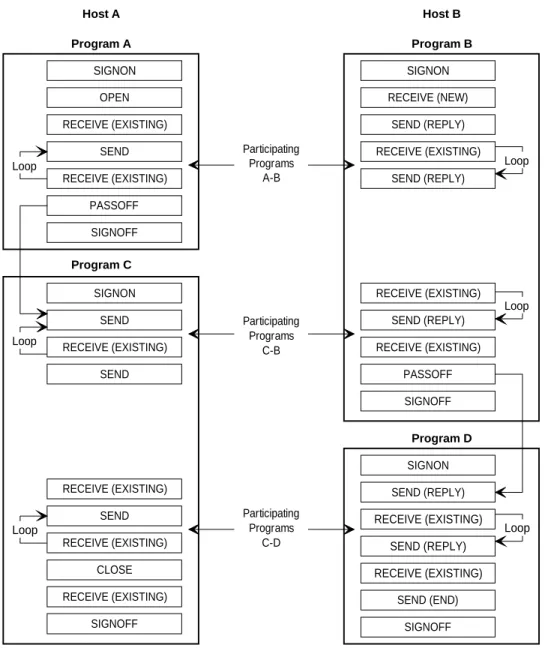
Figure 3-1 shows a block diagram of a typical passoff operation. In this illustration,
primary program A in host A initially establishes a conversation with secondary program B in host B.
At a user-designated time, the send/receive conversation loop is terminated, and program A performs a passoff request to program C. Control of the conversation is then transferred from Program A to Program C. Since Program A has no other conversations, it detaches from DDP-PPC. Program C, which is already attached to DDP-PPC, receives control of the conversation. The conversation continues uninterrupted, but now it exists between primary program C and secondary program B.
Later, secondary program B terminates its receive/send loop, passes off to program D, and detaches program B from DDP-PPC. Again, the conversation continues, but it now exists between primary program C and secondary program D.
Replacing a Program in a Conversation (DDN-PASSOFF)
RECEIVE (EXISTING) Participating Programs A-B Participating Programs C-B Participating Programs C-D Host A Program A Host B Program B SIGNON OPEN SEND SIGNOFF RECEIVE (NEW) SEND (END) Program C Program D RECEIVE (EXISTING) SEND (REPLY) SIGNON SEND RECEIVE (EXISTING) SEND RECEIVE (EXISTING) SEND RECEIVE (EXISTING) CLOSE RECEIVE (EXISTING) SIGNOFF SIGNON RECEIVE (EXISTING) SEND (REPLY) RECEIVE (EXISTING) SEND (REPLY) RECEIVE (EXISTING) SIGNOFF SIGNON SEND (REPLY) RECEIVE (EXISTING) SEND (REPLY) RECEIVE (EXISTING) SIGNOFF PASSOFF PASSOFF Loop Loop Loop Loop Loop LoopFigure 3-1. Typical Block Diagram for Program-to-Program Passoff Succession
The associated function call references the DDN-STATUS-PKT and DDN-DATA-PKT information packets.
Format
COPY DDN-PASSOFF.
or
CALL 'DDN$PASSOFF' USING DDN-STATUS-PKT DDN-DATA-PKT.
Replacing a Program in a Conversation (DDN-PASSOFF)
DDN-STATUS-PKT Packet
See 3.2 for a description of the DDN-STATUS-PKT fields.
DDN-DATA-PKT Packet
01 DDN-DATA-PKT.
02 DDN-CONV-ID PIC 1(36).
02 DDN-DATA-PKT-INFO.
04 DDN-SUCC-ID PIC 1(36).
04 DDN-BUFFER-OFFSET PIC 9(5) COMP.
04 DDN-TEXT-LEN PIC 9(5) COMP.
04 FILLER PIC X(4). 04 DDN-READ-START PIC 1(18). 04 FILLER PIC 1(6). 04 DDN-RELEASE-MSG PIC 1(6). 88 DDN-HOLD-MSG VALUE IS 0. 88 DDN-REL-MSG VALUE IS 1. 04 FILLER PIC 1(6). 04 FILLER PIC X(8).
02 DDN-LOCAL-HOST-NAME REDEFINES DDN-DATA-PKT-INFO PIC X(24).
02 DDN-REMOTE-HOST-NAME REDEFINES DDN-LOCAL-HOST-NAME PIC X(24). 02 DDN-DOMAIN-HOST-INFO. 04 FILLER PIC X(255). 02 DDN-LOCAL-DOMAIN-HOST-NAME REDEFINES DDN-DOMAIN-HOST-INFO PIC X(255). 02 DDN-REMOTE-DOMAIN-HOST-NAME REDEFINES DDN-DOMAIN-HOST-INFO PIC X(255). 02 DDN-DOMAIN-HOST-LENGTH 04 FILLER PIC X(1). 02 DDN-LOCAL-DOMAIN-HOST-LENGTH REDEFINES DDN-DOMAIN-HOST-LENGTH PIC 9(2) COMP. 02 DDN-REMOTE-DOMAIN-HOST-LENGTH REDEFINES DDN-DOMAIN-HOST-LENGTH PIC 9(2) COMP.
Field definitions set by user:
DDN-CONV-ID Conversation-id. Required. Specify the same conversation-id value returned in this field by DDP-PPC on DDN-OPEN call completion. You do not have to set this field unless you have modified it since DDN-OPEN call completion.
DDN-SUCC-ID Successor-id. Required. Specify the signon-id returned in the DDN-STATUS-PKT on the DDN-SIGNON call of the successor application program.
Replacing a Program in a Conversation (DDN-PASSOFF)
Example
The following example shows the lines of code you insert in the procedure division:
Procedure Typical Procedure Division Statements
1. Set successor-id. MOVE DDN-SIGNON-ID TO DDN-SUCC-ID. 2. Issue the function call. COPY DDN-PASSOFF.
Receiving a Message from a Host (DDN-RECEIVE)
3.7.
Receiving a Message from a Host
(DDN-RECEIVE)
Function
A DDN-RECEIVE copy verb accepts messages from a local or remote host.
The associated function call references the DDN-STATUS-PKT, DDN-RECEIVE-PKT and DDN-DATA-PKT information packets.
Note that when you issue a DDN-RECEIVE after a DDN-OPEN, the data that DDP-PPC returns will overwrite the DDN-DATA-PKT packet. Therefore, you should:
$ Save the DDN-DATA-PKT packet before issuing a DDN-RECEIVE $ Restore the DDN-DATA-PKT packet after issuing a DDN-RECEIVE It also references the DDN-MSG-BUFFER working-storage area.
Format
COPY DDN-RECEIVE.
or
CALL 'DDN$RECEIVE' USING DDN-STATUS-PKT DDN-MSG-BUFFER DDN-DATA-PKT DDN-RECEIVE-PKT.
DDN-STATUS-PKT Packet
See 3.2 for a description of the DDN-STATUS-PKT fields.
DDN-MSG-BUFFER
This is a required storage area for messages. The DDN-RECEIVE copy verb and associated function call reference this area to transfer the data. You must code this area in the working-storage section of the application program. See 4.3 for details on specifying the size of this message buffer area.
DDN-DATA-PKT Packet
01 DDN-DATA-PKT.
02 DDN-CONV-ID PIC 1(36).
02 DDN-DATA-PKT-INFO.
04 DDN-SUCC-ID PIC 1(36).
04 DDN-BUFFER-OFFSET PIC 9(5) COMP.
04 DDN-TEXT-LEN PIC 9(5) COMP.
04 FILLER PIC X(4).
04 DDN-READ-START PIC 1(18).
04 FILLER PIC 1(6).
Receiving a Message from a Host (DDN-RECEIVE)
88 DDN-HOLD-MSG VALUE IS 0.
88 DDN-REL-MSG VALUE IS 1.
04 FILLER PIC 1(6).
04 FILLER PIC X(8).
02 DDN-LOCAL-HOST-NAME REDEFINES DDN-DATA-PKT-INFO PIC X(24).
02 DDN-REMOTE-HOST-NAME REDEFINES DDN-LOCAL-HOST-NAME PIC X(24). 02 DDN-DOMAIN-HOST-INFO. 04 FILLER PIC X(255). 02 DDN-LOCAL-DOMAIN-HOST-NAME REDEFINES DDN-DOMAIN-HOST-INFO PIC X(255). 02 DDN-REMOTE-DOMAIN-HOST-NAME REDEFINES DDN-DOMAIN-HOST-INFO PIC X(255). 02 DDN-DOMAIN-HOST-LENGTH 04 FILLER PIC X(1). 02 DDN-LOCAL-DOMAIN-HOST-LENGTH REDEFINES DDN-DOMAIN-HOST-LENGTH PIC 9(2) COMP. 02 DDN-REMOTE-DOMAIN-HOST-LENGTH REDEFINES DDN-DOMAIN-HOST-LENGTH PIC 9(2) COMP.
Field definitions set by user:
DDN-CONV-ID Conversation-id. Required. Specify the same conversation-id value returned in this field by DDP-PPC on DDN-OPEN call completion. You do not have to set this field unless you have modified it since DDN-OPEN call completion.
DDN-BUFFER-OFFSET Required. Specify the offset, in characters, from beginning of DDN-MSG-BUFFER where text is to be stored.
DDN-TEXT-LEN Required. Specify the length in characters of the text to be received.
DDN-READ-START Required. This value must be 0 or a multiple of 4.
DDN-RELEASE-MSG Required. Specify 1 to release the message from the DDP-PPC queue; specify 0 to hold the message. If you release the message, you cannot issue another receive for that message. If you hold the message, you must issue another receive with DDN-RELEASE-MSG set to 1 (to free the message from the DDP-PPC queue, thus allowing you to access the next message on the queue with a subsequent receive).