Holly M. Harmes. Development of an Input Form to Capture Author-Generated
Metadata for a Botanical Image Collection. A Master’s paper for the M.S. in I.S. degree. April, 2001. 35 pages. Advisor: Jane Greenberg.
This project describes the creation of a form for the purpose of capturing
author-generated metadata and allowing individuals to submit botanical images to the UNC
Plant Information Center (PIC). A study of current metadata forms was conducted and
based on these forms, a prototype of a form was created. A small-scale usability study
was conducted with the PIC Advisory Committee and the feedback was utilized to
enhance the template. Proposed future considerations and development suggestions are
provided.
Headings:
Metadata
Author-generated Metadata
Input Form
DEVELOPMENT OF AN INPUT FORM TO CAPTURE
AUTHOR-GENERATED METADATA FOR A BOTANICAL IMAGE
COLLECTION
By
Holly M. Harmes
A master’s project submitted to the faculty of the School of Information and Library Science of the University of North Carolina at Chapel Hill
in partial fulfillment of the requirements for the degree of Master of Science in
Information Science.
Chapel Hill, North Carolina
April, 2001
Approved by:
TABLE OF CONTENTS
Introduction ...3
Literature Review ...5
Objectives ...9
Methodology...10
Results of Study of Existing Forms...11
Major Strengths of Each Form... 14
Major Limitations of Each Form ... 14
Prototype Development...15
Feedback from PIC Advisory Committee...16
Form Revisions...18
Future Considerations...19
Future Developments ...20
Conclusion...20
References ...22
APPENDIX A
Dublin Core Elements ...24
APPENDIX B
Metadata Forms Reviewed...27
APPENDIX C
Botanical Pride Prototype Form...31
Introduction
The Internet has experienced explosive growth over the past few years.
According to a recent survey conducted by the Internet Software Consortium (ISC), the
number of hosts identified in the Domain Name Service increased to around 80 million in
2000 from 1.3 million in 1993. There have also been studies that attempt to estimate the
number of pages available on the web. In a 1998 study based on the number of pages
indexed by major search engines such as Alta Vista, Hotbot, and Northern Light,
Lawrence and Giles provided an estimatethat the size of the indexable Web at that time
was 320 million pages. Lawrence and Giles also conducted a follow-up study in 1999
which showed a huge increase in this number and lead to a new estimate of 800 million
pages as of February 1999.
While this explosive growth of the information available via the web has positive
implications, such as greater accessibility, the added volume introduces issues such as
speed of access and overwhelming as well as frustrating information searches. There is a
definite need for improving access methods to all of these documents so that users may
make the most of this valuable information. The effective use of metadata is often
proposed as a possible way to improve retrieval precision and recall on the Internet.
Metadata is defined as “data about data” and is used to describe digitized and
initiatives, such as the Dublin Core Metadata Initiative (DCMI), have developed that
allow for metadata to be embedded in Web resources. According to Ercegovac, three
overall patterns have evolved in relation to metadata since the mid-1990’s, which are as
follows:
• Overlapping attributes among national metadata standards that evolved in different professional traditions (e.g., MAchine-Readable Cataloging (MARC); Federal Geographic Data Committee (FGDC);
• Metadata structures have become more flexible and scalable (e.g., the Dublin Core); and
• Adoption of a common formal language to support different applications (e.g., Standard Generalized Markup Language (SGML); XML in applications such as Encoded Archival Description (EAD) and Text Encoding Initiative (TEI).
In addition to these trends, there seems to be an even more recent trend toward the
capture and use of author-generated metadata. While in the past, most metadata has been
created only by librarians, information scientists, webmasters, or technical personnel
responsible for web site maintenance, this is changing with more web sites allowing
individuals to submit their images, papers, URL’s, etc. For example,at
http://www.yahoo.comyou can suggest a web site that is currently not listed in the Yahoo
directory. In order to submit your site or another site you must complete a form by
providing basic metadata such as Title, URL, and a Description of the site. Another
example which demonstrates the use of strictly “author-generated” metadata, is the
submission procedure required by the Linux Software Archive at the University of North
Carolina Metalab,http://metalab.unc.edu/pub/Linux/. TheLinux Software Archive is a
contributor-run collection and when someone submits software they must also submit
certain metadata fields about the software. One positive aspect of this approach is that
the author or creator, having created or compiled the software they are describing, knows
with a simple input form that will assist the author in creating standard metadata is,
however, a challenge.
This Master’s Project was part of an initiative to allow students and the general
public to contribute images of botanical specimens, and corresponding metadata, to the
UNC Plant Information Center (UNC/PIC). PIC is a partnership of the North Carolina
Botanical Garden, the UNC Herbarium, the UNC School of Information and Library
Science, the McDougle Middle School, and the Orange County Public Library. PIC’s
overall goal is to “serve as a scientific learning center to a wide range of students” and
uses a series of metadata schemas to facilitate this goal (Greenberg, 2001).
Literature Review
While there is evidence that some research has been done in the area of using input
forms, research specifically on the design of input forms for the purpose of capturing
metadata seems to be somewhat limited. In 1998, Walter Stine conducted a research
project comparing the advantages of using a form fill-in interface to capture data as
opposed to a dialogue interface for capturing data. The form fill-in interface represents
paper forms on the computer screen and the dialogue interface is characterized by an
interview or conversational style of interaction. The factors compared during this study
were the ease of learning, understanding of language, level of frustration, enjoyment using
the system, and perceived confidence in their ability to use the system. While this study
did not show a significant difference in regards to the above factors, the study did show
There has also been research on creating input or data-entry forms that will be used
as substitutes for paper forms. An advantage of this method is to help users to position
data correctly, know what data needs to be entered, and minimize errors (Preece, 1994).
Schneiderman (1992) provides guidelines that may be applied when creating an input
form based on a paper form. Some of these are as follows:
• Meaningful title: avoid computer terminology
• Comprehensible instructions: use familiar language, be brief
• Visually appealing layout of the form: pay attention to the spacing of entry fields; ensure that the screen and form match in layout
• Familiar field labels: use common terms
• Completion signal: make it clear to users what action they should take to signify that they have finished form completion
Constantine and Lockwood (1999) discuss interfaces in general, but also make
some points that are important related to forms. They state that if the main focus of the
interface is to record data from the user, then the user interface should facilitate the input
process. The origin of information is important as it affects the way users will interact
with the interface. According to Constantine and Lockwood, if information originates in
the thoughts of the user, the interface needs to help users to quickly capture ideas and
thoughts and make it easy for the person to change direction and revise their input. In
other words, the form should be easy to use and flexible.
An increasing number of interface design studies have been conducted as it
becomes more apparent how difficult it can be to find information on the Web. Since the
PIC project is web-based this area needed to be explored also. Levi, M. D., & Conrad, F.
G. (1996) conducted a case study of the Bureau of Labor Statistics (BLS) web site. As the
site was likely to become a major point of contact between users and the Bureau of Labor
method chosen by the BLS was a heuristic evaluation which according to Nielsen is easy,
fast, and usually cheaper than other methods. Two groups participated in this evaluation.
The first group was made up of User Interface experts and the second group was made up
of developers who had worked on the prototype. This evaluation involved browsing the
BLS and looking for possible usability problems. These problems were then tied to a
specific heuristic that the participant believed it violated. The heuristics reviewed were as
follows: 1) speak the user’s language; 2) consistency; 3) minimize the users’ memory
load; 4) flexibility and efficiency of use; 5) aesthetic and minimalist design; 6) chunking;
7) progressive levels of detail; and 8) navigational feedback. This study showed that the
UI experts seemed to be more concerned with the broader issues such as consistency and
clutter while the developers noticed such items as the missing links and inconsistent
granularity. Since both areas are important to web design, it might be helpful to provide
developers with a list of usability principles and/or a style guide before development
begins.
Several guidelines about web design are available and these guidelines can prove
helpful during the design of web interfaces and forms. In Nielsen’s Writing for the Web,
he discusses some of the major issues that need to be considered when developing
interfaces and writing for the web. Nielsen’s states that 79% of users scan a page instead
of reading word-for-word, reading from the screen is 25% slower than from paper and
web content should have 50% less word count than its paper equivalent. Some of the
guidelines Nielsen suggests to accommodate for these differences are: 1) Limit scrolling;
Pages: Fresh eyes and skilled editing improve your work. According to this article,
applying these guidelines to white papers has shown an increase in subjective satisfaction
of 37% and an increase in overall usability of 159%.
These interface studies and guidelines provide valuable information, although they
do not address the particular type of interface issues related to capturing author-generated
metadata which is directly related to this project. This area, capturing author-generated
metadata, is possibly the newest and least explored area of those covered in this section.
There are, however, some projects that have begun to look at issues related to the capture
of metadata. One such project was the CAMEL (Collection and Management of
Electronic Links) project at Oregon State University. This project was designed to
“explore using metadata as well as other tools to reduce the need to manually create
records for electronic resources.” (Banerjee 2000) The final project report discusses
many of the challenges that were encountered during CAMEL development. Some of
these are as follows:
• Convincing faculty to submit resources to the CAMEL database – user involvement
• Convincing faculty to use standardized metadata
• Determine what metadata to capture so that it would be most useful
• Maintenance Issues – Due to the fact that CAMEL is a collection of digital resources, problems caused by deletion, moving, renaming, and changing of resources.
The CAMEL project shows that while there are technical issues when
implementing an application of this sort, there are also other factors that need to be
considered such as user interface issues and user education issues. The CAMEL project
As is evident from the literature, there has been research on form and interface
design, although research specifically related to the design of a form or template for the
purpose to capture metadata seems to be lacking. There is a need to investigate how
projects like the Botanical Pride project can facilitate the capture of accurate and
consistent metadata and contribute to a successful operation of a collection of digital
images. This topic was investigated during this research project.
Objectives
As mentioned in the introduction, this Master’s Project was part of an initiative to
allow students and the general public to contribute images of botanical specimens, and
corresponding metadata, to the UNC Plant Information Center (UNC/PIC). Specifically,
the project was designed to accomplish the following goals:
1. Identify and review issues related to designing a form to capture author-generated metadata; and
2. Design an easy-to-use form to capture author-generated metadata, and implement this form.
The resulting interactive module, called “Botanical Pride”, will be incorporated
into the PIC web site. The PIC project uses metadata to enhance searching of their site.
Botanists and other persons knowledgeable in the areas of botany and/or metadata have
provided most of the previously collected metadata underlying PIC. Botanical pride
differs from the other parts of PIC in that the metadata and botanical images will not be
entered by experts. Thus the key factor in designing the Botanical pride form was that it
Methodology
The primary method used for this project was to conduct a case study of selected
input forms. These input forms were selected because they: 1) are currently being or
were designed to be used for the purpose of capturing metadata by individuals who are not
experts in metadata; and 2) are designed to capture metadata based on the Dublin Core
elements. For a list of the Dublin Core elements, see Appendix A.
Form evaluation was based on three cases: 1. The Collection and Management of
Electronic Links (CAMEL) Form, 2. The Nordic Dublin Core Metadata Template, and 3.
The Social Science Information Gateway (SOSIG) Form. Screenshots of these forms are
available in Appendix B.
The first of these forms, the CAMEL input form was designed to provide faculty
members at Oregon State University with a formal mechanism for recommending
web-based resources. The second form, the Dublin Core Metadata Template was created as
part of the Nordic Metadata Project at Helsinki University. There are actually two
versions of this template: 1) a short and simple template that consists of only prompting
for input of six of the 15 Dublin Core elements, and 2) a full version that consists of input
fields for all Dublin Core elements. The short version was evaluated as part of this study.
The last form that was reviewed for this project was the form used to add resources to the
Social Science Information Gateway which is part of the United Kingdom Resource
Discovery Network. This form allows users to submit URL’s to the web site that they
think will be of value to their colleagues and provide various information, or metadata,
Since there were no studies specifically looking at what makes a good entry form
for capturing metadata, a set of criteria was developed based on form criteria discussed in
the literature review and items specific to metadata. The forms discussed above were
evaluated by reviewing the following features:
• Familiar field labels: use common terms
• Flexibility – ability to add multiple values for each or some elements
• Help available
• Meaningful title: avoid computer terminology
• Number of elements of metadata captured
• Optional fields marked
• Order of metadata fields
• Specific elements captured
• Visible space and boundaries for data-entry fields
In addition to the case study discussed above, a prototype of the Botanical Pride
metadata form was tested via a small-scale usability study involving the PIC Advisory
Board. During a regularly scheduled committee meeting, members were given a paper
version of the Botanical Pride metadata form along with the guidelines for filling out the
form. The members had been asked, prior to the meeting, to bring an image that they
could describe for the testing of the form. The Advisory Board members used the form in
order to describe their botanical images, and completed a feedback questionnaire about the
form and guidelines provided.
Results of Study of Existing Forms
The analysis of these forms revealed that each form has both similar and unique
features and they were compared in an effort to create a form that would pull together the
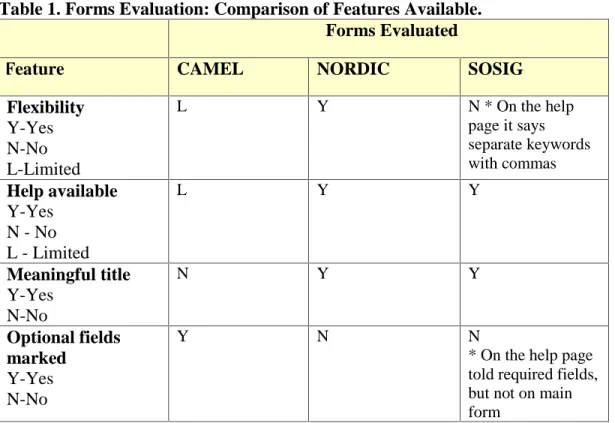
Table 1 (below) shows the results of the evaluation of basic form features of each
of these forms. Each form was given ratings of Yes, No, or Limited for Flexibility and
Help and a Yes or No rating for Meaningful Title and Optional Fields Marked.
Table 1. Forms Evaluation: Comparison of Features Available. Forms Evaluated
Feature CAMEL NORDIC SOSIG
Flexibility
Y-Yes N-No L-Limited
L Y N * On the help
page it says separate keywords with commas
Help available
Y-Yes N - No L - Limited
L Y Y
Meaningful title
Y-Yes N-No
N Y Y
Optional fields marked
Y-Yes N-No
Y N N * On the help page told required fields, but not on main form
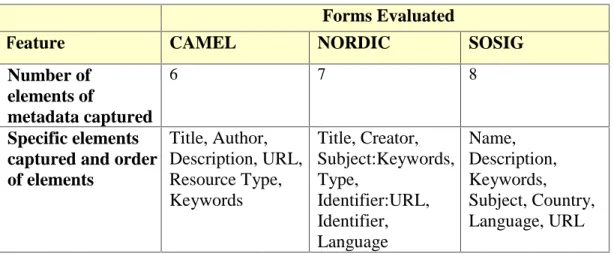
Table 2 (on following page) shows the results of the evaluation of the forms as to
number of metadata fields captured, which metadata fields the form captures, and in what
Table 2. Forms Evaluation: Comparison of Metadata Specific Criteria.
Forms Evaluated
Feature CAMEL NORDIC SOSIG
Number of elements of
metadata captured
6 7 8
Specific elements captured and order of elements Title, Author, Description, URL, Resource Type, Keywords Title, Creator, Subject:Keywords, Type, Identifier:URL, Identifier, Language Name, Description, Keywords, Subject, Country, Language, URL
The review of the field labels on the forms showed that most of the labels were
clear except for possibly “keywords” on the CAMEL and SOSIG forms. On the NORDIC
form, since those labels were directly from the Dublin Core Elements, if a person was not
familiar with the Dublin Core, they might be confused as to what is supposed to be entered
into the fields, but help is also provided.
Also, some of the spacing in the fields, “Visible space for data-entry fields”, did
not seem very helpful in guiding users as to the amount of information that should be
entered into the form fields. On the CAMEL form, the space for URL does not appear to
be long enough for most URL lengths and on the NORDIC form, all of the fields were the
same size if they weren’t dropdown lists. This was also the case with the SOSIG form
Major Strengths of Each Form
Camel
The CAMEL form is a short form that captures just a few elements and appears to
be easy-to-use. The required fields are clearly marked so that individuals entering data
will know which data that they will need to provide.
Nordic
The major strength of the Nordic form is its flexibility. Users are allowed to enter
multiple values of almost all of the items.
SOSIG
The SOSIG form is short, simple, and visually appealing. There is also a
controlled vocabulary list for the “Subject” area field, which should provide some
guidance during completion of the form.
Major Limitations of Each Form
Camel
The CAMEL form is not very appealing visually and seems a little rough. This
may be because the CAMEL project was simply a pilot study to determine the amount of
use and type of information that could be captured with such a form.
Nordic
This form seems to be directed at individuals who are very familiar with the
Dublin Core elements and if some of the field labels were modified slightly the
ease-of-use could be increased considerably. If this were utilized in an organization, there might
SOSIG
The SOSIG form does not provide a lot of help for users on the “Add a New
Resource” page. Also, there is no mention of the entry page as to which fields are
required and which are optional.
Prototype Development
After evaluating the input forms discussed above, a prototype of the Botanical
Pride metadata form was developed. It was decided that since simplicity was of utmost
importance, the form should include a limited number of elements. The following are the
metadata items that were decided on:
1. Coverage - geographic location of item
2. Creator - person submitting item
3. Date - date of image
4. Description - textual description of the content of the resource
5. Keywords – terms that describe image
6. Title - name given to the resource by the person submitting item
Each of the forms that were reviewed provided some type of assistance to the
metadata authors, and it was decided that for the Botanical Pride form a “Guidelines”
page would be created to provide users with examples of what types of information should
be entered in the form fields. Also, each form field label would be linked to the area of
Feedback from PIC Advisory Committee
In an effort to get some feedback on the design of the initial prototype, a
small-scale informal usability study was performed involving members of the PIC Advisory
Board. The advisory board consists of individuals from the University of North Carolina
School of Information and Library Science (SILS), the McDougle Middle School in
Chapel Hill, NC, Orange County Public Library, the North Carolina Botanical Gardens,
and the UNC Herbarium.
A total of ten forms and feedback questionnaires were completed and analyzed.
A copy of the initial “Add a Resource” form is in Appendix C and a copy of the feedback
questionnaire can be found in Appendix D.
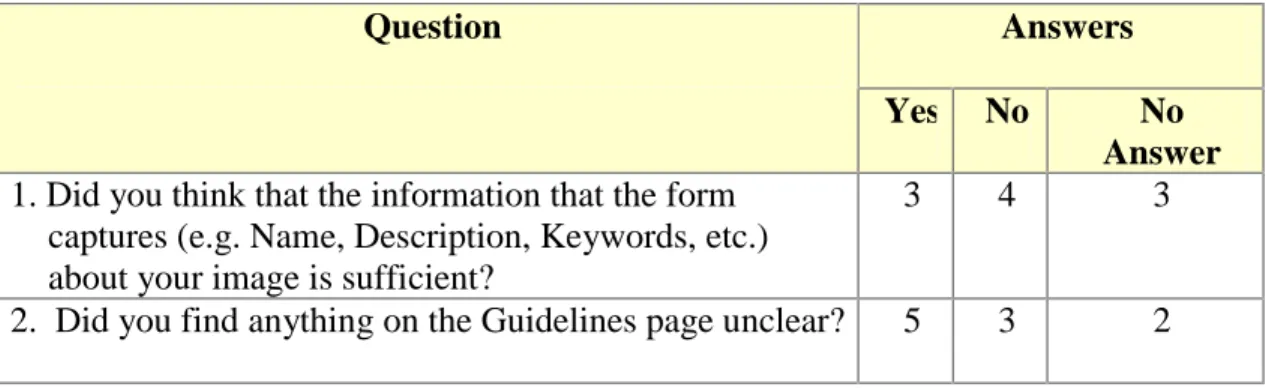
The feedback questionnaire consisted of five simple questions. The responses to
the feedback questions are discussed in this section. Table 2 (below) shows the answers to
the first two questions, which were actually two-part questions in which the first part of
the question required a yes or no answer.
Table 2. Answers to first two feedback questions.
Answers Question
Yes No No Answer
1. Did you think that the information that the form captures (e.g. Name, Description, Keywords, etc.) about your image is sufficient?
3 4 3
2. Did you find anything on the Guidelines page unclear? 5 3 2
These results show that the majority of individuals thought there wasn’t enough
suggestions of elements that should be added to the form if the answer to the first part of
the question was no. Some of the suggested additions included the following:
• Time of day of photo/image
• Season of year
• How is plant propagated?
• Growing site (shade, full sun, etc.)
• More examples
• Add teacher and amateur photographer to botanical affiliation list
• Field for common name and scientific name
Also, a majority of individuals responded that they found the guidelines unclear.
This appeared to be another area that was in need of improvement. Some of the responses
indicated that people were unclear about what types of information to provide in the
“Description” field, and some of the terminology used such as “Resource”, “Keywords”,
and “Metadata”. Preliminary analysis of data shows, however, that the metadata captured
was actually quite acceptable. The responses also indicated a need for more examples of
the types of information to provide.
In addition to these specifically asked about areas, the questionnaire included three
other open-ended items that were designed to allow the participants to give feedback about
what they liked best about the Botanical Pride “Add a Resource” form, what they liked
least about the Botanical Pride “Add a Resource” form, and other comments and/or
Responses to what individuals liked best were very encouraging as they showed a
positive response to the overall project. Some of the specific comments included
statements such as:
• “easy, some opportunity for extra comments”
• “It is a very good idea, especially as it provides a cyber-collection of local
specimens which are actually at disparate locations.”
• “The sense of participation will excite the user.”
The responses to what the individuals liked least about the form included items
such as:
• unclear vocabulary
• incomplete list for the botanical affiliation list items
• uncertainty about the amount of information to submit for image.
The third feedback item resulted in several additional suggestions for
improvements. Some of these are as follows:
• term Resource is unclear – possibly use photo or image
• don’t use term “metadata” on Guidelines page
• add place for the “story behind the picture” and/or “What’s interesting about the
image?”
Form Revisions
Based on the feedback that was received, it seemed like there were two major areas
areas were help and/or examples, and terminology. To address these problem areas, the
following changes were made:
1) The term “Metadata” was replaced with “Information”
2) The form title was changed from “Add a Resource” to “Add an Image”
3) The term “Resource” was changed to “Image” wherever it appeared on the
template and the “Guidelines” pages.
4) More examples were added to the “Guidelines” page to reflect some of the
items that the Advisory Board members felt were lacking. Several of the
additional items mentioned could be included as part of the “Description”
entry and that simply needed to be clarified in the “Guidelines” page.
Screenshots of the revised Botanical Pride metadata form and “Guidelines” form
can be found in Appendix C.
Future Considerations
Certain items may need to be considered as the project becomes integrated into
the PIC site. One of these is the approval of images. The initial idea behind the
Botanical Pride module was to encourage contributions from students and others with an
interest in botany in an effort to increase their feelings of involvement in the project and
enhance learning opportunities. With this being said, initially there will be no restrictions
on the number of entries by one individual. There may however, at some point, arise the
need to review the types of images being submitted and implement some restrictions and
There is also the issue of whether for display purposes, the PIC site should
maintain, or request two versions of the images being submitted (the original image and a
thumbnail version of the image). Having the thumbnail version would create a more
uniform display of images, but may mean more work for the personnel responsible for
the maintenance of the PIC site.
Future Developments
This application is the initial phase of a much larger project within the PIC project.
There have been discussions of creating a “gallery” of different images which would be
submitted by groups such as the Gourd Society of North Carolina
http://www.twincreek.com/gourds/ and the DaffodilSociety.
Conclusion
This research is important because it provides valuable information to persons
interested in using web input forms to capture metadata from individuals about
submissions to their web sites. By designing a simple, easy-to-use metadata entry form,
more accurate and consistent metadata may be captured thus improving searching
performance. Many factors are important to consider when creating such a form and some
of these include: 1) including examples; 2) not using terms that are unfamiliar to users; 3)
include detailed help; and 4) label fields in a meaningful way.
With the ever-increasing amount of documents available on the Internet, there is a
need for efficient tools to aid in the searching of these documents. There is a lot of
to share information among groups with similar interests, but in order to do this in the
most efficient manner, close attention should be paid to the capture and use of metadata in
References
Banerjee, Kyle (2000). Challenges of Using Metadata in a Library Setting: the
Collection and Management of Electronic Links (CAMEL) Project at Oregon State
University. Library Collections, Acquisitions, & Technical Services, 24, 217-227.
Constantine, L. L., & Lockwood, L. A. D. (1999). Software for Use: A Practical
Guide to the Models and Methods of Usage-Centered Design. New York: ACM Press.
Ercegovac, Zorana. (1999). Introduction. Journal of the American Society for
Information Science, 50(13), 1165-1168.
Greenberg, J. (in press, accepted Jan., 2001). Metadata Applications for the Plant
Information Center (PIC) – A Web-based Scientific Learning Center. Interactive
Learning Environments [33 manuscript pages.]
IDS (2000). Internet Domain. http://www.isc.org/ds/.
Lawrence, S., & Giles, C. L. (1998). Searching the World Wide Web, Science,
280(3), 98-100.
Lawrence, S., & Giles, C. L. (1999). Accessibility of information on the web,
Nature, 400, 107-109.
Levi, M. D., & Conrad, F. G. (1996). A heuristic evaluation of a World Wide
Web prototype. Interactions, 3(4), 50-61.
Nielsen, J. (1998). Writing for the Web. http://www.sun.com/980713/webwriting/
Preece, Jenny; Rogers, Yvonne; Sharp, Helen; Benyon, David; Holland, Simon;
Carey, Tom. Human-Computer Interaction. Wokingham, England: Addison-Wesley,
Schneiderman B. (1992). Designing the User Interface: Strategies for Effective
Human-Computer Interaction, 2nd edn. Reading, MA: Addison-Wesley.
Stein, W. (1990). A Comparison of the Effect of Two Interface Styles on System
Efficiency, Error Production, and User Satisfaction. A Master’s paper, University of
The following Dublin Core element descriptions are from the Dublin Core Metadata Initiative site at http://dublincore.org/.
Element Descriptions
1. TitleLabel: Title
The name given to the resource, usually by the Creator or Publisher.. 2. Author or Creator
Label: Creator
The person or organization primarily responsible for creating the intellectual content of the resource. For example, authors in the case of written documents, artists, photographers, or illustrators in the case of visual resources.
3. Subject and Keywords Label: Subject
The topic of the resource. Typically, subject will be expressed as keywords or phrases that describe the subject or content of the resource. The use of controlled vocabularies and formal classification schemas is encouraged.
4. Description Label: Description
A textual description of the content of the resource, including abstracts in the case of document-like objects or content descriptions in the case of visual resources.
5. Publisher Label: Publisher
The entity responsible for making the resource available in its present form, such as a publishing house, a university department, or a corporate entity.
6. Other Contributor Label: Contributor
A person or organization not specified in a Creator element who has made significant intellectual contributions to the resource but whose contribution is secondary to any person or organization specified in a Creator element (for example, editor, transcriber, and illustrator).
7. Date Label: Date
A date associated with the creation or availability of the resource. Recommended best practice is defined in a profile of ISO 8601 ( http://www.w3.org/TR/NOTE-datetime ) that includes (among others) dates of the forms YYYY and YYYY-MM-DD. In this scheme, the date 1994-11-05 corresponds to November 5, 1994.
8. Resource Type Label: Type
The category of the resource, such as home page, novel, poem, working paper, technical report, essay, dictionary. For the sake of interoperability, Type should be selected from an enumerated list that is under development in the workshop series.
9. Format Label: Format
10. Resource Identifier Label: Identifier
A string or number used to uniquely identify the resource. Examples for networked resources include URLs and URNs (when implemented). Other globally-unique identifiers, such as
International Standard Book Numbers (ISBN) or other formal names would also be candidates for this element.
11. Source Label: Source
Information about a second resource from which the present resource is derived. While it is generally recommended that elements contain information about the present resource only, this element may contain metadata for the second resource when it is considered important for discovery of the present resource.
12. Language Label: Language
The language of the intellectual content of the resource. Recommended best practice is defined in RFC 1766 http://info.internet.isi.edu/in-notes/rfc/files/rfc1766.txt
13. Relation Label: Relation
An identifier of a second resource and its relationship to the present resource. This element is used to express linkages among related resources. For the sake of interoperability, relationships should be selected from an enumerated list that is currently under development in the workshop series. 14. Coverage
Label: Coverage
The spatial and/or temporal characteristics of the intellectual content of the resource. Spatial coverage refers to a physical region (e.g., celestial sector) using place names or coordinates (e.g., longitude and latitude). Temporal coverage refers to what the resource is about rather than when it was created or made available (the latter belonging in the Date element). Temporal coverage is typically specified using named time periods (e.g., Neolithic) or the same date/time format (
http://www.w3.org/TR/NOTE-datetime ) as recommended for the Date element. 15. Rights Management
Label: Rights
APPENDIX B
Form 3
APPENDIX C
Initial Botanical Pride Form
Revised Botanical Pride Form
Feedback on Botanical Pride Form
1. Did you think that the information that the form captures (e.g., Name, Description, Keywords, etc.) about your image is sufficient? ___Yes ___ No
If No, what items would you suggest adding to form?
__________________________________________________________________ __________________________________________________________________ __________________________________________________________________ __________________________________________________________________
2. Did you find anything on the Guidelines page unclear? ___ Yes ___ No If Yes, please explain:
__________________________________________________________________ __________________________________________________________________ __________________________________________________________________
__________________________________________________________________
3. What do you like best about the Botanical Pride Add a Resource form?
__________________________________________________________________ __________________________________________________________________ __________________________________________________________________
__________________________________________________________________
4. What do you like least about the Botanical Pride Add a Resource form?
__________________________________________________________________ __________________________________________________________________
_______________________________________________________________________________ _______________________________________________________________________________
5. Please provide any other comments or suggestions.
_______________________________________________________________________________ _______________________________________________________________________________
__________________________________________________________________ __________________________________________________________________ __________________________________________________________________