the M.S. in I.S. degree. April 2009. 46 pages. Advisor: Joanne G. Marshall
Many organizations wishing to build content management systems in a World Wide Web environment have limited funding and staff expertise. This study tested the effectiveness of an inquiry-based design tool as an aid for populating a content management system in a business environment. The design tool had previously been used to develop a website for the University of Indiana at Bloomington’s School of Education. This study used the Indiana design tool at University of North Carolina Healthcare System’s Physicians & Associates as a method of creating a resource portal for employees. The protocol combined inquiry-based design and usability testing to design the information
architecture for the resource portal. The results suggested that the methods employed in the University of Indiana protocol can be used to guide the development of other resource portals and to create successful content management systems.
Headings:
Content Management System Usability Testing
BILLING ENVIRONMENT
by Laura R. Saslaw
A Master’s paper submitted to the faculty of the School of Information and Library Science of the University of North Carolina at Chapel Hill
in partial fulfillment of the requirements for the degree of Master of Science in
Information Science.
Chapel Hill, North Carolina April 2009
Approved by
Table of Contents
List of Figures 2
Acknowledgements 3
1. Introduction 4
1.1 Definitions 7 1.2 Context 9 1.3 Research question 11
2. Literature Review 12
3. Methodology 17
3.1 Methodology used by Frick, Su & An 17
3.2 Methodology used by UNC Physicians & Associates 20
4. Data Collection 24
5. Results & Discussion 27
6. Conclusion 30
7. References 42
Appendix A: Recruitment Email for Needs Assessment Interview 35
Appendix B: Needs Assessment Questions 37
Appendix C: Index Card Items (80 questions) 38
List of Figures
Figure 1: Depiction of data flow for the P&A study 21
Figure 2: Similar labels grouped by theme 25
Figure 3: P&A Resource Portal prototype based on study findings 28
Acknowledgements
1. Introduction
“Website development is much more a journey through uncharted waters. The use of a content management system can help define the shorelines and smooth some rough waters, but the course is still left to be charted by the clarity of
organizational vision and priorities.” (Goodwin, Burford, Bedard, Carrigan & Hannigan, 2005)
An effective website is a usable one, and vice versa. Organizations create usable sites by determining what users need, then presenting the needed information accessibly, potentially making the users themselves more efficient. All organizations benefit by maximizing the usability of their websites. But as companies with more resources raise the bar on site design and usability, other institutions with fewer resources struggle to keep up. By carefully investing in site usability, management, and organization, however, even institutions with fewer resources can maximize efficiency and job performance.
In the early days of web development, the only people who were capable of creating such a site were professional coders and web developers. Now tools such as inquiry-based design (IBD) are available to help site mangers design and implement an effective content management system (CMS). With these tools, organizations with limited expertise or funding can still build an effective site.
so that a relatively unskilled person can perform website modification and development. Thus a CMS can save money and allow key stakeholders the opportunity to easily post and modify information without having to wait for the expensive services of a web developer.
CMSs proliferate because of four factors:
1. A CMS helps organizations manage information. Because anyone in an organization can produce information in the form of documentation, e-mail,
presentations, spreadsheets, etc., “the escalation in the amount of electronic information that is now produced has gotten to the point where for many organizations it is literally out of control” (“What Is a Content Management System,” 2009).
2. A CMS can be scalable and flexible.
3. A CMS can reduce the number of choices regarding style and structure. Without a formal ontology or information architecture analysis, a CMS provides a framework and a place to start the needs assessment process that will lead to the effective organization of information.
4. A CMS facilitates the collection of knowledge, as well as its reuse and sharing. This prevents organizational memory from being lost when employees retire or move on (Myers & French, 2008).
In order for any site or CMS to be useful and effective, it must appeal to the user’s sense of logic and organization. Key tools used to create a useful and effective website include information architecture, including research, inquiry-based design, and usability testing. While information architecture is a complex process, usability is relatively
measured by how quickly a task is performed, how many mistakes are made, how quickly the system is learned and how satisfied people are who perform the task” (“What Is Usability?” 2009).
Unfortunately, information architecture can be very expensive. Only the largest and most profitable companies can afford web developers or information architects full time. Because less-expensive alternatives are needed, this study evaluates the efficacy of a protocol developed by Frick, Su & An (2005) at Indiana University that combined inquiry-based design with the developers’ own homegrown content management system to create an information portal for their School of Education. This study also evaluates whether this protocol can be applied to other environments, such as the one at University of North Carolina Physicians & Associates, a health insurance and billing entity that bills for doctors and services provided by the UNC Healthcare System.
1.1 Definitions
The following terms are used frequently in this paper:
Website design: This is a “process of conceptualization, planning, modeling, and execution of electronic media content delivery via Internet in the form of technologies (such as markup languages) suitable for interpretation and display by a web browser or other web-based graphical user interfaces” (“Web Design,” 2009). Unlike print-based graphic design, website design creates “an effective interface between people and technology” (Macdonald, 2003, p. 6).
“1. The combination of organization, labeling, and navigation schemes within an information system.
“2. The structural design of an information space to facilitate task completion and intuitive access to content.
“3. The art and science of structuring and classifying web sites and intranets to help people find and manage information.
“4. An emerging discipline and community of practice focused on bringing principles of design and architecture to the digital landscape.”
In information architecture, most of the design focus is on user input to inform a site’s organization. Information architecture prioritizes the logical location, layout, breadth, and depth of the presentation of data.
Usability: Simply put, usability is “making sure that something works well: that a person of average (or even below average) ability and experience can use the thing — whether it’s a Web site, a fighter jet, or a revolving door — for its intended purpose without getting hopelessly frustrated” (Krug, 2000, p. 5). Usability studies commonly ask members of the target audience to test a site or site prototype, and they usually involve activities such performing a task or finding information. The user feedback is then incorporated into the site design.
Inquiry-based design: This technique employed in usability testing allows a site to be created and tested by users whose feedback is then analyzed. The site is revamped accordingly, creating the next iteration.
of the information into each page in HTML by hand” (Seadle, 2006, p. 5). It does this by separating content from formatting. CMSs are structured out of the box so that a user can publish content to the site without having to know how to write HTML or code. A CMS could be compared to a music CD case in that it is constructed in a standardized way that maintains its shape but allows the artist to publish text and decorate it however they wish. CMSs are increasingly popular because of their simplicity and ease of use. There are literally hundreds of CMSs available for free or for purchase, or bundled with server-side operating systems, such Microsoft’s SharePoint, which was used in this project.
Resource portal: Once information has been organized and a CMS has been selected, it is possible to build a resource portal, which is a “web site that assembles a wide range of content and services for employees of a particular organization, with the goal of bringing together all the key information they need to do a better job” (“Business Definition for: Enterprise Portal,” 2009). Every organization has multiple users who belong to different groups within their organization and who fill multiple roles. “In today’s Internet, with information overload prevalent even within a single discipline, scholars and researchers struggle to find the precise material they need in the tangled web of online information” (Almasy, 2005, p. 620). A resource portal can provide a one-stop shop for users by providing “information in a variety of forms and from many sources” (Almasy, 2005, p. 621) in a single location or web page.
1.2 Context
UNCH intranet, which was quite robust and well-populated. However, it became apparent that the UNCH resource portal did not contain information specific to P&A.
While UNCH has both Internet and intranet sites for all healthcare employees, P&A’s requirements were specific enough to warrant requesting and receiving funding for its own intranet portal. The next step was to build an effective and informative website that would be a source of organization and information for all P&A staff. As such, the P&A Information Systems Support department began to research an appropriate content and design process, and to seek an appropriate CMS.
Like many organizations, P&A had limited resources and expertise. It found itself in a position similar to that of researchers at Indiana University at Bloomington, who had a pressing need for an intranet, yet limited resources to research, develop, and build it (Frick et al., 2005). By following a uniquely developed inquiry-based design protocol, these Indiana researchers were successful in creating a useful and user-friendly site with limited resources. The Indiana research development team consisted of “a web director and a faculty member with a reduced teaching load, and the co-authors, who are half-time graduate assistants” (Frick et al., p. 20).
By following the first three steps of the Indiana protocol, this researcher attempted to conduct the same website development without any prior expertise in this area. Every effort was made to mirror the protocol’s design process. The full design process included the following 7 steps:
3. Prototype development 4. Usability testing
5. Post-usability prototype modification 6. Finished site publication
7. Site maintenance
Using this protocol, Frick et al. created “a large, successful website efficiently
through inquiry-based design and content management tools” (p. 20). In the methodology section, the steps and procedures of the Frick et al. protocol are described, then compared and contrasted with those used by the P&A team.
1.3 Research Question
2. Literature Review
The purpose of this literature review is to present the content and results of
representative studies from the information science literature as background to the current study. Content management systems (CMSs) are evaluated in many environments: for example, as a way to improve library websites, as a personal organization tool, or using a wiki as a content management system. However, most research does not discuss how they are populated. Usability is also pervasive across multiple environments, but it is not often discussed in conjunction with a CMS implementation. To review and discuss these topics separately is beyond the scope of this paper. Additionally, inquiry-based design is often studied in relation to learning and classroom environments. Because this study is specific to the implementation of a content management system used in conjunction with inquiry-based design to elicit user feedback, this review summarizes articles focusing on these topics considered together, as well as a study of inquiry-based design combined with data logging.
at least as much attention to user issues as they do to technical issues, from the
organizational buy-in and comprehensive training to internal/external usability” (p. 29). The web development team at GSU chose FrontPage as their CMS because their
organization had a blanket license for this application. It was combined with MySQL, a free, open source database system. A team then worked to determine how to set up the database design, the content of the site, and the presentation. Even though this library had many resources, including a CMS, a web developer, and a redesign team for the site, they discovered that a lack of focus on inquiry-based design and user feedback caused
problems. After painstaking research, development, and planning, the site “did not achieve the desired result … The study subjects focused on the resources in the main content area of the guide and almost ignored the resources listed on the sidebar menu” (p. 47). This failure underscores the need for user input early on in this process.
Jones, Milic-Frayling, Rodden & Blackwell (2007) at the University of
methodology in the context of redesigning a software product, it might be equally
effective for redesigning websites, especially ones that have a high volume of page visits so that data logging can capture user behavior. The authors report using semi-structured interviews to “enable [them] to explore a widely diverse set of aspects, from concept understanding, to feature use, activities, and interaction strategies,” which demonstrated that this method “could prove an empirical basis on which to redesign software products” (p. 100). The two previous articles point out the importance of inquiry-based design, whether informing a CMS or redesigning a software product.
Turnbow, Kasianovitz, Snyder, Gilbert & Yamamoto (2005) delve into usability as they address the redesign of the University of California, Los Angeles, Library website. The authors identified the following problems with the existing site: it was unorganized, lacked continuity, used inconsistent nomenclature and jargon, lacked consistent graphic design, and had many outdated pages. Their redesign process used the most basic of usability testing practices: conducting surveys and having users participate in card-sorting exercises to inform the site’s information architecture. With the
website. However, the expense of such a system makes it impractical for other smaller, less resourceful entities. This study suggests using SharePoint, a CMS that comes bundled with Windows Server 2003 and is free.
Taylor, McWilliam, Forsyth & Wade (2002) discuss several underlying yet pervasive issues that plague companies and organizations worldwide. Taylor et al.
gathered information regarding web development and practice by surveying the activities of existing organizations, investigating “the way in which website development activities are currently carried out within UK organizations” (p. 381). Although the authors found that there is no right or generally accepted way to conduct website development, they reached the following conclusions after studying 25 organizations:
• Website development is usually under the purview of the IT specialists within the organization
• Most organizations do not have any procedure or best practices in place when it comes to web development
• There were no “formalized approaches to website analysis activities in any of the 25 organizations studied.” (p. 390)
3. Methodology
3.1 Methodology used by Frick, Su & An
Frick et al. (2005) performed their needs assessment by conducting interviews with key stakeholders (faculty, staff, and administrators) and “gatekeepers,” which they define as “the people who interact often with prospective and current students, their parents, and other members of the public” (p. 21). The authors also sought information from primary target audiences (including students, their parents, and other members of the public) and secondary target audiences (K-12 teachers) in order to obtain specific information about what site users would want or need. Unfortunately, Frick et al. do not discuss how they determined each frequently asked question (FAQ) from these interviews, which raised many questions for the P&A project. Chief among these are:
1. If the users do not submit specific FAQs, how are the questions formed from the needs assessment interviews and user comments?
2. How is tacit knowledge addressed? In other words, how does the researcher obtain items that have been internalized and are no longer questions?
Once enough questions were compiled, they were transferred to index cards, one question/item of need per card. Frick et al. were able to collect several hundred index card items. These cards were pivotal in conducting the introductory analysis that would eventually yield the basic site architecture.
In addition to using the data culled from target audiences, Frick et al. used web statistics to identify frequently used pages. They were able to accomplish this because the site was already in existence and in use. As P&A’s intranet is a new development, web statistics were not available as part of my data analysis.
Frick et al.’s next step was to sort through the gathered data and create a set of index cards “onto which [researchers] put individual FAQs, goal statements, existing hyperlinks and other statements of need (one item per card)” (p. 21). The researchers then recruited students or staff and asked them to sort the cards. The users were asked to do this quickly and pile the cards into common themes. As piles developed, the sorters were asked to label them in their own words with a post-it note. (I assumed that this meant that the users should use words similar to those on the index cards within the piles and avoid any technical jargon or language.) When all the cards or questions were sorted into piles and labeled according to their general theme, the researchers then wrapped the piles and handwritten labels from each user in rubber bands and put them aside to be analyzed later. These piles were then divided up into common sub-piles.
The goal was to try to reduce the number of piles to 10-15, or as few as possible. This was a very important step, as these labels became the top level of the information
Frick et al. next created a set of paper website pages containing sample content and structure based on the labels obtained from the needs assessment and card sorting
exercises. They created a paper simulation of the site in order to have users test its layout and hyperlink navigation. Because Frick et al. used a content management system that required modification of numerous site components built in PHP, XML, HTML, and CSS, it made sense to first test the design ideas on paper. Frick et al. then conducted usability testing using the paper version to obtain feedback from the target audience. The researchers had users answer questions and complete several tasks to test the prototype; they then obtained feedback, modified the design, and moved on to the computer prototype stage.
Throughout the testing of the paper and computer versions of the prototype, Frick et al. kept careful notes of empirical design discoveries and conclusions in order to help maintain site integrity. This allowed the researchers to justify their design decisions. For example:
“During the final production of the 2004 redesign, our Dean and several faculty members questioned the redundancy of audience hyperlinks on our home page. These links occur in both the horizontal navigation bar below the page banner, and again vertically in the left-most column of hyperlinks in the page body. The Dean suggested that we should consider removing those audience links in the left-most column, since it would make the appearance of the home page ‘cleaner’ and less ‘busy.’ Our
response to the Dean was based on usability results. We reported the facts … users frequently selected the audience links … in the left-hand column during our usability evaluations” (p. 24).
feedback from users was more thorough and abundant when the prototypes were less refined, i.e., “not a finished product” (p. 23). The authors then used this feedback to correct any mistakes and modify the architecture, continuing this process until the site was completed and published on the Internet.
3.2 Methodology used by UNC Physicians & Associates
For the P&A organization, the stakeholders and the gatekeepers were considered one and the same: all were staff members. Upon receipt of University of North Carolina Institutional Review Board approval, needs assessment activities were conducted by interviewing eight staff members who were also identified as key stakeholders. The eight potential interviewees were suggested by David Harper, P&A Information Security Officer and ISS Manager, who gave permission for this study to be undertaken. The research subjects were selected for the needs assessment interviews by Harper based on availability, gatekeeper status, willingness to participate, or interest in technology or the intranet. These subjects were contacted via e-mail by the present researcher, Laura Saslaw, UNC P&A Technical Support Specialist, who explained that the study was voluntary (Appendix A) and that the information collected would have all identifying data or content removed. As subjects who were contacted responded to the request, this researcher met with them and conducted semi-structured interviews. Users were asked a set of questions (Appendix B), and this researcher made her own notes on the responses.
From the eight people interviewed, 80 FAQs, or questions based on information needs, were derived upon review and analysis by this researcher. The FAQs were then
transferred to index cards for use in a card sorting exercise. Because the interview process was conversational and minimally directed by specific questions, the items for the index cards had to be derived from long, complex sentences. The creation of the index card items from the interview answers were necessarily a subjective process
In retrospect, the reliability of the index card creation could have been improved by having a second person create index cards from the same interview answers and compare results. This method is called inter-rater reliability (Howell et al., 2005) but was beyond the scope of this study.
The items of need, questions, and other requested information were then transferred to index cards. For example, if an interviewee stated, “I’d like to see a list of vendors that we use and who the contact person is,” the index card item would read, “Where can I find a phone number and contact information for Aetna?” A list of all index card items can be found in Appendix C.
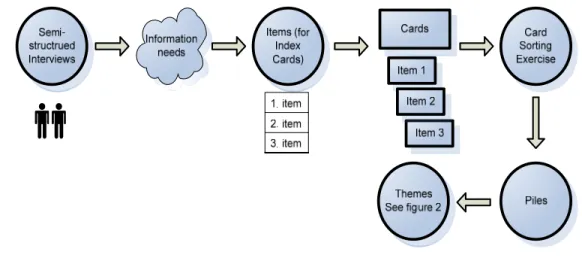
the different labels were grouped under 14 themes. The exercise was successful in identifying the major types of information required in the CMS. Figure 1 shows the flow of data for this study.
Figure 1. Depiction of data flow for the P&A study
Unlike Frick et al.’s, the P&A study did not use paper prototyping because
4. Data Collection
This section describes in more detail the processes of the semi-structured interviews and card sorting exercises for those who may want to replicate this study.
Semi-structured Interviews
In order to create relevant cards for the card sorting exercises, P&A users were interviewed using a set of questions designed to elicit their information needs. Eight staff volunteers were asked the following:
1. What information do you need to find or use on a regular basis to do your job? 2. What resources do you use to do that? For example, when looking for a
person’s contact information, do you use a website, the P&A filer, the Healthcare intranet, e-mail, e-mail address book, personal data collection or another resource?
3. What information do you have difficulty in finding?
4. Have you been frustrated recently because you couldn’t find something in any of the P&A systems that currently exist, e.g., on the filer or the UNC Hospital intranet? What information was that?
5. If you were to use a distribution list, who would be on it and why?
6. When people call you to help them find information, what sorts of information do they ask for? This information could be either from inside or outside P&A. 7. Do you have any other suggestions for the type of information that should be
available on the P&A intranet?
“current IT issues list,” “I would use a policy and HIPAA procedures manual,” “if stuck in [application], who should I call,” or “I’d like to see an online version of Encoder Pro,” among others. The challenge was to determine a simple yet accurate way to ascertain an information item for each index card. From such answers, 80 index cards were created. For example, from the comment “I would like to see a comprehensive phone list/contacts for outside vendors,” the following index cards were created based solely on the
subjective assessment of the researcher:
1. How do I find a phone number for a P&A staff member?
2. Where can I find a phone number and contact information for Aetna US Healthcare?
3. Where can I find a phone number and contact information for Cigna? 4. Who is our contact at Medicaid?
5. Where can I find contacts within the School of Medicine?
In a similar fashion, the following index cards were created for “if stuck in [application], who should I call?”:
1. I can’t reset my PAS password without my Onyen. I don’t know my Onyen. What should I do or who should I call?
2. If there’s something wrong with GE, who do I call? 3. My telephone isn’t working. Who do I call?
4. Which help desk do I call to reset my Onyen password? 5. Which help desk do I call to reset my Sovera password? 6. Which help desk do I call if my printer breaks?
7. Who do I call if my printer is out of toner?
Card Sorting Exercises
Identical labels were grouped together. The label Access was used four times and these labels were grouped together along with System Access which varied only slightly.
Similarly Password was also used four times and easily grouped under the theme
Password. Other disparate labels required knowledge of the organization and inference to
group appropriately. For example, Coder Questions, Position Info, Claim Rep Questions,
and Group Pages all fall under the theme Job or Department Specific. The majority of
qualitative analysis was performed by the researcher as needed.
Frick et al. performed the following steps: conducting interviews, analyzing content structure, making or revising a paper prototype, testing a paper prototype, analyzing the test results, making or revising a computer prototype, testing the computer prototype, analyzing the test results, building and checking the site, maintaining the site, and conducting ongoing reviews of the site. Due to time limitations, the P&A study performed only these steps: conducting interviews, analyzing content structure, and building a prototype of the resource portal.
5. Results and Discussion
There were four sets of results from the various stages of this study:
1. Results from the semi-structure interviews yielded the information needs of eight P&A employees.
2. These information needs were then translated into information items that were placed on 80 index cards.
3. Another eight P&A volunteers sorted the index cards yielding piles of cards and their respective labels.
4. These labels were grouped together based on subjective evaluation which yielded 10 overall themes and 4 sub-themes as shown in Figure 2.
5. The themes then informed the first level of information architecture for the resource portal prototype as shown in Figure 3.
Based on the Frick et al. protocol and subsequent usability testing, P&A Information Systems Services personnel gained valuable insight into the information needs of P&A employees. Study participants were able to voice their needs regarding the types of information that they would like to see on the new P&A portal and have input into the site design. The initial interviews elicited general and specific information needs. The card sorting exercises were useful for developing labels for categories of
information, ultimately contributing to the information architecture of the site.
One of the challenges facing researchers is that managers may regard this type of research as a secondary or limited source of information and not the final basis for decision making regarding the ultimate site design, as was the case at P&A. A useful future study would be to compare user satisfaction of sites that were fully based on protocols such as that of Frick et al. and those that were designed on the basis of management preferences.
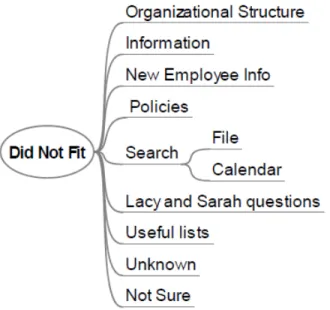
Figure 4. Labels That Did Not Fit Into Other Piles
One possible way to handle this in the future would be to ask a wider range of questions regarding user needs. The researcher was not fully familiar with the possible needs of users; therefore, some important information items may have been overlooked. This points to a need for more user input at the beginning of the study and more thorough question and answer sessions with more volunteers. Ideally, a representative from each type of job, department, or group would contribute input for the needs assessment and semi-structured interviews.
The second discrepancy seen among labels occurred when users labeled the same index card items with different names. For example, one index card said, “My supervisor assigned me to take a learning module. How do I find that?” This index card item elicited the following labels:
• Who To Call? • ISD Questions • Helpful Links
How does the researcher, web developer, or information architect decide where to put information that is hard to categorize? Because the end users assigned a wide variety of labels to the same or similar items, further testing before publication to the site would be beneficial.
Both of these problems could be remedied with further usability testing and observation geared toward fleshing out the most common interpretation of the
information item. It could also be useful to have more than one researcher involved in indentifying the FAQs from the interview data and deciding on the group labels. This could involve using the research technique known as inter-rater reliability to reduce subjectivity and achieve consensus on the best approach.
statements of need, and allusions to other potential information items, this researcher subjectively determined card items based on best judgment. To determine definitively whether the Frick et al. protocol could be repeated in other environments, this process would need to be more fully explained. One solution could be to contact the authors to find out more detail about the process used. However, this also points out a need for researchers to fully describe their methodology so that it can be replicated.
Through the data analysis process, it became clear that the interpretation of user labels and their placement in sub-piles is somewhat subjective. This emphasizes the importance of setting up a prototype site with the labels and sub-labels gathered from the users, and then conducting further usability testing, gathering user feedback, and refining the site architecture so that the site works for the majority of users. These procedures were not possible for this study due to lack of management buy-in, protocol ambiguity, and other interfering factors, such as a new web application rollout that simply took precedence over the P&A resource portal.
6. Conclusion
Not every business or organization has the staff or expertise to create a professional website. Those with limited budgets or resources find site creation
particularly challenging. The complexities of designing a website make it difficult even to know where to begin. This study followed a protocol that is reported in the information science literature, which provided a framework for answering the following question:
Is it possible for an IT professional with limited expertise in web development or
usability analysis to use the Frick et al. protocol to build a successful and efficient
resource portal in a unique environment, using both inquiry-based design and a content
management system?
This study shows that combining inquiry-based design with a viable content management system sets the stage for successful website development, design, and implementation. Figure 2 above shows that there was agreement among themes and labels. The use of these labels to build a site prototype indicates an effective approach to site development and viability.
• Name of the final site decision maker. This person would ideally have some
usability experience or be required to read or research usability concepts.
• Timeline, budget, and methodology. Additionally, anticipate all types of usability
testing and structured modification and add them in.
• Management or executive signatures on all of the above.
Appendix A – Recruitment Email for Needs Assessment Interview Dear P&A staff members:
As you may have heard, the P&A ISS group is working on a resource portal, a.k.a.
intranet, for P&A employees. Additionally, I am working on my Master’s Degree project this semester on web site design and content management and will use the P&A
environment to conduct a research study that will help inform the intranet.
I am seeking volunteers to be interviewed regarding information needs, uses of current resources, and commonly asked questions. The purpose of this study is to see if inquiry-based design and the use of a content management system will help build a useful and effective intranet for employees here at P&A.
To join the study is voluntary. You may refuse to join, or you may withdraw your consent to be in the study, for any reason, at any time, without penalty and without consequence to your employment. Completion of the interview should take no longer than 30 minutes. You are free to answer or not answer any particular question and have no obligation to complete answering the questions once you begin.
If you decide to be in this study, you will be one of approximately 6-8 people in this part of the research study, which is being conducted here at our offices at University Square. Please contact me to schedule an appointment for an interview.
Your responses will be kept completely confidential. All data obtained in this study will be reported as group data. No individual will be identified. The only persons who will have access to these data are the investigator named in this e-mail. It is important that you understand this information so that you can make an informed choice about being in this research study.
You may contact me with any questions at (919) 843-4821 or by e-mail ([email protected])
All research on human volunteers is reviewed by a committee that works to protect your rights and welfare. If you have questions or concerns about your rights as a research subject you may contact, anonymously if you wish, the Institutional Review Board at (919) 966-3113 or by e-mail to [email protected].
Laura R. Saslaw
UNC P&A Technical Support Specialist MSIS Candidate, SILS, UNC - Chapel Hill 919-843-4821 (W)
CONFIDENTIALITY NOTICE: The information contained in this electronic message is legally privileged and confidential information intended solely for the use of the
individual(s) named above. If the reader of this message is not the intended recipient, you are hereby notified that any dissemination, distribution, or copying of this
Appendix B – Needs Assessment questions
1. What information do you need to find or use on a regular basis to do your job? 2. What resources do you use to do that? For example, when looking for a person’s
contact information, do you use a website, the P&A filer, the Healthcare intranet, email, email address book, personal data collection or another resource?
3. What information do you have difficulty in finding?
4. Have you been frustrated recently because you couldn’t find something in any of the P&A systems that currently exist, i.e. on the filer or the UNC Hospital intranet? What information was that?
5. If you were to use a distribution list, who would be on it and why?
6. When people call you to help them find information, what sorts of information do they ask for? This information could be either from inside or outside P&A. 7. Do you have any other suggestions for the type of information that should be
Appendix C: Index card items (80 questions)
1. How do I get access to the Clinical Department folder in Report 2 Web? 2. How do I get access to a folder or file on the J, K, or L drives?
3. How do I, as a supervisor, get access to an old employee’s files and folder? 4. How do I get access to RealMed?
5. How do I get access to AIS? 6. How do I get access to GE?
7. I can’t login to my local workstation. How do I get that reset?
8. I don’t know my username or password for WebCIS. Who should I call to get that information?
9. My password has been revoked on PAS. How do I reset this?
10.I can’t reset my PAS password without my Onyen. I don’t know my Onyen. What should I do or who should I call?
11.I am getting a popup on my computer that says I have a virus. What should I do?
12.I am transferring to a different department within UNCH. Can I keep my email archives? If yes, how do I do that?
13.I am sitting at a different desk today and can’t login to the workstation. What should I do?
14.How do I synchronize my email password with my local password? 15.How do I get CT Vision added to my computer?
16.How do I add a printer to my machine? 17.Where can I find Help Guides for PAS? 18.Where can I find a user manual for GE?
19.Are there any systems down today? If yes, which ones? 20.What is the URL for Medicare’s website?
21.How can I send an email to all supervisors at P&A? 22.How can I send an email to all of Team C?
23.What is the web address for WebCIS?
24.Is there any documentation on how to use a P&A laptop? 25.How can I get to P&A Report 2 Web in Internet Explorer? 26.What is the URL for Sovera?
27.My supervisor assigned me to take a learning module. How do I find that? 28.I need some instructions on how to fill out a denial for a patient account.
Where would I find that?
29.Where would I find a reimbursement form for travel expenses? 30.Is there a webpage that has everything a coder needs to work? 31.What resources do I need to work from home or a remote location? 32.Is there a webpage that is unique to Financial Counselors?
34.If there’s something wrong with GE, who do I call? 35.What is that black box I see when I log into my machine?
36.It’s hard to find documents on the J: drive. How can I do that more easily? 37.How can I find out who a person’s immediate supervisor is?
38.How can I find out a person’s department and job title? 39.My telephone isn’t working. Who do I call?
40.I need to have a phone line moved? How do I do that?
41.How do I send an email to all P&A staff at University Square? 42.Who has access to University Square on the weekends?
43.How do I get keys and a secure card for University Square entry for a new employee?
44.Where can I find a phone number and contact information for Aetna US Healthcare?
45.Where can I find a phone number and contact information for Cigna? 46.Who is our contact at Medicaid?
47.How can I email all of team A, B, C, D, or E? 48.How can I see how much time I have in Kronos? 49.Which help desk do I call to reset my Onyen password? 50.Which help desk do I call to reset my Sovera password? 51.Which help desk do I call if my printer breaks?
52.Who do I call if my printer is out of toner?
53.Where can I find and incoming employee checklist for P&A? 54.Where can I find the photo ID form for new employees?
55.What do I need to do when one of my staff members terminates at P&A? 56.Where can I find an Orientation Schedule?
57.Is there a general place where managers can find all forms they need? 58.How do I access Citrix?
59.Where can I find contacts within the School of Medicine? 60.Where can I find up-to-date email distributions lists? 61.Where can I find FAQs for MS Office Suite?
62.Where can I find a CPT book? 63.How do I access Encoder Pro?
64.My desk is uncomfortable. Who should I call or email? 65.Who do I call if I hurt myself on the job?
66.Where can I find a list of P&A departments?
67.My computer is slow. What should I do or who should I call? 68.I can’t login to WebCIS. Who do I call?
69.Where can I find a list of all Insurance carriers P&A uses? 70.How can I send an email to all of the coders in team D? 71.Why isn’t my wireless working on my laptop?
72.How do I find out who my FACS coordinator is?
73.How does a new employee sign up for parking at University Square? 74.Who do we have contracts with, i.e. Aetna, United, etc.?
77.Where can I find various Human Resources forms? 78.I need a list of all clinical departments.
Appendix D: Card Sorting Exercise Results
user #1 labels user #2 labels user #3 labels user #4 labels user #5 labels user #6 labels user #7 labels user #8
Group Pages Documentation/Forms Finding Forms
Department Specific Questions
Dept/Position Specific
Pages/Issues Management Needs
Documentation &
Forms Carriers
Userful Links Information Websites Website or System Problems Forms Carrier Issues & Info Software IT ‐ FAQs
Password/Access Password Passwords ISD Questions Helpful Links
Apps/Network Computer
Issues Website/Links IT ‐ Printers
Systems Applications/Systems Technical Issues
HR for Supervisors or
Managers Access
Contacts & "Where to finds"
pertaining to P&A Staff Password IT ‐ Security
HR HR Who to call Email Questions Directory Immeidate "Need to Know" Hardware
IT ‐ Remote access Mobile Devices
Useful Contacts Access Access Coder Questions Policies Unknown Access IT ‐ Phones
Email Groups Email Instructions Claim Rep Questions
Computer Problems or
Questions IT ‐ System
Useful Lists Equipment Lacy & Sarah Questions Manual IT ‐ "Who should I
Organizational Structure Insurance
Search ‐ email add external
Not Sure Search ‐ file
Search ‐ calendar System Access New Employee Position Info P&A Contact Info/
10 9 7 8 8 6 6
total labels for all card sorting exercises
References
Almasy, E. (2005).Tools for Creating Your Own Resource Portal: CWIS and the Scout Portal Toolkit. Lirbary Trends. 53, 620-636.
BNET Business Dictionary. Retrieved April 12, 2009, from BNET: The go-to place for management Web site: http://dictionary.bnet.com/definition/enterprise+portal.html
Frick, T., Su, B., & An, Y. (2005). Building a Large, Successful Website Efficiently Through Inquiry-Based Design and Content Management Tools. TechTrends. 49, 20-31.
Goans, D., Leach, G., & Vogel, T. M. (2006). Beyond HTML: Developing and
re-imaging library web guides in a content management system. Library Hi Tech. 24, 29-53.
Goodwin, S., Burford, N., Bedard, M., Carrigan, E., & Hannigan, G. C. (2006). CMS/CMS: content management system/change management strategies. Library Hi Tech. 24, 54-60.
Jones, R., Milic-Frayling, N., Rodden, K., & Blackwell, A. (2007). Contextual Method for the Redesign of Existing Software Products. International Journal of
Human-Computer Interaction, 22, 81-101.
Krug, S. (2000). Don't Make Me Think: A Common Sense Approach to Web Usability. Indianapolis, IN: Macmillan.
Macdonald, N. (2003). What Is Web Design?. Crans-Prs-Cľigny: Rotovision.
Myers, J., & French, L. (2008). Voice for All: Adopting Content Management in Frontline Technical Support. SIGUCCS '08: Proceedings of the 36th annual ACM
SIGUCCS conference on User services. 113-119.
Rosenfeld, L., & Morville, P. (2002). Information Architecture for the World Wide Web. Sebastopol, CA: O'Reilly & Associates.
Seadle, M. (2006).Content Management Systems. Library Hi Tech. 24, 5-7.
Stephens, R. A. (2008, November 7). Content Management Systems - The History and the
Future. Retrieved April 12, 2009, from
http://ezinearticles.com/?Content-Management-Systems---The-History-and-the-Future&id=1665607.
Taylor, M. J., McWilliam, J., Forsyth, H., & Wade, S. (2002). Methdologies and website development: a survey of practice. Information and Software Technology, 44, 381-391.
"Web design." Wikipedia. 5 April 2009. 6 Apr 2009
What is a Content Management System, or CMS?. Retrieved April 12, 2009, from
Enterprise Content Management Web site: http://www.contentmanager.eu.com/cms.htm.