Integrated Management Module II
IMM2 Configurations User's Guide
Version 1.0 (Jan 2013)Table of Contents
Table of Contents ... I
1 Introduction ... 1
1.1 Definitions ... 1
1.2 Related Documents ... 1
2 Help Guide ... 2
2.1 Help Command ... 2
2.2 Showvalues Command... 2
3 Settings Reference ... 3
3.1 Certificate Management ... 3
3.1.1 Settings Description ... 3
3.1.2 Example ... 4
3.2 Policy Settings ... 5
3.3 Power Settings ... 6
3.4 Server Timeouts ... 6
3.5 Date and Time Settings ... 7
3.5.1 Settings Description ... 7
3.5.2 Example ... 9
3.6 Account settings ... 10
3.6.1 Global Login Settings ... 10
3.6.2 User Account ... 11
3.6.3 Relationship between 'User Account' and 'Global Login Settings' ... 12
3.6.4 Group Profiles ... 13
3.7 Remote Alert ... 14
3.7.1 Remote Alert Recipients ... 14
3.7.2 Remote Alert Settings ... 15
3.8 Server Properties ... 15
3.8.1 Settings Description ... 15
3.9 Network Settings ... 16
3.9.1 Ethernet ... 16
3.9.2 SNMP - Simple Network Management Protocol ... 19
3.9.3 DNS - Domain Name System ... 22
3.9.4 SMTP - Simple Mail Transfer Protocol ... 23
3.9.5 LDAP - Lightweight Directory Access Protocol Client ... 23
3.9.6 Telnet ... 25
3.9.7 USB ... 25
3.10 Serial Port ... 25
3.11 Port Control ... 25
3.11.2 Port Assign ... 26 3.12 PXE Network Boot ... 26
1 Introduction
This document explains how to configure the Integrated Management Module Ⅱ service processor (IMM2) settings with the IBM Advanced Settings Utility (ASU) in IBM System x Servers. It includes the detailed descriptions, especially the restrictions and/or dependencies, for each setting. It also lists the setting differences between IMM1 and IMM2.
1.1 Definitions
Listed below are the terminologies used in this document.
ASU – IBM Advanced Settings Utility, an IBM tool to change the IMM and UEFI settings.
IMM – Integrated Management Module. The management controller in IBM System x and BladeCenter servers. Currently there are two different versions of IMM – IMM1 and IMM2. IMM1 can typically be found in the legacy servers such as x3650 M2 and x3650 M3; while IMM2 is the newer version which can be found in the current servers like x3650 M4.
System x Rack Servers
– This refers to rack mounted IBM System x Servers, including the high end System x servers such as x3750 M4, and the high volume System x servers such as x3650 M4, x3550 M4, etc., and the entry level System x servers such as x3250 M4.
Blade Servers – IBM BladeCenter Servers. Generally it refers to both the Power blade servers and the x86 blade servers. In this document, we only refer to the x86 blade servers such as HS23, HS23V etc.
Flex System – This refers to the x86 Compute Node (or sometimes also called x86 ITE) of a Flex System or PureFlex System in this document, such as x240, x440, etc.
1.2 Related Documents
There are two other documents which could give you some help: 1. User's Guide for the IBM Advanced Settings Utility.
http://www-947.ibm.com/support/entry/portal/docdisplay?lndocid=MIGR-5085890 2. Integrated Management Module II User's Guide.
2 Help Guide
This section describes how to use ASU commands to get helpful information on how to set the IMM settings.
2.1 Help Command
Use the help command to view the setting description.
Example:
Command line:
asu help IMM.PowerRestorePolicy
Output:
IMM.PowerRestorePolicy: Power Restore Policy Help for Power Restore Policy
---
"Power Restore Policy" determines the mode of operation if a power loss occurs. This setting can also be configured via BIOS F1 setup.
Always Off: System will remain off once power is restored.
Restore: Restores system to the same state it was before power failed. Always On: System will automatically power on once power is restored.
2.2 Showvalues Command
Use the showvalues command to list all possible values for one or more settings. This is useful for finding the value parameter that is used for the set command.
Example:
Command line:
asu showvalues IMM.PowerRestorePolicy
Output:
IMM.PowerRestorePolicy=Always Off=<Restore>=Always On
Explain:
All these three values are legal for this setting: ‘Always Off’, ‘Restore’ and ‘Always On’. And the value within the brackets is the default value. Here the default value is ‘Restore’.
3 Settings Reference
3.1 Certificate Management
Certificate management is performed by the Chassis Management Module on Flex System. These settings are supported on Rack servers but are not supported on Flex System.
3.1.1 Settings Description
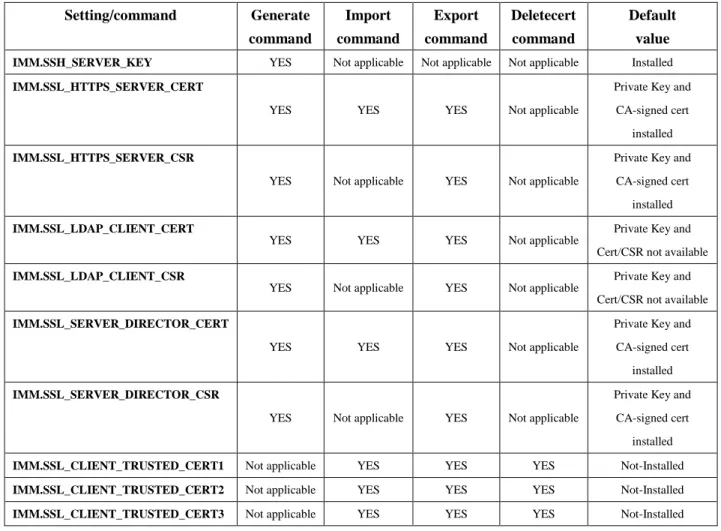
The following table describes the IMM supported commands for Certificate management. Table 1 Certification Settings
Setting/command Generate command Import command Export command Deletecert command Default value
IMM.SSH_SERVER_KEY YES Not applicable Not applicable Not applicable Installed
IMM.SSL_HTTPS_SERVER_CERT
YES YES YES Not applicable
Private Key and CA-signed cert
installed
IMM.SSL_HTTPS_SERVER_CSR
YES Not applicable YES Not applicable
Private Key and CA-signed cert
installed
IMM.SSL_LDAP_CLIENT_CERT
YES YES YES Not applicable
Private Key and Cert/CSR not available
IMM.SSL_LDAP_CLIENT_CSR
YES Not applicable YES Not applicable
Private Key and Cert/CSR not available
IMM.SSL_SERVER_DIRECTOR_CERT
YES YES YES Not applicable
Private Key and CA-signed cert
installed
IMM.SSL_SERVER_DIRECTOR_CSR
YES Not applicable YES Not applicable
Private Key and CA-signed cert
installed
IMM.SSL_CLIENT_TRUSTED_CERT1 Not applicable YES YES YES Not-Installed
IMM.SSL_CLIENT_TRUSTED_CERT2 Not applicable YES YES YES Not-Installed
IMM.SSL_CLIENT_TRUSTED_CERT3 Not applicable YES YES YES Not-Installed
IMM.*_CERT
These commands allow you to generate a self-signed certificate or to import a certificate signed by a certificate authority (CA). If you want to generate a CA-signed certificate, you must first generate a certificate signing request
(CSR) file and have it signed by the certificate authority. The signed-certificate can then be imported into the IMM. (A certificate authority is an entity that issues digital certificates to other entities to allow them to prove their identity to others.)
IMM.SSL_CLIENT_TRUSTED_CERT1/2/3
Allow both self-signed and certificate authority-signed certificates to be imported. If the certificate already exists, you must delete it before you import another.
IMM.SSL_Server_Enable
Description: Enable or disable SSL for the web interface.
Default value: Enabled.
Dependency: In order to enable it, a valid SSL certificate must be in place first, which means you must generate or import the IMM.SSL_HTTPS_SERVER_CERT first.
IMM.CIMXMLOverHTTPS_Enable
Description: Enable or disable SSL for CIM Over HTTPS.
Default value: Enabled.
Dependency: In order to enable it, a valid SSL certificate must be in place first, which means you must generate or import the IMM.SSL_SERVER_DIRECTOR_CERT first.
IMM.SSL_Client_Enable
Description: Enable or disable SSL for the LDAP Client.
Default value: Enabled.
Dependency: In order to enable it, a valid SSL certificate and at least one SSL Client trusted certificate must be in place first, which means you must generate or import the IMM.SSL_LDAP_CLIENT_CERT and set at least one of the IMM.SSL_CLIENT_TRUSTED_CERT1/2/3 first.
IMM.SSH_Enable
Description: Enable or disable the SSH server.
Default value: Enabled.
Dependency: In order to enable it, a valid SSH server key must be installed, which means you must generate the
IMM.SSH_SERVER_KEY first.
3.1.2 Example
Generate a self-signed certificate Command line:
asu generate IMM.SSL_HTTPS_SERVER_CERT asu.xml
Output:
Certificate was generated successfully!
Generate a certificate signing request (CSR) Command line:
Output:
Certificate was generated successfully!
Exporting a certificate signing request Command line:
asu export IMM.SSL_HTTPS_SERVER_CSR asu_csr.der
Output:
Certificate was exported successfully!
(The asu_csr.der file in saved in the current directory.) Importing a signed certificate
The certificate to be imported should be in DER format.
Command line:
asu import IMM.SSL_HTTPS_SERVER_CERT asu_cert.der
Output:
Certificate was imported successfully! Deleting a certificate Command line:
asu deletecert IMM.SSL_CLIENT_TRUSTED_CERT1
Output:
Certificate was deleted successfully! Enable SSL for the web interface
Show IMM.SSL_HTTPS_SERVER_CERT first. If it indicates a certificate is installed, you can enable
IMM.SSL_Server_Enable directly. Otherwise, you need to generate a self-signed certificate or import a signed certificate for IMM.SSL_HTTPS_SERVER_CERT first.
Command line:
asu import IMM.SSL_HTTPS_SERVER_CERT asu_cert.der asu set IMM.SSL_Server_Enable enable
3.2 Policy Settings
IMM.PowerRestorePolicyDescription:Determine the mode of operation if a power loss occurs. It can also be configured via the BIOS F1 setup console.
Default value: Restore.
IMM.ThermalModePolicy
Description: Set the current performance mode of the system.
IMM.PSUOversubscriptionMode
Description: Set the Power Supply OverSubscription Mode.
Default value: Disabled.
Dependency: This mode will take effect after the system reboot.
Restriction: It is only supported on IBM System x3750M4.
3.3 Power Settings
IMM.PowerOnAtSpecifiedTimeDescription:Schedule your server to be automatically powered up on a daily or weekly basis.
Default value: 0:0:0:0:0.
Restriction: The format is "DD:MM:YYYY:HH:mm". Set "0:0:0:0:0" to disable.
IMM.ShutdownAndPowerOff
Description: Schedule the OS to be shut down and the server to be powered off on a daily or weekly basis.
Restriction: The format is "WD:HH:MM" (WD = WeekDay, 0-7 is valid, 0 means everyday). Set "WD:HH:MM" to disable schedule. Numerical values greater than zero must not start with a leading zero. For instance, "0:15:2"; "0:2:3" and "0:2:15" are valid, but "0:02:03"; "0:15:02" and "0:05:12" are invalid.
Default value: WD:HH:MM.
Difference from IMM1: In IMM2, use "WD:HH:MM" to disable schedule, but in IMM1, use "0:0:0" to disable schedule. On IMM2 systems, a “0:0:0” value indicates a daily power action that is performed at midnight.
IMM.PowerOnServer
Description: Schedule the server to be powered on, on a daily or weekly basis.
Restriction: The format is "WD:HH:MM" (WD = WeekDay, 0-7 is valid, 0 means everyday). Set "WD:HH:MM" to disable schedule. Numerical values greater than zero must not start with a leading zero. For instance, "0:15:2"; "0:2:3" and "0:2:15" are valid, but "0:02:03"; "0:15:02" and "0:05:12" are invalid.
Default value: WD:HH:MM.
Difference from IMM1: In IMM2, use "WD:HH:MM" to disable schedule, but in IMM1, use "0:0:0" to disable schedule. On IMM2 systems, a “0:0:0” value indicates a daily power action that is performed at midnight.
IMM.ShutdownAndRestart
Description: Schedule the OS to be shut down and the server to be powered off on a daily or weekly basis.
Restriction: The format is "WD:HH:MM" (WD = WeekDay, 0-7 is valid, 0 means everyday). Set "WD:HH:MM" to disable schedule. Numerical values greater than zero must not start with a leading zero. For instance, "0:15:2"; "0:2:3" and "0:2:15" are valid, but "0:02:03"; "0:15:02" and "0:05:12" are invalid.
Default value: WD:HH:MM.
Difference from IMM1: In IMM2, use "WD:HH:MM" to disable schedule, but in IMM1, use "0:0:0" to disable schedule. On IMM2 systems, a “0:0:0” value indicates a daily restart action that is performed at midnight.
IMM.OSWatchdog
Description: Specify the interval in minutes that the IMM subsystem will check to confirm that the operating system is running properly.
Default value: Disabled.
IMM.LoaderWatchdog
Description: Specify the interval in minutes that the IMM will wait for the server operating system to load before it determines that a problem occurred.
Default value: Disabled.
IMM.PowerOffDelay
Description: Specify the interval in minutes that the IMM will wait for the operating system to shut down before powering off the server.
Default value: Disabled.
3.5 Date and Time Settings
Restriction: Time synchronization is performed by the Chassis Management Module on Flex System. These settings are supported on Rack servers but are not supported on Flex System.
3.5.1 Settings Description
IMM Time Zone & IMM Daylight Savings Time setting.
Description: Use IMM.TimeZone and IMM.DST to display or set the GMT offset, and DST settings. The supported values for DST for IMM are described in Table 2 TimeZone and DST.
Table 2 TimeZone and DST
IMM.TimeZone IMM.DST Options
GMT+3:00, GMT+4:00, GMT+4:30, GMT+5:00. GMT+5:30, GMT+5:45, GMT+6:00, GMT+6:30, GMT+7:00, GMT+8:00, GMT+9:00, GMT+11:00, GMT+13:00, GMT-12:00, GMT-10:00, GMT-4:30,
GMT-2:00
Off
GMT+2:00 Off/Eastern Europe/Minsk/Turkey/Beirut/Amman/Jerusalem GMT-7:00 Off/Mountain/Mazatlan
GMT-6:00 Off/Mexico/Central North America GMT-5:00 Off/Cuba/Eastern North America GMT-4:00 Off/Asuncion/Cuiaba/Santiago/Canada_Atlantic GMT-3:00 Off/Godthab/Montevideo/Brazil East GMT+0:00, GMT+1:00, GMT+3:30, GMT+9:30.
GMT+10:00, GMT+12:00,
GMT-11:00. GMT-9:00, GMT-8:00, GMT-8:30. GMT-3:30, GMT-1:00,
Default value: IMM.TimeZone - GMT+0:00; IMM.DST - Off..
Difference from IMM1: In IMM1, the option for IMM.DST is only Yes/No. If you want to modify IMM.TimeZone, IMM.DST needs to be set 'No' first. Under the 'GMT+3:00, GMT+4:00, GMT+4:30, GMT+5:00. GMT+5:30, GMT+5:45, GMT+6:00, GMT+6:30, GMT+7:00, GMT+8:00, GMT+9:00, GMT+11:00, GMT+13:00, GMT-12:00, GMT-10:00, GMT-4:30' timezones, IMM.DST cannot be enabled.
Displays and configures the Network Time Protocol - IMM.NTPAutoSynchronization,
IMM.NTPHost1, IMM.NTPHost2, IMM.NTPHost3, IMM.NTPHost4, IMM.NTPFrequency.
IMM.NTPAutoSynchronization
Description: NTP Auto Synchronization function.
Default value: Disabled.
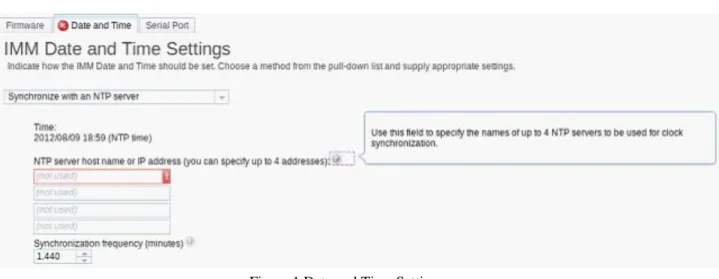
Dependency: If you want to enable it, at least one of the NTP server hostnames or IP addresses (IMM.NTPHost1/2/3/4) must be set first. (Refer to Figure 1 Date and Time Settings.)
Figure 1 Date and Time Settings
IMM.NTPHost1/2/3/4
Description: NTP server host name or IP address.
Restriction: If the value is an IP address, the format should be [0-255].[0-255].[0-255].[0-255]. If the value is a host name, the format should begin with and end with a letter. The characters ~!@#$%^&*()+={}[]:;"'<><.?/\| are not allowed. (Only the "_" and "-" characters are permitted.)
Default value: NULL.
Difference from IMM1: The IMM1 supports only one NTPserver (IMM.NTPHost) and there are no setting restrictions.
IMM.NTPFrequency
Description: Use to specify the "NTP update frequency" (in minutes).
Default value: 1440.
3.5.2 Example
Set the IMM Time Zone to "GMT+2:00", and configure the DST based on this timezone Correct setting method:
Command line:
asu set IMM.TimeZone "GMT+2:00" asu set IMM.DST "Eastern Europe"
Output:
Command completed successfully Set NTP enable
Command line:
asu show imm | grep NTP
Output:
IMM.NTPAutoSynchronization=Disabled IMM.NTPHost1=
IMM.NTPHost2= IMM.NTPHost3= IMM.NTPHost4=
IMM.NTPFrequency=1440
Error setting method:
set IMM.NTPAutoSynchronization Enabled
Output:
Failed to set the following settings:
IMM.NTPAutoSynchronization (Error code : 82) Command completed with error.
Cause:
Must set one of IMM.NTPHost1/2/3/4 first.
Correct setting method: Command line:
set IMM.NTPHost1 192.168.5.1
set IMM.NTPAutoSynchronization Enabled set IMM.NTPFrequency 1440
Output:
3.6 Account settings
3.6.1 Global Login Settings
Restriction: These setting are configured by the Chassis Management Module on Flex System. These settings are supported on Rack servers but are not supported on Flex System.
IMM.User_Authentication_Method
Description: This setting specifies the method that will be used for authenticating a user. Users can be authenticated locally, through an LDAP server, or by attempting the other method if the first authentication method fails.
Default value: Local only.
IMM.WebTimeout
Description: Specify whether or not the session will timeout after a number of minutes of inactivity.
Default value: 20 minutes.
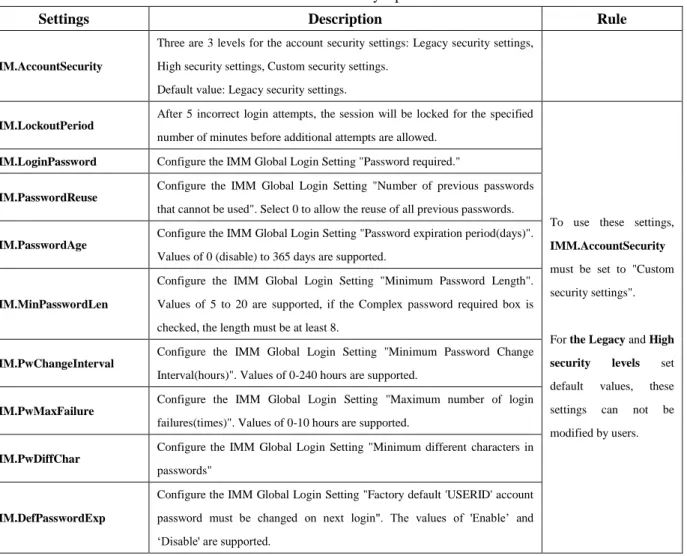
There are additional settings for the account security level. See Table 3 Account Security Options. Table 3 Account Security Options
Settings Description Rule
IMM.AccountSecurity
Three are 3 levels for the account security settings: Legacy security settings, High security settings, Custom security settings.
Default value: Legacy security settings.
IMM.LockoutPeriod
After 5 incorrect login attempts, the session will be locked for the specified number of minutes before additional attempts are allowed.
To use these settings,
IMM.AccountSecurity
must be set to "Custom security settings". For the Legacy and High security levels set default values, these settings can not be modified by users.
IMM.LoginPassword Configure the IMM Global Login Setting "Password required."
IMM.PasswordReuse
Configure the IMM Global Login Setting "Number of previous passwords that cannot be used". Select 0 to allow the reuse of all previous passwords.
IMM.PasswordAge
Configure the IMM Global Login Setting "Password expiration period(days)". Values of 0 (disable) to 365 days are supported.
IMM.MinPasswordLen
Configure the IMM Global Login Setting "Minimum Password Length". Values of 5 to 20 are supported, if the Complex password required box is checked, the length must be at least 8.
IMM.PwChangeInterval
Configure the IMM Global Login Setting "Minimum Password Change Interval(hours)". Values of 0-240 hours are supported.
IMM.PwMaxFailure
Configure the IMM Global Login Setting "Maximum number of login failures(times)". Values of 0-10 hours are supported.
IMM.PwDiffChar
Configure the IMM Global Login Setting "Minimum different characters in passwords"
IMM.DefPasswordExp
Configure the IMM Global Login Setting "Factory default 'USERID' account password must be changed on next login". The values of 'Enable’ and ‘Disable' are supported.
IMM.FirstAccessPwChange
Configure the IMM Global Login Setting "Change Password On First Access". The values of 'Enable’ and ‘Disable' are supported.
Difference from IMM1:
IMM.LockoutPeriod is not under the restriction of the Custom Security State.
IMM.MinPasswordLen only supports values of 1-4 under the Custom Security State, and in the Legacy Security State, the value is '0'. In the High Security State, the value is '4'.
3.6.2 User Account
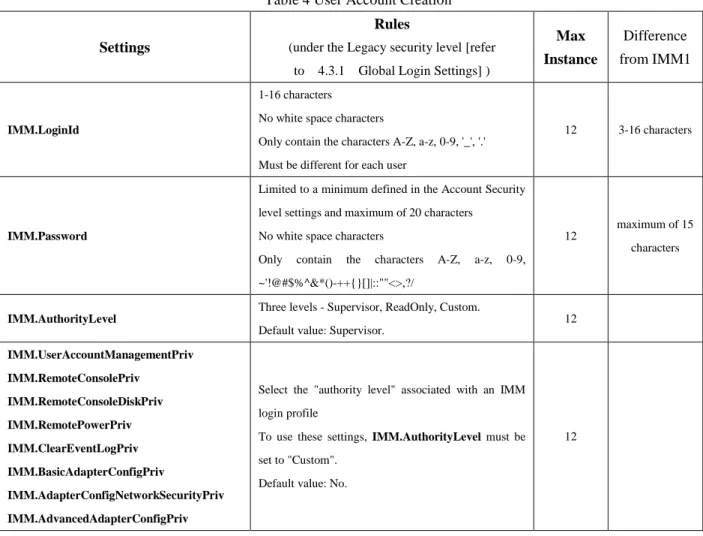
To create a new user account, use IMM.LoginId.*, IMM.Password.*, and IMM.AuthorityLevel.* (* = instance Id).
Table 4 User Account Creation
Settings
Rules
(under the Legacy security level [refer to 4.3.1 Global Login Settings] )
Max Instance Difference from IMM1 IMM.LoginId 1-16 characters
No white space characters
Only contain the characters A-Z, a-z, 0-9, '_', '.' Must be different for each user
12 3-16 characters
IMM.Password
Limited to a minimum defined in the Account Security level settings and maximum of 20 characters
No white space characters
Only contain the characters A-Z, a-z, 0-9, ~'!@#$%^&*()-++{}[]|::""<>,?/
12
maximum of 15 characters
IMM.AuthorityLevel
Three levels - Supervisor, ReadOnly, Custom. Default value: Supervisor.
12 IMM.UserAccountManagementPriv IMM.RemoteConsolePriv IMM.RemoteConsoleDiskPriv IMM.RemotePowerPriv IMM.ClearEventLogPriv IMM.BasicAdapterConfigPriv IMM.AdapterConfigNetworkSecurityPriv IMM.AdvancedAdapterConfigPriv
Select the "authority level" associated with an IMM login profile
To use these settings, IMM.AuthorityLevel must be set to "Custom".
Default value: No.
12
IMM.LoginId is the key record of this group, so it is used to create a new account and delete the old account.
Example:
Create a new account Command line:
asu set IMM.LoginId.2 "test" → create account asu set IMM.Password.2 "PASSW0RD" → modify password
(The order can not be reversed)
Output:
Command completed successfully. Delete account
Command line:
asu delete IMM.LoginId.2 → delete Account No.2
Output:
Command completed successfully.
3.6.3 Relationship between 'User Account' and 'Global Login Settings'
Under different account security level (Legacy/High/Custom), the rules for username and password (IMM.LoginId and IMM.Password) are different. If you want to create a new account or modify an exist account, you need to follow different rules.
Example: Under the High Security Level
Step 1: You can use ASU show the IMM Global Login Settings:
Command line:
asu show imm
Output:
...
IMM.User_Authentication_Method=Local first, then LDAP IMM.LockoutPeriod=60
IMM.WebTimeout=User Picks timeout IMM.AccountSecurity=High security settings IMM.LoginPassword=Enabled
IMM.PasswordReuse=5 Passwords IMM.PasswordAge=90
IMM.MinPasswordLen=8 IMM.PwChangeInterval=24 IMM.PwMaxFailure=5 IMM.PwDiffChar=2
IMM.DefPasswordExp=Enabled IMM.FirstAccessPwChange=Enabled
IMM.RemoteAlertRecipient_Status.1=Disabled ...
Step 2: Based on these settings, the rules for a user account are: a password is required; complex passwords are required; the password expiration period is 90 days; passwords must be more than 8 characters in length; the 5 previous passwords cannot be reused; 24 hours must expire before the password can be change again; the account
will be locked out on 5 consecutive login failures; a new password must have at least 2 different characters than the previous password; the factory default "USERID" account password must be changed on next login; a new user must change the password on the first access. Additionally, complex passwords are required and must adhere to the following rules:
Password must contain characters in at least 3 of the following 4 categories, at least one lower case Alpha character
at least one upper case Alpha character at least one Numeric character
at least one Special character
Example of a compliant password: Command line:
asu set IMM.LoginId.5 immtest asu set IMM.Password.5 IMMtest12
Output:
Command completed successfully.
Example of a non-compliant password: Command line:
asu set IMM.Password.5 immtest12
Output:
Failed to set the following settings: IMM.Password.5 (Error code : 80) Command completed with error.
Cause of the failed password change attempt:
Passwords must contain characters in at least 3 of the 4 categories: one lower case Alpha character, one upper case Alpha character, one Numeric character, one Special character. In this example the password only uses characters in two of the categories.
3.6.4 Group Profiles
Restriction: The LDAP accounts are configured by the Chassis Management Module on Flex System. These settings are supported on Rack servers but are not supported on Flex System.
Table 5 Group Profiles
Settings Rules Max Instance
IMM.GRP_GroupName
Specify the group id for this group profile. Limited to 63 characters
Group IDs should be the same as their counterparts configured on LDAP servers
16
Default value: Supervisor.
IMM.GRP_UserAccountManagementPriv IMM.GRP_RemoteConsolePriv
IMM.GRP_RemoteConsoleDiskPriv IMM.GRP_RemotePowerPriv IMM.GRP_ClearEventLogPriv IMM.GRP_BasicAdapterConfigPriv IMM.GRP_NetworkSecurityPriv IMM.GRP_AdvancedAdapterConfigPriv
Select the "authority level" associated with an IMM login profile To use these settings, IMM.GRP_AuthorityLevel must be set to "Custom".
Default value: No.
16
3.7 Remote Alert
3.7.1 Remote Alert Recipients
Use these settings to configure individual alert recipients. Up to 12 unique recipients can be defined. By default no recipients are defined.
IMM.RemoteAlertRecipient_Status
Description: Configure the IMM Remote Alert Recipient "Status." Use this field to determine whether alerts will be sent to this recipient.
IMM.RemoteAlertRecipient_Name
Description: Configure the IMM Remote Alert Recipient "Name". Also use this field to delete one recipient.
IMM.RemoteAlertRecipient_Method
Description: Configure the IMM Remote Alert Recipient setting "method": 0 - Email Notification, 1- Syslog Notification.
IMM.RemoteAlertRecipient_Email
Description: Configure the IMM Remote Alert Recipient "E-mail address (userid@hostname)". This setting is only used for the 'Email notification' method.
IMM.RemoteAlertRecipient_Address
Description: Configure the IMM Remote Alert Recipient "IP address". This setting is only used for the 'Syslog Notification' method.
IMM.RemoteAlertRecipient_Port
Description: Configure the IMM Remote Alert Recipient "Port". This setting is only used for the 'Syslog Notification' method.
IMM.RemoteAlertRecipient_IncludeEventLog
Description: Configure the IMM Remote Alert Recipient setting "Include event log with e-mail alerts." Select Enabled to attach the event log to all e-mail alert notifications.
Description: Send an alert for Critical events.
IMM.RemoteAlertRecipient_WarningAlerts Description: Send an alert for Warning events.
IMM.RemoteAlertRecipient_SystemAlerts Description: Send an alert for System events.
IMM.RemoteAlertRecipient_CriticalAlertsCategory
Description: Send an alert to the recipient for certain categories of critical events: "all", "none", "custom:temp|vlot|powr|disk|fans|cpu|memo|incp|prrd|otal".
IMM.RemoteAlertRecipient_WarningAlertsCategory
Description: Send an alert to the recipient for certain categories of warning events: "all", "none", "custom:temp|vlot|powr|disk|fans|cpu|memo|incp|prrd|otal".
IMM.RemoteAlertRecipient_SystemAlertsCategory
Description: Send an alert to the recipient for certain categories of system events: "all", "none", "custom:temp|vlot|powr|disk|fans|cpu|memo|incp|prrd|otal".
3.7.2 Remote Alert Settings
IMM.RetryLimitDescription: Specify the number of additional times that the IMM subsystem will retry an attempt to send an alert. This value applies to all alerts except for SNMP. SNMP alerts are attempted only once.
Default value: 5 times.
IMM.EntriesDelay
Description: Specify the time interval (in minutes) that the IMM subsystem will wait before sending an alert to the next recipient in the list.
Default value: 0.5 minutes.
IMM.RetryDelay
Description: Specify the time interval (in minutes) that the IMM subsystem will wait between retries to send an alert.
Default value: 0.5 minutes.
3.8 Server Properties
3.8.1 Settings Description
IMM.IMMInfo_NameDescription: Configure a name for this IMM.
Default value: NULL.
IMM.IMMInfo_Contact
Description: Specify the name of the person who should be contacted with regards to this system.
Restriction: Limited to 47 characters, and cannot contain these characters &<>
Default value: NULL.
IMM.IMMInfo_Location
Description: Identify where this system is located.
Restriction: Limited to 47 characters, and cannot contain these characters !~`@#%&*()/:;"'<>{}[]?=|+
Default value: NULL.
IMM.IMMInfo_Lowest_U
Description: Lowest unit of system in a rack where the system is located.
Restriction: 0 - 99, 0 means N/A.
Default value: 0.
3.9 Network Settings
Restriction: There is no network access to the IMM on BladeCenter.These network settings are not supported on Blade Servers.
3.9.1 Ethernet
Global settingIMM.HostName1,
Description: Use this setting to define a unique hostname for the IMM.
Restriction: Limited to 63 characters, and cannot contain a '.' in it.
Difference from IMM1: In IMM2, changes will take effect immediately. In IMM1, changes will take effect after next restart of IMM.
IMM.SharedNicMode,
Description: Specify whether the IMM should use the dedicated systems management network or the shared network port.
Restriction: This is not supported on Flex System. Some rack servers may not provide a dedicated systems management network port.
Difference from IMM1: In IMM2, changes will take effect immediately. In IMM1, changes will take effect after next restart of IMM.
IPv4
IMM.Network1,
Difference from IMM1: In IMM2, changes will take effect immediately. In IMM1, changes will take effect after next restart of IMM.
IMM.HostIPAddress1,
Restriction: [0-255].[0-255].[0-255].[0-255] (except [0-255].0.0.0), no spaces.
Difference from IMM1:
In IMM1, valid values are [0-255].[0-255].[0-255].[0-255].
In IMM2, changes will take effect immediately. In IMM1, changes will take effect after next restart of IMM.
IMM.HostIPSubnet1,
Restriction: [0-255].[0-255].[0-255].[0-255] (except 0.0.0.0 and 255.255.255.255), no spaces, bits that are set contiguously starting at the leftmost bit (for example, 0.255.0.0 is not valid).
Difference from IMM1:
In IMM1, valid values are [0-255].[0-255].[0-255].[0-255].
In IMM2, changes will take effect immediately. In IMM1, changes will take effect after next restart of IMM.
IMM.GatewayIPAddress1,
Restriction: [0-255].[0-255].[0-255].[0-255], no spaces, no consecutive periods.
Difference from IMM1: In IMM2, changes will take effect immediately. In IMM1, changes will take effect after next restart of IMM.
IMM.DHCP1,
Description: Configure whether or not DHCP will be used by the IMM to get an IP address. There are three possible modes - Disabled, Enabled, DHCP then try static IP configuration.
Difference from IMM1: In IMM2, changes will take effect immediately. In IMM1, changes will take effect after next restart of IMM.
The following settings are read-only,
IMM.DHCPAssignedHostname (has the same value as IMM.HostName1, when shown)
IMM.DHCPAssignedHostIP1 IMM.DHCPAssignedGateway1 IMM.DHCPAssignedNetMask1 IMM.DHCPAssignedDomainName IMM.DHCPAssignedPrimaryDNS1 IMM.DHCPAssignedSecondaryDNS1 IMM.DHCPAssignedTertiaryDNS1
IPv6
IMM.IPv6Network1,
Description: Enable or disable IPv6 support on the IMM.
Description: Enable or disable static configuration settings for IPv6. If enabled, the static IPv6 IP address will be used.
IMM.IPv6HostIPAddressWithPrefix1,
Description: Specify the IMM static IPv6 IP configuration "IPv6 IP address". This setting consists of an IPv6 address and a prefix length which is between 1 and 128.
Restriction: The valid format is ipv6-address/prefix-length, like 2001:411:3eff::123/64.
IMM.IPv6GatewayIPAddress1,
Description: Specify the IMM static IPv6 IP configuration "IPv6 Gateway address".
IMM.IPv6DHCP1,
Description: Enable or disable DHCPv6 assigned configuration on the IMM.
IMM.IPv6Stateless1,
Description: Enable or disable Stateless auto-configuration on the IMM. The following settings are read-only,
IMM.IPv6LinkLocalIPAddress1
IMM.IPv6StatelessIPAddress1 (It will return a maximum of 16 Stateless IPv6 addresses)
IMM.IPv6StatelessGateway1 IMM.IPv6DHCPAssignedHostIP1 IMM.IPv6DHCPAssignedDomainName IMM.IPv6DHCPAssignedPrimaryDNS1 IMM.IPv6DHCPAssignedSecondaryDNS1 IMM.IPv6DHCPAssignedTertiaryDNS1
Advanced Ethernet
IMM.AutoNegotiate1,
Description: Configure the IMM Advanced Ethernet Setup to "Auto Negotiate" the speed of the Ethernet connection.
Restriction: It is not supported on Flex System.
Default value: Yes.
Dependency: If it is set to Yes, both IMM.LANDataRate1 and IMM.Duplex1 values are suppressed. If it’s set to
No, the values for those two settings will be effective.
IMM.LANDataRate1,
Description: "Data rate" specify the amount of data to be transferred per second over your LAN connection.
Default value: Auto.
IMM.Duplex1,
Default value: Auto.
IMM.MTU1,
Description: Configure the IMM Advanced Ethernet Setup "Maximum transmission unit".
Restriction: 68 - 1500 for IPv4, 1280 - 1500 for IPv6.
Default value: 1500.
IMM.MACAddress1,
Description: Configure the IMM Advanced Ethernet Setup "Locally administered MAC address." Use this field to specify a physical address for this IMM subsystem. If a value is specified, this MAC address will override the burned-in MAC address.
Restriction: The locally administered address must be a hexadecimal value between 000000000000 -
FFFFFFFFFFFF. This value must be in the form XX:XX:XX:XX:XX:XX where "X" is a number between 0 - 9 and A - F. This IMM subsystem does not allow use of a multicast address. A multicast address has the least significant bit of the first byte set to 1. The first byte must, therefore, be an even number.
IMM.BurnedInMacAddress,
Description: This is the MAC address burned in during manufacturing. It’s readonly.
3.9.2 SNMP - Simple Network Management Protocol
IMM.SNMPv1AgentDescription:Enable/Disable the IMM Simple Network Management Protocol "SNMPv1 agent".
Restriction: It is not supported on Flex System.
Default value: Disabled.
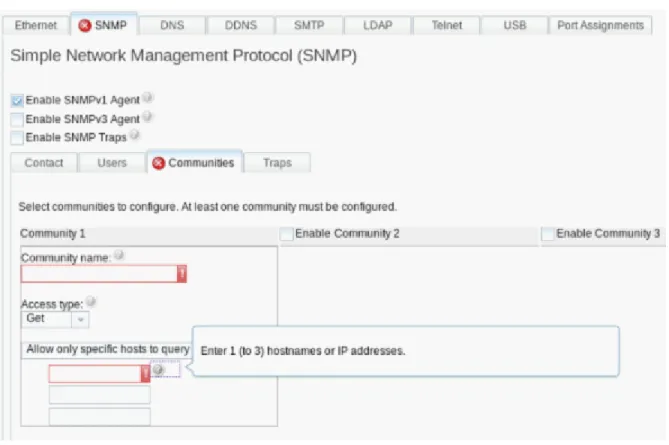
Dependency: To enable the SNMPv1 agent, you must meet the following criteria (Refer to Figure 2 SNMPv1 Settings),
IMM.IMMInfo_Contact is specified.
IMM.IMMInfo_Location is specified.
At least one of SNMPv1 Communities (Maximum is 3)configured,
One Community name (IMM.Community_Name)is specified, One Access type (IMM.Community_AccessType.1/2/3) is chosen,
One valid IP address (IMM.Community_HostIPAddress*.*, *=1~3)is specified,
IMM.Community_HostIPAddress*.* (*=1~3) Description: Enable hostname or IP address.
Restriction: If the value is an IP address, the format should be [0-255].[0-255].[0-255].[0-255] (except for 0.0.0.0). If the value is a host name, the format should begin with and end with a letter, and cannot contain
~!@#$%^&*()+={}[]:;"'<><.?/\| (only the "_" and "-" special characters are permitted).
Figure 2 SNMPv1 Settings
IMM.SNMPv3Agent Default value: Disabled.
Dependency:
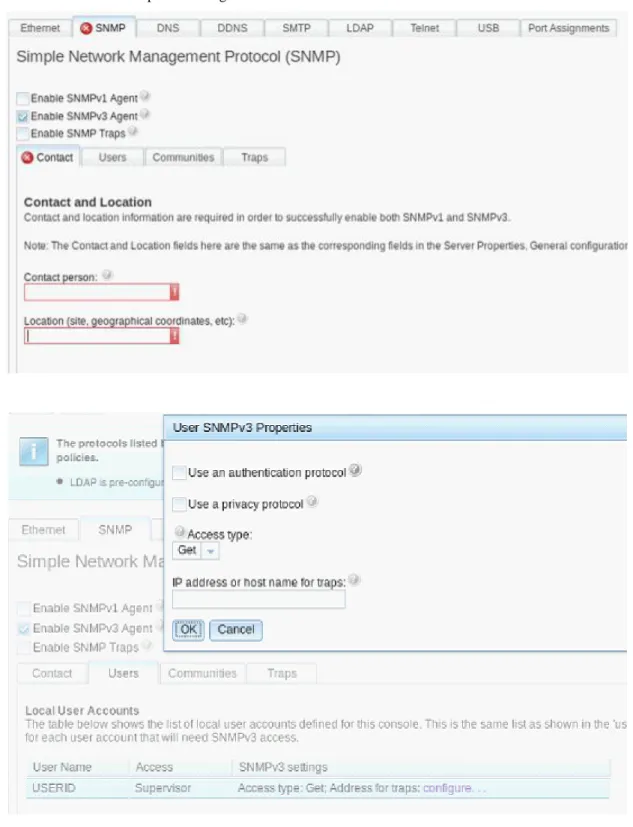
To enable the SNMPv3 agent, you must meet the following criteria (Refer to Figure 3 SNMPv3 Settings),
IMM.IMMInfo_Contact is specified.
IMM.IMMInfo_Location is specified.
You must configure SNMPv3 for each user account that will need SNMPv3 access:
IMM.SNMPv3_AuthenticationProtocol
Description: Specify the IMM SNMPv3 "Authentication Protocol", three supported methods, HMAC-MD5, HMAC-SHA.
IMM.SNMPv3_PrivacyProtocol
Description: Specify the IMM SNMPv3 "Privacy Protocol", three supported methods, NONE, CBC-DES and AES
IMM.SNMPv3_PrivacyPassword
Description:Specify the IMM SNMPv3 "Privacy Password."
IMM.SNMPv3_AccessType
Description:Specify either "Get" or "Set" as the access type.
Description:Specify the trap destination for the user. This is can be an IP address or hostname.
Restriction: If the value is an IP address, the format should be [0-255].[0-255].[0-255].[0-255]. If the value is a host name, the format should begin with and end with a letter, and cannot contain ~!@#$%^&*()+={}[]:;"'<><.?/\|
(Only the "_" and "-" special characters are permitted).
Difference from IMM1: No special setting restriction.
IMM.SNMPTraps
Description: SNMP traps. The SNMP agent notifies the management station about events on the system using traps.
Default value: Disabled.
You can configure SNMP to filter the events, based on type (The SNMP Alert settings are global for all SNMP traps):
IMM.SNMPAlerts_CriticalAlert
Description: Configure the IMM SNMP Alerts Settings to send traps on "Critical Alerts".
IMM.SNMPAlerts_WarningAlert
Description: Configure the IMM SNMP Alerts Settings to send traps on "Warning Alerts".
IMM.SNMPAlerts_SystemAlert
Description: Configure the IMM SNMP Alerts Settings to send traps on "System Alerts".
3.9.3 DNS - Domain Name System
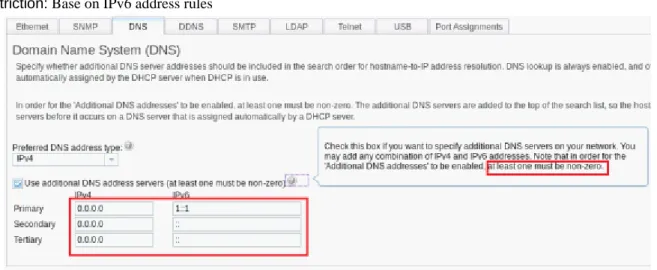
IMM.DNS_EnableDependency: Before enabling the IMM Domain Name System (DNS), you need to add at least one of the 3 DNS server IP addresses (IPv4 or Pv6) ( IMM.DNS_IP_Address1/2/3 or IMM.IPv6DNS_IP_Address1/2/3 ). (Refer to Figure 4 DNS Settings)
IMM.DNS_IP_Address1/2/3
Restriction: Format should be [0-255].[0-255].[0-255].[0-255], no white spaces, and [0-255].0.0.0 is not a valid value.
Difference from IMM1: [0-255].[0-255].[0-255].[0-255], no white spaces.
IMM.IPv6DNS_IP_Address1/2/3 Restriction: Base on IPv6 address rules
3.9.4 SMTP - Simple Mail Transfer Protocol
IMM.SMTP_ServerNameDescription: Configure the IMM "SMTP server host name or IP address."
Restriction: If the value is an IP address, the format should be [0-255].[0-255].[0-255].[0-255]. If the value is a host name, the format should begin with and end with a letter, and cannot contain ~!@#$%^&*()+={}[]:;"'<><.?/\|
(Only the "_" and "-" special characters are permitted).
Difference from IMM1: No special setting restriction.
IMM.SMTP_Port
Description: SMTP port number.
Restriction: 1 - 65535.
Difference from IMM1: There are three other SMTP settings in IMM1: IMM.SMTP_Authentication, IMM.SMTP_UserName, IMM.SMTP_Password, to configure the IMM "SMTP Authentication".
3.9.5 LDAP - Lightweight Directory Access Protocol Client
Restriction: The LDAP settings are configured by the Chassis Management Module on Flex System. These settings are supported on Rack servers but are not supported on Flex System.
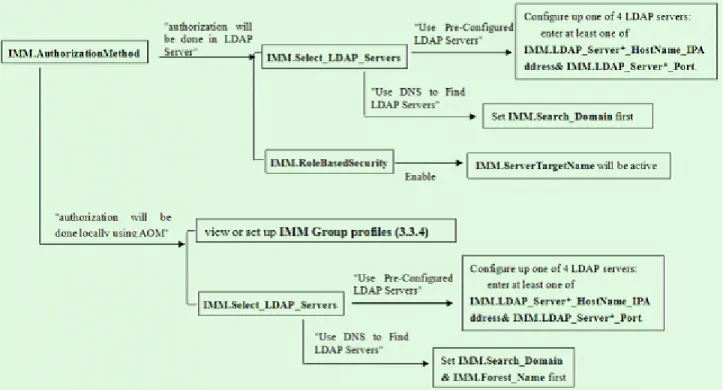
The following figure describes the relationship between IMM LDAP settings. (Please follow the map below to ensure that the LDAP settings are configured properly.)
Figure 5 Diagram for LDAP Settings Effective Routines
IMM.AuthorizationMethod
Dependency: If authorization is done locally using AOM (Authentication-Only Mode) the IMM will be
responsible for providing all authorization information. Users can view or set up the authorization (See 4.3.4Group profiles).
IMM.Select_LDAP_Servers
Description: Configure how to find LDAP Servers either using DNS or pre-configured servers.
IMM.LDAP_Server*_HostName_IPAddress (* - 1-4)
Description: Configure the IMM "LDAP Server Fully Qualified Host Name or IP Address".
Restriction: If the value is an IP address, the format should be [0-255].[0-255].[0-255].[0-255]. If the value is a host name, the format should begin with and end with a letter, and cannot contain ~!@#$%^&*()+={}[]:;"'<><.?/\|
(Only the "_" and "-" special characters are permitted).
IMM.LDAP_Server*_Port (* - 1-4)
Description: Configure the IMM "LDAP Server Port".
Restriction: 1 - 65535.
Difference from IMM1: In IMM1, there is only one setting - IMM.LDAP_Server*_HostName_IPAddress (* - 1-4) to set LDAP Server host name or IPAddress and port. The format is '(hostname or IPaddress): port', like
192.1.1.1:390.
IMM.Forest_Name
Description: Configure active directory forest name.
IMM.Search_Domain
Description: Configure the IMM LDAP Client DNS "Search Domain".
IMM.RoleBasedSecurity
Description: Enable/Disable enhanced role-based security for Active Directory Users.
IMM.ServerTargetName
Description: Configure the target name for this particular IMM (Free-formatted).
Dependency: It will be active when IMM.RoleBasedSecurity enabled.
IMM.Root_DN
Description: Configure LDAP Miscellaneous Parameters - Root Distinguished Name.
IMM.UID_Search
Description: Configure LDAP Miscellaneous Parameters - UID Search Attribute.
IMM.BindingMethod
Description: Configure LDAP Miscellaneous Parameters - Binding Method. There are three options, Anonymous Bind, Bind with Configured Credentials (need to set IMM.ClientDN, IMM.Client_Password), Bind using Login Credentials.
IMM.GroupFilter
IMM.Group_Search_Attribute IMM.Login_Permission_Attribute
3.9.6 Telnet
IMM.TelnetSessions
Description: Set the IMM Telnet connection count.
Restriction: Value can be disable, 1, or 2. This setting is not supported on Flex System.
3.9.7 USB
IMM.LanOverUsb
Description: Configure the IMM setting "Disallow commands on USB interface".
Dependency: User can set IMM.PortForwarding when it’s enabled.
IMM.PortForwarding
Description: Enable/Disable external Ethernet to Ethernet over USB port forwarding.
Dependency: Need to configure one port mapping (in the Web or Command Line Interface) first.
3.10 Serial Port
IMM.SerialRedirectionCLIMode1
Description:Specify the IMM Serial Redirect "CLI mode" for the Serial Port.
Default value: CLI active / user defined keystroke sequences.
Restriction: It is not supported on Blade Servers.
IMM.SerialExitCLIKeySequence
Description: Specify the IMM Serial Redirect "'Exit CLI' key sequence" for the Serial Port, which will be used to exit the CLI interface.
Default value: "^[(".
Restriction: It is not supported on Blade Servers.
IMM.SerialBaudRate
Description:Specify the IMM Serial Port "Baud rate".
Default value: 115200.
Restriction: It is not supported on Blade Servers.
3.11 Port Control
3.11.1 Port Control
IMM.HttpPortControl IMM.HttpsPortControl
IMM.CIMOverHttpPortControl IMM.CIMOverHttpsPortControl IMM.TelnetLegacyPortControl IMM.SSHLegacyPortControl IMM.RemotePresencePortControl IMM.SNMPAgentPortControl IMM.SLPPortControl
IMM.FTPDataPortControl IMM.FTPServerPortControl IMM.SFTPPortControl
IMM.IMMFTPServerPortControl IMM.IMMDebugPortControl IMM.FiretoolServerPortControl IMM.DHCPClientPortControl IMM.DHCPBootPCClientPortControl IMM.CMMIPMIPortControl
Restriction: These settings are not supported on Flex System or Blade Servers.
3.11.2 Port Assign
Description: Configure the port assignments for various protocols,
IMM.CIMOverHTTPPort IMM.CIMOverHTTPSPort IMM.HTTPPort
IMM.SSLPort IMM.TelnetPort IMM.SSHPort
IMM.SNMP_AgentPort
IMM.SNMP_TrapPort
IMM.RemoteConsolePort
Restriction: 1 - 65535.
The IMM.HTTPPort, IMM.SSLPort, IMM.TelnetPort, IMM.SSHPort, IMM.SNMP_AgentPort, IMM.SNMP_TrapPort, IMM.RemoteConsolePort settings are not supported on Blade Servers.
IMM.PXE_NextBootEnabled
Description: Enable PXE network boot at next server restart.
Default value: Disabled.
Appendix
Ⅰ
Differences between IMM1 and IMM2
Setting name IMM2 bahavior IMM1 bahavior
IMM.SSL_Server_Enable IMM.CIMXMLOverHTTPS_ Enable
IMM.SSL_Client_Enable
Default value: Enabled. Default value: Disabled.
IMM.SSL_HTTPS_SERVER _CERT IMM.SSL_HTTPS_SERVER _CSR IMM.SSL_LDAP_CLIENT_ CERT IMM.SSL_LDAP_CLIENT_ CSR IMM.SSL_SERVER_DIREC TOR_CERT IMM.SSL_SERVER_DIREC TOR_CSR
Default value: Private Key and CA-signed cert installed
Default value: Private Key and Cert/CSR not available.
IMM.ShutdownAndPowerOff IMM.PowerOnServer IMM.ShutdownAndRestart
Use "WD:HH:MM" to disable a scheduled action. Default value: WD:HH:MM
Use "0:0:0" to disable a scheduled action. Default value: 0:0:0
IMM.DST The supported values: On/Off/Special values
The supported values: Yes/No
IMM.NTPHost1/2/3/4 If the value is an IP address, the format should be [0-255].[0-255].[0-255].[0-255].
If the value is a host name, the format should begin with and end with a letter, and cannot contain ~!@#$%^&*()+={}[]:;"'<><.?/\| (Only the "_" and "-" special characters can be used).
Default value: Null.
Only one NTPserver ( IMM.NTPHost ) exists.. No special setting restriction.
Default value: 127.0.0.1
IMM.NTPFrequency Default value: 1440 Default value: 80 IMM.LockoutPeriod Be active when IMM.AccountSecurity in "Custom
security settings" state.
No special setting restriction. IMM.MinPasswordLen 5 - 20
If the Complex password required box is checked, the length must be at least 8.
1-4
If the Complex password required box is checked, the length must be at least 2.
IMM.LoginId 1-16 characters 3-16 characters
level settings and maximum of 20 characters Security level settings and maximum of 15 characters
IMM.EntriesDelay Default value: 0.5 minutes. Default value: 0.0 minutes.
IMM.HostName1 Changes will take effect immediately. Changes will take effect after next restart of IMM. IMM.SharedNicMode Changes will take effect immediately. Changes will take effect after next restart of IMM. IMM.Network1 Changes will take effect immediately. Changes will take effect after next restart of IMM. IMM.HostIPAddress1 [0-255].[0-255].[0-255].[0-255] (except [0-255].0.0.0),
no spaces.
Changes will take effect immediately.
[0-255].[0-255].[0-255].[0-255], no spaces. Changes will take effect after next restart of IMM. IMM.HostIPSubnet1 [0-255].[0-255].[0-255].[0-255] (except 0.0.0.0 and
255.255.255.255), no spaces, bits that are set contiguously starting at the leftmost bit (for example, 0.255.0.0 is not valid).
Changes will take effect after next restart of IMM.
[0-255].[0-255].[0-255].[0-255], no spaces. Changes will take effect after next restart of IMM.
IMM.GatewayIPAddress1 Changes will take effect immediately. Changes will take effect after next restart of IMM. IMM.DHCP1 Changes will take effect immediately. Changes will take effect after next restart of IMM. IMM.SNMPv3_Authenticatio
nProtocol.* ( * = 1-12 )
Default value: NONE Default value: HMAC-MD5 IMM.DNS_IP_Address1/2/3 [0-255].[0-255].[0-255].[0-255], no white spaces, and
[0-255].0.0.0 is not a valid value.
[0-255].[0-255].[0-255].[0-255], no spaces.
IMM.SMTP_Authentication IMM.SMTP_UserName IMM.SMTP_Password
Does not exist. Configures the IMM "SMTP Authentication"
IMM.LDAP_Server*_HostNa me_IPAddress (* - 1-4)
Configure the IMM "LDAP Server Fully Qualified Host Name or IP Address".
If the value is an IP address, the format should be [0-255].[0-255].[0-255].[0-255] (except for 0.0.0.0). If the value is a host name, the format should begin with and end with a letter, and cannot contain ~!@#$%^&*()+={}[]:;"'<><.?/\| (Only the "_" and "-" special characters can be used).
Configure the IMM "LDAP Server Fully Qualified Host Name or IP Address" and "LDAP Server Port" together. It is the combination of IMM.LDAP_Server*_HostName_IPAddress and IMM.LDAP_Server*_Port .
The format is '(hostname or IPaddress): port'. Example: 192.1.1.1:390. Port information is not necessary, if omitted, the default port value is 390. IMM.LDAP_Server*_Port (*
- 1-4)
Configure the IMM "LDAP Server Port". Does not exist.
IMM.Community_HostIPAdd ress*.* ( *=1~3 )
If the value is an IP address, the format should be [0-255].[0-255].[0-255].[0-255].
If the value is a host name, the format should begin with and end with a letter, and cannot contain ~!@#$%^&*()+={}[]:;"'<><.?/\| (Only the "_" and "-"
special characters can be used). IMM.SNMPv3_TrapHostnam
e
If the value is an IP address, the format should be [0-255].[0-255].[0-255].[0-255].
If the value is a host name, the format should begin with and end with a letter, and cannot contain ~!@#$%^&*()+={}[]:;"'<><.?/\| (Only the "_" and "-" special characters can be used).
No special setting restriction.
IMM.SMTP_ServerName If the value is an IP address, the format should be [0-255].[0-255].[0-255].[0-255].
If the value is a host name, the format should begin with and end with a letter, and cannot contain ~!@#$%^&*()+={}[]:;"'<><.?/\| (Only the "_" and "-" special characters can be used).