MS Windows DHCP Server
Configuration
Abstract
This document describes how to configure option 43 on a Microsoft Windows 2000/2003 DHCP server. This information may be used in an Aruba Networks solution to allow an Aruba AP to automatically discover the IP address of a master for configuration and management.
Table of Contents
MS WINDOWS DHCP SERVER CONFIGURATION ... 1
The AP Master Discovery Process... 3
Configuring the Vendor Class Identifier Code for MS Servers... 6
The AP Master Discovery Process
Overview This section describes how an Aruba AP may automatically discover the Aruba master. The master is essential in any Aruba network as it provides a central place for configuration of APs at boot time.
AP discovery process
When an Aruba Access Point (AP) is first powered-up it needs to contact the master Aruba Mobility Controller to obtain its software image and AP configuration. An Aruba AP can be statically configured with the IP address of the master controller, but most of the time the AP uses one of four automatic methods to discover the IP address of the master
controller in the following preferred order:
1 Auto Discovery Protocol (ADP) – broadcast
2 Auto Discovery Protocol (ADP) - multicast
3 Dynamic Host Configuration Protocol (DHCP)
4 Domain Name Services – DNS lookup
Once the AP receives the IP address of the master controller, the AP uses this address as the IP address of a TFTP server and downloads its software image. After the AP completes the download of its image, it repeats the boot-up process to obtain the same IP address of the master controller for bootstrapping/obtaining its configuration.1
ADP The ADP protocol is the first method that all Aruba APs will use to discover the master. The ADP protocol works as follows:
1 AP sends out a discovery packet
2 Master responds with its own loopback address – local controllers may also respond with the loopback address of the master
3 AP connects to the correct controller and downloads its configuration as well as any new firmware
4 AP reboots and goes operational with correct configuration There are two ways ADP can discover the master IP address – through broadcast and multicast.
1
The DNS method is typically recommended as the preferred best practice. However DHCP discovery is also a common configuration. The rest of this document will focus on the DHCP method as an alternative to DNS.
The AP Master Discovery Process
continuedBroadcast ADP In the broadcast version of ADP, an Aruba AP sends out broadcast packets using the broadcast address 255.255.255.255. The master or local controllers will then respond to the AP with the master loopback address.
!
Important: This method requires the master or other controllers to be located on the same Layer 2 network as the AP.Multicast ADP With the multicast version, an Aruba AP sends out IP multicast packets using the group address 224.0.82.11. The controllers will reply to the AP with its own loopback IP address.
!
Important: This method requires the network to correctly pass multicast traffic between the AP and the controllers.DHCP option 43 DHCP servers are a popular way of configuring clients with basic networking information such as an IP address, a default gateway, network mask, DNS server, etc. Most DHCP servers have the ability to also send a variety of optional information as well. One of these is the Vendor-Specific Option Code, often called option 43.
Here is how option 43 works:
1 The DHCP client on an Aruba AP adds an optional piece of information called the Vendor Class Identifier Code (Option 60) to its DHCP request. The value of this code is ArubaAP
2 The DHCP server sees the vendor information and checks if it has option 43 configured, if it does, it will send the Vendor-Specific Option Code (43) to the client. The value of this option is the loopback address of the Aruba master
3 The AP gets a response from the DHCP server and checks if option 43 was returned, if it was, the AP contacts the master using the supplied IP address
The AP Master Discovery Process
continuedDNS In most cases this is the most popular discovery method. It has the advantage of working very well across both Layer 2 and Layer 3 networks. If an Aruba AP fails to receive the IP address of the master controller via DHCP or either ADP method, the AP will use the IP address of the domain name server it received from DHCP to perform a DNS lookup.
Â
Note: This method requires a DNS host entry that corresponds to the name of the master. By default, APs look for the entry aruba-master.Configuring the Vendor Class Identifier Code for
MS Servers
Overview This section describes how to configure the Vendor Class Identifier Code (option 60) on a Microsoft Windows-based DHCP server.
Why option 60 is needed?
As mentioned in the overview section earlier, option 60 identifies and associates a DHCP client with a particular vendor. Any DHCP server configured to take action based on a client’s vendor ID should also have this option configured as well.
Since option 60 is not a predefined option on a Windows DHCP server, it must be added to the option list for the DHCP server.
Configuring option 60
Here is the basic procedure for configuring option 60:
1 On the DHCP server, open the DHCP server administration tool by clicking Start -> Administration Tools -> DHCP
2 Find your server and right-click on the scope to be configured under the server name. Select Set Predefined Options…
3 In the Predefined Options and Values dialogue box, click the Add… button
4 In the Option Type dialogue box, enter the following information:
Name Aruba Access Point
Data Type String
Code 60
Description Aruba AP vendor class identifier
5 Click the OK button to save this information
6 In the Predefined Options and Values dialogue box, make sure 060
Aruba Access Point is selected from the Option Name drop-down box
7 In the Value field, enter the following information:
String ArubaAP
Configuring the Vendor Class Identifier Code for
MS Servers
continuedTest & Validate
Make sure the vendor class identifier has been set correctly. Here is the procedure:
1 Open the DHCP administration tool
2 Click the plus sign next to your DHCP server
3 Click the plus sign next to the scope that Aruba APs will use
4 Right-click on the Scope Options entry and choose Configure
Options…
5 Click the General tab
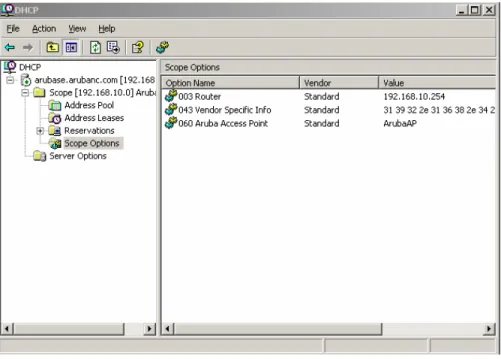
6 Scroll down the list of options and select 060 Aruba Access Point
7 Ensure this option is listed and that the value configured is ArubaAP
8 Click the OK button
The DHCP scope is now configured with an Aruba vendor class
identifier. The next step is to configure option 43 so the DHCP server will correctly return the Aruba master IP address to Aruba AP clients.
Configuring the Vendor-Specific Option Code for
MS Servers
Overview This section describes how to configure option 43, the vendor-specific option code, on a Microsoft Windows-based DHCP server.
Why option 43 is needed?
As mentioned in the overview section earlier, option 43 will return the Aruba master IP address to an Aruba DHCP client. This information allows Aruba APs to auto-discover their master and gain their configuration.
Configuring option 43
Here is the basic procedure for configuring option 43:
1 On the DHCP server, open the DHCP server administration tool by clicking Start -> Administration Tools -> DHCP
2 Find your server and right-click on the scope to be configured under the server name. Click on the Scope Options entry and select
Configure Options…
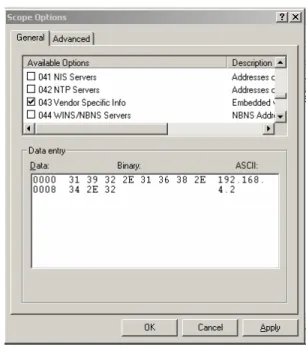
3 In the Scope Options dialogue box, scroll down to and select 043 Vendor Specific Info
Configuring the Vendor-Specific Option Code for
MS Servers
continued4 In the Data Entry field, click anywhere in the area under the ASCII heading and enter the following information:
ASCII Loopback address of the master2
Figure 1 - Scope options dialogue
5 Click the OK button to save the configuration
2
This address may be one of three things: the loopback address of the master, the virtual IP (VIP) address of a VRRP group for the master, or the IP address of the terminating local controller
Configuring the Vendor-Specific Option Code for
MS Servers
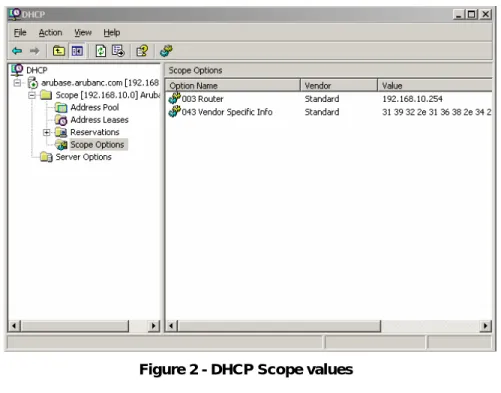
continuedOption 43 has now been configured for this DHCP scope. Note that although the IP address was entered in ASCII text, it displays the value in binary.
Figure 2 - DHCP Scope values
Test & Validate
Make sure the vendor class identifier has been set correctly. Here is the procedure:
1 Open the DHCP administration tool
2 Click the plus sign next to your DHCP server
3 Click the plus sign next to the scope that Aruba APs will use
4 Right-click on the Scope Options entry and verify the value displayed for Vendor Specific Info on the right-hand panel
Configuring the Vendor-Specific Option Code for
MS Servers
continuedSummary The DHCP scope is now configured to provide an Aruba AP with the IP address of the Aruba master device. The AP will use this address to directly contact its managing controller and began the image load and bootstrap process.