Teradata Aster MapReduce Appliance 2
Database SQL and Function Reference
Version 4.6.2 — December 14, 2011 Updated versions of this guide: http://tays.teradata.com
Contents
Preface
... V--v Conventions Used in This Guide ... V--v Contacting Technical Support ... V--vi About Aster Data ... V--vi About This Document ... V--viiAster SQL and Function Reference
V--1
V--1 SQL Commands
V--3 ABORT ... V--6 ALTER INDEX ... V--7 ALTER ROLE ... V--7 ALTER SCHEMA ... V--8 ALTER TABLE ... V--9 ALTER USER ... V--15 ALTER VIEW ... V--16 ANALYZE ... V--17 BEGIN ... V--18 CASE ... V--20 CLOSE ... V--20 CLUSTER ... V--21 COALESCE ... V--22 COMMIT ... V--22 COPY ... V--23 CREATE DATABASE ... V--28 CREATE INDEX ... V--29 CREATE ROLE ... V--31 CREATE SCHEMA ... V--32 CREATE TABLE ... V--34 CREATE TABLE AS ... V--42 CREATE USER ... V--43 CREATE VIEW ... V--45 DECLARE ... V--46 DELETE ... V--49 DROP DATABASE ... V--51 DROP INDEX ... V--51
DROP ROLE ... V--52 DROP SCHEMA ... V--53 DROP TABLE ... V--53 DROP USER ... V--54 DROP VIEW ... V--55 END ... V--56 EXPLAIN ... V--57 FETCH ... V--57 GRANT ... V--61 INSERT ... V--64 MERGE ... V--66 MOVE ... V--69 REINDEX ... V--70 REVOKE ... V--71 ROLLBACK ... V--74 SELECT ... V--75 SET ... V--83 SHOW ... V--85 START TRANSACTION ... V--87 TRUNCATE ... V--88 UPDATE ... V--89 VACUUM ... V--92 WITH ... V--94
V--2 Functions and Operators
V--95
Logical Operators ... V--95 Comparison Operators ... V--96 Mathematical Operators and Functions ... V--97 Trigonometric Functions ... V--99 String Functions and Operators ... V--100 Bit String Functions and Operators ... V--103 SQL/MapReduce Functions ... V--103 nPath ... V--104 Pattern Matching Functions and Operators ... V--108 Datatype Formatting Functions and Operators ... V--121 Date/Time Functions and Operators ... V--123 Aggregate Functions ... V--130 Aggregate Functions for Statistics ... V--130 Conditional SQL Expressions ... V--131 Subquery SQL Expressions ... V--133
V--3 Window Functions
V--137
Synopsis of Window Function Syntax ... V--137 Window Function Order of Evaluation ... V--138 Numbering Window Functions ... V--139 LEAD and LAG functions ... V--145 Aggregate Window Functions ... V--146 Repartitioning Performance for Window Functions and SQL-MapReduce Queries ... V--154 Deprecated Behavior ... V--154 Window Function Known Issues ... V--155
V--4 Datatypes
V--157
List of Supported Datatypes ... V--157 Numeric Types ... V--159
Character Types ... V--163 Date/Time Types ... V--165 Bit String Types ... V--169 Boolean Types ... V--169 Binary Types ... V--170 Network Address Types ... V--172 UUID Type ... V--178 Type Casts ... V--179
V--5 Date and Time
V--181
Date/Time Input Interpretation ... V--181 Date/Time Keywords ... V--182
V--6 Data Dictionary Views
V--185
Introduction to Data Dictionary Views ... V--186 User-Related Data Dictionary Views ... V--186 Role-Related Data Dictionary Views ... V--187 Group Membership Data Dictionary Views ... V--187 Database-Related Data Dictionary Views ... V--187 Schema-Related Data Dictionary Views ... V--188 SQL-MapReduce and Installed File-Related Data Dictionary Views ... V--188 Table-Related Data Dictionary Views ... V--190 Column-Related Data Dictionary Views ... V--190 Index-Related Data Dictionary Views ... V--191 Constraint-Related Data Dictionary Views ... V--191 Logical Partition-Related Data Dictionary Views ... V--192 Inheritance-Related Data Dictionary Views ... V--193 Types Data Dictionary View ... V--193 Cluster State Data Dictionary Views ... V--193 Activity Data Dictionary Views ... V--194 Temporary Data Dictionary Views ... V--198
V--7 SQL Vocabulary
V--199
Identifiers, Keywords, and Naming Conventions ... V--199 Comments in SQL ... V--201 Value Expressions ... V--201
System Limits
... V--203Error Codes
... V--205Preface
This guide provides data analysts and database administrators with detailed explanations of functions, SQL commands, datatypes, and error codes in Aster Database.You can download other useful tools and documents from asterdata.com/support. In addition, the Aster Data Resource Center at https://everest.asterdata.com/resourcecenter provides documents, videos, and downloadable client software for various operating systems.
Conventions Used in This Guide
This document assumes that the reader is comfortable working in Windows and Linux/UNIX environments. Many sections assume you are familiar with SQL.
This document uses the following typographical conventions.
Typefaces
Command line input and output, commands, program code, filenames, directory names, and system variables are shown in a monospaced font. Words in italics indicate an example or placeholder value that you must replace with a real value. Bold type is intended to draw your attention to important or changed items.
SQL Text Conventions
In the SQL synopsis sections, we follow these conventions
• Square brackets ([ and ]) indicate one or more optional items.
• Curly braces ({ and }) indicate that you must choose an item from the list inside the braces. Choices are separated by vertical lines (|).
Contacting Technical Support Aster Data proprietary and confidential
• En ellipsis (...) means the preceding element can be repeated.
• A comma and an ellipsis (, ...) means the preceding element can be repeated in a comma-separated list.
• In command line instructions, SQL commands and shell commands are typically written with no preceding prompt, but where needed the default Aster Database SQL prompt is shown: beehive=>
Command Shell Text Conventions
For shell commands, the prompt is usually shown. The $ sign introduces a command that’s being run by a non-root user:
$ ls
The # sign introduces a command that’s being run as root:
# ls
Contacting Technical Support
If you need the latest documentation or client software, check the Aster Data Resource Center at https://everest.asterdata.com/resourcecenter. Here you will find the latest documents, videos, and downloadable client software for various operating systems..
For further assistance, contact Aster Data technical support. Support Portal: to http://tays.teradata.com.
Email: [email protected] Telephone: +1-650-273-5599
About Aster Data
Aster Data provides data management and advanced analytics for diverse and big data, enabling the powerful combination of cost-effective storage and ultra-fast analysis of relational and non-relational data. Aster Data is a division of Teradata and is headquartered in San Carlos, California. For more information, go to http://tays.teradata.com.
Aster Data proprietary and confidential About This Document
About This Document
This is the “Aster Data Teradata Aster MapReduce Appliance 2 Database SQL and Function Reference,” version 4.6.2, edition B035-5488-121K. This edition covers Aster Database version 4.6.2_r27284 and was published December 14, 2011. You can open the HTML-formatted version of this document by clicking the Help link in the Aster Database AMC.
Get the latest edition of this guide! This guide updated very frequently. You can find the latest edition at www.asterdata.com/support
Copyright and Legal Statements
The product or products described in this book are licensed products of Teradata Corporation or its affiliates.
Teradata, Aster Data, nCluster, SQL-MapReduce, Aprimo, BYNET, DBC/1012, DecisionCast, DecisionFlow, DecisionPoint, Eye logo design, InfoWise, Meta Warehouse, MyCommerce, SeeChain, SeeCommerce, SeeRisk, Teradata Decision Experts, Teradata Source Experts, WebAnalyst, "More Data. Big Insights," and "You’ve Never Seen Your Business Like This Before" are trademarks or registered trademarks of Teradata Corporation or its affiliates. Adaptec and SCSISelect are trademarks or registered trademarks of Adaptec, Inc. AMD Opteron and Opteron are trademarks of Advanced Micro Devices, Inc.
BakBone and NetVault are trademarks or registered trademarks of BakBone Software, Inc. EMC, PowerPath, SRDF, and Symmetrix are registered trademarks of EMC Corporation. GoldenGate is a trademark of GoldenGate Software, Inc.
Hewlett-Packard and HP are registered trademarks of Hewlett-Packard Company. Intel, Pentium, and XEON are registered trademarks of Intel Corporation.
IBM, CICS, RACF, Tivoli, and z/OS are registered trademarks of International Business Machines Corporation.
Linux is a registered trademark of Linus Torvalds.
LSI and Engenio are registered trademarks of LSI Corporation.
Microsoft, Active Directory, Windows, Windows NT, and Windows Server are registered trademarks of Microsoft Corporation in the United States and other countries.
Novell and SUSE are registered trademarks of Novell, Inc., in the United States and other countries.
QLogic and SANbox are trademarks or registered trademarks of QLogic Corporation. SAS and SAS/C are trademarks or registered trademarks of SAS Institute Inc. SPARC is a registered trademark of SPARC International, Inc.
Sun Microsystems, Solaris, Sun, and Sun Java are trademarks or registered trademarks of Sun Microsystems, Inc., in the United States and other countries.
Symantec, NetBackup, and VERITAS are trademarks or registered trademarks of Symantec Corporation or its affiliates in the United States and other countries.
Unicode is a collective membership mark and a service mark of Unicode, Inc.
UNIX is a registered trademark of The Open Group in the United States and other countries. Other product and company names mentioned herein may be the trademarks of their respective owners.
About This Document Aster Data proprietary and confidential
THE INFORMATION CONTAINED IN THIS DOCUMENT IS PROVIDED ON AN “AS-IS” BASIS, WITHOUT WARRANTY OF ANY KIND, EITHER EXPRESS OR IMPLIED, INCLUDING THE IMPLIED WARRANTIES OF MERCHANTABILITY, FITNESS FOR A PARTICULAR PURPOSE, OR NON-INFRINGEMENT. SOME JURISDICTIONS DO NOT ALLOW THE EXCLUSION OF IMPLIED WARRANTIES, SO THE ABOVE EXCLUSION MAY NOT APPLY TO YOU. IN NO EVENT WILL TERADATA CORPORATION BE LIABLE FOR ANY INDIRECT, DIRECT, SPECIAL, INCIDENTAL, OR CONSEQUENTIAL DAMAGES, INCLUDING LOST PROFITS OR LOST SAVINGS, EVEN IF EXPRESSLY ADVISED OF THE POSSIBILITY OF SUCH DAMAGES.
The information contained in this document may contain references or cross-references to features, functions, products, or services that are not announced or available in your country. Such references do not imply that Teradata Corporation intends to announce such features, functions, products, or services in your country. Please consult your local Teradata Corporation representative for those features, functions, products, or services available in your country. Information contained in this document may contain technical inaccuracies or typographical errors. Information may be changed or updated without notice. Teradata Corporation may also make improvements or changes in the products or services described in this information at any time without notice.
If you’d like to help maintain the quality of this documentation, please send us your comments on the accuracy, clarity, organization, and usefulness of this document. You can send your comments to [email protected].
Any comments or materials (collectively referred to as “Feedback”) sent to Teradata Corporation will be deemed non-confidential. Teradata Corporation will have no obligation of any kind with respect to Feedback and will be free to use, reproduce, disclose, exhibit, display, transform, create derivative works of, and distribute the Feedback and derivative works thereof without limitation on a royalty-free basis. Further, Teradata Corporation will be free to use any ideas, concepts, know-how, or techniques contained in such Feedback for any purpose whatsoever, including developing, manufacturing, or marketing products or services incorporating Feedback. Copyright © 2011 by Teradata Corporation. All Rights Reserved.
www.asterdata.com
Document revision history:
Volume V: Aster SQL and
Function Reference
This volume of the guide explains the SQL commands available in Aster Database. Later sections list all functions and operators, date and time constraints, and error codes. The subsections are:
• SQL Commands (page V-3)
• Functions and Operators (page V-95) • Window Functions (page V-137) • Datatypes (page V-157)
• Date and Time (page V-181) • Data Dictionary Views (page V-185) • SQL Vocabulary (page V-199) • System Limits (page V-203) • Error Codes (page V-205)
V--1
SQL Commands
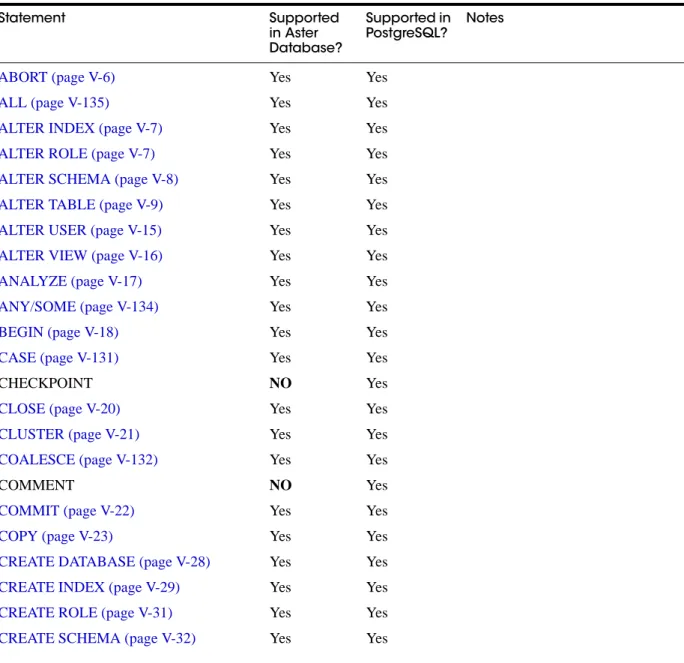
This chapter provides a reference for SQL and SQL-like commands supported in Aster Database. To find the command descriptions, follow the cross references in the table below. This table also lists Aster Data / PostgreSQL syntactic compatibility.Table 1-1 Aster Data/PostgreSQL Command Compatibility
Statement Supported in Aster Database? Supported in PostgreSQL? Notes
ABORT (page V-6) Yes Yes
ALL (page V-135) Yes Yes
ALTER INDEX (page V-7) Yes Yes
ALTER ROLE (page V-7) Yes Yes
ALTER SCHEMA (page V-8) Yes Yes
ALTER TABLE (page V-9) Yes Yes
ALTER USER (page V-15) Yes Yes
ALTER VIEW (page V-16) Yes Yes
ANALYZE (page V-17) Yes Yes
ANY/SOME (page V-134) Yes Yes
BEGIN (page V-18) Yes Yes
CASE (page V-131) Yes Yes
CHECKPOINT NO Yes
CLOSE (page V-20) Yes Yes
CLUSTER (page V-21) Yes Yes
COALESCE (page V-132) Yes Yes
COMMENT NO Yes
COMMIT (page V-22) Yes Yes
COPY (page V-23) Yes Yes
CREATE DATABASE (page V-28) Yes Yes
CREATE INDEX (page V-29) Yes Yes
CREATE ROLE (page V-31) Yes Yes
Aster Data proprietary and confidential
CREATE TABLE (page V-34) Yes Yes
CREATE TABLE AS (page V-42) Yes Yes
CREATE USER (page V-43) Yes Yes
CREATE VIEW (page V-45) Yes Yes
DEALLOCATE NO Yes
DECLARE (page V-46) Yes Yes
DELETE (page V-49) Yes Yes
DROP DATABASE (page V-51) Yes Yes
DROP INDEX (page V-51) Yes Yes
DROP ROLE (page V-52) Yes Yes
DROP SCHEMA (page V-53) Yes Yes
DROP TABLE (page V-53) Yes Yes
DROP USER (page V-54) Yes Yes
DROP VIEW (page V-55) Yes Yes
END (page V-56) Yes Yes
EXECUTE NO Yes
EXISTS (page V-133) Yes Yes
EXPLAIN (page V-57) Yes Yes
EXTRACT Function (page V-124) Yes Yes
FETCH (page V-57) Yes Yes
GRANT (page V-61) Yes Yes
GREATEST and LEAST (page V-133) Yes Yes
IN (page V-133) Yes Yes
INSERT (page V-64) Yes Yes
LISTEN NO Yes
LIKE (page V-108) Yes Yes
LOAD NO Yes To load a function, use Aster
Database ACT’s \install
command.
LOCK NO Yes
MERGE (page V-66) Yes No
MOVE (page V-69) Yes Yes
NOT IN (page V-134) Yes Yes
NOTIFY NO Yes
NULLIF (page V-133) Yes Yes
PREPARE NO Yes
PREPARE TRANSACTION NO Yes
Statement Supported in Aster Database? Supported in PostgreSQL? Notes
Aster Data proprietary and confidential
REASSIGN OWNED NO Yes
REINDEX (page V-70) Yes Yes
RELEASE SAVEPOINT NO Yes
RESET NO Yes
REVOKE (page V-71) Yes Yes
ROLLBACK (page V-74) Yes Yes
SAVEPOINT NO Yes
SELECT (page V-75) Yes Yes
SET (page V-83) Yes Yes
SHOW (page V-85) Yes Yes
START TRANSACTION (page V-87) Yes Yes
TRUNCATE (page V-88) Yes Yes
UNLISTEN NO Yes
UPDATE (page V-89) Yes Yes
VACUUM (page V-92) Yes Yes
WITH (page V-94) Yes Yes
Statement Supported in Aster Database? Supported in PostgreSQL? Notes
ABORT Aster Data proprietary and confidential
ABORT
ABORT -- abort the current transaction
Synopsis
ABORT [ WORK | TRANSACTION ];
Description
ABORT rolls back the current transaction and causes all the updates made by the transaction to be discarded. This command is identical in behavior to the standard SQL command ROLLBACK.
Parameters
WORK and TRANSACTION These are optional keywords.
Notes
Use COMMIT to successfully terminate a transaction. Issuing ABORT when not inside a transaction does no harm.
Examples
To abort all changes:
ABORT;
Compatibility
This command is an Aster Database extension. ROLLBACK is the equivalent standard SQL command.
See Also
To initiate a transaction:
• BEGIN (page V-18)
• START TRANSACTION (page V-87)
To finish a transaction:
• COMMIT (page V-22) • END (page V-56)
To cancel a transaction:
Aster Data proprietary and confidential ALTER ROLE
ALTER INDEX
ALTER INDEX -- change the definition of an index
Synopsis
ALTER INDEX name RENAME TO new_name;
Description
ALTER INDEX changes the name of an existing index. There is no effect on the stored data.
Parameters
name The name of an existing index to alter.
new_name New name for the index.
Notes
These operations are also possible using ALTER TABLE. The phrase ALTER INDEX is in fact just an alias for the forms of ALTER TABLE that apply to indexes.
Examples
To rename an existing index:
ALTER INDEX distributors RENAME TO suppliers;
Compatibility
ALTER INDEX is an Aster Database extension.
ALTER ROLE
ALTER ROLE -- change a database role
Synopsis
ALTER ROLE name [ [ WITH ] option [ ... ] ]
where option can be:
INHERIT | NOINHERIT
ALTER SCHEMA Aster Data proprietary and confidential
Description
ALTER ROLE changes the attributes of a database role.
The first variant of this command listed in the synopsis can change many of the role attributes that can be specified in CREATE ROLE. All the possible attributes are covered, except that there are no options for adding or removing memberships; use GRANT and REVOKE for that. Attributes not mentioned in the command retain their previous settings. A superuser can change any of these settings.
The second variant changes the name of the role. Users and roles having the db_admin privilege can rename roles.
Parameters
name - The name of the role whose attributes are to be altered.
INHERIT, NOINHERIT - These clauses alter attributes originally set by CREATE ROLE. For more information, see the CREATE ROLE reference page.
newname - The new name of the role.
Notes
Use CREATE ROLE to add new roles, and DROP ROLE to remove a role.
ALTER ROLE cannot change a role's memberships. Use GRANT and REVOKE to do that.
Compatibility
The ALTER ROLE statement is an Aster Database extension.
See Also
“CREATE ROLE” on page V-31, “DROP ROLE” on page V-52, “GRANT” on page V-61,
“REVOKE” on page V-71.
ALTER SCHEMA
Synopsis
ALTER SCHEMA name RENAME TO newname
ALTER SCHEMA name OWNER TO newowner
Description
ALTER SCHEMA changes the definition of a schema.
You must own the schema to use ALTER SCHEMA. To rename a schema you must also have the CREATE privilege for the database. To alter the owner, you must also be a direct or indirect member of the new owning role, and you must have the CREATE privilege for the database.
Parameters
Aster Data proprietary and confidential ALTER TABLE
newname The new name of the schema. The new name cannot begin with nc_, as such names are reserved for system schemas.
newowner The new owner of the schema.
See Also
“CREATE SCHEMA” on page V-32 and “DROP SCHEMA” on page V-53.
ALTER TABLE
ALTER TABLE -- change the definition of a table
Synopsis
ALTER TABLE [ ONLY ] name action [, ... ]; ALTER TABLE [ ONLY ] name
RENAME [ COLUMN ] column TO new_column; ALTER TABLE name
RENAME TO new_name; ALTER TABLE name
SET SCHEMA new_schema; ALTER TABLE name
ATTACH PARTITION new_partition_name (
attach_partition_list | attach_partition_range ) FROM old_table_name;
ALTER TABLE name
ALTER partition_reference ATTACH PARTITION new_partition_name ( attach_partition_list | attach_partition_range
) FROM old_table_name ALTER TABLE name
ALTER partition_reference { NOCOMPRESS | COMPRESS [HIGH | MEDIUM | LOW] }; ALTER TABLE name
ALTER partition_reference RENAME TO new_partition_name; ALTER TABLE name
DETACH partition_reference INTO new_table_name;
where action is one of:
ADD [ COLUMN ] columnname datatype [ DEFAULT default_value ] [ column_constraint [ ... ] ]
DROP [ COLUMN ] column [ RESTRICT | CASCADE ]
ALTER [ COLUMN ] column TYPE type [ USING expression ] ALTER [ COLUMN ] column { SET | DROP } NOT NULL
ALTER TABLE Aster Data proprietary and confidential
ALTER [ COLUMN ] column SET DEFAULT default_value
ADD table_constraint
DROP CONSTRAINT constraint_name [ RESTRICT | CASCADE ] NOCOMPRESS | COMPRESS [ HIGH | MEDIUM | LOW ]
INHERIT parent_table NO INHERIT parent_table OWNER TO new_owner
where attach_partition_list is:
VALUES ( value_list )
where attach_partition_range is:
START { constant [ INCLUSIVE | EXCLUSIVE ] | MINVALUE } END { constant [INCLUSIVE | EXCLUSIVE ] | MAXVALUE }
where partition_reference is:
PARTITION ( partition_name [. partition_name ...] )
Description
ALTER TABLE changes the definition of an existing table.
You must own the table to use ALTER TABLE. To alter the owner, you must also be a direct or indirect member of the new owning role, and that role must have CREATE privilege on the table. (These restrictions ensure that altering the owner doesn't do anything you couldn't do by
dropping and recreating the table. However, a superuser can alter ownership of any table in any way.)
Actions for ALTER TABLE
ADD COLUMN This form adds a new column to the table, using the same syntax as CREATE TABLE. In ADD / DROP/ ALTER COLUMN, the keyword COLUMN is noise and can be omitted.
In ADD COLUMN and in ALTER COLUMN SET DEFAULT , the DEFAULT clause allows you to ensure that the column will be set to the default value if no value is provided when a row is inserted or updated. The clause takes the same form as the DEFAULT clause in CREATE TABLE. Note that when you add a column, all existing rows in the table are initialized with the column’s DEFAULT value, or with NULL if no DEFAULT clause is specified.
Aster Data proprietary and confidential ALTER TABLE
DROP COLUMN This form drops a column from a table. If the table has indexes and table constraints that involve the column, those will be dropped automatically. If a view (or any other object outside the table) depends on the column, then you can add the keyword CASCADE to force the dropping of those dependent entities.
A recursive DROP COLUMN operation will remove a child or descendant table's column only if the descendant (a) does not inherit that column from any other parents and (b) never had an independent definition of the column.
Note: The DROP COLUMN form does not physically remove the column, but simply makes it invisible to SQL operations. Subsequent insert and update operations in the table will store a null value for the column. Thus, dropping a column is quick but it will not immediately reduce the on-disk size of your table, as the space occupied by the dropped column is not reclaimed. The space will be reclaimed over time as existing rows are updated.
ALTER COLUMN TYPE This form changes the type of a column of a table. Indexes and simple table constraints involving the column will be automatically converted to use the new column type by re-parsing the originally supplied expression. The optional USING clause specifies how to compute the new column value from the old; if omitted, the default conversion is the same as an assignment cast from old datatype to new. A USING clause must be provided if there is no implicit or assignment cast from old to new type.
Note: The fact that ALTER TYPE requires rewriting the whole table is sometimes an advantage, because the rewriting process eliminates any dead space in the table. For example, to reclaim the space occupied by a dropped column immediately, the fastest way is
ALTER TABLE table ALTER COLUMN anycol TYPE anytype;
where anycol is any remaining table column and anytype is the same type that column already has. This results in no semantically-visible change in the table, but the command forces rewriting, which gets rid of no-longer-useful data.
SET/DROP NOT NULL These forms change whether a column is marked to allow null values or to reject null values. You can only use SET NOT NULL when the column contains no null values.
ADD table_constraint This form adds a new constraint to a table using the same syntax as CREATE TABLE. You cannot add DISTRIBUTE BY (or the now deprecated PARTITION KEY) table constraints; see “Notes About ALTER TABLE” on page V-13.
Adding a CHECK or NOT NULL constraint requires scanning the table to verify that existing rows meet the constraint.
In parent-child table hierarchies, adding a constraint to the parent cascades to the child only for CHECK constraints.
DROP CONSTRAINT This form drops the specified constraint on a table. You cannot drop DISTRIBUTE BY (or the now deprecated PARTITION KEY) table constraints; see “Notes About ALTER TABLE” on page V-13.
Tip! In a table that contains many rows, adding a column with a DEFAULT value may take a long time, because Aster Database will add the default value to every existing row. If you wish to add a new column with a DEFAULT rule but not simultaneously add values for existing rows in the table, then you should first perform an ALTER TABLE ADD COLUMN without a DEFAULT rule, and then perform a second ALTER TABLE ALTER column_name SET DEFAULT to add the rule without inserting default values for existing rows.
ALTER TABLE Aster Data proprietary and confidential
ALTER TABLE test_table DROP CONSTRAINT my_constraint;
NOCOMPRESS | COMPRESS [HIGH | MEDIUM | LOW] This form alters the level of table compression to the level specified. It can change a compressed table to uncompressed, an uncompressed table to a specified level of compressions, or a compressed table to a different level of compression. See “Compression” on page II-8 for an overview of compression in Aster Database.
INHERIT/NO INHERIT This form changes whether or not the table has an inheritance relationship with the specified parent table.
OWNER This form changes the owner of the table to the specified user. Changing the OWNER never recurses to child tables.
ATTACH PARTITION This form takes an existing table and attaches it as a partition of an existing logically partitioned table. The tables do not need to reside in the same schema. Any table in a schema other than the current schema must be schema qualified. The database user must be an owner of both tables, and must possess the USAGE privilege for the schema(s). ATTACH PARTITION takes as an argument either the list of values (for a PARTITION BY LIST table) or the range of values (for a PARTITION BY RANGE table) for the partition to be created. These may not overlap with the definitions of any existing partitions of the partitioned table. Furthermore, if the data within the table to be partitioned falls outide of the list or range of values for that partition to be created, the ATTACH will fail.
See ALTER TABLE...ATTACH PARTITION (page I-20) for more information on requirements for a table to be attached as a partition. Any existing constraints will be stripped from the table being attached and replaced with the constraints from the top level table in the partitioned table hierarchy.
DETACH PARTITION This form takes an existing partition and detaches it from its parent logically partitioned table, creating a new standalone table. The new table that is created will have the same constraints as the top level table in the partitioned table hierarchy. The detached table will be created in the same schema as the original parent table, unless another schema is specified. This operation is used when a subsequent operation must be performed on the child partition in isolation of its parent (e.g. DROP). See ALTER TABLE...ATTACH PARTITION (page I-20) for more information.
ALTER PARTITION...NOCOMPRESS | COMPRESS [HIGH | MEDIUM | LOW] This form takes an existing partition and compresses it (or uncompresses it). If the compression is changed on a partition with sub-partitions, then each sub-partition will be compressed or uncompressed in the same way. See “Compression” on page II-8 for more information on compression.
RENAME The RENAME forms change the name of a table (or an index, sequence, or view) or the name of an individual column in a table. There is no effect on the stored data.
ALTER PARTITION...RENAME takes an existing partition and renames it.
SET SCHEMA Moves the table into another schema. Associated indexes, constraints, and sequences owned by table columns are moved as well. The parameter new_schema is the name of the new schema for the table.
Aster Data proprietary and confidential ALTER TABLE
Parameters for ALTER TABLE
The parameters for ALTER TABLE are:
See “CREATE TABLE” on page V-34 for a further description of valid parameters.
Notes About ALTER TABLE
You cannot modify a distribution key column in any way. (See “Rules for distribution keys” on page I-10.) This means:
• There is no ALTER TABLE support for changing the DISTRIBUTE BY method of a table. Instead, use a CTAS statement to re-create a new table with the distribution key you want.
• For tables that use the legacy PARTITION KEY syntax:
• DROP CONSTRAINT cannot drop PARTITION KEY table constraints.
• ADD table_constraint cannot add PARTITION KEY table constraints.
ALTER TABLE Examples
To add a column of type varchar to a table:
name The name (possibly schema-qualified) of an existing table to alter. If ONLY is specified, only that table is altered. If ONLY is not specified, the table and all its child and descendant tables (if any) are updated.
column Name of a new or existing column. new_column New name for an existing column. new_name New name for the table.
type Datatype of the new column, or new datatype for an existing column.
table_constraint New table constraint for the table. See “Notes About ALTER TABLE”, below. constraint_name Name of an existing constraint to drop. See “Notes About ALTER TABLE”, below.
CASCADE Automatically drop objects that depend on the dropped column or constraint (for example, views referencing the column).
RESTRICT Refuse to drop the column or constraint if there are any dependent objects. This is the default behavior.
parent_table The table name of the new parent table. new_owner The username of the new owner of the table.
new_schema The name of the new schema of which the table will be a member.
partition_reference The reference to the individual partition of a logically partitioned table hierarchy. The syntax is as follows:
partition_reference = PARTITION ( partition_name [. partition_ name ...] )
Note that to refer to a partition several level down the hierarchy, you must list each of the partitions in order, separated by “.”, and then the child partition you wish to access. For example, to refer to the partition three levels down the partition hierarchy with the name “2001_11_30” you would reference it as (year2001.2001_ november.2001_11_30).
new_partition_name The new name to give the partition, when renaming an existing partition. old_table_name The name of the table to be attached to a logically partitioned table as a new
partition.
ALTER TABLE Aster Data proprietary and confidential
ALTER TABLE distributors ADD COLUMN address varchar(30);
To drop a column from a table:
ALTER TABLE distributors DROP COLUMN address RESTRICT;
To change the types of two existing columns in one operation:
ALTER TABLE distributors
ALTER COLUMN address TYPE varchar(80), ALTER COLUMN name TYPE varchar(100);
To change an integer column containing UNIX timestamps to timestamp with time zone via a USING clause:
ALTER TABLE sales_fact
ALTER COLUMN sales_timestamp TYPE timestamp with time zone USING
timestamp with time zone 'epoch' + sales_timestamp * interval '1 second';
To attach a table to a logically partitioned table as a new partition:
ALTER TABLE distributors
ATTACH PARTITION north_america ( VALUES ('US','Canada')
) FROM north_america_distributors;
To detach a partition from a logically partitioned table:
ALTER TABLE distributors DETACH PARTITION (asia) INTO asia_distributors;
To rename a partition:
ALTER TABLE distributors ALTER PARTITION (asia) RENAME TO asiapac;
To compress a partition:
ALTER TABLE distributors ALTER PARTITION (asia) COMPRESS LOW;
To rename an existing column:
ALTER TABLE distributors RENAME COLUMN address TO city;
To rename an existing table:
ALTER TABLE distributors RENAME TO suppliers;
To add a not-null constraint to a column:
ALTER TABLE distributors ALTER COLUMN street SET NOT NULL;
To remove a not-null constraint from a column:
ALTER TABLE distributors ALTER COLUMN street DROP NOT NULL;
Aster Data proprietary and confidential ALTER USER
ALTER TABLE distributors ADD CONSTRAINT zipchk CHECK (char_ length(zipcode) = 5);
To remove a check constraint from a table and all its children:
ALTER TABLE distributors DROP CONSTRAINT zipchk;
Compatibility of ALTER TABLE
The ADD and DROP forms conform to the SQL standard. The other forms are Aster Database extensions of the SQL standard. Also, the ability to specify more than one manipulation in a single ALTER TABLE command is an Aster Database extension.
ALTER TABLE DROP COLUMN can be used to drop the only column of a table, leaving a zero-column table. This is an extension of SQL, and it violates the SQL rule that disallows zero-column tables.
ALTER USER
ALTER USER - changes attributes of a user
Synopsis
First variant:
ALTER USER username [ [ WITH ] option [ ... ] ]
where option can be:
INHERIT | NOINHERIT | PASSWORD 'password'
Second variant:
ALTER USER username RENAME TO newname;
Third variant:
ALTER USER username SET search_path { TO | = } { value }
Example usage
ALTER USER owright PASSWORD '1st1nFlight';
ALTER USER owright RENAME TO orvillew;
ALTER USER orvillew SET search_path TO capmkts,fixedinc,public;
Description
ALTER USER changes the attributes of a database user.
The first variant of this command listed in the synopsis can change many of the user attributes that can be specified in CREATE USER. All the possible attributes are covered, except that there
ALTER VIEW Aster Data proprietary and confidential
are no options for adding or removing memberships; use GRANT and REVOKE for that. Attributes not mentioned in the command retain their previous settings. A superuser can change any of these settings. Ordinary users can only change their own password.
The second variant (RENAME) changes the name of the user. A superuser can change any of these settings. The current session user cannot be renamed. Connect as a different user if you need to do that. Note that when a user is renamed, the password for that user is reset to be the same as the new username. It is recommended that renaming a user and setting a new password for a user be done as part of the same transaction to avoid any security issues.
The third variant sets the default schema search path of the user. See the description of
search_path, below. When the user subsequently starts a new session, the specified schema search path is used as his default.
Parameters
username - The name of the user whose attributes are to be altered.
INHERIT | NOINHERIT - These clauses alter attributes originally set by CREATE USER. For more information, see “CREATE USER” on page V-43.
PASSWORD 'password' - Sets the user’s password to password.
newname - The new name of the user.
search_path - An ordered, comma-separated list of existing schema names that will be the user’s default schema search path. When Aster Database tries to resolve an unqualified object name, it searches these schemas in the order specified here. If the user creates an object without qualifying its name with a schema, the object is created in her current schema, which, by default, is the first schema in the search path. The user can override this default using the “SET search_ path” command. For more details, see “Schema Search Path” on page II-108.
Compatibility
The ALTER USER statement is an Aster Database extension. The SQL standard leaves the definition of users to the implementation.
See Also
“ALTER ROLE” on page V-7, “CREATE USER” on page V-43
ALTER VIEW
ALTER VIEW -- change the definition of a view
Synopsis
ALTER VIEW name RENAME TO newname;
Description
ALTER VIEW changes the definition of a view. The only currently available functionality is to rename the view. To execute this command you must be the owner of the view.
Aster Data proprietary and confidential ANALYZE
Parameters
name The name (optionally schema-qualified) of an existing view.
newname The new name of the view.
Notes
In Aster Database, you cannot change the schema or owner of a view.
Examples
To rename the view foo to bar:
ALTER VIEW foo RENAME TO bar;
Compatibility
ALTER VIEW is a PostgreSQL extension of the SQL standard.
See Also
CREATE VIEW, DROP VIEW
ANALYZE
ANALYZE -- collect statistics about a database
Synopsis
ANALYZE table [ (column [, ...] ) ] [ CASCADE ]
Description
ANALYZE collects statistics about the contents of the specified table in the database and stores the results in internal tables. Subsequently, the query planner uses these statistics to help determine the most efficient execution plans for queries.
You have the option of specifying one or more column names, in which case only the statistics for those columns are collected. If your table has child tables created through inheritance, don’t forget to include the CASCADE option. If the table is a logically partitioned table, ANALYZE
BEGIN Aster Data proprietary and confidential
Parameters
Outputs from ANALYZE
None.
Notes About ANALYZE
It is a good idea to run ANALYZE periodically, or just after making major changes in the contents of a table. Accurate statistics will help the planner to choose the most appropriate query plan, and thereby improve the speed of query processing. Also, the information provided by the EXPLAIN
command is only as current as the last running of ANALYZE.
Aster Data recommends that you run ANALYZE after every batch of writes so that the statistics are refreshed in bulk. You should run ANALYZE after any running of a CREATE TABLE AS SELECT, INSERT, UPDATE, DELETE, or ALTER TABLE statement. A common strategy is to run VACUUM and ANALYZE once a day during a low-usage time of day.
Unlike VACUUM FULL, the ANALYZE command requires only a read lock on the target table, so it can run in parallel with other activity on the table.
The statistics collected by ANALYZE usually include a list of some of the most common values in each column and a histogram showing the approximate data distribution in each column. One or both of these may be omitted if ANALYZE deems them uninteresting (for example, in a unique-key column, there are no common values) or if the column datatype does not support the appropriate operators.
Compatibility
There is no ANALYZE statement in the SQL standard.
See Also
“EXPLAIN” on page V-57 and “VACUUM” on page V-92, and “5.3. Run ANALYZE regularly to ensure Aster Database produces the most optimal query plans” on page II-63.
BEGIN
BEGIN -- start a transaction block
Synopsis
BEGIN [ WORK | TRANSACTION ];
Description
BEGIN initiates a transaction block, that is, all statements after a BEGIN command will be executed in a single transaction until an explicit COMMIT or ROLLBACK is given. By default
table The name of a table to analyze.
column The name of a column to analyze. This defaults to all columns.
Aster Data proprietary and confidential BEGIN
(without BEGIN), each statement is executed in its own transaction and a commit is implicitly performed at the end of the statement (if execution was successful, otherwise a rollback is done). In Aster Database, all statements are executed in an individual transaction by default. Grouping multiple statements together into an explicit transaction block not only provides transactional atomicity, but allows transaction costs to be shared across multiple statements. When executing modifying statements, it is highly recommended that these be grouped into a transaction, as they will require replication across Aster Database.
Parameters
WORK Optional keyword. Has no effect.
TRANSACTION Optional keyword. Has no effect.
Notes
START TRANSACTION has the same functionality as BEGIN. Use COMMIT or ROLLBACK to terminate a transaction block.
Issuing BEGIN when already inside a transaction block will not affect the state of the transaction.
Examples
To begin a transaction block:
BEGIN;
Compatibility
BEGIN is an Aster Database language extension. It is equivalent to the SQL-standard command START TRANSACTION. Click on this link for additional compatibility information.
Warning! The BEGIN keyword is used for a different purpose in embedded SQL. You are advised to be careful about the transaction semantics when porting database applications.
See Also
To initiate a transaction:
• START TRANSACTION (page V-87)
To finish a transaction: • COMMIT (page V-22) • END (page V-56) To cancel a transaction: • ABORT (page V-6) • ROLLBACK (page V-74)
CASE Aster Data proprietary and confidential
CASE
See “CASE” on page V-131.
CLOSE
CLOSE -- close a cursor
Synopsis
CLOSE name;
Description
CLOSE frees the resources associated with an open cursor. After the cursor is closed, no subsequent operations are allowed on it. A cursor should be closed when it is no longer needed. Every non-holdable open cursor is implicitly closed when a transaction is terminated by COMMIT or ROLLBACK. A holdable cursor is implicitly closed if the transaction that created it aborts via ROLLBACK. If the creating transaction successfully commits, the holdable cursor remains open until an explicit CLOSE is executed, or the client disconnects.
Parameters for CLOSE
name The name of an open cursor to close.
Notes
Aster Database does not have an explicit OPEN cursor statement; a cursor is considered open when it is declared. Use the DECLARE statement to declare a cursor.
Examples
For example, to close the cursor, myappfetch:
CLOSE myappfetch;
Compatibility
CLOSE fully conforms to the SQL standard.
See Also
Aster Data proprietary and confidential CLUSTER
CLUSTER
The CLUSTER command clusters a table according to an index, thereby physically re-sorting records on disk according to an index. The goal is to unite on a single disk those records that you might read together.
More: Synopsis | Description | Parameters | Notes | Examples | Compatibility
Synopsis
CLUSTER tablename [ USING indexname ]
Description
CLUSTER instructs the database to cluster the table specified by tablename based on the index specified by indexname. The index must already have been defined on tablename.
When a table is clustered, it is physically reordered based on the index information. Clustering is a one-time operation: when the table is subsequently updated, the changes are not clustered. That is, no attempt is made to store new or updated rows according to their index order.
When a table is clustered, the database remembers which index it was clustered by. The form
CLUSTER tablename re-clusters the table using the same index as before.
When a table is being clustered, an exclusive access lock is acquired on it. This prevents any other database operations (both reads and writes) from operating on the table until the CLUSTER is finished.
Parameters
tablename The name (possibly schema-qualified) of a table.
indexname The name of an index.
Notes
In cases where you are accessing single rows randomly within a table, the actual order of the data in the table is unimportant. However, if you tend to access some data more than others, and there is an index that groups them together, you will benefit from using CLUSTER. If you are
requesting a range of indexed values from a table, or a single indexed value that has multiple rows that match, CLUSTER will help because once the index identifies the table page for the first row that matches, all other rows that match are probably already on the same table page, and so you save disk accesses and speed up the query.
During the cluster operation, a temporary copy of the table is created that contains the table data in the index order. Temporary copies of each index on the table are created as well. Therefore, you need free space on disk at least equal to the sum of the table size and the index sizes. It is advisable to run ANALYZE on the newly clustered table to ensure that future query plans make good choices.
It is also important to note that, in the Aster Database implementation, clustering is done at the level of workers. There is no notion of a global clustering. However, if the index on which the clustering is done includes the distribution key, you create the effect of global clustering.
COALESCE Aster Data proprietary and confidential
Examples
Cluster the table employees on the basis of its index employees_ind:
CLUSTER employees USING employees_ind;
Cluster the employees table using the same index that was used before:
CLUSTER employees;
Compatibility
There is no CLUSTER statement in the SQL standard. Our syntax is however compatible with PostgreSQL. PostgreSQL also allows an unqualified CLUSTER command that performs clustering on all tables in the system. Aster Database does not allow that since it may be too expensive an operation, and would disallow any access to any of the tables while it runs.
COALESCE
See “COALESCE” on page V-132.
COMMIT
COMMIT -- commit the current transaction
Synopsis
COMMIT [ WORK | TRANSACTION ];
Description
COMMIT commits the current transaction. All changes made by the transaction become visible to others and are guaranteed to be durable if a crash occurs. This command is equivalent to the Aster Database command END.
Parameters
WORK Optional keyword. Has no effect.
TRANSACTION Optional keyword. Has no effect.
Notes
Use ROLLBACK to abort a transaction.
Issuing COMMIT when not inside a transaction does no harm.
Examples
To commit the current transaction and make all changes permanent:
Aster Data proprietary and confidential COPY
Compatibility
The SQL standard only specifies the two forms COMMIT and COMMIT WORK. Otherwise, this command is fully conforming.
See Also
To initiate a transaction:
• BEGIN (page V-18)
• START TRANSACTION (page V-87)
To finish a transaction: • END (page V-56) To cancel a transaction: • ABORT (page V-6) • ROLLBACK (page V-74)
COPY
COPY -- copy data between a client and a table
• Synopsis (page V-23) • Description (page V-24)
• Parameters for COPY (page V-24) • Notes About COPY (page V-26) • Input Formats for COPY (page V-26) • Example Use of COPY (page V-27) • Compatibility of COPY (page V-28)
Synopsis
Copy into Aster Database:
COPY tablename [ ( column [, ...] ) ] FROM STDIN
[ [ WITH ]
[ DELIMITER [ AS ] 'delimiter' ] [ NULL [ AS ] 'null string' ] [ CSV [ QUOTE [ AS ] 'quote' ] [ ESCAPE [ AS ] 'escape' ] ] ] [ AUTOPARTITION ]
[ LOG ERRORS
[ INTO { errortablename | NOWHERE } ] [ WITH LABEL label ]
[ ERROR LIMIT { limit | UNLIMITED } ] ]
COPY Aster Data proprietary and confidential
Copy from Aster Database:
COPY tablename [ ( column [, ...] ) ] TO STDOUT
[ [ WITH ]
[ DELIMITER [ AS ] 'delimiter' ] [ NULL [ AS ] 'null string' ] [ CSV
[ QUOTE [ AS ] 'quote' ] [ ESCAPE [ AS ] 'escape' ] ] ];
Description
COPY moves data between Aster Database tables and a remote client (STDIN/STDOUT), via the connection between the client and the server. Specifically, COPY TO copies the contents of a table to standard output, while COPY FROM copies data from standard input to a table (appending the data to whatever is in the table already).
If a list of columns is specified, COPY will only copy the data in the specified columns to or from the source. If there are any columns in the table that are not in the column list, COPY FROM will insert the default value of NULL for those columns.
To copy data from one or more files into Aster Database, you can also use the ncluster_loader utility, as explained in “ncluster_loader Client-Side Loading Tool” on page II-130. The ncluster_ loader tool uses the COPY command to perform the data loading.
Parameters for COPY
Table 1-2 Parameters for COPY
tablename The name of an existing table.
column An optional list of columns to be copied. If no column list is specified, all columns of the table will be copied.
STDIN Specifies that input comes from the client application.
STDOUT Specifies that output goes to the client application.
delimiter The single character that separates columns within each row (line) of the file. The default is a tab character in text mode, a comma in CSV mode.
null string The string that represents a null value. The default is \N (backslash-N) in text mode, and an empty value with no quotes in CSV mode. You might prefer an empty string even in text mode for cases where you don't want to distinguish nulls from empty strings.
When loading any non-CSV delimited format (e.g. TSV), you can easily load files that contain empty strings (that is, files that don’t use the typical "\N" to represent nulls). To do this, use COPY with the null keyword, followed by two double-quote characters. That is, the argument looks like:
null ""
Note: When using COPY FROM, any data item that matches this string will be stored as a null value, so you should make sure that it is not a string that might otherwise occur in the input
CSV Selects Comma Separated Value (CSV) mode (by default, the input is expected interpreted using the text format described below).
Aster Data proprietary and confidential COPY
escape Specifies the character that should appear before a QUOTE data character value in CSV mode. The default is the QUOTE value (usually double-quote).
Output On successful completion, a COPY command returns a command tag of the form:
COPY count
Where count is the number of rows copied.
AUTOPARTITION Automatically partitions data during copying. With this feature enabled, Aster Database automatically routes each row within a logical partition hierarchy down to the appropriate child table. Logical partitioning is done based on the check constraints of the target table. See “Autopartitioning” on page II-141.
LOG ERRORS Including the LOG ERRORS clause activates error logging. With error logging enabled, the COPY command tolerates poorly formatted input data like this: COPY logs each malformed row to the appropriate load error logging table and continues loading additional (correctly formed) rows in the current load job. Aster Data refers to this as “error logging”.
Omitting the LOG ERRORS phrase disables error logging. With error logging disabled, the COPY operation fails immediately when it encounters a malformed row. With error logging disabled, COPY fails or succeeds in an atomic fashion: either all rows are copied, or none are. This feature is also available in the ncluster_loader tool as shown in “ncluster_loader Client-Side Loading Tool” on page II-130.
By default, malformed rows for distributed tables go into table nc_
errortable_part table, and malformed rows for replicated tables go into the
nc_errortable_repl table. Optionally, you can create your own load error logging tables, as explained in “INTO errortablename”, below. The schema for error logging tables is shown in “Load Error Logging Tables” on page V-196. To see the number of rows that loaded or failed to load, query the load error statistics tables nc_all_errorlogging_stats and nc_user_
errorlogging_stats. For more information, see “Load Error Statistics Tables” on page V-197.
INTO 'errortablename' LOG ERRORS INTO 'errortablename' specifies the error logging table into which malformed rows should be copied together with detailed error
information. You can specify any table that inherits from the appropriate default table, nc_errortable_part table, or nc_errortable_repl. See “Creating a Load Error Logging Table” on page V-197.
If INTO 'errortablename' is not specified, then malformed rows go into the default tables as explained in LOG ERRORS, above.
WITH LABEL WITH LABEL 'label' tags failed rows with 'label'. The label is useful for finding your failed rows in the error logging table and for finding statistics about the load attempt in the nc_all_errorlogging_stats table. If you do not provide a label, Aster Database uses a statement identifier as the label value. (There’s one statement identifier per COPY command; if there is one map entry for many input files, then you’ll have a unique statement identifier per input file.)
NOWHERE NOWHERE instructs the COPY command to discard all malformed rows (and continue loading correctly formed rows).
ERRORLIMIT limit ERRORLIMIT followed by an integer limit value sets the maximum number of allowed failed rows for this COPY job before it is forced to fail. ERRORLIMIT UNLIMITED tells the COPY to continue running, regardless of the number of error rows it encounters. Statement failure is atomic; the whole transaction aborts if the limit is reached. This value is a global limit; Aster Database aggregates the errors detected across all partitions.
COPY Aster Data proprietary and confidential
Notes About COPY
When a COPY operation fails, any rows it had inserted are removed, but they still occupy disk space. This may amount to a considerable amount of wasted disk space if the failure happened well into a large copy operation. You may wish to invoke VACUUM to recover the space.
Input Formats for COPY
Input can be:
• “Text Formatted Input to COPY” on page V-26, or
• “CSV Formatted Input to COPY” on page V-27
Text Formatted Input to COPY
When COPY is used without the CSV option, the data read is interpreted as a text file with one line per table row. Columns in a row are separated by the DELIMITER character. The column values themselves are strings of each attribute's datatype. The specified null string is used in place of columns that are null. COPY FROM will raise an error if any line of the input file contains more or fewer columns than are expected.
End of data can be represented by a single line containing just backslash-period (\.). Backslash characters (\) may be used in the COPY data to quote data characters that might otherwise be taken as row or column delimiters. In particular, the following characters must be preceded by a backslash if they appear as part of a column value: backslash itself, newline, carriage return, and the current delimiter character.
COPY FROM matches the input against the null string before removing backslashes. Therefore, a null string such as \N cannot be confused with the actual data value \N (which would be
represented as \\N).
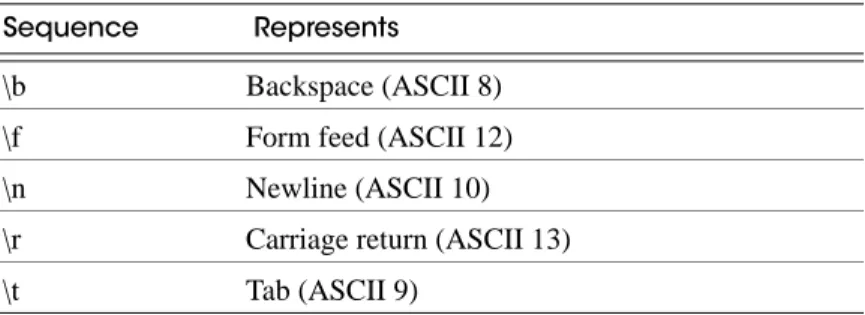
The following special backslash sequences are recognized by COPY FROM.
Table 1-3 Backslash sequences recognized by COPY FROM
Any other backslashed character that is not mentioned in the above table will be taken to represent itself. However, beware of adding backslashes unnecessarily, since that might accidentally produce a string matching the end-of-data marker (\.) or the null string (\N by default). These strings will be recognized before any other backslash processing is done. It is strongly recommended that applications generating COPY data convert data newlines and carriage returns to the \n and \r sequences respectively. At present, it is possible to represent a data carriage return by a backslash and carriage return, and to represent a data newline by a backslash and newline. However, these representations might not be accepted in future releases. They are also highly vulnerable to corruption if the COPY data is transferred across different machines (for example, from Unix to Windows or vice versa).
Sequence Represents
\b Backspace (ASCII 8)
\f Form feed (ASCII 12)
\n Newline (ASCII 10)
\r Carriage return (ASCII 13)
Aster Data proprietary and confidential COPY
COPY FROM can handle lines ending with newlines, carriage returns, or carriage
return/newlines. To reduce the risk of error due to un-backslashed newlines or carriage returns that were meant as data, COPY FROM will complain if the line endings in the input are not all alike.
CSV Formatted Input to COPY
This format is used for importing and exporting the Comma Separated Value (CSV) file format used by many other programs, such as spreadsheets. Instead of the escaping used by Aster Database's standard text mode, it recognizes the common CSV escaping mechanism.
The values in each record are separated by the DELIMITER character. If the value contains the delimiter character, the QUOTE character, the null string, a carriage return, or line feed character, then the whole value is prefixed and suffixed by the QUOTE character, and any occurrence within the value of a QUOTE character or the ESCAPE character is preceded by the escape character. The CSV format has no standard way to distinguish a NULL value from an empty string. Aster Database's COPY handles this by quoting. A data value matching the null string must be quoted. Therefore, using the default settings, a NULL is written as an unquoted empty string, while an empty string is written with double quotes ("").
Because backslash is not a special character in the CSV format, \., the end-of-data marker, could also appear as a data value. To avoid any misinterpretation, a \. data value appearing as a lone entry on a line is not interpreted as the end-of-data marker if it is quoted. Therefore, if you are loading a file created by another application that has a single unquoted column and might have a value of \., you might need to quote that value in the input file.
Note: In CSV mode, all characters are significant. A quoted value surrounded by white space, or any characters other than DELIMITER will include those characters. This can cause errors if you import data from a system that pads CSV lines with white space out to some fixed width. If such a situation arises you might need to preprocess the CSV file to remove the trailing white space, before importing the data into Aster Database.
Note: CSV mode will recognize CSV files with quoted values containing embedded carriage returns and line feeds. Thus the files are not strictly one line per table row like text-mode files. Note: Many programs produce strange and occasionally perverse CSV files, so the file format is more a convention than a standard. Thus you might encounter some files that cannot be imported using this mechanism.
Example Use of COPY
The following example copies a table from the client using text format with the default parameters:
COPY country FROM STDIN;
Here is a corresponding sample of data suitable for copying:
AF AFGHANISTAN AL ALBANIA DZ ALGERIA ZM ZAMBIA ZW ZIMBABWE
(Note that the white space on each line is actually a tab character.)
CREATE DATABASE Aster Data proprietary and confidential
COPY country FROM STDIN WITH CSV QUOTE AS '@';
Here is the same sample of data encoded appropriately:
@AF@,@AFGHANISTAN@ @AL@,@ALBANIA@ @DZ@,@ALGERIA@ @ZM@,@ZAMBIA@ @ZW@,@ZIMBABWE@
Compatibility of COPY
There is no COPY statement in the SQL standard.
See Also
See also “ncluster_loader Client-Side Loading Tool” on page II-130.
CREATE DATABASE
CREATE DATABASE -- create a new database
Synopsis
CREATE DATABASE name [ [WITH] ENCODING [=] encoding ];
Description
CREATE DATABASE creates a new database in the Aster Database cluster. To create a database, you must be a superuser or have the special db_admin privilege. See “CREATE USER” on page V-43. The creator becomes the owner of the new database.
Important! When you create a database, no other users have the right to use it. You must manage user privileges as follows:
• To grant users the right to use the new database, you must grant at least the CONNECT privilege on the database to the users or roles who will use it. See GRANT for details.
• To grant users the right to create tables in the new database, you must grant them at least the CREATE privilege on one of the schemas in the database. If your Aster Database has granted ALL privileges on schema PUBLIC to users in the PUBLIC role (this is the default setting of Aster Database upon installation), then all users can, by default, create databases in new databases you create. In other words, they can create tables within the public schema in the new database. For all other set-ups, you should create one or more schemas in the database, and grant appropriate privileges on those schemas.
• To deny users the right to create tables and objects in a database, see “Revoking Users Rights to Create Tables” on page V-72.
Parameters for CREATE DATABASE
name The name of a database to create.Aster Data proprietary and confidential CREATE INDEX
encoding The name of the database character encoding. Currently the available encoding formats are SQL_ASCII and UTF8. The default encoding for any database is UTF8.
Notes
CREATE DATABASE cannot be executed inside a transaction block. Use DROP DATABASE to remove a database.
Examples
To create a new database:
CREATE DATABASE sales;
To create the database with UTF8 encoding instead:
CREATE DATABASE sales WITH ENCODING = 'UTF8';
Compatibility
There is no CREATE DATABASE statement in the SQL standard. Databases are equivalent to catalogs, whose creation is implementation-defined.
CREATE INDEX
CREATE INDEX -- define a new index
Synopsis
CREATE INDEX name ON table [ USING method ] ( { column | ( expression ) } [, ...] ) [ WHERE predicate ];
Description
CREATE INDEX constructs an index name on the specified table. Indexes are primarily used to enhance database performance (though inappropriate use will result in slower performance). The key field(s) for the index are specified as column names. Multiple fields can be specified. An index field can be an expression computed from the values of one or more columns of the table row. This feature can be used to obtain fast access to data based on some transformation of the basic data. For example, an index computed on upper(col) would allow the clause WHERE upper(col) = 'JIM' to use an index.
Aster Database supports the B-tree index method (“btree”) and the GiST method (“gist”). When the WHERE clause is present, a partial index is created. A partial index is an index that contains entries for only a portion of a table, usually a portion that is more useful for indexing than the rest of the table. For example, if you have a table that contains both billed and unbilled orders, where the unbilled orders take up a small fraction of the total table and yet that is an often used section, you can improve performance by creating an index on just that portion.
The expression used in the WHERE clause may refer only to columns of the underlying table, but it can use all columns, not just the ones being indexed. Presently, subqueries and aggregate
CREATE INDEX Aster Data proprietary and confidential
expressions are also forbidden in WHERE. The same restrictions apply to index fields that are expressions.
All functions and operators used in an index definition must be "immutable", that is, their results must depend only on their arguments and never on any outside influence (such as the contents of another table or the current time). This restriction ensures that the behavior of the index is well-defined.
Parameters
Notes
Multicolumn indexes: The B-tree index method supports multicolumn indexes. Up to 32 fields may be specified by default.
Use DROP INDEX to remove an index.
Avoiding scanning of rows with nulls in a column: When a user submits a query containing an IS NULL or IS NOT NULL clause, the planner does not, by default, use an index to search for results. The best way to encourage the planner to use indexes in such cases is to create a partial index using an IS NULL predicate. Another, very efficient way to give your queries the ability to avoid scanning rows with a null value in a particular column is to use logical partitioning. To do this, create a parent-child table hierarchy in which the check constraints ensure that all rows with a null in the relevant column are saved in a child table set aside for that. Queries whose predicate requires a value or NOT NULL in the relevant column will not scan the null-valued rows.
Indexes on expressions Indexes on expressions (also called functional indexes or function-based indexes) are defined on the result of an expression applied to one or more columns of a single table. Indexes on expressions can be used to build the index so that it better matches the type of predicates your queries use.
For example, a common way to do case-insensitive comparisons is to use the lower function to convert all values to lower case letters:
SELECT * FROM test1 WHERE lower(col1) = 'value';
This query can use an index, if one has been defined on the result of the lower(column)
operation:
CREATE INDEX test1_lower_col1_idx ON test1 (lower(col1));
Another common use is to define less granular indexes on a timestamp column. For example:
CREATE INDEX soldone_idx ON soldone (EXTRACT(YEAR FROM timeofsale)); name The name of the index to be created.
table The name of the table to be indexed.
method The name of the method to be used for the index. The choices are btree and gist. The default method is btree. For a description of GiST indexes, see “GiST Indexes (ip4range Indexes)” on page V-176.
column The name of a column of the table.
expression An expression based on one or more columns of the table. The expression usually must be written with surrounding parentheses, as shown in the syntax. However, the parentheses may be omitted if the expression has the form of a function call.
Aster Data proprietary and confidential CREATE ROLE
The expression in the index definition can take more than one argument. Each argument is a column name or a constant.
Examples
To create a B-tree index on the column title in the table films:
CREATE INDEX title_idx ON films (title);
Compatibility
CREATE INDEX is an Aster Database language extension. There are no provisions for indexes in the SQL standard.
See Also
“DROP INDEX” on page V-51.
CREATE ROLE
Synopsis
CREATE ROLE name [ [ WITH ] option [ ... ] ]
where option can be:
INHERIT | NOINHERIT | IN ROLE rolename [, ...] | IN GROUP rolename [, ...] | ROLE rolename [, ...] | ADMIN rolename [, ...]
Description
CREATE ROLE adds a new role in an Aster Database cluster. You must be a superuser (that is, a member of the db_admin role) to use this command.
A role is an entity that can have database privileges and typically consists of users and/or roles as members. A role can be considered synonymous with a “group”, and it can also be used as a means of applying usage permissions to a user or group of users.
Roles are defined at the database cluster level, and so are valid in all databases in the cluster.
Parameters
name - The name of the new role.
INHERIT, NOINHERIT - These clauses determine whether a role "inherits" the privileges of roles it is a member of. A role with the INHERIT attribute can automatically use whatever database privileges have been granted to all roles it is directly or indirectly a member of. Without
INHERIT, membership in another role only grants the ability to SET ROLE to that other role; the privileges of the other role are only available after having done so. If not specified, INHERIT is the default. Currently, SET ROLE is not supported in Aster Database.