2
The year 2008 was the year when the importance of rich online media as a form of content distribution and consumption was established beyond any doubt. Take, for example, the 2008 Summer Olympics Games in Beijing, when NBCOlympics.com attracted close to 6½ million users daily, who, on average, stayed more than 13 minutes per visit and spent more than 27 minutes when consuming video. In total, users watched more than 6 million hours of video content or 60 million video streams, which represents a 5-fold and 20-fold increase compared to the Torino and Athens games combined.
Not only the number of users, but also the viewing time marks a big difference. In the past, online video consumption was limited to ―snippets‖ of video, now the prolonged viewing indicates that users enjoy the experience and find the image and sound quality acceptable. Worldwide, billions of videos are viewed online every month.
In the first half of 2008, for the first time, some territories—such as the United Kingdom—saw growth in online advertising spend massively outpace growth in spending across other media. OFCOM recently reported that online advertising revenue in the United Kingdom for 2007 was £2.8 billion while TV ad revenue from terrestrial broadcasters was £2.4 billion. As the migration of ad spending to online spending continues to follow consumer media consumption patterns, advertisers need to be where people spend most of their time. However, in the second half of 2008, the global economic downturn has led to a much bigger impact on advertising budgets generally. Clients are scrutinizing how their ad money is being spent across digital and analog channels, and effective business intelligence (BI) reporting and analysis to monitor campaign effectiveness is becoming more important than ever.
Furthermore, content and monetization strategies are constantly refined to meet this lightning pace of market evolution. Those involved in online video—from content production companies and home micro-producers to broadcasters, publishers, and other content distributors—all realize that the monetization of both content and audiences will become a priority, as nobody can afford to endlessly produce and distribute video content for free. Advertising-funded and pay-for-content business models are playing the lead role in turning video on the Web into a profitable business.
Until now, setting up an online video service was a complex undertaking and fraught with difficulties, and the process of preparing, loading, and delivering multimedia content, combined with the serving of appropriate advertising, required a lot of manual work and did not really scale very well.
This white paper introduces an end-to-end blueprint for video services delivered using the Web, developed by Microsoft and its partners. It encompasses business models for online video services, a sample client design providing a state-of-the-art user experience, and the back-end software architecture to support a commercial online video service. The front-end components not only deliver video, audio, images, and a variety of advertising formats, but they support different interaction models and combine a player functionality, content exploration and
3
communications tools, community services, and customization options into a truly engaging user
experience. The back-end software architecture shows how Microsoft® server products and
services can be used for content loading and preparation, content protection, content delivery, content marketing, contextual and targeted advertising, customer relationship management (CRM), customer profiling, analytics, and reporting.
Our goal was to address the needs of those who produce, distribute, and deliver online video services to users via the Internet in a coherent and consistent way, end to end. As the market for online video services evolves, so will this blueprint.
We understand that where you stand in the process defines your needs. This paper shows how you can use the Microsoft platform to overcome your specific challenges and stay one step ahead of the market.
Acknowledgements
This white paper was developed by the Worldwide Media & Entertainment Industry Management team at Microsoft Corporation, working with Microsoft‘s Developer and Platform Evangelist group, Microsoft product groups, and partners.
For more information
For more information about the blueprint proposed through this white paper and for more information about the products and services mentioned therein, please contact your Microsoft
4
Contents
1 Executive summary ... 7
1.1 Business benefits ... 9
1.1.1 Reach, engage, and retain audiences ... 9
1.1.2 Provide a differentiated value proposition for advertisers ... 10
1.1.3 Enable future rich media services ... 10
1.2 A Microsoft blueprint for online video services ... 11
2 Business models ... 12
2.1 Free to view ... 12
2.2 Pay-for-content ... 12
2.2.1 Types of pay-for-content models... 12
2.2.1.1 Subscriptions ... 12
2.2.1.2 Pay-to-view and pay-to-rent ... 13
2.2.1.3 Pay-to-own ... 13
2.2.1.4 Windowing ... 13
2.2.2 Considerations for effective pay-for-content models ... 13
2.3 Advertising-funded business models ... 15
2.3.1 Online video advertising formats ... 15
2.3.2 Contextual advertising ... 16
2.3.3 Targeted advertising ... 19
2.3.4 Considerations for effective online advertising ... 20
2.3.5 Measuring the effectiveness of advertising ... 22
2.4 Other elements of business models ... 23
2.4.1 User profiling ... 23
2.4.2 Leveraging/enhancing existing sites ... 23
2.4.3 Affiliate marketing ... 24
2.4.4 Sales of themes and skins ... 24
2.5 Sample ad revenue model ... 25
3 User experience ... 28
3.1 Overviews ... 28
3.2 Key features ... 29
3.2.1 Viewing content in the player ... 30
3.2.2 Selecting scheduled programs with the Electronic Program Guide (EPG) ... 31
5
3.2.4 Discovering content with the content navigator... 32
3.2.5 Finding content via search ... 33
3.2.6 Configuring user preferences ... 34
3.2.7 Registration ... 35
3.2.8 Ratings, recommendations, and communications ... 35
3.2.9 Connected media experiences ... 35
4 User roles and user journeys ... 36
4.1 User roles and personas ... 36
4.2 End user personas ... 36
4.2.1 Miguel—Media Explorer ... 36
4.2.2 Adia—End User ... 37
4.2.3 Carles—End User... 37
4.3 Back-office user roles ... 38
4.3.1 Ad Sales Manager ... 38
4.3.2 Media Buyer ... 38
4.3.3 Content Manager ... 39
4.3.4 Executive Producer ... 39
4.3.5 Content Marketer... 39
4.3.6 User Experience Designer ... 40
4.4 User journeys ... 40
4.4.1 Example end-user journeys ... 40
4.4.2 Example back-office user journeys ... 41
4.4.3 Example external user journeys ... 41
5 Business functions ... 42
5.1 Overview ... 42
5.2 Digital content management (DCM) ... 43
5.3 Digital content distribution ... 46
5.4 User experience delivery ... 46
5.5 User experience adaptation ... 47
5.6 Advertising... 48
5.7 E-commerce ... 49
5.8 Digital rights management (DRM) ... 50
5.9 Customer relationship management (CRM) ... 51
5.10 Attract and retain users ... 52
6
5.12 Analytics and reporting ... 54
5.12.1 Reports for Executive Producers ... 55
5.12.2 Reports for Ad Sales Managers and Media Buyers ... 56
5.12.3 Reports for Content Marketers... 56
5.12.4 Reports for Content Managers ... 56
6 Microsoft‘s blueprint for online video services ... 58
6.1 Overview ... 58
6.2 Solution architecture ... 60
6.2.1 Presentation layer ... 60
6.2.1.1 User experience delivery—Windows Presentation Foundation and Microsoft Silverlight... 61
6.2.1.2 User experience adaptation—Microsoft Expression Studio ... 63
6.2.2 Services layer ... 66
6.2.2.1 Digital content management—Microsoft Office SharePoint Server 2007... 66
6.2.2.2 Digital content distribution—Windows Media Services, Internet Information Services 7.0 Media Pack, Move Networks ... 71
6.2.2.3 Advertising—Fast AdMomentum ... 77
6.2.2.4 E-commerce—Microsoft Commerce Server ... 80
6.2.2.5 Digital rights management—Microsoft PlayReady ... 84
6.2.2.6 Customer relationship management—Microsoft Dynamics CRM ... 87
6.2.2.7 Attracting and retaining users—FAST ESP, FAST Recommendations ... 91
6.2.2.8 Community services—Windows Live ... 96
6.2.2.9 Analytics & Reporting—Microsoft SQL Server, Microsoft PerformancePoint Server, Microsoft Commerce Server ... 100
6.2.3 Data storage layer ... 104
6.3 Integrating with existing systems and third-party services... 104
7 Phased deployment—example scenario ... 106
7.1 Phase 1: Digital content management and delivery ... 106
7.2 Phase 2: Monetization ... 107
7.3 Phase 3: Attracting and retaining users and community services ... 108
7.4 Phase 4: Analytics and reporting ... 108
7.5 Phase 5: Customer relationship management ... 109
7
1
Executive summary
Our lifestyles are changing: We are becoming more mobile in our work and social lives. This has an impact on how we use media, and on what we expect from media: We increasingly expect content to be available anytime, anywhere, on any device, and we want more control over the content we consume, including when and how we watch a movie or a TV show.
Customers and advertisers demand more, and the opportunity for media and telecommunications companies is huge: Online video not only attracts larger audiences than traditional ―static‖ Web content, it also is a compelling new advertising medium, for example, because video ads are considered much more engaging than traditional banner ads. Rules for targeting and contextual placement of ads can help to deliver the right message to the right people at the right time, increasing the efficiency of ad campaigns, and real-time reporting provides advertisers with near-immediate insight into campaign effectiveness. All this makes commercial online video services a potentially very profitable business.
Building a successful online video service, though, remains a challenge for media and telecommunications companies. It often requires custom development, integrating several separate products, defining interfaces, data models, and workflows. And while time-to-market often is crucial for success as consumers‘ attitudes and behaviors in consuming online content are rapidly evolving, all this consumes time and introduces risk and complexity. Using a standardized white-label online video service from a third party may seem a pragmatic solution but creates new dependencies, takes away differentiation options, and may disinter mediate audience and advertiser relationships. Finally, operating an online video service in many cases is more labor intensive than it should be, because many back-end processes for content loading and preparation, and for ad booking, are manual and inefficient. In many deployments, workflow optimization and automation have not been an area of focus during the design phase, causing increased operating costs.
The Microsoft blueprint for online video services, as proposed through this white paper, is intended to help providers succeed with commercial online video services—to help them get started more quickly, reduce the cost and risk associated with bespoke implementations, develop a differentiated value proposition to consumers and advertisers, and effectively monetize their offerings.
The consumer front ends are intended to provide a rich and interactive experience through which all types of video services can be consumed (for example, live TV, catch-up TV, and video on demand), across a variety of different devices. The front-end components of this blueprint include a media player, a customizable electronic program guide, various methods of searching for and selecting content, and integration with messaging and community services.
But this blueprint is not just about the consumer experience. It also includes a complete back-end infrastructure for loading content and preparing it for distribution, an e-commerce module supporting pay content business models, an advertising module for monetization through contextual and targeted advertising, plus reporting and CRM modules.
8
On the business side, this white paper discusses various business models for monetizing online video services. While the basic sources of revenue—subscriptions, transactions, and advertising— are the same as in ―traditional‖ video media, online video services require the business models to be adapted to the user expectations and advertiser demands in online media. Solutions based on this blueprint will support a combination of pay-for-content and ad funding, the business model most likely to be successful for online video.
This blueprint for online video services is based on the experience gathered by Microsoft and its partners through dozens of online media projects. It identifies the key business processes and explains how these can be supported by Microsoft products and services. The business benefits of solutions based on this blueprint are described in the following section 0. An overview of the business functions covered in this blueprint is given in section 1.2 below.
9 1.1 Business benefits
1.1.1 Reach, engage, and retain audiences
Online video services delivered using the Web provide an opportunity to attract new audiences and build deeper, multichannel relationships with them, retaining users as they choose among different channels to consume content. Solutions based on this blueprint help to engage users more intensely through a differentiated user experience with a ―look and feel‖ that is
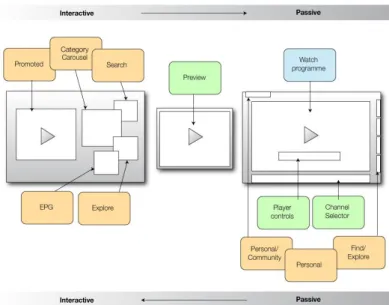
customizable. As shown in Figure 1, the end-user interface is not just a media player or an electronic program guide but a composition of different functional elements that enable both an interactive (―lean-forward‖) and a passive (―lean-backward‖) experience. Its key features are inspired by the best practice in online video and include the following:
Tools for content discovery and program selection, including tools to explore
available content and search for content, an electronic program guide, and promotions, ratings, and recommendations
A video player that supports in-portal, full-screen, and detached mini-player
modes
Messaging and community features
Advertising opportunities around each functional element and also embedded
within each element
Figure 1: Example of an end-user interface based on this blueprint
With solutions based on this blueprint, online video services providers can also enhance the positioning of the media brand. They can build content awareness and content purchase intent (for example, pay content) through a composite of different functional elements such as the
10
Electronic Program Guide (EPG) (section 3.2.2), the content selector (section 3.2.3), and the content navigator (section 3.2.4). Each of the functional elements of the front-end and the interactions with these elements present opportunities for users to experience the media brand and content, explore more content, and engage with the brand.
The user experience described in this blueprint is designed to become a user‘s ―online video portal‖: Because it accommodates a variety of content delivery networks, users can aggregate and view all their content choices in one place—not just on-demand content, but any combination of live and catch-up content as well as on-demand content. Users will not have to depend on different media players, different applications, and different Web sites to listen to audio and view videos, but can use a single front end to aggregate all their favorite content into one place and control how it is presented.
1.1.2 Provide a differentiated value proposition for advertisers
Rich media applications based on this blueprint enable a broad spectrum of marketing
opportunities—banner advertising, in-stream advertising, promotional content, sponsored links, and recommendations, which can be combined for maximum brand engagement. The proposed digital advertising solutions support behavioral targeting as well as contextual advertising, optimizing advertising effectiveness, and driving ad space sales at much higher prices than traditional online advertising. Extensive analysis and reporting capabilities enable better tracking of user interactions and campaign effectiveness, helping advertisers to make insightful decisions on their campaign strategy. When changes to the campaign are needed, the proposed integrated design shortens time to market of new ad content by dynamically refreshing metadata and ad creative.
1.1.3 Enable future rich media services
Online video is an evolving market, and service providers need to evolve their offerings to stay competitive. The modular, services-oriented architecture (SOA) proposed in this blueprint provides the extensibility and scalability to support future rich media services across multiple digital channels:
Its client application can be adapted to meet the service provider‘s specific needs
for branding and functionality.
Its three-tier design and the open interfaces of its services enable service
providers to combine existing with new services, on-premise services with hosted and ―cloud‖ services.
Its workflows are configurable to support specific business processes.
Its digital rights management capability protects content from unauthorized
duplication while enabling the delivery and sharing of content across devices and platforms.
Solutions based on this blueprint help service providers to get started quickly but also to keep their options open regarding future enhancements of the service.
11 1.2 A Microsoft blueprint for online video services
Figure 2 provides an overview of the Microsoft blueprint for online video services proposed through this white paper. The blueprint describes the business functions, user roles, and
processes required for operating a commercial online video service and explains how these can be supported by Microsoft products and services.
Figure 2: Business functions in online video
In the following chapters, we explain this blueprint in more detail. We begin with a review of the business models for monetizing online video services in Chapter 2. Chapter 3 introduces the proposed end-user experience and its functional elements. The personas of ―typical‖ end users we had in mind when designing the end-user experience are described in Chapter 4, along with the internal and external user roles required to operate an online video service. The business
functions required for running an online video service and how they can be supported using Microsoft products and services are explained in chapters 0 and 6. Chapter 7 describes an example scenario for a phased, step-by-step deployment of this blueprint.
12
2
Business models
Online video services based on this blueprint enable a variety of different business models for monetizing content and audiences—―free to view,‖ ―pay-for-content‖ as well as advertising-funded business models—and any combination of these.
In the following sections, these business models and how they are supported by the business functions in this blueprint are described in more detail.
2.1 Free to view
The most basic business model supported by this blueprint is the ―free to view‖ model, where the content provider makes content available at no charge. Typically, this model works best for mainstream (non-premium) content, and it is typically combined with an ad-funded business model.
Each viewer, though, makes a ―deal‖ with the content provider—a subliminal contract describing what the viewer expects to get from the overall experience and what the viewer is willing to ―give‖ or ―accept‖ in time, attention, personal data, and exposure to advertising. This blueprint offers several possibilities for such ―deals‖ between content providers and viewers, like promoting content by recommending it to a friend in exchange for free content. The service provider also might aim at increasing the time spent with the service through a loyalty program or through cross-channel promotions. The necessary processes are supported by several business
functions—―Attract and Retain Users,‖ ―E-Commerce,‖ ―CRM,‖ and ―Community,‖ as described in Chapter 0 below. They enable consumers to share recommendations and they enable Content Marketers to manage promotions, loyalty programs, and customer profiles. They also track customer interaction histories.
2.2 Pay-for-content
Some content, including some kinds of premium and special interest content, can be monetized most effectively through pay-for-content models. Online video services based on this blueprint support subscriptions, pay-to-view and pay-to-own business models, and windowing.
In this blueprint, pay-for-content models are supported mainly through the E-Commerce business function, which enables content providers to define commercial offerings (subscriptions, rentals, purchases) and associate them with any selection of content objects. Also, the E-Commerce business function enables promotions, discounts, and bundles, and enables content providers to make targeted offers based on the user‘s purchase history.
To protect content from unauthorized duplication or distribution, this blueprint includes digital rights management as a business function, enabling end-to-end content protection along the content value chain.
2.2.1 Types of pay-for-content models
2.2.1.1 Subscriptions
In a subscription-based business model, the user pays a monthly or yearly fee for access to a selection of content defined by the content provider. While in traditional TV this selection
13
typically is a ―TV channel,‖ online video services based on this blueprint can provide this selection as either a ―channel‖ or any combination of on-demand video items bundled together based on various criteria: The content items may be part of a series, they may belong to the same genre, or they may be a ―mix‖ defined by the content provider or user. Thus, this blueprint enables more versatile subscription-based business models.
2.2.1.2 Pay-to-view and pay-to-rent
In a pay-to-view or pay-to-rent business model, the user pays for viewing the content for a certain period of time, for a number of times and/or on a certain set of devices. Contrary to the pay-to-own business model described in section 2.2.1.3 below, the user‘s right to see the content expires after a certain period of time or after a number of exhibits. In the pay-to-view business model, the user may or may not be allowed to share content with other users.
Solutions based on this blueprint not only support simple pay-to-view models where the user can play back the content only once, but they also support multiple exhibits across multiple devices, and the option of sharing content with friends.
2.2.1.3 Pay-to-own
The key difference between pay-to-own and pay-to-view is that the user‘s right to play back the content does not expire, and that the user may transfer this right to other users. For live content, pay-to-own models may include the right to record the content as it is being streamed, storing it for later reuse on a hard disk or a portable medium.
Online video services based on this blueprint not only support simple pay-to-own models where the user can only store and play back the content on one device, but they also support replicating the content to multiple devices, and the option of transferring rights to others.
2.2.1.4 Windowing
As consumers are demanding content early, windowing—that is making content accessible at a premium before it is broadly distributed—can generate additional revenue from ―fans‖ willing to pay more for earlier access. For content that appeals to a fan audience, windowing is an effective way of increasing the total revenue through the content life cycle.
Online video services based on this blueprint enable windowing because they can provide instant access to content after its release without the latencies inherent in traditional distribution
channels like cinemas, DVDs, and television.
2.2.2 Considerations for effective pay-for-content models
Pay video content delivered through the Web addresses the growing global video-on-demand market. In a 2008 report on growth in global entertainment and media, PricewaterhouseCoopers (PwC) predicts that the global video-on-demand market would be worth $12 billion in 2012. This is up from $4.2 billion in 2007, with a compound average growth rate (CAGR) of 23.5 percent. This excludes revenues from advertising, which are expected to account for a large portion of total revenue, and tape and DVD video rentals.
14 Table 1: Global outlook on pay-for-content revenue in video on-demand (in U.S.$ millions)
Among the pay-for-content models in video, subscription-based models are most widespread: In 2008, they are expected to account for almost 80 percent of the total pay-for-content revenue. But in past years, video on-demand and mobile TV revenues have grown significantly, and by 2012, they are expected to account for 4.2 percent and 6.4 percent of the total pay-for-content market in video, respectively.
Future content consumption choices
These categories, though—subscriptions, video on-demand, and pay-per-view—have been coined by history, but we expect that in the future, online rich media content will be selected, consumed, and paid for based on simpler, convergent user experiences. The blueprint proposed through this white paper supports these convergent user experiences.
For instance, if the user is watching an episode of ―Lost,‖ her interest in viewing other content is likely to be determined by contextual ―nearness,‖ not by the subscription model. If she has missed last week‘s episode, she might want to watch that first or maybe she has missed a month‘s worth of previous episodes and wants to catch up on those before watching the latest episode. Enabling the user to ―catch up‖ on a developing story makes it more likely she will be interested in
watching next week‘s episode.
Monetizing these choices requires making the right (contextually relevant) content offers at the right point in time, and it requires flexibility in how users are charged for these offers. To
encourage the user to ―catch up‖ on a series, the last four episodes may be offered as a bundle at a discounted price, while the ability to watch next week‘s episode today may come at a premium. Moreover, having spent a Sunday afternoon watching ―Lost,‖ the user may leave the house for a dinner appointment but may want to continue watching the last episode while in transit, on a mobile phone or on a portable device. And when in an airport lounge waiting for a return flight on the next day, the user may want to continue watching on a laptop.
15
Variations on all of these choices currently exist. But online rich media services based on this blueprint enable a convergence of all these choices and the methods by which to pay for them comfortably and securely. This ease of use may have a significant positive impact on consumer engagement with pay models.
2.3 Advertising-funded business models
Most content can be monetized most effectively through advertising-funded business models. In addition to ―traditional‖ banner ads, online video services, based on this blueprint, support a wide range of in-stream video ad formats, as defined by the Interactive Advertising Bureau (IAB): Linear ads, non-linear ads and companion ads (for a detailed explanation of these ad formats, see section 2.3.1). In addition, they enable contextual placement of ads through topic keywords, and targeting of ads based on user profile data, user preferences, and user interaction history. In this blueprint, ad-funded business models are enabled by the advertising business function supported by a digital advertising solution. Publishers use publisher tools to specify the
demographics they attract, and the editorial context they provide. Advertisers use buyer tools to manage ad campaigns and select a medium and ad keywords to target an audience and place their ads in the appropriate editorial context. On the display side, both linear video ad formats like prerolls and interstitials and non-linear video ad formats like overlays, underlays, animations, and picture-in-picture ads are supported.
The blueprint proposed through this white paper takes online video advertising far beyond the pre-roll and post-roll ads common today, bringing the full potential of online video advertising to bear. These capabilities should translate into real business value for both content service
providers and advertisers. According to the research group Dynamic Logic, the most effective online video ads are likely to generate much higher increases in awareness than the most effective static online banner ads.
2.3.1 Online video advertising formats
The IAB has published digital video ad format guidelines and recommendations for best practices, which are increasingly being adopted by most online video service providers.
The main distinction in in-stream video advertising formats is between linear and non-linear formats. Linear video ads are displayed in sequence before, during, or after the main video content. IAB recommends that the duration of such linear video ads should not exceed 15 seconds. One of the key characteristics of a linear video ad is that the ad demands the full attention from the user as the ad takes over the user experience entirely, typically for a bounded period of time. However, in the case of the interactive ad format, the full ad experience may be open-ended.
In contrast, non-linear ad formats run in parallel to the main content experience. As a result, most non-linear formats employ multiple stages to the ad display. Initially, there is some form of invitation or teaser unit that invites the user to further interact and usually expand the ad unit. A key characteristic of non-linear ad formats is that the user may continue to view content while the initial ad is displayed. Figure 3 provides an overview of the different types of ads, as defined by the IAB.
16 Figure 3: Different types of video ads, as defined by the Interactive Advertising Bureau (2008)
A third category, called companion ads, can be combined with both linear and non-linear video ads and are commonly text, banners, rich media, or video player skins that wrap around the video experience. Companion ads can run alongside either or both the video or ad content. The primary purpose of the companion ad is to offer sustained visibility of, for example, the sponsor
throughout the video content experience.
2.3.2 Contextual advertising
Ads placed in the appropriate context are believed to have a greater chance of attracting a user, because they tend to have more relevance to the user‘s tastes. Contextual advertising is about providing ads that are related to the context of what the user is watching or the actual context of their chosen viewing environment.
With online video services based on this blueprint, there are many opportunities to offer both display ads and in-stream video ads based on the context of what the user is watching or the context of the situation governed by an external event in the environment. For example, a local weather forecast for severe rain could prompt umbrella ads. In the example below, a Clairol ―Nice & Easy‖ hair product pre-roll video ad is displayed during a commercial break of the movie ―The Devil Wears Prada‖ where a lead character is known for having beautiful red hair.
17 Figure 4: Example for contextual placement of a display ad
The contextual ad displayed in Figure 4 is recognized through the matching of topic keywords— related to the content—to ad keywords. This means that graphical or text-only ads corresponding to the topic keywords are displayed and are, therefore, always relevant to the context. Another example might include a search query for ―flowers‖ returning an advertisement for a florist‘s Web site or the selection of the ―Gardening Channel,‖ resulting in advertising for greenhouses.
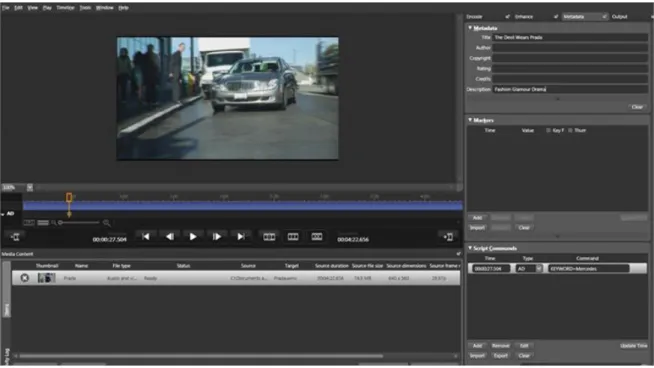
Topic keywords can be associated with a piece of video content (a title) and in some cases be derived from available metadata (for example, movie title, actors‘ names, genre, abstract, etc.). Solutions based on this blueprint also allow for topic keywords to be inserted along the timeline of the video as in specific scenes (as shown in the example in Figure 5) or even generated through search queries, news feeds, or other sources to enable the serving of contextual advertising. Figure 5 below shows how topic keywords can be added along the timeline of video content. In the example, topic keywords such as ―Mercedes-Benz‖ and ―Luxury Automobile‖ are added to this specific scene.
18
The markers can then be used to drive and source appropriate ads from the advertising solution. Moreover, the advertising solution can save groups of keywords under subject-specific (or other) headings to make future content tagging even easier.
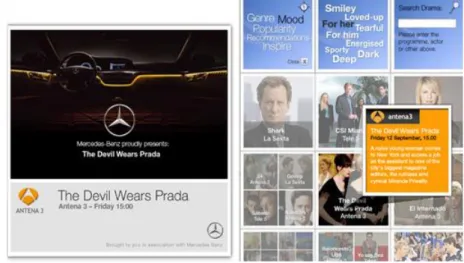
As a result, appropriate ads can be sourced that match these keywords. In the example in Figure 7, the Mercedes-Benz video ad is used as a pre-roll to ―The Devil Wears Prada‖ as the topic keywords associated with the main video indicate that a Mercedes-Benz appears in a specific upcoming scene.
Figure 6: Example for the contextual placement of a pre-roll video ad
Furthermore, contextual ads can also be served at specific markers during the playback of video content as demonstrated in Figure 8. However, it is important to note that this can be seen as disruptive to the user experience—something that should be considered when designing the user interface.
19
Another technique that can be enabled by solutions based on this blueprint involves embedding keyword hyperlinks in content that is sponsored by an advertiser. When a user follows the link, they are sent to a sponsor‘s Web site or other desired destination.
As contextual advertising is still in its infancy, it is yet to reach its full potential. As the process— and technological capabilities—become more refined, it is likely that results will improve. One method of reaching such potential may well be combining contextual with targeted advertising (section 2.3.3).
2.3.3 Targeted advertising
Targeted advertising (also known as behavioral targeting) enables advertisers to target their ads at an audience based on the users‘ profiles, preferences, and past behavior; it enables publishers to offer higher-value inventory commanding higher prices and generating more revenue, as advertisers know that it is an effective methodology.
Solutions based on this blueprint not only offer contextual advertising capabilities, but also behavioral targeting capabilities, which can be combined for maximum effectiveness. While it is commonly accepted that contextual placement of advertising increases its effectiveness, it is worth noting that targeting—i.e., delivering the ad to an audience interested in the product or service advertised—seems likely to have even greater impact on brand preference and
engagement, as research1 carried out by Yahoo and MediaVest indicates.
Solutions based on this blueprint allow advertising to be targeted based on a user‘s profile data, user-configured preferences, and the user‘s past behavior, typically recorded by the user‘s past clickstream, (i.e., his/her past navigation through the application). The user‘s profile data can be captured during a registration process, while user preferences are gathered when the user configures the online video client to their liking by selecting favorite channels, favorite programs, and other data.
Clickstream can provide even more useful and relevant data. For example, if a user is known to have recently visited a number of automotive shopping/price comparison sites, based on
clickstream analysis enabled by cookies stored on the user‘s computer, then that user can then be served auto-related ads when using the online video service. (Of course, installing a cookie on the user‘s computer should only be done with the user‘s consent.)
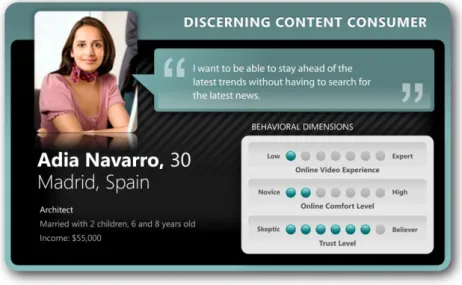
For example, meet Adia in Figure 8, our discerning content consumer. We know from her user profile, stored preferences, and clickstream analysis that she likes luxury brands and cars and is a big fan of Shakira.
20 Figure 8: Adia Navarro, a consumer user persona
Adia is using the video player watching the TV program ―Lost.‖ When she pauses the content playback, an overlay ad of the ―Shakira Live‖ DVD displays. The overlay ad is just one type of targeted ad display.
Figure 9: Example for the targeted placement of a picture-in-picture video ad 2.3.4 Considerations for effective online advertising
Solutions based on this blueprint can make online video advertising more effective for both content service providers and advertisers in several ways: They present an opportunity to optimize effectiveness and yield with both targeted advertising and contextual advertising. They even enable for both these forms of advertising to be combined for maximum effect. And finally, they allow for a reduced time-to-market of new ad content via dynamically refreshing keyword groups, improved linkage to marketing campaigns and ready interfaces for external ad booking systems and other advertising engines.
21 Figure 10: Example for combining contextual and targeted placement of a display ad
For example, the Mercedes-Benz display ad in the bottom left of the screen shown in Figure 10 is a combined contextual and targeted ad because it not only relates to Adia‘s user profile and preferences, but also to the context of what she is watching, in this case ―The Devil Wears Prada‖ that has a scene in which the Mercedes-Benz car appears.
In the example in Figure 11, not only does a Windows Mobile® software ad appear (reflecting the
context of mobile phones appearing in the main video), but the type of mobile phones that appear on the bar at the bottom of the screen may be tailored to her tastes. Because her user profile might indicate she has preferences for personal digital assistants (PDAs), the Windows Mobile content is combined with a selection of PDAs to maximize relevancy and impact.
Figure 11: Example for contextual placement of a display ad, with targeted product offerings
We believe that success for advertising in online video is all about simplicity, relevance, and placement: ―Simplicity‖ because ads must not be too complex that they distract attention away from the main content; ―Relevance‖ in that ads must be relevant to the audience—for example, advertising a sci-fi action movie like ―Transformers‖ around an episode of ―Sex and The City‖ may be seen as irrelevant by audiences; And finally ―placement‖ (both spatial and temporal), because ads need to inserted carefully without jarring the user experience. An ad taking the entire screen during a key moment in a live event is likely to detract from the user experience and may not stimulate favorable associations.
22 Figure 12: Example for contextual placement of a display ad with a video mini player
The example in Figure 12 shows the Mercedes-Benz display ad underneath the mini-player model, which is currently playing ―The Devil Wears Prada.‖ We believe this is an effective ad because it is simple (it does not shift attention away from the main content experience), relevant (both to Adia‘s user profile and to the content) and also well-placed (underneath the player and also only when ―The Devil Wears Prada‖ preview is playing). Similarly, the Mercedes-Benz video ad may be displayed as a pre-roll to the movie as opposed to a random insertion at any point during the movie.
So simplicity, relevance, and placement are key elements of success with an advertising strategy in online video. We now explore how the effectiveness of advertising—specifically, of contextual advertising and targeted advertising—can be measured.
2.3.5 Measuring the effectiveness of advertising
Advertising in an online video service based on this blueprint offers brand owners the opportunity to discover which of their products are generating the most interest and sales potential, through reporting that aggregates data from a variety of sources.
Methods to measure the effectiveness of advertising are evolving, and which methods to use depend on the client and, if ad-funded models are combined with pay-for-content models, the associated pay-for-content model. Key metrics for measuring the effectiveness of online advertising include cost per impression (CPI), click-through rate (CTR), and the cost per action (CPA).
However, the key challenge with measurement that the advertisers and media buyers face is defining how to measure ―engagement,‖ as in the level of attachment a user has to a brand (both consciously and unconsciously) and the ―call to action‖ they then take up based on that
perception. Call to Action is an extremely important measure for success. Brand owners will want to know whether their investment into placing an ad on a (video) portal is generating a certain level of activity and a certain level of engagement with the ad.
In the beginning, click-through rates were considered the epitome of sophisticated online marketing success measurements. The next evolutionary step was to link the last ad seen or clicked with an action, which led to the concept of ―conversion tracking‖ as a measure of
23
advertising effectiveness. More recently, it was understood one needs to evaluate every touch point on the path to conversion to really understand what impacts ad effectiveness.
Measuring engagement
Measuring engagement is an evolving topic in the world of online advertising at the moment, and there are different variations of how engagement is defined and measured. The technical
definition of engagement expresses the level of attention an ad draws from a user, weighing up how effective it is in the real world. Based on this technical definition, measurement should take into account the overall interaction rate; specific interaction with video objects; and viral effects such as video sharing or e-mailing. Of course, the final click-through rate should also be taken into account.
But these types of measures are seriously flawed, engagement does not just relate to one ad but all the ads in a series or collection; actually it relates to all the touch points with a brand. So engagement is part of a wider user journey and, therefore, brands need to reach potential customers across a variety of touch points in their journeys.
Not all ads are intended to serve the same purpose. Some advertising is targeted at achieving awareness, whereas other advertising seeks to ―close the deal.‖ Solutions based on this blueprint can be designed to enable complete conversion analysis across the whole user journey to understand which sites, ads, and placements are most effective before the intended action/conversion.
2.4 Other elements of business models 2.4.1 User profiling
Because solutions based on this blueprint can store user profile data and user preferences, they can provide useful information for guiding marketing campaigns. Such information can contribute towards both internal marketing (where the user is served targeted advertising and receives targeted private messages) and external marketing (where the user has opted in to receive direct marketing content). Information on hobbies, interests, gender, household income, marital status, and lifestyle choices may be gathered through the user registration process. The user may also be asked to provide more details about him/her as part of a ―deal‖ where content is made available in exchange for profiling information (in section 2.1 above). More accurate customer profiles can lead to better-targeted advertising and marketing, so gathering user profiling data may be an important element of any business model.
2.4.2 Leveraging/enhancing existing sites
High-profile media and social network sites on the World Wide Web attract very large audiences, generating a lot of traffic. For video content providers who own or have access to those sites, it may make sense to ―embed‖ their online video service into one of those existing sites so that they can harness the traffic generated by those, rather than trying to attract large audiences to a new site.
On the other hand, Web sites of video content owners in the past often have been seen as marketing instruments intended to drive audiences to other distribution channels. Until very
24
recently, for example, this was true for most broadcasters‘ Web sites. An online video service based on this blueprint can change this. It can be embedded into existing Web sites to enhance their functionality with video, attract more traffic, provide a more compelling experience, and, ultimately, become a new, very cost-effective content distribution channel.
So, the ability to embed online video services into existing Web sites is key. Content (and whichever mechanisms are in place to monetize it) needs to be seen by the widest audience possible. Hence, this blueprint provides for open application programming interfaces (APIs) and uses standardized feed formats to facilitate integration with existing sites and content sources.
2.4.3 Affiliate marketing
Another monetization option are affiliate marketing partnerships where certain actions performed by the user result in a new window opening where the user is directed to a specific Web site or premium content offered by another broadcaster. The affiliate would pay a referral or commission fee.
Solutions based on this blueprint provide for several opportunities for affiliate marketing. For instance, the operator of the online video service may be a ―pure‖ content distributor, and the affiliate may be a brand or a channel as shown in Figure 13. Actually, affiliate marketing can also be used to monetize other capabilities of solutions based on this blueprint, like display
advertising and in-stream video advertising.
Figure 13: Example of affiliate marketing FINAL 2.4.4 Sales of themes and skins
In the field of mobile telecommunications, the sale of themes and skins has become
commonplace. These are less monetized in the online field, mainly due to the availability and ease of access to good-quality free alternatives.
However, themes and skins—if well-designed and linked to desirable content (for example, music stars, football teams, favorite programs, etc)—may well have a market. For instance, a sponsor of a program might be offered the opportunity to provide a branded theme or skin that is applied to the player when this program plays. Even if some users may reject such changes, most will simply
25
choose to leave it in place, creating additional brand profile opportunities and opportunities-to-see. Such branding could be monetized through a fixed term agreement with either a fixed rate or perhaps a performance-based compensation. The agreement could be based on a formula, taking into account the number of users that choose to keep the skin and the amount of time they keep the skin.
Because certain guidelines need to be observed (no interference with functionality, ability to revert to own preferences, and option to reject branded skins), solutions based on this blueprint enable branded themes and skins within the boundaries of the defined client functionality. Branded skins may be created as part of the user experience adaptation business function. Using appropriate tools, designers may modify the appearance of the client application without
changing its functionality.
2.5 Sample ad revenue model
In this section, we present a summary model describing how an online video service can be monetized through a combination of display advertising (for example, banner ads) and affiliate or tenancy deals (where revenues are generated through commission).
Figure 14: Ad revenue growth for an online video service
Figure 14 gives an overview of how ad revenue may develop in time, and the summary model is detailed in Table 2 below. In the following, the assumptions on which the summary model is based are described.
Assumptions
The model is based on the following assumptions:
Online video users: We assume the number of online video users to be 300,000 in
the area covered by the online video service. This is about the number of online video users in a medium-sized European country. A Forrester report found that there were approximately 4 million online video subscribers in Europe in 2007.
0 € 500,000 € 1,000,000 € 1,500,000 € 2,000,000 € 2,500,000 € 3,000,000 € 3,500,000 € 4,000,000 € 4,500,000 € 5,000,000 €
Year 1 Year 2 Year 3 Year 4 Year 5
Affiliate marketing revenue per year Display advertising revenue per year
26
Based on a PWC report, we assume the number of online video users to grow by 16.4 percent year over year (YoY).
Advert types and ad positions: We assume there are five ad positions in total on
the online video portal, two banner ad positions, and two in-stream ad positions (picture-in-picture and pre-roll).
Average target Cost per Mille (CPM) rates: We assume the average target CPM
rate to be significantly higher for in-stream ads than for banner ads. We further assume the CPM rates to gradually decrease.
Percentage of sales through ad sales channels: We assume three sales channels
are used to sell the ad inventory—a direct sales channel, media agencies, and ad networks. Only a small percentage on premium inventory will be sold through direct sales. Most ad positions are sold through media agencies and ad networks. Eventually, the percentage of ad positions sold through direct sales increases.
Cost of sales per ad sales channels: For direct sales, we set the cost of sales to
zero, assuming the online advertising would be sold through an existing ad sales department at no incremental cost. For media agency sales, we set the cost of sales to 20 percent, and for ad networks, to 10 percent. We further assumed remnant inventory (the inventory sold through ad networks) will be sold at a 70 percent discount off the target CPM rates.
Total number of ad impressions: We assume that only 35 percent of the inventory
will be sold in the first year, increasing to 65 percent of sold inventory in the fifth year.
Revenue: In addition to the revenue from display advertising, we assume some
additional revenue can be generated from affiliate marketing (see section 2.4.3 above).
27
Traffic Year 1 Year 2 Year 3 Year 4 Year 5
Unique Users per month 300,000 349,200 406,469 473,130 550,723
Growth Rate year over year 16.40% 16.40% 16.40% 16.40% 16.40%
Ad Impressions per month, per user 10 8 6 7 7
Ad Impressions per month 3,000,000 2,793,600 2,438,813 3,311,908 3,855,061
Advert Types
Banner number of ad positions 2 2 2 2 2
Banner - Floating number of ad positions 1 1 1 1 1
In-Stream - Pic in Pic number of ad positions 1 1 1 1 1
In-Stream - Pre-Roll number of ad positions 1 1 1 1 1
Total number of ad positions 5 5 5 5 5
Average target CPM rates
Banner avg. target CPM rate 8.00 € 8.00 € 7.00 € 7.00 € 6.00 €
Banner - Floating avg. target CPM rate 5.00 € 5.00 € 4.00 € 4.00 € 3.00 €
In-Stream - Pic in Pic avg. target CPM rate 15.00 € 15.00 € 13.00 € 13.00 € 11.00 €
In-Stream - Pre-Roll avg. target CPM rate 20.00 € 20.00 € 16.00 € 16.00 € 14.00 €
Total for all ad positions @ avg. CPM rates 48.00 € 48.00 € 40.00 € 40.00 € 34.00 €
Percentage of sales through ad sales channels
Direct Sales % of total sales 10% 15% 20% 25% 30%
Media Agency Sales % of total sales 40% 45% 50% 55% 60%
Ad Network Sales % of total sales 50% 40% 30% 20% 10%
Total 100% 100% 100% 100% 100%
Cost of sales per ad sales channel
Direct Sales % of revenue
Media Agency Sales % of revenue 20% 20% 20% 20% 20%
Ad Network Sales % of revenue 10% 10% 10% 10% 10%
Discount for Remnant Inventory % of revenue 70% 70% 70% 70% 70%
Total number of ad impressions
Total Number of Ad Impressions (5 ad positions) per month 15,000,000 13,968,000 12,194,064 16,559,539 19,275,303
Sold Inventory avg. per year 35% 45% 55% 60% 65%
Total Number of Sold Ad Impressions (5 ad positions) per month 5,250,000 6,285,600 6,706,735 9,935,723 12,528,947
Revenue per ad sales channel
Direct Sales revenue per month 25,200 € 45,256 € 53,654 € 99,357 € 127,795 €
Media Agency Sales revenue per month 80,640 € 108,615 € 107,308 € 174,869 € 204,472 €
Ad Network Sales revenue per month 34,020 € 32,585 € 21,730 € 21,461 € 11,502 €
Total revenue per month 139,860 € 186,456 € 182,691 € 295,687 € 343,769 €
Revenue
Display advertising revenue per year 1,678,320 € 2,237,472 € 2,192,298 € 3,548,246 € 4,125,231 € Affiliate marketing revenue per year 60,000 € 108,000 € 150,000 € 210,000 € 270,000 €
Total revenue per year 1,738,320 € 2,345,472 € 2,342,298 € 3,758,246 € 4,395,231 €
(assuming direct sales would be handled by existing ad sales department and not incur incremental cost)
28
3
User experience
3.1 OverviewsOnline video is an emerging, evolving medium that is offering new experiences and encouraging new behaviors from users. Creating compelling online video user experiences may be seen as difficult, but the key to success in this area lies in understanding that the functionality users expect and the behavioral patterns users apply to online video are inspired by both ―traditional‖ TV and the Web. By applying our knowledge of how users have traditionally engaged with TV and Web-based applications, we are able to create new, immersive, and successful digital experiences for viewing and interacting with video content.
Passive versus interactive experiences
Traditionally, TV has been classified as a passive user experience. Viewers choose the channel or program they wish to watch and then sit back and watch the program with their family or group or independently. Viewers may be emotionally involved with the content of the program, but only interact with the television set to change channels, change settings, or set recordings. They exercise little or limited control of what they are consuming.
By contrast, using computers is an interactive experience where the user continually interacts with an application or Web site. The computer also promotes constant multitasking; for example, working on a document while browsing Web sites or communicating with friends via instant messaging (IM). These tasks are often interdependent, leading to the enrichment of one task (for example, discovery of content online recommended by a friend) and increased communication (sending found content on to friends). The interplay between these tasks is becoming more and more seamless, and these behaviors are increasingly popular.
While watching something on TV is usually a passive experience (Figure 15), online video services based on this blueprint offer more of an interactive experience (as shown in Figure 16), providing more control of the content, but also the ability to switch back to a TV-like experience if desired.
Figure 15: A passive viewing experience— waiting for content and limited control; feel
quite distant from the content
Figure 16: An interactive viewing experience—watching and switching between content as quickly as possible; feel
29
Combining video content with the type of interactions that users commonly adopt using a computer create experiences that enable users to cycle easily between active engagement to passive viewing and back to interactions. For example, a user may have interacted with an online video service to find a program (active) and then sit back and watch it (passive). The user can then progress to discover related programs or content, to share or comment, and to discover and explore commercials (active). Solutions based on this blueprint help content providers and advertisers explore the numerous commercial opportunities afforded by this cycle.
3.2 Key features
The client design proposed in this blueprint enables the user to consume video content in a variety of forms:
Live—watching live television programming or live event coverage
Catch-up/Look-ahead—watching television content that was broadcasted in the
past within a certain timeframe after the content was broadcasted/watching television content that is scheduled for broadcast within the next few days
Video on Demand (VoD)—choosing from a catalog of video content and viewing
content at any time
Figure 17 shows an example of a client user interface that makes the above services available and enables the user to switch from an interactive experience to passive viewing through a desktop PC-style interface that adapts to active and passive use modes. The key features that enable the user to select content are described in the following sections. These features establish the principles of user interaction and the transitions from interactive selection to passive viewing, then from passive viewing back to interactivity stimulated by video content.
30 3.2.1 Viewing content in the player
The player is a core component to the client design because it enables the playback of video content and in-stream video advertising. This is the area where the user is watching video content but also interacts with it through commands such as:
Play, pause, resume play, and stop.
Rewind and fast forward.
Adjust volume and mute.
Figure 18: Player in full-screen mode with playback controls, mute button, and tabs
The player unit is available in three modes—window mode, full-screen mode, and mini-player mode. These options are easily accessible by the user through icons and keyboard shortcuts. Options and commands would only be made visible when the mouse is close to or over the rim of the video display area.
―Window mode‖ describes a mode where the player is displayed inside a window,
which may contain other elements like the Electronic Program Guide or the search box.
―Full screen mode‖ is where the player takes over the whole screen and content is
displayed in highest resolution and quality.
―Mini-player mode‖ is where the player is reduced to gadget-size format, enabling
the user to ―keep an eye‖ on the content (for example, news) while using another application. For instance, a user may choose to watch the news in mini-player mode to be able to work with another application. When something visually interesting comes up in the news program, the user may enlarge the player to window or full-screen mode for better viewing. The user may then switch focus to the content, away from the other application.
We believe that this combination of options, which gives the user both a truly interactive
experience but also the opportunity to switch to a more passive mode of viewing (i.e., full screen) when required, will meet most users‘ needs.
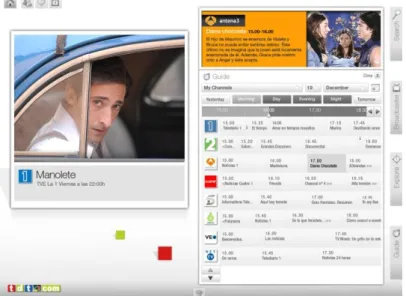
31 3.2.2 Selecting scheduled programs with the Electronic Program Guide (EPG)
How it works
The EPG allows users to choose what they want to watch from a range of channels and content available. In this design, typically the EPG is based to broadcast TV schedules, but may differ in those cases where TV programs are not licensed for Web TV.
To view what is on later today or in the next three days, the user may scroll along the timeline into the future. The broadcaster may choose to offer program information, a program trailer, or even the opportunity to watch the program in advance of its live TV broadcast.
Users can also use the EPG for advanced viewing or catch-up viewing because they can use it to find TV programs they want to catch up on or watch again. After seven days, programs are automatically added to the video on-demand library or the content owners‘ back catalog.
Figure 19: Electronic program guide How it meets user needs
This feature allows users another way to watch broadcast television. It delivers greater flexibility for viewers to choose when and where to watch their broadcaster/program of choice. This
flexibility offers more TV viewing options within the household and at work, reducing dependence on the TV schedule because users have a seven- to ten-day time period to watch programs without worrying about recording or missing a show.
With this greater schedule-based choice, the user can watch what is on now, what has just been on, what was on a few days ago, and maybe what is on tomorrow.
The benefit to scheduled TV is that the catch-up and look-ahead services require the user to make less viewing selections. Also, service providers may offer a TV news summary with weather forecasts plus advertising of national or regional context—in short, a prepackaged content selection as a video on-demand item.
32 3.2.3 Selecting media brands and promoted content with the selector
How it works
This option is based on the most common and established way that users decide what to watch. They usually select a particular media brand (for example, the BBC) or a certain channel (for example, Fox News), then watch the content on it. To differentiate between channels, content owners develop brand values that differentiate themselves in the market and offer a way for users to know what sort of content that they can expect from a media brand.
In the client proposed in this blueprint, a carousel allows the user to refine her/his selection process to an individual media brand (Figure 20). After selecting a media brand, the user is then offered a range of promoted programs from that media brand through the same carousel control, displayed in a branded style (Figure 21).
Figure 20: Media brand selector Figure 21: Promoted content selector How it meets user needs
Users often select a trusted source for their viewing and may follow this media brand‘s
suggestions when selecting content. The media brand and promoted content selector uses this knowledge by offering the user an easy way to narrow their search to their preferred content provider, and then further to a promoted program.
Once within the branded environment, though, users can access the full functionality including catch-up, look-ahead, and search in a familiar branded environment. By placing this additional functionality within a familiar context, it encourages more cautious users to explore the full potential that solutions based on this blueprint offer.
3.2.4 Discovering content with the content navigator How it works
Rather than simply enabling channel-hopping, the client design proposed in this blueprint offers a new dimension in helping viewers find content that they want to watch. By attaching metadata to programs, series, and even sections (chapters) of programs, users can explore and discover programs by genre, mood, or popularity, through recommendations, and be inspired (―surprise me‖) by system-generated suggestions. This metadata can either be supplied by the content
33
provider or generated by users, and combining metadata from both sources typically provides most value to users.
The content navigator offers descriptors that categorize the content based on different criteria, enabling users to navigate the ―universe‖ along their chosen ―axis‖ or criterion. For example, by selecting ―genre,‖ viewers can drill down into a range of different content genres, like news, entertainment, documentaries, drama, and action. For each genre, a list of available programs is displayed. Results can be sorted alphabetically, by date of production or broadcast and, if available, user rating. The user would also be able to search within these results. The results are displayed as images with the program title and content provider, enabling users to make fast, informed choices. Deeper interaction with the panel reveals additional information, including program description and viewing options.
Figure 22: Discovering content with the content navigator
To deliver this functionality, only basic metadata like program titles, contributors, production dates, and abstracts is required. To provide an indication of a program‘s popularity, the number of times a program is viewed on the online video service or published viewing figures may be
displayed, or users may be allowed to rate the programs. Recommendations could be sourced from TV review editorial publications or, alternatively, from user-generated reviews.
How it meets user needs
Viewers watch television to be entertained and informed but their moods, desires, and emotional states vary greatly. The functionality of the proposed client design offers new, targeted ways for viewers to discover programs that match their mood and meet their viewing interests. This user-centered approach increases the likelihood of users finding programming in tune with their needs, likely leading to increased use of the online video service.
3.2.5 Finding content via search How it works
Searching for content is an integral part of user interaction and should replicate the rich, interactive experience offered by other elements of the client design proposed in this blueprint.
34
The search functionality offers dynamic visual searching by program title, actor, or keyword with results displayed as images accompanied by program title and broadcast provider details. Further interaction with the panel reveals program description and viewing options. Results can be sorted alphabetically, by date of production or broadcast and, if available, user rating. The user would also be able to search within these results or conduct a new search.
Figure 23: Finding content with search How it meets user needs
This functionality will appeal to active users who have some idea of what they want to watch. The inclusion of a picture and program description (on rollover) will offer the user greater clarification of the search result and the option to delve deeper for more information. The visual search also exposes similar related programs that could appeal to the user. This can broaden their positive experience of using the platform. The dynamic search offers a real-time visual interaction more in keeping with the TV user experience.
3.2.6 Configuring user preferences
Users that have registered with the online video service may be allowed to configure the user experience to their liking, by, for example, selecting a color scheme, a background theme, and one of several preset layouts of the user controls. A registered user also may configure her favorite channels in the channel selector, set preferences for certain types of content that can guide content promotions, and be granted access to additional content, like VoD content. There would also be a parental control feature to block content that is only appropriate for adults. If a user specifies she is interested in music, fashion, and lifestyle, these types of programs then appear more prominently in the content selector and hit lists.
There is also the opportunity to block or hide certain types of content so that they do not feature prominently in user choice options (for example, ―I am not interested in animals and the channel ‗Animal Planet‘‖). This removes animal-related content from the selector and shifts the ―Animal Planet‖ channel down the EPG channel list.
35
Providing these configuration options is a simple but effective way of personalizing the user experience and helping users to find relevant content more quickly.
3.2.7 Registration
Although users could use an online video service anonymously, in solutions based on this blueprint, they would be encouraged to register their details to customize settings, personalize the functions to their liking, and possibly even access premium content.
Users may hesitate about lengthy registration processes. However, most will not object to a quick and simple first-time registration (name plus e-mail), with the option of enhancing the personal profile at a later stage. Ideally, users would be incentivized to detail their profile by providing more personalization options or granting access to premium content. That said, even the most basic registration gives the service provider the beginnings of a user profile that can be matched to other elements of information collected.
Registration and subsequent user profiling enables more effective targeted advertising, one of the keys to commercial success in online video.
3.2.8 Ratings, recommendations, and communications
In a full implementation of this blueprint, we envision that users can add user-generated metadata to content, like simple ratings (for example, one to five stars), recommendations (for example, recommend this movie to a friend), reviews, and integration with Windows LiveTM network of Internet services (for example, Instant Messenger). The latter enables users to send links to content items that may be of interest to others and chat about the content they are watching in real time. User-generated recommendations and reviews would also be used to make content suggestions to the user (for example, ―10 of your friends have rated ‗Shrek‘ five stars‖). Complexity arises once users are allowed to start commenting on content and, therefore, a degree of moderation and maintenance would be required. Although some ratings and
comments could be made private to only friends, benefits can be explored further in making user-generated content public, as can be seen from e-commerce sites, which use recommendations and comments to drive sales.
In the shorter term, the use of simple ratings is much used and an effective driver of recommendation-based choice.
3.2.9 Connected media experiences
Additionally, the use of instant messenger is an excellent way of enhancing the social viewing experience. There are still many kinds of programming that may either be watched live (for example, sports events or soaps) or viewed by an online community contemporaneously. Instant messaging provides a simple and effective method for discussing events with friends or
colleagues and for creating a more engaging overall experience with social aspects that go beyond what traditional television could offer.