Tanvi Dharmarha, International Journal of Advances in Computer Science and Technology, 3(5), May 2014, 357 - 363
357
Testing Cloud Application System Resiliency by Wrecking the System
Tanvi Dharmarha
Adobe Systems, India, [email protected]
ABSTRACT
When application architecture moves to the public cloud, failures and outages are inevitable. Rather than panicking when failures strike at the worst time, one should prepare for failures in good times. The best way to tackle failure is to fail often. This cycle of failing instances deliberately and then testing helps an organization bulletproof its Cloud based infrastructure.
Through this paper we will learn the steps and strategy involved in testing cloud application systems for resiliency and recoverability by opting in for failure. Key words: Load Testing, Cloud Testing, Chaos Testing, Design for Failure
1. INTRODUCTION
Most cloud infrastructure providers, Amazon being the preeminent ones, offer the functionality to auto scale the virtual machines instances based on the demand curve for the application. Auto scaling allows increasing (up-scale) or decreasing (down-scale) the number of virtual instances depending on predefined parameters which can range from percentage CPU utilization, specific process’s CPU or memory utilization or number of virtual connections over a defined continuous interval.
In case of heavy load, application should up-scale automatically to accommodate the large number of requests. If during such times, there is an infrastructure failure or a system outage, there needs to be a mechanism in place to reinstate the infrastructure so that the application runs seamlessly for the end customer/user. Currently organizations invest time and effort for simulating heavy load to test for system’s load bearing capacity but do not address the need for testing the robustness of system in case of outages and unexpected failures. Such failures often lead to customer dissatisfaction, organization defamation and revenue losses due to failed transactions.
2. SOLUTION
To test for system failures, we need a solution that can simulate failures. To achieve this, we have designed a service that when launched, goes and wrecks the system. There are few services which exist in the market, such as Netflix’s Chaos Monkey[1] which also test for resiliency by killing random instances. However when chaos strikes; it can bring down an instance, load balancer, zone or data center, choke an instance’s CPU, detach a volume or deregister an instance from the load balancer, etc. We have also encountered situations where an entire availability zone was sometimes giving delayed responses and other times erratic responses. In order to simulate all kinds of possible destruction/chaos in our application topology we decided to implement a service in-house rather than use an existing solution.
This custom built service first takes a system snapshot before exhausting instances so that it can restore the instance in case something goes wrong. Tester can control the type of instances to exhaust and also the level of destruction. Testers are required to observe the application behavior and performance before and after the system wreck.
We have deployed the services on one of the instances inside the same cloud network as the production system so that it can make connections with other infrastructure elements.
This activity should be done in tandem with the load and stress testing of the system.
Knowledge of application infrastructure is key in building scenarios for resiliency checks. Failing the right infrastructure elements is more important than failing any element. From a tester’s standpoint, it is imperative to know which all infrastructure elements are part of the Auto scaling Group and which elements can or cannot do without immediate recoverability.
2.1 Application Details
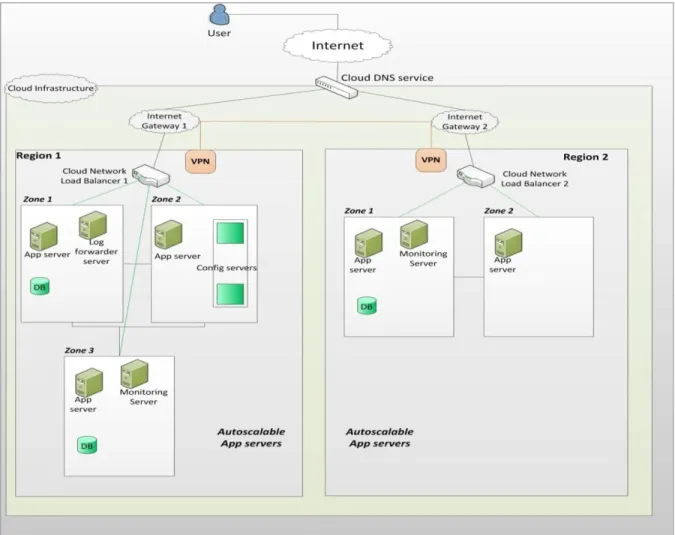
We have a web application hosted on the cloud with the following topology (see Figure 1)
1. Application servers instances across regions and zones
Volume 3, No.5, May 2014
International Journal of Advances in Computer Science and Technology
Available Online at http://warse.org/pdfs/2014/ijacst10352014.pdf358 2. Database servers across regions and zones
3. Database Configuration servers
4. Performance Monitoring Servers across regions
5. Log forwarder Servers 6. Load Balancers across regions
Once we have the information about the topology we can unleash the script. Following are the steps, used to configure the script for the application, and the test cases executed to check the system mettle.
Step 1: Establish connection to the service to kill instances
To connect to the service, tester should have an account that has administrative privileges’ on the infrastructure instances. A typical connection would require details
about the host, username and password or keyphrase as applicable.
Step 2: Configure the Setup for testing
The service would have to be configured to include
information about the environment
(Development/QA/Stage or Production) and the target cloud region.
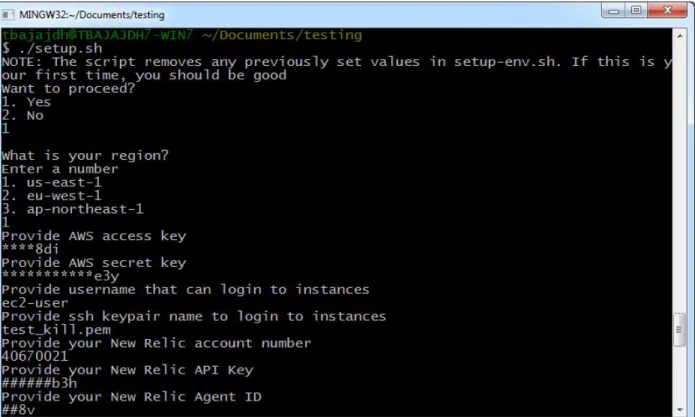
Figure 2 shows the information required for environment setup.
359 Step 3: Tag Instances
Before executing the commands to kill random instances, one should tag instances to limit the scope of testing and to avoid any unnecessary snags arising out of wrecking other instances.
Tagging should be done in a manner that it is easy to identify what kinds of instances are being targeted. For example, application servers could be tagged as Kill_AppServers so when the script runs to kill instances, it will only pickup instance Ids with the associated tag.
Step 4: Define the degree of destruction
Testers can configure what level of destruction is required for a particular test case. For example if the number of instances is 10 and the tester wants to tear down 5 instances, he/she can define the destruction degree as 50%.
Step 5: Simulate load on the application
Before triggering the script for wrecking the system, it is suggested to simulate consistent load on the application and to monitor error rates, CPU utilization and the Application Performance Index (APDEX) score [2].
Step 6: Run the script for the desired test
There can be multiple types of tests that can be performed to wreck the system. It is important to monitor the right parameters for each test. Following are some tests applicable to our application topology and some issues observed during run on our application listed under observations.
a. Kill Random Instances. This is the most important and the most basic test to test the system’s infrastructure mettle. As the name suggests, through this test, a tester simulates a situation where in any random instance that is part of the cloud formation goes down. The target instance could be an application server, database server, monitoring server or a load balancer. The underlying goal of this test is to ensure that there are no hiccups for the end users of the application during the outage. If an instance goes down, the cloud formation should have a mechanism to quickly spawn a new instance to minimize downtime or have sufficient redundancy to redirect traffic to another running instance. In this case tagging would be done for all instances in the cloud.
Figure 2: Script for Environment setup
360 Testers should constantly monitor the application performance before and after the environment wrecking. Important things to watch out for after the environment wreck include
1. APDEX score
2. Average response time 3. Throughput
4. Error rate
5. Alerts or Alarms if warned systems go down
Observation: Alert notification mail was not sent when the Load Balancers was failing as the health check on the load balancer had issues in syntax.
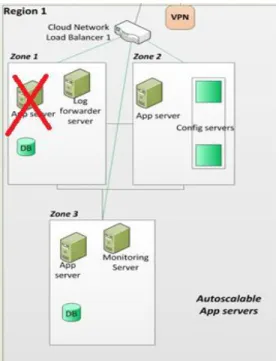
b. Kill Random Instances based on the Auto Scaling Groups: Through this test, the tester simulates a situation where in an instance within the Auto Scaling Group goes down so that chaos is distributed across the Auto Scaling group (see Figure 3). Generally servers are part of auto scaling groups, and if for some reason one instance goes down, one or more instances must spawn up depending on the criterion for auto scaling. In the meantime, the load should be distributed across the Auto Scaling group seamlessly. In this case tagging would be done for all instances in the Auto Scaling Group ASG1.
Testers should watch out for the following things during this test
1. APDEX score 2. Error Rate 3. Throughput
4. CPU utilization of remaining Servers within the Auto Scaling Group
5. Load distribution on Servers 6. Auto Scaling of Server
7. Alert or Alarm with the target instance details.
For simulating more destruction, say 50%, tagging can be applied with Destruction parameters
Observation: Instances were not auto scaling as CPU for existing instances was not reaching a level to meet the criteria for auto scaling. This helped us determine that our CPUs were going underutilized. So we decreased the number of min application server instances by 1
As a result, CPU utilization improved, fixed cost of 1 CPU intensive large instance eliminated and auto scaling worked well. Instance_name = *, tag_name=Kill_Any Instance_name = *, AutoScalingGroup = ASG1, tag_name=Kill_ASG1 Destruction = 50
361 c. Kill Random Instances based on Instance
Type: Through this test, the tester simulates a situation where in a particular type of instance goes down so that chaos is distributed across various instances types; assuming that different instance types categorize different functionality being served in the application stack. Failure of application servers which are usually part of auto scaling groups will have different impact on system compared to failure of database configuration server which might not auto scale.
In this case tagging would be done for all instances with the substring AppServer or DBConfSvr (Figure 4).
Or
Testers should watch out for the following things during this test
1. APDEX score 2. Error Rate 3. Throughput
4. CPU utilization of remaining Application Servers
5. Load distribution on Application Servers
6. Auto Scaling of Application Server within zone of the target Application Server
7. Alert or Alarm with the target instance details.
d. Chokes Random instances: This test requires modifying the service configuration scripts to specify the % of CPU choking to be simulated. A small change in the shell file that resides on the service instance does the trick. Through this test, the tester simulates load on specified instance(s) till the time the CPU utilization reaches the level specified in the file. The important thing to keep in mind here is to continue to choke CPU for the pre-defined amount of time so as to meet the auto scaling criteria.
In this case tagging would be done for one instance with its complete name.
Tester should watch out for the following things during the test.
1. APDEX score 2. Error rate
3. Auto scaling once CPU choking times exceeds the defined limit.
Instance_name = *AppServer*, tag_name=Kill_AppServer Instance_name = *DBConfSvr*, tag_name=Kill_DBConf Instance_name = ec2_AppServer_UE1, tag_name= Choke_CPU Figure 3: Auto-scaling Application Server killed
362 4. Observe monitors for noticeable spike in
CPU usage of target instance.
Observation: Choking was proper and auto scaling was successful and instance CPU’s showed spikes but the new instance that had spun up did not reflect in the monitoring server. The cloud formation script was fixed to reflect changes
e. Kill Any Process: This test requires modifying the service configuration scripts to specify the process name and id to be killed. Similar to the previous case, a small shell command fetches the process name and id. Through this test, the tester simulates a scenario to verify if the application can withstand a software process failure. Example processes include java, httpd or nginx.
Observation: The application was able to restart the process and was able to recover from the failure.
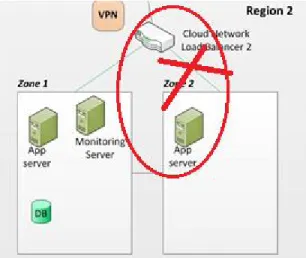
f. Stops random instances in the Load Balancer: Through this test the tester simulates a situation where in an instance registered in the Load Balancer goes down so that chaos is distributed across the Load Balancer as depicted in Figure 5.
Observations: Load Balancer redistributed load to other application servers in the same zone of the target instance. Load was getting distributed based on latency and load effectively.
3.SUMMARY REPORTS
After each test, load testers should draw reports of load summary and separate out the metrics into three categories.
1. Before system Wreck 2. During Wreck 3. After Recovery
4.COST BENEFIT ANALYSIS
The cost associated with creating and using the service is as follows
Implementation time: 1 months approximating to 1 month salary ~$8000
Deployment on Cloud and usage rate: 0.25$/hr for basic instance and usage of 2 hours per day for a period of 2 months amounts to $30
Total Cost ~$8030 for 2 months
If an organization does not have failure recovery mechanisms, it can lose overhundred thousand dollars for every hour of downtime. A Standish study estimated that credit card applications lose around $2.6 million for every hour of downtime, whereas last year’s 49-minute Amazon.com outage reportedly cost the online retail website nearly $5 million in deferred revenue [3]
Thus the overall costs of chaos testing are far less, on average, than the costs of potential losses due to application downtime.
5.CONCLUSION
Production systems on the cloud should be tested regularly and the best way to do that is by automatically simulating random failures and automatically repairing failures, wherever possible. Testing for resiliency is not a costly approach as it involves just another basic instance to deploy the service.
Testing for redundancy and testing monitoring systems are equally important as testing the application especially when your production infrastructure is derived from the support of other production systems.
Figure 5: App Server registered within Load Balancer killed
363 Remember, dedicating extra time and effort during the load testing phase to check for stability of the system helps reduce issues in production, downtime, customer dissatisfaction and revenue losses.
REFERENCES [1] http://techblog.netflix.com/2012/07/chaos-monkey-released-into-wild.html [2] http://en.wikipedia.org/wiki/Apdex [3] http://www.itbusinessedge.com/slideshows/ downtime-report-top-ten-outages-in-2013.html