w
ww
ww
w..d
diig
gii..c
co
om
m
Dynamic IP Address Support
White Paper
AbstractIn the world of TCP/IP, each network device receives an identifier called an IP address.
Unfortunately, there are a finite number of IP addresses available, therefore not every computer can have its own unique IP. One of the solutions is called dynamic IP addressing which offers a new IP address each time a new device logs on to a particular network. Using this method, a limited number of IPs can be used to address a larger number of devices based on average usage. One problem with this approach is it becomes extremely difficult, if not impossible, to communicate with a device whose IP address is constantly changing.
By using Dynamic Domain Name Server (DNS) technology, users can seamlessly connect to devices using dynamic IP addressing schemes. The following paper explains how the Digi Dynamic DNS solves the problems associated with communicating to remote devices in a dynamic IP environment.
Overview
Wireless (cellular/PCS) networks often offer dynamic public IP addresses as a solution for mobile device
connectivity. These dynamic IP addresses are typically assigned from a “pool” of IP addresses kept by the wireless carrier. Upon network connection, a wireless device is assigned an IP address from the IP address pool. If the device disconnects and then reconnects, the newly assigned IP address may not be the same as that of the prior connection. Wireless carriers use different algorithms for determining IP address assignment; typically, if the network disconnection is not lengthy, the same IP address will be assigned on reconnection. However, due to network maintenance schedules and other possible outages (e.g., power failure), it is not practical to assume that a dynamically assigned IP address will be constant even when persistent connections are selected.
Dynamic IP addresses are not an issue for Mobile Originated (MO) connections, assuming the application
connected to has another means besides IP address to identify each mobile device. Typically, this involves assigning a unique device ID to each device. The unique ID can be based on the MAC address, the Electronic Serial Number (ESN), or some other unique device identifier.
Dynamic IP addresses are problematic when the application solution depends on Mobile Terminated (MT) connections (enterprise server connecting to the mobile device) as the “current” IP address may be
unknown. Digi solves this problem with a Dynamic Domain Name Server (DDNS) solution utilizing the
Digi Connectware Manager, Digi cellular/PCS devices (Digi Connect®WAN family, ConnectPort™ WAN VPN),
and a customer supplied RFC 2136 compliant Domain Name Server (DNS). A DNS is a service that translates domain names into IP addresses. For example, the URL http://www.digi.com contains the domain name digi.com, which translates to IP Address 198.51.192.45.
Digi's Dynamic DNS Solution
Digi Connectware Manager is part of the Digi Connectware® Suite. It provides enterprise class remote site
management and administration for Digi Connect products. Digi Connectware Manager can be installed by a customer or hosted by a Digi ASP partner, and can be accessed securely from anywhere across an IP network, including the Internet.
Digi Connectware Manager, Digi cellular devices, and an RFC 2136 compliant DNS server operate in conjunction with one another to offer MT connections. When Digi cellular devices connect through the wireless network to the Digi Connectware Manager, they report their current IP addresses. Digi Connectware Manager recognizes each device from a uniquely assigned device ID. At each connection, Digi Connectware Manager updates the DNS server with the current IP address. If a device disconnects from Digi Connectware Manager and then reconnects, the DNS server is updated if the device’s IP address for new connection has changed.
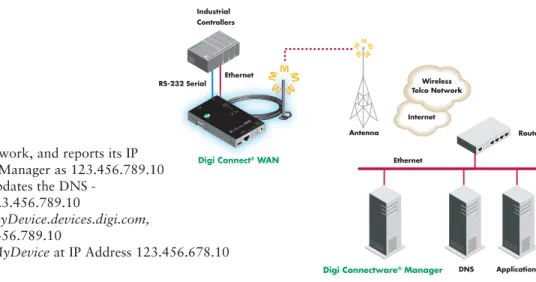
Figure 1 below shows the interaction and flow between the DDNS system components.
Router Antenna
Digi Connect® WAN Ethernet
Wireless Telco Network Internet Industrial Controllers RESET 9-30V DC525mA MAX STATUS PWR ETHERNETLINKACT
Digi ConnectWAN
AUX SIGNALSTRENGTH LINK ACTIVE SERIAL RS-232 Serial Ethernet
Dynamic Public IP
1. MyDeviceconnects to the Network, and reports its IP
Address to Digi Connectware Manager as 123.456.789.10 2. Digi Connectware Manager updates the DNS -
MyDevice.devices.digi.com=123.456.789.10
3. Application requests Device MyDevice.devices.digi.com,
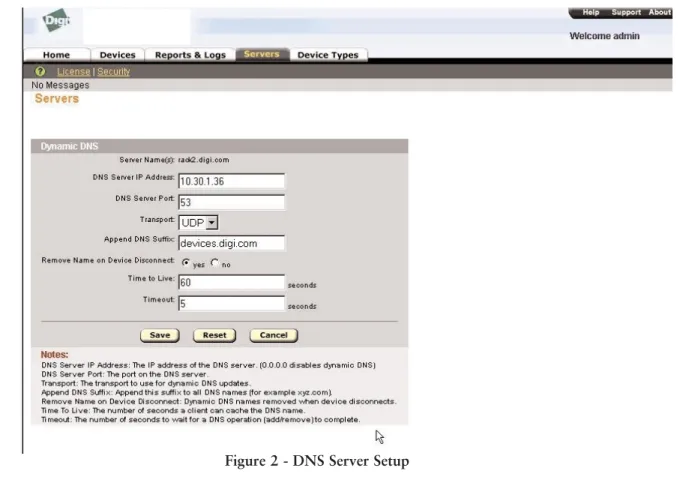
Figure 2 shows the Digi Connectware Manager DNS setup page. This page defines the connection parameters between the DNS server and Digi Connectware Manager. The “Notes” section under the user entry panel defines the various configurable parameters.
DNS Server IP Address- The IP address of the DNS server. The value 0.0.0.0 disables the DNS update feature.
DNS Server Port- The DNS server port connected to for update transactions. Default value is 53. Ports can range
from 0 to 65535.
Transport- The transport to use for DNS server updates, selectable as either TCP or UDP transport.
Append DNS Suffix- The suffix to append to all host names. For example, if the device host name is “MyDevice,”
and the DNS suffix is “devices.digi.com,” lookups for MyDevice are sent to the DNS server as “MyDevice.devices.digi.com.”
Remove Name on Device Disconnect- If selected, the DNS entry for a device is invalidated when the device
disconnects from the Digi Connectware Manager. This could be the result of a manually initiated disconnect or due to missed “keep-alive” activity.
Time To Live- Specifies the amount of time that applications and other DNS servers are allowed to cache the
record. Values can range from 1 to 65535 seconds.
Timeout- The time allotted for the DDNS to respond to an update request. Values can range from 1 to 60
seconds.
3 Figure 2 - DNS Server Setup
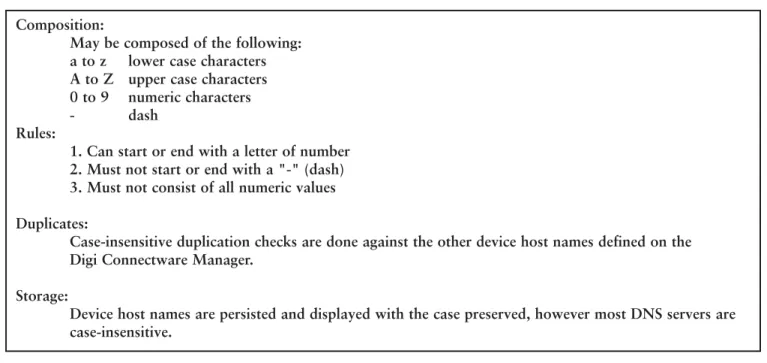
Devices are assigned a “friendly” host name as an identifier. The following table details the requirements to which a host name must adhere:
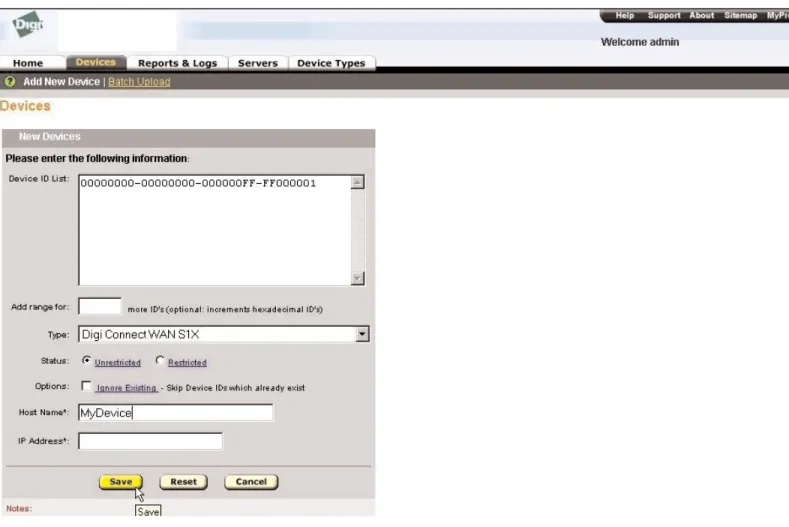
The host name for each device is entered in the “New Devices” panel in the “Add New Devices” function located in the “Devices” tab - see Figure 3.
When a device connects to Digi Connectware Manager, the DDNS update transaction will be attempted:
• If DDNS updates are enabled by setting the DNS server IP address to a valid IP address
(i.e., something other than 0.0.0.0).
• If a valid device host name has been assigned.
• If the device IP address has been reported during a previous connection or assigned via the
Digi Connectware Manager console's “Add New Device” or “Edit Device” panels.
When a device connects, the DDNS update transaction will consist of a request to delete any record with the host name currently defined for the device in the zone specified by the "Append DNS Suffix" configuration parameter. The update transaction also contains a request to add a new host (type “A”) record. The new record format contains:
• The device host name + “Append DNS Suffix” to form the full domain name
• The device's assigned or reported IP address
• The time-to-live specified in the DDNS configuration parameters
When a device disconnects from Digi Connectware Manager, if the "Remove Name on Device Disconnect" is set to “Yes,” a DDNS update request will be sent to remove the host record that was added when the device connected.
Note that if a device's host name is modified when a device is already connected, the modification will not take effect until the current session is terminated and the device reconnects to Digi Connectware Manager.
Composition:
May be composed of the following: a to z lower case characters A to Z upper case characters 0 to 9 numeric characters - dash
Rules:
1. Can start or end with a letter of number 2. Must not start or end with a "-" (dash) 3. Must not consist of all numeric values Duplicates:
Case-insensitive duplication checks are done against the other device host names defined on the Digi Connectware Manager.
Storage:
Device host names are persisted and displayed with the case preserved, however most DNS servers are case-insensitive.
Digi Connectware Manager
The Digi Connectware Manager software is available for loading on the following host systems:
• Microsoft®Windows®2000 Professional
• Microsoft Windows 2000 Server
• Microsoft Windows XP
• Microsoft Windows Server™ 2003
• MS SQL Server, MSDE (MSDE included on CD) or Oracle database
The host hardware must meet the following minimum requirements:
• Pentium III or above
• 866 MHz CPU (1 GHz recommended)
• 512 Mb RAM (1 Gb recommended)
• 300 Mb disk space
Figure 3 - Host Name Setup
In addition to providing support for dynamic IP address connections, Digi Connectware Manager also provides enterprise class management and administration to its remote site management class of products. This includes the following capabilities:
• Enterprise management and configuration of groups of devices across remote networks
• Automatic firmware management and upgrading
• Alarm generation and alerting
• Secure communications via 256-bit AES encryption and authentication
Please contact us at 1-800-437-7251 or 952-912-3444 for additional information or to discuss your specific application requirements.
Conclusion
Digi Connectware Manager offers support for dynamic IP addresses through an easily configurable DNS server interface. This feature provides an excellent solution for Mobile Terminated applications using dynamic IP addresses over Wide Area Networks. Additionally, static IP addresses are also supported. A future release of Digi Connectware Manager will offer a Mobile Terminated solution for devices located behind a Network Address Translation.
These robust IP management solutions, in addition to the many other management/administrative functions, make Digi Connectware Manager an optimal solution for remote device management and operations.
Digi International
11001 Bren Road E. Minnetonka, MN 55343 U.S.A.
PH: 877-912-3444 952-912-3444
Digi International
France
31 rue des Poissonniers 92200 Neuilly sur Seine PH: +33-1-55-61-98-98 FX: +33-1-55-61-98-99
Digi International KK
NES Building South 8F 22-14 Sakuragaoka-cho, Shibuya-ku
Tokyo 150-0031, Japan
Digi International
(HK) Limited Suite 1703-05, 17/F., K Wah Centre 191 Java Road North Point, Hong Kong
Digi International, the leader in device networking for business, develops reliable
products and technologies to connect and securely manage local or remote electronic devices over the network or via the web. With over 20 million ports shipped worldwide since 1985, Digi offers the highest levels of performance, flexibility and quality.
WHEN