DATA-DRIVEN DATABASE EDUCATION: A QUANTITATIVE STUDY OF SQL LEARNING IN AN INTRODUCTORY DATABASE COURSE
A Thesis presented to
the Faculty of California Polytechnic State University San Luis Obispo
In Partial Fulfillment
of the Requirements for the Degree Master of Science in Computer Science
by
COMMITTEE MEMBERSHIP
TITLE: Data-Driven Database Education: A Quantitative Study of SQL Learning in an Introductory Database Course
AUTHOR: Andrew Von Dollen
DATE SUBMITTED: July 2019
COMMITTEE CHAIR: Alex Dekhtyar, Ph.D. Professor
Computer Science & Software Engineering
COMMITTEE MEMBER: Chris Lupo, Ph.D. Professor
Computer Science & Software Engineering
COMMITTEE MEMBER: Lubomir Stanchev, Ph.D. Professor
ABSTRACT
Data-Driven Database Education: A Quantitative Study of SQL Learning in an Introductory Database Course
Andrew Von Dollen
ACKNOWLEDGMENTS
TABLE OF CONTENTS
Page
LIST OF TABLES . . . x
LIST OF FIGURES . . . xii
1 INTRODUCTION . . . 1
2 BACKGROUND AND RELATED WORK . . . 6
2.1 The Relational Data Model . . . 6
2.2 Relational Algebra . . . 7
2.3 The Structured Query Language . . . 11
2.4 Teaching Relational Algebra and SQL . . . 15
2.5 Related Work . . . 18
2.5.1 SQL Concepts and Common Errors . . . 19
2.5.2 SQL Semantics and Correctness . . . 20
2.5.3 Query Similarity . . . 21
2.5.4 SQL Testing and Quality Metrics . . . 23
2.5.5 Interactive Lab Environments . . . 24
2.5.6 Database Lab Environments . . . 25
2.5.7 Concept Inventory Construction and Evaluation . . 26
3 TOOL IMPLEMENTATION . . . 28
3.1 Application Overview . . . 28
3.2 Instructor Features . . . 30
4 METHODOLOGY . . . 36
4.1 Overview . . . 37
4.2 Experimental Design . . . 38
4.3 Lab Assignments and Query Types . . . 39
4.3.1 Query Types and SQL Concepts . . . 40
4.4 Data Set . . . 45
4.4.1 Raw Data . . . 45
4.4.2 Error Taxonomy . . . 47
4.5 Error Detection . . . 52
5 RESULTS . . . 54
5.1 Overview of Results . . . 54
5.2 Analysis by Instructor . . . 55
5.3 Lab A Analysis . . . 57
5.3.1 Repeated Measures ANOVA . . . 59
5.3.2 Lab A Discussion . . . 61
5.4 Lab B Analysis . . . 61
5.5 Lab C Analysis . . . 63
5.5.1 Consolidated Discussion of Difficult Concepts . . . . 65
5.6 Analysis of Errors . . . 65
5.6.1 Common Syntax Errors . . . 66
5.6.2 Difficult-to-Resolve Syntax Errors . . . 68
5.7 Quantifying Student Learning . . . 72
5.8 Principal SQL Concepts . . . 74
5.9 Concept Associations . . . 76
6 THREATS TO VALIDITY . . . 79
7 CONCLUSIONS AND FUTURE WORK . . . 81
7.1 Recommendations for Lab Improvement . . . 81
7.1.1 Concept Combinations . . . 82
7.1.2 Recently-Added SQL Features . . . 82
7.1.3 SQL Interpretation Skill . . . 83
7.1.4 Emphasis on ANSI-Standard SQL . . . 84
7.2 Future Work . . . 84
7.2.1 Curriculum Mapping & Dynamic Exercise Assignment 85 7.2.2 Formalizing Concept Associations . . . 85
7.2.3 Automatic Error Detection . . . 86
7.2.4 Further Investigation of Terminal Attempts . . . 86
7.2.5 Measuring the Impact of Lecture . . . 87
BIBLIOGRAPHY . . . 88
APPENDICIES A EXPERIMENTAL MATERIALS . . . 94
A.1 Informed Consent Form . . . 94
B LAB DATABASES . . . 96
D LAB EXERCISES . . . 106
D.1 Selected Exercises from Lab A . . . 107
D.2 Selected Exercises from Lab B . . . 109
LIST OF TABLES
Table Page
2.1 Sample DEPARTMENT Relation, with Primary Key DeptId . . . 6
2.2 Sample STUDENT Relation, with Primary Key StudentId, and Foreign Key DeptId . . . 7
2.3 Example of Selection and Projection in Relational Algebra . . . . 8
2.4 Cartesian Product of STUDENT and DEPARTMENT . . . 9
2.5 Result of a Natural Join Between Relations STUDENT and DE-PARTMENT with a Further Selection and Projection Applied . . 10
4.1 Course Enrollment and Study Participants . . . 38
4.2 Lab Databases Used in this Study . . . 40
4.3 Summary of Lab Assignments Used in this Study . . . 42
4.4 SQL Query Concepts Studied in this Thesis . . . 44
4.5 Summary of the Distribution of SQL Concepts Across Lab Assign-ments . . . 45
4.6 High-Level Groups Used to Categorize Student-Submitted SQL Queries . . . 48
4.10 Queries Deemed Correct by Lab 365 but Deemed Invalid by Man-ual Review (Percentage Average Across Exercises in Each Lab.) . 52
5.1 Results from Two-sample K-S Test [20], Comparing Percent Suc-cess and Average Attempts for Each Exercise, by Instructor. . . . 58 5.2 Exercises from Lab A on Which We Focus Our Detailed Analysis. 59 5.3 Lab A ANOVA Result for Exercises AIRLINES-3, AIRLINES-4,
AIRLINES-5, CSU-4, and CSU-6 . . . 60 5.4 Lab B ANOVA Result for Exercises INN-5, KATZENJAMMER-4,
and KATZENJAMMER-6 . . . 62 5.5 Exercises from Lab B on Which We Focus Detailed Analysis . . . 63 5.6 Lab C ANOVA Result for Exercises BAKERY-8, BAKERY-9, and
MARATHON-5 . . . 63 5.7 Exercises from Lab C on Which We Focus Detailed Analysis. . . . 64 5.8 Cases Where More than Five Attempts Were Required to Resolve
a Syntax Error . . . 70 5.9 Categorization of Terminal Attempts . . . 72 5.10 Core SQL Concepts Ranked by Subjective Complexity . . . 75 5.11 Frequently-Occurring (≥ 90% support) Subsets of SQL Concepts
LIST OF FIGURES
Figure Page
3.1 Lab 365 Application Database, Entity-Relationship Diagram . . . 29
3.2 Lab 365: Lab Assignment Setup Screen; Available Only to Instruc-tors . . . 30
3.3 Lab 365: Instructor Home Screen; Displays High-Level Student Progress for Each Lab Exercise . . . 31
3.4 Lab 365: User Home Screen; Lists Available Lab Assignments . . 32
3.5 Lab 365: Main Lab Exercise Screen, User’s View . . . 33
3.6 Lab 365: SQL Syntax Error Display, User’s View . . . 34
4.1 SQL Concept Co-occurrence Matrix, Where Values in Each Cell Represent the Number of Times the Two Concepts Appear in the Same SQL Exercise . . . 46
5.1 Percent Success by Instructor . . . 56
5.2 Average Attempts by Instructor . . . 56
5.3 Histogram of Lab Exercises, Binned by Percent of Students who Successfully Solved the Exercise, Split by Instructor . . . 57
5.4 Histogram of Lab Exercises, Binned by Average Attempt Count per Student, Split by Instructor. . . 57
5.5 Summary of Lab A . . . 58
5.6 Summary of Lab B . . . 62
5.8 Syntax Error Percentages for All Exercises in Lab A (Per-Student
Averages) . . . 67
5.9 Syntax Error Percentages for All Exercises in Lab B (Per-Student Averages) . . . 67
5.10 Syntax Error Percentages for All Exercises in Lab C (Per-Student Averages) . . . 67
5.11 Syntax Errors for all Lab Assignments, Comparing Syntax Error Proportions Between Students who Correctly Solved the Exercise with Students who Did Not Submit a Correct Response . . . 68
5.12 Syntax Errors, Attempts Required to Fix . . . 69
5.13 Student Work Sequence: Grouping Restrictions . . . 73
5.14 Student Work Sequence: Does Not Exist . . . 73
5.15 Average Attempts and Percent Success for the 18 Core SQL Con-cepts Listed in Table 5.10 . . . 77
.1 AIRLINES Database - ER Diagram . . . 97
.2 BAKERY Database - ER Diagram . . . 98
.3 CARS Database - ER Diagram . . . 99
.4 CSU Database - ER Diagram . . . 100
.5 INN Database - ER Diagram . . . 101
.6 KATZENJAMMER Database - ER Diagram . . . 102
.7 MARATHON Database - ER Diagram . . . 103
.9 WINE Database - ER Diagram . . . 105
.10 Lab A Exercises and Concepts . . . 113
.11 Lab B Exercises and Concepts . . . 114
1 Introduction
Databases are widely used as core components of modern software systems. In any application that must maintain persistent information, a database manage-ment system often works behind the scenes to support reliable, efficient, and scalable data storage and retrieval. In particular, Relational Database Manage-ment Systems (RDBMS) and the Structured Query Language (SQL) have been dominant since the 1980s in the fields of finance, telecommunications, most en-terprise software, as well as a wide variety of other application domains. With the advent of NoSQL and NewSQL database management systems [27], SQL and its companion relational model have been re-framed and implemented in new ways. However, the underlying relational foundations remain just as relevant and ubiquitous today as they have been for the last several decades.
common errors and student approaches to the process of translating English in-formation requests into valid SQL queries that produce the desired result.
We further seek to identify, analyze, and ultimately work to correct cases where the approach taken by students devolves into simple trial and error mode, without careful problem analysis and evaluation of an attempted solution’s cor-rectness. When learning SQL, it is especially important that students ask ques-tions such as: “Which relational concepts or patterns are most appropriate for this specific problem?” and “Does my solution solve the general problem clearly and efficiently?” Evaluating these questions requires that students develop a thorough understanding of the ways in which the features of SQL fit together, as well as a sound mental model of relational operators. Our study aims to highlight areas where these learning tasks may be particularly challenging.
Within the context of lab exercises in an introductory database course, we gather data and perform analysis. With this analysis, we seek catalog SQL query types and their varying levels of perceived difficulty. We also quantitatively study common errors in SQL, and identify patterns in the ways individual student solutions progress. Our ultimate goal is to better teach students to write valid queries in SQL.
challeng-ing concepts and patterns will be used as an guide for the enhancement of lab exercises, while also identifying possible areas that deserve more emphasis or explanation during lectures of in other instructional material.
To conduct our study, we developed a custom tool to gather in real time and later analyze student interactions with a database management system, includ-ing all SQL statements issued by the student. We performed this data collection with the approval of Cal Poly’s Institutional Research Board and with each stu-dent’s explicit informed consent. The data we gathered provides a window into the problem solving approach followed by students as they complete course lab assignments. Our custom tool allowed passive collection of detailed data that would have been impossible to gather via surveys or similar instruments. We used these data to expand upon previous work devoted to the study of common semantic errors in SQL conducted by Brass and Goldberg [4], as well as studies of SQL learning by Taipalus et al. [36] [35] and Ahadi et al. [2]. We confirmed the completeness and accuracy of previously-compiled lists of common errors within the context of an undergraduate database course. We also compiled additional detailed statistics that provide insight into temporal relationships between errors. Put another way, we were able to determine whether students who encountered errorX typically went on to later face errorY, perhaps representing a compound-ing aspect to initial confusion. Understandcompound-ing these relationships between errors, along with student problem-solving patterns, allowed us to develop recommenda-tions for course material and instructional tools that may help prevent student misunderstandings from accruing over time.
student to the database for each exercise, along with the outcome: either success or, in the case of a syntax error, the specific error code and descriptive message returned by the RDBMS. With our detailed, longitudinal data, we identified misunderstandings that precede common errors, and developed a picture of the varying problem-solving approaches students followed after encountering a par-ticular error. Using our study results to add depth to previously-compiled lists of common errors, we provide recommendations for additional teaching exam-ples, enhanced practice problems, as well as improved lab exercises. Ultimately, we intend to validate these improved instructional tools and methods in future database courses.
The main contributions of this thesis are:
• Design and implementation of an online database lab tool, which we refer to as “Lab 365”,
• Data collection in an introductory database course, spanning four sections taught by two instructors over two academic quarters,
• Statistical analysis of student effort, common errors, and student problem-solving processes, and
• Suggestions for improvement to lab activities.
With our analysis and recommendations, we aim to address areas where stu-dents face particular difficulty when learning relational concepts as they are im-plemented in the Structured Query Language.
2 Background and Related Work
2.1 The Relational Data Model
The relational data model plays a fundamental role of modern data management. Relational database management systems (RDBMS) such as PostgreSQL, Oracle, Microsoft SQL Server, and MySQL are in widespread use today. All share a common foundation in relational concepts introduced by EF Codd in 1969 [11]. The relational model serves as a logical representation of data, independent of the precise physical layout used for storage. In this logical model, the central data structure is therelation, or a set of tuples. A relationalschemais defined based on a set of named attributes; each attribute has a defined domain (scalar data type). In less formal terms, a relation can be viewed as a two-dimensional table with named columns where values in a given column are all of the same simple, atomic type (atomic types include: integer, string, date, or decimal number). Tables 2.1 and 2.2 show example DEPARTMENT and STUDENT relations which might form a small part of a university’s database.
Table 2.1: Sample DEPARTMENT Relation, with Primary Key DeptId
DeptId College DeptName
CSC CENG Computer Science MATH COSAM Mathematics
BIO COSAM Biology
Table 2.2: Sample STUDENT Relation, with Primary Key StudentId, and For-eign Key DeptId Referencing the DEPARTMENT Relation (Table 2.1)
StudentId FirstName LastName DeptId DateEnrolled
001 Samuele Naldrett CSC 2017-05-06
002 Dario Stiger BIO 2018-12-18
003 Minda Hallick CSC 2018-07-13
be used to create references from one tuple to another tuple, a concept known as referential integrity or foreign key constraints. TheDeptIdattribute (column) in theSTUDENTrelation depicted in Table 2.2 serves as a foreign key which references the primary key of the DEPARTMENT relation shown in Table 2.1.
2.2 Relational Algebra
In addition to the relational model’s basic structure and integrity rules, a formal algebra has been defined for manipulation and queries over relational data. Re-lational algebra builds on first-order logic and set theory to define five primitive operators on relations: selection, projection, set union, set difference, and Carte-sian product. Each operator takes one or two relations as its operands and yields a new relation.
disjunction, or negation. Selection returns only those tuples that satisfy the filter expression. Projection generates a relation that includes only a subset of a rela-tion’s attributes. The projection operator may remove, perform calculations on, and/or change the order of attributes in the resulting relation. It is important to note that projection, like all relational algebra operators, yields aset of tuples from which any duplicates have been removed. For simplicity, the brief overview in this section deals only with relational algebra’s set semantics. The algebraic operations described here are also defined (with different semantics) for bags, or multisets, which may contain duplicates.
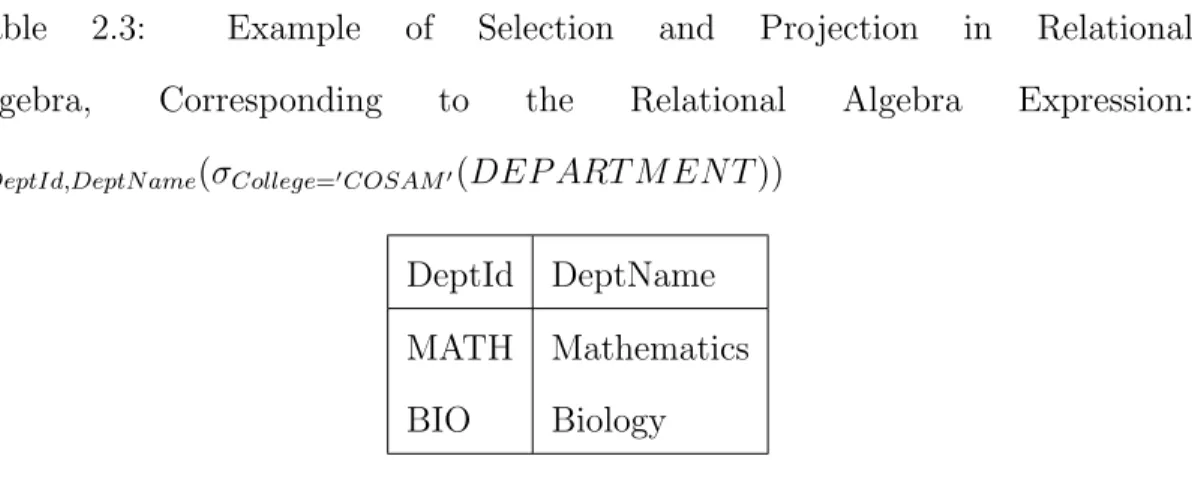
Table 2.3: Example of Selection and Projection in Relational Algebra, Corresponding to the Relational Algebra Expression: πDeptId,DeptN ame(σCollege=0COSAM0(DEP ART M EN T))
DeptId DeptName MATH Mathematics BIO Biology
In relational algebra, set union and set difference borrow behavior from their counterparts in set theory, with the constraint that the two relations involved share the same schema, that is: the two relations must have the same degree (number of attributes) and each matching pair of attributes must be from the same domain (i.e. same data type.) This requirement of union-compatibility ensures that these operators can be applied to sets of tuples in a well-defined way.
relations by concatenating the tuples pairwise in every possible way. Cartesian product forms the basis of the derivedjoin operator (on) which pairs tuples from two relations based on a comparison of values within the tuples. Several join variations are defined for convenience, all based on the combination of Cartesian product with the primitive selection and/or projection operators. Join variants includenatural join, which pairs tuples based on the equivalence of attributes with the same name and applies an implicit projection to remove duplicate columns; theta join, which pairs tuples based on some arbitrary condition; and semi-join, which pairs tuples, then projects attributes from just one of the input relations. Each of these joins operates on two relations and produces a subset of the full Cartesian product of the two input relations.
Table 2.4: Cartesian Product of STUDENT and DEPARTMENT:ST U DEN T ×
DEP ART M EN T
StudentId FirstName LastName DeptId DateEnrolled DeptId College DeptName
001 Samuele Naldrett CSC 2017-05-06 CSC CENG Computer Science
002 Dario Stiger BIO 2018-12-18 CSC CENG Computer Science
003 Minda Hallick CSC 2018-07-13 CSC CENG Computer Science
001 Samuele Naldrett CSC 2017-05-06 MATH COSAM Mathematics
002 Dario Stiger BIO 2018-12-18 MATH COSAM Mathematics
003 Minda Hallick CSC 2018-07-13 MATH COSAM Mathematics
001 Samuele Naldrett CSC 2017-05-06 BIO COSAM Biology
002 Dario Stiger BIO 2018-12-18 BIO COSAM Biology
003 Minda Hallick CSC 2018-07-13 BIO COSAM Biology
Table 2.5: Result of a Natural Join Between Relations STU-DENT and DEPARTMENT with a Further Selection and Projec-tion Applied, Corresponding to the Relational Algebra Expression:
πStudentId,LastN ame,DeptN ame(σCollege=0CEN G0(ST U DEN T ./ DEP ART M EN T))
StudentId LastName DeptName
001 Naldrett Computer Science 003 Hallick Computer Science
of these derived operators allows for a more convenient and compact representa-tion, and these operators (with the exception of division) correspond directly to language features available in SQL.
Finally, there are several operators that depart from the set-theoretic founda-tions of relational algebra. These operators correspond to features found in the SQL implementation, which offers support for grouping and aggregation, bag (or multiset) semantics, and the notion of result ordering. The “extended” relational algebra operators include group by (γ), duplicate elimination (δ), and sorting (τ).
Relational algebra is a powerful, formally defined query language used to manipulate data represented according to the structure and constraints defined by the relational model. The syntax of the SQL programming language closely follows the basic operators defined by relational algebra.
physical plan ultimately used to execute a given query. A physical execution plan specifies an implementation for each relational algebra operator in a logical plan. For example, a join operation might be performed using a simple nested loop. Or, the RDBMS might choose a hash or sort-merge join implementation. Given the tight link between relational theory and practical database implementations, relational algebra is an important topic in introductory database courses.
2.3 The Structured Query Language
The Structured Query Language (SQL) is a special-purpose declarative language that builds on concepts from the relational model and relational algebra. Intro-duced in the early 1970’s, today SQL is widely used as a core component of many software applications and it endures as a fundamental and ubiquitous tool for data manipulation.
SELECT DISTINCT StudentId, LastName, DeptName FROM Student NATURAL JOIN Department
WHERE College = 'CENG'
This query corresponds to the relational algebra expression from Table 2.5: πStudentId,LastN ame,DeptN ame(σCollege=0CEN G0(ST U DEN T ./ DEP ART M EN T))
Generalizing from this simple example, theSELECT clause lists columns to be projected. TheFROMclause identifies a query’s subject table(s) and joins. Finally, the WHERE clause specifies conditions for row selection. Construction of a simple SQL query typically involves the following process:
1. Choose the table(s) from which data should be retrieved
2. If two or more tables are involved, determine the conditions to be used to pair tuples from multiple tables
3. Construct a boolean expression to filter for row(s) of interest 4. Choose column values to be included in the result table
After following these steps, it is entirely possible to arrive at a SQL command that is syntactically correct and produces correct results for certain input data, but which fails to be a generally valid solution to the problem at hand. As a simple example, given the sample student data in Table 2.2, the following query returns IDs, first and last name of all students enrolled in the CSC department:
SELECT StudentId, FirstName, LastName FROM Student
WHERE StudentId = '001' OR StudentId = '003'
the stated information request, since it fails to include CSC students not present in the sample table. A valid query would apply selection criteria on the DeptId column rather than the StudentId column. From a different perspective, it is often the case that, for a given SQL problem, a number of equally valid, yet syntactically dissimilar, solutions exist. The ability to correctly interpret the semantics of an SQL statement can be difficult for novice students to acquire, but it is an essential skill for any student who wishes to effectively apply SQL to all manner of database tasks.
To illustrate the steps required to construct advanced SQL queries and to highlight one of the possible pitfalls, consider the task of listing the IDs and names of all departments in which no students enrolled during calendar year 2017. Based on the sampleDEPARTMENTandSTUDENTrelation instances in Tables 2.1 and 2.2, this task might be decomposed as follows:
1. Construct a query to list all departments in which at least one student did enroll during 2017, then
2. List all departments, excluding those returned by the above query.
A list of all departments in which at least one studentdid enroll during 2017 can be computed in SQL using the following straightforward query:
SELECT DISTINCT d.DeptId
FROM Department d JOIN Student s ON d.DeptId = s.DeptId WHERE DateEnrolled >= '2017-01-01'
This query may then be used as a building block to produce the requested information, namely: the IDs and names of departments without student enroll-ments in 2017:
SELECT DeptId, DeptName FROM Department
WHERE DeptId NOT IN ( SELECT DISTINCT d.DeptId
FROM Department d JOIN Student s ON d.DeptId = s.DeptId WHERE DateEnrolled >= '2017-01-01'
AND DateEnrolled <= '2017-12-31' )
There are several alternate approaches to this problem that are equally cor-rect. Importantly, there are also approaches to this task that seem reasonable on the surface but which represent fundamental misunderstandings of SQL concepts. The following is an example of one such flawed attempt:
SELECT DISTINCT d.DeptId
FROM Department d JOIN Student s ON d.DeptId = s.DeptId WHERE NOT(DateEnrolled >= '2017-01-01'
AND DateEnrolled <= '2017-12-31')
for every department, and all student enrollment dates within each department either fall entirely within, or entirely outside the date range. Subtleties such as this are present throughout the SQL language, and are the source of considerable student confusion.
Extensive research has been conducted in the areas of SQL semantics, valid-ity, and quality. The breadth of this research underscores the complexity and intricacies of SQL and makes clear the need to carefully evaluate the ways in which SQL is taught and learned. Courses that cover SQL, including the one on which we base this thesis, typically introduce both the basic syntax of SQL as well as the language’s more nuanced features and the ways in which these features combine to form complex queries.
2.4 Teaching Relational Algebra and SQL
The database course that is the subject of this thesis covers the relational model, relational algebra, SQL, transactions, and Java Database Connectivity (JDBC). This quarter-long (10 week) course does not extensively cover topics such as the Entity-Relationship (E-R) model or database normalization, which are typically included in a semester-length database course. After completing the course, stu-dents may elect to take a second quarter-long course that introduces E-R model-ing, normalization, and other topics related to the design and implementation of database applications. Students also have the opportunity to take another course that covers advanced database system internals and implementation. The study described in this thesis is focused exclusively on the first, introductory course.
fields pursuing a concentration in Data Science. All students who take the course are required to have previously taken courses in discrete math, fundamental data structures, and basic procedural programming.
The course’s coverage spans SQL’s main sublanguages, beginning with the Data Definition Language (DDL), followed by the Data Control Language (DCL), the Data Manipulation Language (DML), the Data Query Language (DQL), and finally the Transaction Control Language (TCL). A significant potion of the course’s SQL coverage centers on the DQLSELECTstatement, beginning with the SELECT, FROM, and WHERE clauses. The course then moves to more advanced con-cepts including grouping (GROUP BY clause), grouping with restriction (HAVING clause), and nested queries. The course focuses on ANSI-standard SQL syntax included in the SQL-92 specification. We also introduce several recently incorpo-rated and widely supported language features, including window functions and common table expressions (using the WITHclause.) Vendor-specific extensions to standard SQL syntax are explicitly not introduced, except where they are useful for comparison with standard language features.
During the course, all students complete the same sequence of lab assign-ments. An initial lab assignment requires students to work in pairs to develop an application to run queries over tabular data without the aid of a database or SQL. Students then work individually to complete a second lab focused on SQL DDL (CREATE TABLE and ALTER TABLE) and relational constraints. In the third lab, students again work individually on a lab that covers basic data ma-nipulation using SQL DML. Following this, lab assignments shift to SQL query tasks, which are the focus of this thesis. Labs four, five, and six consist of 30-40 exercises, each of which is an English information request. Working individu-ally, students are required to translate these information requests into valid SQL SELECT queries. Each of these three labs focuses on a different set of SQL con-cepts: table joins & selection criteria, grouping & aggregation, and finally nested SQL. The seventh, and final, lab asks students to work in small teams to build a Java application that uses the Java Database Connectivity (JDBC) API to inter-act with a database. Lab assignments are distributed to students in a sequential way. In other words, the lab two assignment is typically made available just after the submission deadline for the first lab. Students are allowed approximately one week to complete each lab assignment and are free to use any available resources, including class notes, textbooks, and online resources. The lab assignments we study in this thesis are strictly individual efforts; all solutions must be formulated without code sharing between students.
This thesis concentrates on three lab assignments (labs four through six, men-tioned above) that involve the translation of English information requests into SQL queries. In the sections that follow, these labs are referred to as labs A, B, and C, which correspond to numbered labs four, five, and six, respectively.
2.5 Related Work
The work described in this thesis builds on previous research in the areas of SQL concept categorization and error classification by Brass and Goldberg [4] [3] and Taipalus et al. [36], interactive environments designed as instructional aids, and specifically, interactive database instruction environments. When analyzing SQL query concepts and errors, we apply the categorization taxonomy described by Taipalus et al. in [36], and we compare our analysis to the analysis presented by Taipalus et al. in [35] and Ahadi et al. [2].
2.5.1 SQL Concepts and Common Errors
Recent work by Taipalus et al. [36] identifies fundamental SQL query concepts and describes a unified error classification framework. Based on a large empiri-cal study, the authors identify the most prevalent errors and misunderstandings encountered by students, and further determine the types of queries that invite certain errors. The authors describe three categories of SQL errors: syntax er-rors, semantic erer-rors, and logical errors. Statements that are invalid according to the SQL specification are considered syntax errors, and the authors categorize these using a DBMS-independent classification. Valid statements that produce incorrect results are categorized as either semantic or logical errors. Queries that are incorrect regardless of the information request are considered to be semantic errors. Logical errors are present in those queries that are both syntactically valid and produce a correct result forat least one information request, but fail to produce the intended results for a given information request. With this classifica-tion of common errors and descripclassifica-tion of the the types of exercises that typically cause students to encounter certain errors, Taipalus et al. proceed to describe effective methods for the development of course exercises that encourage students to learn how to avoid common pitfalls.
projection are highlighted as errors that are both commonly encountered and difficult for students to identify and fix. The authors point out that syntax errors, though common, are relatively easy for students to find and fix since they result in immediate DBMS error messages. A clear picture of less obvious types of errors serves as a useful guide for exercise design, and offers a valuable window into the student problem-solving process.
2.5.2 SQL Semantics and Correctness
hope to define techniques that demonstrably help students learn to avoid these errors.
In an attempt to bridge the gap between the formality of relational theory and its implementation in SQL, Guagliardo et al. [16] run experiments on a large collection of generated queries and database instances to arrive at a description of “real-life” SQL queries. In doing so, this work provides a useful tool for programmers who wish to understand the behavior of SQL queries. This work also provides a valuable experimental basis for questions about query correctness and the subtleties present in SQL implementations. Subtleties, such as the handling ofnull values and bag versus set semantics, can be a source of confusion for those attempting to learn SQL.
2.5.3 Query Similarity
In our observations of the ways in which students independently solve problems, we attempt to cluster students based on similarity of queries used among groups of students. This permits identification of certain problem-solving patterns shared by more than one student. To perform this clustering of queries, we analyze queries for their structural similarity.
this analysis of query clustering, the authors provide a better basis for database performance tuning, security auditing, and benchmark design. Our study of the SQL learning process has at its core a similar collection of widely varying queries from multiple sources. Applying the clustering techniques from Hul et al. [23], in this thesis we seek to extract problem solving patterns that exist in students’ lab work.
Directly addressing questions of query correctness and equivalence, Chu et al. describe COSETTE, an automated prover for determining whether two SQL queries are truly equivalent [9]. The authors demonstrate that COSETTE is able to decide equivalence for a large subset of SQL queries. In cases where the tool detects query inequivalence, COSETTE is further able to produce data that serves as a counterexample. This capability, integrated into an interactive tool, clearly highlights cases where a query returns correct results for a given database instance, but fails to correctly solve the general question. Cases such as this often represent subtle misunderstandings on the part of students learning SQL. The ability to automatically identify these cases would likely improve students’ understanding of the complex features of SQL.
why novice students faced with the task of formulating a valid solution for a complex task can be overwhelmed by the intricacies and features of SQL.
2.5.4 SQL Testing and Quality Metrics
Traditional research into automated testing and test coverage focuses mainly on applications written in imperative or structured programming languages. Some-what less emphasis has been paid to automated testing for declarative languages such as SQL, particularly in the typical case where SQL is embedded within an application that is written in a procedural language, such as Java or Python. In [34], Suarez-Cabal et al. describe coverage measurements specifically designed to measure SQL queries. Furthermore, the authors present testing techniques to ensure high test coverage of query code, especially SQL embedded within a larger application.
In a similar way, Veanes et al. describe methods for the generation of test data and SQL query parameters to fully exercise given test conditions [37]. To do so, the authors transform the problem of test data generation into one of satisfiability. The authors integrate their approach into the database testing framework exposed by the Visual Studio IDE.
corresponding SQL features can be most effectively taught, especially in cases where there is a need to layer concepts in complex ways. We hypothesize that students who firmly understand basic relational algebra building blocks will be better able to combine these concepts in a modular way to develop solutions to complex information requests.
2.5.5 Interactive Lab Environments
Significant research effort has been applied to the design and implementation of effective interactive environments to teach introductory programming concepts. Such environments have been used to teach a wide range of topics, including traditional procedural programming [18], test driven development [19], as well as SQL [25]. In this thesis, we adopt many proven ideas from this previous work, particularly the use of immediate, automatic feedback.
Higgins et al. describe a Computer Based Assessment (CBA) system, known as CourseMarker [18], which is used to teach introductory Java programming at the University of Nottingham. The design of CourseMarker emphasizes free-form programming exercises, in contrast to similar systems focused narrowly on simple text-based or multiple choice exercises. The CourseMarker system also provides immediate feedback to students, which is shown by the study to clearly benefit students. In this thesis, we adopt many of these same proven ideas to build an interactive tool to allow students to solve SQL exercises rather than procedural programming problems.
development (TDD) and related learning processes. They design an interactive environment named WebIDE that encourages students to use TDD methods while solving programming problems related to array handling. The study finds that students who complete assignments using WebIDE, a custom “intelligent tutor-ing system,” performed better on objective assessments and have a subjectively better learning experience.
2.5.6 Database Lab Environments
In the specific area of database courses, Mitrovic presents a SQL-specific intel-ligent tutoring system, known as SQL-Tutor [25], designed to teach the SQL programming language. The authors explore how well this interactive environ-ment supports student learning by conducting three evaluation studies. First, the authors investigate a student modeling approach known as Constraint-Based Modeling (CBM) [26]. This approach is similar to the work described by Hilton and Janzen in [19]. In both cases, the authors evaluate the usefulness of their systems (SQL-Tutor and WebIDE) based on subjective student assessments. Ad-ditionally, the authors use SQL-Tutor to build long-term models of student knowl-edge. These models then drive adaptive problem selection, aimed to improve the student learning process. This last line of inquiry, in particular, forms part of the basis for the longitudinal studies conducted in the study of the SQL learning process described in this thesis.
benefit from immediate help during an in-person lab. The authors also describe the possibility of later data analysis to determine whether or not the interven-tions were successful, as well as to identify common misunderstandings. We do not, in this thesis, focus immediately on the real-time intervention possibilities. However, the lab tool described in this thesis does permit such investigations in the future.
2.5.7 Concept Inventory Construction and Evaluation
Drawing from prior research related to instructional effectiveness in the fields of physics, circuits, and engineering [14], recent work by Caceffo et al. describes the application of concept inventories to teaching and assessment in the field of computer science [5]. Traditionally, a concept inventory (CI) is a carefully constructed multiple-choice test that aims to thoroughly cover a given subject area. Each question that appears on a concept inventory is designed, based on careful research, to measure students’ understanding of specific concepts.
3 Tool Implementation
To investigate the student learning process, we built a custom application, re-ferred to throughout this thesis as “Lab 365”. We used this application to gather data related to the student problem solving process within the context of normal course lab assignments. This tool allowed passive collection of data that would have been difficult to gather via surveys, interviews, or similar research instru-ments. The detailed data we collected provide a fine-grained, unfiltered view of the student problem-solving process. As noted by Fincher in [15], a rich data set, such as ours, allows analysis beyond what could be accomplished through the use of researcher-distant methods, such as questionnaires, surveys, or interviews. The data-gathering tool we constructed was specifically designed to support in-vestigations that closely analyze the student problem solving process.
3.1 Application Overview
Lab 365 stores application configuration, user accounts, and student activity logs in a single MySQL database, depicted as an Entity-Relationship diagram in Figure 3.1. In addition, the tool connects to several separate lab databases against which student queries are executed. These MySQL lab databases are created and populated manually. All students have a read-only view of the same shared lab databases. Details about the content and structure of these lab databases can be found in Section 4.3.1 and Appendix B.
3.2 Instructor Features
Administrative screens, available only to course instructors, facilitate setup and review of lab assignments and the SQL exercises that comprise each lab. For each assignment, the instructor must specify a name, description, start/due dates, and a list of individual SQL exercises. Each SQL exercise consists of a label, an English-language information request, and a single “Check SQL” statement that is used to produce a result table for comparison with user submissions. The SQL concept(s) present in each exercise may optionally be provided to allow analysis on a concept-level basis, as we do in Chapter 5. Figure 3.2 depicts the screen an instructor uses to create or modify a lab assignment.
Figure 3.2: Lab 365: Lab Assignment Setup Screen; Available Only to Instructors
3.3, a bar chart indicates the number of students who have attempted each exer-cise (light-grey bars) as well as a count of students who have submitted a correct response (green bars.)
Figure 3.3: Lab 365: Instructor Home Screen; Displays High-Level Student Progress for Each Lab Exercise
3.3 User Interface for Students
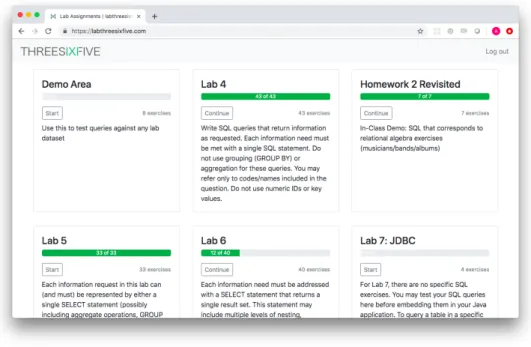
Figure 3.4: Lab 365: User Home Screen; Lists Available Lab Assignments
editor panel into which SQL commands may be typed. Three action buttons are available:
1. Run SQL - execute the SQL statement currently in the editor panel,
re-turning either the result table or an error message from the RDBMS. This feature is intended to be used to run SQL statements that do not fully solve a problem. Example uses include: testing subqueries in isolation, or inspecting the contents of a specific table.
2. Check- execute a full SQL statement and compare the result of the current
SQL statement to the expected result table. Displays the results from the student’s SQL query along with a “Correct” or “Incorrect” indicator.
The results for each SQL statement are displayed in tabular form in a collapsible right-hand panel. Any errors from the underlying RDBMS, including syntax errors, are echoed directly to the user, as shown in Figure 3.6.
Figure 3.5: Lab 365: Main Lab Exercise Screen, User’s View
Students are free to work on lab exercises in any order and at any time up to a pre-defined assignment due date. For most exercises, the “Show Expected Results” button is available, except as noted in Appendix D, and this feature may be accessed at any time). As mentioned by Taipalus in [36], the ability to view expected results does not accurately mimic real-world scenarios in which developers are often required to develop correct SQL queries without previous knowledge of expected results. We provide this capability to permit ready com-parison with previous studies of SQL learning. We intend in the future to conduct experiments related to the availability of result tables.
sub-Figure 3.6: Lab 365: SQL Syntax Error Display, User’s View
4 Methodology
In the introductory database course on which this thesis is based, students learn the principles of modern relational databases. Specifically, the course’s learning objectives indicate that students should (after completing the course) be able to:
• Describe and apply the principles of the relational model and relational algebra.
• Create a relational database using SQL’s Data Definition Language (DDL).
• Formulate SQL statements for data manipulation.
• Formulate information retrieval statements using relational algebra and SQL, including the primitive operations of selection, projection, Cartesian product, set union, and set difference; as well as derived operations such as joins.
• Design and implement a Java-based application that interacts with a rela-tional database using the JDBC API.
• Describe, at a high level, the internal organization of a DBMS, including key subsystems and their purpose.
than others. Although experience as an instructor provides some intuitive insight into the relative difficulty of SQL concepts, quantitative confirmation is required. Fundamentally, this study aims to answer the question: “What database query concepts, or combinations thereof, trouble students the most?”
We concentrate our study on the problem-solving steps taken by students who are faced with the task of transforming English-language information re-quests into syntactically and logically valid SQL queries. Specifically, we pose the following research questions:
1. What are the most difficult SQL concepts, or combinations of concepts, to master?
2. Among students who attempted a given query problem and were unsuc-cessful, what are the most common terminal errors?
3. Which SQL syntax errors require the most number of attempts for students to resolve?
4. Among those students who areunable to successfully solve a given problem, what errors are encountered that are not also encountered by those students who successfully solve the same problem?
4.1 Overview
an Informed Consent form (Appendix A.1). The “Study Participants” column in the summary table shows the number of students who chose to sign the form and participate in the study described in this thesis.
Table 4.1: Course Enrollment and Study Participants
Cohort Quarter Instructor Enrollment Study Participants
1 Winter 2019 A 31 26
2 Spring 2019 A 35 30
3 Spring 2019 B 37 32
4 Spring 2019 B 32 26
4.2 Experimental Design
The primary quantitative experiment described in this thesis uses repeated mea-sures design [13] to compare student performance on multiple SQL lab exercises over time. In addition, we used simple mean and variance comparisons to com-pare lab assignments and, by extension, to comcom-pare student approaches to the SQL concepts that are the focus of each lab assignment. As discussed in Section 2.4, each lab assignment consists of 30-40 exercises centered around a particular set of SQL language features. Specifically, the first lab assignment focuses on joins and filtering, a second lab emphasizes grouping and aggregation, and the third lab covers nested queries. Lab assignments build on one another, combining concepts in progressively more complex ways.
she chooses, raising the possibility that fatigue or other factors may play a role in student performance. We can, however, observe the order in which students work on lab exercises. At a broad level, we control the order in which entire labs are assigned. In our study, students completed a full assignment related to joins and filtering expressions before beginning work on exercises related to grouping and nested SQL.
4.3 Lab Assignments and Query Types
We collected data to support this via a custom web-based application (described in Chapter 3). This lab tool is used by students to solve lab exercises assigned during normal course lab activities. This application captured student interac-tions with the course database, including all attempts to solve problems, as well as errors encountered. The study includes longitudinal data; we recorded student lab activity over time to allow an individual’s learning progress to be analyzed and compared to that of other students. By collecting fine-grained detail consisting of all student attempts, rather than conducting traditional surveys or analyzing final responses only, we were able to perform data analysis that is much closer to the student, as described by Fincher et al. [15].
4.3.1 Query Types and SQL Concepts
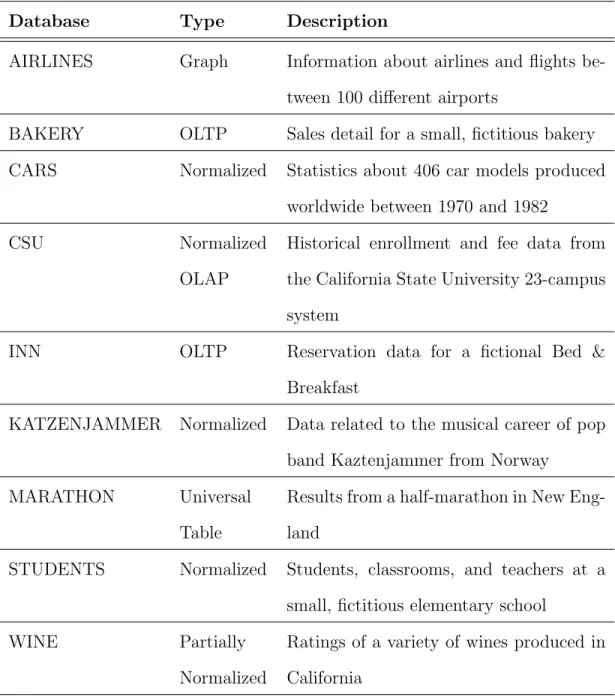
Lab exercises are based on nine different databases containing hand-crafted data. Each database follows a common structural theme, as outlined in Table 4.2.
Table 4.2: Lab Databases Used in this Study
Database Type Description
AIRLINES Graph Information about airlines and flights be-tween 100 different airports
BAKERY OLTP Sales detail for a small, fictitious bakery CARS Normalized Statistics about 406 car models produced
worldwide between 1970 and 1982
CSU Normalized
OLAP
Historical enrollment and fee data from the California State University 23-campus system
INN OLTP Reservation data for a fictional Bed & Breakfast
KATZENJAMMER Normalized Data related to the musical career of pop band Kaztenjammer from Norway
MARATHON Universal
Table
Results from a half-marathon in New Eng-land
STUDENTS Normalized Students, classrooms, and teachers at a small, fictitious elementary school
WINE Partially
Normalized
Appendix B contains full descriptions of the nine lab databases used in this study. These lab databases form the basis for all lab assignments. A single lab assignment consists of between five and eight exercises for each database. Within a lab assignment, exercises are arranged in increasing order of perceived difficulty. For example, an exercise labeled BAKERY-1 is intended to be easiest exercise within the BAKERY database for that lab assignment, while BAKERY-2 requires a more complex solution. Query concepts are repeated across mul-tiple databases. For instance, the multi-table join concept might appear in BAKERY-3, CSU-4, and AIRLINES-2. In this way, students gain practice apply-ing SQL query concepts within multiple database structures. Furthermore, some database structures invite or require certain approaches. For example, in the single-table MARATHON database, solutions must be expressed using self-joins or subqueries. Through exposure to multiple database structures, students are encouraged to practice and refine skills spanning all SQL concepts and multiple problem domains.
Table 4.3: Summary of Lab Assignments Used in this Study
Lab Exercises Area of Focus
A 43 JOIN, WHERE
B 33 GROUP BY, aggregate functions, HAVING
C 40 Nested SQL
Each lab assignment centers around certain features of SQL, as listed in Table 4.3. Below is an example introduction to a lab assignment:
Write SQL queries that return information as requested. Each infor-mation need must be met with a single SQL statement. Do not use grouping (GROUP BY) or aggregation for these queries. You may re-fer only to codes/names included in the question. Do not use numeric IDs or key values.
on measures of expressive ease and task complexity as two of our independent variables.
We adopt and extend SQL concept categorizations from previous studies of SQL learning by Ahadi et al. [2] and Taipalus et al. [36]. Both prior studies identify concepts such as single-table queries, multi-table joins, restriction ex-pressions, grouping, nested SQL, and ordering. In this thesis, we study several SQL concepts that were not specifically included in these prior studies. These additional SQL concepts are: set operations, such as UNION, joins based on an inequality comparison between column values, which we term “non-equi-joins”, relational division, full outer join, and pivot operations used to transpose rows and columns. Table 4.4 contains a complete list of SQL concepts that we address in this thesis.
Table 4.4: SQL Query Concepts Studied in this Thesis
Query Concept Description
Single-table Selection and projection using a single table [2]
Multi-table Multiple tables joined together using natural or
equi- joins
[2]
Ordering Sorting using the ORDER BYclause [36]
Expressions Row restriction expressions that appear in the
WHEREclause
[36]
Expressions With Nesting Row restriction expressions that involve nested
conjunctions and disjunctions
[36]
Multiple Source Tables Projected columns from multiple tables [36]
Grouping Row grouping using theGROUP BY clause [2]
Grouping restrictions Use of the HAVINGclause [36]
Aggregation Functions Use of SQL aggregate functions with or without
theGROUP BYclause
[2]
Computed Grouping Grouping on computed values, rather than plain
column values
Parameter distinct DISTINCT keyword required within an aggregate
function (ie. COUNT(DISTINCT ...)
[36]
Does not exist Negated existential quantification (¬∃),
corre-sponds to SQL’s NOT IN, NOT EXISTS, or OUTER
JOINsyntax
[36]
Uncorrelated subquery Single-level nested SQL in any of the SELECT
clauses
[2]
Correlated subquery Correlation required between inner and outer
sub-query
[2]
Equal subqueries Two or more subqueries that appear at the same
level
[36]
Self-join A join that requires two instances of the same table [2]
Scalar Functions Use of SQL scalar functions, such as ROUND, or
RDBMS-specific date functions
Set Operations Use of relational set operations, such as UNION
Non-Equi-Join Join based on an inequality between condition
Relational Division Identify values from a relation that are paired with
all values from another relation
Pivot Transpose data from multiple rows into columns
within a single row
Full Outer Join Include all values from both the left and right sides
of a join
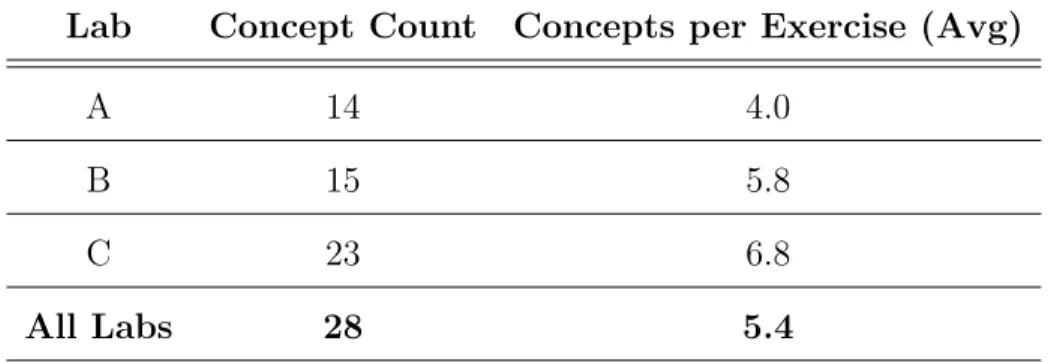
Table 4.5: Summary of the Distribution of SQL Concepts Across Lab Assign-ments
Lab Concept Count Concepts per Exercise (Avg)
A 14 4.0
B 15 5.8
C 23 6.8
All Labs 28 5.4
4.4 Data Set
The data we analyze in this thesis consists of an established set of SQL query problems as described above, coupled with extensive student-database interaction data collected as part of this thesis. To allow comparison with previous similar studies, we classify query concepts and errors according to the taxonomies de-scribed by Taipalus et al. in [36]. In this section, we describe the raw data that we collected and we summarize the error taxonomy used in the next chapter.
4.4.1 Raw Data
The data-gathering application described in Section 3.1 records the following detail for every student interaction with the course database:
• Anonymized course/section identifier
• Anonymized student identifier
Single-Table * Multi-Table * Ordering + Expressions + Expressions With Nesting + Multiple Source Tables + Grouping * Grouping Restrictions * Aggregate Functions * Computed Grouping Parameter Distinct + AggFn Evaluated Against Agg Value AggFn Evaluated Against Column Value + AggFn Evaluated Against Constant Value + Does Not Exist + Uncorrelated Subquery * Correlated Subquery + Equal Subqueries + Self-Join * Scalar Functions Computed Selection Computed Projection Distinct Projection Set Operations Non-Equi-Join Relational Division Pivot Full Outer Join Unique Exercise Count (Single Concept)
* Single-Table * Multi-Table + Ordering + Expressions + Expressions With Nesting + Multiple Source Tables * Grouping * Grouping Restrictions * Aggregate Functions Computed Grouping + Parameter Distinct AggFn Evaluated Against Agg Value + AggFn Evaluated Against Column Value + AggFn Evaluated Against Constant Value + Does Not Exist * Uncorrelated Subquery + Correlated Subquery + Equal Subqueries * Self-Join Scalar Functions Computed Selection Computed Projection Distinct Projection Set Operations Non-Equi-Join Relational Division Pivot Full Outer Join
0 03621 2 0 21 11273 7 8 0 2 4 11 0 5 6 6 0 4 1 0 3 0 0 142
0 063 50231 3814380 5 10 8 0 1 14 4 7 10 6 1 17 9 1 4 2 2 074 36 63062328 4718493 10 11 4 1 4 13 4 10 13 11 1 17 10 1 6 2 2 199
2150 620 0 20276320 6 3 5 1 4 8 3 7 14 6 1 15 8 1 5 2 2 171
2 2 3 0 0 2 1 0 2 0 1 0 0 0 0 0 0 0 1 0 0 0 0 0 0 0 0 0 4 031 2820 2 0 15 8 15 0 2 4 3 0 0 6 1 1 3 5 1 11 1 1 0 0 1 031
2138 47 271 15 025 582 9 18 8 2 0 20 4 10 3 8 0 12 0 0 5 0 0 159
11 14 18 6 0 8250241 2 12 2 2 0 13 1 2 2 4 0 3 0 0 1 0 0 025
27 38 49 322 1558 240 3 11 18 8 2 0 20 4 11 6 10 0 15 0 0 5 0 0 165
3 0 3 0 0 0 2 1 3 0 0 1 0 0 0 1 0 0 0 3 0 2 0 0 0 0 0 0 3 7 5 10 6 1 2 9 2 11 0 0 2 0 0 0 2 0 1 3 1 0 1 0 0 1 0 0 0 12 8 10 11 3 0 4 18 12 18 1 2 0 0 1 0 15 1 4 0 2 0 2 0 0 0 0 0 0 18 0 8 4 5 0 3 8 2 8 0 0 0 0 0 0 5 3 1 0 0 0 4 0 0 0 0 0 0 8 2 0 1 1 0 0 2 2 2 0 0 1 0 0 0 1 0 0 1 0 0 0 0 0 1 0 0 0 2 4 1 4 4 0 0 0 0 0 0 0 0 0 0 0 5 0 0 0 0 0 0 0 0 0 0 0 0 5
11 14 13 8 0 6 20 13 20 1 2 15 5 1 5 0 0 1 0 2 0 4 0 0 0 0 0 024
0 4 4 3 0 1 4 1 4 0 0 1 3 0 0 0 0 2 0 0 0 2 0 0 0 0 0 0 4 5 7 10 7 0 1 10 2 11 0 1 4 1 0 0 1 2 0 0 1 0 2 0 0 3 0 0 1 12 6 10 13 14 1 3 3 2 6 0 3 0 0 1 0 0 0 0 0 0 0 1 3 0 4 2 2 0 16 6 6 11 6 0 5 8 4 10 3 1 2 0 0 0 2 0 1 0 0 0 10 0 0 0 0 0 0 12 0 1 1 1 0 1 0 0 0 0 0 0 0 0 0 0 0 0 0 0 0 0 0 0 0 0 0 0 1 4 17 17 15 0 11 12 3 15 2 1 2 4 0 0 4 2 2 1 10 0 0 0 1 0 0 0 0 21 1 9 10 8 0 1 0 0 0 0 0 0 0 0 0 0 0 0 3 0 0 0 0 0 2 2 0 0 10 0 1 1 1 0 1 0 0 0 0 0 0 0 0 0 0 0 0 0 0 0 1 0 0 0 0 0 0 1 3 4 6 5 0 0 5 1 5 0 1 0 0 1 0 0 0 3 4 0 0 0 2 0 0 1 0 0 7 0 2 2 2 0 0 0 0 0 0 0 0 0 0 0 0 0 0 2 0 0 0 2 0 1 0 0 0 2 0 2 2 2 0 1 0 0 0 0 0 0 0 0 0 0 0 0 2 0 0 0 0 0 0 0 0 0 2
1 0 1 1 0 0 1 0 1 0 0 0 0 0 0 0 0 1 0 0 0 0 0 0 0 0 0 0 1 0
8 16 24 32 40
Count of Exercises in which Concepts Co-Occur
Figure 4.1: SQL Concept Co-occurrence Matrix - Values in Each Cell Represent the Number of Times the Two Concepts Appear in the Same SQL Exercise. In this thesis, we studied 28 distinct SQL concepts and 130 different lab exercises. Concepts marked with an asterisk (*) were discussed by Ahadi et al. in [2]; concepts marked with a plus sign (+) were first discussed by Taipalus et al. [36]
• Full SQL statement submitted by student
• Database error code and message (if any)
• Number of rows and columns in the result set (if any)
All data exported for analysis are anonymized. Course/section information and student detail, including all personally identifiable information (PII), is omit-ted from all files that are exporomit-ted for analysis. Anonymized student identifiers are stable over time. This permits us to analyze an individual student’s activities across multiple exercises, while still explicitly avoiding export of any personal information.
From this raw data we extract summary statistics, such as attempt counts per exercise, timing statistics, and success rates for each lab exercise (the percentage of students who successfully complete each exercise.) Certain SQL statements are excluded from attempt counts, including: commands used to inspect the RDBMS catalog (such as the MySQL show tables ordescr <table name> commands), empty statements likely issued inadvertently, and identical statements run in succession. In addition to count, timing, and success rate metrics, we categorize each student-submitted query using the groups described in Tables 4.6, 4.7, 4.8, and 4.9. This categorization of queries allows us to analyze common syntax errors and error sequencing. In addition, we can begin to investigate misunderstandings that lead to semantic and logical errors.
4.4.2 Error Taxonomy
Table 4.6: High-Level Groups Used to Categorize Student-Submitted SQL Queries
Category Description
Syntax Error One or more syntax errors
Semantic Error Syntactically correct query that is in-correct, no matter the information re-quest.
Logical Error Syntactically correct query that sat-isfies an information request different from that stated.
Valid Query fully satisfies the information re-quest
Syntax Errors
Syntax errors represent the most frequently-encountered type of errors in our data. The presence of a syntax error prevents the database from evaluating a query and results in an immediate error message. We restrict our study to syntax errors as reported by the MySQL RDBMS. We explicitly do not consider cases where certain syntax violates the ANSI SQL standard but is accepted by a particular RDBMS. Examples of non-standard syntax include: non-standard quotes, non-standard operators (&& versus AND, != versus <>, etc.), as well as implicit type coercion operations which are permitted by lenient default settings in certain RDBMSs (including MySQL.) As discussed in Section 7.1.4, future emphasis seems warranted in this area. However, the results discussed in this thesis considered a statement to be syntactically valid if it executed without error in the course MySQL lab environment, which does not exactly adhere to the ANSI standard.
When analyzing syntax errors in student data, we apply the RDBMS-independent classification scheme described by Taipalus and summarized in Table 4.7. The classes and identifiers we use for syntax errors (ie. SYN-1) are identical to those defined by Taipalus, et al. in [36].
Semantic Errors
Table 4.7: Classification of Syntax Errors, as Proposed by Taipalus et al. [36]
ID Description
SYN-1 Ambiguous database object SYN-2 Undefined database object SYN-3 Data type mismatch
SYN-4 Illegal aggregate function placement SYN-5 Illegal or insufficient grouping SYN-6 Other common syntax error
sensible way, such as comparing values from different domains or simple failure to include a necessary join condition.
While it would be possible in some cases for databases to detect these errors and warn users, commonly-used databases do not have this capability. Semantic errors can be difficult for SQL novices to detect and correct [32], and it is therefore useful to include them in this study of student errors.
Table 4.8: Classification of Semantic Errors, First Proposed by Brass & Goldberg [4], further Studied by Taipalus et al. [36]
ID Description
SEM-1 Inconsistent expression SEM-2 Inconsistent join SEM-3 Missing join SEM-4 Duplicate rows
Logical Errors
The last category of errors, termed logical errors by Brass and Goldberg in [3] and further studied by Taipalus et al. in [36], includes many errors that trouble students considerably. Logical errors are those that cause a SQL query to be incorrect for a particular information request. Often, the presence of a logical error causes a query to be correct for a different information request than the stated request.
Examples of logical errors include confusion between AND and OR, missing parentheses in complex boolean expressions that combine AND with OR, joins on incorrect columns, or improper nesting of subqueries. As is the case with semantic errors, a database will (without error or warning) execute a query that contains logical errors. It is the user’s responsibility to evaluate each query and its output to determine whether an error is present. Logical errors represent a particularly subtle and troublesome area for students who are learning SQL.
Table 4.9: Classification of Logical Errors, as Described by Taipalus et al. [36]
ID Description
4.5 Error Detection
The Lab 365 tool performs only a basic level of error detection and query vali-dation. As described in Section 3.3, the tool determines query “correctness” by comparing results from a student’s query against the output from a ground truth query within a single database instance. Students are instructed to ensure that their queries are generally valid; grades are assigned based on a manual review of SQL queries submitted by the student. Table 4.10 summarizes cases where queries were deemed correct by the Lab 365 tool, but were ultimately invalidated through manual review.
Table 4.10: Queries Deemed Correct by Lab 365 but Deemed Invalid by Manual Review (Percentage Average Across Exercises in Each Lab.)
Lab Valid Violates Assignment Invalid
A 92% 5% 3%
B 96% 2% 2%
C 89% 0% 11%
• Hard-coded identifier(s) or key value(s) used instead of appropriate filter expressions;
• Comparisons performed using non-key values with incorrect assumptions about uniqueness, for example: an IN expression based on customer last name rather than unique customer identifier;
• Use of LIMITto report a minimal or maximal value without accounting for the possibility of ties.
These common errors are described thoroughly to students in advance us-ing examples, targeted lecture material, and detailed lab assignments, yet these errors clearly remain a point of confusion and misunderstanding. The manual validation process builds on the error taxonomy described in the preceding sec-tions, allowing identification of specific SQL concepts that invite subtle logical errors that are difficult for novices to understand and avoid when writing SQL queries. In Sections 7.1.3 and 7.2.3, we suggest several ways to address these common areas of misunderstanding using new teaching material and extensions to the Lab 365 tool.
5 Results
In this chapter, we present an investigation into the student problem-solving process spanning 116 SQL exercises and 28 distinct SQL concepts. We identify difficult SQL concepts and common errors, with a particular emphasis on SQL syntax errors. We analyzed 149,188 SQL statements representing the accumu-lated lab work in four sections of an introductory database course by 114 students, all of whom provided their informed consent (A.1).
5.1 Overview of Results
Of the 149,188 SQL statements we analyzed:
• 47,815 (32.1%) attempts consisted of syntax errors;
• 10,091 (6.8%) statements returned the correct result table which run against a single sample database instance;
• 4,126 (2.8%) ran without error but yielded zero rows, indicating a semantic error;
• 8,311 (5.6%) were executed without error using the “Check SQL” button but did not return correct results, implying a logical or semantic error;
• The remaining 78,845 (52.8%) attempts consisted of data exploration, par-tial attempts that may have been combined into complete solutions, seman-tic errors, or logical errors.
success rates along with the average number of attempts submitted by each stu-dent. (Refer to Table 4.3 for a description of the lab assignments included in this study.) Guided by a high-level view of student behavior, we identified areas of particular difficulty. We confirmed the significance of these observations us-ing the repeated measures ANOVA method described in Section 5.3.1. Finally, we performed detailed analysis on exercises that exhibit the combination of low success rate and a high average number of attempts.
5.2 Analysis by Instructor
We collected data in four sections of the same introductory class taught by two different instructors. As shown in Table 4.1, 56 study participants (49%) were enrolled in sections taught by instructor A. The remaining 58 students (51%) were enrolled in instructor B’s sections. Both instructors taught based on a common set of learning objectives and general course content. Students in all sections completed an identical set of SQL lab exercises. Since course content and lab exercises are closely aligned between instructors, we expect the performance of students on lab exercises to be comparable between instructors. Figures 5.1, 5.2, 5.3, and 5.4 show the percent of student success and average attempts for each lab exercise, split by instructor.
Lab Exercises
0% 20% 40% 60% 80% 100%
% of Students who Submitted Correct Responses
Instructor A Instructor B
Figure 5.1: Percent Success by Instructor
Lab Exercises
10 20 30 40
Average Attempts per Student
Instructor A Instructor B
Figure 5.2: Average Attempts by Instructor
0% 10% 20% 30% 40% 50% 60% 70% 80% 90% 100%
% of Students who Submitted Correct Responses
0 10 20 30 40 50 60 Count Instructor A Instructor B
Figure 5.3: Histogram of Lab Exer-cises, Binned by Percent of Students who Successfully Solved the Exer-cise, Split by Instructor
0 5 10 15 20 25 30 35 40
Average Attempts per Student
0 5 10 15 20 25 30 35 40 Count Instructor A Instructor B
Figure 5.4: Histogram of Lab Ex-ercises, Binned by Average Attempt Count per Student, Split by Instruc-tor.
When applying the K-S test, the null hypothesis states that the two samples are taken from the same statistical distribution. Results of this K-S test are mixed for our instructor data. When comparing percent success between the two instructors, a low p-value (0.0022) causes us to reject the null hypothesis that the two samples are drawn from the same distribution. However, when comparing average student attempts between instructors, a relatively high p-value (0.1658) means that we cannot reject the null hypothesis. We conclude that student success percentages are significantly different between the two instructors in our study, but that average attempts per exercise arenot significantly different between the two instructors. Further data collection and analysis is warranted, particularly for the lab exercises that exhibit large differences in percent success, as shown in Figure 5.1. In addition, analysis that controls for GPA or course exam performance would likely offer insight.
5.3 Lab A Analysis
Table 5.1: Results from Two-sample K-S Test [20], Comparing Percent Success and Average Attempts for Each Exercise, by Instructor.
Sample K-S Statistic p-value
Percent Success 0.2414 0.0022 Average Attempts 0.1466 0.1658
0 10 20 30 40 50
Average Attempts per Student
70 75 80 85 90 95 100
% of Students who Submitted Correct Responses
(A) C-4
(A) C-6
(A) A-3
(A) A-4
(A) A-5
Figure 5.5: Summary of Lab A - Joins and WHERE. Each dot corresponds to a single lab exercise, plotted based on the percent of students who submitted a correct response (y-axis) versus the average number of attempts per student (x-axis). Average attempt counts reflect all students (incorrect and correct). Labels on data points are exercise identifiers, representing the first initial of the database name along with exercise number (eg. A-3 indicates the third exercise in the AIRLINES database)