July 2013
Product Specification
Industrial
1.8” micro SATA II SLC SSD
-HERMES-ER Series-
Doc-No: 100-XP8SR-JESL-01V0
responsibility for any errors that may appear in this document, nor for incidental or consequential damages resulting from the furnishing, performance or use of this material. No part of this document may be reproduced, transmitted, transcribed, stored in a retrievable manner or translated into any language or computer language, in any form or by any means, electronic, mechanical, magnetic, optical, chemical, manual or otherwise, without the prior written consent of an officer of APRO Co., Ltd.
All parts of the APRO documentation are protected by copyright law and all rights are reserved.
APRO and the APRO logo are registered trademarks of APRO Co., Ltd.
Product names mentioned herein are for identification purposes only and may be trademarks and/or registered trademarks of their respective companies.
© 2012 APRO Corporation. All rights reserved.
Revision History
Revision Description Date
C
ONTENTS
1.
INTRODUCTION ... 4
-1.1.
S
COPE ... 5-1.2.
S
YSTEMF
EATURES ... 5-1.3.
DRAM
B
UFFER ... 5-1.4.
F
LASHM
ANAGEMENTT
ECHNOLOGY-
S
TATICW
EARL
EVELING ... 5-1.5.
C
ONFORMALC
OATING ... 6-1.6.
B
ADB
LOCKM
ANAGEMENT ... 6-2.
PRODUCT SPECIFICATIONS ... 7
-2.1.
S
YSTEME
NVIRONMENTALS
PECIFICATIONS ... 7-2.2.
S
YSTEMP
OWERR
EQUIREMENTS ... 7-2.3.
S
YSTEMP
ERFORMANCE ... 7-2.4.
S
YSTEMR
ELIABILITY ... 8-2.5.
P
HYSICALS
PECIFICATIONS ... 8-2.6.
C
APACITYS
PECIFICATIONS ... 9-3.
INTERFACE DESCRIPTION ... 10
-3.1.
SATA
II
INTERFACE ... 10-3.2.
P
INA
SSIGNMENTS ... 10-4.
COMMAND SETS ... 11
-4.1
ATA
REGISTER ... 11-4.1.1
CHECK
POWER
MODE
(E5
H) ... -
12-4.1.2
EXECUTE
DIAGNOSITICS
(90
H) ... -
12-4.1.3
IDENTIFY
DEVICE
(EC
H)... -
14-4.1.4
IDLE
(E3
H) ... -
24-4.1.5
I
DLEI
MMEDIATE(E1
H) ... -
26-4.1.6
S.M.A.R.T.
F
UNCTION(S
ELF-M
ONITORING,
A
NALYSIS,
ANDR
EPORTINGT
ECHNOLOGY)... -
27-4.1.6.1
S.M.A.R.T.
R
EADD
ATA(B0
H WITH A FEATURE VALUE OFD0
H) ... -
27-4.1.6.2
S.M.A.R.T.
ENABLE
OPERATIONS
(B0
H WITH AF
EATURE REGISTER VALUE OFD8
H) ... -
29-i
APRO Industrial1.8” SATA II SLC SSD built-in DDRII 512Mbits SDRAM – HERMES-ER Series4.1.7
R
EADM
ULTIPLE(C4
H) ... -
31-4.1.8
R
EADS
ECTOR(
S)
(20
H) ... -
33-4.1.9
R
EADV
ERIFYS
ECTOR(40
H) ... -
35-4.1.10
R
EADDMA
(C8
H) ... -
37-4.1.11
S
ETM
ULTIPLEM
ODE(C6
H) ... -
39-4.1.12
S
ETS
LEEPM
ODE(E6
H) ... -
40-4.1.13
F
LUSHC
ACHE(E7
H) ... -
42-4.1.14
S
TANDBY(E2
H) ... -
43-4.1.15
S
TANDBYI
MMEDIATE(E0
H) ... -
45-4.1.16
W
RITEM
ULTIPLE(C5
H) ... -
46-4.1.17
W
RITES
ECTOR(30
H) ... -
49-4.1.18
W
RITEDMA
(CA
H) ... -
51-4.1.19
E
XECUTED
EVICED
IAGNOSTIC(90
H) ... -
53-4.1.20
S
ECURITYS
ETP
ASSWORD(F1
H) ... -
54-4.1.21
S
ECURITYU
NLOCK(F2
H) ... -
56-4.1.22
S
ECURITYE
RASEP
REPARE(F3
H) ... -
58-4.1.23
S
ECURITYE
RASEU
NIT(F4
H) ... -
59-4.1.24
S
ECURITYF
REEZEL
OCK(F5
H) ... -
62-4.1.25
S
ECURITYD
ISABLEP
ASSWORD(F6
H) ... -
63-4.1.26
R
EADB
UFFER(E4
H) ... -
65-4.1.27
W
RITEB
UFFER(E8
H) ... -
67APPENDIX A: ORDERING INFORMATION ... 69
-1.
P
ARTN
UMBERL
IST ... 69-2.
P
ARTN
UMBERD
ECODER ... 69APPENDIX B: LIMITED WARRANTY ... 70
-ii
APRO Industrial1.8” SATA II SLC SSD built-in DDRII 512Mbits SDRAM – HERMES-ER SeriesList of Tables
T
ABLE1:
E
NVIRONMENTALS
PECIFICATION... -
7
-T
ABLE2:
P
OWERR
EQUIREMENT... -
7
-T
ABLE3:
S
YSTEMP
ERFORMANCES... -
7
-T
ABLE4:
S
YSTEMR
ELIABILITY... -
8
-T
ABLE5:
P
HYSICALS
PECIFICATIONS OFAPRO
I
NDUSTRIAL1.8”
MICROSATA
II
SLC
SSD
HERMES-ER
S
ERIES.
-8
-T
ABLE6:
D
EVICEP
ARAMETERS... -
9
-T
ABLE7:
P
INA
SSIGNMENTS... -
10
-T
ABLE8:
ATA
C
OMMAND TABLE... -
11
-List of Figures
F
IGURE1:
APRO
I
NDUSTRIAL1.8”
MICROSATA
II
SLC
SSD
HERMES-ER
S
ERIES SYSTEM BLOCK DIAGRAM.. -
4
-F
IGURE2:
APRO
I
NDUSTRIAL1.8”
MICROSATA
II
SLC
SSD
HERMES-ER
S
ERIESD
IMENSION... -
9
-F
IGURE3:
T
HE CONNECTORS OF1.8”
MICROSATA
II
SLC
SSD ... -
10
-iii
APRO Industrial1.8” SATA II SLC SSD built-in DDRII 512Mbits SDRAM – HERMES-ER Series1. Introduction
APRO Industrial 1.8” micro SATA II SLC SSD HERMES-ER Series provide high capacity flash memory Solid State Drive (SSD) that electrically complies with Serial ATA 2.6 (SATA) standard and supports SATA Gen-II (3.0 GB/s) with high performance. The main used flash memories are SLC-NAND type flash memory chips. The available disk capacities are 8GB, 16GB, 32GB, 64GB and 128GB.
The operating temperature grade is optional for commercial grade 0°C ~ 70°C and Industrial grade with special conformal coating treatment on PCBA completely which may support operating temperature -40°C ~ +85°C. Trim command supports under Windows 7, which improves SSD performance. The sequential read is up to 203.3 MB/sec, and sequential write is up to 107.8 MB/sec.
The APRO Industrial 1.8” micro SATA II SLC SSD built-in DDRII 512Mbits SDRAM products provide a high level interface to the host computer. It is native design to provide higher bandwidth for flash memory access. Each sector is protected by a powerful 24 bits per 512 bytes block error correction (ECC). APRO Industrial 1.8” micro SATA II SLC SSD HERMES-ER Series intelligent controller manages interface protocols, data storage and retrieval as well as ECC, defect handling and diagnostics, power management and clock control.
Figure 1 shows a block diagram of the high tech Industrial 1.8” micro SATA II SLC SSD in HERMES-ER Series.
Figure 1: APRO Industrial 1.8” micro SATA II SLC SSD HERMES-ER Series system block diagram
- 4 -
APRO Industrial 1.8” micro SATA II SLC SSD built-in DDRII 512Mbits SDRAM – HERMES-ER Series1.1. Scope
This document describes the features and specifications and installation guide of APRO’s Industrial 1.8” micro SATA II SLC SSDs – HERMES-ER Series. In the appendix, there provides order information, warranty policy, RMA/DOA procedure for the most convenient reference.
1.2. System Features
SLC-NAND type flash technology
1.8” form-factor ( shorter than PCMCIA Type II form-factor)
Micro SATA 7 pins (data) + 9 pins (power connector) interface
ATA/ATAPI-8 compliant
SATA 1.0a and SATA 2.6 specification compliance
SMART (Self-Monitoring, Analysis and Reporting Technology) function supported.
Supports Window-7 TRIM Command
Non-volatile memory and no moving parts
SLC Flash SSD capacity in 8GB, 16GB, 32GB, 64GB and 128GB
Sequential read performance up to 203.3 MB/sec (Max.)
Sequential write performance up to 107.8 MB/sec (Max.)
Automatic 24 bits per 512 bytes block error correction (ECC) and retry capabilities
+3.3V or +5 V ±5% Power input voltage.
Shock : 1,500G, compliance to MIL-STD-810F
Vibration : 15G, compliance to MIL-STD-810F
Very high performance, very low power consumption
Low weight, Noiseless
1.3. DRAM Buffer
SSDs designed with a 512Mbits DDRII SDRAM buffer which is support high transfer rate as a data buffer for the SSD; SSD with SDRAM buffer is able to deliver excellent random data transfer speed.
1.4. Flash Management Technology - Static Wear Leveling
In order to gain the best management for flash memory, APRO 1.8” micro SATA II SLC SSD HERMES-ER Series supports
Static Wear-leveling technology to manage the Flash system. The life of flash memory is limited; the management is to increase the life of the flash product.
A static wear-leveling algorithm evenly distributes data over an entire Flash cell array and searches for the least used physical blocks. The identified low cycled sectors are used to write the data to those locations. If blocks are empty, the write occurs normally. If blocks contain static data, it moves that data to a more heavily used location before it moves the newly written data. The static wear leveling maximizes effective endurance Flash array compared to no wear leveling or dynamic wear leveling.
- 5 -
APRO Industrial 1.8” micro SATA II SLC SSD built-in DDRII 512Mbits SDRAM – HERMES-ER Series1.5. Conformal Coating
Conformal coating is a protective, dielectric coating designed to conform to the surface of an assembled printed circuit board. Commonly used conformal coatings include silicone, acrylic, urethane and epoxy. APRO applies only silicone on APRO storages products upon requested especially by customers. The type of silicone coating features good thermal shock resistance due to flexibility. It is also easy to apply and repair.
Conformal coating offers protection of circuitry from moisture, fungus, dust and corrosion caused by extreme environments. It also prevents damage from those Flash storages handling during construction, installation and use, and reduces mechanical stress on components and protects from thermal shock. The greatest advantage of conformal coating is to allow greater component density due to increased dielectric strength between conductors.
APRO apply MIL-I-46058C silicon conformal coating.
1.6. Bad Block Management
Bad blocks of NAND flash may accumulate up to 2% of entire number of blocks during its manufacturing process and during the flash operational usage.
A system must be able to recognize bad block(s) based on the original bad block information and create a bad block table to keep track of blocks that fail during use. The first block of NAND Flash (block 0) is guaranteed to be good. The bad block information is stored in the reservoir area that is located in the highest address region of the NAND flash. Once the bad blocks have been located, and the bad blocks be no longer accessed.
To locate the bad blocks on a brand new device, read out each block. Any block that is not all FFFFh in 1st sector of 1st or
2ndpage in a spare area is a bad block. Although random bit errors may occur during use, this does not necessarily mean that a block is bad. Generally, a block should be marked as bad only when there is a problem or erase failure. This can be determined by doing a status read after erase/program operation. The flash memory is initialized by formatting the flash memory into a reserved area and user area.
In order to detect the initial bad blocks to handle run time bad blocks, APRO HERMES Series’ SSD provides the Bad Block Management scheme. It remaps a bad block to one of the reserved blocks so that the data contained in one bad block is not lost and new data writes on a bad block is avoided.
- 6 -
APRO Industrial 1.8” micro SATA II SLC SSD built-in DDRII 512Mbits SDRAM – HERMES-ER Series2. Product Specifications
For all the following specifications, values are defined at ambient temperature and nominal supply voltage unless otherwise stated.
2.1. System Environmental Specifications
Table 1: Environmental Specification
APRO Industrial 1.8” micro SATA II SLC SSD HERMES-ER Series
Commercial Grade Industrial Grade SP8SRxxxG-JECTC WP8SRxxxG-JEITI Temperature Operating: Non-operating: 0ºC ~ +70ºC -20ºC ~ +80ºC -40ºC ~ +85ºC -50ºC ~ +95ºC
Humidity Operating & Non-operating: 10% ~ 95% non-condensing
Vibration Operating & Non-operating: 15G, compliance to MIL-STD-810F
Shock Operating & Non-operating: 1,500G, compliance to MIL-STD-810F
2.2. System Power Requirements
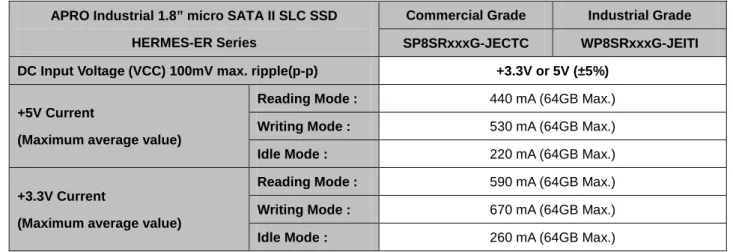
Table 2: Power Requirement
APRO Industrial 1.8” micro SATA II SLC SSD HERMES-ER Series
Commercial Grade Industrial Grade SP8SRxxxG-JECTC WP8SRxxxG-JEITI DC Input Voltage (VCC) 100mV max. ripple(p-p) +3.3V or 5V (±5%)
+5V Current
(Maximum average value)
Reading Mode : 440 mA (64GB Max.)
Writing Mode : 530 mA (64GB Max.)
Idle Mode : 220 mA (64GB Max.)
+3.3V Current
(Maximum average value)
Reading Mode : 590 mA (64GB Max.)
Writing Mode : 670 mA (64GB Max.)
Idle Mode : 260 mA (64GB Max.)
2.3. System Performance
Table 3: System Performances
Flash IC Toshiba SLC Flash IC
Data Transfer Mode supporting Serial ATA Gen-II (3.0Gb/s = 384MB/s) Maximum
Performance
Capacity 8GB 16GB 32GB 64GB 128GB Sequential Read (MB/s) 210 MB/s 210 MB/s 251.4 MB/s 232.6 MB/s 232.6 MB/s
Sequential Write (MB/s) 100 MB/s 100 MB/s 150.3 MB/s 130.5 MB/s 130.5 MB/s
Random Access Time 0.1 ms 0.1 ms 0.1 ms 0.1 ms 0.1 ms
The number of Flash IC 8 8 8 8 8
- 7 -
APRO Industrial 1.8” micro SATA II SLC SSD built-in DDRII 512Mbits SDRAM – HERMES-ER SeriesNote:
(1). All values quoted are typically at 25℃ and nominal supply voltage.
(2). Testing of the Industrial 1.8” micro SATA II SLC SSD maximum performance was performed under the following platform: - Computer with AMD 3.0GHz processor
- Windows XP Professional operating system
(3). Above performance data are for reference only for the performance would be different for various factors such like flash memory chips, system configurations, OS and software for performance testing,…etc.
2.4. System Reliability
Table 4: System Reliability
Wear-leveling Algorithms Static Wear-leveling
Bad Blocks Management Supportive
ECC Technology 24 bits per 512 bytes block
2.5. Physical Specifications
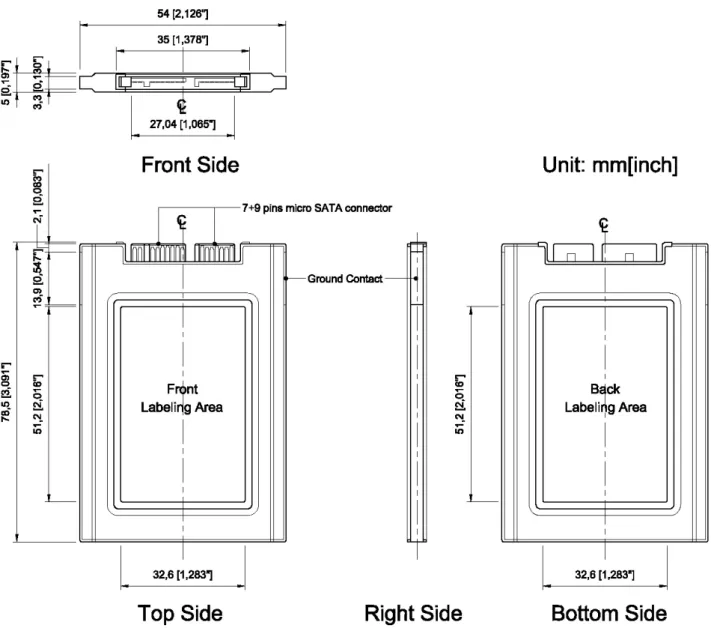
Refer to Table 5 and see Figure 2 for Industrial 1.8” micro SATA II SLC SSD HERMES-ER Series physical specifications and dimensions.
Table 5: Physical Specifications of APRO Industrial 1.8” micro SATA II SLC SSD HERMES-ER Series
Capacity: 256GB Length: 78.5 + 0.30mm / 3.09 in
Width: 54 + 0.20mm / 2.13 in
Thickness: 5 + 0.15mm / 0.20 in
Weight: 25g + 5g / 0.88oz
- 8 -
APRO Industrial 1.8” micro SATA II SLC SSD built-in DDRII 512Mbits SDRAM – HERMES-ER SeriesFigure 2: APRO Industrial 1.8” micro SATA II SLC SSD HERMES-ER Series Dimension
2.6. Capacity Specifications
The table 6 shows the specific capacity for the various models and the default number of heads, sectors/track and cylinders.
Table 6: Device Parameters
Unformatted Capacity Cylinder Head Sector LBA 8GB 13,587 16 63
13,695,696
16GB 16,383 16 63
29,323,728
32GB 16,383 16 63
62,533,296
64GB 16,383 16 63
125,045,424
128GB 16,383 16 63
250,069,680
- 9 -
APRO Industrial 1.8” micro SATA II SLC SSD built-in DDRII 512Mbits SDRAM – HERMES-ER Series3. Interface Description
3.1. SATA II interface
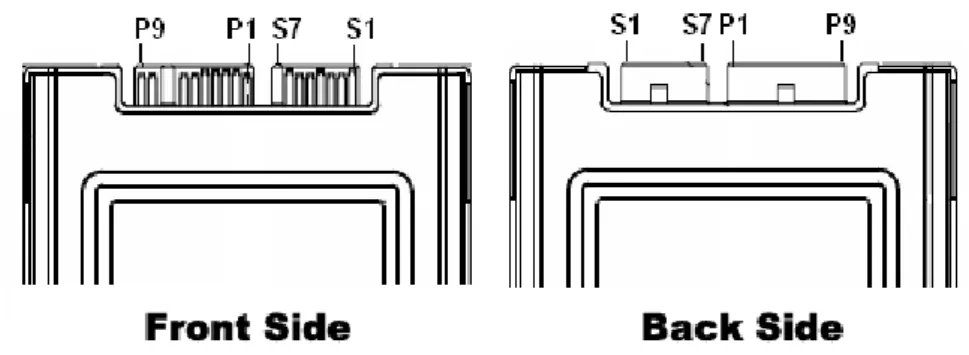
APRO Industrial 1.8” micro SATA II SLC SSD HERMES-ER Series comes with 7 pins + 9 pins micro SATA connector.
Figure 3: The connectors of 1.8” micro SATA II SLC SSD
3.2. Pin Assignments
There are total of 7 pins in the signal segment and 15 pins in the power segment. The pin assignments are
listed in below table 7.
Table 7: Pin Assignments
Name Type Description S1 GND
S2 A+
Differential Signal Pair A
S3 A-
S4 GND
S5 B-
Differential Signal Pair B
S6 B+
S7 GND
Key and Spacing separate signal and power segments
Cable Usage
Backplane
P1 V33 3.3V Power 2nd Mate 3rd Mate
P2 V33 3.3V Power, Pre-charge 1st Mate 2nd Mate
P3 GND 1st Mate 1st Mate
P4 GND 1st Mate 1st Mate
P5 V5 5V Power, Pre-charge 1st Mate 2nd Mate
P6 V5 5V power 2nd Mate 3rd Mate
P7 R Reserved 2nd Mate 3rd Mate
KEY KEY KEY NC NC
P8 Optional Vendor Specific 2nd Mate 3rd Mate
P9 Optional Vendor Specific 2nd Mate 3rd Mate
- 10 -
APRO Industrial 1.8” micro SATA II SLC SSD built-in DDRII 512Mbits SDRAM – HERMES-ER Series4. Command Sets
4.1 ATA register
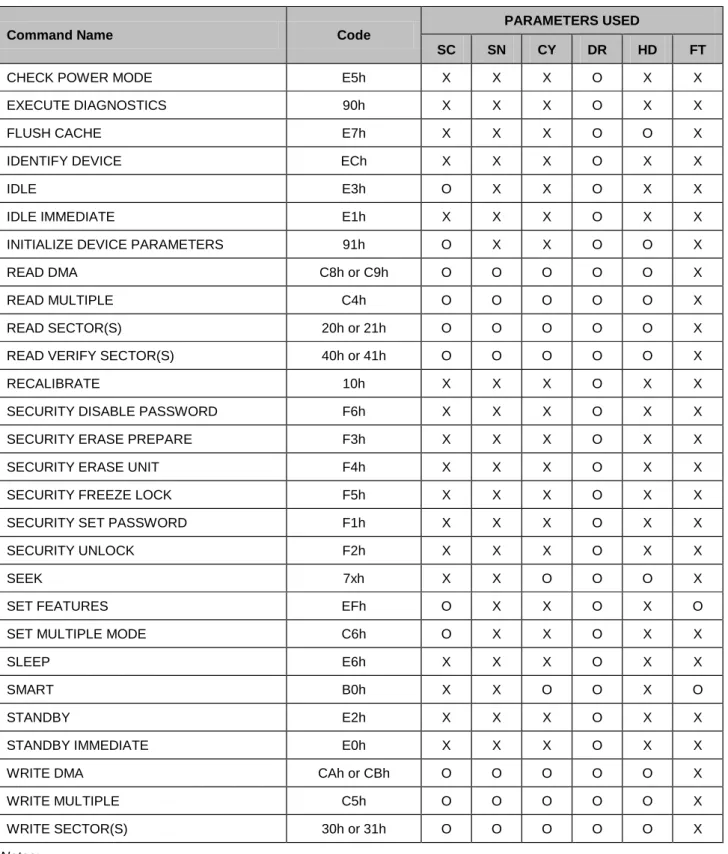
This table with the following paragraphs summarizes the ATA command set.
Table 8: ATA Command table
Command Name Code
PARAMETERS USED
SC SN CY DR HD FT
CHECK POWER MODE E5h X X X O X X EXECUTE DIAGNOSTICS 90h X X X O X X FLUSH CACHE E7h X X X O O X IDENTIFY DEVICE ECh X X X O X X
IDLE E3h O X X O X X
IDLE IMMEDIATE E1h X X X O X X INITIALIZE DEVICE PARAMETERS 91h O X X O O X READ DMA C8h or C9h O O O O O X READ MULTIPLE C4h O O O O O X READ SECTOR(S) 20h or 21h O O O O O X READ VERIFY SECTOR(S) 40h or 41h O O O O O X RECALIBRATE 10h X X X O X X SECURITY DISABLE PASSWORD F6h X X X O X X SECURITY ERASE PREPARE F3h X X X O X X SECURITY ERASE UNIT F4h X X X O X X SECURITY FREEZE LOCK F5h X X X O X X SECURITY SET PASSWORD F1h X X X O X X SECURITY UNLOCK F2h X X X O X X
SEEK 7xh X X O O O X
SET FEATURES EFh O X X O X O SET MULTIPLE MODE C6h O X X O X X
SLEEP E6h X X X O X X
SMART B0h X X O O X O
STANDBY E2h X X X O X X
STANDBY IMMEDIATE E0h X X X O X X WRITE DMA CAh or CBh O O O O O X WRITE MULTIPLE C5h O O O O O X WRITE SECTOR(S) 30h or 31h O O O O O X
Notes:
- 11 -
APRO Industrial 1.8” micro SATA II SLC SSD built-in DDRII 512Mbits SDRAM – HERMES-ER SeriesSC = Sector Count Register SN = Sector Number Register CY = Cylinder Low/High Register
DR = DEVICE SELECT Bit (DEVICE/HEAD Register Bit 4) HD = HEAD SELECT Bit (DEVICE/HEAD Register Bit 3-0) FT = Features Register
ATA Command specifications
4.1.1
CHECK POWER MODE (E5h)Features
Power Management Feature Set
- This command is mandatory for devices.
- This command is mandatory when the Power Management feature set
is implemented.
Protocol
Non-Data command
Check power mode
command for INPUTS information
Register 7 6 5 4 3 2 1 0 Features Na Sector Count Na LBA Low Na LBA Mid Na LBA High Na
Device Obs Na obs DEV Na Na Na Na
Command E5hs
Device register : DEV shall specify the selected device.
4.1.2
EXECUTE DIAGNOSITICS (90h)Features
General feature set
Protocol Device diagnostic
Inputs Only the command code (90h). All other registers shall be ignored.
- 12 -
APRO Industrial 1.8” micro SATA II SLC SSD built-in DDRII 512Mbits SDRAM – HERMES-ER SeriesExecute device diagnostic command for INPUTS information
Register 7 6 5 4 3 2 1 0 Features Na Sector Count Na LBA Low Na LBA Mid Na LBA High NaDevice Obs Na obs DEV Na Na
Command 90h
Device : DEV shall be ignored.
Execute device diagnostic command for NORMAL INPUTS information
Register 7 6 5 4 3 2 1 0 Error Diagnostic Code
Sector Count Signature
LBA Low Signature
LBA Mid Signature
LBA High Signature
Device Signature
Status BSY DRDY DF Na DRQ Na Na ERR
Error register : Diagnostic Code. The diagnostic code written into the Error register is an 8-bit code. Sector Count, LBA Low, LBA Mid, LBA High, Device registers : Device signature
Device register : DEV shall be cleared to zero. Status register : TBD
Execute device diagnostic command for STATUS REGISTER information
Code Description 01h Device passed Others Device failed
Error Outputs –
Table of Identify device command for inputs information shows the error information
that is returned as a diagnostic code in the Error register.
Prerequisites –
This command shall be accepted regardless of the state of DRDY.
Description –
This command shall cause the devices to perform the internal diagnostic tests.
- 13 -
APRO Industrial 1.8” micro SATA II SLC SSD built-in DDRII 512Mbits SDRAM – HERMES-ER Series4.1.3
IDENTIFY DEVICE (ECh)Feature General feature set
Protocol PIO data-in
Identify device command for INPUTS information
Register 7 6 5 4 3 2 1 0 Features Na Sector Count Na LBA Low Na LBA Mid Na LBA High Na
Device Obs Na Obs DEV Na Na Na Na
Command ECh
Device register : DEV shall specify the selected device.
Identify device command for NORMAL OUTPUTS information
Register 7 6 5 4 3 2 1 0 Error Na Sector Count Na LBA Low Na LBA Mid Na LBA High Na
Device obs Na Obs DEV Na Na Na Na
Status BSY DRDY DF Na DRQ Na Na ERR
Device register : DEV shall indicate the selected device. Status register :
BSY shall be cleared to zero indicating command completion. DRDY shall be set to one.
DF (Device Fault) shall be cleared to zero. DRQ shall be cleared to zero.
ERR shall be cleared to zero. Prerequisites : DRDY set to one.
Description : The IDENTIFY DEVICE command enables the host to receive parameter information from the device. When the command is issued, the device sets the BSY bit to one, prepares to transfer the 256 words of device
identification data to the host, sets the DRQ bit to one, clears the BSY bit to zero, and asserts INTRQ if nIEN is cleared to
- 14 -
APRO Industrial 1.8” micro SATA II SLC SSD built-in DDRII 512Mbits SDRAM – HERMES-ER Seriesinformation defines the arrangement and meaning of the parameter words in the buffer. All reserved bits or words shall be zero.
Some parameters are defined as a 16-bit value. A word that is defined as a 16-bit value places the most significant bit of the value on signal line DD15 and the least significant bit on signal line DD0. Some parameters are defined as 32-bit values (e.g. words (61:60)). Such fields are transfer using two successive word transfers. The device will first transfer the least significant bits, bits (15:0) of the value, on signal lines DD(15:0) respectively. After the least significant bits have been transferred, the most significant bits, bits(31:16) of the value, shall be transferred on DD(15:0) respectively. Some parameters are defined as a string of ASCII characters.
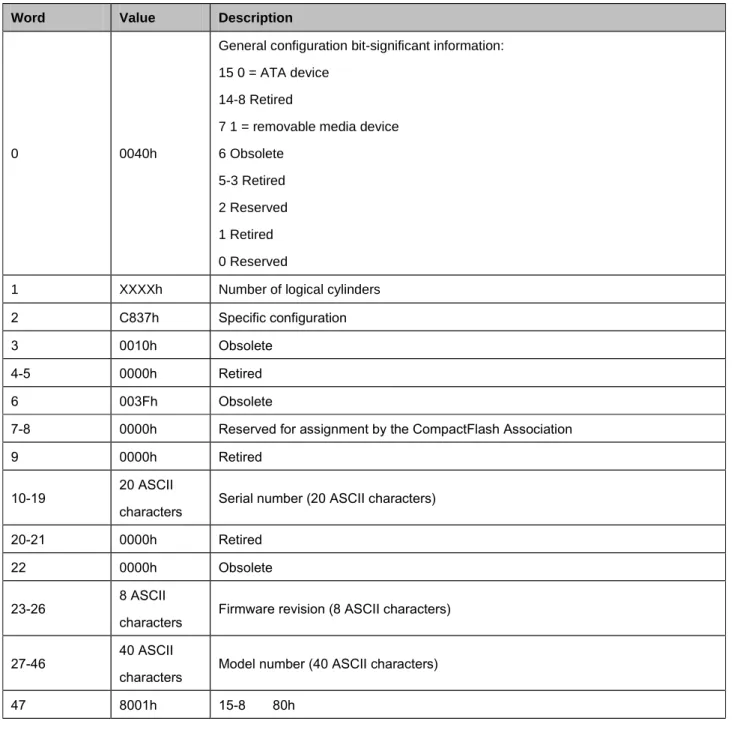
Table 9: Identify device information default value
Word Value Description
0 0040h
General configuration bit-significant information: 15 0 = ATA device
14-8 Retired
7 1 = removable media device 6 Obsolete
5-3 Retired 2 Reserved 1 Retired 0 Reserved
1 XXXXh Number of logical cylinders
2 C837h Specific configuration 3 0010h Obsolete
4-5 0000h Retired 6 003Fh Obsolete
7-8 0000h Reserved for assignment by the CompactFlash Association 9 0000h Retired
10-19 20 ASCII
characters Serial number (20 ASCII characters) 20-21 0000h Retired
22 0000h Obsolete 23-26 8 ASCII
characters Firmware revision (8 ASCII characters) 27-46 40 ASCII
characters Model number (40 ASCII characters) 47 8001h 15-8 80h
- 15 -
APRO Industrial 1.8” micro SATA II SLC SSD built-in DDRII 512Mbits SDRAM – HERMES-ER Series7-0 00h = Reserved
01h-FFh = Maximum number of sectors that shall be transferred per interrupt on READ/WRITE MULTIPLE commands
48 0000h Reserved
49 2F00h
Capabilities
15-14 Reserved for the IDENTIFY PACKET DEVICE command.
13 1 = Standby timer values as specified in this standard are supported 0 = Standby timer values shall be managed by the device
12 Reserved for the IDENTIFY PACKET DEVICE command. 11 1 = IORDY supported
0 = IORDY may be supported 10 1 = IORDY may be disabled 9 1 = LBA supported
8 1 = DMA supported. 7-0 Retired
50 4000h
Capabilities
15 Shall be cleared to zero 14 Shall be set to one 13-2 Reserved
1 Obsolete
0 Shall be set to one to indicate a device specific Standby timer value minimum.
51-52 0000h Obsolete
53 0007h 15-3 Reserved
2 1 = the fields reported in word 88 are valid 0 = the fields reported in word 88 are not valid 1 1 = the fields reported in words 70:64 are valid 0 = the fields reported in words 70:64 are not valid 0 Obsolete
54 XXXXh Number of current cylinders 55 XXXXh Number of current heads
56 XXXXh Number of current sector per track 57-58 XXXXh Current capacity in sectors 59 0101h 15-9 Reserved
8 1 = Multiple sector setting is valid
7-0 xxh = Setting for number of sectors that shall be transferred per interrupt on
- 16 -
APRO Industrial 1.8” micro SATA II SLC SSD built-in DDRII 512Mbits SDRAM – HERMES-ER SeriesR/W
Multiple command
60-61 XXXXXXXXh Total number of user addressable sectors 62 0000h Obsolete
63 0007h 15-11 Reserved
10 1 = Multiword DMA mode 2 is selected 0 = Multiword DMA mode 2 is not selected 9 1 = Multiword DMA mode 1 is selected 0 = Multiword DMA mode 1 is not selected 8 1 = Multiword DMA mode 0 is selected 0 = Multiword DMA mode 0 is not selected 7-3 Reserved
2 1 = Multiword DMA mode 2 and below are supported 1 1 = Multiword DMA mode 1 and below are supported 0 1 = Multiword DMA mode 0 is supported
64 0003h 15-8 Reserved
7-0 PIO modes supported
65 0078h Minimum Multiword DMA transfer cycle time per word 15-0 Cycle time in nanoseconds
66 0078h Manufacturer’s recommended Multiword DMA transfer cycle time 15-0 Cycle time in nanoseconds
67 0078h Minimum PIO transfer cycle time without flow control 15-0 Cycle time in nanoseconds
68 0078h Minimum PIO transfer cycle time with IORDY flow control 15-0 Cycle time in nanoseconds
69-70 0000h Reserved (for future command overlap and queuing) 71-74 0000h Reserved for the IDENTIFY PACKET DEVICE command 76-79 0006h Reserved for Serial ATA
80 01FEh Major version number 0000h or FFFFh = device does not report version 15 Reserved
14 Reserved for ATA/ATAPI-14 13 Reserved for ATA/ATAPI-13 12 Reserved for ATA/ATAPI-12 11 Reserved for ATA/ATAPI-11 10 Reserved for ATA/ATAPI-10
- 17 -
APRO Industrial 1.8” micro SATA II SLC SSD built-in DDRII 512Mbits SDRAM – HERMES-ER Series9 Reserved for ATA/ATAPI-9 8 Reserved for ATA/ATAPI-8 7 1 = supports ATA/ATAPI-7 6 1 = supports ATA/ATAPI-6 5 1 = supports ATA/ATAPI-5 4 1 = supports ATA/ATAPI-4 3 Obsolete 2 Obsolete 1 Obsolete 0 Reserved 81 0000h Minor version number
0000h or FFFFh = device does not report version 82 7069h Command set supported.
15 Obsolete
14 1 = NOP command supported
13 1 = READ BUFFER command supported 12 1 = WRITE BUFFER command supported 11 Obsolete
10 1 = Host Protected Area feature set supported 9 1 = DEVICE RESET command supported 8 1 = SERVICE interrupt supported 7 1 = release interrupt supported 6 1 = look-ahead supported 5 1 = write cache supported
4 Shall be cleared to zero to indicate that the PACKET Command feature set is
not supported.
3 1 = mandatory Power Management feature set supported 2 1 = Removable Media feature set supported
1 1 = Security Mode feature set supported 0 1 = SMART feature set supported
- 18 -
APRO Industrial 1.8” micro SATA II SLC SSD built-in DDRII 512Mbits SDRAM – HERMES-ER Series83 7C08h Command sets supported. 15 Shall be cleared to zero 14 Shall be set to one
13 1 = FLUSH CACHE EXT command supported 12 1 = mandatory FLUSH CACHE command supported 11 1 = Device Configuration Overlay feature set supported 10 1 = 48-bit Address feature set suppoted
9 1 = Automatic Acoustic Management feature set supported 8 1 = SET MAX security extension supported
7 See Address Offset Reserved Area Boot, INCITS TR27:2001 6 1 = SET FEATURES subcommand required to spinup after power-up 5 1 = Power-Up In Standby feature set supported
4 1 = Removable Media Status Notification feature set supported 3 1 = Advanced Power Management feature set supported 2 1 = CFA feature set supported
1 1 = READ/WRITE DMA QUEUED supported 0 1 = DOWNLOAD MICROCODE command supported 84 4040h Command set/feature supported extension.
15 Shall be cleared to zero 14 Shall be set to one
13 1= IDLE IMMEDIATE with UNLOAD FEATURE supported 12 Reserved for technical report
11 Reserved for technical report
10 1= URG bit supported for WRITE STREAM DMA EXT and WRITE STREAM
EXT
9 1= URG bit supported for READ STREAM DMA EXT and READ STREAM EXT
8 1= 64-bit World wide name supported
7 1= WRITE DMA QUEUED FUA EXT command supported
6 1= WRITE DMA FUA EXT and WRITE MULTIPLE FUA EXT commands supported
5 1= General Purpose Logging feature set supported 4 1= Streaming feature set supported
3 1= Media Card Pass Through Command feature set supported 2 1= Media serial number supported
- 19 -
APRO Industrial 1.8” micro SATA II SLC SSD built-in DDRII 512Mbits SDRAM – HERMES-ER Series1 1 = SMART self-test supported 0 1 = SMART error logging supported
85 7069h Command set/feature enabled 15 Obsolete
14 1 = NOP command enabled
13 1 = READ BUFFER command enabled 12 1 = WRITE BUFFER command enabled 11 Obsolete
10 1 = Host Protected Area feature set enabled 9 1 = DEVICE RESET command enabled 8 1 = SERVICE interrupt enabled
7 1 = release interrupt enabled 6 1 = look-ahead enabled 5 1 = write cache enabled
4 Shall be cleared to zero to indicate that the PACKET Command feature set is
not supported.
3 1 = Power Management feature set enabled 2 1 = Removable Media feature set enabled 1 1 = Security Mode feature set enabled 0 1 = SMART feature set enabled 86 BC00h Command set/feature enabled.
15-14 0 = Reserved
13 1 = FLUSH CACHE EXT command supported 12 1 = FLUSH CACHE command supported 11 1 = Device Configuration Overlay supported 10 1 = 48-bit Address features set supported
9 1 = Automatic Acoustic Management feature set enabled
8 1 = SET MAX security extension enabled by SET MAX SET PASSWORD 7 See Address Offset Reserved Area Boot, INCITS TR27:2001
6 1 = SET FEATURES subcommand required to spin-up after power-up 5 1 = Power-Up In Standby feature set enabled
4 1 = Removable Media Status Notification feature set enabled 3 1 = Advanced Power Management feature set enabled 2 1 = CFA feature set enabled
- 20 -
APRO Industrial 1.8” micro SATA II SLC SSD built-in DDRII 512Mbits SDRAM – HERMES-ER Series1 1 = READ/WRITE DMA QUEUED command supported 0 1 = DOWNLOAD MICROCODE command supported 87 4040h Command set/feature default.
15 Shall be cleared to zero 14 Shall be set to one
13 1 = IDLE IMMEDIATE with UNLOAD FEATURE supported 12 Reserved for technical report
11 Reserved for technical report
10 1 = URG bit supported for WRITE STREAM DMA EXT and WRITE STREAM
EXT
9 1 = URG bit supported for WRITE STREAM DMA EXT and READ STREAM EXT
8 1=64 bit World wide name supported
7 1 = WRITE DMA QUEUED FUA EXT command supported
6 1 = WRITE DMA FUA EXT and WRITE MULTIPLE FUA EXT commands supported
5 1 = General Purpose Logging feature set supported
4 1 = Valid CONFIGURE STREAM command has been executed 3 1 = Media Card Pass Through Command feature set enabled 2 1 = Media serial number is valid
1 1 = SMART self-test supported 0 1 = SMART error logging supported 88 XX7Fh 15 Reserved
14 1 = Ultra DMA mode 6 is selected 0 = Ultra DMA mode 6 is not selected 13 1 = Ultra DMA mode 5 is selected
0 = Ultra DMA mode 5 is not selected 12 1 = Ultra DMA mode 4 is selected
0 = Ultra DMA mode 4 is not selected 11 1 = Ultra DMA mode 3 is selected 0 = Ultra DMA mode 3 is not selected 10 1 = Ultra DMA mode 2 is selected 0 = Ultra DMA mode 2 is not selected 9 1 = Ultra DMA mode 1 is selected 0 = Ultra DMA mode 1 is not selected
- 21 -
APRO Industrial 1.8” micro SATA II SLC SSD built-in DDRII 512Mbits SDRAM – HERMES-ER Series8 1 = Ultra DMA mode 0 is selected 0 = Ultra DMA mode 0 is not selected 7 Reserved
6 1 = Ultra DMA mode 6 and below are supported 5 1 = Ultra DMA mode 5 and below are supported 4 1 = Ultra DMA mode 4 and below are supported 3 1 = Ultra DMA mode 3 and below are supported 2 1 = Ultra DMA mode 2 and below are supported 1 1 = Ultra DMA mode 1 and below are supported 0 1 = Ultra DMA mode 0 is supported
89 0000h Time required for security erase unit completion 90 0000h Time required for Enhanced security erase completion 91 0000h Current advanced power management value
92 0000h Master Password Revision Code
93 0000h Hardware reset result. The contents of bit (12:0) of this word shall change only during the execution of a hardware reset.
15 Shall be cleared to zero 14 Shall be set to one
13 1 = device detected CBLID – above ViH 0 = device detected CBLID – below ViL 12 Reserved
11 0 = Device 1 did not assert PDIAG 1 = Device 1 asserted PDIAG
10-9 These bits indicate how Device 1 determined the device number: 00 = Reserved
01 = a jumper was used 10 = the CSEL signal was used
11 = some other method was used or the method is unknown 8 Shall be set to one
94 0000h 15-8 Vendor’s recommended acoustic management value 7-0 Current automatic acoustic management value 95 0000h Stream Minimum Request Size
96 0000h Streaming Transfer Time – DMA
97 0000h Streaming Access Latency – DMA and PIO 98-99 0000h Streaming Performance Granularity
100-103 XXXXh Maximum user LBA for 48-bit Address feature set
- 22 -
APRO Industrial 1.8” micro SATA II SLC SSD built-in DDRII 512Mbits SDRAM – HERMES-ER Series104 0000h Streaming transfer Time – PIO 105 0000h Reserved
106 4000h Physical sector size / Logical Sector Size
15 Shall be cleared to Zero 14 Shall be set to one
13 1 = Device has multiple logical sectors per physical sector 12 1 = Device Logical Sector Longer than 256 Words 11-4 Reserved
3-0 2 logical sectors per physical sector
107 0000h Inter-seek delay for ISO-7779 acoustic testing in microseconds 108 0000h 15-12 NAA (3:0) 11-0 IEEE OUI (23:12) 109 0000h 15-4 IEEE OUI (11:0) 3-0 Unique (35:32) 110 0000h 15-0 Unique ID (31:16) 111 0000h 15-0 Unique ID (15:0)
112-115 0000h Reserved for world wide name extension to 128 bits 116 0000h Reserved for technical report
117-118 0000h Words per Logical Sector 119-120 4000h Reserved
121-126 0000h Reserved
127 0000h Removable Media Status Notification feature set support 15-2 Reserved
1-0 00 = Removable Media Status Notification feature set not supported 01 = Removable Media Status Notification feature supported 10 = Reserved 11 = Reserved 128 0 X 0 0 X X X X Security status 15-9 Reserved
8 Security level 0 = High, 1 = Maximum 7-6 Reserved
5 1 = Enhanced security erase supported 4 1 = Security count expired
3 1 = Security frozen 2 1 = Security locked 1 1 = Security enabled
- 23 -
APRO Industrial 1.8” micro SATA II SLC SSD built-in DDRII 512Mbits SDRAM – HERMES-ER Series0 0 1 = Security supported 129-159 0000h Vendor specific
160 0000h CFA power mode 1
15 Word 160 supported 14 Reserved
13 CFA power mode 1 is required for one or more commands implemented by the device
12 CFA power mode 1 disabled 11-0 Maximum current
161-175 0000h Reserved for assignment by the CompactFlash Association 176-205 0000h Current media serial number
206-254 0000h Reserved 255 0000h Integrity word
15-8 Checksum 7-0 Signature
4.1.4 IDLE (E3h)
Features
Power Management Feature Set
Protocol
Non-Data
Values other than zero in the Sector Count register when the IDLE command is issued shall determine the
time period programmed into the Standby timer.
Idle command for INPUTS information
Register 7 6 5 4 3 2 1 0
Features
Na
Sector Count
Timer period value
LBA Low
Na
LBA Mid
Na
LBA High
Na
Device
Obs
Na
Obs
DEV
Na
Na
Na
Na
Command
E3h
Device register : DEV shall specify the selected device.
- 24 -
APRO Industrial 1.8” micro SATA II SLC SSD built-in DDRII 512Mbits SDRAM – HERMES-ER SeriesIdle command sector count register contents information
Sector Count register contents Corresponding timeout period
0 (00h)
Timeout disabled
1-240 (01h-F0h)
(value*5)s
241-251 (F1h-FBh)
((Value-240)*30)min
252 (FCh)
21min
253 (FDh)
Period between 8 and 12 hrs
254 (FEh)
Reserved
255 (FFh)
21 min 15 s
NOTE – Times are approximate
Idle command for NORMAL OUTPUTS information
Register 7 6 5 4 3 2 1 0
Error
Na
Sector Count
Na
LBA Low
Na
LBA Mid
Na
LBA High
Na
Device
obs
Na
obs
DEV
Na
Na
Na
Na
Status
BSY
DRDY
DF
Na
DRQ
Na
Na
ERR
Device Register : DEV shall indicate the selected device. Status register :
BSY will be cleared to zero indicating command completion. DRDY will be set to one.
DF (Device Fault) will be cleared to zero. DRQ shall be cleared to zero.
ERR shall be cleared to zero.
Idle command for ERROR OUTPUTS information
Register 7 6 5 4 3 2 1 0
Error
Na
Na
Na
Na
Na
ABRT
Na
Na
Sector Count
Na
LBA Low
Na
LBA Mid
Na
LBA High
Na
Device
obs
Na
obs
DEV
Na
- 25 -
APRO Industrial 1.8” micro SATA II SLC SSD built-in DDRII 512Mbits SDRAM – HERMES-ER SeriesDescription : The IDLE command allows the host to place the device in the idle mode and also set the Standby timer. Prerequisites : DRDY set to one
4.1.5 Idle Immediate (E1h)
Features
Power Management Feature Set
Protocol
Non-Data
Idle immediate command for INPUTS information
Register 7 6 5 4 3 2 1 0
Features
Na
Sector Count
Na
LBA Low
Na
LBA Mid
Na
LBA High
Na
Device
obs
Na
obs
DEV
Na
Na
Na
Na
Command
E1h
Device register : DEV shall specify the selected device.
Idle immediate command for NORMAL OUTPUTS information
Register 7 6 5 4 3 2 1 0
Error
Na
Sector Count
Na
LBA Low
Na
LBA Mid
Na
LBA High
Na
Device
obs
Na
obs
DEV
Na
Na
Na
Na
Status
BSY
DRDY
DF
Na
DRQ
Na
Na
ERR
Description: The IDLE IMMEDIATE command allows the host to immediately place the device in the idle mode. Device Register : DEV shall indicate the selected device.
Status register:
BSY will be cleared to zero indicating command completion. DRDY will be set to one.
DF (Device Fault) will be cleared to zero. DRQ shall be cleared to zero.
ERR shall be cleared to zero. Prerequisites : DRDY set to one
- 26 -
APRO Industrial 1.8” micro SATA II SLC SSD built-in DDRII 512Mbits SDRAM – HERMES-ER Series4.1.6 S.M.A.R.T. Function (Self-Monitoring, Analysis, and Reporting Technology)
Individual SMART commands are identified by the value placed in the Feature register.
SMART Feature registers values
Value Command D0h SMATR Read Data
D8h SMART ENABLE OPERATIONS
D9h SMART DISABLE OPERATIONS
4.1.6.1 S.M.A.R.T. Read Data (B0h with a feature value of D0h)
Features
Operation when the SMART feature set is implemented.
Protocol
PIO data-in
SMART command for INPUTS information
Register 7 6 5 4 3 2 1 0 Features D0h Sector Count Na LBA Low Na LBA Mid 4Fh LBA High C2h
Device Obs Na obs DEV Na Na Na Na
Command B0h
Device register : DEV shall specify the selected device
SMART command for NORMAL OUTPUTS information
Register 7 6 5 4 3 2 1 0 Error Na Sector Count Na LBA Low Na LBA Mid Na LBA High Na
Device Obs Na obs DEV Na Na Na Na
Status BSY DRDY DF Na DRQ Na Na ERR
Description : This command returns the Device SMART data structure to the host. Device register : DEV shall indicate the selected device.
Status registers :
- 27 -
APRO Industrial 1.8” micro SATA II SLC SSD built-in DDRII 512Mbits SDRAM – HERMES-ER SeriesDRDY will be set to one. SMART enabled. DF (Device Fault) will be cleared to zero. DRQ shall be cleared to zero.
ERR shall be cleared to zero.
Prerequisites : DRDY set to one. SMART enabled.
ID of SMART data structure
ID (Hex) Description
AA Total Bad Block Count, Later Bad Block Count AD Average erase Count, Max Erase Count
Smart command for BAD BLOCK COUNT information (AAh)
Byte
Function Description0
0x00
NA
1
0x00
NA
2
Total Bad Block Count byte 1
Total Bad blocks of SSD
3
Total Bad Block Count byte 0
4
Later Bad Block Count byte 1
Later Bad blocks of SSD
5
Later Bad Block Count byte 0
6
Reserved
NA
7
Reserved
NA
Smart command for AVERAGE/MAX ERASE count information (ADh)
Byte
Function Description0
Average Erase Count (High Byte)
Average erase count of all blocks.
1
Average Erase Count
2
Average Erase Count (Low Byte)
3
Max Erase Count (High Byte)
Indicate a block which’s erase count is the
largest.
4
Max Erase Count
5
Max Erase Count (Low Byte)
6
Reserved
NA
7
Reserved
NA
When the Maximum erase count is 255 bigger than average erase count, the wear-leveling will be executed.
- 28 -
APRO Industrial 1.8” micro SATA II SLC SSD built-in DDRII 512Mbits SDRAM – HERMES-ER Series4.1.6.2 S.M.A.R.T. ENABLE OPERATIONS (B0h with a Feature register value of
D8h)
Features
Smart Feature Set
Protocol
Non-data
SMART Enable command for INPUTS information
Register 7 6 5 4 3 2 1 0 Features D8h Sector Count Na LBA Low Na LBA Mid 4Fh LBA High C2h
Device Obs Na obs DEV Na Na Na Na
Command B0h
Device register : DEV shall specify the selected device.
SMART command for NORMAL OUTPUTS information
Register 7 6 5 4 3 2 1 0 Error Na Sector Count Na LBA Low Na LBA Mid Na LBA High Na
Device Obs Na obs DEV Na Na Na Na
Status BSY DRDY DF Na DRQ Na Na ERR
Description : This command enables access to all SMART capabilities within device. Device Register : DEV shall indicate the selected device.
Status register:
BSY will be cleared to zero indicating command completion.
DRDY will be set to one. (This command enables access to all SMART capabilities within device.) DF (Device Fault) will be cleared to zero.
DRQ shall be cleared to zero. ERR shall be cleared to zero. Prerequisites : DRDY set to one.
- 29 -
APRO Industrial 1.8” micro SATA II SLC SSD built-in DDRII 512Mbits SDRAM – HERMES-ER Series4.1.6.3
SMART DISABLE OPERATIONS (B0h with a Feature register value
of D9h)
Features
Smart Feature Set
Protocol
Non-data
SMART DISABLE Command for INPUTS information
Register 7 6 5 4 3 2 1 0
Features
D9h
Sector Count
Na
LBA Low
Na
LBA Mid
4Fh
LBA High
C2h
Device
Obs
Na
obs
DEV
Na
Na
Na
Na
Command
B0h
Device register : DEV shall specify the selected device.
SMART command for NORMAL OUTPUTS information
Register 7 6 5 4 3 2 1 0
Error
Na
Sector Count
Na
LBA Low
Na
LBA Mid
Na
LBA High
Na
Device
Obs
Na
obs
DEV
Na
Na
Na
Na
Status
BSY
DRDY
DF
Na
DRQ
Na
Na
ERR
Description : This command disables all SMART capabilities within device. Device Register : DEV shall indicate the selected device.
Status register :
BSY will be cleared to zero indicating command completion. DRDY will be set to one. SMART enabled.
DF (Device Fault) will be cleared to zero. DRQ shall be cleared to zero.
ERR shall be cleared to zero.
Prerequisites : DRDY set to one. Smart enabled.
- 30 -
APRO Industrial 1.8” micro SATA II SLC SSD built-in DDRII 512Mbits SDRAM – HERMES-ER Series4.1.7
Read Multiple (C4h)
Protocol
PIO data-in
Read multiple command for INPUTS information
Register 7 6 5 4 3 2 1 0
Features
Na
Sector Count
Sector Count
LBA Low
LBA(7:0)
LBA Mid
LBA(15:8)
LBA High
LBA(23:16)
Device
obs
Na
obs
DEV
LBA(27:24)
Command
C4h
Sector Count :Number of sectors to be transferred. A value of 00h specifies that 256 sectors are to be transferred. LBA Low : Starting LBA bits (7:0).
LBA Mid : Starting LBA bits (15:8) LBA High : Starting LBA bits (23:16)
Device : DEV shall specify the selected device. Bit (3:0) starting LBA bits (27:24)
Read multiple command for NORMAL OUTPUTS information
Register 7 6 5 4 3 2 1 0
Error
Na
Sector Count
Na
LBA Low
Na
LBA Mid
Na
LBA High
Na
Device
obs
Na
obs
DEV
Na
Na
Na
Na
Status
BSY
DRDY
DF
Na
DRQ
Na
Na
ERR
Device register : DEV shall specify the selected device. Status register :
BSY will be cleared to zero indicating command completion DRDY will be set to one.
DF (Device Fault) will be cleared to zero. DRQ will be cleared to zero
ERR will be cleared to zero.
- 31 -
APRO Industrial 1.8” micro SATA II SLC SSD built-in DDRII 512Mbits SDRAM – HERMES-ER SeriesRead multiple command for ERROR OUTPUTS information
Register 7 6 5 4 3 2 1 0
Error
Na
UNC
MC
IDNF
MCR
ABRT
NM
Obs
Sector Count
Na
LBA Low
LBA(7:0)
LBA Mid
LBA(15:8)
LBA High
LBA(23:16)
Device
obs
Na
obs
DEV
LBA(27:24)
Status
BSY
DRDY
DF
Na
DRQ
Na
Na
ERR
Description: This command reads the number of sectors specified in the sector Count register. The number of sectors per block is defined by the content of word 59 in the IDENTIFY DEVICE response.
An unrecoverable error encountered during the execution of this command results in the termination of the command. The Command Block registers contain the address of the sector where the first unrecoverable error occurred. The amount of data transferred us indeterminate. An unrecoverable error encountered during the execution of this command results in the termination of the command. The Command Block registers contain the address of the sector where the first
unrecoverable error occurred. The amount of data transferred us indeterminate. Error register:
UNC shall be set to one if data is uncorrectable.
IDNF shall be set to one if a user-accessible address is requested could not be found. LBA Low, LBA Mid, and LBA High, Device
Shall be written with the address of first unrecoverable error. Status register:
BSY will be cleared to zero indicating command completion DRDY will be set to one.
DF (Device Fault) will be cleared to zero. DRQ will be cleared to zero
ERR will be set to one if an Error register bit is set to one. Prerequisites : DRDY set to one.
- 32 -
APRO Industrial 1.8” micro SATA II SLC SSD built-in DDRII 512Mbits SDRAM – HERMES-ER Series4.1.8 Read Sector(s) (20h)
Protocol
PIO data-in
Read sector command for INPUTS information
Register 7 6 5 4 3 2 1 0
Features
Na
Sector Count
Sector Count
LBA Low
LBA(7:0)
LBA Mid
LBA(15:8)
LBA High
LBA(23:16)
Device
obs
Na
obs
DEV
LBA(27:24)
Command
20h
Sector Count : Number of sectors to be transferred. A value of 00h specifies that 256 sectors are to be transferred. LBA Low : Starting LBA bits (7:0).
LBA Mid : Starting LBA bits (15:8) LBA High : Starting LBA bits (23:16)
Device : DEV shall specify the selected device. Bit (3:0) starting LBA bits (27:24)
Read sector command for NORMAL OUTPUTS information
Register 7 6 5 4 3 2 1 0
Error
Na
Sector Count
Na
LBA Low
Na
LBA Mid
Na
LBA High
Na
Device
obs
Na
obs
DEV
Na
Na
Na
Na
Status
BSY
DRDY
DF
Na
DRQ
Na
Na
ERR
Device register : DEV shall specify the selected device. Status register:
BSY will be cleared to zero indicating command completion DRDY will be set to one.
DF (Device Fault) will be cleared to zero. DRQ will be cleared to zero
ERR will be cleared to zero.
- 33 -
APRO Industrial 1.8” micro SATA II SLC SSD built-in DDRII 512Mbits SDRAM – HERMES-ER SeriesRead sector command for ERROR OUTPUTS information
Register 7 6 5 4 3 2 1 0
Error
Na
UNC
MC
IDNF
MCR
ABRT
NM
Obs
Sector Count
Na
LBA Low
LBA(7:0)
LBA Mid
LBA(15:8)
LBA High
LBA(23:16)
Device
obs
Na
obs
DEV
LBA(27:24)
Status
BSY
DRDY
DF
Na
DRQ
Na
Na
ERR
Description: This command reads from 1 to 256 sectors as specified in the Sector Count register. A sector count of 0 requests 256 sectors. This transfer shall begin at the sector specified in the LBA Low, LBA Mid, LBA High, and Device registers. The DRQ bit is always set to one prior to data transfer regardless of the presence or absence of an error condition. The device shall interrupt for each DRQ block transferred.
An unrecoverable error encountered during the execution of this command results in the termination of the command. The Command Block registers contain the address of the sector where the first unrecoverable error occurred. The amount of data transferred us indeterminate.
Error register:
UNC shall be set to one if data is uncorrectable.
IDNF shall be set to one if a user-accessible address is requested could not be found. LBA Low, LBA Mid, and LBA High, Device
Shall be written with the address of first unrecoverable error. Status register:
BSY will be cleared to zero indicating command completion DRDY will be set to one.
DF (Device Fault) will be cleared to zero. DRQ will be cleared to zero
ERR will be set to one if an Error register bit is set to one. Prerequisites : DRDY set to one.