A Compact Computing Environment
For A Windows PC Cluster
Towards Seamless Molecular Dynamics
Simulations
Yuichi Tsujita
∗Abstract—A Windows PC cluster is focused for its high availabilities and fruitful functions such as a well-tuned MPI library and a fully-equipped job scheduler. However, the software tools are complicated for users who are not familiar with the Windows system. They don’t want to pay much time to learn about the sys-tem because what they want is getting calculated re-sults. Furthermore, there is not any tool to support visualization of calculated results. To support seam-less molecular dynamics simulations from computa-tions to visualization on a Windows cluster, a com-pact computing environment has been built by using Java. It provides hints for parallel computing and as-sists seamless job execution and its visualization. As a result, application users can proceed their compu-tations without deep understandings of the Windows cluster.
Keywords: Windows PC cluster, MS-MPI, job sched-uler, Java RMI, molecular dynamics simulation
1
Introduction
It is now familiar to build and utilize a PC cluster by using a Windows server system [1]. The Windows system provides many useful software tools such as a well-tuned MPI [2] library named MS-MPI [1] and a powerful job scheduler.
Those software tools are available with a Windows GUI. However, most of the application users do not expect to encompass the expertise for the Windows cluster. As a re-sult, they have difficulties in operation of their programs because of complexity in selection and utilization of ap-propriate functions of the system. Furthermore, there is not any support to check standard output/error of a running job in a GUI menu named Compute Cluster Job Manager of the job scheduler. Instead, a command line interface is available to check them, however, it is too complicated for non-expert users. It is also noticed that
∗Department of Electronic Engineering and Computer Science,
Faculty of Engineering, Kinki University, 1 Umenobe, Takaya, Higashi-Hiroshima, Hiroshima 739-2116, Japan,
E-mail: [email protected]
there is not any support for a visualization of calculated results.
To remove such difficulties, a compact and user-friendly computing environment which is available on a client PC is built to manipulate the Windows cluster. A comput-ing environment has been built by uscomput-ing Java because Java is useful for building GUI applications and platform independent. It collects essential functions for a target molecular dynamics simulation to control a remote Win-dows cluster from a client PC. This environment consists of client and server programs and hides complexity of job execution on the Windows cluster from application users. The client program runs on a client PC, while the server program runs on a head node of a Windows cluster. A platform dependent part is encapsulated in the server program. This computing environment provides hints for parallel computing in a simple manner. Furthermore, it assists program job submission into the job manager of the Windows cluster.
In this paper, section 2 briefly explains the Windows clus-ter. Section 3 describes about motivations, details of its system architecture, and a user interface of the environ-ment. Related work is also remarked in section 4, followed by summary of this work in section 5.
2
Brief Overview of a Windows PC
Clus-ter
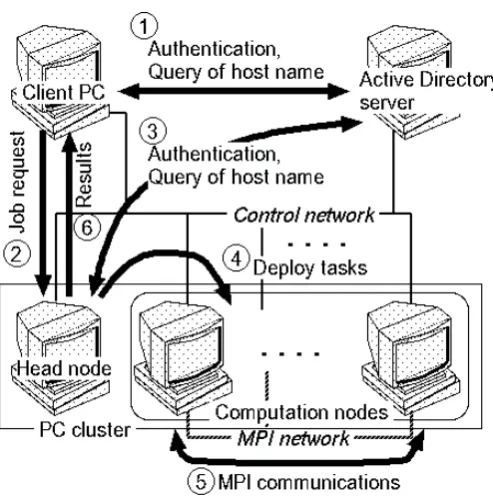
Figure 1: Typical configuration of a Windows PC cluster
such as a user ID about the submitted job (Fig. 1(3)). The job scheduler analyzes its request and tasks in the job are queued for computation.
Once enough CPUs can be assigned for a waiting job, the scheduler allocates vacant computation nodes for each task (Fig. 1(4)). For parallel computing, a well-tuned MPI library named MS-MPI [1] is provided. The library is based on an MPICH2 [3] implementation. After par-allel computation by the computation nodes (Fig. 1(5)), status of a task is returned through the Compute Cluster Job Manager or the CLI (Fig. 1(6)).
3
Client Computing Environment For a
Windows PC Cluster
3.1
Architecture
This system is developed to provide the following func-tions:
• Support of parameter settings such as a user ID, a program name, the number of CPUs, a work direc-tory, and standard input/output/error
• Support of seamless job execution and visualization by encapsulating complicated Windows cluster op-erations
• Job and task monitoring
To provide a user-friendly interface for non-expert users, a GUI interface is essential. It is also remarked that
portability is important issue. Therefore, Java SE Devel-opment Kit 6 [4] was selected to develop the computing environment.
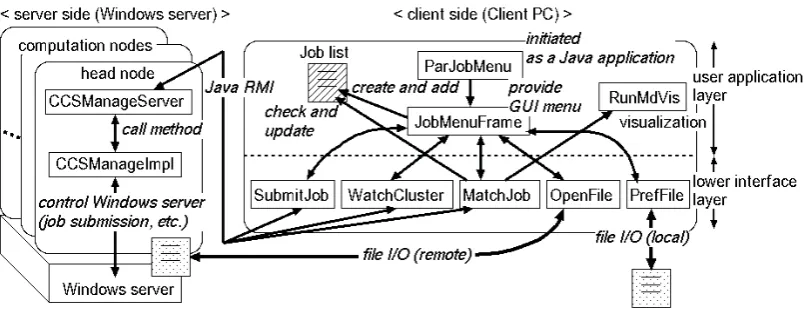
An organization of developed Java classes is illustrated in Figure 2. This system has two parts; one is a server side part which runs on a head node of a PC cluster and the another is a client side part which runs on a client PC. The reason for such configuration is to provide a platform independent system in the client side. All the platform dependent properties are deployed in the server side.
Data communications between server and client are car-ried out by using Java’s Remote Method Invocation (RMI). This system is available for a user in a Windows domain in which an Active Directory server runs.
The client side has two layers in implementation; one is a user application layer and the another is a lower inter-face layer. The application layer provides GUI menus for job creation, job submission, and monitoring a PC clus-ter and jobs in a seamless manner. TheJobMenuFrame
class provides such GUI menus and a user can specify several parameters here. A job list is created to store information about submitted jobs and associated tasks. TheJobMenuFrame class creates the list at the start-up of this system with the help of a Java’sJTreeobject.
On the other hand, the lower layer provides control meth-ods for a Windows cluster. Some of the Java classes (SubmitJob, MatchJob, and WatchCluster) provide in-terfaces for an RMI server object (CCSManageServer) in the server side. Besides, theMatchJobandWatchCluster
classes invoke threads which run in parallel with a main thread. The former checks status of a selected task by accessing a job list, while the latter checks the number of available CPUs by issuing a command to the cluster.
Both theJobMenuFrame and MatchJobclasses fetch the job list. For job submission, several associated meth-ods of the JobMenuFrame class are used. Once a job is created, a user can add several tasks in the associated job. A user can submit the job with the help of the
SubmitJobclass. Job submission to a remote Windows cluster is carried out by using Java RMI with the help of the CCSManageServer and CCSManageImpl classes on a remote Windows cluster. Later, theJobMenuFrame class stores information about the job and associated tasks in the job list. TheMatchJobclass fetches the list periodi-cally to check status of a selected task.
Figure 2: Organization of developed Java classes
Figure 3: Data structure of a job list to hold information about submitted jobs and associated tasks
monitoring of job and a PC cluster system, and so forth.
Figure 3 depicts an example of a data structure of the job list. A tree node associated with a job is created under the root node, “Job”. In this figure, MXD1 and MXD2 stand for names of jobs, where 650 and 651 stand for job IDs. Associated parameters such as the maximum number of CPUs, user ID, and so forth are registered with those parameters.
A child node is created for a task under associated job node so as to have a similar data structure in the Win-dows job manipulations. Associated parameters such as the number of CPUs to be used, a work directory, stan-dard input/output/error are registered. With the help of this data structure, we can easily check a target job or a target task effectively.
3.2
Seamless job submission and
visualiza-tion
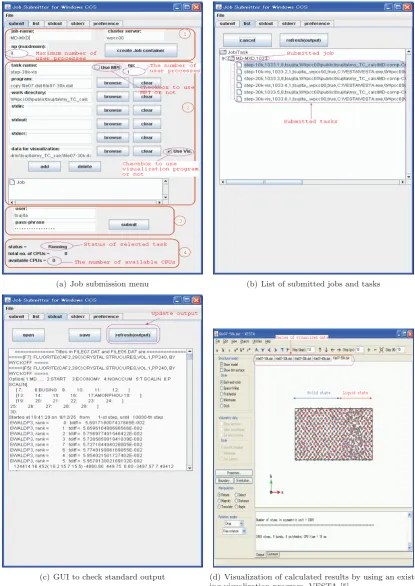
To start computation, users need to create a job to be passed to a job scheduler. A menu window provided by theJobMenuFrameclass helps to create the job and asso-ciated tasks as shown in Figure 4 (a). In this menu, job creation, task creation, job submission, and status mon-itor are available. In the job creation (Fig. 4 (a): (1)), a
user specifies a job name, name of a cluster’s head node, and the maximum number of requested CPUs to be used. Later, pressing a button, “create Job container,” creates a new job by using a method of the SubmitJob class. A corresponding icon for the job is indicated in the tree structure style list of this menu.
In the second one (Fig. 4 (a): (2)), a task name, a program name, a work directory, standard input/output/error, and the number of CPUs are specified in the menu. There are check boxes for an MPI program and visualization program. Once a user presses a button, “add,” the task is registered in the selected job with the help of the
SubmitJob class. Later, an icon which stands for the task is indicated under the associated job’s icon in a tree structure manner.
In the third one (Fig. 4 (a): (3)), the job including tasks is passed to an RMI server program on a head node of a PC cluster by using a Java RMI with the help of the
SubmitJobclass when a user presses a button, “submit.” In this operation, a user need to specify a user ID and a pass phrase. The RMI server receives the job and sub-mits it into a job scheduler by using the CLI. If a user succeeds the submission, information of the job and asso-ciated tasks are registered in a job list which is indicated in a Job list menu as shown in Fig. 4 (b).
A user can check status of a selected task in the list (Fig. 4 (a): (4)) with the help of theMatchJobclass. The total number of CPUs and available CPUs are also indi-cated here with the help of theWatchClusterclass.
Standard output and error are indicated in tab menus, “stdout” and “stderr,” respectively by using the
(a) Job submission menu (b) List of submitted jobs and tasks
[image:4.595.82.498.125.712.2](c) GUI to check standard output (d) Visualization of calculated results by using an exist-ing visualization program, VESTA [5]
window which has the same GUI.
After computations, we may have a molecular image by an existing visualization program named VESTA [5]. Here we can see several images obtained through 10,000 to 50,000 steps computations (10,000 steps each) to know melting temperature regarding stable and unstable condi-tions. In this example, solid and liquid parts are isolated at first. By facing the both parts at some temperature, we may know melting point of this material after a sort of computation steps. The developed computing environ-ment is very helpful for this kind of computations.
4
Related Work
There are many implementations to manage parallel com-putations on PC clusters. Condor [6] provides a chance to develop, implement, and deploy mechanisms to realize high throughput computing on large collections of dis-tributed computing resources. A job scheduler named Condor Central Manager deploys a submitted job to un-used computer. Each computer carries out an allocated job and returns results to the job scheduler.
Sun Grid Engine [7] also enables resource management and job scheduling as the Condor system does. How-ever, Condor has much functions than Sun Grid Engine because Condor aims at managing non-dedicated cluster systems. Whereas the Sun Grid Engine is more limited to the job resource management and monitoring in a closed cluster computing system.
Recently, a Windows PC cluster was deployed as a com-puting resource in the National Grid Service [8] by using a modified Globus [9] infrastructure named CCS Globus gateway [10]. Furthermore, its work-flow system provides usability in application user’s computations.
Those systems described above are very powerful for a large scale PC cluster or a grid computing environment, however, users are required to be familiar with underly-ing system architectures. Besides, an administrative user should arrange configurations of both the hardware and the software. The computing environment in this paper aims to provide a compact and user-friendly computing environment for a small Windows cluster. It does not re-quire any special servers and software, except for prepar-ing a Java software. This computprepar-ing environment enables non-expert users to utilize a Windows cluster without higher skills.
5
Summary
A compact computing environment for a Windows PC cluster has been developed to assist parallel computations for molecular dynamics simulations. This system consists of server and client programs to hide complex Windows cluster dependent mechanisms from a user level
appli-cation. Inter-communications between server and client parts are realized by using Java RMI. The server pro-gram is deployed on a head node of a PC cluster, while the client program runs on a client PC. Once a user sends requests for their parallel computations from a client part to a server part by using this computing environment, the server part proceeds requested operations in cooperation with the Windows cluster. In this computing environ-ment, users can easily submit their jobs and identify job status without deep understandings about the Windows cluster. Standard output and error of running tasks are seamlessly indicated on the computing environment. Af-ter computations, we can visualize calculated results in cooperation with an existing Windows native program in a seamless manner.
As a future work, preparing a menu to choose parameters for MD simulation runs is considered. Besides, extension to other cluster systems such as a Linux-based PC cluster is considered. Furthermore, secured connection in Java RMI between client and server parts is also considered.
Acknowledgment
The author would like to thank Prof. Katsuyuki Kawa-mura, Tokyo Institute of Technology, Japan for providing a molecular dynamics simulation program named MX-DORTOP [11]. The author also would like to thank Dr. Tatsumi Arima, Kyushu University, Japan for his kind advice about simulation works presented in this pa-per.
References
[1] C. Russel, “Overview of Microsoft Windows Com-pute Cluster Server 2003, white paper,” Technical report, Microsoft Corporation, November 2005.
[2] MPI Forum, http://www.mpi-forum.org/
[3] MPICH2, http://www.mcs.anl.gov/research/ projects/mpich2/.
[4] Developer Resource for Java Technology,
http://java.sun.com/
[5] K. Momma and F. Izumi, “VESTA: a three-dimensional visualization system for electronic and structural analysis,” J. Appl. Crystallogr., vol. 41, pp. 653–658, 2008.
[6] D. Thain, T. Tannenbaum, and M. Livny, “Dis-tributed computing in practice: the Condor experi-ence,”Concurrency and Computation: Practice and Experience, vol. 17, no. 2-4, pp. 323–356, 2005.
[7] Sun Grid Engine,
[8] The National Grid Service,
http://www.ngs.ac.uk/
[9] I. Foster, C. Kesselman, and S. Tuecke, “The anatomy of the grid: Enabling scalable virtual orga-nizations,” The International Journal of High Per-formance Computing Applications, vol. 15, pp. 200– 222, Fall 2001.
[10] Microsoft High Performance Comput-ing Institute, School of Engineering Sciences, University of Southampton,
http://www.soton.ac.uk/ses/research/mshpci/ index.html
[11] Kawamura Laboratory, Tokyo
Institute of Technology,