Proceedings of the 2018 Conference on Empirical Methods in Natural Language Processing (System Demonstrations), pages 84–89
84
Sisyphus, a Workflow Manager Designed for
Machine Translation and Automatic Speech Recognition
Jan-Thorsten Peter, Eugen Beck, and Hermann Ney RWTH-Aachen University
Templergraben 55, 52062 Aachen, Germany {lastname}@cs.rwth-aachen.de
Abstract
Training and testing many possible parameters or model architectures of state-of-the-art ma-chine translation or automatic speech recog-nition system is a cumbersome task. They usually require a long pipeline of commands reaching from pre-processing the training data to post-processing and evaluating the output.
This paper introduces Sisyphus, a tool that aims at managing scientific experiments in an efficient way. After defining the workflow for a given task, Sisyphus runs all required steps and ensures that all commands finish success-fully. It avoids unnecessary computations by reusing tasks that are needed for multiple parts of the workflow and saves the user time by de-termining the order in which the tasks are to be performed. Since the program and work-flow are written in Python they can be easily extended to contain arbitrary code. This makes it possible to use the rich collection of Python tools for editing, debugging, and documenta-tion. It only has few requirements on the un-derlying server or cluster, and has been suc-cessfully tested in many large scale setups and can handle thousands of tasks inside the work-flow.
1 Introduction
Building competitive machine learning systems requires the correct execution of many different commands and components.
For example, a machine translation system needs to pre-process the data, train a neural net-work, and its performance evaluated. Each of these steps can contain a large number of separate steps. Running and later replicating all steps by hand is cumbersome and error-prone.
A common approach to reduce these problems is to create ad-hoc scripts for each given task. Al-though this can be a solution for some parts of the process, it is inflexible when changing workflows as often as required in research. Additionally,
er-rors are easily overlooked when running a large number of scripts in parallel.
Sisyphus is written to ensure that tasks can be easily repeated and offers an overview of large ex-periment setups with a vast number of steps. Or-ganizing the work this way also allows the user to easily reconfigure experiment and reuse tested sub-tasks in other workflows. It is designed to han-dle large and complicated workflows, containing ten thousands of tasks in practice.
Finding a good naming scheme for multiple related experiments is also hard, since initially good choices often turn out to grow into strange constructs as new experiments are added over time resulting in names like “ExperimentA-withB-withoutC-D=6-version3”. Sisyphus maps all jobs to a unique path and can create links bearing de-scriptive names. This allows the user to rename everything without violating any dependencies.
1.1 Basic Assumption
In Sisyphus, workflows are broken down into sub-tasks called “Jobs”. A job performs a specific function, e.g. evaluating a translation, it often re-quires an external script or program. Sisyphus is built on one main assumption: Any job only re-lies on a given list of parameters. e.g. evaluating a translation depends on the hypothesis, the refer-ence, and optionally a script.
This property is used to avoid multiple compu-tations of the same job. Randomness is best mod-eled using seeds that are given via the job param-eters to allow for reliable reproducible results. If this is not possible, e.g. for asynchronous neural network training, Sisyphus still works, but cannot be guaranteed to to reproduce the exact same re-sult.
depend on it. Since a reliable test, e.g. hashing, would be too costly to run for each startup, since it can take a long time on large files like the training data.
1.2 Design Goals
The design of Sisyphus is mainly guided by the problems that we encounter while building sta-tistical machine translation and automatic speech recognition systems. Sisyphus aims to address the following problems:
• Separation of the workflow description of an experiment and the place where the experi-ment is run: This allows the user to store the small description on an expensive but safe file server with backups, while the outputs of an experiment are stored on a larger, but less re-liable file system (Section4.1and4.3).
• Reusability of jobs: Once a job is defined, it should be easy to use at a different position within the workflow.
• Minimal requirements on the underlying server structure: Sisyphus only requires Python 31 with a few basic packages and a
Unix-type operating system.
• Work definition independent of underlying queuing engine: Moving it to a different en-gine should be easy, e.g. testing the workflow on a local computer before moving it to a grid engine.
• Avoid redundant computations to save time and disk space by grouping jobs with the same input arguments.
• Start all needed jobs automatically in the cor-rect order and, if no blocking dependencies are found, in parallel.
• Automatically check for errors and, if possi-ble, recover. Errors that occur silently some-where in the pipeline can cause strange re-sults and are hard to find. (Section3.3)
• Be as general as possible and easy to extend: The whole workflow definition is written in standard conforming Python. This allows for a lot of flexibility in defining a workflow and to use external tools written for Python e.g. to check and edit the workflow.
• The ability to integrate any external tool that has a command line interface into a job.
1https://www.python.org/
2 Related Work
A large variety of heavyweight workflow manage-ment systems exist, e.g. Pegasus (Deelman et al.,
2015), Taverna (Wolstencroft et al., 2013), and Kepler (Lud¨ascher et al., 2006). They can cover a large variety of use-cases (Liew et al.,2016), but their use is hindered by strict requirements on the users computing nodes.
The toolkit that seems to be most similar to our approach is Ducttape2, the successor of LonnyBin (Clark and Lavie, 2010). It is well designed and covers many useful points. However, we miss a more flexible configuration of the workflow e.g. workflows that adjust to the outputs of finished jobs are not supported. This does not allow to trig-ger parts of the workflow only if current computa-tions show that they are required.
Ducttape uses branch points to distinguish be-tween different experiment settings. This creates a fairly intuitive directory structure, but does not depend on the true value given to each parameter. If a parameter of a step is changed, it still maps to the same directory. Additionally, long names collapse to a hash value, losing the benefit of in-tuitively named directories. Interruptions of Duct-tape automatically stop all current computations, which makes it problematic to add additional ex-periments to a running workflow.
Sisyphus contains an experimental script to convert Ducttape workflows into Sisyphus recipes.
3 Basic Elements
Every workflow can be modeled as a series of jobs. The output of a job can be either files or param-eters (paramparam-eters can be seen as special case of files). This can be mapped to a directed acyclic graph where each node is a job and each edge is a file or parameter. The latter are either passed on to another job or returned as result of the workflow.
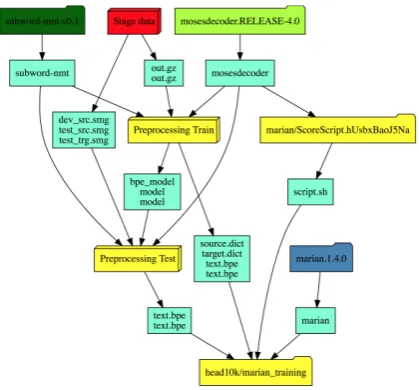
The user can request the necessary files and Sisyphus executes all jobs that are needed to com-pute them. All jobs that are part of the graph but are not required for the desired output are ignored. This graph structure, as shown in Figure1, is sim-ilar to the approach followed by (Clark and Lavie,
2010).
3.1 Jobs
Jobs are the core element of Sisyphus, and are rep-resented by the nodes in the dependency graph. Every Job has specified inputs and outputs. When
Figure 1: Example of a workflow as it is drawn by the web interface. Jobs can be grouped to blocks for a bet-ter visualization as it is done here with the stage data block and the pre-processing blocks. If a Job finishes successfully it is marked dark-green, running Jobs are marked in green-yellow, Jobs that are runnable but not running yet are marked blue, Jobs that have to wait for other Jobs to finish are marked yellow, and Jobs that failed are marked red. A block takes always the status of the most problematic Job, e.g. if one Job failed it is red, if all Jobs are finished it is green. Files that are shared between Jobs are colored aquamarine.
an instance of a Job is created all inputs need to be specified. However, they can be the output of another Job. Once a Job is completed, all of its outputs are guaranteed to be available for future computations.
After a Job is created, a hash value is computed based on the given input parameters. This hash is used to ensure that only one node is used to repre-sent the same computation. Additionally, it is used as part of the path inside the work directory (Sec-tion 4.3) associated with the Job. This directory contains log files, status files, the work directory and the output directory. All commands will be run in the work directory, which is initially empty.
A Job is executed as soon as all inputs are ready, meaning all Jobs that compute inputs are finished. Before its execution, a Job has the opportunity to request additional inputs. This can happen as a re-sponse to the content of the previously specified inputs, e.g. to implement an automatic parame-ter optimization. If the Job does not specify addi-tional inputs, it is scheduled for execution in the configured queueing system.
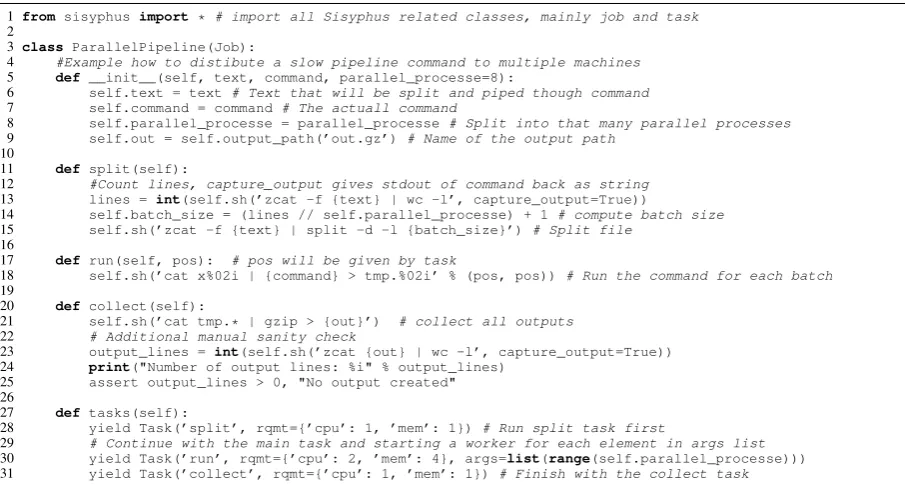
An example Job definition is shown in Figure2.
3.2 Tasks
Each Job must have one or more Tasks in which the actual command is specified. All Tasks that belong to the same Job share the same work direc-tory, and are executed in a fixed linear order.
A Task object is the combination of a method of the Job class, a set of requirements, and option-ally a set of parameters that will be passed to the method when executed. It is submitted to the grid engine and once it is scheduled Sisyphus executes the given method. It is also possible to create ar-rays of Jobs by providing a list of parameter-sets. These are executed in parallel (to the extent sup-ported by the queue). A common approach is to have a setup Task using one worker, a Task with multiple parallel running instances, and finally a Task to collect the outputs of all parallel Tasks and to write them into the Jobs output file.
3.3 Error Handling
Sisyphus uses strict error checking to avoid errors in which a step causes problems down the line. This makes it easier to track down the problem that caused the error. By default, a Job switches into an error state if:
• a shell command returns a non-zero value, which is also true for any command inside a pipeline,
• an uninitialized variable is called, or
• the Python code throws an exception, which can be used in combination with assertions.
This means the execution of this Job is stopped to give the user a chance to fix the problem. After-wards, the user can either delete or move the Job directory by himself, or let Sisyphus do it for him. If a Task is known to fail spontaneously, it can be set to retry multiple times.
1 from sisyphus import * # import all Sisyphus related classes, mainly job and task 2
3 class ParallelPipeline(Job):
4 #Example how to distibute a slow pipeline command to multiple machines
5 def __init__(self, text, command, parallel_processe=8):
6 self.text = text # Text that will be split and piped though command
7 self.command = command # The actuall command
8 self.parallel_processe = parallel_processe # Split into that many parallel processes
9 self.out = self.output_path(’out.gz’) # Name of the output path
10
11 def split(self):
12 #Count lines, capture_output gives stdout of command back as string
13 lines = int(self.sh(’zcat -f {text} | wc -l’, capture_output=True))
14 self.batch_size = (lines // self.parallel_processe) + 1 # compute batch size
15 self.sh(’zcat -f {text} | split -d -l {batch_size}’) # Split file
16
17 def run(self, pos): # pos will be given by task
18 self.sh(’cat x%02i | {command} > tmp.%02i’ % (pos, pos)) # Run the command for each batch
19
20 def collect(self):
21 self.sh(’cat tmp.* | gzip > {out}’) # collect all outputs
22 # Additional manual sanity check
23 output_lines = int(self.sh(’zcat {out} | wc -l’, capture_output=True))
24 print("Number of output lines: %i" % output_lines)
25 assert output_lines > 0, "No output created"
26
27 def tasks(self):
28 yield Task(’split’, rqmt={’cpu’: 1, ’mem’: 1}) # Run split task first
29 # Continue with the main task and starting a worker for each element in args list
30 yield Task(’run’, rqmt={’cpu’: 2, ’mem’: 4}, args=list(range(self.parallel_processe)))
[image:4.595.75.528.64.308.2]31 yield Task(’collect’, rqmt={’cpu’: 1, ’mem’: 1}) # Finish with the collect task
Figure 2: Example of a job containing multiple task and running the one task on multiple computers
it as such. If not it stops executing further steps and waits for a manual fix by the user.
3.4 Paths and Variables
Jobs are connected by Path and Variable objects, representing the edges in the dependency graph. A Variable is a subclass of the Path object which can store arbitrary pickleable Python objects to be passed between Jobs.
A Job checks all Path objects that are given as inputs and start a Job only once all inputs are avail-able. There are multiple ways for a Path to become available. If it is created as an output of a Job, it is available either once the Job is finished or it is marked as available by the Job earlier. This can be used for example if a neural network training cre-ates save points of the current training state which can be evaluated before the whole training is fin-ished. If a Path object is used to add an input file to the graph, Sisyphus marks it as available if the file exists and alerts the user otherwise.
3.5 Engine
An engine defines how to execute and schedule the given tasks. Currently supported engines are the Son Grid Engine (SGE) with its closely related forks, Platform Load Sharing Facility (LSF), and a local engine running on the same node as Sisy-phus. It is also possible to combine different en-gines. A common setup is to have a local engine for small Jobs, e.g. counting the number of lines in a file, and a cluster-based engine for everything
else. The choice which engine to use can be given via the requirement argument of a Task. Currently all engine implementations require that all nodes have access to a shared file system.
4 Directory Structure
A Sisyphus experiment directory usually consists of:
• a recipe directory, containing the source code for the Jobs (Section4.1),
• a config directory, which defines the Jobs to run and the order of their execution (Section
4.2),
• a work directory, each Job will create a direc-tory here to run its code, store its output, and save log files (Section4.3),
• a output directory containing links the fin-ished outputs (Section4.4),
• an aliases directory, containing links to run-ning Jobs with given aliases (Section 4.4), and
• a settings files, that holds global settings, e.g. which engines are available (Section4.5).
4.1 Recipe Directory
run an experiment. Recipe files are valid Python files and can be imported similarly to any other Python modules. This allows the users to manage their experiments like a regular Python project, creating dependencies between different Jobs sim-ilar to Python module imports. The only thing that separates the recipe directory from a regular mod-ule directory is that it can contain Jobs descrip-tions.
Beside placing Jobs in the recipe directory, it is also common to place functions encapsulating re-occurring workflows here. Any valid Python code can be placed here.
4.2 Config Directory
The configuration directory is used to actually cre-ate the graph and select which outputs has to be computed. Similar to the recipe directory, it con-tains regular Python files that can be imported like any other Python module. It has to import the needed modules from the recipe directory and create the appropriate Jobs. When starting Sisy-phus the user selects which configuration should be loaded to construct the graph.
4.3 Work Directory
The work directory stores the realization of the graph. Each Job gets its own directory. Its path is constructed from the recipe module, the Job name and the hash value of the given in-puts. This yields a compromise between struc-tured file names, brevity and the individuality of these names. The work directory can be linked to a different file system with sufficient disk space.
4.4 Output and Aliases Directory
Outputs that are computed by Sisyphus are linked to the output directory. Similarly, it is possible to give important Jobs one or more meaningful aliases to make it trivial to find them.
4.5 Settings File
The settings file is used for global parameters. This is the place to define which engine should be used, if and how the requirements of interrupted Jobs are changed, if the Job directory is cleaned automatically after it finishes, what the default en-vironment of an executed shell command should looks like, and various delays to allow networked file systems to synchronize.
5 Helpers
Sisyphus provides a few tools to help with reoc-curring tasks.
5.1 Web Server
The web server provides a list with all Jobs and their current states. Alternatively, it is also possi-ble to show all Jobs in a graph structure, as shown in Figure1. Each Job can be selected to show more detailed information about its status, dependencies and possible error messages.
5.2 Console
It is possible to start an interactive Python shell to analyze the graph or test different functions di-rectly. It also serves to call the team import (Sec-tion5.3) and clean up helper (Section5.5).
5.3 Team Import
If multiple people work on the same task, it is helpful to avoid rerunning computations that have been already carried out by others. Sisyphus can automatically check other work directories and import finished Jobs. This saves one from manu-ally linking finished computations, as it is usumanu-ally the case when using scripts.
5.4 Virtual File System
An alternative way to have a structured access to all Job work directories and attributes is the virtual file system using fuse. This allows one to use any console or script to navigate the graph.
5.5 Clean Up
After the experiments are finished it is time to clean up. Sisyphus supports a few options to do this depending how harsh the clean up has to be. This is mainly a trade-off between how much space is used on disk vs. how many steps are needed to re-run the experiments.
The least invasive method is to delete the work directory of each Job to remove temporary data created during the execution of the Job and to pack all log files into a tar archive. This can be set to run automatically in the background after a Job has finished successfully.
A more invasive option to free space is the clean-up of the current graph by removing Jobs that are not needed for further computations of the workflow anymore. This only keeps Jobs which produce outputs that are marked as targets or Jobs that are still needed to reach unfinished targets. In addition Jobs can be saved from deletion by defining a score, Jobs with a score higher than the chosen threshold will be kept. These are typi-cally Jobs that are expensive to recompute, e.g. the training of a neural networks.
6 Real-World Usage
Sisyphus is extensively used by the machine trans-lation and the automatic speech recognition teams at the RWTH Aachen University. All WMT and IWSLT submissions by the RWTH Aachen Uni-versity since 2015 until now have been created using Sisyphus (Peter et al., 2015b,a). It was used for speech recognition inZeyer et al.(2017). AppTek3also uses Sisyphus internally.
7 Conclusion
We presented overview of our novel workflow manager Sisyphus. Features like automatic er-ror detection, efficient usage of computational re-sources, scalability, easy of reproducibility, abil-ity to share work with others have been proven to be extremely helpful for our research. The large collection of tools for Python can be used with-out modification for editing, debugging, and docu-menting the workflow, since it is written in Python. It is freely available online4 under the Mozilla
License v2.0 to encourage the adoption by other groups.
Acknowledgements
This work has received fund-ing from the European Research Council (ERC) (under the Euro-pean Union’s Horizon 2020 re-search and innovation programme, grant agreement No 694537, project ”SEQ-CLAS”) and the Deutsche Forschungsgemein-schaft (DFG; grant agreement NE 572/8-1, project ”CoreTec”). The GPU computing cluster was supported by DFG (Deutsche Forschungsgemein-schaft) under grant INST 222/1168-1 FUGG. The work reflects only the authors’ views and none of the funding agencies is responsible for any use that may be made of the information it contains.
3http://www.apptek.com/
4https://github.com/rwth-i6/sisyphus
We want to thank explicitly Wilfried Michel, Nick Rossenbach, Arne Nix, Jan Rosendahl, Weiyue Wang, Henrik Rosendahl, and Julian Schamper for using and testing Sisyphus early on. We also really appreciate the detailed feedback from our reviewers.
References
Jonathan H. Clark and Alon Lavie. 2010. Loony-Bin: Keeping Language Technologists Sane through Automated Management of Experimental (Hy-per)Workflows. InProceedings of the International Conference on Language Resources and Evaluation, LREC 2010, 17-23 May 2010, Valletta, Malta.
Ewa Deelman, Karan Vahi, Gideon Juve, Mats Rynge, Scott Callaghan, Philip J. Maechling, Rajiv Mayani, Weiwei Chen, Rafael Ferreira da Silva, Miron Livny, and Kent Wenger. 2015. Pegasus, a Workflow Man-agement System for Science Automation. Future Gener. Comput. Syst., 46(C):17–35.
Chee Sun Liew, Malcolm P. Atkinson, Michelle Galea, Tan Fong Ang, Paul Martin, and Jano I. Van Hemert. 2016. Scientific Workflows: Moving Across Paradigms.ACM Comput. Surv., 49(4):66:1–66:39.
Bertram Lud¨ascher, Ilkay Altintas, Chad Berkley, Dan Higgins, Efrat Jaeger, Matthew Jones, Edward A. Lee, Jing Tao, and Yang Zhao. 2006. Scientific Workflow Management and the Kepler System: Re-search Articles. Concurr. Comput. : Pract. Exper., 18(10):1039–1065.
Jan-Thorsten Peter, Farzad Toutounchi, Stephan Peitz, Parnia Bahar, Andreas Guta, and Hermann Ney. 2015a. The RWTH Aachen German to English MT System for IWSLT 2015. InInternational Workshop on Spoken Language Translation, pages 15–22, Da Nang, Vietnam.
Jan-Thorsten Peter, Farzad Toutounchi, Joern Wue-bker, and Hermann Ney. 2015b. The RWTH Aachen German-English Machine Translation System for WMT 2015. InEMNLP 2015 Tenth Workshop on Statistical Machine Translation, page 158163, Lis-bon, Portugal.
Katherine Wolstencroft, Robert Haines, Donal Fellows, Alan Williams, David Withers, Stuart Owen, Stian Soiland-Reyes, Ian Dunlop, Aleksandra Nenadic, Paul Fisher, Jiten Bhagat, Khalid Belhajjame, Finn Bacall, Alex Hardisty, Abraham Nieva de la Hi-dalga, Maria P. Balcazar Vargas, Shoaib Sufi, and Carole Goble. 2013. The Taverna workflow suite: designing and executing workflows of Web Services on the desktop, web or in the cloud. Nucleic Acids Research, 41(W1):W557–W561.