Users’ Adoptive Behavior towards the ERP System
Chaudhry Muhammad Nadeem Faisal1, Muhammad Shakeel Faridi2, Zahid Javed2, Muhammad Shahid1
1
Department of Computer Science, National Textile University, Faisalabad, Pakistan
2
Department of Computer Science, University of Agriculture, Faisalabad, Pakistan Email: {cmn.faisal, m.shahid}@ntu.edu.pk, {shakeelfaridi, zahidjaved.uaf}@gmail.com
Received March 2, 2012; revised April 8, 2012; accepted April 15, 2012
ABSTRACT
Generically system includes two types of categories, computerized based system and socio-technical system; the dif-ference between both types of systems is that the socio-technical systems deals with technical operation and involves the users. Information system that deals with the flow of information regarding business and social perspective falls in socio-technical based system. ERP (Enterprise Resource Planning) is the best example of Information system that or-ganization adopt to make fast the business process. The ERP systems are suffering from multifaceted interface. Previ-ous research shows that there is a need for an improvement regarding user interface because it is the way of communi-cate with system. As the emphasis of HCI (Human Computer Interaction) is to clearly understand the users’ philosophy, reminiscence and problems solving technics in order to design users oriented applications. Therefore the usability engi-neering is the only way to study the deeds of users by getting analysis on prototype or system by offering different methods and techniques. This paper will focus on the users’ experiences in view of financial module in ERP system which is based on different sub-components. To carry this research work HCI research methods, automated explicitly survey questionnaire method and focus group were adopted to gather users understanding in order to evaluate the se-lected application in ERP system. This study involved group of users from various corporate level industries in textile sector. It is the extended work as in previous only two industries were selected.
Keywords: Enterprise Recourse Planning; Human Computer; Interaction; Usability Engineering; User Interfaces
1. Introduction
The ERP can be defined as package, components and sub-components of business applications. The reason for the integration of these components is to manage the business processes that carry the fast flow of information within organization internally and externally [1,2]. These corporate systems are enlarged with functionality and offer significant benefits to improve the operational effi-ciency in organization and it also manage the linking with the stakeholders [3,4]. ERP includes software for manufacturing; order tracking, payable and receivable accounts, general ledger, purchase & inventory, ware- housing, transportation and human resources. In spite of significant benefits, ERP system always been criticized due to complexity. Complexity is only because of inte- gration of different business applications and also to process huge data. The richer or multifaceted systems can provide less effective functionality if they have huge usability problems [4,5]. Furthermore the functionality and complexity corporate system persuade the confusion, frustration and failure with negative responses toward users, thus which leads mistake while working on such applications [4,6]. Therefore there is requirement to de-
2. What Is Usability
System plays important by developing new technologies that support the users in various contexts. The dominancy of interactive system in computing paradigm because of its technologic nature to supported the users in every field of life. Usability testing is used to evaluate such interactive technologies. It not deals the functional speci- fications delivered by the system but it is related to the emergent system properties, features and system inter-face. So usability is a discipline that helps the investiga-tor to uncover the usability related issues and to improve the usability of the product. Generally, these are the fol-lowing three types of usability evaluation methods: test-ing, inspection, and inquiry.
2.1. Usability Testing [8-10]
In usability testing approach the users have to work on the precise tasks based on defined scenarios using system or system prototype. It includes: Coaching Method, Co- discovery Learning, Performance Measurement, Ques-tionasking Protocol, Remote Testing, Retrospective Test- ing, Shadowing Method, Teaching Method, and Thinking Aloud Protocol.
2.2. Inspection [8,9]
In usability Inspection approach, the usability specialist, software developer, designers, users and experts exam- ine usability related harms or feature in a user interface. It includes the following techniques. Cognitive Walk- throughs, Feature Inspection, Heuristic Evaluation, Plu- ralistic Walkthrough, and Perspective-based Inspection.
2.3. Inquiry [8,9]
In usability Inquiry approach, the usability evaluators ga- ther the information from users about their likes, dislikes, needs, and understanding of the system by observing and letting them answer questions verbally or in written form. It include strategies: Field Observation, Focus Groups, Interviews, Logging Actual Use, Proactive Field Study, and Questionnaires.
2.4. Commonly Used Assessment Criteria [11-17]
The Usability evaluation of such socio-technical systems are very much complex because of limited and varied cri- teria. Mostly adopted parameters to evaluate the user in- terface are as given below. Ease of use, usefulness, task support, learnability, memorability, presentation, help and support, navigation, guidance, flexibility, customiza- tion, completeness, reliability, system responsiveness and system response time.
3. Empirical Work
Usability discusses different attributes of system from
user’s point of view. Primarily usability survey method was adopted as it is cost effective and efficient way to gather the data from participants while concerning the usability testing it is reasonably difficult for authors to perform usability test because of following constraints time, obligatory resources and participants’ unwillingness usability testing. The survey includes the rating scale for evaluation. To assess the ERP system, automated survey method was developed using Oracle. The automated sur- vey tool was integrated with HR module in ERP. The purpose of integration is due to control the users’ demo-graphic qualities and uniqueness. Steps involve in con-ducting a survey using automated tool.
1) Survey was designed and developed within Oracle on 32 bit operating system.
2) All questions were based on usability criterion. 3) 50 users related to the application in ERP were se-lected non-randomly for assessment purpose.
4) For the evaluation of ERP system, the financial module was selected.
5) Link of questionnaire was sent to the selected par-ticipants and users had to rate usability questions from the given values accordingly or perceived.
4. Analysis
The Criterion at which assessment methods was designed is shown in Table 1 and selection of swaying attributes were based on literature given by (Chin et al., 1988, Da-vis, 1989, Nielsen, 1993, Lewis, 1995, Perlman, 1997, Akash Singh, Evaluation Criteria for Assessing the Us- ability of ERP, SAICSIT’09, 12-14 October 2009, Ri- verside, Vanderbijlpark, South Africa Systems) and in- dustrial inspection. The assessment tool comprises 40 statements that users have to rate accordingly.
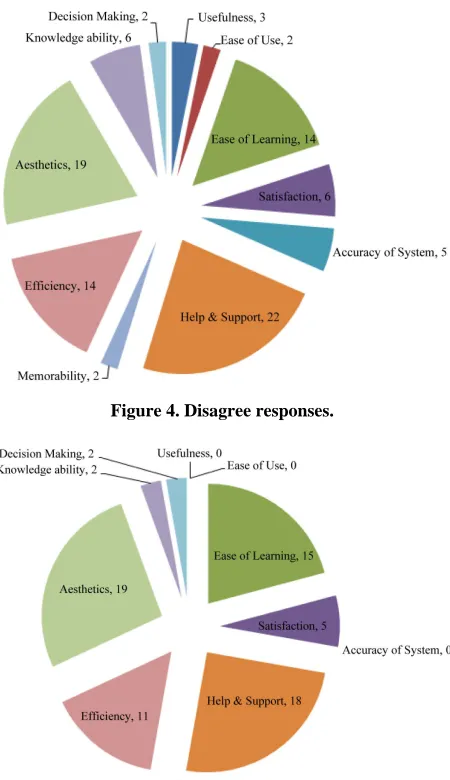
Responses’ received from users and were stored in Database that is administrating by the IT department of MTM. The users have to answer the question as per va- lue they perceived from the chosen module at their work. So this regards 50 mangers were preferred and from them 31 have more than 3 years’ experience whereas 19 man- gers have less than 1 year experience in industry. 39 out of 50 have master level qualification while remaining 11 are charted accountants. The authors received the re- sponse from all 50 users precisely and completely. Fig-ures 1-2 shows the strongly agrees (5) and agree (4) re-sponses. Figure 3 shows natural (3) responses. Similarly
Figures 4-5 shows disagree (2) and strongly disagree (1) number of responses against usability assessment crite- rion.
5. Finding
Table 1. Selected criteria for assessment.
SN CRITERIA ATTRIBUTES
1 Usefulness
1. It helps me to be more effective during working;
2. It helps me to be more productive; 3. I would find the system useful in my job; 4. It makes the things I want to accomplish eas-ier to get done;
5. It saves my time when I use it; 6. It meets my needs and requirements; 7. It does everything I would expect it to do; 8. Using the system would improve my job performance;
2 Ease of Use
9. It is easy and simple to use; 10. It is user friendly;
11. It requires the fewest steps possible; to accomplish what I want to do with it; 12. It is flexible and Using it is effortless; 13. My interaction with the system would be clear and understandable;
14. I can use it without written instructions; 15. I can recover from mistakes quickly and easily; 16. I can use it successfully every time; 17. Training time is sufficient to understand all the aspect;
3 Easy of Learning
18. I learned to use it quickly; 19. It is easy to learn to use it; 20. I easily remember how to use it; 21. I quickly became skillful with it;
4 Satisfaction
22. It is fun to use; 23. I am satisfied with it; 24. It is easy to use;
25. It works the way I want it to work; 26. It is wonderful;
27. I feel I need it for job; 28. It is pleasant to use;
5 Efficiency 29. Overall Efficiency of the system;
6 Memorability 30. Overall memorability of the system;
7 Error
Prevention 31. Errors (Accuracy) of the system;
8 Aesthetic
32. Arrangement of Color on Screen are beauti-ful;
33. Arrangement of Text on Screen is visible; 34. Graphically application is nice and attractive; 35. User Interface is Customizable or are you eli-gible to change the menu bar or button;
9 Help & Support
36. How fast feedback in system;
37. Error messages provides information about the error or cause of error;
10 Decision Making
38. Is System provides information for; 39. Is System provides information for better deci-sion making;
11 Knowledge Ability
40. ERP System provides me information and also help in documentation;
41. System allow me to enter my daily experience, tasks or problems, that I faced during working time in office;
[image:3.595.315.535.89.259.2]42. The system provide me knowledge to solve the problem.
[image:3.595.314.533.298.477.2]Figure 1. Showing the responses toward strongly agrees.
Figure 2. Showing the responses toward agrees.
[image:3.595.313.535.515.713.2]Figure 4. Disagree responses.
Figure 5. Strongly disagree responses.
existing practices of usability for software development and the impact of ERP capabilities on managers in deci- sion making skills. The assessment was based on precise criteria with HCI (Human Computer Interaction) para- meters using usability assessment tool. After assessment, it was found that majority of participants gets problems in 3 (Easy of learning), 5 (Efficiency), 8 (Aesthetics) and 9 (Help and Support).
1
x ,
n N
n i i
M
Standard error of means against 3, 5, 7, and 8 are 2.646, 2.946, 3.302 and 4.159 respectively. Results taken from the whole investigations a show that, the selected applications does not provides the sufficient help and support in documentation to users to improve the learn- ability for system. The graphic wisdom of the software is not attractive and good to involve the users thru time of
interaction with the ERP system. Thus the issues and problems that arise in learnability is only due to lack of help and support in the ERP and which is the main cause for that the industry has to spend enough time and cost for training. Similarly novice and new users have spent their time and efforts to develop the understanding with the interfaces of ERP system. According to the statistics analyzed from automated survey method also shows that ERP systems are very useful and provides help to the manager and users in making decision with sufficient knowledge in certain conditions towards better decisions. But knowledge and information provides selected appli- cation is very specifics that cover the limited decisions about the working. The statistics also shows interface of the sleeted application is poorly arranged that alternately affect the user performance and efficiency. As the results the investigation shows that by the improving the usabi- lity of information system not only enhances users’ pro- ductivity but also provides them efficient working envi- ronment for personal growth. This study conducted on a group of users in textile industry but does not represent the whole sample size consequently the results are very much specific.
6. Conclusion
REFERENCES
[1] Boudreau, “Marie-Claude Boudreau, Learning to Use ERP Technology: A Causal Model,” 36th Annual Hawaii Interna-tional Conference on System Sciences (HICSS’ 03)—Track 8, Big Island, 6-9 January 2003.
doi:10.1109/HICSS.2003.1174611
[2] J.-Y. Yeh, “Evaluating ERP Performance from User Per- spective,” IEEE Asia-Pacific Conference on Services Com- puting (APSCC ’06), Guangzhou, December 2006, pp. 311- 314.
[3] N. C. Goodwin, “Functionality and Usability,” Communica- tions of the ACM, Vol. 30, No. 3, 1987, pp. 229-233. doi:10.1145/214748.214758
[4] I. Ceaparu, J. Lazar, K. Bessiere, J. Robinson and B. Shnei-derman, “Determining Causes and Severity of End-User Frus-tration,” International Journal of Human-Computer Interac-tion, Vol. 17, No. 3, 2004, 333-356.
doi:10.1207/s15327590ijhc1703_3
[5] P. W. Jordan, “An Introduction to Usability,” Taylor and Francis Ltd., Oxford, 1998, pp.1-7.
[6] L. Hohmann, “Usability: Happier Users Mean Greater Prof- its,” Information Systems Management, Vol. 20, No. 4, 2003, pp. 66-76.
doi:10.1201/1078/43647.20.4.20030901/77295.10 [7] A. Singh, “Improving the Usability of ERP Systems through
the Application of Adaptive User Interfaces,” Proceedings of 11th International Conference on Enterprise Information Systems (ICEIS), Milan, 12-14 October 2009, pp. 87-88.
[8] F. Calisir, “The Relation of Interface Usability Characteris- tics, Perceived Usefulness, and Perceived Ease of Use to End-User Satisfaction with Enterprise Resource Planning
(ERP) Systems,” Computers in Behavior, Vol. 20, No. 4, 2004, pp. 505-515
[9] C. M. Nadeem Faisal, “Usability form Industrial Pro- spec-tive,” 2012.
https://files.itslearning.com/data/640/8517/papers/3.pdf
[10] Chaudhry Muhammad Nadeem Faisal, “Usability Evaluation of In-Housed Developed ERP System,” 2011 International Conference on Graphic and Image Processing, Cairo, 1-3 October 2011. doi:10.1117/12.913212
[11] L. Herbert, “Put Business Applications to the Usability Test,” Forrester Research, Cambridge, 2006.
[12] Keystone Strategy Inc., “ERP End-User Productivity: A Field Study of SAP and Microsoft,” Microsoft Dynamics, 2007.
[13] D. Matthews, “Usability as ERP Selection Criteria,” 2008. http://ifs.datahost.com/shop/images/wp-usability.pdf
[14] SAP Design Guild, “User Day Toolkit,” 2004.
http://www.sapdesignguild.org/resources/user_day_toolki t/index.htm
[15] J.-H. Wu, “Development of a Tool for Measuring Key-User Satisfaction in an ERP Environment,” Proceedings of the 6th Pacific Asia Conference on Information Systems (PACIS), Tokyo, 2-4 September 2002, pp. 555-568.
[16] W. O. Galitz, “The Essential Guide to User Interface De- sign, an Interdiction to GUI Design Principles and Tech- nique,” Jhone Wiley and Sons, 2002, pp. 55-717.