DIF Clearinghouse
p.o. Box 638Newton Lower Falls, MA 02162
DIF TECHNICAL SPECIFICATION
DIF tm is the format for data interchange
developed by Software Arts, Inc.
@ Copyr ight 1981 by Software Arts, Inc. All rights reserved.
DIF is a trademark of Software Arts, Inc.
Limited License to Copy:
This Technical Specification is intended for the use of the
original purchaser only. The original· purchaser is hereby
licensed to copy it for his own use, provided that this notice,
together with the copyright, trademark and warranty notices, are
reproduced on each such copy. Copying of this document in any
form for purposes of resale, license or distribution is
prohi-bited.
No Warranty:
This document is being published to enhance the
DIF, a format for data interchange, as used by the
and other programs.
usefulness of
VisiCalc
®
NEITHER SOFTWARE ARTS, INC. NOR THE DIF CLEARINGHOUSE MAKES ANY
WARRANTY, EXPRESS OR IMPLIED, WITH RESPECT TO THE QUALITY,
ACCURACY OR FREEDOM FROM ERRORS OF THE DIF FORMAT OR OTHER
CONTENTS OF THIS DOCUMENT, INCLUDING, WITHOUT LIMITATION, ANY
IMPLIED WARRANTIES OF MERCHANTABILITY OR OF FITNESS FOR A
PARTICULAR PURPOSE, AND SOFTWARE ARTS, INC. SPECIFICALLY
DISCLAIMS ALL LIABILITY FOR DAMAGES RESULTING FROM THE USE OF
SUCH FORMAT OR OTHER CONTENTS.
DIFtm Technical Specification
1. Introduction
This document is the technical specification of DIF, the data
interchange format developed by Software Arts, Inc. It is a
reference document and. not a tutorial. It includes a description of the DIF file organization and structure, required items, and optional standard items. It also explains the use of the optional standard items by specific applications. Appendix A is an example of a DIF data file.
Programs should use defined standard items when possible. The DIF Clearinghouse will update this document to describe new items as they are defined and record their use in specific programs.
Programmers developing new software that incorporates new
optional items should inform the Clearinghouse fully about them so that they can be standardized for common use by any program supporting the DIF format.
Programmers should remember that the program reading the data can be extremely simple. The program writing the data must handle it in such a way that it can be read by any program supporting DIF.
Within this text, upper case characters are actual values to be entered as shown and lower case characters name the value to be entered to a field. It is assumed that the ASCII character set is being used. See the sec tion on Definitions for a discuss ion of character sets.
2. Constraints of the Format
The DIF format was designed for ease of use, and, for the sake of simplicity, certain constraints have been imposed on the format. Because DIF is not intended to be a universal representation for all data, one of these constraints is the representation of data in tables with rows of equal length and columns of equal length. A second constraint is that, because many users program in BASIC,
the files must be compatible with BASIC programs. Programs
wr i t ten in another language, such as Pascal, can use a set of subroutines to read and write DIF files.
Below is a list of specific constraints on a DIF file.
1. Because some BASICs have only primitive facilities for reading and writing strings, the convention of keeping
numbers and strings on separate lines has been
adopted.
2. Two items, VECTORS and TUPLES, are required to support
DIFtm Technical Specification
3. Because some systems do not allow programs to test for the end of a file, a special data value, EOD, provides graceful termination to a program.
4. To simplify programming, there are only two formats within the file, and all fields are predefined as character strings or numbers.
5. Strings must be enclosed in quotes if they contain characters other than alphanumerics.
6. The character set is restricted to the printable ASCII characters.
7. Although DIF places no explicit restr iction on the
length of data strings, some systems may impose
res'trictions.
Since the DIF format is not meant to meet all the needs for data representation, it may be necessary to use multiple DIF files or additional formats for some applications. A word processor, for example, would not use a DIF file to store text but could use DIF files for tables of values within a report.
3. Organization of the DIF Data File
A DIF file is a text file using the standard printable character
set of the host machine. The model for the data is a table.
Fields are called vectors; records are called tuples. Data is organized into vectors of equal length. Each tuple consists of a row of corresponding values read across each vector. The user determines the specific' groupings of vectors and tuples. Often vectors are treated as columns and tuples are treated as rows, but because DIF can transpose columns and rows, the terms vectors and tuples are used instead of the terms columns and rows.
The DIF file consists of two sections, a header section and a data section. The header section contains descriptions of the file and the data section contains the actual values.
4. The Header Section
The header section is composed of header items. There are four
standard required header items and several standard optional
DIFtm Technical Specification
4.1 The Header Item
The header items describe the data organization. Each header item consists of four fields arranged lon three lines as illustrated below. The first line is a token , the second line consists of two numbers, and the third line contains a string.
Topic
vector Number, Numeric Value "String Value"
4.1.1 The Topic
The first line of the header item is the Topic. It identifies the header item, and must be a token.
4.1.2 The Vector Number
The first field on the second line is the Vector Number. If the
header item describes a specific vector, the Vector Number
specifies the vector being described. If the header item
describes the entire file and not one specific vector, the Vector Number is zero (0).
4.1.3 The Numeric Value
The Value is an integer and occupies the second field of the second line, separated by a comma from the Vector Number. If the header item does not use a numeric value, the Value is zero (0).
4.1.4 The String Value
The String Value occupies the third line of the header item. The String Value is always enclosed in quotation marks. If i t is not used, the line consists of a null string, a pair of quotations marks with no space between them.
DIFtm Technical Specification
4.2 Header Items
There are four required header items. The other header items descr ibed in th is document are standard optional header items. The defined standard items should be used by new programs using DIF. If it is absolutely necessary, a new header item may be defined to meet the needs of a particular program. For details, see the section on Defining New Header Items.
A program may ignore all header items until it finds the header item DATA, described below.
The following four header items are required:
4.2.1 The First Header Item
TABLE O,version "title"
The header item TABLE must be the first entry in the file. It identifies the file as a DIF file. The version number must be 1. The "title" is the title of the table and describes the data.
4.2.2 Vector Count
VECTORS O,count
""
The header item VECTORS specifies the number of vectors in the file.
Note: This header item must appear before header items that refer to vector numbers. Otherwise, it can appear anywhere within the header section.
4.2.3 Tuple Count
TUPLES O,count
""
DIFtm Tec~nical ~ecification
storage space for the data. This item may appear anywhere within the header section.
Note: Programs reading the data assume that the tuple count is correct. Some programs may be able to generate this information only after all data has been generated. These programs must reread the DIF file to count the tuples, and rewrite the TUPLES item with the correct count.
4.2.4 The Last Header Item
DATA 0,0
1111
The header item DATA must be the last header item. It tells the program that all remaining data in the file are data values.
The following header items are optional. The programs that are known to use them are noted with the i tern. For detailed information on each program's specific use of the item, see the section below on Applications Programs.
4.2.5 Vector Label
LABEL
vector# ,line# "label"
The header item LABEL provides a label for the specified vector. The line number provides an option for labels that span more than one line, and can be ignored by a system that allows single line
labels only. The values 0 and I are equivalent line numbers.
Note: Some programs do not use the LABEL field. If the first vector in a tuple contains string values, the first data value in
the tuple may be treated as a label.
Used by the VisiPlottm and VisiTrend/VisiPlottm programs.
4.2.6 Vector Comment
COMMENT
DIptm Technical Specification
The header item COMMENT is similar to LABEL. It - provides an
option to systems that allow an expanded descr iption of a vector in addition to a label.
Used by the VisiPlot and VisiTrend/VisiPlot programs.
4.2.7 Pield Size
SIZE
vec tor, bytes
.".
The header item SIZE provides to programs such as data base systems the option to allocate fixed size fields for each value.
Because SIZE is an optional item, programs using SIZE must be able to read files produced by programs unable to generate SIZE information.
Used by the CCA/DMS program.
4.2.8 Periodicity
PERIODICITY vector:jf: ,per iod
""
The header item PERIODICITY provides the option of specifying a period in a time series.
Used by the VisiPlot and VisiTrend/VisiPlot programs.
4.2.9 Major Start
MAJORSTART vector:jf:,start
""
The header item MAJORSTART specifies the first year of a time series.
4.2.10 Minor Start
MINORSTART vectori,start
""
DIFtm Technical Specification
The header item MINORSTART specifies the first period of a time series.
Used by the VisiPlot and VisiTrendjVisiPlot programs.
4.2.11 True Length
TRUELENGTH
vec tor # , leng th
""
The header item TRUELENGTH specifies the portion of a vector that contains significant values.
Used by the VisiPlot and VisiTrendjVisiPlot programs.
4.2.12 Units
UNITS vectori,O "name"
The header item UNITS specifies the unit of measure for the
values in the given vector. Name is the unit, for example meters
or ft.
Used by TK!Solver.
4.2.13 Display units
DISPLAYUNITS vectori,O "Name"
The header item DISPLAYUNITS specifies the unit in which the
values in the given vector should be displayed. This unit may be
different from the one in the UNITS field. The values in the
DIFtm Technical Specification
value conversion between the UNITS and DISPLAYUNITS.
For example, a vector might be stored in km, but displayed in the
program in miles. The UNITS field wouldlbe km, the DISPLAYUNITS
field would~iles, and the values in thevector would be in
km. Any programusing the vector would have to define the
conversion between km and miles to display the values in miles.
Used in the TK!Solver program.
4.3 Defining New Header Items
If there is no standard optional header item to fulfill the specific need of a subsystem, a new header item may be defined. Because the DIF format is intended for common use, new optional
header items should be standardized through the DIF
Clearinghouse. They will then be added to this document.
To be accepted as standard items, new optional i terns must be consistent with existing conventions.
An optional item extends the format for a specific application.
Any program reading the DIF file should be able to operate
without optional items. If a reading program requires the
information provided by an optional item, it should prompt the user to supply the missing information and not require the item itself.
5. The Data Section
The data section consists of a series of tuples. The Data Values within the tuples are organized in vector sequence.
Each Data Value represents one element of data in the file. The data may be either the actual data or one of the two Special Data Values that mark the beg inning of a tuple (BOT) and the end of data (EOD) in the file.
Each Data Value consists of two lines. The first line consists of
two fields containing numeric values, and the second line
consists of one field containing a string value. The format is:
DIFtm Technical Specification
5.1 The Type Indicator Field
The Type Indicator is an integer that tells the program what kind of data is represented by this value. There are currently three possible values.
-1 The data is a Special Data Value, indicating either the
beginning of a tuple or the end of data. The Number Value is
zero CO) and the String Value is either BOT or EOD. See the
description below of Special Data Values.
o
The data is numeric. The Number Value field contains theactual value and the String Value field contains a Value Indicator. See the descriptions below of the Number Value and String Value fields.
I The data is a string value. The Number Value is zero (0) and
the String Value field contains the actual string value.
5.2 The Number Value Field
When the Type Indicator is 0, the Number Value field contains the
actual value. The value must be a decimal (base 10) number. It
may be preceded by a sign (+ or -) and it may have a decimal
point. It may be preceded or followed by one or more blanks. If the data value contains an exponent of a power of ten, the value is followed by the letter E and the signed or unsigned exponent power of ten.
Note: This is the only place where DIF allows a non-integer value. Some programs accept only integer values.
5.3 The String Value Field
The contents of the String Value field are dependent on the Type Indicator.
5.3.1 Special Data Value
If the Type Indicator is -1, the String Value is one of the two
Special Data Values, BOT or EOD, and the Number Value is O.
Each tuple begins with the Special Data Value BOT (Beginning of Tuple). If a program cannot generate a VECTORS header item before generating all data, it can use the Special Data Value BOT to determine the number of vectors in the file by counting the
number of Data Values between BOTs when it rereads the file. A
DIFtm Technical Specification
The Special Data Value EOD (End of Data) indicates the' end of data in the file. The EOD occurs at the end of the last tuple in the file. If the program is unable to generate a TUPLES header item before generating all data, it can determine the number of tuples by coun ting the number of BOTs before the EOD when i t rereads the file. A program can also use the EOD Special Data Value to detect the end of the file.
5.3.2 Numeric Value and Value Indicator
If the Type Indicator is 0, the data is numeric, and the String Value is one of the Value Indicators descr ibed below. The Value Indicator overrides the value.
A subsystem may define Value Indicators for its own needs. New Value Indicators should be registered with the DIF Clearinghouse.
The Value Indicators currently defined are:
V Value - This is the String Value most commonly used with
a numeric value. The Number Value contains the actual value.
NA Not Available The value is marked as not available. The
Number Value is
o.
ERROR The value represents the result of an invalid
calculation. The Number Value is
o.
TRUE Logical value. The Number Value is 1.
FALSE Logical value. The Number Value is
o.
The String Value can be ignored in favor of the Number Value, or all values with a Value Indicator other than V can be considered nonexistent. Quotes are not permitted around the Value Indicator.
5.3.3 String Value
If the Type Indicator is 1, the Str ing Value is the actual character str ing. If the vqlue is a token, the quotation marks are optional. However, if there is a beginning quotation mark, there must be a terminating quotation mark.
6. Definitions
Dlptm Technical Specification
Character Sets This document assumes use of the ASCII character set. The following characters are permitted:
EBCDIC
String Length
1"(#$%&1 ()*+,-./
0123456789:1<=>1 @ABCDEFGHIJKLMNO PQRSTUVWXYZ [\]"
'abcdefghij klmno
pqr s tuvwxyz
t
I
}-(The first character in this list is a space.)
There are 95 pr intable characters, including the
space. If the host computer has more than 95
characters, the additional characters must be
mapped into the 95 ASCII characters to transfer data to another machine.
Some computers permit only 64 characters. When data is transfered to these machines, lower case
characters and the characters '{I}- are mapped
into their corresonding upper case characters. If these transformations affect the integrity of the data, associated documentation should specify the effect.
Transfers between character sets should be
transparent to most users. To assure
compatibility, strings should not contain
nonprinting characters.
EBCDIC is a binary representation of characters and is used primarily for large IBM computers. An
awareness of the representation used is not
essential, but if files are transferred between machines they must be converted to the standard representation of the host machine.
Because EBCDIC defines more than the 95 standard
printable characters, users should avoid the
additional characters when preparing data files on an EBCDIC machine.
Some programs place a length limit on strings that they read. This results in the truncation of long str ing values. Some systems also limit the length of lines in a data file. Programs should support a minimal string length of 64 characters, but longer ones are preferable.
String Delimiters
Some systems delimit
instead of quotation
str ings marks.
with When
apostrophes
Dlptm Technical Specification
transferred to or from these systems, appropriate changes must be made.
Tokens A token is a str ing cons isting of upper case
alphanumeric characters. It should have a maximum length of 32 characters. Commonly, tokens mayor
may not be contained within quotation marksi
however, a token that is a required string, such
as a header item topic, must be represented
without quotation marks.
Floating Point Numbers
A floating point number consists of an optional
sign and a series of digits followed by an
optional dec imal point. The number may be
followed by the letter E (exponent) and a signed decimal exponent.
Note: Some systems generate the letter D to
indicate a double precl.sl.on floating point
number. This is not standard, but it can be read by compatible programs within a single system. When transfer ing data to other computers, the D must be converted to an E.
7. Applications Programs
This section records the specific use of DIF by applications programs that support it. Programmers who intend to interface with any of these programs should note the specifics listed here. Standardized optional items used by these applications are listed
in the general section on Optional Header Items. However, if a
program uses a header item that varies significantly from the conventions, it is mentioned only in this section. The accuracy of this information is not guaranteed.
7.1 The CCA/DMS Program
Published and distributed by VisiCorp, Inc.
Uses: SIZE
7.2 The TREND-SPOTTER(R) Program
Published and distributed by Software Resources, Inc.
DIptm Technical Specification
7.3 The VisiCalc(R) Program
Published and distributed by VisiCorp, Inc.
Program created and written by Software Arts, Inc.
The VisiCalc program does not generate the LABEL items. Some programs inter facing to the VisiCalc program have adopted the convention of eXamining the first Data Value in a tuple, and, if
it is a string value, treating it as a label.
7.4 TK!Solver
Published and distributed by Software Arts, Inc.
Uses: UNITS, DISPLAYUNITS
7.S the VisiPlot and VisiTrend/VisiPlot Programs
Published and distributed by VisiCorp, Inc.
Ear ly versions of the Vi'siPlot and VisiTrend/VisiPlot programs used the Number Value and Str ing Value incorrectly, storing the Number Value in the String Value field. Programs exchanging data with these versions should check the String Value. If it is not null, the string must be converted and the Number Value computed.
Uses: LABEL, COMMENT, MAJORSTART, MINORSTART, PERIODICITY,
TRUELENGTH
DIF is a trademark of Software Arts, Inc.
TREND-SPOTTER is a reg istered trademark of Fr iend Information
Systems.
VisiCalc is a registered trademark of VisiCorp Inc. VisiPlot is a trademark of VisiCorp Inc.
DIptm Technical Specification
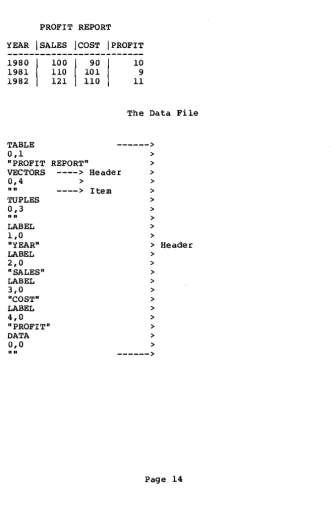
I. Sample DIF File
This is an example of a DIF data file. The data in the file is represented by the table below.
PROFIT REPORT
YEAR ISALES ICOST IPROFIT
1980 I
1981 1982 TABLE 0,1 "PROFIT VECTORS 0,4
""
TUPLES 0,3""
LABEL 1,0 "YEAR" LABEL 2,0 "SALES" LABEL 3,0 "COST" LABEL 4,0 "PROFIT" DATA 0,0""
100
I
90I
110 101
121 110
REPORT"
10
9
11
The Data File
---> > > ----> Header > > > ----> Item > > > > > >
[image:16.436.41.374.105.622.2]D1ptm Technical Specification
-1,0 --->
BOT >
0,1980 >
V >
0,100 >
V >
0,90 >
V >
0,10 >
V >
-1,0 >
BOT >
0,1981 ---> >
V > > Data
0,110 > >
V > > Part
0,101 ---> Data > Tuple >
V ---> Value > >
0,9 > >
V > >
-1,0 > >
BOT ---> >
0,1982 >
V >
0,121 >
V >
0,110 >
V >
0,11 >
V >
-1,0 >
DIFtm Technical Specification
II. Sample BASIC program that writes a DIF file
This program enters student records into a file by prompting the
user for a student's name and test scores and copying the
information into a DIF file.
100 REM - THIS PROGRAM CREATES A DIF FILE CONTAINING THE 110 REM - NAME AND TEST SCORES OF A GIVEN NUMBER OF STUDE
120 REM - IT PROMPTS FOR A FILE NA»E, THE TOTAL NUMBER OF
130 REM - STUDENTS, AND THE NUMBER OF TEST SCORES FOR
140 REM - EACH STUDENT. IT THEN PROMPTS FOR A STUDENT'S
150 REM - NAME AND TEST SCORES, AND WRITES TH&~ TO THE
160 REM - FILE AS A TUPLE.
1000 PRINT "OUTPUT FILE NAME:"~ :REM - GET FILE NAME.
1010 INPUT F$
1020 OPEN "0",1 ,F$ :REM - OPEN FILE FOR OUTP
1030 PRINT "NUMBER OF STUDENTS:"~
1035 :REM - PROMPT FOR NUMBER
1040 INPUT NT :REM - TUPLES.
1050 PRINT "NUMBER OF TEST SCORES PER STUDENT:"~
1060 INPUT NV :REM - NUMBER OF VECTORS
1070 NV = NV + 1 :REM - NUMBER OF SCORE
1080 GOSUB 3000 :REM - USE SUBROUTINE TO
1090 :REM - OUTPUT DIF HEAD
2000 FOR I
=
1 TO NT :REM - OUTPUT A TUPLE FOR: REM - EACH STUDENT.
2010 2020 2025
T
=
-1: V=
0: S$=
"BOT":REM - OUTPUT BOT SPECIAL
2030 GOSUB 4000 :REM - DATA VALUE.
2040 PRINT "NAME OF STUDENT i" ~ I~
2050 INPUT S$
2060 T
=
1: V=
02070 GOSUB 4000
2080 FOR J
=
1 TO NV-l2090 PRINT "SCORE i"iJ;
2100 INPUT V
2110 T
=
0: S$=
"V"2120 GOSUB 4000
2130 NEXT. J
2140 NEXT I
2150 T = -1: V
2160 GOSUB 4000 2170 CLOSE 1 2180 STOP
0: S$ "EOD"
:REM - GET NAME OF THIS S
:REM - OUTPUT AS STRING 0
:REM - VALUE.
:REM - PROCESS EACH SCORE
:REM - GET SCORE.
:REM - OUTPUT SCORE AS A
:REM - VALUE.
:REM - OUTPUT EOD SPECIAL
: REM - VALUE.
DIptm Technical ~ecification
3000 :REM - ROUTINE TO OUTPUT
3010 PRINTil,"TABLE":PRINTi1,"0,1":GOSUB 3500 3020 PRINTi1,"TUPLES":PRINTi1,"0,";NT:GOSUB 3500 3030 PRINTi1,"VECTORS":PRINTil,"0,";NV:GOSUB 3500 3040 PRINTi1,"DATA":PRINTil,"0,0":GOSUB 3500
3050 RETURN 3500
3510
3520 PRINTi1,CHR$(34);CHR$(34) 3530 RETURN
4000 4010 4020 4030 4040
4050 PRINTi1,T;",";V 4060 PRINTil,S$ 4070 RETURN 5000 END
:REM - ROUTINE TO OUTPUT
:REM - NULL STRING ("11
:REM - PRINT 2 QUOTATION
:REM - ROUTINE TO OUTPUT
:REM - VALUE. T IS TH
:REM - INDICATOR, V IS
:REM - NUMBER VALUE, A
Dlptm Technical Specification
III. Sample BASIC program that reads a DIF file
This program uses the output DIF file from the sample program in Appendix B to calculate an average score and letter grade for each. student.
100 :REM - THIS PROGRAM READS A DIF FILE CONTAINING THE
110 :REM - TEST SCORES OF A GROUP OF STUDENTS, CALCULAT
120 :REM - AN AVERAGE SCORE FOR EACH STUDENT, MATCHES T
130 :REM - AVERAGE TO A LETTER GRADE, AND PRINTS THE
140 :REM - STUDENT'S NAME, AVERAGE, AND LETTER GRADE.
500 DIM T(100) :REM - MAXIMUM OF 100 VECTORS.
510 DIM V(100) :REM - T IS THE TYPE INDICATOR, V
520 DIM V$ (100) :REM - THE NUMBER VALUE, AND V
530 :REM - THE STRING VALUE OF EAC
535 :REM - VALUE.
540 GOSUB 5000 :REM - INITIALIZATION SUBROUTINE.
550 GOSUB 6000 :REM - SUBROUTINE TO READ HEADER.
560 FOR I = 1 TO NT :REM - FOR EACH TUPLE,
570 GOSUB 7000 :REM - GET ALL VECTOR ELEMENTS
575 :REM - TUPLE.
580 M=O :REM - M IS THE SUM OF THE SeO
590 FOR J = 1 TO NV :REM - FOR EACH VECTOR VALUE,
600 IF T(J)=l THEN PRINT V$(J) :REM - PRIN~ NAME.
610 IF T(J)=O THEN M = M+V(J) :REM - ADD SCORES.
620 NEXT J
630 M = M/(NV-1): PRINT M :REM - PRINT STUDENT'S AVERAG
640 IF M<=50 THEN PRINT "THIS STUDENT'S FINAL GRADE IS
650 IF M<=70 AND M>50 THEN PRINT "THIS STUDENT'S FINAL
660 IF M<=85 AND M>70 THEN PRINT "THIS STUDENT'S FINAL
670 IF M<=94 AND M>85 THEN PRINT "THIS STUDENT'S FINAL
680 IF M>94 THEN PRINT "THIS STUDENT'S FINAL GRADE IS A
690 NEXT I 700 CLOSE 2
710 PRINT "FINISHED CALCULATING GRADES" 720 STOP
5000
5010 PRINT "FILE NAME"; 5020 INPUT F$
5030 OPEN "I",2,F$ 5040 NV = 0
5050 NT = 0 5060 RETURN
:REM - INITIALIZATION CODE.
:REM - OPEN FILE FOR INPUT.
:REM - INITIAL VECTOR COUNT.
DIF tm Technical Specification
6000 6010 6020 6030 6040 6050 6060 6065
:REM - READ HEADER. GET NUMBER OF VECTORS AND TUPL
INPUTi2,T$ :REM - GET TOPIC.
INPUTi2,S,N :REM - GET VECTOR NUMBER AND VALU
INPUT#2,S$ :REM - GET STRING VALUE.
IF T$="VECTORS" THEN 6500:REM - CHECK FOR KNOWN HEAD
IF T$="TUPLES" THEN 6600 :REM - ITEMS.
IF T$="DATA" THEN RETURN
6070 GOTO 6010 6500 NV = N
6510 IF NV<=100 THEN 6520 PRINT "TOO MANY 6530 CLOSE 2
6540 STOP 6600 NT = N 6610 GOTO 6010
:REM - "DATA" ENDS HEADER.
:REM - IGNORE UNKNOWN ITEMS.
:REM - NUMBER OF VECTORS.
6010 :REM - CHECK FOR 100 OR LESS VE VECTORS. PROGRAM CAPACITY 100 VECTOR
:REM - NUMBER OF TUPLES. :REM - GET NEXT HEADER ITEM.
7000 :REM - SUBROUTINE TO GET ALL VECTOR ELEMENTS IN A
7010 GOSUB 8000 :REM - GET NEXT DATA VALUE.
7020 IF Tl<>-l THEN 9000 :REM - MUST BE BOT, ELSE ERROR 7030 IF S$<>"BOT" THEN. 9000
7040 FOR K = 1 TO NV :REM - GET EACH DATA VALUE.
7050 GOSUB 8000
7060 IF Tl>l THEN
7070 T(K) = Tl
7080 V(K) = Vl
7090 V$(K) = S$
7100 NEXT K
7110 RETURN
9000
: REM - SAVE TYPE INDICATOR.
:REM - SAVE NUMBER VALUE.
:REM - SAVE STRING VALUE.
8000 :REM - SUBROUTINE TO GET NEXT DATA VALUE.
8010 INPUTi2,Tl,Vl :REM - GET TYPE INDICATOR, NUMERIC
8020 INPUT#2,S$ :REM - VALUE, AND STRING VALUE.
8030 RETURN
9000 :REM - ERROR ROUTINE
9010 PRINT "ERROR IN FILE FORMAT"
9020 CLOSE 2 :REM - END PROGRAM
Dlptm Technical Specification
IV. Sample Pascal program using a DIF ·file
This program is a Pascal program that reads data from a DIF file into an array and displays the results on the terminal.
This is a simple program which reads DIF file data into an arra
displays the results on the terminal. It makes use of a proced
called "get dif array" which handles only numeric data. It is
for Apple Pascal 1.1 and may require modification to run on oth
program dif_read;
const
max vector max:tuple
type
var
vec tor index tuple Index dif_array
in file fname matrix
10; 10;
o •.
max vector;o •.
max-tuple;{ maximum number of
t
maximum number ofarray
[T ••
max_vector, 1. .max_tuple] of real;text; str ing [15] ;
dif_array;
num vectors num-tuples
code, i, j
D1ptm Technical Specification
"Get dif array" reads a DIF file and returns the file data (cur
only-numeric) in an array. Also returns number of vectors and
-- these must be specified in file header -- and an error code.
procedure get_dif_array (var dif file: text; var real arrdY: dif var nvectors: vector index; var ntuples: var return_code: integer);
const
special -1; numeric
{ currently defined data types
0; char_string 1; other
type
var
header item
data value
hdr item data val tuple, vector
record topic vector num value
str ing value
end;
-record kind
number value string-value
end;
-header item; data value; integer;
str ing; vector index; integer; string
-1 •• 2; { currently defined real;
string
"Read integer" reads an integer terminated with a comma. Th
is required because this Pascal dialect's "read" procedure r only <space>, eo In and eof as delimiters of integer values.
procedure read_integer (var number: integer); var
sign, magnitude : integer; ch : char;
begin
sign := 1; magnitude:= 0;
read (difile, ch);
while ch <>
I,'
dobegin
case ch of
{ initialize } { get 1st chara
t
comma is deli' - ' : sign := -1;
' 0 ' , ' 1 ' , ' 2 ' , ' 3 ' , ' 4 ' , ' 5 ' , ' 6 ' , ' 7 ' , ' 8 ' , ' 9 '
: magnitude := magnitude
*
10 + ord(ch){ case } (difile, ch)
- or end;
read end;
number := sign
*
magnitudeend; {read_integer}
get next char
D1ptm Technical Specification
{ "Read string" deletes leading and trailing blanks and strip quotes from quoted str ings. }
procedure read string (var str: string);
begin.
-readln (difile, str);
while str[l]
= , ,
do leading blankdelete (str, 1, 1) i
if str[l]
= '"'
strip quotesthen begin
de Ie te ( s tr, 1, 1);
delete (str, pose'''', str),
length(str) - pos("", str) + 1)
end·
else if pose' I, str) > 0 trailing bla
then delete (str, pose' I , str),
length (str) -pose' I
end; { read_str ing }
D1ptm Technical Specification
procedure read header item (var item: header_item) i
begin -
-read string (item.topic); read-integer (item.vector num); readln (difile, item.value)i
read string (item.strin~_value)
endi
T
read_header_item!
{ get topic }
t
get vector ni
get value }t
get str ing vprocedure read data value (var value: data_value)i
begin
-read integer (value. kind) ;
readln (difile, value.number value) i read string (value.string value)
endi
T
read_data_value}-begin {get dif array }
return code : = -0;
nvectors := 0; ntuples := 0;
repeat
read header item (hdr item) i
if hdr item~topic = 'VEcTORS'
then nvectors := hdr item.value
else if hdr item. topic ~ 'TUPLES'
then ntuples := hdr item.value until hdr_item.topic = 'DATA';
if (nvectors = 0) or (ntuples = 0)
then return code := 1
else begin
-{ get data typ } get number v
L get str ing v
assume no pr initialize } read header
vector count
tuple count
check counts
for tuple := 1 to ntuples do read data }
begin
read data value (data val) i
t
BOT }for vector := 1 to nvectors do
begin
read data value (data val) ; if data val. kind = numeric
then real array[vector, tuple] :=
- data_val. number_value
end end;
read data value (data val);
if (data val.kind <> special) or
(data-val.string value <> 'EOD')
then return code-:= 2
end
-end; get_dif_array}
Dlptm Technical Specification
begin
writelni get DlF file name
write ('DlF file name: '); readln (fname);
reset (in_file, fname);
close (in file) ; case code-of
0: begin wr i telni
open and point to BOF }
{ close DlF file }
t
display results }writeln ( .... , fname:lS, .... , , contains " num vectors:
, vectors and " num tuples:3, , tuples.');
writeln ('The data values follow in tuple order:');
writeln; I
for i := 1 to num_tuples do
begin
for j := 1 to num vectors do
write (matrix[J, ij:lO:2); writeln
end; writeln end;
1: writeln ('Error. Tuple or vector count not found.');
2: writeln ('Error. Data not properly terminated.')
end {case}