Framework for Analysis and Forecasting on
Browser Forensics
1
Krishna Punwar,
2Dr.Ravi K Sheth,
3Dr.Sunil B Mane
1, 2Department of Information and Technology Raksha Shakti University, Ahmedabad, India 3Department of computer science College of Engineering Pune, India
Abstract: Nowadays, Browser and Internet users day by day using emerging quickly and the web browser through providing various web activities like browsing internet, emails, social media applications, internet banking, cloud storage, downloads etc. A number of crimes happen on computer resources can examine user activities by analysing the evidence of web browsers. It is most important for the forensic analyst to gather and examine output associate with web browser usage of the evidence. Current days, we have different types of web browser available like Google Chrome, Safari, Opera, Internet Explorer, Firefox Mozilla, Tor Browser, Lynx etc.
In this project, we analyzed how to collect history, cookies, location, log files, login data, user profile, user activities, download files and dump files then we retrieve data from web browser.
The main focus on recovering deleted data and depth analysis of browser activities using tools and some techniques. Also, we compare used tools result based on analysis and identify the dark side of the tools then how to overcome the situation. In tools there are many limitations of recover data and it may be reduced limitations of tools by designing a framework which shall help in removing some constraints and easily access some browser forensics tools on single platform.
Keywords: Web Browser, Forensics Tools, Web activities
I. INTRODUCTION
Web browsers are the most crucial tools on many of the crimes happened on digital resources. Examining the evidence which is the subject of criminal records is an important step examination of your browser.
Browser files enclosed crucial evidence related to Suspect's Internet activities and therfore its investigation is essential in both offline and live forensic analysis. Web browsers create a number of files in the local system when a user browses Internet. These files may hold History, Cookies, Cache, Bookmarks and other forensically relevant information. Whenever a user makes request in the web browser, the details of that access will be added in the browser files.
Browser Forensics is the main part of Internet Forensics which deals with extraction and investigation of browsers files generated by web browsers.
Web Browsers keep information related to Visited Sites, Downloads, Search History, Cookies and Cache Information in a predefined location in the Suspect's machine. Browser Forensics does a crucial role in providing forensically relevant information in a cybercrime investigation.
This is because, web browsers creates a number of files in the local system at the time of Internet Browsing. These files may hold History, Cookies, Cache, Bookmarks and other forensically relevant information. Whenever a user makes request in the web browser, the details of that access will be added in the browser files. Browser Files once created can be accessed and analyzed for retrieving forensic evidence from it. So, evidences of Cyber Crimes based on Internet usage including social media can be identified through browser forensics.
II. LITERATURE REVIEW
Andrew Marrington, Ibrahim Baggili, Talal Al Ismail and Ali Al Kaf have conducted research on a forensic examination of the privacy benefits of portable web browsers. Their main focus on Portable web browsers are installed on removable storage devices which can be taken by a user from computer to computer. In their work, one of the stated benefits of portable web browsers is increased privacy of browser, through minimization of the traces of browsing activity leave on the host’s hard disk. On the basis of this state, it would have the appear portable web browsers pose a challenge to digital forensic examiners trying to reconstruct past web browsing activity in the context of a digital investigation. The research examines one popular portable web browser, Google Chrome in both normal and private browsing mode, and compares the forensic traces of its use to forensic traces of the installed version of the same browser. The results show that Google Chrome Portable leaves traces of web browsing activity on the host computer’s hard disk, and demonstrate a need for forensic testing of the privacy claims made for the use of portable web browsers. Anuradha P., Raj Kumar T. and Sobhana N.V. have conducted research on Recovering Deleted Browsing Artifacts from Web Browser Log Files in Linux Environment. Their main focus on recovering such deleted browsing artifacts from the installed browser by an in depth analysis of the image of the hard disk used by the suspects involved in the crime.
III. ANALYSIS OF BROWSER
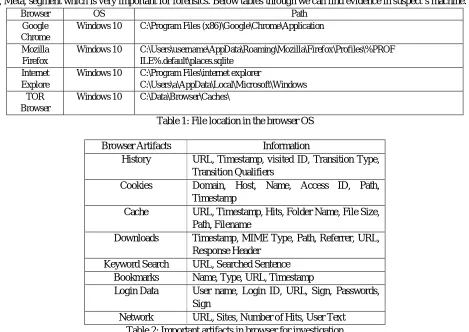
Browsers are one of the most commonly used applications in digital devices. Users perform their internet activities with web browsers in different operating systems. Web browsers are used for many purposes like, searching information, e-mail, e-commerce, and news, e-banking and social media. For this reason, it is one of the most important parts of evidence analysis. Information like which URLs was visited by the user, which words was searched, when these actions were made, are used by digital forensics experts to determine the crime. Also, usage of various web browsers in the same duration must be analyzed. A browser creates a number of files in the local system at the time of Internet Browsing. These files may hold History, Cookies, Cache, Bookmarks and other forensically relevant information and it is very important for investigation process. These tables are downloads, history, presentation, URL, keyword search, segment usage,
Visits, Meta, segment which is very important for forensics. Below tables through we can find evidence in suspect’s machine.
Browser OS Path
Google Chrome
Windows 10 C:\Program Files (x86)\Google\Chrome\Application
Mozilla Firefox
Windows 10 C:\Users\username\AppData\Roaming\Mozilla\Firefox\Profiles\%PROF
ILE%.default\places.sqlite Internet
Explore
Windows 10 C:\Program Files\internet explorer
C:\Users\a\AppData\Local\Microsoft\Windows TOR
Browser
Windows 10 C:\Data\Browser\Caches\
Table 1: File location in the browser OS
Browser Artifacts Information
History URL, Timestamp, visited ID, Transition Type, Transition Qualifiers
Cookies Domain, Host, Name, Access ID, Path, Timestamp
Cache URL, Timestamp, Hits, Folder Name, File Size, Path, Filename
Downloads Timestamp, MIME Type, Path, Referrer, URL, Response Header
Keyword Search URL, Searched Sentence Bookmarks Name, Type, URL, Timestamp
Login Data User name, Login ID, URL, Sign, Passwords, Sign
[image:2.595.63.532.412.744.2]A. Technology and Setup
In preparation for the browser forensic analysis, the following tools were used.
1) Hardware
a) Desktop PC (4GB RAM)
b) USB External Drive (16 GB) for portable browser forensics
2) Software (free versions) a) Windows 10
b) FTK Imager
c) Autopsy
d) Wireshark
e) RAM dump
f) Nirsoft Tools
g) Google chrome
h) Mozilla Firefox
i) Internet Explorer
In this paper we are using different web browser and different modes like regular mode, portable and privacy mode. Then analyze browser’s malicious activities and recovering deleted information, to using some tools and techniques.
IV. ANALYSIS OF THE RESULTS
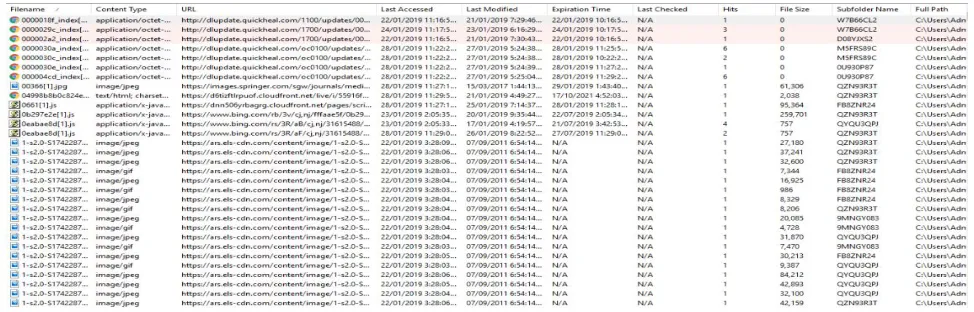
In this paper, the information that was retrieved from memory is enough to conclude browsing activities and establishing link between the web browsing activities and the suspect. For example, browsing history, search history, cache files, cookies and file download were retrieved from memory for all of the browsers we studied and analyzed. These are important evidential information for digital forensics investigators.
For normal browser, which is already installed in computer, the forensics artifacts retrieved from cookies, cache, downloads and history. Analysis of the memory dumped file showed browser related entries in memory indicating various browser activities. And we are able to detect browsing and URL history, search history, and downloaded files, some information such as cookies, email password, timelines, and process ID. These all are information retrieved from various Nirsoft browser forensics tools.
[image:3.595.54.541.583.739.2]Fig 1: Details of retrieved browsing history
For portable browser analysis, we take one USB drive and installed portable browser version. Try some activities on various browsers then removed all activities for analysis purpose. Then we followed the below steps:
1) Attached the portable browser USB drive to the machine and configured the browsers as the default browser with extensions and plug-ins disabled.
2) Then we performed a browsing session, attached the external drive to the suspect machine and captured RAM, saved the file onto the external drive and removed external drive for RAM analysis.
3) Then reduced the amount and time of data analysis.
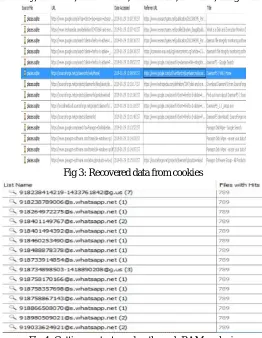
[image:4.595.70.518.162.563.2]4) Next, analysis of the memory dumped file showed browser-related entries in memory indicating web browser activity. We got some information like search history, metadata, web cookies, thumbnails, raw files, images and videos.
[image:4.595.165.427.223.561.2]Fig 3: Recovered data from cookies
Fig 4: Getting contact number through RAM analysis
For private browsing, we are using TOR browser, show some artifacts for investigation using different methods. There are some methods like RAM dump, packet capturing, registry files and network analysis. When we are using RAM dump, it provided several different file types of carved data that linked back to the browsing protocol used.
The Registry files indicated that Tor was downloaded and executed on the machine and RegShot, open-source software that allows for the comparison of the state of the Registry at different moments in time, provided the types of changes made to the registry during installation and uninstallation of Tor.
HKEY_CURRENT_USER\Software\TOR\TypedURL. Network forensics will be carried out by wireshark and extracted evidences provide information related to web traffic.
V. FRAMEWORK
Retrievable browser forensics artifacts after different browsing session via memory forensics for browsers are summarized in below table:
Browsing Mode Forensics Analysis Techniques & Tools Limitations Normal Browsing
(Google Chrome, Internet Explorer, Mozilla Firefox)
ChromeCookie View ChromeCache View My Last Search MozillaCookies View IECookies View IECache View
We are able to analyze multiple web browsers, lacks the accurate artifacts extraction. The process is time consuming because there is no single tool for analysis of browser data recovery so we are using different tools for extraction. And some tools are not supported in windows 10. Portable Browsing
(Google Chrome, Internet Explorer, Mozilla Firefox)
Registry Editor FTK Imager Autopsy
Won’t be any traces of Internet activities in the local machine once the browsing is completed. These data will be available only if these portable devices are identified and seized from the scene of crime.
Private Browsing(TOR) Wireshark Registry Editor RAM dump
In private browsing, information only temporarily. Once the user leave browsing session, the browser will erase most of the records from history, cookies, cached files etc.
Above table information are shows analysis of browser data extraction, analysis and forecasting said browsers. Secondly we are developing one framework for browser forensic analysis process, in this framework we are combine different browser forensics tools through this process investigator easily access tools at single platform. Because of these challenges, there are currently no single tool or framework for recovering all data at once tool, or implement the time consuming of data collection from a running system. In this framework, for front end programming languages are html, css and JavaScript and back end programming language is python supported. This framework ensures that browser forensics makes easier for investigator; there should be one appropriate Framework through some limitations can be minimized. If the application or tools requires a investigator to find artifacts in each time to use different tools, so this framework through investigate and deals with different artifacts to find suspect. To carry out the work in firstly, multiple tools available in this, at that time which one you have to use for forensic process along with the useful information. A framework that allows incident responders to extract and analyze at system.
VI. CONCLUSION AND FUTURE WORK
REFERENCES
[1] Erhan Akbal1*, Fatma Güneş1, Ayhan Akbal2 1 Department of Digital Forensics Engineering, Fırat University Technology Faculty, 23119, Elazig, Turkey, Digital Forensic Analyses of Web Browser Records(2016)
[2] Dr. Digvijaysinh Rathod Institute of Forensic Science Gujarat Forensic Sciences University Gandhinagar, Gujarat , Web Browser Forensics: Google
Chrome(2017)
[3] asaf varol, faculty of technology, Turkiye, Forensic Analysis and Evidence Collection for Web Browser Activity(2017) III
[4] https://www.nirsoft.net