
The effectiveness of video tutorial and preview on self efficacy, task performance and learning : an experimental study conducted at a middle school in Shanghai, China
41
0
0
Full text
(2) PREVIEW IN VIDEO TUTORIALS. Table of contents. 1. Introduction ................................................................................................................................. 5 1.1. Problem Statement............................................................................................................... 5 1.2. Observational learning and Demonstration-Based Training............................................. 7 2.2. Instructional feature of preview ........................................................................................ 14 1.3. Research questions and hypotheses .................................................................................. 16 2. Method ...................................................................................................................................... 17 2.1. Participants ......................................................................................................................... 17 2.2. Instrumentation .................................................................................................................. 17 2.2.1. Training materials ....................................................................................................... 17 2.2.2. Self-Efficacy measurement questionnaires ............................................................... 20 2.2.3. Task performance tests ............................................................................................... 21 2.2.4. Trainer instructions ..................................................................................................... 23 2.3. Procedure............................................................................................................................ 23 2.4. Analysis .............................................................................................................................. 24 3. Result ......................................................................................................................................... 25 3.1. Descriptive analysis ........................................................................................................... 25 3.2. Self-Efficacy before and after training ............................................................................. 25 3.3. Task performances and learning ....................................................................................... 26 4. Discussion ................................................................................................................................. 28 5. Conclusions ............................................................................................................................... 34 References ..................................................................................................................................... 37. 2.
(3) PREVIEW IN VIDEO TUTORIALS. Acknowledgement I would like to express my deepest appreciation to all those who helped me complete this Master thesis. A special gratitude I give to my first supervisor, Professor Hans Van der Meij, who actively showed me the study direction, instructed me to design the relevant experimental materials and provided a lot of feedback on the thesis draft, especially the theoretical part. Furthermore I would also like to acknowledge with much appreciation my second supervisor, Professor Jan Van der Meij, who mainly supported me on the technical part, i.e., how to produce and edit the video tutorial in this study. Special thanks go to the internet engineer, Evert Duipmans, without whose support it would not have been possible to build the login system website and the internet version of the video tutorial. Last but not least, many thanks go to IT teacher, Gu, who helped me conduct the experiments at a middle school in Shanghai, China. In addition, I also would like to express my appreciation to University of Twente English teacher, Jeroen Gevers, who assisted me with the academic writing of this thesis. In the end, I wish to thank all the friends around me who provided me valuable comments and advice on the final project..
(4) PREVIEW IN VIDEO TUTORIALS. Abstract. Video tutorials have become a popular and evidence-based medium for software training. In order to optimize the effectiveness of video tutorial on software learning, eight guidelines for the design of instructional videos for software training have been proposed. However, systematic validation of the guidelines by scientific experiments is still lacking. In order to fill the gap between scientific theory and practical application, this study aims to investigate the effectiveness of video tutorial on Microsoft Word formatting which are designed based on the eight guidelines, especially to examine the effectiveness of preview on self-efficacy, task performance and learning. Therefore, four research questions are formulated to examine the effect of video tutorial and preview on self-efficacy, immediate post-test, delayed post-test and transfer test. This study compares the effectiveness of video tutorial with and without preview. Experiments were conducted at a middle school in China. Respondents were 65 sixth-grade students (mean age 11 years; range 10-16). Data were collected in two sessions, at seven-day intervals. Paired-Sample t-tests and ANCOVAs were used to analyse the data. Results indicated the video tutorial supported students’ self-efficacy, task performance and learning. However, there was no significant difference between the effectiveness of video tutorial with and without preview on self-efficacy, immediate post-test, delayed post-test and transfer test. More attractive video tutorial and additional experiments are called for in further research to valid the current result.. Keywords: Video tutorial, preview, effectiveness. 4.
(5) PREVIEW IN VIDEO TUTORIALS. The Effectiveness of Video Tutorial and Preview on Self-efficacy, Task Performance and Learning: An Experimental Study Conducted at a Middle School in Shanghai, China. 1. Introduction 1.1. Problem Statement. With the widespread of computer and information technology around the world, video tutorials have been used for different educational subjects in recent years. Due to different quality levels of video tutorials are used in different learning subjects , mixed results on the effect of video tutorials are produced (Ploetzner, R., & Lowe, R., 2012). In the area of software training, Van der Meij, H & Van der Meij, J (2013) advocated eight guidelines for the design of instructional videos (see Figure1). Subsequently, a video tutorial on Microsoft Word Formatting is developed based on the eight design guidelines. A comparison of the software training between in paper-based manual and in instructional video is conducted. Since video tutorials possess the advantages of multimedia representation, congruence between screen animation and task execution, and easy-to-follow model, it is demonstrated that the video tutorial is a superior instructional medium in software training. Despite of the advantages of using video tutorial for software training, there are still some limitations, i.e. passive processing, lack of structure overview, and pace uncontrollability (Van der Meij, H., & Van der Meij, J., 2014). The eight design guidelines for software training in some degree overcome the disadvantages of video tutorials, e.g., the inclusion of user control to prevent learners’ passive processing and the inclusion preview before demonstration to provide the overall structure. Systematic application of guidelines in real context are still lacking, hence more scientific experiments to verify the guidelines are called for conducting (Rosen, et al., 2010). Van der Meij, H & Van der Meij, J (2014) indicated that the assumed critically instructional 5.
(6) PREVIEW IN VIDEO TUTORIALS. feature of preview was an issue for further study. In order to fill the gap between scientific theory and practical application, this study contributed to the existing literature regarding the effectiveness of the video tutorial for software training, especially instructional feature of preview on self-efficacy, task performance and learning. Preview the task, which was the fourth guideline advocated by Van der Meij, H. and Van der Meij, J in 2013 (see figure 1). It comprises three sub-guidelines: a) promote the goal; b) use a conversation style to enhance perception of task relevance; c) introduce new concepts by showing their use in context. Generally speaking, preview is considered to have three roles in the video tutorial: goal promoting, cognitive load reducing, and motivation stimulating. However, whether the video tutorial of Microsoft Word formatting, especially the preview, are effective in real learning context have not been tested yet. Therefore, the purpose of this research is to investigate the effectiveness of video tutorial of Microsoft Word formatting and preview on students’ selfefficacy, task performance and learning. This study is conducted by comparing students’ self-efficacy questionnaires, pre-test, immediate post-test, delayed post-test, and transfer test through video tutorial on Microsoft Word formatting with preview and without preview. The article consists of five chapters. Chapter one introduced the research topic and purpose, theoretical foundation which the study was based on, research questions and hypotheses. Chapter two described the experimental participants and related instruments used in this research. Chapter three showed the statistical results from experiments. After that, the discussion and alternative explanations of the results were presented in Chapter four. Chapter five summarized a final conclusion of this research and further research suggestion.. 6.
(7) PREVIEW IN VIDEO TUTORIALS. Figure 1. Eight guidelines for the design of video tutorial for software training (Source: van der Meij & van der Meij, 2013). 1.2. Observational learning and Demonstration-Based Training. An important theoretical foundation for the construction of the video tutorial in this study is Bandura’s (1986) social cognitive theory and his views on observational learning. According to this theory a large proportion of an individual’s knowledge is acquired through directly observing others. In other words, people learn from observing a model of task performance. However, a modelled task performance may be insufficient for people to perceive and abstract the pertinent knowledge for learning. Therefore, Demonstration-Based Training (DBT) was developed, which aimed to develop specific knowledge, skills and altitudes through the systematic design and use of complementary instructional features (Rosen, et al., 2010). In DBT, these features are coupled to the four key processes involved in observational learning, as distinguished by Bandura (1986). These processes are discussed. 7.
(8) PREVIEW IN VIDEO TUTORIALS. below, along with (a selection of) the corresponding instructional features that aim to support these processes. Attentional processes. Attention refers to the process of observers selectively attending to specific observable actions according to their accessibility, relevance, complexity, and functional value (Bandura, 1986). Attentional processes are the first step in observational learning. They influence retention, production and motivational processes. Due to human’s limited cognitive capacity of working memory, attention must be directed to the most essential part in a task accomplishment. Irrelevant information can usually be neglected. Two instructional features that can initiate and sustain attention are narration, and highlighting (Grossman et al. 2013). Both features were employed to construct the videos in the present study. In addition, we discuss user control and video pacing & length. Narration is defined as the spoken text that accompanies the dynamic display of the user’s actions on the software (i.e., Microsoft Word version 2007). The narration in the video came from a human voice rather than being computer-generated. In addition, the narration came from a female speaker who was a native Mandarin speaker. It was synchronized between the narration and the animation. According to the dual-coding theory, people have separate channels for processing visual and auditory information, and the information from these two channels can be converted mutually (Paivio, 1986). Text and picture can thus strengthen each other. But this occurs only when there is synchronisation. The content of the narration concentrated on the two necessary components in procedural discourse, namely goals, and actions & reactions (Van der Meij and Van der Meij, 2013). Goal information informed the viewers about the aim of the modelled actions. The action & reaction information concentrated on task execution. In the action-part the user was told how to give action input (e.g., mouse clicks). In the reaction-part the user was told what happened on the screen. Narration was considered. 8.
(9) PREVIEW IN VIDEO TUTORIALS. a convenient and effective method to direct learners’ attention (Bandura, 1986). In addition, Swarts (2012) demonstrated that learners are more like to watch a video tutorial with narration than videos without spoken comments. Highlighting or signalling is a kind of instructional feature that guides learners’ cognitive processing toward relevant information by verbal or visual symbols (Mautone & Mayer, 2001). There are various signalling techniques that can be used in video tutorials. From these options we chose to employ colour coding and zooming. In colour coding the learners’ attention is drawn by using a red arrow or circle. Zooming means that the change of perspective on the user interface. Zoom in is used to focus on a part of the interface. Zoom-in is beneficial for readability. It facilitates recognition of objects and legibility of on-screen text, among others. Zooming also has the advantage of being faithful to the actual interface in the animation. Van der Meij and Van der Meij, (2013) suggest that zooming is recommended when the visibility is low. On the one hand, zooming can draw the learners’ attention to a critical part on the screen; on the other hand, the zoomed image of task demonstration can become much clearer. Bouheix and Guignard (2005) demonstrated that signalling cues improved learning significant, especially when the user has control over the presentation. Likewise, De Koning et al (2007) showed that visual cueing improved comprehension and transfer significantly. User control means that learners have the option to influence video playing (Van der Meij and Van der Meij, 2013). In this video tutorial that we study, learners are able to start, pause, stop, restart and turn backward or forward the video. The control enables learners adjust their viewing to their attentional processes. Tabbers and de Koeijer (2010) found that user control led to significantly better transfer performances but not more retention. Moreover, the effectiveness of user control influenced by the characteristics of learners and the tutorial. Boucheix and Schneider (2009) discovered that user control improved only the. 9.
(10) PREVIEW IN VIDEO TUTORIALS. learning of low ability learners. In addition, they showed that user control only had a positive effect on relatively complex rather those simple tasks. Video pacing refers to the speed of the video. The tutorial should demonstrate and explain task execution in just the right pace for learners (Van der Meij and Van der Meij, 2013). The pacing of the video can affect the learners’ attention processes. . If the pace is too fast, the learner may experience cognitive overload. If it is too slow, the learner may become bored, lose interest and pay less attention. One empirical study demonstrated that students’ cognitive ability was one of the factors to be considered in selecting an appropriate video pace. Higher cognitive ability students required a faster pace (Dominic et al, 2012). Various studies have investigated what might be an effective pace. Morain & Swars (2012) suggested employing a conversational tempo. But some other research demonstrated instructional videos with faster tempo are more popular and engaging (Ten Hove, P. & Van der Meij. H., 2015; Guo, P.J., Kim, J., & Rubin, R., 2014). Video length means the duration of an instructional video. In the present study, the average video length in experimental condition is 3.17 minutes; and average video length in control condition is 1.93 minutes. It was found that video of under 3 minutes yielded the highest engagement (Guo, Kim and Rubin, 2014). The videos in the present study closely approximate this time limit. Retention processes. Retention means converting concrete observations to cognitive symbols in memory that can affect future behaviour. Meaningful learning is an effective method to support retention. It generally refers to a situation in which the learner understands the information and all the relationships that exist. Meaningful learning leads an integrated representation, which facilitates retention (Mayer, 2001). Therefore, instructional features that promote meaningful learning are essential to enhance retention. The video tutorial in this. 10.
(11) PREVIEW IN VIDEO TUTORIALS. study employed five instructional features to support retention process, respectively narration, segmentation, pause & natural breaks, and simple-to-complex sequencing. Narration is the spoken text that accompanies the animation. The narration in the video tutorial helps the learner to understand the demonstration by explaining the procedure and providing background information that helps the learners make sense of the demonstrated performance. Dual coding theory and multimedia learning theory both support the role of narration in enhancing understanding and learning (Paivio, 1986; Mayer, 2001 Segmentation indicates that each video in the tutorial is divided into manageable and meaningful segments. The segmentation in the tutorial is reflected in the task of creating a table of content which was split into three smaller videos: styling the main headings, styling the subheadings and creating an automatic table of content. The first two videos are the prerequisites for accomplishing the third one. The segmentation helped learners in gradually gaining knowledge and skill without causing cognitive overload. Moreno (2009) demonstrated that segmentation significantly improved retention of practical skills. It was discovered that segmented animation led to significantly more learning only for learners with low prior knowledge. Two explanation of the segmentation effect were given. One, segmentation gave learners extra time to engage in cognitive processes. Two, segmentation demarcated the overall structure of the information for the learner (Spanjers et al, 2011; Spanjers et al, 2012). Pause & natural breaks, refer to a temporary stop or rest in a demonstration. During a break the visual image is kept still and there is no narration. The video tutorial systematically employs such breaks. After completion of a step in a procedure the video runs on for 2 seconds without giving new verbal or visual information. Thereafter the next step automatically follows. After the preview and demonstration, the pause lasts 5 seconds. The brief breaks enable learners to organize previous information and prepare for the upcoming. 11.
(12) PREVIEW IN VIDEO TUTORIALS. information. Spanjer, van Gog& Merrienboer (2010) found that such pauses at the end of each instructional video had a beneficial effect on cognitive load and learning. Likewise, Mercer (2015) also demonstrated that taking a short break in learning had beneficial effects on memory performance. Simple-to-complex sequencing indicates that learners benefit from demonstrating a simple video prior to a complex one. It aligns with human’s cognitive hierarchy of knowledge building, in which the acquirement of basic and simple knowledge provides the foundation for building more advanced and complex knowledge. There are three chapters in the video tutorial used in the present study. The first chapter is easiest, the second chapter is more difficult and last chapter is the most difficult. The design of the tutorial thus followed the simple-to-complex sequencing principle. It was indicated that a simple-to-complex sequencing approach prevents cognitive overload, and make sure that each task is approachable for the learner (Van Merriënboer, Kirschner, & Kester, 2003). Reproduction processes. Reproduction refers to performing the observed behaviour in seemingly appropriate contexts through activating the stored cognitive symbol (Bandura, 1976). In the video tutorial of this study, practice after the demonstration is the only instructional feature to facilitate reproduction process. Practice, means physically or cognitively rehearsing the modelled behaviour. It is an important and effective method to strength the memory track of desired behaviour. In the present study, the students were required to practice the task immediate after each task demonstration. This gave them the opportunity to cognitively rehearse the task procedure. During practice students were allowed to refer to the video tutorial when necessary, so they could correct or remind themselves of the procedures. The training arrangement reflects Van der Meij and Van der Meij, J’s (2013 design guideline, which advocates strengthening a demonstration with practice. Empirical studies have demonstrated the practice has a positive. 12.
(13) PREVIEW IN VIDEO TUTORIALS. effect on learners’ retention of knowledge and skills. These effects are moderated by timing (practice can take place before or after the demonstration) and the learners’ prior knowledge (Ertelt, 2007; Wouters, Paas, & van Merriënboer, 2010). It was also found that students learned more when they could access the videos during practice (Shippey et al, 2011). Motivational processes. Motivation generally refers to an internal state that initiates and maintains goal-directed behaviour (Mayer, 2008). Motivation processes are considered the most critical part of observational learning, which increased trainees' active engagement in the other three observational learning processes (Bandura, 1986). Higher level of motivation cause more attention during observation, more retention of the behaviour after observation, as well as more reproduction of demonstrated performance afterwards. People with higher motivation in observational learning are more likely to achieve the targeted learning objectives (Salas, et al., 2009). Instructional features used to enhance learners’ motivation in this video tutorial include simple-to-complex sequencing, user control, and using spoken human voice and narration in conversational style. Simple-to-complex sequencing not only enables learners gradually gain knowledge and skills in simple-to-complex sequence, but also enhance learners’ self-efficacy and motivation. Successful task accomplishment at the beginning would enhance learners’ self-efficacy and motivation to continue the following tasks. It was indicated that the most effective method to improve learners’ motivation to continue learning was increase students’ success rate at beginning (Coe et al, 2014). The video tutorial in this study arranged the instructional video from simple to complex. It increases learners’ possibility to success at beginning, which can enhance learners’ motivation to continue to watch the following videos. User control, not only gives learners the authority to adjust their attention, but also enhances their motivation. User control overcomes one of the disadvantages of video tutorial, which is passive processing. Students can stop, restart, and turn forward or backward the. 13.
(14) PREVIEW IN VIDEO TUTORIALS. video based according to their needs through the user control button, which gives learners options to be active in certain degree. According to constructivism, learning occurs best when learners’ minds actively inquires and processes information (Mayer, 2001). The instructional feature of user control provides just an option for learners to actively acquire and process information, which further increases learners’ comprehension and motivation. The use of spoken human voice and conversational style in narration indicates the voice in narration is human instead of computer-generated voice, and address learners as “you” directly like having conservation. The voice of narration in present study is from a female mandarin native speaker, which reflects the Van der Meij, H., & Van der Meij, J.’s (2013) design guideline of using spoken human voice. It aligns with the voice principle, which states that learners learned more effectively when the narration spoken in human voice with a standard-accented instead of machine voice (Mayer, 2005). Guo, P.J., Kim, J., & Rubin, R. (2014) also suggested that video produced with a more personal feel would be more engaging. The conservational style was also reflected in the narration, as can be seen from “Have you noticed the right margin in the text is too small?” which directly addresses the learners as “you” and asks a question to stimulate their motivation. It matches with the personalization principle, which claims that learners are more likely to follow the narration presented in conversation style.. 2.2. Instructional feature of preview The preview in the tutorial gives learners instructions prior to the demonstration. The role of preview is like that of an advance organizer, which means that it contained that the learner could use to organize and interpret the information from the demonstration (Mayer, 2003). Prior knowledge plays an important role in comprehension, and what people learn depends on both instructional message and their activated prior knowledge (Mayer, 2008).. 14.
(15) PREVIEW IN VIDEO TUTORIALS. Just like prior knowledge, the preview provides the pertinent information prior to training that affords or facilitates learners to process the demonstration. Empirical studies on the effect of preview in multimedia learning are scarce. However, the effect of preview on text retention is investigated in some research. One empirical study pointed out the beginning summary had no effect on the text recall (Hartley, Goldie, & Steen, 1976), but another research found that beginning summary supported the retention of information (Hartley & Trueman, 1982). And a possible explanation for the ineffectiveness of beginning summary is that learners skip over the preview and pay more attention to the main text body, therefore it is suggested that preview in which stimulates learners’ active processing is more likely to improve retention (McLaughlin Cook, 1981). In addition, Denner, Rickards, & Albanese (2003) stated that the preview which required learners to actively rehearse the preview process was demonstrated to perform better than the passive presentation of preview. One of Van der Meij, H & Van der Meij,J’ s (2013) design guidelines for video construction is to include a preview. The guideline holds three sub-guidelines: 1) preview should promote the goal of the video tutorial 2) narratives should be in conversional style 3) critical and new concepts should be explained by demonstration in video tutorial. Thus, the preview prepares the viewer for the ensuing demonstration, by drawing attention, stimulating motivation and reducing cognitive load (Van der Meij, H, & Van der Meij, J, 2013). The preview of the video tutorial in this study shows learners an abbreviated form of a complete task performance. As it highlights the goal and conveys the information that the task is approachable, the preview is considered to enhance learners’ self-efficacy. In addition, as the preview introduces the screen objects names that are important in the demonstration, it reduces the students’ cognitive load. The inclusion of a preview to a training situation aligns. 15.
(16) PREVIEW IN VIDEO TUTORIALS. with the pre-training principle advocated by Mayer (2008). This principle holds that users must be taught the names and characteristics of essential components prior to training. 1.3. Research questions and hypotheses This study aims to investigate the effectiveness of video tutorial and the instructional feature of preview on self-efficacy, task performances and learning. The video tutorial on Microsoft Word’s formatting followed the eight design guidelines for software training which were proposed by Van der Meij, H and Van der Meij, J in 2013. It is expected that the video tutorial positively affect students’ self-efficacy, task performance and learning. Due to the aforementioned functions of preview in the video tutorials, it is expected preview has positive effect on self-efficacy, task performance and learning. In order to achieve the goal of this study, four research questions and hypotheses are formulated as below: Question 1: How well does the video tutorial support self-efficacy, and is there an effect of condition? It’s predicated that video tutorial supports learners’ self-efficacy, and preview in the video tutorial has positive effect on students’ self-efficacy. Question 2: How well does the video tutorial support task performance in immediate post-test, and is there an effect of condition? It’s assumed that the video tutorial supports task performance in immediate post-test, and students who watch the video tutorial with preview preform significantly better than without preview. Question 3: How well does the video tutorial support task performance in delayed post-test, and is there an effect of condition? It’s hypothesised that the video tutorial support task performance in delayed post-test, students who watch the video tutorial with preview score significantly higher than without preview. 16.
(17) PREVIEW IN VIDEO TUTORIALS. Question 4: How well does the video tutorial support learning in transfer test, and is there an effect of condition? It’s hypothesised that the video tutorial supports learning in transfer test, and students who watch the video tutorial with preview score significantly higher than without preview.. 2. Method 2.1. Participants The participants are 65 sixth-grade students (31 girls and 34 boys), who are from a middle school in Shanghai, China. The mean age of students is 11 years old, ranges from 10 to 16. Two sixth-grade classes are randomly selected from a middle school in Shanghai, China. Students in each class are randomly assigned to experimental condition and control condition. The experimental instruments are described below. 2.2. Instrumentation 2.2.1. Training materials. Video tutorial. The video tutorial in present study is the Chinese translation of Dutch video tutorial on Microsoft Word’s formatting, which is based on Van der Meij, H. & Van der Meij, J.’s (2013) eight design guidelines of instructional videos for software training (see Figure 1). The video tutorial consists of three chapters. Chapter one demonstrates how to adjust the left and right margin for an entire word document, which is divided into two videos. Chapter two models how to adjust the left and right margin for a text segment, and improve a list, which contains four videos. Chapter three instructs how to create a table of contents, which consists of three videos. The arrangement of three chapters reflects the sequence of simple to complex. The content of the video tutorial has not been trained by the students yet. Due to the internet speed is not fast enough in the experimental school, it is not possible for a whole class of student to watch video tutorial simultaneously online. So the 17.
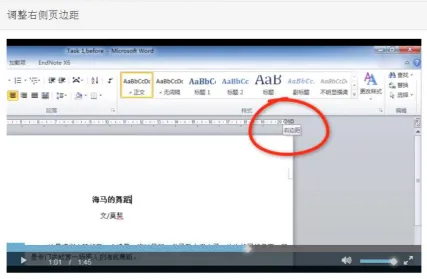
(18) PREVIEW IN VIDEO TUTORIALS. video tutorial is displayed as a list of video segments, which is copied to each student’s computer. Each video segment can be easily watched by double clicking the icon. The video tutorial comprises the image of screen recording and the sound of narration, which are in synchronization. The voice of narration is from a native female speaker of mandarin. Preview videos display the complete task procedures in short time. The narration in previews consists of five to six sentences (see Figure 2). The first sentence always greets the audience in a conversational style and then follows with a task-related question on the problem, e.g. “Hello, everyone! Have you noticed that the right side of this text doesn’t look nice?” Thereafter, there is a quick dynamic demonstration in which critical screen objects are explained. Techniques of zooming and highlighting are used to draw attention to essential parts. When narration referring to an object on screen, the screen will be zoomed in and highlighted the object with a red circle or an arrow, e.g. when narrator speaking “did you notice the right margin is too small?” an arrow will appear on the right margin of the text (see figure 3). Furthermore, students are able to pause, start or restart the video tutorial through clicking the left bottom button; the volume of video tutorial also can be adjusted. At the end of preview, there is five-second pause, which indicates the screen recording is kept still and there is no narration. The pause allows learners to sink in previous information. The average length of previews is 1.24 minutes (range1.06−1.50).. 18.
(19) PREVIEW IN VIDEO TUTORIALS. Figure 2. Preview narratives from “Adjusting the right margin for the whole text” (translated version). Figure 3. The instructional feature of zooming and highlighting.. 19.
(20) PREVIEW IN VIDEO TUTORIALS. Demonstration videos display the procedures of task execution in more detail. It begins with a sign stating Demonstration in Chinese (White Letters on black background), which is same as preview. The procedures are clearly numerated in sequence, (e.g., “first, we must…;second, we should…”) Both the action that takes place on the screen and system reaction are given sufficient attention to in narration, e.g., “Move the cursor to the ruler” which indicates the action that takes place on the screen, “The cursor changes into a double arrow” states the change duo to the action. The instructional features, e.g., zooming, highlighting, are also reflected in the demonstration. At the end of each step in the demonstration exist two seconds pause, thereafter the next step follows. At the end of the demonstration have five-second pause, which is same as preview. The average length of each demonstration video is 1.93 minutes (range 1.39-2.43). Practice file. The practice file consists of a practice instruction and seven Microsoft Word documents. The practice file can be found under the student’ name file which on the desktop of each student’s computer. The practice instruction includes seven tasks, each task starts with a brief introduction of the task, and then displays a pair of before-and-after screenshots, at last instructs students to open the corresponding word document to accomplish the task. The seven Word documents are identical as the ones used for demonstration in the video tutorial. The seven word documents are especially designed for students to practice after each video segment. Students are allowed to refer to the video tutorial when they encounter difficulties while doing practice.. 2.2.2. Self-Efficacy measurement questionnaires. 20.
(21) PREVIEW IN VIDEO TUTORIALS. Self-efficacy is measured through Initial Self-Efficacy Questionnaire (ISEQ), which is prior to the video tutorial, and Final Self-Efficacy Questionnaire (FSEQ), which is after the video tutorial. Initial Self-Efficacy Questionnaire (ISEQ). The ISEQ is used to measure students’ self-efficacy before the video tutorial. It is generated based on Bandura’s (2006) guide for constructing self-efficacy scales. The questionnaire consists of seven identical questions. Prior to each question, there is a brief introduction of the task and a pair of before-and-after screenshots that indicate the task. The question is “How well do you think you think you can complete this task?” The answers are given on a 7-point Likert scale ranging from “very poorly” to “very well”. The reliability of the ISEQ is satisfactory (Cronbach’s alpha = 0.93). Final Self-Efficacy Questionnaire (FSEQ). The FSEQ is used to measure students’ self-efficacy after the video tutorial. The format of FSEQ is same as ISEQ, which consists of seven before-and-after screenshots and seven identical questions. The Word documents that used for displaying before-and-after screenshots are different from the ones in ISEQ. But the question is same as the ISEQ, namely “How well do you think you think you can complete this task?” The answers are given on a 7-point Likert scale ranging from “very poorly” to “very well”. The reliability of the FSEQ is also satisfactory (Cronbach’s alpha = 0.92). 2.2.3. Task performance tests Tests are used to measure the task performance skills taught in video tutorial. There are in total four task performance tests: pre-test, immediate post-test, delayed post-test and transfer test. The standard of scoring is one score is rewarded to any tasks that are completely correct; zero score is given to any tasks which are not formatted at all or not fundamentally correct. The maximum score for pre-test, immediate post-test and delayed post-test is nine, and the maximum score for transfer test is four.. 21.
(22) PREVIEW IN VIDEO TUTORIALS. 2.2.3.1. Pre-test, immediate post-test and delayed post-test Pre-test is the test before video tutorial, which includes seven tasks. The tasks are same as the ones to be trained in video tutorial, individually are, indenting the left and right margin for the whole text, indenting the left and right margin for a paragraph, indenting the first line of a paragraph, improving a list, and creating an automatic table of content. Pre-test comprises a pre-test instruction and seven Word documents. Pre-test instruction includes seven tasks. Each task starts with a short description of the task, and then follows a beforeand-after screenshots which displays the task, at last instruct learners to open the corresponding Word document to finish the task. The pre-test file can be found under students’ name files which on the desktop of computers. Immediate post-test is the test immediate after video tutorial, delayed post-test is the test on seven days later after video tutorial. The file of immediate post-test and delayed posttest are same as the pre-test, which include a test instruction and seven Word documents. The formats of test instruction and seven Word documents in immediate post-test and delayed post-test are same as the ones in pre-test, only the content of Word documents is slightly different. 2.2.3.2. Transfer test Transfer test is to test performance skills which have not been taught in the video tutorial. Transfer test file includes a transfer test instruction and four Word documents. Transfer test instruction consists of four tasks: 1) adjusting the top margin for a whole text 2) indenting sections from a list 3) indenting the first line of a quotation 4) moving a text section and renewing the table of contents. Four Word documents are especially designed for students to practice and test.. 22.
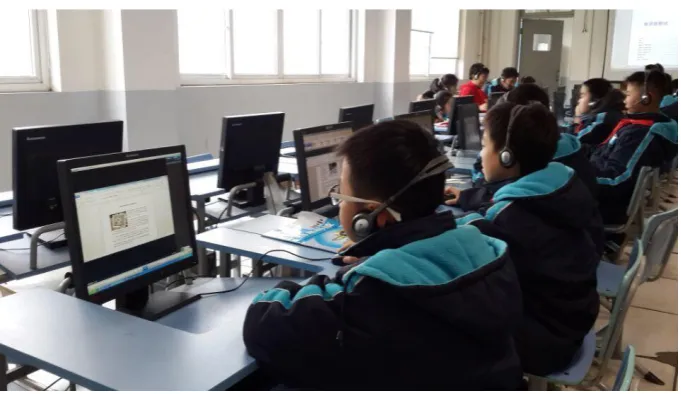
(23) PREVIEW IN VIDEO TUTORIALS. 2.2.4. Trainer instructions There are in total two trainer instructions, one is for pre-training, training and immediate post-training in first session, another is for delayed post-test and transfer test in second session. Trainer instructions are designed especially for the trainer, who is the IT teacher of the two classes, to prepare for experiments and instruct students in training and tests. Each trainer instruction comprises two chapters, the first chapter describes the detailed preparation should be done before experiments; the second chapter is instructional words and actions which should be spoken and done by the trainer during training and tests. The trainer is informed to read the trainer instructions carefully and make the corresponding preparation before experiments, and also follow the experimental procedures and instructional words during training and tests. 2.3. Procedure Experiments took place at a computer lab of the middle school (see Figure 4). Each computer was equipped with a headphone. Experiments were conducted in two sessions, at seven-day intervals. In the first session, each student received an ID card, which stated the student’s name and number. After all students have sat down in front of computers, a 3minute introduction was given by the teacher, which informed them the training of Microsoft Word formatting. And then students were instructed to complete the Initial Self-Efficacy Questionnaire (ISEQ) and pre-test. After a short break, students were instructed to watch the video tutorial and practice the task. Students were allowed to refer to the video tutorial while doing practice. After that, students took the Final Self-Efficacy Questionnaire (FSEQ) and immediate post-test. The first session in total took around 80 minutes. The delayed post-test and transfer test in the second session were conducted seven days later. Same students took the delayed post-test and transfer test, and they were not allowed to access the video tutorial. The tests in the second session took around 40 minutes.. 23.
(24) PREVIEW IN VIDEO TUTORIALS. Figure 4. Students are doing Microsoft Word formatting tasks. 2.4. Analysis. IBM Statistic SPSS 22 is used to analyse the data. First, comparative data on the gender, age, ISEQ and pre-test between two conditions are calculated, which is to ensure the baseline equivalence. Independent-samples T-Test is used to compare age, ISEQ and pre-test between preview condition and control condition. Chi-Square Test is used to compare the gender among the two conditions. The tests are two-tailed, because the predications are twodirectional. Second, paired-sample t-test is used to analyse the effect of video tutorial on selfefficacy, immediate post-test, delayed post-test and transfer test. Three, the effect of condition are analysed through running ANCOVAs, ISEQ and pre-test as covariate. The assumption of homogeneity of variance should be checked in advance. The test is one-tailed, since the hypothesis is one-directional. The degrees of freedom sometimes are not identical, due to the missing data. The critical significance level alpha is set as 0.05. C, which qualifies as small for d=0.2, medium for d=0.5 and large for d=0.8 (Cohen, 1988).. 24.
(25) PREVIEW IN VIDEO TUTORIALS. 3. Result 3.1. Descriptive analysis In the 65 participants, 2 participants’ data are missing. Therefore, there are in total 63 valid participants. Among the students, there are 29 girls and 34 boys. A chi-square test revealed that gender was not statistically different between two conditions (X 2 (1, 63) = 0.38, p = 0.53). The mean age of the students is 11.33 (SD = 0.80), ranges from 10 to16. Students’ age is not significant different between two conditions (t (61) = 0.73, p =0.47). The ISEQ was also not significantly different between the two conditions (Me = 5.53, SDe =1.39, Mc = 5.79, SD c =0.93, t (52) = 0.79, p =0.43). However, the pre-test was significant different between two conditions. Students’ pre-test score in control condition (Mc = 0.47, SDc =0.19) is significantly higher than preview condition (Me = 0.31, SDe =0.19, t (58) = 3.32, p =0.002). Therefore, the baseline of task performance in pre-test is not equivalent; students in control condition have significantly higher Word formatting ability than students in preview condition. 3.2. Self-Efficacy before and after training. As shown in Table 1, students’ self-efficacy after training (Mf = 6.52, SDf = 0.67) is significantly higher than the self-efficacy before training (Mi = 5.61, SDf = 1.19, t (46) = 5.12, p = 0.00). Cohen's d = 0.94, which is large effect. The result confirmed the hypotheses that video tutorial had positive effect on students’ efficacy. Furthermore, students’ initial selfefficacy (Mi = 5.61) is relatively high, since it higher than the mid-point. Therefore, it indicates that the tasks of word formatting are relatively easy for most of students. In regard to the effect of condition, an ANCOVA analysis showed there was no significant difference between two conditions (F (1, 44) = 1.69, p = 0.10). The result did not support the hypotheses that students’ self-efficacy in the experimental condition improved significantly higher than students’ self-efficacy in control condition. 25.
(26) PREVIEW IN VIDEO TUTORIALS. Table1. Students’ self-efficacy before and after training Self-efficacy Before. After. Condition Preview. M (SD) 5.53 (1.40). M (SD) 6.40 (0.75). Control. 5.80 (0.93). 6.53 (0.91). Total. 5.61 (1.19). 6.52 (0.67). * Scale maximum is 7. A higher score indicates higher self-efficacy. 3.3. Task performances and learning. Among four tests (pre-test, immediate post-test, delayed post-test and transfer test), the score in delayed post-test is the highest (Mdp = 0.70, SDdp = 0.20), and pre-test is the lowest (Mpt = 0.39, SDpt = 0.21). Table2 displayed the descriptive analysis of the four tests. The chart graph in figure 5 showed the comparative result more clearly.. 26.
(27) PREVIEW IN VIDEO TUTORIALS. Table2. Mean score (Standard Deviations) for Pre-test, Training, Immediate Posttest and Delayed Post-test by Condition.. Condition. Pre-test M (SD). Immediate post- Delayed test post-test M (SD) M (SD). Transfer test M (SD). Preview. .31 (.20). .50 (.30). .70 (.21). .50 (.30). Control. .48 (.19). .58 (.31). .69 (.19). .55 (.27). Total. .39 (.21). .54 (.31). .70 (.20). .52 (.29). Figure 5. The chart graph of comparative mean score of tests between conditions.. 27.
(28) PREVIEW IN VIDEO TUTORIALS. One–sided paired sample tests indicated immediate post-test (Mip= 0.54, SDip = 0.31) scored significantly higher than the pre-test (Mpt = 0.39, SDpt = 0.21, t (59) = 4.47, p =0.00). The effect size is middle (d = 0.62). The same result were found in delayed post-test (Mdp = 0.70, SDdp = 0.20, t (56) = 8.04, p =0.00, d = 1.51) and transfer test (Mtt = 0.52, SDtt = 0.29, t (54) = 2.84, p =0.00, d = 0.56), which all scored significantly higher than pre-test. The results confirmed the hypothesis that video tutorial supported students’ task performance in immediate post-test, delayed post-test and transfer test. ANCOVA was used to check the effect of conditions, and pre-test as covariate. First the assumption which homogeneity of variance was checked for all the tests, no violation was found. One-sided ANCOVA showed the preview condition in immediate post-test (Me= 0.50, SDe = 0.30) did not score higher significantly than the control condition (Mc= 0.58, SDc = 0.31, F (1, 59) = 0.00, p = 0.47); preview condition in delayed post-test (Me = 0.70, SDe = 0.21) did not score significantly higher than the control condition (Mc= 0.69, SD c = 0.19, F (1, 56) = 0.01, p = 0.45); preview condition in transfer test (Me= 0.50, SDe = 0.30) also did not score higher significantly than the control condition (Mc= 0.55, SD c = 0.27, F (1, 54) = 0.17, p = 0.68). Therefore, the hypothesis that preview in the video tutorial had positive effect on students’ immediate post-test, delayed post-test and transfer test were not supported.. 4. Discussion The results confirmed the hypothesis that video tutorial supported self-efficacy, task performances in immediate post-test, delayed post-test, and learning in transfer test. The findings align with the result of Van der Meij’s (2014) developing and testing a video tutorial for software training, which demonstrated that the video tutorial of Word formatting was an effective method for software training. Unexpectedly, results did not support the other part of hypothesis that the preview in the video tutorial had significant effect on self-efficacy, task. 28.
(29) PREVIEW IN VIDEO TUTORIALS. performance and learning. The results contradict to the guideline of preview the task advocated by Van der Meij, H. & Van der Meij, J. in 2013. However, after carefully analysed the tests, an interesting discovery was found (See figure 5). First, the mean score of pre-test in preview condition is significantly lower than in control condition. But after the video tutorial, there is no significantly difference between two conditions in immediate post-test, delayed post-test and transfer test. Reversely, the mean score of delayed post-test in preview condition is slightly higher than in control condition. Hence, it indicates the preview in the video tutorial has positive effect on students’ task performances and learning, but the effect is not significant. Another discovery is that the practice after watching the video tutorial scores significant higher than immediate post-test. The result is not surprising, because students start to practice the task after they just watching the particular task performance, and students are allowed to refer to the video tutorial as a performance aid. But in immediate post-test, students have to accomplish the tasks only based on their symbolic memory. So the immediate post-training is more difficult than the practice for students. From the cognitive respect, students did not convert all the observational information to cognitive symbols in memory, which caused the poorer task performance in immediate post-test. An unexpected result is that task performance in delayed post- test is significant better than immediate post-test. There are several potential reasons. First, students might practice the tasks at home. Second, it’s possible that students cognitively rehearse the task procedures during the seven-day interval. Third, students gradually integrate the observational information with their prior knowledge, and then construct more coherent cognitive mental model that facilitate future reproduction process. Anyway, the potential reasons need to be further analysed.. 29.
(30) PREVIEW IN VIDEO TUTORIALS. The main result that fail to demonstrate the effect of preview on self-efficacy, task performance in immediate post-test, delayed post-test, and learning in transfer test. It might be caused by the following factors. First, the total length and average length of the videos with preview is too long for teenagers. The average length of each instructional video in preview condition is 3.17 minutes, which is 1.24 minutes longer than in control condition (1.93 minutes). Plaisant and Shneiderman (2005) indicated the optimal length of each video tutorial was between15 to 60 seconds. It is possible that average length of 3.17 minutes for each video clip is too long for 11 years-old students. Moreover, the total length of the video tutorial in preview condition is 28.57 minutes, which is 11.21 minutes longer than the control condition (17.36 minutes). Students in preview condition may lose the attention in the end of the video tutorial Hoven, P. & Van der Meij, H., (2015) indicated that the video length and watch time was significantly negative correlated, which suggested learners were more likely to finish watching shorter videos than longer ones. Furthermore, Guo, Kim and Rubin (2014) also stated that shorter videos were much more engaging. The data of students’ video watching recording can be useful to investigate whether the students have finished watching videos or not, however, since an accident that happened prior to experiments, the data were not successfully collected. Second, it’s possible that speed of the video tutorial is too slow, which leads to longer video tutorial, and further reduce students’ learning engagement. Video speed is a vital dimension of a video tutorial, which effects learners’ attention. The speed of a video tutorial comprises two aspects: pauses and narration speed. Van der Meij, H. &Van der Meij, J (2013) suggested to have two-second pause after each step and five-second pause after each video segment in narration, video tutorial in this study follows this guidelines. Concerning narration speed, Fischer, S., Lowe, R., & Schwan, S. (2008) indicated that fast presentation speed in videos improved comprehension significantly compared to normal speed, since learners’ 30.
(31) PREVIEW IN VIDEO TUTORIALS. attention would pay on the most crucial function part in complex dynamic animation. Hoven, P. & Van der Meij, H., (2015) indicated that popular instructional videos usually had faster speaking rate compared to normal speed videos. Suggestions on the most appropriate speaking rate in video tutorials are not uniform, however, 125-150 words per minutes is considered in lower range, 150-175 words per minutes is regards as in middle range, faster speaking rate indicates narration speed over 175 words per minute . Guo, Kim and Rubin (2014) found that learners’ engagement usually increased with speaking rate, which might be explained by fast-speaking instructors usually conveyed more energy and enthusiasm, which increased learners’ engagement. The average speaking rate in the video tutorial of this study is 122 words per minutes, which is below the lower range. In order to increase learners’ engagement, it is suggested to enhance the narration speed to which appropriate to students’ cognitive ability. In addition, the tone of narration is also required to be enthusiastic and encouraging. However, whether the increase of the speaking rate to upper range, which means enhance the narration speed to 175 words per minutes, is effective method to improve learning outcomes is called for further research. Third, the fail of detecting the effectiveness of preview might due to the preview in the video tutorial changes from facilitator to redundant information for some capable students. According to Sweller’s (1988) cognitive load theory, total cognitive load is divided into: intrinsic cognitive load (ICL), extrinsic cognitive load (ECL) and germane cognitive load (GCL). ICL is determined by the intrinsic nature of instructional materials, which cannot be changed. ECL is the cognitive effort which requires students to engage to activities that are not directed at schema acquisition or automation, which should be reduced in instructional design. GCL are the process which directs the learner to the essential features of the problem situation, e.g. schema acquisition processes and schema automation processes, which should be maximized in instruction. Pre-training principle is proposed by Mayer (2001), which aims 31.
(32) PREVIEW IN VIDEO TUTORIALS. to increase the germane cognitive load by dividing the essential cognitive processing into preview and demonstration. However, the assumption of the pre-training principle is verbal and visual channel are both overloaded with essential processing demands in demonstration (Mayer. R.E., & Moreno, R., 2003). More specifically, demonstration may be too fast that only enables learners to build component model, which left no time or cognitive space to build causal model. Therefore, pre-training is only necessary when learners have no cognitive space to build both component model and causal model simultaneously in demonstration (Mayer, R.E., 2005). However whether students’ cognitive load is overloaded with essential information in demonstration part is not measured yet, which means whether the video tutorial in present study satisfies the assumption of pre-training principle is unknown yet. If the assumption is violated, the preview might changes from facilitator to redundant information. Moreover, the preview in this study has demonstrated the procedures of the task, it’s possible that some students have no patience to watch the repletion of the procedures in demonstration carefully, which reduce learning engagement. Therefore, different versions of preview can be tested in the further, e.g., purely indicate the names and functions of the related buttons in the demonstration, and more explicitly state the goal of the instructional video. Fourth, the last factor which accounts for the ineffectiveness of instructional feature of preview is the imperfection of experiments conduction. Since experiments are conducted by an IT teacher at the middle school in Shanghai, China, and the experimental process have not been supervised by others. Furthermore, whether the IT teacher totally follows the trainer instructions is not guaranteed. Therefore, additional experiments which it’s better supervised by the designer need to valid the current results. Due to the practice constraint that the utmost experiment time for first session is 80 minutes, which is two classes’ duration (each class’ duration is 40 minutes). Video watching 32.
(33) PREVIEW IN VIDEO TUTORIALS. time in experimental condition (28.57 minutes) is 11.21 minutes longer than control condition (17.36 minutes), students in experiment condition might do not have enough time to practice the task and complete the immediate post-test. It’s also possible that students in control condition finish the training earlier, students in experiment condition may be influenced by other students and finish tasks rashly. Therefore, sufficient time for students should be guaranteed in future research and students in different conditions are better separated in case of inter-condition influence. Two suggestions for designing video tutorials in further research are discussed below. First, it is suggested to include error-prevention warning in form of narration or on-screen text. The analysis of students’ task performance indicates that 43.1% of students’ second task in immediate post-test looks well formatted but whose solution is not a fundamental solution, which meant almost half of students fail the task because of the easily-fell pitfall, i.e., confusing left indent button with left margin button. In order to improve students’ success rate, some error-protection warnings can be added in the video tutorial to prevent students’ mistakes. One principle of designing minimalist instruction for practical computer skills which is advocated by Carroll, J.M. (1990) is support of error recognition and recovery. So it’s suggested that to add narration or on-screen text warnings to the place where students are most likely to commit mistakes. Concerning this video tutorial, students easily confuse three different triangle buttons on the ruler, which are left indent button, left margin button and first line indent button. Narration should indicate learners there are three different buttons and emphasis to click the correct button, or on-screen text of the correct button is shown to remind learners. Second, considering the practice after video tutorial is critical for students to recall the overall procedures. However, students may sometimes forget to practice after watching videos, especially when students watch videos online. A plausible solution is reminding 33.
(34) PREVIEW IN VIDEO TUTORIALS. learners to do the responding practice in form of on-screen text or narration after watch this video tutorial. It is even better to provide the hyperlink which directly access to the Word document to practice. However, this feature is called for more advanced technique support. Two main limitations in this study are immature video tutorial production and imperfection of experiments conduction. The quality of video tutorial directly affects learning outcomes, even though the video tutorial effectively improves learner’s task performance and learning, but there are still growing potentials. Engaging and encouraging are two important indicators of a good video tutorial, which is neglected in this video tutorial. There are three aspects in the three-part of Carliner’s framework for information design: physical design, cognitive design and affective design. Some physical and cognitive design are paid attention to in this video tutorial, e.g., pauses, highlight. But some important aspects are neglected, e.g. the speed of narration and the length of video tutorial. The aspect of affective design in this video tutorial is totally neglected. It is suggested to do more preparation before recording the narration and rehearse the script with the tone of engagement and confidence, which will also inspire learners (Swarts, J. 2012). Another limitation in this research is the imperfection of experiment conduction. More specifically, the data of students’ video watching is missing in the experiment, which causes the impossibility of further analysis of learners’ engagement.. 5. Conclusions. The purpose of this study is to investigate the effectiveness of video tutorial, especially the instructional feature of preview, on students’ self-efficacy, task performance and learning. Therefore, fours research questions are formulated to accomplish the goal: 1) How well does the video tutorial support self-efficacy, and is there an effect of condition?. 34.
(35) PREVIEW IN VIDEO TUTORIALS. 2) How well does the video tutorial support task performance in immediate post-test, and is there an effect of condition? 3) How well does the video tutorial support task performance in delayed post-test, and is there an effect of condition? 4) How well do the video tutorial support learning in transfer test, and is there an effect of condition? It was hypothesized that the video tutorial supported students’ self-efficacy, task performances in immediate post-test, delayed post-test and learning in transfer test. Furthermore, it was also hypothesized that preview in the video tutorial had positive effect on students’ self-efficacy, task performance and learning in all tests. The results demonstrate that the video tutorial which based on Van der Meij, H & Van der Meij, J’s (2013) eight design guidelines support students’ self-efficacy, task performance and learning. However, the results do not support the fourth guideline, which preview the task facilitates learners’ self-efficacy, task performance and learning. There are four potential reasons of the contradiction between the hypothesis and the result. First, the video tutorial with preview is too long for teenagers. Second, the speed of the video tutorial is too low to be attractive. Third, the preview is not necessary due to the relatively easy demonstration. Fourth, experimental time is not sufficient for preview condition. Due to the limitations of this study, the results are called for validation by further research. In further research, some suggestions are worth of taking into consideration. In the phase of video tutorial designing, three aspects of design: physical design, cognitive design and effective design, all should be carefully considered. Especially the pace and length of. 35.
(36) PREVIEW IN VIDEO TUTORIALS. video tutorial should be appropriate for learners. In order to enhance students’ engagement, video tutorial can be shortened by increasing narration speed to upper range, which is 175words per minute. In addition, the tone of narration should be encouraging and enthusiastic. Second, in order to prevent students from committing mistakes, errors recognition warnings can be added at the most confusing place in form of narration or onscreen text. Guo, P.J., Kim, J., & Rubin, R. (2014) suggested that videos that intersperse an instructor’s talking head are more engaging. However whether display instructor’s head at opportune times in this video tutorial is called for further research. Experimental conduction is critical to collect accurate data. First, facilities and environments of the experimental school have to be satisfied, e.g. fast internet speed, principal and instructor’s cooperation. Second, in order to ensure the data’s accuracy, sufficient time for experiments has to be guaranteed, and experimental procedures are better to be supervised.. 36.
(37) PREVIEW IN VIDEO TUTORIALS. References. Angeli, E., Wagner, J., Lawrick, E., Moore, K., Anderson, M., Soderlund, L., & Brizee, A. (2010, May 5). General format. Retrieved from http://owl.english.purdue.edu/owl/resource/560/01/ Ausubel, D.P. (1960).The use of advance organizers in the learning and retention of meaningful verbal material. Journal of Educational Psychology, 51(5), 267-272. Baldwin, T. T., & Ford, J. K. (1988). Transfer of training: A review and directions for future research. Personnel Psychology, 41, 63-105. Bandura, A. (1976). Social Learning Theory. Englewood Cliffs, N.J: Prentice-Hall. Bandura, A. (1986). Social foundations of thought and action: a social cognitive theory. Englewood Cliffs, N.J: Prentice-Hall. Bandura, A. (2006). Guide for constructing self-efficacy scales. In Pajares.F, & Urdan.T.C. (Eds.), Self-efficacy Belief of Adolescents (307-337). US: Information Age Publishing, Inc. Bandura, A. (2012). On the functional properties of perceived self-efficacy revisited. Journal of Management, 38 (1), 9-44. doi: 10.1177/0149206311410606 Carroll, J.M. (1990). The Nurnberg Funnel. Designing minimalist instruction for practical computer skill. Cambridge, MA: MIT Press. Chan, L.P., Patil, N.g., Chen, J.Y., Lam, J.M., Lau, C.S., & Ip, M.S.M. (2010). Advantage of video trigger in problem-based learning. Medical Teacher, 32, 760-765.. 37.
(38) PREVIEW IN VIDEO TUTORIALS. Coe, R., Aloisi, C., Higgins, S. & Major, L, E. (2014). What makes great teaching? Review of the underpinning research. Retrieved from: http://www.suttontrust.com/wpcontent/uploads/2014/10/What-Makes-Great-Teaching-REPORT.pdf Cohen, J. (1988). Statistical power analysis for the behavioural sciences. Hillsdale, NJ: Erlbaum. Colquitt, J. A., & LePine, J. A. (2000). Toward an integrative theory of training motivation: A meta-analytic path analysis of 20 years of research. Journal of Applied Psychology, 85(5), 678-707. Cuddihy, E., Mobrand, K.A.& Spyridakis, J, H. (2012). Web page previews: effect on comprehension, user perceptions, and site exploration. Journal of Information Science, 38(2), 103–117. Denner, P, R., Rickards, J, P. & Albanese, A, J. (2003). The effect of story impressions preview on learning from narrative text. The Journal of Experimental Education, 71 (4), 313-332. Dominic, M., Caroline, A., Jane, S., Alan, S, G., Gavin’s., Camilla, C. (2012). Pacing Strategy in Schoolchildren Differs with Age and Cognitive Development. Medicine & Science in Sports & Exercise, 44(2), p 362–369. Fischer, S., Lowe.R.K. & Schwan, S. (2008). Effects of Presentation Speed of a Dynamic Visualization on the Understanding of a Mechanical System. Applied Cognitive Psychology, (22) 1126-1141. Grossman, R., Salas, E., Pavlas, D., & Rosen, M. A. (2013). Using instructional features to enhance demonstration-based training in management education. Academy of Management Learning & Education, 12(2), 219-243. 38.
(39) PREVIEW IN VIDEO TUTORIALS. Guo, P.J., Kim, J., & Rubin, R. (2014). How video production affects student engagement: An empirical study of MOOC videos. Paper presented at the the first ACM conference on Learning @ (L@S’ 14), Atlanta, GA. Hartley, J., Goldie, M., & Steen, L. (1976). The role and position of summaries: Some issues and data. Educational Review, 31(1), 59-65. doi: 10.1080/0013191790310107 Keller, J. M. (2010). Motivational Design for Learning and Performance: The ARCS Model Approach. New York: Springer. Mayer, R. E. (2001). Multi-media Learning. Cambridge, NY: Cambridge University Press. Mayer, R.E., & Moreno, R. (2003). Nine ways to reduce cognitive load in multimedia learning. Educational Psychology, 38 (1), 43-52. Mayer, R.E. (2005). Principles for managing essential processing in multimedia learning: Segmenting, pertaining, and modality principles. In R.E. Mayer (ED.), The Cambridge handbook of multimedia learning (pp169-182). Cambridge, NY: Cambridge University Press. Mayer, R. E. (2008). Applying the science of learning: Evidence-based principles for the design of multimedia instruction. American Psychologist, 11, 760-769. McLaughlin Cook, N. (1981). Summaries: Further issues and data. Educational Review, 33(3), 215-222. doi: 10.1080/0013191810330305 Mercer T. (2015) Wakeful rest alleviates interference-based forgetting. Memory, 23 (2),127– 137.. 39.
(40) PREVIEW IN VIDEO TUTORIALS. Plaisant, C., & Shneiderman, B. (2005). Show me! Guidelines for recorded demonstration. Paper presented at the 2005 IEEE Symposium on Visual Language and HumanCentric Computing (VL/HCC'05), Dallas, Texas. Ploetzner, R., & Lowe, R. (2012). A systematic characterisation of expository animations. Computers in Human Behaviour, 28, 781-794. Rosen, M. A., Salas, E., Pavias, D., Jensen, R., Fu, D., & Lampton, D. (2010). Demonstration-based training: a review of instructional features. Human Factors and Ergonomics Society, 52(5), 596-609. Salas, E., Rosen, M. A., Pvalas, D., Jensen, R., Fu, D., Ramachandran, S., Hinkelman, E., Lampton, D. R. (2009). Understanding demonstration-based training: A definition, conceptual framework, and some initial guidelines (Report No.1261). Arlington: United States Army Research Institute for the Behavioural and Social Science. Spanjers, I. A. E., van Gog, T., Wouters, P., & van Merrienboer, J. J. G. (2011).An expertise reversal effect of segmentation in learning from animated worked-out examples. Computers in Human Behavior, 27 (1), 46–52. Spanjers, I. A. E., van Gog, T., Wouters, P., & van Merrienboer, J. J. G. (2012). Explaining the segmentation effect in learning from animations: The role of pausing and temporal cueing. Computers & Education, 59, 274-280. Swarts, J. (2012). New modes of help: Best practices for instructional video. Technical Communication, 59 (3), 195-206. Sweller, J. (1988). Cognitive load during problem solving: Effects on learning. Cognitive Science, 12, 257-285.. 40.
(41) PREVIEW IN VIDEO TUTORIALS. Ten Hove, P. & Van der Meij. H. (2015). Like It or Not. What Characterizes YouTube's More Popular Instructional Videos? Technical Communication, 62 (1), 48-62. Van der Meij, H. (2014). Developing and testing a video tutorial for software training. Technical Communication, 61(2), 110-122. Van der Meij, H., & Van der Meij, J. (2013). Eight guidelines for the design of instructional videos for software training. Technical Communication, 60(3), 205-228. Van der Meij, H., & Van der Meij, J. (2014). A comparison of paper-based and video tutorial for software learning. Computers & Education, 78, 150-159. Van der Meij, H., & Van der Meij, J. (2014). A test of the design of a video tutorial for Software training. Journal of Computer Assisted Learning, 1-17. Warner, C. D, & Jackson, J. D. (2009). A time course of exanimation of the preview effect: older adult need a longer preview than younger adult. Experimental Aging Research, 35, 327–347. 41.
(42)
Figure
Outline
Related documents
management software necessary to safely deliver electricity to charge the batteries of an electric vehicle. FCEV Fuel Cell
4 EFFECTS OF FOULING AND SCALING ON THE REJECTION OF TRACE ORGANIC CONTAMINANTS BY A NANOFILTRATION MEMBRANE: THE ROLE OF CAKE-ENHANCED CONCENTRATION POLARISATION ..... Table
The World Health Organization, 44 the American College of Surgeons/ Surgical Infection Society 45 and the Healthcare Infection Control Practices Advisory Committee of the Centers
When compared with littermate controls, MyHC mutant myocytes exhibited a reduced redox environment characterized by higher levels of NAD(P)H (Figure 8B) and GSH (Figure 8C),
The EU ETS would not exist if it were not for the Kyoto Protocol and it is the ”flagship measure” by which the member states of the EU will meet their obligations under the
It is known that scorpions are common in urban and rural areas of Iran (41), but in our study, rural areas showed the most abundant species than urban areas... Iran
Duchenne Muscular Dystrophy "The Most Powerful Arm Ever Invented" Havas Worldwide Australia, North Sydney. 2014 Cresta Awards
En comparant l’évolution du pourcentage de disparition des cristaux dans des urine des patients lithiasiques et des solutions oxalate, selon la concentration de l’extrait aqueux
