Varsha Tomar
M.Tech Scholar Banasthali University Jaipur, IndiaManisha Bhatia
Assistant Professor Banasthali University Jaipur, IndiaABSTRACT
Software localization includes translation of short text strings appearing in user interfaces (UI) into language option. These strings are usually unrelated to the other string in the UI. For translation of UI from English language to Hindi language there are some coding schemes. In this document, one of these coding has been used for a new localized software product development in place of localizing an already existing software product.
This paper presents a “Localized Text Editor” in Hindi language which has been developed using Unicode and Java programming. Each English language string of user interface is replaced with Hindi language string with the help of Unicode of Hindi latter‟s and symbols. The Unicode is stored into dictionary. This “Localized Text Editor” facilitates people to work with their own language text editor software.
General Terms
Localization, Internationalization, Globalization, Universal Code.
Keywords
Localization (L10N), User Interface (UI), Universal Code (Unicode), Localized Text Editor (LTE).
1.
INTRODUCTION
Software Localization is demanding research area in the field of natural language processing. A standalone application is developed using Unicode in Java which show the Hindi language UI in place of English language UI. This standalone application is known as “Localized Text Editor”. Method used for developing LTE is Unicode. Developer uses this scheme because in java there is no other method for generating UI in Hindi. Hind word for each English language button is designed with Unicode directory. Unicode has been generated with the help of Unicode standard version 6.3. For LTE designing each English word is first translated manually into Hindi word and then programmer generate Unicode string corresponding to each letter, vowels, constants and signs. This string generates the complete Hindi word. This developed LTE perform all the functions of standard text editor (Notepad).
2.
LOCALIZATION STRATEGIES
There are two possible strategies for software localization as:
2.1
For designing a new localized software
product:
Developer can put every resources needed for localized software product in some type of resource repository. This repository may be Windows resource files, .NET assemble files, or a database. This resource repository is easily editable,
and also eliminates the need for source code recompiling. The LTE is an example of this strategy.
2.2
For localizing an already existing
software product:
Developer has the source code (in source language) of the software product that needs to be localized. This strategy reuses the existing software product for the target locale.
3.
FUNCTIONALITY AND CONTROL
FLOW
Designing of a new localized software product (LTE) is done by functioning of various components. Figure 1 shows the complete functionality of Localized Text Editor (LTE) as a combined outcome of functions of different components.
3.1
Developer
The developer can use Java platform for developing the localized application. For localization of user interface of Java application developer can select the target locale Hindi using Java code as:
Developer has to design the UI for LTE using java programming and develop the code.
3.2
Localization
For developing a localized application (LTE) according to strategy “Designing a new localized software product”, (as above paragraph 3.1) developer can put every resources needed for localized software product in some type of resource repository. For standalone java application they use dictionary file as resource repository, follow the high level architecture and use the Unicode version 6.3.0.
3.2.1
Localization Architecture:
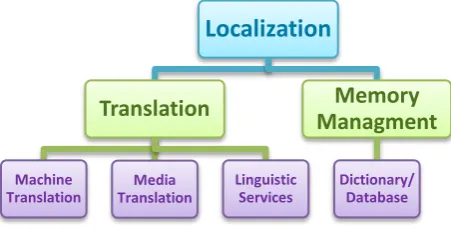
The high level architecture for product localization encompasses the different module of complete project as a service. There are two main services for localization project as: Translation and Memory Management. Translation process includes services such as Machine Translation (MT) services, Media Translation and Linguistic services such as spell check. (As shown in figure 2)
Every localization project consist a new set of rules, checklists, information sheets and contact details. Whenever one can work on a localization project, he will have some rules or checklists on how to organize the project. There might be a list or questions to ask the user, to get all the information needed for the project.
Figure 1. The overall modular functionality of the Localized Text Editor
For example if programmers wish to create a project Localized Text Editor which is a standalone Hindi language Text Editor for local market, then they must follow some rules, checklist in order to organize the project. One rule applied in case of LTE is that every Hindi language string correspond to English language string must be registered with the database including the Unicode.
Figure 2: High level architecture for Localization
If a user wants to open an already registered product (that is *.txt file) then user click on “Qkby > Qkby [kkssys” an open dialog box is open to select the file from the list (as shown in figure 4).
If a user wants to save the file user click on “Qkby > ,sls lgst
s”
an open dialog box is open to save the file (as filename.txt).This way the user will work on a Text Editor with her own locale language Hindi for Indian market
3.2.2
Unicode:
Computer needs a code that transforms characters into numbers, to store text and numbers that human can understand. The Unicode Standard is a character coding system designed to support the worldwide interchange, processing, and display of the written texts of the diverse languages and technical disciplines of the modern world. In addition, it supports classical and historical texts of many written languages. The Version 6.3.0 is the latest version of the Unicode Standard [1].
Table 1: Different Unicode Transformation Unit
UTF-8
Uses 1 byte (8 bits) to encode English characters. It can use a sequence of bytes to encode the other characters. It is widely used in email system.
UTF-16
Uses 2 bytes (16 bits) to encode most commonly used characters. If needed, the additional characters can be represented by a pair of 16-bit numbers.
UTF-32
Uses 4 bytes (32 bits) to encode the characters. It became apparent that as the Unicode standard grew a 16-bit number is too small to represent all the characters. It is capable of representing every Unicode character as one number.
Code Points and Code units are respectively used for the value that a character is given in the Unicode standard and the way to provide an index for where a character is positioned on a plane. For example Code Point to encode the characters, “v” is U+0905, “vk” is U+0906, “b” is U+0908.
With UTF-16 each 16-bit number is a code unit. The code units can be transformed into code points. For example, the flat note symbol "♭" has a code point of U+1D160 and it lives on the second plane of the Unicode standard. It would be encoded using the combination of the following two 16-bit code units: U+D834 and U+DD60 [2].
3.3
Dictionary File
Unicode used to transfer characters into numbers, to store text and numbers that human can understand for computer system. For Java programming Unicode characters can be expressed through Unicode Escape Sequence (USE). USE may appear anywhere in Java source file. USE consists of:
1. A backslash “\”
2. A “u”
3. Four hexadecimal digits (the characters „0‟ through „9‟ or „a‟ through „f‟ or „A‟ through „F‟).
Such sequences represent the UTF-16 encoding of a Unicode character. For example the developer can design the Unicode dictionary that consist all the desire code for Hindi language
Localization
Translation
Machine Translation Media Translation Linguistic ServicesMemory
Managment
Dictionary/ Database DEVELOPER JAVA PlatformCompile & Run
Localized Text Editor
Localization
Unicode
Dictionary File
(Containing Unicode for Hindi language)
Update & Access Replace UI
[image:2.595.58.284.354.469.2]Table 2: Unicode for Hindi language string of Localized Text Editor (LTE)
English language string for Text Editor
Hindi language string for Localized Text
Editor (LTE)
Unicode
File Qkby \u095E\u093E\u0907\u0932
New u;k \u0928\u092F\u093E
Open [kksys \u095E\u093E\u0907\u0932\u0020\u0916\u094B\u0932\u0947
Save lgsts \u0938\u0939\u0947\u091C\u0947
Save As ,sls lgsts \u0910\u0938\u0947\u0020\u0938\u0939\u0947\u091C\u0947
Page Setup i`IB lSVvi \u092A\u0943\u0937\u094D\u0920\u0020\u0938\u0947\u091F\u0905\u0 92A
Print NkWais \u091B\u093E\u0901\u092A\u0947
Exit ckgj \u092C\u093E\u0939\u0930
Edit laiknu \u0938\u0902\u092A\u093E\u0926\u0928
Undo Igys tSlk \u092A\u0939\u0932\u0947\u0020\u091C\u0948\u0938\u093E
Cut dkVsa \u0915\u093E\u091F\u0947\u0902
Copy udy djsa \u0928\u0915\u0932\u0020\u0915\u0930\u0947\u0902
Paste fpidk,W \u091A\u093F\u092A\u0915\u093E\u090F\u0901
Delete feVk;sa \u092E\u093F\u091F\u093E\u092F\u0947\u0902
Find <Ww<s \u0922\u0942\u0901\u0922\u0947
Replace izfrLFkkfir \u092A\u094D\u0930\u0924\u093F\u0938\u094D\u0925\u093E\u092A\u 093F\u0924
Select All lHkh pqus \u0938\u092D\u0940\u0020\u091A\u0941\u0928\u0947
Format izk#i \u092A\u094D\u0930\u093E\u0930\u0942\u092A
Word Wrap 'kCn osIBu \u0936\u092C\u094D\u0926\u0020\u0935\u0947\u0937\u094D\u0920\u0
928
Font v{kj \u0905\u0915\u094D\u0937\u0930
Color jax \u0930\u0902\u0917
View n`j; \u0926\u0943\u0936\u094D\u092F
Help enn \u092E\u0926\u0926
About Editor Laiknd dk ifjp; \u0020\u0915\u093E\u0020\u092A\u0930\u093F\u091A\u092F
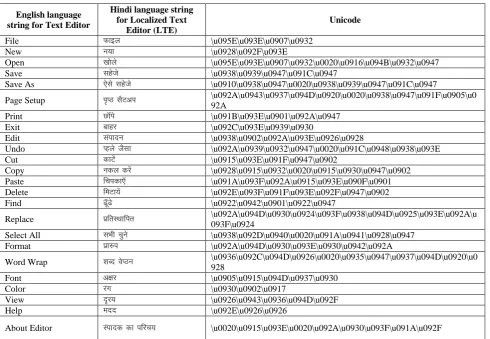
As shown in above table Unicode convert the English language UI into Hindi language UI by Java programming. Similarly developer can develop the LTE with any target language such as: Guajarati, Tamil, Marathi, Punjabi etc using Unicode. We can represent text in any language and even a lot of things that aren‟t text (mathematical symbol, arrows, emoticons, and more).
4.
IMPLEMENTATION
Developer implements the software application for Hindi language as target locale and this application is named as “Localized Text Editor (LTE)”. Implementation is done using
core Java programming. The result of efficient programming is represented in form of developed java application.
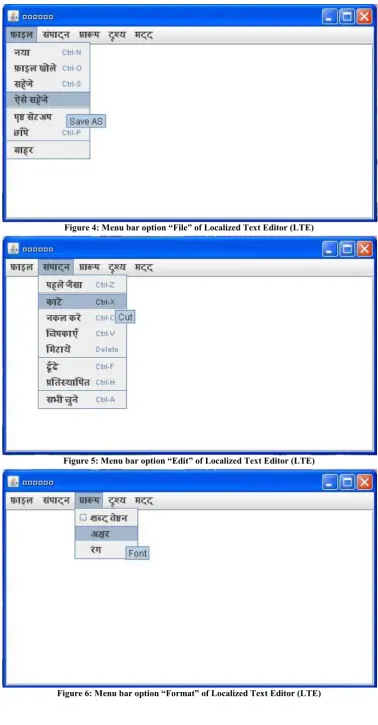
[image:3.595.120.478.586.745.2]Figure 3 shows the developed Localized Text Editor (LTE) with Hindi language as target language. Such editor facilitates the user to work with their own locale environment. Editor has five menu bar option as “File, Edit, Format, View and Help” (as shown in figure 3). Figure 4 to figure 8 represent the menu item for each menu bar option respectively. The sample screen layouts depicting the same are given bellow.
Figure 4: Menu bar option “File” of Localized Text Editor (LTE)
[image:4.595.108.487.68.794.2]Figure 5: Menu bar option “Edit” of Localized Text Editor (LTE)
Figure 7: Menu bar option “View” of Localized Text Editor (LTE)
Figure 8: Menu bar option “Help” of Localized Text Editor (LTE)
5.
TESTING
The framework should also document the different quality measures that are available, in order to judge the quality of the LTE. That‟s way one can choose the appropriate measures for the project. These quality measures are: Customer satisfaction index (based on the choice of translation terms used), Reliability, Costs of quality activities, Re-work, Test Coverage, Responsiveness (turnaround time) to users, etc.
Testing is also a part of quality management. In case of LTE project, developer perform linguistic/terminology testing, localization testing. Linguistic testing: check the grammatical and contextual errors. Localization testing: checks the quality of a product‟s localization for a particular target culture/locale. Localization testing can be executed only on the localized version of a product.
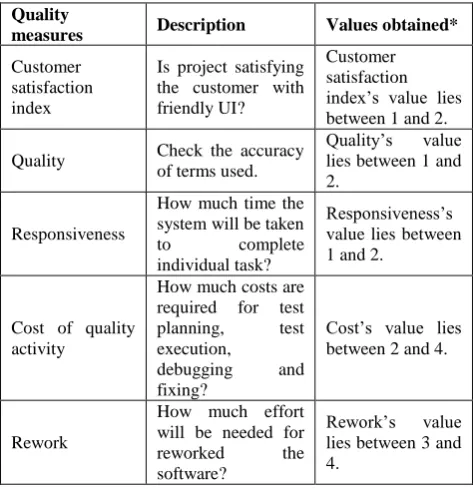
The various graphics, icons, symbols and colors used in the software product must adhere to the cultural conventions of the target locale. Following quality measures mentioned in table 3 may be considered for testing the localized product:
Table 3: Various Quality measures for Localized product
Quality
measures Description Values obtained*
Customer satisfaction index
Is project satisfying the customer with friendly UI?
Customer satisfaction index‟s value lies between 1 and 2.
Quality Check the accuracy of terms used.
Quality‟s value lies between 1 and 2.
Responsiveness
How much time the system will be taken to complete individual task?
Responsiveness‟s value lies between 1 and 2.
Cost of quality activity
How much costs are required for test planning, test execution,
debugging and fixing?
Cost‟s value lies between 2 and 4.
Rework
How much effort will be needed for reworked the software?
Rework‟s value lies between 3 and 4.
[image:5.595.310.547.484.729.2]6.
CONCLUSION
The purpose of this paper has been explaining the developed Localized Text Editor (LTE) which can be developed using Java programming and Unicode. The LTE is an example of localization of a text editor (commonly having source language English) into target language Hindi. This text editor facilitates the common Indian mass to work with a user friendly environment. It provides all the basic features of a text editor with a more favored interface in Hindi that gives the desired local “look-and-feel”. It also provides easy way for part of public of India who don‟t know English, to handle the Editor efficiently. It conclude from analysis that text editor is properly developed and perform all necessary functionality.
7.
FUTURE SCOPE
There is a scope in the future where the “Text Editor” can be developed for all Indian local languages as: Guajarati, Marathi, Bengali, and Panjabi etc. The text editor also includes spell checker, auto correction & advance formatting tools in future. The function of this “Text Editor” is also extended by including import options for various object files such as images, charts etc.
8.
REFERENCES
[1] www.unicode.org/standard/standard.html
[2] www.java.about.com/od/programmingconcepts/a/unicod e.htm
[3] M Bhatia and P Dhayani, “Localization, Translation Cloud and Virtualization”, International Conference on
Electrical Engineering and Computer Sciences (EECS), April-2013, Nainital (India).
[4] M Bhatia, V Tomar and A Sharma, “A survey of Software Localization work”, Journal of Global Research in Computer Science, Vol-4, no-8, 2013.
[5] M Bhatia, A Sharma and V Tomar, “Conceptuality of Software Localization”, International Journal of Scientific Research in Computer Science Applications and Management Studies, Vol-2, no-5, 2013.
[6] M Bhatia and V Tomar, “Service Oriented Architecture Based Framework for Software Localization”, International Conference on Emerging trends in Engineering & Applied Sciences, at Rajasthan College of Engineering for Women, Jaipur (Rajasthan, India).
[7] R.W. Collins, “Software Localization: Issues and Methods”, The 9th European Conference on Information Systems, Bled, Slovenia, June 27-29, 2001.
[8] M. Rosen, B. Lublinsky, K.T. Smith and M.J. Balcer, “Applied SOA, Service Oriented Architecture and Design Strategies”, E-Book, published by Wiley Publishing, Inc.