
© 2016, IRJET | Impact Factor value: 4.45 | ISO 9001:2008 Certified Journal | Page 642
E-Mail Header- A Forensic Key to Examine an E-Mail
Swapnil Gupta
1, Kopal Gupta
2, Dr. Anu Singla
31,2,3 Institute of Forensic Science & Criminology,
Bundelkhand University, Jhansi (U.P.), India
---***---Abstract - In today’s world of technology, it is very difficult to identify the location of a crime. Similar things also happen in case of an e-mail. E-mail is an electronic message transmitted over a network from one user to another while e-mail header is a part of an e-mail that comes before the body of the letter and contains information about the e-mail. Simply, e-mail header is a return address and route label of an e-mail. E-mail header consists of two parts, one is ‘header’ which represent journey information of e-mail from origin to destination and another is ‘body’ which include written part as well as attachment part, e.g. are pictures, documents, sounds & videos, etc. In the present study an attempt has been made to review e-mail header and its structure, location, protocols, formation as well as forensic examination.
Key Words: E-mail Header, SMTP, MTA, POP, IMAP, MAPI,
HTTP
1.INTRODUCTION
“Any sufficiently advanced technology is
indistinguishable from magic.” - C. Clarke
E-mail like electricity, refrigeration and broadcasting is one of those magical technologies which we use every day without really understanding, how it works. E-mail is the second most used application on the internet next to web browsing. 95% of all business documents are created digitally and most of them are never printed. 50 billion e-mails transverse through the internet daily. The average business person sends and receives approx. 50 to 150 e-mails every day. E-mail contributes 500 times greater volume to the internet that web page contains. [1]
Now a day, everybody is having his/her e-mail account onto different domain. Each e-mail address has 2 parts: forename@lastname. Forename is known as e-mail account and lastname is called as domain name. Domain name is registered with the ICANN (Internet
Corporation for Assigned Names & Numbers). Domain Name Server (DNS) is the phonebook of the internet.
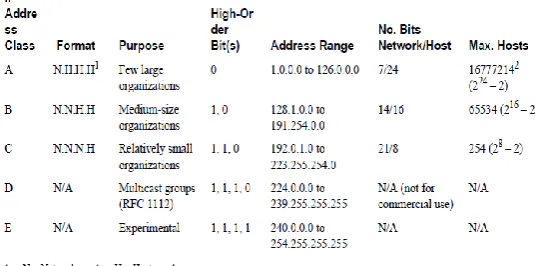
Every device involved in communicating on internet requires an IP (Internet Protocol) address. An IP address is a series of 4 digits ranging from 0 to 255. It allows for a total of 256^4 or 1,099,511,627,776 unique addresses. An IP address may belong to either of two categories: static and dynamic. A static IP address is permanently assigned to devices configured to always have the same IP address (e.g. Website) while dynamic IP address is temporally assigned from a pool of available addresses registered to an ISP (Internet Service Provider). ISP is a commercial vendor, which reserves block of IP addresses to users. ISP may log date, time, account user information and ANI (Automatic Number Identification). [2] The
following table [3] is showing details of all classes of IP
[image:1.595.309.577.461.594.2]addresses:
Fig 1: Classes of IP Address
© 2016, IRJET | Impact Factor value: 4.45 | ISO 9001:2008 Certified Journal | Page 643 Basically, an e-mail is handled by a minimum of
four separate computers:
(i) The computer it is sent from
(ii) The mail server of the sender
(iii) The mail server of the receiver
(iv) The computer that receives the e-mail
Suppose that ‘A’ wants to send an e-mail to ‘B’. ‘A’ and ‘B’ use different ISP for sending and receiving e-mail. ‘A’ uses alphanet.com and ‘B’ uses betanet.com. Firstly, ‘A’ composes an e-mail on his computer known as A.alphanet.com. The message will then be send from
his computer to his mail server i.e.
mailserver.alphanet.com. After this point, ‘A’ has no control on the message and it will be processed by other computers, out of his control. When mailserver.alphanet.com finds that the message is to be delivered to ‘B’ in the betanet.com, it places the message in the inbox of ‘B’. Next time, when ‘B’ checks his e-mail account, he finds that the e-mail of ‘A’ is delivered to him.
Fig 2: Life Cycle of A’s E-mail to B
The following table and diagram illustrate the following details:
Step1 ‘A’ composes message in his computer known as A.alphanet.com.
Step2 A.alphanet.com sends the e-mail to mailserver.alphanet.com.
Step3 mailserver.alphanet.com sends the e-mail to the mail server of ‘B’ i.e. mailserver.betanet.com
Step4 ‘B’ uses his computer (B.betanet.com) to check his e-mail
Step5 B.betanet.com retrieves e-mail of ‘A’ from mailserver.betanet.com.
An ‘e-mail header’ is a part of an e-mail that comes before the body of the letter and contains information about the e-mail. In simple words, e-mail header is a return address and route label of an e-mail.
Therefore an e-mail is made up of two main parts, the ‘header’ and the ‘body’. The header part contains all the technical information such as who are the sender and recipient and from how many systems the message passed through on its way. The body contains the actual message including written part and attachment part. Attachment may be any type of file such as pictures, documents, sound and video, etc. [4]
Location of E-Mail Header
© 2016, IRJET | Impact Factor value: 4.45 | ISO 9001:2008 Certified Journal | Page 644
1. Gmail Account- First of all, login your Gmail
[image:3.595.39.303.184.349.2]account. Then go to inbox, select one of your messages, now click on reply option and then select show original option. That is the e-mail header present on the new window.
Fig 3: E-mail Header of Gmail
2. Rediffmail Account- Firstly, login your Rediffmail
account. Then go to inbox and select one of your messages. Now click on show full header option. That is the e-mail header, you can see on new window.
3. Yahoomail Account- First of all, login your
Yahoomail account. Then go to inbox and select one of your messages. Now click on full header option. That is the e-mail header; you can see it on the same window.
Working and Protocols of E-Mail
E-mail system is an integration of several hardware and software components, services and protocols, which provide interoperability between its users and among the components along the path of transfer. The system includes sender’s client, server computers and receiver’s client, server computers with required software and services installed on each. Besides, it uses various systems and services of the internet. The sending and receiving servers are always connected to the internet but the sender’s and receiver’s clients connect to the internet as and when required. [5]
How Does E-mail Work?
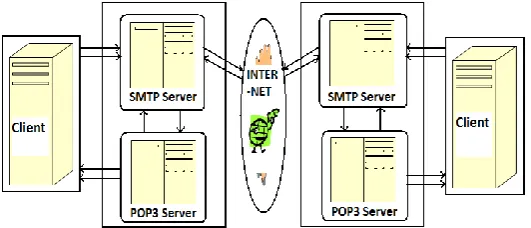
An e-mail is based on a Client Server Model.
The Client- The client carries out the user’s
interactions with e-mail server. A client can appear in various forms:
a. Application based- These are installed onto user machines and include Microsoft outlook, etc.
b. Web based- These appear in a web browser’s Window include Gmail, Hotmail, Yahoomail, etc.
The client also configured with the account information and names or IP addresses of e-mail server for communicating.
The Server- The client only has to connect to the
e-mail server when it sends and receives new e-e-mail.
How Does E-mail Server Work?
Most of the e-mail servers work by running two separate processes on the same machine. Each machine has two servers. First is SMTP (Simple Mail Transfer Protocol) server that receives outgoing e-mails from other SMTP servers and second is POP3 (Post Office Protocol 3) server that holds e-mail in a queue and delivers e-mail to the client when they are downloaded. Sometimes, TCP/IP (Transmission Control Protocol/ Internet Protocol) or IP port 25 is used to send the mail and POP3 on port 110 is used to check the mail.
[image:3.595.313.579.572.686.2]© 2016, IRJET | Impact Factor value: 4.45 | ISO 9001:2008 Certified Journal | Page 645 TCP/IP is having many ports that range from 0 to
65535 and it uses different ports to perform different jobs. Such as Port 21 is used for FTP (File Transfer Protocol), Port 25 for SMTP (Simple Mail Transfer Protocol), Port 80 for HTTP (Hyper Text Transfer Protocol), Port 110 for POP3 (Post Office Protocol 3). Therefore, Protocol is like the address of the Post Card which is a bit of computer code and is used as a communicator between two applications. Ports are also known as “Points of Entry”.
Outgoing Mail Protocol
1. SMTP (Simple Mail Transfer Protocol)
2. MTA (Message Transfer Agent) = Message ID
Incoming Mail Protocol
1. POP/ POP3 (Post Office Protocol)
2. IMAP (Internet Mail Access Protocol)
3. MAPI (Messaging Application Programme Interface)
4. HTTP (Hyper Text Transfer Protocol)
IMAP is used for viewing e-mail stored on a server. The basic difference between IMAP and POP3 is that IMAP does not download the message while POP3 does. [1]
Commands and Formation of E-Mail Header
SMTP Commands- Most common SMTP commands
used for outgoing mails are as follows [6]-
1. HELO Command- HELO command is used by
sending machine to identify itself. When SMTP is established, mail servers send a 220 code to signal that it is ready. Now client will sends a HELO Command. This will identify the sending machine.
E.g. If A.alphanet.com sends HELO to Mailserver.alphanet.com, and then its command would be ‘HELO A.alphanet.com’. 220 Code (<domain> Service Ready)
2. MAIL FROM /ENVELOPE FROM
Command-MAIL FROM Command is used to identify the
sender’s E-mail address and initiates a mail transaction.
E.g. ‘MAIL FROM: [email protected]’.
This command does not verify that e-mail address provided is valid. When mail server accepts this command, it replies back a 250 code.
250 Code (Requested mail action okay, completed)
3. RCPT TO Command- RCPT TO Command is
similar to MAIL FROM Command; it specifies e-mail address of the recipient.
E.g. ‘RCPT TO: [email protected]’.
This command does not verify that e-mail address provided is valid. When mail server accepts this command, it replies back a 250 code.
250 Code (Requested mail action okay, completed)
4. DATA Command- DATA Command signifies the
message portion of the e-mail.
DATA starts the actual mail entry. Everything entered after a DATA Command is considered as part of the message.
If the mail server accepts this command, it replies back a 354 code.
354 Code (Start mail input; end
with<CRLF>.<CRLF>)
5. QUIT Command- QUIT command signals the
termination of an SMTP session.
When client want to stop the SMTP connection, then QUIT command is given.
© 2016, IRJET | Impact Factor value: 4.45 | ISO 9001:2008 Certified Journal | Page 646
Table: SMTP Sequence of an E-mail[8]
Formation of E-mail Header
Formation of e-mail header is also called ‘E-mail Metadata’. Metadata in an e-mail message is in the form of control information, i.e. envelope and headers including headers in the message body, which contain information about the sender and/or the path along which the message has traversed. [7] E-mail header is
organised from bottom to top. As the message passes through mail server, some information added by these into previous information. So mail server referred to as Message Transfer Agent (MTA) and each adds a ‘Received’ section to e-mail header.
[image:5.595.44.304.102.418.2]E.g. The content of A’s mail has written in the first (1) set of message, A’s mailserver in second (2) set and B’s mailserver in third (3) set as shown below:
Fig 5: Parts of E-mail Header
Forensic Examination of E-Mail Header
The examination of e-mail header can be done line by line analysis.
A. Message Header- It contains information added to
header by sender’s e-mail. This is user created information. It contains Date, From, To, Subject, MIME Version, Content- Type and Content- Length.
Description of Message Header (Header from the Client)
This information is assigned by the sender’s machine. It is not important for the investigation purpose because sender’s machine may be wrong in date and time.
© 2016, IRJET | Impact Factor value: 4.45 | ISO 9001:2008 Certified Journal | Page 647 This information is entered by the user. While Cc
(Carbon Copy) & Bcc (Blind Carbon Copy) allows the sender to add multiple recipient, similar to the ‘To’ header.
This information is entered by the user.
SMTP can send only text, while this method is used to send attachment is UUencode or MIME (text, images, video etc). UUencode firstly convert binary to text which can travel by SMTP. MIME (Multi-purpose Internet Mail Extensions) is used to change nature of attachment. It encodes images and sounds.
It tells the recipient about the information of e-mail client to interpret the content of the message.
It tells about all the attachments.
B. Envelope Header- It contains information added to
header by Mail server that receive the message during the journey. It contains Received and Message ID lines.
Description of Envelope Header (Header from the Mail Server)
It is a unique identifier assigned to each message. It is assigned by the first mail server. It can be forensically examined.
Forensic Examination- Message ID plays a vital role in
tracing e-mails. Message IDs are created by both e-mail client and mail server. Usually first part of ID is created by client software while second part by SMTP server.
The given Message ID is showing following information:
Year 2008, Month 11, Day 11, Time 09:45:50 GMT
Received field is a unique numerical address for each computer through which that e-mail passed while being sent known as an electronic postmark. It can be examined forensically.
Forensic Examination- The message received from
computer claiming to be A.alphanet.com and server IP address is z17mr1009295 on Thu, 13 Nov 2008 20:15:50 -0800PST. Therefore it gives IP address of its mail server. It could indicate name of server, protocol used, date and time of server.
It is the last stamp placed on the header.
Forensic Examination- This message received from
computer claiming to be Mailserver.alphanet.com and server IP address is 160.121.0.5. It is received by Mailserver.alphanet.com and with SMTP ID of 23so1241039agd on Fri 14 Nov 2008 09:45:53 +0530. Therefore, it gives IP address of its mail server. It could indicate name of server, protocol used, date and time of server.
N.B. The information at Sr. No. [11] is configured in e-mail client by user and may not be reliable. It is provided by MAIL FROM Command.
3. CONCLUSIONS
© 2016, IRJET | Impact Factor value: 4.45 | ISO 9001:2008 Certified Journal | Page 648 Expires, Follow-up- To, Injection- Date, Injection- Info,
Newsgroups, Organization, Path, Summary,
Supersedes, User- Agent, Xref, which can be useful the tracing of an e-mail. Hence, after the thorough examination of e-mail header one can easily understand its technology and process. This article may not only be useful for Forensic Scientist but for a layman also.
REFERENCES
[1] Ball, C. (2005), “Six on Forensics”,
http://www.craigball.com/_OFFLINE/cf_vcr.pdf, 64-95.
[2] National Institute of Justice (2007)
“Investigations Involving the Internet and Computer Networks” Special Report, U.S. Department of Justice Office of Justice Programs.
[3] Internetworking Technology Overview (1999),
“Internet Protocols”,
http://fab.cba.mit.edu/classes/961.04/people/neil /ip.pdf.
[4] Colvin, T. & Jolley, J. (2005), “Viewing E-mail
Headers”, National Criminal Justice Computer Laboratory & Training Centre.
[5] Banday, M. T. (2011), “Technology Corner
Analysing E-Mail Headers for Forensic
Investigation”, Journal of Digital Forensics, Security and Law, Vol. 6(2).
[6] Riabov, V. V. (2005) “SMTP (Simple Mail Transfer
Protocol)”, Rivier College,
https://www.rivier.edu/faculty/vriabov/Informati on-Security-SMTP_c60_p01-23.pdf.
[7] G.E. Investigations, “How to Interpret E-mail
Headers”, LLC & Team Majestic Designs, LLC.
[8] Banday, M. T. (2011), “TECHNIQUES AND TOOLS
FOR FORENSIC INVESTIGATION OF E-MAIL”,
![Table: SMTP Sequence of an E-mail[8]](https://thumb-us.123doks.com/thumbv2/123dok_us/8203422.816172/5.595.106.570.50.423/table-smtp-sequence-of-an-e-mail.webp)
