2019 International Conference on Computer Science, Communications and Multimedia Engineering (CSCME 2019) ISBN: 978-1-60595-650-3
Research on Beautification Method of 3D Face Model Based on Texture
Jin-fang LI
1, Jia-hong CAI
1, Han-wu HE
2,*, Er-fang LI
3,
Jian-qing MO
1and Jia-yuan LIU
11Guangdong University of Technology, Guangzhou 510006, China
2
Guangdong College of Industry and Commerce, Guangzhou 510510, China
3Henan Polytechnic University Hospital, Jiaozuo 454150, Henan, China
*Corresponding author
Keywords: Face model, Texture processing, Fast marhcing, Model whitening, Gamma transform.
Abstract. The beautification effect design method of the medical beauty industry mainly deals with the texture of the 3D face model, including texture local processing and texture overall processing method. In this paper, two new methods are proposed for texture local processing. One is the real-time texture local repair method based on fast marching method, the other is the ROI texture fusion method based on pixel extraction; the overall processing method for face-finished texture is lacking. A defect of model whitening effect is proposed, and an improved gamma transform texture pixel enhancement algorithm is proposed.
Introduction
3D face model modeling and optimization techniques are widely used in multimedia, VR (virtual reality) games and medical fields. But even in today's mature medical aesthetics industry, experienced doctors sometimes can't make beauty seekers get the desired results after surgery, so good postoperative simulation is an essential step, which can be Both physicians and beauty seekers provide powerful visualization methods, and this technique requires efficient 3D face model beautification methods.
The design of face beautification effect is a hot topic researched by scholars at home and abroad. Tian Tanghao [1] developed a 3D face simulation cosmetic system, which can realize 3D face analysis, free deformation and simulated facelift, but requires users to manually mark feature points, which requires professional knowledge to adjust 3D faces. Zhao Yan [2] studied a technique based on graphical personal face repair, which can simulate the effect of 3D face postoperative surgery, and improve a Gaussian distribution function to make the STL data of face model can be used. In the deformation of the area, but there are problems such as cumbersome operation and no texture display. Tang Yucheng [3] and others proposed a GPU-based 3D face data repair method, which can improve the low-quality part by scanning the face data scanning cavity, and obtains a good effect, and this method lacks the processing of the overall texture of the model. Bertalmio [4] proposed a repair algorithm based on Partial Differential Equations (PDE). The main idea of this algorithm is to iterate the information around the repaired area by the direction of the iso-illuminance line along the pixels in the image. It is in the area to be repaired until the image is completely filled, and the repair algorithm can only be applied to the two-dimensional scene, which is difficult to implement in the three-dimensional face model texture patching.
Local Repair of Model Texture
Texture Repair Method Based on Fast Marching Method
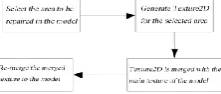
Dynamic texture generation—The first step is to select the texture area to be processed in the 3D model. In this paper, the texture coordinates of the model of the mouse are obtained by using the ray technique, and the selected area is selected by drawing the circle as shown in Figure 1.
[image:2.595.240.362.309.367.2]
Figure 1. Circle. Figure 2. Generated texture. Figure 3. Mapping.
In the second step, in order to clearly distinguish the skin area, the method of filling the circular contour is filled by the method of diffusing water filling [5]. In this paper, the color of the filling is white, as shown in Figure 2. In order to make the selected target area become smoother, and further to the target area Gaussian blur processing. A texture is then dynamically generated for the target area and saved as a .PNG format. The flow chart is shown in Figure 4.
Figure 4. Generated texture process.
The third step is to calculate the texture coordinates of the 3D face model corresponding to the texture based on the generated dynamic texture [6]. The calculation process is as follows:
𝑀 = 𝑀𝐶→𝑃∗ 𝑀𝑊→𝐶∗ 𝑀𝑀→𝑊 (1)
𝑀𝑀→𝑊: Matrix transformed from model space to world.
𝑀𝑊→𝐶: Matrix transformed from world to camera space.
𝑀𝐶→𝑃 Matrix transformed from camera to cropping space.
𝑀: A matrix whose vertex coordinates are transformed from model space to clipping space. Therefore, we can get the expression of the whole transformation process of the texture projected onto the model:
VPr oject = M*V (2)
The fixed points coordinates projected onto the screen are then mapped to the model's texture coordinates according to the formula. Map the texture to the 3D face model, as shown in Figure 3.
FMM texture repair process—According to the dynamic texture generated in the previous section, the 3D face model texture is repaired by using the texture as a mask by the fast marching algorithm. The method of rapid travel is a method of repairing the model texture, that is, progressively moving from the boundary to be repaired to the center of the area to be repaired, and repairing the pixels of the boundary, so that the value of the pixel in the area to be repaired is The method of decrementing is done [7]. In this paper, we use the fast marching method to generate a texture consistent with the size of the area to be repaired according to the dynamic selection, and then perform iterative pixel fusion on the selected area to remove the acne and stains in the 3D face texture, and friendly Apply to 3D scenes. The specific repair process is shown in Figure 5.
[image:2.595.243.354.712.759.2]Through the real-time repair of the above model texture, the stains in the model texture can be removed. The effect comparison of two different face models is shown in Figure 6. As shown in Figure 6, it can be seen that the face acne Has been repaired.
[image:3.595.145.333.115.250.2]
a. Original image b. Constituency image c. Repaired
Figure 6. Effect of rendering.
ROI Texture Fusion Method Based on Pixel Extraction
Pixel extraction is the picking of the desired color by ray technology, and then the picked color is mixed with the ROI area on the 3D face model and covered by its color at the specified position [8].
Pick color principle—The color is picked up by the mouse to obtain the R, G, and B values of the mixed color, and then the local pixel information is saved as texture data by the RedPixels() function. Finally, the pixel information is filled into the new by the DrawFilledCircle() function in Opencv. The texture T is produced in a new texture.
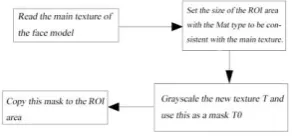
[image:3.595.225.374.411.479.2]Texture ROI area blend—The resulting new texture is blended with the face model texture. The first step is to determine the ROI area that the face model texture needs to be mixed. The flow is shown in Figure 7.
Figure 7. Determine the ROI area process.
First, a Mat type image with the same size as the face model texture is generated, then the new texture T is grayed out to T0, and finally the new texture T is copied to the Mat image using T0 as a mask. Figure 8 is a face model texture, Figure 9 is a grayscale mask T0, and Figure 10 is a final determined ROI region.
Figure 8. Face model texture. Figure 9. Grayscale mask.
Figure 10. Final ROI area. Figure 11. Texture blending image.
In the second step, the ROI region and the face model texture are linearly mixed [9], and the linear blending operation is to perform binary pixel operation, and the formula is shown in equation (3).
g(𝑥) = (1 − α)𝑓𝑎(𝑥) + α𝑓𝑏(𝑥) (3)
[image:3.595.164.429.559.702.2]𝑓𝑎(𝑥), 𝑓𝑏(𝑥): Represents two images participating in the blending.
g(𝑥): Represents the output object.
[image:4.595.274.319.164.224.2]The size and type of the two images must be identical, that is, the image matrix dimensions must be the same. Finally, the merged effect map is obtained, as shown in Figure 11 is a texture blend map. Figure 12 is an effect diagram after mixing ROI textures for pixel extraction. The example proves that the method is intuitive and easy to operate.
Figure 12. ROI texture blending effect image.
Overall Processing of Model Texture
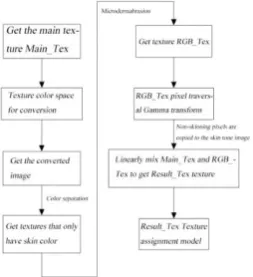
The three-dimensional face model is designed to be landscaping, mainly for the dermabrasion of the texture containing the skin color in the face model [10]. In order to meet the effect requirements of the skin-second surgery of the medical aesthetic plastic surgery, in this paper, the technical implementation route as shown in Figure 13 is proposed.
Figure 13. Overall beautification design route.
According to Figure 13, the main texture of the face model is first obtained, and the color space of the texture is converted. The converted space selects different skin color spaces according to different skin color methods, and then is extracted according to the corresponding different skin color detection technologies. Skin color texture, in order to achieve the best effect of the microdermabrasion algorithm, the YCrCb color space Cr component + Otsu threshold is used to segment the skin color detection method. After obtaining the texture containing only the skin color, it is dermabrasion treatment, and in order to achieve the whitening effect after the dermabrasion treatment, this paper proposes an improved gamma transform texture pixel enhancement algorithm [11-12]. Finally, the skin color texture is merged with the non-skin texture area to obtain the final face model texture.
Skin Color Detection Method
One of the skin color detection methods is based on the skin color detection of the elliptical skin color model, and this detection method greatly affects the shape effect of the skin color on the CbCr plane when the texture brightness component value is large or very small [13]. Therefore, it is proposed to extract the Cr component of the YCrCb color space, and then use the Otsu method to threshold the Cr component to obtain the skin color region.
[image:4.595.235.362.349.488.2]boundary value of the two parts is mainly calculated by calculating the intra-class variance between the corresponding background and the foreground under different thresholds. When the variance within the class takes the maximum value, the threshold is the threshold value Otsu seeks.
In order to find the maximum value of the variance within the class, the threshold between the background and the foreground is represented by T, and the image size is set to M*N, wherein the number of pixels smaller than the threshold T is N_0, which is larger than the threshold T The number is N_1, as shown by equations (4), (5), (6), (7), (8), (9), and (10).
𝜔0 = 𝑁0
𝑀×𝑁 (4)
𝜔1 = 𝑀×𝑁𝑁1 (5)
𝑁0+ 𝑁1 = 𝑀 × 𝑁 (6)
𝜔0+ 𝜔1 = 1 (7)
𝜇 = 𝜔0∗𝜇 0+ 𝜔1∗𝜇1 (8)
𝜉 = 𝜔0(𝜇0− 𝜇)2+ 𝜔 1(𝜇1− 𝜇)2 (9)
Substitute equation (5) into equation (6) to obtain the equivalent formula: 𝜉 = 𝜔0∗𝜔 1∗(𝜇0− 𝜇1)2 (10)
𝜔0: Represents the ratio of the number of pixels in the foreground to the total number of pixels in the image. 𝜇0: Represents its average gray value. 𝜔1: Represents the ratio of the number of background pixels to the total number of pixels in the image. 𝜇1: Represents its average gray value. 𝜇: Represents the average grayscale value of the whole image. 𝜉: Represents the variance between classes. Traversing all ξ finds the maximum value and obtains the corresponding T, which is the threshold value sought. Finally, the threshold is divided by the threshold, and the obtained image is an image with only skin color. Texture-based Dermabrasion Algorithm Implementation After obtaining the face model texture containing only skin color, the texture is dermabrasion. The skin filtering texture is processed by bilateral filtering algorithm. 𝑔(𝑥, 𝑦) =𝜔1 𝑝∑𝑖,𝑗∈𝛺𝜔𝑠(𝑖, 𝑗)𝜔𝑟(𝑖, 𝑗)𝐼(𝑖, 𝑗) (11)
𝑔(𝑥, 𝑦): Represents the processed image.
𝜔𝑠(𝑖, 𝑗): Represents the weight of the spatial domain.
𝜔𝑟(𝑖, 𝑗): Represents the grayscale domain weight.
𝜔𝑝: Represents the normalized parameter.
𝐼(𝑖, 𝑗): Represents the source image to be processed
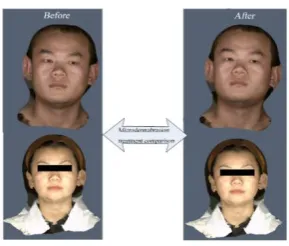
Figure 14. Microdermabrasion contrast effect image.
Texture Pixel Enhancement Algorithm Based on Improved Gamma Transform
The two subsections introduce the method of skin surface treatment of the face model, but still lack the whitening treatment of the face model. In this paper, a texture pixel enhancement algorithm based on Gamma function transformation is proposed.
Gamma correction methods have a wide range of applications in overcoming the effects of light. Based on references [11] and [12], a new correction method is constructed to compensate for illumination. Traditional Gamma correction usually selects the gamma value, and each pixel in the image is corrected by the same gamma value, as shown by equation (12).
𝑂(𝑥, 𝑦) = 255 × (𝐹(𝑥,𝑦)255 )𝛾 (12) Where O(x, y) represents the output image, F(x, y) represents the source image, and the highlight and shadow portions of the image are expanded and compressed by the gamma parameter γ.
In this paper, we use the distribution of illumination components in the face model texture to selectively adjust the parameters of the gamma function. The extraction of the illumination component M(x, y) is convoluted with the source image F(x, y) using a Gaussian function G(x). That is, the formula (13) and the formula (14) are shown.
𝐺(𝑥) =2𝛱𝜎1 2𝑒𝑥2+𝑦22𝜎2 (13)
(14) The γ is obtained as shown in the formula (15).
(15) The resulting γ is then brought into the formula (12). According to the Figure 15, the face model texture is subjected to texture pixel processing, and then the convolution kernels in the Gaussian function are taken to different sizes to obtain an effect d iagram as shown in Figure 16.
[image:6.595.207.386.623.759.2]Figure 15. Gamma processing flow chart.
Figure 16. Different convolution kernel effect images from left to right (original image, convolution kernel 3*3, 7*7, 13*13).
( , ) ( , ) ( )
M x y F x y G x
128 ( , ) 128
1 ( )
2
M x y
According to the convolution kernel size of different Gaussian functions, the illumination component maps are different. From left to right, Figure 16 is the original image, 3*3 convolution kernel, 7*7 convolution kernel, and 13*13 convolution kernel effect. It can be seen that when the convolution kernel of 13*13 size is selected, the compensation effect on the illumination is better, and the whitening effect can be obtained.
Conclusions
This paper mainly studies and proposes a new texture-based 3D face model beautification method. In the local texture processing, two methods are proposed: a texture local restoration based on fast marching method, and a texture fusion method based on pixel picking in ROI region. In the overall skin model, a texture-based dermabrasion algorithm and a gamma-transformed texture pixel enhancement algorithm are proposed. After the method proposed in this paper is applied to the repair process of 3D face model, the acne spot of face model can be removed in real time, and the skin model and whitening function of face model can be used. It has good application value.
Acknowledgements
This work was supported by the Science and Technology Plan Project of Guangdong (No. 2016A040403108) and the National Natural Science Foundation of China (No. 51275094) and the Science and Technology Plan Project of Guangzhou (No.201704020110).
References
[1] Tanghao Tian: 3D face plastic cosmetic simulation system[D].Zhejiang University, 2018.
[2] Yan Zhao: Study on key technologies of facial individual reconstruction based on computer graphics[D].Hebei University of Technology, 2014.
[3] Yucheng Tang, Mingjun Zhang, Haoyu Wang, et al: Fast linear recovering algorithm for low quality 3D face data based on GPU. Journal of Electronic Measurement and Instrumentation 30(06), 959-967 (2016).
[4] Bertalmio, Marcelo, Sapiro, et al. Image inpainting 4(9), 417-424 (2000).
[5] Jiaxin Chen: Real-time Color Object Recognition Method Based on Flood Fill Algorithm. Computer Simulation 29(3), 4-9 (2012)
[6] Tinan Huang, Ronghua Liang, Fuli Wu, et al: The Research of Constrain Texture Mapping for 3D Facial Model[J]. Journal of System Simulation, 385-388 (2008).
[7] Zhiyun Xiao, Wenxia Zhang, Yuli Jiang: Fast image restoration algorithm based on fast marching method [J]. Journal of Computer Applications 27(s2), 60-61 (2007).
[8] Bo W, Liu C, Yong S, et al: A fusion-based approach to image segmentation using ROI and multi-phase level set model[C] //International Congress on Image & Signal Processing. 2010:1120-1153.
[9] Yang Cao, Yupin Luo, Shiyuan Yang: Hybrid Linear Model Based Image Denoising [J]. Chinese Journal of Computers 32(11), 2260-2264(2009).
[10] Qinqin Zhou, Chaohui Zheng: Facial Beautification with Self-adaptive Algorithm[J].Journal of Jianghan University(Natural Science Edition) 39(1), 49-53 (2011).
[12] Lee S, Kwon H, Han H, et al: A Space-Variant Luminance Map based Color Image Enhancement[J]. Consumer Electronics IEEE Transactions on 56(4), 2636-2643 (2010).