60459690
CONTRPL DATA
CORPORATION
NOS VERSION 2
REFERENCE SET
VOLUME 4
PROGRAM INTERFACE
CDC® COMPUTER SYSTEMS:
CYBER 180
REVISION RECORD
REVISION
(04-26-82)
B (01-27-83)
(09-30-83)
(10-12-84)
(03-27-85)
DESCRIPTION
P u b l i c a t i o n N o . 60459690
Manual released. Manual reflects NOS 2.0 at PSR level 562. This manual documents the following new features: QAC interface; revised DSP parameter block; new format of GETFNT macro; new macros GETEOJS, SETJOB, SETFS, GETSSID, and GETJOSC; EJT job status and connection status fields; service c l a s s t y p e s ; u n i v e r s a l a v a i l a b i l i t y o f t h e X J i n s t r u c t i o n ; b i n a r y m e m o r y d u m p r e q u e s t ( D M B ) ; n e w p a r a m e t e r f o r t h e S TAT U S m a c r o t h a t r e t u r n s a d d i t i o n a l i n f o r m a t i o n f o r t a p e fi l e s ; a n d r e v i s e d C I O i n t e r f a c e .
Manual updated to reflect NOS 2.1 at PSR level 580 and to make miscellaneous technical changes. New features include extended DSP parameter block, QAC extended GET request, addition to QAC PEEK reply b l o c k f o r r e m o t e h o s t fi l e s , p r e fi x t a b l e f o r D M B p r o c e s s o r, a n d S H E L L a n d WA I T m a c r o s . T h i s e d i t i o n o b s o l e t e s a l l p r e v i o u s e d i t i o n s .
Manual updated to reflect NOS 2.2 at PSR level 596/587 and to make miscellaneous technical changes. N e w f e a t u r e s i n c l u d e c o m m o n l i b r a r i e s , e n h a n c e d s y s t e m s e c u r i t y, s e r v i c e c l a s s a s s i g n m e n t b y u s e r s , e x p a n d e d e q u i p m e n t s t a t u s t a b l e , a n d s u p p o r t f o r C Y B E R 1 7 0 M o d e l 8 4 5 . T h i s e d i t i o n o b s o l e t e s a l l
p r e v i o u s e d i t i o n s .
Manual updated to reflect NOS 2.3 at PSR level 617 and to make miscellaneous technical changes. New f e a t u r e s f o r t h i s r e l e a s e i n c l u d e a l t e r n a t e C AT L I S T r e s t r i c t i o n , d e f a u l t c h a r g e r e s t r i c t i o n ,
enhanced CLASS command, support of the 834 Disk Subsystems, support of the 639 Magnetic Tape Units, a n d s u p p o r t o f t h e C Y B E R 1 8 0 C o m p u t e r S y s t e m s . T h i s e d i t i o n o b s o l e t e s a l l p r e v i o u s e d i t i o n s . Manual updated to reflect NOS 2.4.1 at PSR level 630 and to make miscellaneous technical changes. New features for this release include support of the CYBER 180 Models 840, 850, and 860, support of
the 5870 Printer, and support of the 895 Disk Subsystem.
REVISION LETTERS I, O, Q, S, X AND Z ARE NOT USED.
© 1 9 8 2 , 1 9 8 3 , 1 9 8 4 , 1 9 8 5 by Control Data Corporation A l l r i g h t s r e s e r v e d
P r i n t e d i n t h e U n i t e d S t a t e s o f A m e r i c a
Address comments concerning this m a n u a l t o :
C o n t r o l D a t a C o r p o r a t i o n
P u b l i c a t i o n s a n d G r a p h i c s D i v i s i o n 4201 North Lexington Avenue S t . P a u l , M i n n e s o t a 5 5 11 2
or use Comment Sheet in the back of t h i s m a n u a l .
LIST OF EFFECTIVE PAGES
0 ^ \
New features, as well as changes, deletions, and additions to information in this manual, are indicated by bars in the margins or by a dot near the page number if the entire page is affected. A bar by the page number indicates pagination rather than content has changed.
PAGE R E V F r o n t C o v e r
I n s i d e F r o n t C o v e r T i t l e P a g e 2 3 4 5 6 7 8 9
10 D .
11 12 13 1-1 1 - 2 1 - 3 1 - 4 1-5 1 - 6 1 - 7 1 - 8 1 - 9 1-10 1-11 1-12 1-13 1-14 1-15 1-16 1-17 1-18 1-19 1-20 1-21 2 - 1 2 - 2 2 - 3 2 - 4 2 - 5 2 - 6 2 - 7 2 - 8 2 - 9 2 - 1 0 2 - 11 2 - 1 2 2 - 1 3 2 - 1 4 2 - 1 5 2 - 1 6 2 - 1 7 2 - 1 8 2 - 1 9 2 - 2 0 3 - 1
PAGE R E V 3 - 2
3 - 3 3 - 4 3 - 5 3 - 6 3 - 7 3 - 8 3 - 9 3 - 1 0 3 - 11 3 - 1 2 3 - 1 3 3 - 1 4 3 - 1 5 3 - 1 6 3 - 1 7 3 - 1 8 3 - 1 9 3 - 2 0 3 - 2 1 3 - 2 2 3 - 2 3 3 - 2 4 3 - 2 5 3 - 2 6 3-27 3 - 2 8 3 - 2 9 3 - 3 0 3-31 3 - 3 2 3 - 3 3 3 - 3 4 3 - 3 5 3 - 3 6 3-37 3 - 3 8 3 - 3 9 3 - 4 0 3-41 3 - 4 2 3 - 4 3 3 - 4 4 3 - 4 5 3 - 4 6 3-47 3 - 4 8 3 - 4 9 3 - 5 0 3 - 5 1 3 - 5 2 3 - 5 3 3 - 5 4 3 - 5 5 3 - 5 6 3 - 5 7 3 - 5 8 3 - 5 9
PAGE R E V 3-60
3-61 3 - 6 2 4-1 4 - 2 4 - 3 4 - 4 4 - 5 4 - 6 4 - 7 4 - 8 4 - 9 4 - 1 0 4 - 11 4 - 1 2 4 - 1 3 4 - 1 4 4 - 1 5 4 - 1 6 4-17 4 - 1 8 4 - 1 9 4 - 2 0 4-21 4 - 2 2 4 - 2 3 4 - 2 4 4 - 2 5 4 - 2 6 4 - 2 7 4 - 2 8 4 - 2 9 4 - 3 0 5 - 1 5 - 2 5-3 5 - 4 5 - 5 5 - 6 5 - 7 5 - 8 5 - 9 5 - 1 0
5-11 5 - 1 2 5-13 5 - 1 4 5-15 5 - 1 6 5-17 5 - 1 8 5-19 5 - 2 0 5-21 5 - 2 2 5-23 5 - 2 4 5-25
PAGE R E V 5 - 2 6
5 - 2 7 5 - 2 8 5 - 2 9 5 - 3 0 5 - 3 1 5 - 3 2 5 - 3 3 5 - 3 4 5 - 3 5 5 - 3 6 5 - 3 7 5 - 3 8 5-39 5 - 4 0 5 - 4 1 5 - 4 2 5 - 4 3 5 - 4 4 5 - 4 5 6 - 1 6 - 2 6 - 3 6 - 4 6 - 5 6 - 6 6 - 7 6 - 8 6 - 9 6 - 1 0 6 - 11 6 - 1 2 6 - 1 3 6 - 1 4 6 - 1 5 6 - 1 6 6-17 6 - 1 8 6 - 1 9 6 - 2 0 6-21 6 - 2 2 6 - 2 3 6 - 2 4 6 - 2 5 6 - 2 6 6 - 2 7 6 - 2 8 6 - 2 9 6 - 3 0 6-31 6 - 3 2 6 - 3 3 6-34 6 - 3 5 6 - 3 6 6 - 3 7 6 - 3 8
PAGE REV 6 - 3 9
6 - 4 0 6-41 6 - 4 2 7 - 1 7 - 2 7 - 3 7 - 4
7 - 4 . 1 / 7 - 4 . 2 7 - 5
7 - 6 7 - 7 7 - 8 7 - 9 8 - 1 8 - 2 8 - 3 8 - 4 8 - 5 8 - 6 8 - 7 8 - 8 8 - 9 8 - 1 0 8 - 11 8-12 8 - 1 3 8-14 8 - 1 5 8 - 1 6 8 - 1 7 8-18 8 - 1 9 8 - 2 0
8 - 2 0 . 1 / 8 - 2 0 . 2 8-21
8-22 8 - 2 3 9-1 9 - 2 9 - 3 9 - 4 9 - 5 9 - 6 9 - 7 10-1 10-2 10-3 10-4 10-5 10-6 10-7 1 0 - 8 10-9 1 0 - 1 0 10-11 1 0 - 1 2 1 0 - 1 3
PAGE REV PA G E REV 10-14 B - l
10-15 B-2 11-1 B-3 11-2 B-4 11-3 B-5 11-4 B-6 11-5 B-7 11-6 B-8 11-7 B-9 11-8 B-10
11-9 B - l l
11-10 B-12 11-11 B-13 11-12 B-14 11-13 B-15 11-14 B-16 11-15 B-17 11-16 B-18 11-17 B-19 11-18 B-20 11-19 B-21 11-20 B-22 11-21 B-23 11-22 B-24 11-23 B-25
11-24 . B-26 11-25 . C-l
11-26 C-2 11-27 C-3 11-28 C-4 11-29 C-5 11-30 C-6 11-31 C-7 11-32 C-8 11-33 C-9 11-34 C-10
11-35 C - l l
12-1 C-12
12-2 C-13
12-3 C-14
12-4 C-15
12-4.1/12-4.2 D - l 12-5 E - l
12-6 E-2 12-7 E-3 12-8 E-4 12-9 E-5 12-10 E-6 12-11 E-7 12-12 E-8 12-13 E-9 12-14 E-10
12-15 E - l l 12-16 E-l 2 12-17 F - l
12-18 F - 2
A - l F-3
A-2 F-4
A-3 F - 5
A-4 F - 6
A-5 F-7
A-6 F - 8
A-7 F-9
A-8 F-10
A-9 F - l l A-10 G - l A - l l G-2
A-12 G-3
A-l 3 G-4
A-14 G-5 A-15 G-6 PAGE G-7 G-8 G-9 G-10 H - l H-2 H-3 H-4 H-5 H-6 H-7 H-8 H-9 1-1 1-2 1-3 1-4 1-5 1-6 1-7 1-8 J - l J - 2 J - 3 J - 4 J - 5 J - 6 J - 7 J - 8 K - l K-2 K-3 K-4 L - l L-2 L-3 L-4 L-5 M-l M-2 M-3 Index-1 Index-2 Index-3 Index-4 Index-5 Index-6 Index-7 Index-8 Index-9 Index-10 Index-11 Index-12 Index-13 Index-14 Index-15 Comment Sheet Back Cover
REV A A D A A A A B B A A A A A A A D A C A C D A A A A C A A D D D C D D E D E D D D E E E E E E E E E E E E E E E E
PAGE REV PAGE REV
PREFACE
This manual describes the Network Operating System (NOS), Version 2. NOS controls operation of CDC® CYBER 180 Computer Systems, Models 810, 830, 835, 840, 845, 850, 855, and 860; CDC CYBER 170 Computer Systems, Models 171, 172, 173, 174, 175, 176, 720, 730, 740, 750, 760, 815, 825, 835, 845, 855, 865, and 875; CDC CYBER 70 Computer Systems, Models 71, 72, 73, and 74; and CDC 6000 Computer Systems.
The NOS Reference Set, composed of four separate volumes, describes the external features of NOS 2.
AUDIENCE
Volume 1, Introduction to Interactive Usage, is written for the novice.
Volume 2, Guide to System Usage, is written for the applications or systems programmer who is unfamiliar with NOS.
Volume 3, System Commands, is written for all NOS users.
Volume 4, Program Interface, is written for the experienced COMPASS applications programmer or systems programmer.
The reader of each volume should have a knowledge of the material contained in the previous volumes.
ORGANIZATION
Volume 1, Introduction to Interactive Usage (60459660), shows a user at an interactive terminal how to enter, run, and correct programs, and how to create, retrieve, and maintain p e rm a ne n t files. O t her t opic s c ove r e d in c lude p h ys i ca l te r mi n a l c o n n e cti o n a n d l o g i n /l o g o u t procedures.
Volume 2, Guide to System Usage (60459670), describes the general concepts of NOS and some o f t h e u t i l i t i e s u s e d w i t h N O S . To p i c s i n c l u d e d a r e j o b p r o c e s s i n g , fi l e c o n c e p t s ,
procedures, magnetic tape processing, Modify, and loading files. This volume is to be used as a learning tool and does not contain comprehensive descriptions of all NOS commands.
Volume 3, System Commands (60459680), describes the system commands that form the user interface to NOS.
Volume 4, Program Interface (60459690), describes the COMPASS program interface to NOS. Detailed descriptions of function processors and macros available to COMPASS user programs are included.
CONVENTIONS
The following notational conventions are used throughout this manual.
SYSTEM REQUEST AND MACRO FORMATS
The system request and macro formats in this manual are presented using both uppercase and lowercase characters. Uppercase characters must be entered exactly as shown; lowercase characters are to be replaced with the appropriate characters as described in the text.
The auto recall parameter is a special case. This parameter is shown in uppercase for all requests except CIO requests. However, the system processes all non-CIO requests made by user programs with auto recall, regardless of whether or not the auto recall parameter is specified in the request. The system processes CIO requests with auto recall only if the auto recall parameter is specified in the request.
NUMBER BASE NOTATION
Decimal base is used throughout this manual except where otherwise noted. Octal integers greater than 7 or less than -7 are written with a subscript 8 or the word octal. Octal base is used in the following contexts:
• Address indices for memory tables and parameter blocks.
• D i s p l a y c o d e v a l u e s .
• Function codes of macros.
• Numbers of words in memory.
• N u m e r i c a l f i e l d s i n m e m o r y.
Decimal base is used in all program examples except where the BASE OCTAL pseudoobstruction or the postradix B is used.
EXTENDED MEMORY
Extended memory for model 176 is large central memory extended (LCME). Extended memory for CYBER 180-class models and models 865 and 875 Is unified extended memory (UEM). Extended memory for models 865 and 875 may also include either extended core storage (ECS) or
extended semiconductor memory (ESM). Extended memory for all other NOS computer systems is either ECS or ESM. ECS and ESM are the only forms of extended memory that can be shared in an ECS multimainframe complex and can be accessed by a distributive data path (DDP).
In this manual, ECS refers to both ECS and ESM, and extended memory refers to all forms of extended memory unless otherwise noted.
Programming information for the various forms of extended memory can be found in the COMPASS Version 3 Reference Manual and in the appropriate computer system hardware reference
manual.
Some of the CYBER 170 Computer Systems share many of the functional and architectural
a t t r i b u t e s o f t h e C Y B E R 1 8 0 C o m p u t e r S y s t e m s . S p e c i fi c a l l y, C Y B E R 1 7 0 M o d e l s 8 1 5 , 8 2 5 , 8 3 5 , ^ ^ 845, and 855 fall into this category. It is sometimes convenient to refer to the CYBER 18o'
models and these CYBER 170 models collectively. This manual uses the term CYBER 180-class
m a c h i n e s t o r e f e r t o t h i s c o l l e c t i o n . - » « S s .
MEMORY WORD FORMATS
The following notations are used in memory word formats:
• Bits of memory words are numbered in decreasing order from left to right, starting with 59 on the left and ending with 0 on the right.
• Bytes (12-bit portions) of memory words are numbered in increasing order from left to right, starting with 0 (byte 0 consists of bits 59 through 48, byte 1 consists of bits 47 through 36, byte 2 consists of bits 35 through 24, byte 3 consists of bits 23 through 12, and byte 4 consists of bits 11 through 0).
• F i e l d s t h a t c o n t a i n o n l y c a p i t a l l e t t e r s i n d i c a t e p o r t i o n s o f m e m o r y t h a t c o n t a i n the display code values for those letters.
• Diagonal lines (Y/A ) indicate a portion of memory that is not used by the system and may contain any value. These portions may, however, be used by future versions of NOS.
• The word 'reserved' or the phrase 'reserved for Control Data* indicates a portion of memory that is either used internally by the system or is reserved for future use. The phrase 'reserved for installations* indicates a portion of memory that each installation may use in whatever manner it chooses.
• A zero indicates a portion of memory that contains all binary zeros.
CHARACTER SETS
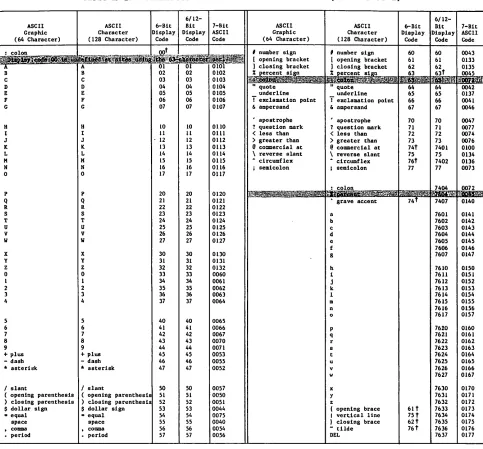
The ASCII character set is used in the examples in this manual. Other NOS-compatible character sets are described in appendix A.
SUBMITTING COMMENTS
The last page of this manual is a comment sheet. Please use it to give your opinion on the m a n u a l ' s u s a b i l i t y, t o s u g g e s t s p e c i fi c i m p r o v e m e n t s , a n d t o r e p o r t a n y e r r o r s . I f t h e
comment sheet has already been used, you can mail your comments to:
Control Data Corporation
Publications and Graphics Division ARH219 4201 Lexington Avenue North
St. Paul, MN 55112
Additionally, if you have access to SOLVER, an online facility for reporting problems, you can use it to submit comments about the manual. Declare your problem type as DOC and use NS2 as the product identifier.
RELATED PUBLICATIONS
The following manuals contain information directly related to the material presented in this volume.
The NOS Manual Abstracts is a pocket-sized manual containing brief descriptions of the contents of all NOS and NOS product manuals. The abstracts can be useful in determining which manuals are of greatest interest to you.
Control Data also publishes a Software Publications Release History of all software manuals a n d r e v i s i o n p a c k e t s i t h a s i s s u e d . T h i s h i s t o r y l i s t s t h e r e v i s i o n l e v e l o f a p a r t i c u l a r manual that corresponds to each released level of software.
These manuals are available through Control Data sales offices or Control Data Literature Distribution Services, 308 North Dale Street, St. Paul, MN 55103.
Control Data Publication
BML Message Formats
Common Memory Manager Version 1 Reference Manual
COMPASS Version 3 Reference Manual
CYBER Loader Version 1 Reference Manual
CYBER Record Manager Advanced Access Methods Version 2 Reference Manual
CYBER Record Manager Basic Access Methods Version 1.5 Reference Manual
CYBER Supermini Operations Handbook
Modify Reference Manual
NOS Version 2 Administration Handbook
NOS Version 2 Analysis Handbook
NOS Version 2 Applications Programmer's Instant
NOS Version 2 Diagnostic Index
NOS Version 2 Installation Handbook
NOS Version 2 Manual Abstracts
NOS Version 2 Network Terminal User's Instant
NOS Version 2 Operations Handbook
NOS Version 2 System Overview
NOS Version 2 Systems Programmer's Instant
Software Publications Release History
Publication Number
60459940
60499200
60492600
60429800
60499300
60495700
60459850
60450100
60459840
60459300
60459360
60459390
60459320
60485500
60459380
60459310
60459270
60459370
60481000
Appendix K contains a comprehensive bibliography of all Control Data publications related to NOS.
DISCLAIMER
This product is intended for use only as described in this document. Control Data cannot be responsible for the proper functioning of undescribed features or undefined parameters.
y£$$srv
CONTENTS
1. PROGRAM/SYSTEM COMMUNICATION
1-1
CIO Processing on Secured Systems 3-12 Reading Files 3-12 Function Processors1-1
W r i t i n g F i l e s 3-12 System Requests1-2
C r e a t i n g F i l e s 3-12 System Request Processing1-3
Status Returned by CIO 3-12 Issuing RA+1 Requests1-5
CIO Open and Close Functions 3-12NOS Systems Texts
1-6
OPEN 3-13Macro Usage
1-7
Mass Storage Operations 3-14 SYSCOM1-8
Unlabeled Tape Processing 3-15 Common Deck Usage1-9
Nonstandard Labeled TapeSecurity Considerations 1-17 Processing 3-15 Memory Protection 1-17 Standard ANSI Labeled Tape
System and File Access Controls 1-17 Processing 3-15 Security Access Levels 1-18 Extended Label Processing 3-17 Security Access Categories 1-20 CLOSE 3-20 R e s p o n s i b i l i t i e s f o r D a t a CLOSER 3-23 S e c u r i t y 1-20 CIO Read Functions 3-24 S e c u r i t y C o n fl i c t P r o c e s s i n g 1-21 RPHR (000) 3-25 READ (010) 3-25 READSKP (020) 3-26 READCW (200) 3-27 2. FILE ENVIRONMENT TABLE (FET)
2-1
READLS (210) 3-29 RPHRLS (230) 3-30 C i r c u l a r B u f f e r s2-1
READNS (250) 3-31FIRST Address
2-2
READN (260) 3-32LIMIT Address
2-2
READEI (600) 3-33 IN Address2-2
CIO Write Functions 3-33OUT Address
2-3
WPHR (004) 3-34FET Description
2-4
WRITE (014) 3-34FET Creation Macros 2-14 WRITER (024) 3-35
FILEB 2-14 WRITEF (034) 3-35
FILEC 2-14 WRITECW (204) 3-36
RFILEB 2-14 REWRITE (214) 3-38
RFILEC 2-15 REWRITER (224) 3-39
FET Modification Macro 2-17 REWRITEF (234) 3-39 SETFET Parameter Processing 2-19 OVWRITE (244, 254) 3-40 SETFET Examples 2-20 WRITEN (264) 3-41 F i l e P o s i t i o n i n g F u n c t i o n s 3-42
BKSP (040) 3-42
BKSPRU (044) 3-43 3. INPUT/OUTPUT
3-1
REWIND (050) 3-43 UNLOAD (060) 3-44 Combined Input/Output (CIO)3-1
RETURN (070) 3-45 CIO Function Processing3-4
POSMF (110) 3-46 Accessing Files3-7
Standard ANSI LabeledReading Files
3-8
M u l t i fi l e S e t P r o c e s s i n g 3-46 W r i t i n g F i l e s3-8
E x t e n d e d L a b e l M u l t i fi l eRandom Request Processing 3-10 Set Processing 3-47
EVICT (114) SKIPF (240) SKIPFF (240) SKIPEI (240) SKIPB (640) SKIPFB (640) Data Transfer Macros
READC WRITEC READH WRITEH READO WRITEO READS WRITES READW WRITEW
CYBER Record Manager I/O
4. LOCAL FILE MANAGER
Error Processing RENAME (000) SETFS (003) SETFAL (007) LOCK (010) UNLOCK (Oil) STATUS (012) STATUS (013) REQUEST (014) REQUEST (015) ASSIGN (020) ENCSF (022) PSCSF (023) LABEL (024) GETFNT (025) PRIMARY (031) FILINFO (032)
5. PERMANENT FILE MANAGER
Alternate User Access Processing Error Processing
PFM Macro Parameter Conventions Auxiliary Device Request
SAVE (001, CCSV) GET (002, CCGT) PURGE (003, CCPG) CATLIST (004, CCCT) PERMIT (005, CCPM) REPLACE (006, CCRP) APPEND (007, CCAP)
3-51 DEFINE (010, CCDF) 3-52 ATTACH (Oil, CCAT) 3-52 CHANGE (012, CCCG) 3-53 OLD (021, CCOD) 3-53 SETPFAC (022, CCAC) 3-54 SETPFAL (023, CCAL) 3-54
3-58 3-59 3-59
3-59 6. CONTROL POINT M 3-60
3-60 SETPR (001) 3-60 MODE (002) 3-61 SETASL (003) 3-61 SETJSL (003) 3-61 SETTL (003) 3-62 EREXIT (004)
ROLLOUT (006) SETSSM (010) ONSW (Oil)
4-1
OFFSW (012) GETJN (013)4-2
GETPR (015)4-2
GETEM (016)4-3
GETASL (017)4-3
GETJSL (017)4-4
GETTL (017)4-4
SETLC (022)4-4
SETRFL (023)4-5
GETJCR (024)4-6
SETJCR (025)4-7
SETSS (026)4-9
GETJO (027) 4-10 GETJA (030) 4-10 USECPU (031) 4-11 USERNUM (032) 4-18 GETFLC (033, 055) 4-26 PACKNAM (035) 4-26 PACKNAM (036)GETSS (037) VERSION (044) GETLC (045)
5-1
GETGLS (046) SETGLS (047)5-3
MACHID (050)5-4
GETACT (051) 5-10 SETMFL (052) 5-14 GETPFP (057) 5-15 GETLOF (061) 5-19 SETLOF (062) 5-20 GETJCI (074) 5-21 SETJCI (074) 5-27 PROTECT (075) 5-29 SETJOB (106) 5-30 GETSSID (110)5-32 5-36 5-38 5-42 5-43 5-44 6-1 6-1 6-2 6-3 6-4 6-4 6-5 6-7 6-8 6-9 6-9 6-10 6-10 6-11 6-11 6-12 6-12 6-13 6-14 6-15 6-16 6-16 6-17 6-17 6-18 6-18 6-19 6-20 6-21 6-21 6-22 6-23 6-23 6-24 6-25 6-25 6-27 6-27 6-28 6-28 6-29 6-30 6-31 6-31 6-32
GETJOSC SHELL ( GETJAL SETJAL GETUSC SETSC ( GETPAGE SETPAGE GETLVL GETRI ( GETCN ( CSTATUS
( 111 ) 113) (116) (117) (123) 124) (127) (130) (133) 134) 136) (137)
7. FILE ROUTING
DSP Function ROUTE
Error Processing
8. QUEUE ACCESS INTERFACE
QAC Requests ALTER Request GET Request PEEK Request
9. SYSTEM TIME/DATE REQUESTS
CLOCK DATE EDATE ETIME HTIME JDATE PDATE RTIME STIME TIME
6-33 11. SYSTEM/LOADER REQUESTS 11-1 6-33
6-35 System Requests 11-1
6-35 ABORT 11-1
6-36 DAYFILE 11-1
6-38 ENDRUN 11-5
6-39 GETLIDA 11-5
6-39 GETMC 11-7
6-40 GETSSM 11-8
6-40 MEMORY 11-9
6-41 MESSAGE 11-10
6-42 MOVE 11-12
RECALL 11-12
SUBR 11-13
SYSTEM 11-13
7-1
WAIT 11-15User Field Length Dump Requests 11-16
7-1
Dump Extended Memory (DEP) 11-167-7
Dump Extended Memory with7-9
Display Code (DED) 11-16Binary Dump of Central Memory
and Extended Memory (DMB) 11-17
8-1
Dump Central Memory (DMP)Dump Central Memory with Display
11-19
8-10 Code (DMD) 11-19
8-11 Queue File Manager 11-19
8-14 RERUN (015) 11-20
8-16 NORERUN (016) 11-20 Loader Requests 11-20
OVERLAY 11-21
LOADD 11-24
9-1
LOADQ 11-26Memory Allocation for Overlay
9-2
Loaders 11-289-2
In te r a c ti ve Te r mi n a l R e q u e st s 11-299-3
DISTC Macro 11-299-4
CSET Macro 11-319-5
PROMPT Macro 11-319-5
SETSLM Macro 11-329-6
TSTATUS Macro 11-339-6
EFFECT Macro 11-359-7
9-7
10. JOB CONTROL
Translate Control Statement CONTROL (004)
EXCST (005) Checkpoint/Restart
CHECKPT
Reprieve Processing RPVBLK REPRIEVE 10-1 10-1 10-2 10-5 10-5 10-5 10-8 10-10 10-15
12. PROGRAM WRITING TECHNIQUES 12-1
W r i t i n g P r o g r a m s u n d e r N O S 1 2 - 1 P a r a m e t e r P r o c e s s i n g 1 2 - 1 W r i t i n g I n t e r a c t i v e P r o g r a m s 1 2 - 4 C o n v e r s i o n P r o b l e m s 1 2 - 4 Default File Assignments and
S p e c i a l F i l e T r e a t m e n t 1 2 - 4 . 1 S p e c i a l H a n d l i n g 1 2 - 5 O t h e r S p e c i a l H a n d l i n g 1 2 - 5 P r o g r a m C o n t r o l o f Te r m i n a l A c t i v i t y 1 2 - 6
C o n t r o l B y t e s 1 2 - 7 0 0 0 0 - E n d - o f - L i n e 1 2 - 7 0 0 0 1 , 0 0 0 2 - E n d - o f - B l o c k 1 2 - 7 0 0 0 3 - A u t o I n p u t 1 2 - 7 0 0 0 4 - L o g O f f U s e r 1 2 - 8 0 0 0 5 - I n i t i a t e A S C I I I n p u t 1 2 - 8 0 0 0 6 - I n i t i a t e Tr a n s p a r e n t
I n p u t M o d e 1 2 - 8 0 0 0 7 - I n i t i a t e Tr a n s p a r e n t
O u t p u t 1 2 - 9
0 0 1 0 - R e s e r v e d 1 2 - 1 1 0 0 11 - I n i t i a t e A S C I I O u t p u t 1 2 - 11 0 0 1 2 - R e s e r v e d 1 2 - 1 1 0 0 1 3 - E n d - o f - S t r i n g 1 2 - 1 1 0014 - Internal End-of-Block 12-11 0015 - Executive Auto Input 12-11 0 0 1 6 - Te r m i n a l R e d e fi n i t i o n 1 2 - 11 C o n t r o l o f P r o g r a m E x e c u t i o n 1 2 - 1 6 Reprieve Processing for User
B r e a k s 1 a n d 2 1 2 - 1 8
APPENDIXES
A. CHARACTER SETS
A-l
COMCCMDOther Common Decks Character Set Anomalies
A-2
SYSLIBCharacter Set Tables
A-2
I n t e r a c t i v e J o b s
A-3
Batch Jobs
A-3
Jobs Using Line Printers
A-3
G. BINARY FORMATS Jobs Using Magnetic Tape A-l 2B. MESSAGES
C. GLOSSARY
D. INTERPRETIVE MODE READING AND WRITING OF EXTENDED MEMORY
E. SPECIAL USER INFORMATION
Job Communication Area Exchange Package Area
EJT Connection Status Codes EJT Job Status Codes
EJT Scheduling Data Field File Types and Origin Codes
Service Class Types
Default Service Classes Device Types
Error Flags
F. CPU COMMON DECKS
CPCOM COMCMAC
B-l
C-l
D-l
E - l
E - l E-4 E-6 E-6 E-7 E-8 E-9 E-9 E-10 E - l l
F - l
F - l F-5
PP - CYBER 180, CYBER 170, CYBER 70, or 6000 Computer Systems PP
Absolute
OPL - Modify Old Program Library Deck
Modification Table Format Text Format
OPLD - Program Library Directory ULIB - User Library Group
TEXT - Unrecognized as Binary PROC - Procedure
Compressed Compile File
H. EXAMPLES OF RANDOM I/O
I. PROGRAMMING STANDARDS
Documentation Standards Design Overview E x t e r n a l I n t e r f a c e I n t e r n a l I n t e r f a c e Detailed Code Analysis
Comment Statement Documentation Table Generation
Further Considerations Coding Specifications
F-7 F-8 F-10
G-l
G - l
G-2 G-3 G-4 G-5 G-7 G-9 G-9 G-10
H-l
1-1 1-1 1-1 1 - 2 1 - 2 1-2 1-2 1-7 1-8 1-8J. MAGNETIC TAPE FORMATS
J - l
K. BIBLIOGRAPHYK-i
D a t a F o r m a t s J - l I ( I n t e r n a l ) F o r m a t J - 2 S ( S t r a n g e r ) F o r m a t J - 3 S I ( S y s t e m I n t e r n a l ) F o r m a t J - 4 L ( L o n g B l o c k S t r a n g e r ) F o r m a t J - 5 F ( F o r e i g n ) F o r m a t J - 5 End-of-Tape/End-of-Reel
C o n d i t i o n s J - 6 H D R l L a b e l F o r m a t J - 7
L. SHELL PROCESSING
M. EXTENDED REPRIEVE PROCESSING
L - l
M - l
INDEX
FIGURES
2 - 1 C i r c u l a r B u f f e r 2-2 Read Operation 2 - 3 Wr i t e O p e r a t i o n
2-4 Standard FET for Mass Storage File
2-5 Standard FET for Labeled Mag netic Tape File (CIO and POSMF) 3-1 Sample Random Access File
Format
3-2 Modified Sample Random Access File Format
3-3 Data Transfer Buffer Arrangement 11-1 Absolute Loader Memory Assignment E-l Job Communication Area
E-2 Exchange Package Area G - l M o d i f y L i b r a r y F i l e F o r m a t G-2 Modification Table Format G-3 Modify Text Format
G - 4 L i b r a r y F i l e D i r e c t o r y Ta b l e G-5 User Library (ULIB) Format G-6 ULIB Record Format
G-7 ULIB Deck Entry/Externals Format
2-1 G-8 2-3 H - l 2 - 4
2-4
H-2
2-5 H-3 3-7 H-4 3-10 3-55 11-28 H-5 E - lE-4 G-2 1-1 G-3 1-2 G-4 G-5 1-3 G-7
G-8 L - l G-9 M - l
Compressed Compile File Format G-10 COMPASS Program to Create a
R a n d o m F i l e H - 2 Input File for Program
Creating a Random File
( F i g u r e H - l ) H - 4 Structure of the Random
F i l e C r e a t e d H - 5 COMPASS Program Using READLS
Macro to Retrieve a List of Records from a Random
F i l e H - 6
COMPASS Program to Replace Certain Records on a Random
F i l e H - 8
S o u r c e C o d e f o r D O C M E N T 1 - 4 External Documentation of
P r o g r a m 1 - 5 Internal Documentation of
P r o g r a m 1 - 6 S h e l l P r o g r a m E x a m p l e L - 3 E x t e n d e d R e p r i e v e E x a m p l e M - 2
TABLES
1-1 User Job Access Levels 2-1 Effects of r, w, and rr FET
Parameters on File Manipulation Operations
3-1 CIO Function Status Response Codes and Processing Options 10-1 RPV Error Codes, Classes, and
Flags
1 2 - 1 Te r m i n a l R e d e fi n i t i o n Parameters 1-18 2-13
3-6
10-14 12-12A - l C h a r a c t e r S e t s f o r I n t e r a c t i v e
J o b s A - 5
A - 2 C h a r a c t e r S e t s f o r B a t c h J o b s A - 7 A-3 ASCII to 6/12-Bit Display Code
C o n v e r s i o n A - 1 0 A-4 Nine-Track ASCII Coded Tape
C o n v e r s i o n A - 1 3 A-5 Nine-Track EBCDIC Coded Tape
C o n v e r s i o n A - 1 4 A-6 Seven-Track Coded Tape Conversion A-15
0*%
PROGRAM/SYSTEM COMMUNICATION
0$^\
The Network Operating System (NOS) allows communication between a CPU program and predefined system routines and functions as follows:
• RA+1 system requests to function processors.
• NOS systems texts.
• M a c r o s . t
• Common decks.'*
These routines enable you to perform complex operations with a minimum of coding. They have been thoroughly tested and optimized, and are designed to meet system interface requirements.
FUNCTION PROCESSORS
Several NOS system routines process user requests. Sections 3 through 11 contain d e s c r i p t i o n s o f e a c h f u n c t i o n p r o c e s s o r, i n c l u d i n g :
• I d e n t i f i c a t i o n o f t h e r e q u e s t s ( f u n c t i o n n u m b e r s ) .
• Systems texts containing macros and symbol definitions needed to issue the requests.
• System macros (or common decks containing macros) available to issue the requests.
• Common decks containing efficient code and macros to issue the requests.
• I n f o r m a t i o n r e t u r n e d f r o m t h e p r o c e s s o r a f t e r t h e r e q u e s t s .
Following is a list of the NOS function processors whose system request formats are described in this manual.
P r o c e s s o r D e s c r i p t i o n S e c t i o n
A B T E x i t p r o c e s s i n g r e q u e s t 1 1
C I O C o m b i n e d i n p u t / o u t p u t 3
C K P C h e c k p o i n t p r o c e s s o r 1 0
C P M C o n t r o l p o i n t m a n a g e r 6
TRefer to the COMPASS Version 3 Reference Manual for a complete description of how macros are defined and used.
ftRefer to the Modify Version 1 Reference Manual for a complete description of how common decks are defined and used.
Processor
CVL
DED,
DEP
DMB
DMD,
DMP
DSP
END
LDD,
LDQ
LDR,
LDV
LFM
MEM
MSG
PFM
QAC
QFM
RCL
RFL
RPV
SFM
TCS
TIM
TLX
WCL
D e s c r i p t i o n S e c t i o n C o m m o n v a l i d a t i o n i n t e r f a c e p r o c e s s o r 1 1
E x t e n d e d m e m o r y d u m p l l
Binary dump of central memory and extended memory 11 C e n t r a l m e m o r y d u m p n
F i l e r o u t i n g 7
P r o g r a m t e r m i n a t i o n r e q u e s t l l
F a s t d y n a m i c l o a d i n g n
O v e r l a y r e q u e s t 1 1
L o c a l fi l e m a n a g e r 4
M e m o r y r e q u e s t s 1 1
S y s t e m m e s s a g e p r o c e s s o r H
P e r m a n e n t fi l e m a n a g e r 5
Q u e u e a c c e s s i n t e r f a c e 8
Q u e u e fi l e m a n a g e r 1 1
R e c a l l C P U 1 1
M e m o r y r e q u e s t s 1 1
R e p r i e v e p r o c e s s i n g 1 0
S y s t e m fi l e m a n a g e r 1 1
C o m m a n d t r a n s l a t o r 1 0
T i m e a n d d a t e f u n c t i o n s 9
I n t e r a c t i v e t e r m i n a l r e q u e s t s 1 1
R e c a l l C P U f o r a s p e c i fi e d t i m e 1 1
SYSTEM REQUESTS
All communication with the system is performed by entering a system request in location 1 (RA+1) of the field length and executing an exchange jump (XJ) instruction (refer to figure E-l). The system then initiates execution of that portion of the system required to satisfy the request. There are two types of system requests.
• Those that contain all information necessary in RA+1 (for example, RCL).
0 Those that require additional areas for parameters or results from the system; for example, CIO requires the specification of a file environment table (FET).
1-2
,>^Ss
0$&*\
The format of the 60-bit request is one of the following (depending on whether two or three parameters are to be passed).
5 9 4 0 35 23 11
>Y/,
P3 P159 4 0 3 5
K**a
P2 P1f f f S y s t e m r e q u e s t n a m e .
R A u t o r e c a l l b i t .
P l » P 2 » P 3 P a r a m e t e r s p a s s e d t o t h e p o r t i o n o f t h e s y s t e m t h a t p r o c e s s e s fff ,
0$0$&Ps>
SYSTEM REQUEST PROCESSING
Whether a system request communicates with a FET or another parameter block, the first word of this area is usually the status word. Both the system and the user program use the lower portion of this word to communicate the status of the request. When bit 0 is cleared
(equals 0), the system is in control of the request; when it is set (equals 1), the user program is in control of the request.
For example, to write on file ABC, the user program must perform the following steps (if you use the macro interface described in section 3, the common decks COMCCIO and COMCSYS perform these steps for you).
1. Check the status (bit 0 of the first word of the FET, address 2000 in the example) of ABC.
2. If ABC is busy (bit 0 cleared), the user program must wait until bit 0 is set. This is done by issuing a system request to recall (RCLP), or by issuing a RECALL macro on the FET.
3. When ABC is idle (bit 0 set), the user program must clear bit 0 and place the request in RA+1.
4. If other processing can be performed, the user program proceeds.
5. If further processing depends upon ABC being completed, the user program must check the status word for completion (bit 0 set by the system).
To perform this write operation on file ABC, the user program issues a system request to
CIO. The following diagram illustrates the program/system control when performing this
operation.
User Program Control of ABC System Control of ABC
RA+1 CIO 2000 -iRA+1
2000
User Program Control of ABC
RA+1
ABC
16
2000 2000ABC
17
. - fl ^ y
The user program requests the system to take control of ABC by clear ing bit 0 of the first word of the FET (address 2000) and entering CIO 2000 in RA+1.
The system clears RA+1 upon begin ning processing of the request.
The system sets bit 0 of t h e fi r s t w o r d o f t h e FET upon completing the r e q u e s t .
In many situations, the program cannot proceed until the system request is complete (as in steps 2 and 5 when ABC is busy). The user program can prevent further execution until the request is complete (bit 0 of the first word of the FET set) by issuing a recall (RCLP) request or a RECALL macro on the FET after the CIO request or by specifying the auto recall bit on the original CIO request. This reduces the amount of CPU time used by the job.
If the request in the previous example were issued with auto recall specified,
RA+1 C I O P 2 0 0 0
L>
2000 A B C 1 6
P is the display code representation of the a u t o r e c a l l b i t ( 2 0 8 ) ; t h a t i s , b i t 4 0 o f RA+1 is set.
.'-*SS\
the system would not allow the job to continue execution until bit 0 of word 2000 is set.
y ^ j P ^ ^
The program must perform the following steps to process the request with auto recall (if you use the macro interface described in section 3, the common decks COMCCIO and COMCSYS perform these steps for you).
1. Check the status of ABC (bit 0 of word 2000, which is the first word of the FET).
2. If ABC is busy, wait until bit 0 is set and return to step 1. This can be done by issuing an RCLP request or a RECALL macro on word 2000.
3. Clear bit 0 of word 2000 and place the CIOP request in RA+1.
Processing can proceed with the assurance that the previous operation on ABC is completed (bit 0 of word 2000 does not have to be checked).
You should be aware that many system requests require that the auto recall bit be set. This is noted in the description of the requests where applicable.
ISSUING RA+1 REQUESTS
When a system request is placed in RA+1, the user program should issue an exchange jump instruction (XJ) to ensure immediate processing of the request.
When the system detects a request in RA+1 that can be processed, RA+1 is cleared and processing begins.
f T h e f o l l o w i n g e x a m p l e i l l u s t r a t e s t h e s t e p s i n v o l v e d i n p r o c e s s i n g a s y s t e m r e q u e s t . 1. The user program issues a CIO request on the FET address, without the auto recall
b i t s e t . t t o R A + 1 .
2. The user program issues an XJ instruction.
3. The system immediately accepts the CIO request. The user program begins to execute again only after the system has started processing the request.
4. At the point where the user program requires that the CIO request be completed before further instructions are executed, the program issues an RCLP request on the FET address. This prevents the user program from continuing until the CIO request is completed.
The user program places the system request in RA+1 and executes an XJ instruction. The CPU is exchanged to the system program CPUMTR from the user program. The system acts upon the request immediately.
If you use the macros described in this manual, the common deck COMCSYS places the function request in RA+1 and issues the XJ instruction for you.
tlf the CIO request in this example were made with the auto recall bit set, step 4 would not be necessary because the user program would not resume execution until the CIO request completes.
NOS SYSTEMS TEXTS
The following systems texts are available to you.
• S Y S T E X T.
• P P T E X T.
• NOSTEXT.
• P S S T E X T.
• E C S T E X T.
Although other systems texts exist, the macros described in this manual are supported only i n t h e s y s t e m s t e x t s j u s t l i s t e d .
SYSTEXT contains system communication macros that are used by the CPU COMPASS programmer. PPTEXT contains symbol definitions used by all system PP routines for intercommunication and contains the micro NOSVER as defined in the system OPL common deck COMSVER. NOSTEXT
contains all system communication macros, micros, and symbol definitions that are found in SYSTEXT and PPTEXT.
NOTE
In order to use symbol definitions contained in a systems text, you must include the COM PASS pseudoinstruction SST in your program.
PSSTEXT contains macros that are defined on system OPL common decks COMCMAC and COMCCMD, and the micro NOSVER defined on system OPL common deck COMSVER (refer to Common Deck Usage in this section and to appendix F).
ECSTEXT contains operation definitions that are defined on common deck COMCECM. These definitions provide instructions for interpretive mode reading and writing of extended memory (refer to appendix D).
By selecting the correct systems text (for the applications COMPASS programmer, this is usually SYSTEXT and/or PSSTEXT), you can reduce the amount of system resources needed for assemblies.
To obtain listings of the systems texts, enter one or more of the following commands after accessing the system OPL.t
MODIFY,Q,CL,CS=0,Z./*EDIT,SYSTEXT
MODIFY,Q,CL,CS=0,Z./*EDIT,PPTEXT
MODIFY,Q,CL,CS=0,Z./*EDIT,NOSTEXT
MODIFY,Q,CL,Z./*EDIT,ECSTEXT
TYour site must control access to the system OPL as required by the site's licensing agreement. Contact your site analyst to obtain the procedure for gaining access to the
system OPL. These examples (and all following examples) assume that you have the system OPL available with a local file name of OPL.
/ # ^ \
To obtain a listing of PSSTEXT, enter the following commands after accessing the system OPL.
MODIFY,Z./*EDIT,PSSTEXT
COMPASS,I,LO=X.
MACRO USAGE
Macros are available for issuing most requests to the function processors. If macros are not available, you can define your own using the MACRO pseudoinstruction (refer to the COMPASS Version 3 Reference Manual).
A macro is a predefined sequence of COMPASS statements that can be used in a program. You can use predefined macros by specifying the location of the macro definitions to COMPASS with the S or G parameter. For example:
COMPAS S,I,B,S=XYZTEXT.
This call causes all macro definitions in XYZTEXT to be available for assembly of the program. If no S parameter is specified, COMPASS uses the system default system text SYSTEXT. The macros described in this manual, unless otherwise noted, are defined in SYSTEXT and NOSTEXT.
Some macros are defined in common decks. To assemble programs containing these macros, the common deck must be called into the text of the program (refer to Common Deck Usage in this section). If a macro is defined in common deck COMCMAC or COMCCMD, you have the option of specifying the alternate systems text PSSTEXT. For example:
COMPASS,I,B,S,S=PSSTEXT.
This makes available all macro definitions in PSSTEXT (that is, those defined in common decks COMCMAC and COMCCMD) as well as all macros in SYSTEXT for the assembly of the program.
In addition to the macros available in SYSTEXT, an integer divide operation definition is p r o v i d e d f o r y o u r c o n v e n i e n c e . I t s f o r m a t i s a s f o l l o w s :
I X i X j / X k
The operation divides Xj by Xk and places the result in Xi. The contents of registers Xj, Xk, and B7 are destroyed.
When a macro parameter refers to an address, the parameter may generally be a register name, a relocatable address, an external symbol, or an absolute address* You should consult the expansions of the system macros to determine whether registers can be used with a given macro and, if so, the optimum use of registers. You are responsible for ensuring that a
register used as a parameter contains only the parameter (for example, if an 18-bit address is specified by an X register, you must in some cases ensure that the upper 42 bits of the r e g i s t e r a r e z e r o ) .
Most NOS system macros and common decks preserve the contents of the following registers.
AO, XO, A5, and X5
Also, upon exit, the contents of registers Bl and X2 are as follows:
B l 1
X2 FET address (refer to section 2), if a macro specifies the FET address as a parameter
There are exceptions to these rules; you should refer to documentation of a macro or common deck when in doubt.
The contents of the Bl register are assumed to be 1 upon entry only if the SYSCOM Bl macro is called or the Bl=l COMPASS pseudoinstruction is defined.
SYSCOM
The SYSCOM macro performs the following functions.
• Optionally defines the Bl=l COMPASS pseudoinstruction.
• Defines system communication symbols.
If this macro is used, it should be declared before executable statements or common decks occur in the program.
Macro format:
L o c a t i o n O p e r a t i o n V a r i a b l e
S Y S C O M B l
B l I f p r e s e n t , C O M P A S S p s e u d o i n s t r u c t i o n B l = l i s d e fi n e d .
Many system common decks called from macros assume the contents of the Bl register to be equal to 1. Other common decks assume Bl is equal to 1 only if the macro SYSCOM Bl or COMPASS pseudoinstruction Bl=l is defined. If the Bl parameter is not included in the SYSCOM call or if there is no SYSCOM call, these common decks then generate additional code to set Bl equal to 1. If SYSCOM Bl or the Bl=l pseudoinstruction is used, it is your
responsibility to set the Bl register equal to 1. This should be done as the first instruction executed in the program.
The specification of SYSCOM (with or without specifying Bl) also makes available the system communication symbols (refer to figure E-l). These are:
S y m b o l V a l u e D e s c r i p t i o n R A . M T R 1 A d d r e s s o f R A + 1 .
A R G R 2 A d d r e s s o f t h e fi r s t a r g u m e n t .
S P P R 2 ? 8 S p e c i a l p r o g r a m p a r a m e t e r a r e a ( l o c a t i o n s 27g through 47s).
1 - 8 6 0 4 5 9 6 9 0 B
Symbol
PGNR
ACTR
CMUR, RA.CMU
LWPR
FWPR
JOPR
XJPR, RA.CEJ
CSMR
LDRR
CCDR
LINP
Value
648
648
658
658
668
668
668
678
678
708
60 io
D e s c r i p t i o n
Program name (bits 59 through 18).
Argument count (bits 17 through 0).
Compare/move unit (CMU) available flag ( b i t 5 9 ) .
LWA+1 of the assigned program space (bits 17 through 0). If Common Memory Manager i s l o a d e d i n y o u r j o b ' s fi e l d l e n g t h , b i t s
17 through 0 contain the complement of the LWA+1 of the assigned program space (refer to the Common Memory Manager Reference Manual).
FWA of the assigned program space (bits 17 through 0).
Job origin type (bits 35 through 24).
C e n t r a l e x c h a n g e a v a i l a b l e ( b i t 5 9 ) . T h i s b i t i s a l w a y s s e t .
System character set mode flag (bit 59); set if 64-character set mode.
LDR completion (bit 29).
Command image (eight locations).
Lines per page; used to format output.
COMMON DECK USAGE
A system common deck is a COMPASS subroutine or group of macro or symbol definitions that have been tested, optimized, and placed on a program library from which you can access them.
All of the common decks supplied with the system are available to any user who has access to the system OPL.f The OPL is a collection of records of text that can be accessed randomly by the Modify utility program. Refer to MODIFY command in section 13 of Volume 3, System Commands, or to the Modify Version 1 Reference Manual. Normally, the system OPL is available as a direct access permanent file and you must issue an ATTACH command before Modify runs.
Several classes of system common decks exist; however, you need only be concerned with the CPU common decks. Documentation of the common decks provided with the system OPL can be obtained with the following commands after the system OPL is accessed.
MODIFY,Z./*EDIT,CALLCPU DOCMENT.
To obtain a complete listing of the routines, enter the following command.
MODIFY,Q,CL,CS=NOSTEXT,Z./*EDIT,CALLCPU
TYour site must control access to the system OPL as required by the site's licensing agreement. Contact your site analyst to obtain the procedure for gaining access to the
system OPL.
Appendix F contains a list of the CPU common decks of general interest and describes their f u n c t i o n s .
CPU common deck names have the following format.
COMCxxx
C O M I n d i c a t e s a c o m m o n d e c k .
C S p e c i fi e s C P U c o m m o n d e c k .
x x x E n t r y p o i n t n a m e ( s o m e t i m e s d e fi n e d i n s i d e t h e r o u t i n e a s x x x = ) .
The typical COMPASS programmer who is writing relocatable programs is generally unaware of the common deck interface, and needs only be concerned if a common deck of unique nature (for example, the common deck that converts display code to binary representations) is required, or if the specified common deck is not on the system library (SYSLIB). Refer to appendix F for a list of common decks available in relocatable form on SYSLIB.
Two common decks (COMCMAC and COMCCMD) are also available on systems text PSSTEXT. You have the option of either calling these decks from the system OPL or specifying the alternate systems text PSSTEXT as described under Macro Usage, earlier in this section.
Most system macros require that the common deck related to a function processor be available in the program; however, you do not need to specifically call them when assembling
relocatable programs, since all macros specify entries to common decks as external symbols. When the relocatable subroutines are loaded, the routines required at execution time (such
as LFM= and CIO= ) are loaded from SYSLIB.
For example, a subroutine uses the following macro.
R E A D A B C , R
T h i s m a c r o r e q u i r e s r o u t i n e s C I O = a n d S Y S = ; h o w e v e r , t h e R E A D m a c r o g e n e r a t e s : j
R J = X C I O =
and CIO- generates:
R J = X S Y S =
Since these are flagged as external references (=X), the loader satisfies them from SYSLIB i f t h e y a r e n o t l o c a l l y s a t i s fi e d .
If a program is not relocatable or if the desired common deck is not on SYSLIB, then a system common deck must be accessed from the system OPL.
/gi^S,
To use a common deck, either insert the Modify directive *CALL in the text of your program, use the COMPASS pseudoinstruction XTEXT, or, for a relocatable program, reference the entry point as an external so that it is loaded and linked from SYSLIB.
NOTE
When using a common deck, you should be aware both of the entry and exit conditions for the common deck and of which registers
that deck uses. These are contained in the documentation within each common deck.
The following example illustrates the procedure for using the *CALL directive.
/ ^ N
J 0 B 1 .
USER,USERNAM,PASSWRD. CHARGE,*.
COPYBR, INPUT,XF ILE. ATTACH,OPL/UN=LIBRARY.
RFL, 45000. M0DIFY,Q,CL.
LGO. E 0 R -PROG
IDENT PR0G,TME ABS
ENTRY START SYSCOM B1 ORG 11 OB TME CON
OUTPUT FILEC OBUF, 101 START SB1
CLOCK TME SA5 TME BX6 X5 WRITEO OUTPUT WRITER OUTPUT
END RUN •CALL COMCCIO •CALL C0MCWT0 *CALL COMCSYS
OBUF BSS END
101B
-EOR-* REWIND XFILE •CREATE XFILE •EDIT PROG E 0 I
-COPY PROGRAM TO XFILE ATTACH OPL
CALL MODIFY PROGRAM
LOAD AND EXECUTE COMPASS BINARY
DECK NAME TO BE EDITED
BODY OF ABSOLUTE COMPASS PROGRAM THAT OUTPUTS THE CURRENT TIME
CLOCK MACRO REQUIRES COMMON DECK COMCSYS
WRITEO MACRO REQUIRES COMMON DECK C0MCUT0, WRITER REQUIRES COMCCIO, END RUN REQUIRES COMCSYS MODIFY DIRECTIVES TO INSERT
SPECIFIED COMMON DECKS
MODIFY INPUT DIRECTIVES-REPOSITION XFILE TO BOI CREATE PROGRAM LIBRARY MODIFY DECK PROG
After the system OPL is attached, the Modify utility edits the COMPASS deck by inserting the common decks in place of the respective *CALL statements. The Q parameter on the MODIFY command causes Modify to call COMPASS to assemble the resultant COMPASS program. The CL parameter specifies COMPASS list output. The COMPASS listing from this program does not contain a listing of the called common decks, since these common decks contain the CTEXT
p s e u d o i n s t r u c t i o n . I n s t e a d , t h e f o l l o w i n g i s p r o v i d e d .
OBUF
ENDRUN CTEXT CTEXT CTEXT BSS END
COMCCIO - I/O FUNCTION PROCESSOR, COMCWTO - WRITE ONE WORD.
COMCSYS - PROCESS SYSTEM REQUEST. 101B
To have the specified common decks listed in the program, you must use the COMPASS LIST pseudoinstruction in the program, or use list options in the COMPASS command.
The net effect of the *CALL statement is that the text for the specified common deck is inserted at that position in the program text. In the previous example, the assembler would r e c e i v e t h e f o l l o w i n g t e x t .
COMCCIO
C I 0 =
WRITER OUTPUT ENDRUN
PS
EQ
COMCWTO
WTO=
COMCSYS S Y S = P S
CIO=
ENTRY/EXIT
RETURN
PS
R J = X C I O =
ENTRY/EXIT
ENTRY/EXIT
END
/ i ^ ^ x
The procedure for using the COMPASS pseudoinstruction XTEXT to obtain common decks is detailed in the following example.
J0B2.
USER,USERNAM,PASSWRD. CHARGE,*.
ATTACH,0PL/UN=LIBRARY. COMPASS.
LGO.
-EOR-IDENT PROG,TME ABS
ENTRY START SYSCOM B1 ORG 11 OB TME CON
OUTPUT FILEC OBUF,101B START SB1
CLOCK TME SA5 TME BX6 X5 WRITEO OUTPUT WRITER OUTPUT
ENDRUN
OPL XTEXT COMCSYS OPL XTEXT COMCWTO OPL XTEXT COMCCIO OBUF BSS
END
101B
-EOI-r
yfjpP^*.
After attaching the system OPL, a call is made to the COMPASS assembler. The XTEXT pseudoinstruction provides a means of obtaining source statements from a file other than that being used for input. COMPASS transfers the text from the external source and assembles it before taking the next statement from the program.
A COMPASS listing from a program using the XTEXT pseudoinstruction also does not list the inserted common decks. These can be obtained with the COMPASS LIST pseudoinstruction or by using list options on the COMPASS command.
A conflict of tags is one problem that may arise when using common decks. Since all tags and routine names within common decks conform to the NOS programming specifications (refer t o a p p e n d i x I ) , e a c h r o u t i n e n a m e r e l a t e s t o i t s p a r t i c u l a r f u n c t i o n . N o r m a l l y, a l l s y s t e m common decks are automatically qualified by the common deck name (refer to the description of the QUAL pseudoinstruction in the COMPASS Version 3 Reference Manual) , so that no
internal tags other than routine names should cause a tag conflict. If one of your routine names conflicts with a routine name in a common deck being used, you should rename your
r o u t i n e .
If you do not wish to rename your routines, you may instead use the following procedure.
1. Define the tag QUAL$ to turn off automatic qualification of common decks.
2. Manually qualify the entire common deck (including the routine names) with the QUAL pseudoinstrueton.
For example, to use the space-fill-name common deck COMCSFN, you can use the method shown in the following sample program.
DUPLICT
,»^®S\
IDENT DUPLICT ENTRY DUPLICT
•CALL QUALS
COMCMAC
E Q U 1 SUPPRESS AUTOMATIC COMMON DECK QUALIFICATION
THE *SPACE FILL NAME* COMMON DECK MUST BE QUALIFIED BECAUSE THE PROGRAM HAS A SUBROUTINE *SFN* AND THE PROGRAMMER DOES NOT WISH TO RENAME THE SUBROUTINE.
D U P L I C T S B 1 SA1 MXO SX5 BX1 RJ SA6 SX1 RJ SB2 RJ
S A 6 D U P D MESSAGE DUPB„R
ENDRUN
ENTRY
SET SYMBOL NAME IN MESSAGE
CLEAR VALUE PORTION OF WORD
SAVE VALUE
1
DUPA
-18
X1 +
X 0 * X 1
^
/SFILL/SFN SPACE FILL WORD
DUPC
X5+ CONVERT VALUE
CDD
3 SHIFT VALUE 3 CHARACTERS LEFT
SFN-*
Transfers controL to
COMCSFN, qualified
by SFILL
ISSUE MESSAGE
Transfers control to
the program's shift
register routine, SFN
DUPA
CON
DUPB
CON
DUPC
CON
CON
DUPD
CON
CON
SFN
SPACE
* *
*
*
*
OLNAME+123456
10H SYMBOL
0 S Y M B O L N A M E
1OHHAS VALUE
0 CONVERTED SYMBOL VALUE
0 MESSAGE TERMINATOR
4,10
SFN - SHIFT REGISTER BY *N* CHARACTERS.
ENTRY (X6) = REGISTER TO SHIFT.
(B2) = NUMBER OF CHARACTERS TO SHIFT.
EXIT <X6) = SHIFTED LEFT.
,«^%\
. ^ 8 8 k
*
USES
B - 2 .
• •
X - 6, 7.
SFN
SUBR
ENTRY/EXIT
SX7
B2
SET NUMBER OF BITS TO SHIFT
SB2
B2+B2
LX7
SB2
B2+X7
LX6
X6,B2
SHIFT REGISTER
E
Q
SFNX
RETURN
SPACE
4,10
*
COMMON DECKS.
•CALL
COMCSYS
•CALL
COMCCDD
QUAL
SFILL
QUALIFY *SFN*
•CALL
COMCSFN
QUAL
RESTORE NULL QUALIFIER
SPACE
4,10
END
DUPLICT
1-14
60459690 B
The QUAL$ tag can also be used to suppress the qualification of common decks called more
than once in separate overlays. In the following example, the QUAL pseudoinstruction is
used in each of the two primary overlays; the symbol QUAL$ is used to allow a copy of
COMCCDD in each overlay without symbol conflicts.
OVER
I D E N T M A I N , M A I N TA I N ABS
TITLE MAIN (0,0) OVERLAY.
ORG 11 OB
MAIN (0,0) OVERLAY
QUALS
MAIN
EQU
SUPPRESS COMMON DECK QUALIFICATION
LOAD TWO OVERLAYS - ONE AT A TIME - EACH WILL USE
ITS OWN COPY OF *CDD*, BUT WILL USE *SYS=* AND
*MSG=* THAT RESIDE IN THE (0,0) OVERLAY.
S B 1
1
MESSAGE MAIA„R • MAIN RUNNING.*
OVERLAY MAIB,0100B LOAD *0VL1* OVERLAY
S B 2 X 1 E X E C U T E * 0 V L 1 *
J P
B 2
MA 11
MA 12
OVERLAY MAIB,0200B LOAD *0VL2* OVERLAY
S B 2 X 1 E X E C U T E * 0 V L 2 *
J P
B 2
MESSAGE MAIC„R
ENDRUN END
* MAIN COMPLETE.*
MAIA DATA C* RAIN RUNNING.*
MAIB CON OLLGO OVERLAY FILE NAME
MAIC DATA C* MAIN COMPLETE.*
•CALL COMCSYS
•CALL COMCOVL
O V E R B S S 0 O V E R L A Y A R E A B A S E
TTL PRIMARY (1,0) OVERLAY.
EJECT
QUAL 0VL1 DEFINE QUALIFICATION FOR THIS OVERLAY
IDENT OVL1,0V1,0V1,1,0 PRIMARY (1,0) OVERLAY
ORG OVER START AT OVERLAY ARE*
READ THE REAL TIME CLOCK AND ISSUE A DAYFILE MESSAGE INDICATING WHEN OVERLAY WAS CALLED.
OV1 RTIME SA1 MXO BX1 RJ SA6 OV1A OV1A
-36
- X 0 * X 1 CDD OV1C MESSAGE OV1B,,R
E Q M A I 1
GET CURRENT TIME
CONVERT MILLISECONDS TO DISPLAY CODE
* OVL1 RETURN
CALLED AT NNNNNN*
OV1A OV1B OV1C •CALL CON DATA CON CON COMCCDD
0 R E A L T I M E C L O C K 20H OVL1 CALLED AT
0 C O N V E R T E D M I L L I S E C O N D S 0 M E S S A G E T E R M I N A T O R
TTL EJECT QUAL
IDENT ORG
PRIMARY (2,0) OVERLAY.
0VL2 DEFINE QUALIFICATION FOR THIS OVERLAY O V L 2 , O V 2 , O V 2 , 2 , 0 P R I M A R Y ( 2 , 0 ) O V E R L AY OVER START AT OVERLAY AREA
0V2
READ THE REAL TIME CLOCK AND ISSUE A DAYFILE MESSAGE INDICATING WHEN OVERLAY WAS CALLED.
RTIME SA1 MXO BX1 RJ SA6 0V2A 0V2A - 3 6 -X0*X1 CDD 0V2C MESSAGE 0V2B„R E Q M A I 2
GET CURRENT TIME
CONVERT MILLISECONDS TO DISPLAY CODE
* 0VL2 CALLED AT RETURN
NNNNNN*
0 V 2 A C O N 0 R E A L T I M E C L O C K 0 V 2 B D A T A 2 0 H 0 V L 2 C A L L E D A T
0 V 2 C C O N 0 C O N V E R T E D M I L L I S E C O N D S C O N 0 M E S S A G E T E R M I N A T O R
•CALL COMCCDD
END
1-16
r * * ^ ^ \
SECURITY CONSIDERATIONS
A NOS computer system provides extensive protection of information contained in your jobs a n d fi l e s . S p e c i fi c a l l y, i t p r o t e c t s t h e c e n t r a l m e m o r y a s s o c i a t e d w i t h y o u r a c t i v e j o b s and it enforces job and file access controls.
MEMORY PROTECTION
A program cannot dump or directly change the job field length with an RA+1 request if the program is one of the following types.
• A user program that has set secure system memory (SSM) status with the SETSSM macro ( r e f e r t o s e c t i o n 6 ) .
/ f ^ v • A u s e r p r o g r a m l o a d e d f r o m a n e x e c u t e - o n l y f i l e .
The following RA+1 requests can either dump or change the job's field length and therefore are not allowed in the types of programs just mentioned.
C a l l D e s c r i p t i o n
C K P C h e c k p o i n t r e q u e s t
D E D E x t e n d e d m e m o r y fi e l d l e n g t h w i t h d i s p l a y c o d e d u m p r e q u e s t
D E P E x t e n d e d m e m o r y fi e l d l e n g t h d u m p r e q u e s t
D M B C e n t r a l m e m o r y a n d e x t e n d e d m e m o r y fi e l d l e n g t h b i n a r y f o r m a t d u m p r e q u e s t
D M D C e n t r a l m e m o r y fi e l d l e n g t h w i t h d i s p l a y c o d e d u m p r e q u e s t
D M P C e n t r a l m e m o r y fi e l d l e n g t h d u m p r e q u e s t
Refer to Volume 3, System Commands, for a list of system commands that set SSM status.
SYSTEM AND FILE ACCESS CONTROLS
A NOS computer system operates in either secured or unsecured mode, depending on the option selected by your site. On an unsecured system, the primary control of system access is based on user names and user passwords. The system further restricts the use of certain system resources (for example, applications and special commands) to those explicitly
granted that privilege by your site. NOS enforces file access controls based on user names, file passwords, and permissions granted by the owner of the file. The controls based on file passwords and permissions are set at the discretion of the file owner.
On a secured system, NOS enforces an additional set of access controls based on security access levels and categories. These controls limit access to information based on the user's authorized clearance level and need-to-know categories versus the security access level and category markings associated with each file and maintained by the system.. These mandatory controls are enforced in addition to the discretionary controls which remain a v a i l a b l e .
Each user is authorized to use one or more security access levels and zero or more security access categories. Every file on a secured system has a single security access level and / # * * * »■ m a y h a v e o n e o r m o r e a c c e s s c a t e g o r i e s a s s o c i a t e d w i t h i t . To a c c e s s a f i l e , t h e u s e r j o b \ m u s t b e v a l i d a t e d f o r t h e fi l e ' s s e c u r i t y a c c e s s l e v e l a n d f o r a l l o f t h e fi l e ' s a c c e s s
c a t e g o r i e s •
^ fl ^ v
SECURITY ACCESS LEVELS
A security access level limits the disclosure of sensitive information to persons who are authorized access to information at the level of sensitivity indicated by that access level. A secured system supports up to eight security access levels. The number of access levels to be used, the names of those levels, and the degree of sensitivity associated with each level are selected by your site. The access levels are ordered so that the least sensitive information is associated with the lowest access level and increasingly sensitive information is associated with higher access levels. (The access levels have numerical values of 0 through 7; the corresponding released default names are LVLO through LVL7.) Each user is authorized to use a set of security access levels (normally a contiguous range o f l e v e l s , s u c h a s L V L O t h r o u g h L V L 4 ) . 5 s
The system associates a set of access levels with each job. This set is the intersection of your authorized set of access levels, the range of levels currently valid for the system, the range of access levels allowed for your job's origin type, and, if specified by the system, the range of access levels allowed over your communication line to the computer. F o r i n t e r a c t i v e j o b s , y o u r j o b ' s i n i t i a l a c c e s s l e v e l i s t h e l o w e s t l e v e l i n t h e s e t o f access levels for your job. For batch jobs, the initial access level is the access level of t h e l o c a l fi l e t h a t i n i t i a t e d t h e j o b .
Example 1:
You are authorized to use levels LVLO through LVL5, the system is currently validated for levels LVLO through LVL7, your job origin type has an access level range of LVLl through LVL4, and your communication line has an access level range of LVLO through LVL3. As shown in table 1-1, your job will have an access level set of LVLl through LV L 3 , a n d t h e j o b ' s i n i t i a l a c c e s s l e v e l w i l l b e LV L l . I f t h i s j o b i s i n i t i a t e d v i a a ROUTE or SUBMIT of a local file with access level LVL2, that will be the job's initial access level.
Table 1-1. User Job Access Levels
LVLO LVLl LVL2 LVL3 LVL4 LVL5 LVL6 LVL7
User
System
Job Origin
Communication L i n e
User Job
,*4**^?V