© 2017, IRJET | Impact Factor value: 5.181 | ISO 9001:2008 Certified Journal | Page 258
Paper on Virtual inputs for Computer
Ashish Patil
1, Rohit Pawar
2, Akshay Kumbhar
3, Kiran Salunkhe
41,2,3Department of E&TC, SGI Kolhapur, Maharashtra, India
4 Assistant Professor, Department of E&TC ,SGI Kolhapur, Maharashtra, India
***Abstract
To create a program to access the computer
using the virtual keyboard and touchpad with the concept of image processing implied using MATLAB software. The virtual keyboard is the the concept which can be implemented to overcome the traditional computer keyboard proving to be more advantageous than the old ones. The input to the system is provided by using a camera which fetches the frames of the the projected keyboard. The typing is captured by the camera which acts as input or the only sensing device in the system, as we project the pattern on the flat surface. Camera will sense the finger tips as the IR light cuts the finger tips ,it is detected and the light is observed onto the camera. So this forms the basic operation of the Virtual keyboard.
Virtual keyboard is the portable has less physical
appearance and thus can be said to the more user-friendly device. These keypads have an elegant look and a better feel.
Key Words: Image Acquisition & Processing toolbox,
Finger position detection, Camera angle configuration, Camera Calibration, mouse pointer control.
1. INTRODUCTION
A virtual keyboard is the keyboard in which the QWERTY projection is formed on surface . Touching the image of a key generates a unique electronic signal
corresponding to a key's image. Additionally virtual keyboards have no wires, buttons, or
switches. Virtual keyboards are also compatible with many Smartphones and PDAs. A virtual keyboard is also called a projection keyboard. VKEY is the trademarked name of the virtual keyboard developed as the Virtual Devices. As the technology have undergone advancement from the computer being bus size to a tiny device that fits on your single hand or just on your palm itself. Various devices and components underwent great modifications but one device remained unchanged
and its traditional look remained the same for years. Reduced size of the keyboard has proved to be
advantageous as the users of computer are annoyed by the
bulky size of the device and the mechanism of the keys prone to be affected by the external environmental conditions like the dust water spills also germ build up onto the mechanical keys so the new innovation Virtual Keyboard uses advanced technologies to project a full-sized computing key-board to any surface. This device has become the solution for computer users who prefer to do touch-typing than typing over keys.
Virtual Keyboard is a way to eliminate the extra effort just being similar to touch type. All that's needed to use the keyboard is a flat surface
1.1 Finger position detection:
In this first step we are going to determine the position of the fingertips based physical orientation on geometrical scale. Here the position of the fingers are found out in two co-ordinates or planes ‘x’ and ’y’ planes and also regions associated along the regions of particular key on keyboard[1].Fist step involves taking the frames of the projected keyboard or the snapshots.
Then we perform finding the positions of the pixels and defining them. In experiments, we took the co-ordinates of particular key positions along ‘x’ and ‘y’ coordinates. We then define a sequence of positions in from as we did with particular key.
We use the median filter to filter out the noise. Median filtering is a nonlinear operation often used in image processing to reduce "salt and pepper" noise[2][3]. A median filter is more effective than the convolution when the intention is to simultaneously reduce noise and obtain the Edges.
We are going to convert the gray image to binary image replacing all pixels in input image with luminance which is greater than level with the value 1 (white) and replace all other pixels with the value 0 (black)[4][5].
© 2017, IRJET | Impact Factor value: 5.181 | ISO 9001:2008 Certified Journal | Page 259
We import the java library to get the ASCII value of each and every key at the initial of the code.
1.2 Touch
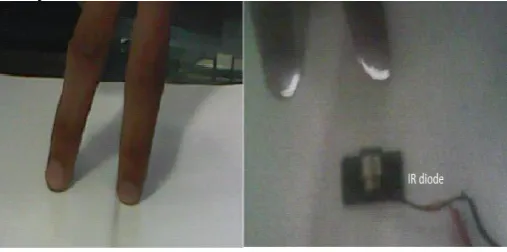
In the second step of image processing we are finding the position of the fingers using the Infrared beam in which the quantities determined in the first step are used to the estimate positions of the fingertips and the required output is generated as the fingers cutting the mat detect the presence of the infrared beam lying along the flat surface[6] i.e. the fingers that cut the infrared beam flat along the surface. We here use a technique called as shadow analysis[8].
The process of shadow analysis is to detect or to find the shadow of the user’s hands from the captured frame which is covering the key or adjacent to it. It obtains coordinates for single key.
We complete this process of shadow analysis by using the infrared beam each time. The beam produces a narrow linear infrared covering surface which can be extended up to 30cm or 12 inches. For each fingertip position ‘p’ we determine in the total area in binary image which is designated for the key. If the beam cuts the finger then of shadow is created and we conclude that the fingertip is in contact with the table and the desired key is obtained as detected by camera else the finger co-ordinates are not traced as finger is not in cutting the beam. In this experiment we investigate each of the area for the corresponding key press.
1.3 Mapping of
The previous stages of processing of image we get a list of co-ordinates that determine were the user has touched the keyboard.
In this stage, we describe how to convert obtained image coordinates to keyboard coordinates, and then to obtain the various key presses .All the processes we have performed are corresponding to the MATLAB Software.
The system designed does not recognize the keyboard instead it only determines the co-ordinates given at certain edges which are arranged in rectangle manner according to the width and height of the
rectangle keyboard .The heightand the width of the
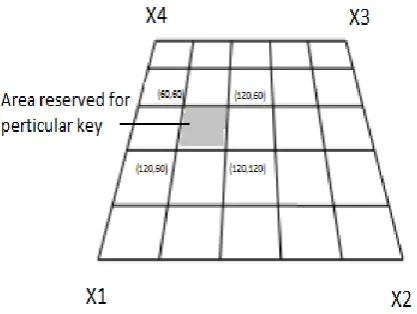
[image:2.595.37.291.570.696.2]various keys are present inside the Database[7]. For understanding purposes, let us consider our keyboard consisted of a square-shaped grid with 10 letters and 10 numerical keys, as represented in Figure. We designate the edge points forming the outermost part that the camera can capture. Each point xi = (xi, yi, zi) is a point in the plane of the keyboard mat. In this stage we are going to use a pinhole camera (The image of a pinhole camera may be projected onto a screen for real-time viewing which is used for safe observation of solar eclipses) or to capture the image on paper.
But most of the times the pinhole camera is used often used for the photography without with photographic film or photographic paper placed on the surface opposite to the pinhole aperture, of focal length a, we calculate the keys in terms of the coordinates for the camera.
© 2017, IRJET | Impact Factor value: 5.181 | ISO 9001:2008 Certified Journal | Page 260
[image:3.595.38.247.195.352.2]keyboard is as shown in the figure which is perpendicular to the x-axis, with length h and the width of the image being w. Thus the representation of the keyboard projection appears in such manner like a keyboard-mat representing the x and y coordinates
Figure shows the keyboard-mat along the three dimensions as the positions differs the coordinates change in x, y plane getting the exact overview of the area possessed by a certain key
1.4 Mouse Controls:
The next stage involves the Mouse pointer
Design it operates similar to that of the hardware mouse, making it virtual would reduce the extra accessory and would make the interaction with computer more easier. It would add to aesthetics of the new design.
In this phase we detect positional values of the x and y planes with respect to the centroid values of the object. We compare it with Centroid[5], mouse also makes the use of the java library which is useful for the alignment of the mouse helpful for the motion.
To move the mouse pointer we must adjust
the resolution of the screen according to the resolution of the camera which is the sensor[4]. To move the mouse pointer we make the use of centroid co-ordinates.
If a single object is defined then it can be used as the mouse pointer here we can define number of the objects according the requirement.
Similarly number of objects can be defined to indicate different events such as double click, right click or left click and so on.
2. Total Layout-
1. Keyboard Pattern Generation: The pattern of the keyboard is generated by a laser diode with and dice which has the impression of the keyboard present on it and produces an accurately spaced keyboard onto the surface
-The pattern of the keyboard on the surface is not however involved in the detection process and it is only used as a reference for the user.
- In a fixed type of the assembly the pattern can easily be projected onto the interface surface. Various types of projection elements are available in market.
2. The Infra-Red Projection over the surface: An infra-red plane of light is generated on the interface surface. The Infra-red beam plane is present above and is along the surface in a parallel direction.
-The light is invisible to the user and is few millimeters above the surface.
-When a particular position or the key position is touched on the flat surface interface, the light is reflected from the infra-red in the vicinity of the key along the surface and directed towards the sensor module which is the camera.
3. Mapping coordinates: The reflected light user interactions with the interface surface is passed through an infra-red filter and imaged on to an image sensor in the sensor module.
-The CMOS sensor camera has a custom hardware and it is capable of making a real time determination of the location from where the light was reflected.
4. Interpretation and communication: The Camera
© 2017, IRJET | Impact Factor value: 5.181 | ISO 9001:2008 Certified Journal | Page 261
communicates them through the appropriate interface to computer.
-By events it is understood any key stroke, mouse or touchpad control.
-The projection keyboards use a red diode laser as a light source and may project a full size QWERTY keyboard. The projected keyboard size is usually mm and it is projected at a distance of 80mm from the virtual keyboard unit.
5. Image Processing with MATLAB: Images are used everywhere, from everyday devices like cameras and smart phones to advanced devices for medical field, automotive safety, industrial automation and more. -MATLAB and Image Processing Toolbox provide a means to explore design ideas and create unique solutions for imaging systems[4][5].
MATLAB toolboxes used in our project are as follows 1. Image acquisition Toolbox.
2. Image processing toolbox
-The GUI can be also built using toolbox.
Algorithms-
We have used the algorithm explained below:
1. Acquiring real-time video from CMOS camera
2. Converting the video into frames/images
(about 30 times every second) and taken for processing.
3. Extracting different objects from the image.
4. Detecting the centroids of the defined object.
5. Identifying the event based on the centroids
of defined objects.
6. Performing different actions by the events
identified in above step.
Conclusion-
In this study, we have implemented virtual keyboard along with the mouse to make the
computer user-friendly and wireless. This system is been implemented with the help of MATLAB
environment and MATLAB Image Processing Toolbox.
Here we implement the various devices with less number of hardware and some of which are integrated inside the computer itself. Virtual keyboard and mouse gives a better feel and an aesthetic look. The keypress provided using the virtual keyboard is elegant and the pointer moving the cursor and the simulating the mouse click events also worked well. However, system has some
disadvantages such as beam can be harmful to the human health, and movement of the cursor is very sensitive to motion. Because of this reason, to control the cursor, pointer cannot be used on the air
efficiently.
© 2017, IRJET | Impact Factor value: 5.181 | ISO 9001:2008 Certified Journal | Page 262 Acknowledgement-
It gives us immense pleasure in presenting the project report on ‘Virtual inputs for Computer’.
I would like to thank my internal guide Prof. K.D.Salunkhe for giving us all the help and guidance required for the project . I am really grateful to them for their support. Their valuable advice was also very helpful.
I am also grateful to Dr.S.R.Chougule ,Head of Electronics and Telecommunication Engineering Department, SGI college of Engineering for her support, advice along with motivation for doing something innovative.
At last we would like to thank our the college facility providing laboratory in charge for providing various resources such as laboratory with all needed software platforms, continuous Internet Connection, for Our Project.
References-
1. Prof. A.S.Mane, Prof. S.M.Sangve ,”Reconfigurable Virtual Keyboard”
2. Digital Image Processing using MATLAB-Rafel C. Gonzalez, Richard E. Woods
Digital Image Processing using MATLAB-Rafel C. Gonzalez, Richard E. Woods, Steven l. Eddins
3. Salt-and-Pepper Noise Removal by Median-type Noise Detectors and Detail-preserving Regularization Raymond H. Chan, Chung-Wa Ho, and Mila Nikolova
4. Virtual Mouse using MATLAB , EE7700 -Semester Project Report Kazim Sekeroglu
5. http://www.mathworks.com
6. http://www.instuctibles.com
7. ‘Review Of Virtual Keyboard’ , Ayesha Shaikh, Antara Kanade, Mabel Fernandes .
(Computer Department, Modern Education Society’s College of Engineering, and Pune)
8.Automatic and Accurate Shadow Detection using
Near-Infrared Information, Authors -Dominic