Prosiding Seminar Kebangsaan Aplikasi Sains dan Matematik 2013 (SKASM2013) Batu Pahat, Johor, 29 - 30 Oktober 2013
NUMERICAL DIFFERENTIATIONS SPREADSHEET
CALCULATOR
Kim Gaik ~ a ~ ' , (Sie Lo~ig KekZ & Rosmila Abdul Kahar')
' ~ a c u l t ~ of Electrical and Electronics, Universiti Tun Hussein Onn Malaysia, 86400 Pavit Raja, Johor, Malaysia
tay@,uthm. edz~.nty
' " ~ e ~ a r t m e n t of Mathematics & Statistics, Faculty of Science,Technology & Human Development, Universiti T ~ i n Hzissein Onn Malaysia, 86400 Pavit Raja, Johor, Malaysia
slkek@,uthm. edu.mv rosnzila@z~thnz.edu.my
In this paper, we have developed a spreadsheet calculator for numerical differentiations. In this spreadsheet calculator, users may select either a given function or a given data to approximate the numerical differentiation. For a given function option, users are only required to key in the value of x, the functionflx) and the step size h. The spreadsheet calculator will then tabulate the (x, Ax)) data into a given table. On the other hand, for a given data option, users only have to key in the (x, y) data into the given table. For both options, the first derivative at the specified value of x will be approximated by using 2- point forward, 2-point backward, 3-point central, 3-point forward, 3-point backward and 5-point formulas, whereas the second derivative at the specified value of x will be calculated by using 3-point central and 5-point formulas. With this numerical differentiations spreadsheet calculator, we hope to help educators to prepare their marking scheme easily and to assist students in checking their answers.
Keywords: numerical differentiation, 2-point forward, 2-point backward, 3-point central, 3-point forward, 3-point backward and 5-point formulas
1. INTRODUCTION
Many physical problems involving the rate of change need differentiation. For example, velocity is the rate of change of distance with respect to time, while acceleration is the rate of change of velocity with respect to time. The rate of change of y with respect to x can be calculated from the gradient of the curve in a graph of y against x.
For a function that is not easily differentiated analytically or when only a set of data is given, numerical differentiation can be used. Normally, the derivative off at a specified value of
x
can be approximated using the difference formulae based on Taylor's series expansions, for example the first derivative at the specified value of x can be approximated by using 2-point backward, 2-point forward, 3-point central, 3-point forward, 3-point backward and 5-point formulas, whereas the second derivative at the specified value of x can be approximated byusing 3-point central and 5-point formulas. Approximating the definite differentiation numerically based on the above formulas is straight forward, but for' educators and students who have already mastered its calculation skills and require a quick solution, recalculating it may be a boring and time-wasting process. Hence, there is a need to design a numerical differentiation spreadsheet calculator to help students and educators who need immediate solutions.
A series of papers working on solving numerical methods in classroom and examination situations using spreadsheet which focus on systems of nonlinear and linear equations, approximation of interpolation, computing of eigenvalues, ordinary differential equations (ODES) by the Fourth-order Runge-Kutta (RK4) and the Laplace equation can be seen in [l-
91. Recently, a Richardson's extrapolation spreadsheet calculator up to level 4 was developed in [lo] to approximate definite differentiation numerically.
However, literature works dealing with spreadsheet calculator for approximating definite differentiation by using the difference formulas in Excel have not been explored as yet. Thus, in this paper, we have developed a spreadsheet calculator to approximate the first derivative at the specified value of x by using 2-point backward, 2-point forward, 3-point central, 3-point forward, 3-point backward and 5-point formulas, whereas the second derivative can be approximated at the specified value of x by using 3-point central and 5-point formulas. With t h s numerical differentiations spreadsheet calculator, we hope to help educators in preparing their marking scheme and assisting students to check their answers automatically.
This paper is organized as follows. Section 2 provides the background of numerical differentiation. Numerical examples are given in Section 3. The spreadsheet calculator is given in Section 4. Finally, a conclusion is given in the final part of this paper., Section 5.
2. NUMERICAL DIFFERENTIATION
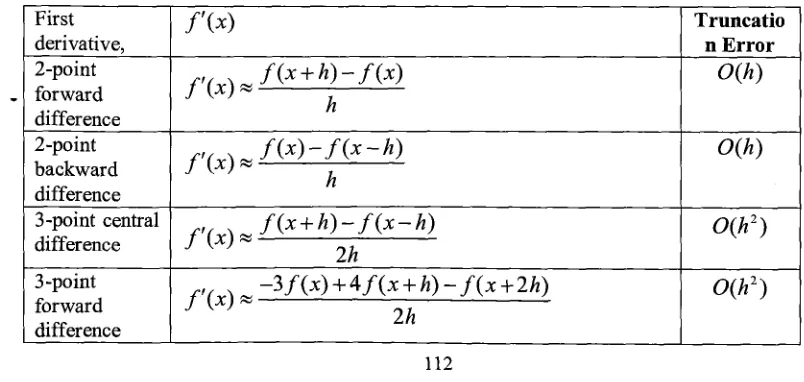
In this section, we give first and second derivatives formulas with its truncation error based on finite-difference formula as given in Table 1. The detail of derivation of these formulas can be referred to using any numerical methods books or numerical analysis books.
Table 1 :;The Difference Formula First derivative, 2-point forward difference 2-point backward difference 3-point central difference 3 -point forward difference
f
'(x>
f
'(XI
%f
( x
+
h )
-
f
(4
h
f
'(XI
%f
( 4 - f
( x - h )
h
f
'(XI
%f
( x + h I - f ( x - h )
2h
- 3 f ( x ) + 4 f ( x + h ) - f ( x + 2 h )
f
'(XI
%2h
Truncatio n Error
O(h)
O(h)
O ( h 2 )
[image:2.553.84.486.527.718.2]Prosiding Seminar Kebangsaan Aplikasi Sains dan Matematik 2013 (SKASM2013) Batu Pahat, Johor, 29 - 30 Oktober 2013
3.0 NUMERICAL EXAMPLE
In this section, we provide two numerical examples to calculate the first and second derivatives based on the difference formula in Table 1.
O ( h 2 )
O ( h 4 )
O(h2
O ( h 4 )
3-point backward difference 5-point central difference Second derivatives, 3 -point central difference 5-point central difference
3.1. Numerical Example 1
f ( x - 2 h ) - 4 f ( x - h ) + 3 f ( x )
f
' ( X I
=
2h
f ( x - 2 h ) - 8 f ( x - h ) + 8 f ( x + h ) -
f ( x + 2 h )
f
' ( 4
=
12h
f
" ( X I
f " ( x )
=
f ( x - h ) - 2 f ( x ) + f ( x + h )
h
- f ( x - 2 h ) + 1 6 f ( x - h ) - 3 0 f ( x ) + 1 6 f ( x + h ) - f ( x + 2 h ) f " ( x ) %
12h2
Given
f ( x )
=sin(x)
.
Approximatef '(0.8)
andf "(0.8)
by using all appropriate formulas in Table 1 withh
=0.1
andh
=0.05.
State which h gives better approximation. Do in four decimal places calculation.Solution
2-point forward difference
f ( x
+
h )
-f ( x ) sin(x
+
h)
-
sin(x)
f
' ( 4
=
- -h
h
2-point backward difference
f ( x )
-
f ( x
-h ) sin(x)
-sin(x
-h )
f
' ( 4
=
- -3-point central difference
3-point forward difference
-3
f
(x) +4 f
(x+
h)-
f
( x+
2h)-3
sin(x)+
4
sin(x+
h)-
sin(x+
2h)f
' ( 4=
-
-
2h 2h
-3
sin(0.8)+
4sin(0.8+
0.1) - sin(0.8+
2(0.1))f
'(0.8) x = 0.69882(0.1)
3-point backward difference
5 -point formula
3-point central for second derivatives .
Prosiding Seminar Kebangsaan Aplikasi Sains dan Matematik 2013 (SKASM2013) Batu Pahat, Johor, 29 - 30 Oktober 2013
We show the solution with
h
= 0.1 manually, but the solution withh
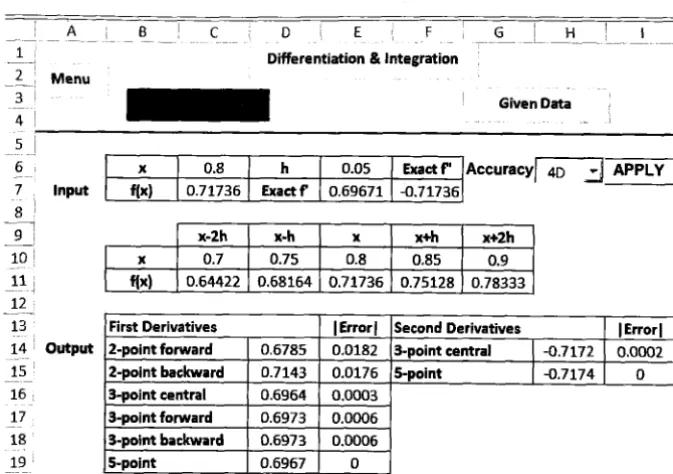
= 0.05 will be shown directly fiom the spreadsheet calculator in Section 4. By comparing Figure 2 and 3 in Section 4, we notice that a smaller h gives smaller errors and hence gives better approximation.3.1. Numerical Example 2
Given the following set of discrete data in Table 2.
Find the approximate values of
f
'(0.4) andf "(0.4)
using all the appropriate difference formulas in Table 1.Solution
2-point forward difference
Table 2
2-point backward difference
x
f
(x)
3-point central difference 0.2
1.0832
0.3 1.1972
0.4 1.3771
0.5 1.6487
0.6 2.0544
3-point forward difference
3-point backward difference
5-point formula
3-point central for second derivatives
f " ( x )
=
f ( . - h ) - 2 f ( x ) + f
( x + h )
h2
-
5-point formula for second derivatives- f ( x - 2 h ) + 1 6 f ( x - h ) - 3 0 f ( x ) + l 6 f ( x + h ) -
f ( x + 2 h )
f " ( x )
=
Prosiding Seminar Kebangsaan Aplikasi Sains dan Matematik 2013 (SKASM2013) Batu Pahat, Johor, 29 - 30 Oktober 2013
4. SPREADSHEET CALCULATOR
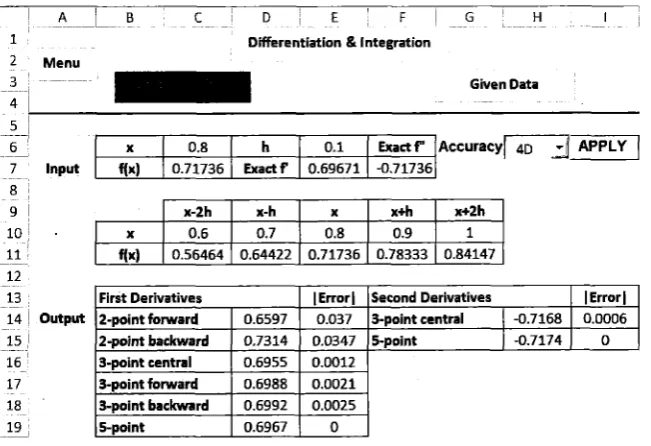
Figure 1 illustrates the numerical differentiation spreadsheet calculator. There are two options which are Given Function and Given Data respectively in this spreadsheet calculator. Figure 1 shows the first option, that is the Given Function option as solved in Numerical Example 1
in Section 3.1. For option 1, users only need to enter the function which is needed to find its first and second derivatives in cell C7, the specified value of x is needed to obtain its derivatives in cell C6 while step size h needs to be keyed into cell E6. Finally, users need to click the APPLY button. The APPLY button is associated with the macro option in Excel spreadsheet which records the action of copying cell C7 to cells C11:Gll. Once the APPLY button is clicked, the first derivative at the specified value of x will be approximated by using 2-point forward, 2-point backward, 3-point central, 3-point forward, 3-point backward and 5-
point formulas in cells D14:D19 respectively, whereas the second derivative at the specified value of x will be calculated using 3-point central and 5-point formulas in cells H14: H15. Users can select one decimal place, two decimal places up to nine decimal places calculation from the pull down menu in cell H6. To get the absolute error, users can enter the exact functions of first derivative and second derivative in cell E7:F7 respectively. Figure 2 gives the solution of Numerical Example 1 with
h
=0.05.
1 - - A -
L B
c - D E I F I G ~H - I 1 Differentiation & Integration2 Menu
Given Data
Figure 1 : Numerical Differentiation Spreadsheet Calculator: Given Function Option (Solution of Numerical Example 1 with h = 0.1)
-
I5
~
--1 6
-- 7 Input 8 9 I
10 . 11 - -
1 2 13 - 14 1 Output 15 1 - --
16 17 18 19 -
x
1
0.81
h1
0.1 ( E x a c t f "f(x)
1
0.717361
Exactf1
0.696711
-0.71736 [image:7.547.101.427.391.614.2]* _ I 0 - 1 c D E I F - G- - - I -- H -_ I - I- ~
1
- - Differentiation & Integration
2 Menu
--
3
- Given Data
4 - I
5 I
10 11 1 -
12
- - -
13
14 Output
15
- - - 16
17
[image:8.556.131.468.65.302.2]- I
Figure 2: Numerical Differentiation Spreadsheet Calculator: Given Function Option (Solution of Numerical Example 1 with h = 0.05)
6 x
1
0.81
hI
0.05I
Exactf'7 Input f[x)
1
0.717361
Exactf1
0.69671 ( -0.71736Figure 3 illustrates the
Given
Data Option in Numerical Differentiation Spreadsheet Calculator as solved in Numerical Example 2. In this option, users need to enter 5 data points with the same step size h into cell C7: G8 and its h into 18, the first derivative at the specified value ofx
will then be approximated by using 2-point forward, 2-point backward, 3-point central, 3-point forward, 3-point backward and 5-point formulas in cells Dll:D16 respectively, whereas the second derivative at the specified value of x will be calculated by using 3-point central and %point formulas in cells H11: H12. Users can select one decimal place, two decimal places up to nine decimal places calculation from the pull down menu in cell H6.~ c c u r a c ~ I U ] - ~
1
- - Differentiation & Integration
Q 1
2 Menu
3 Given Function
A
I - Input
8
- -
-
9 10 11 1213 Output
- -
*I
15 16 Second derivatives 3-polnt central5point 9.0317
Fig. 3: Numerical Differentiation Spreadsheet Calculator: Given Data Option (Solution of Numerical Example 2)
[image:8.556.107.466.471.668.2]Prosiding Seminar Kebangsaan Aplikasi Sains dan Matematik 2013 (SKASM2013) Batu Pahat, Johor, 29 - 30 OMober 2013
5. CONCLUSION
We have developed a numerical differentiations spreadsheet calculator with two options, which are Given Function and Given Data respectively. For a given function option, users only need to key in the value of x, the functionflx) and the step size h followed by clicking the APPLY button. The spreadsheet calculator will then tabulate the (x,flx)) data into a given table. On the other hand, for a given data option, users are only required to key in the five data point of (x, y) data with the same increment h and its step size h into the given table. For both options, the first derivative at the specified value of x will be approximated by using 2- point forward, 2-point backward, 3-point central, 3-point forward, 3-point backward and 5- point formulas, whereas the second derivative at the specified value of x will be calculated by using 3-point central and 5-point formulas. Users may select a certain number of decimal places calculation from the pull down menu in this spreadsheet calculator. With this numerical differentiations spreadsheet calculator, we hope to help educators to prepare their marking scheme with ease and to facilitate students in checking their answers.
6 ACKNOWLEDGEMENT
T h ~ s project is financially supported by UTHM MDR research grant scheme vote 1109.
References
[I] Tay, K. G., Kek, S. L. & Abdul-Kahar, R. (2009). Solving Non-Linear Systems by Newton's Method Using Spreadsheet Excel. Proceeding of the 3rd International
Conference on Science and Mathematics Education (CoSMED 2009). Pg. 452-456.
[2] Kek, S. L. & Tay, K. G. (2008). Solver for System of Linear Equations. Proceeding of the National Symposium on Application of Science Mathematics 2008 (SKASM 2008). Pg 605-615. Batu Pahat: Penerbit UTHM.
[3] Kek, S.L. & Tay, K. G. (2009). Design of Spreadsheet Solver for Polynomial
Interpolation. National Seminar on Science and Technology 2009 (PKPST 2009): Pg. 69-73.
[4] Tay, K. G., Kek, S. L. & Abdul-Kahar, R. (2010). Langrange Interpolating Polynomial Solver Using Spreadsheet Excel. Proceeding of the National Symposium on
Application of Science Mathematics 2010 (SKASM 2010) and 18" Mathematical Science National Symposium (SKSM 2010). Pg. 331-337.
[6] Tay, K. G. & Kek, S. L. (2009). Approximating the Smallest Eigenvalue Using Inverse
Method Through Spreadsheet Excel. Proceeding of the 1 7 ~ National Symposium on
Mathematical Science (SKSM 2009). Pg. 653-658.
[7] Tay, K. G. & Kek, S. L. (2009). Fourth Order Runge-Kutta Method Using Spreadsheet Excel. Proceedings of the 4Lh International Conference on Research and Education in Mathematics (ICREM4). Pg. 666-672.
[8] Tay, K. G, Kek, S. L & Abdul-Kahar, R. (2012). A Spreadsheet Solution of a System of Ordinary Differential Equations Using the Fourth-Order Runge-Kutta Method.
Spreadsheets in Education (eJSiE): 5(2): Pg. 1-10. ISSN 1448-6156.
[9] Tay, K. G., Kek, S. L. & Abdul-Kahar, R. (2009). Solutions of Laplace's Equations Using Spreadsheet Excel. National Seminar on Science and Technology 2009
(PKPST 2009). Pg. 40-45.
[lo] Tay, K.G, Kek, S. L., Abdul-Kahar, R., Azlan, M. A. & Lee, M. F. (20 13) A Richardson's Extrapolation Spreadsheet Calculator for Numerical Differentiation,"
Spreadsheets in Education (eJSiE): 6(2): 1-5. ISSN 1448-6156.
[ l 11 Rao, S.S., (2002). Applied Numerical Methods For Engineers and Scientists. Upper