http://ijeas.truescholar.org
36
DESIGN AND IMPLEMENTATION OF WEB BASED CHURCH MANAGEMENT
SYSTEM USING PHP AND MYSQL
Agbemabiese P. A
1, Gabriel Tetteh-Kwao
2, Simon Amonovi3Electrical/Electronic Engineering Department.
Koforidua Polytechnic, Ghana.
Corresponding Author:
Agbemabiese P. A
__________________________________________________________________________________________
ABSTRACT
This paper developed a complete web based church management system using PHP, HTML, CSS, Java Script and MySQL database. The system was deployed over the internet using Xampp and apache server. A packet tracer simulation network was configured to demonstrate how a packet moves from one computer to the other, over the internet. The design and implementation of the church management system was achieved using the Water Fall Model of the System Development life cycle (SDLC). The work implemented a centralized database for accessing various forms of reports. This work performed an analysis using a bar chart to compare the simulation result with the result of application of the work over the web. The local area network took 4 milliseconds to send a packet and received acknowledgement, while it took 8 milliseconds to send a packet to another computer on an intranet before receiving an acknowledgement. On the other hand, when applied to the wide area network, it took 10 seconds to send a packet to the destination before receiving an acknowledgement. The time taken for accessing MySQL server database in real-time was approximately 800 milliseconds. It took 10 milliseconds to send a packet from one computer to another using the Wide area network which was the longest time recorded in the simulation event while 200 milliseconds was recorded in the real time event of the same. The implementation of this work would enhance accountability and motivation among church members as well as leaders. Members of the church could also access information on the go.
© Ideal True Scholar
KEYWORDS: Packet, Simulation, Waterfall model, Apache server, Real-Time
__________________________________________________________________________________
INTRODUCTION
The church is a religious institution or place of worship where Christians are thought the word of God, how to win souls, train and evangelize as commanded by the Lord and Master Jesus Christ. During this processes reports and records are required. The reports and records they provide to their authorities are in the manual form of recording data into books and ledgers. This act of keeping records is very tiresome when retrieving it for further reports. Such record keepings may involve changing from the normal file system to the use of word documents like excel, access, word processing editor; for generating reports which is better than the normal file system; however this system also has its own challenges and difficulties associated with it as information has to be printed in volumes and shared on tables across board. Many a time after getting these report printed it has to be conveyed to its destination and these reports has to be either retyped at the head office or stored on external drives to be sent to the head office. Considering these options and looking at how the world has grown tremendously in telecommunications and the use of internet for communication, there is therefore the need to use current system so that information can be accessed in real-time over the internet. This would enhance
access to information by the church leaders and members at any time at their convenience.
THE RESEARCH PROBLEM(S)
The management of files and documentation is the most difficult task for every church. This is because every church data needs to be managed, so that the church leaders and members can easily access information and use them as and when they are needed in order to make informed decisions but this is not the case asMS Excel is used virtually in keeping all records of the church; which makes it difficult to share data from multiple systems in a multi user environment. Remote access to information and printing at a click of a button is difficultas there is no automated system to support their work in real-time over the internet. These problems lead to retarding growth and development in the church. This work seeks to address these problems by developing Web base church management system.
The aim of this work is to Design a Web Based Church Management System.
37 CSS and Java Script and a centralized database over the internet using MySQL server. Additionally, to deploy the system over the internet using XAMPP and Apache Server. Furthermore to configure a Packet Tracer to demonstrate the application repository Church management system to see if it can be configured to meet most individual church’s needs.
Gilbert A.F (2012), considered ECross CHURCH MANAGEMENT SYSTEM in which a client server desktop application was used that works in a LAN (Local Area Network) or a WAN (Wide Area Network). The software allows a church to store all information about their branches, including Membership, Family, Associations, Assets, Pledges and Tithes. A role based application in which users can only access forms (menus) they have been assigned to. There is the need to acquire servers and other networking facilities to facilitate the network environment. Also the Software application needs to be installed on all computers before it can receive updates.
Yohannes and Cassandra (2014), focused on the Development of Church Information System for Xyz Church, of which the Information System was developed to accommodate the needs of XYZ Church, some of which includes recording and storage of data in a manual form by utilizing resources of different applications such as paper work or a program such as Word and Excel. The centralized system was developed in the area of storage, management and data presentation. It implemented DBMS (Database management systems) that helped the church to eliminate data redundancy and produced consistent data, and generated a centralized data repository which is equipped with integrated security and data access. In addition, the developed information system at XYZ church used the web-based application as a media renderer that specifically facilitates the assessment of information by the congregation. It utilised a module website wireframe which adds and edits the data of the congregation or the church. However, this application can only be accessed by the specific language proficient categories of learners. The work inter-mixed two languages which make knowledge in one language a barrier in learning the software. Also there is the tendency of members who have the ability to go online, edit and update information on the system to edit other people’s data without their knowledge raising a security concern. Kiran and Ramesh (2004), considered Documentation of Church Archival Materials (DOCCAM),which is a desktop application software designed to keep records of Church Archives Materials. It has a computerized database that facilitates the effective bibliographic information of a church or an organization. It provides a means for the retrieval of
the valuable information stored in the archives and have an easy access to the archival materials for research scholars, historians and church personnel etc. Database of the archival materials contains references to manuscripts micrographic materials, etc. The tools used to develop the Documentation of Church Archival Materials (DOCCAM) System are Microsoft Access as the back end with Visual Basic (VB) as front end. It has Login Administration Form that permits the Administrator and the Supervisor to open with user ID and password. The DOCCAM Package is user friendly and menu driven. However, there is a limitation to the back end of the database system since it uses a Microsoft Access database which is a desktop application that runs on a local network; it does not provide the flexibility of working or researching at a convenient time.
William, Luis and Jenny (2014), worked on an Information system in which a stand-alone desktop application was developed to present a solution that addresses the drawbacks of low-income churches, which does not require a sophisticated platforms and much effort for its implementation. The system was designed to optimize records keeping time. Object oriented approach was used in the development of the information system. The tools used for the software implementations were C++ programming language which can run on cross-platforms, third wxWidgets library; used for creating graphical interfaces, third wkHTML to PDF library and the SQLite for creating the database which is normally called DAO (Data Access Object) that takes care of managing access to the database, performing the four basic operations (queries, inserts, updates and deletion of information). However, the system does not have room for upgrade and does not have a web-oriented application, which has a single repository of information that can use the advantages of today's technology, such as cloud computing, making resources accessible in real-time and everywhere at a particular time with an internet connection.
METHODOLOGY
This chapter refers to a set of procedures, techniques and methods employed in the research process. This work considered the following requirements for the development of church Management system.
System development life cycle (SDLC) approach was employed in the development of the system. System Development Life Cycle is a conceptual model used in project management that describes the stages involved in an information system development project from the initial feasibility study through to maintenance of the completed application. System Development Life Cycle has six-phases and these are:
Feasibility study
38
Design
Implementation
Test
Maintenance.
This work focused on the waterfall model to achieve the System development life cycle (SDLC) (a type of graph that depicts the result of each SDLC Phase flowing down into the next stage shown in figure 1.0) as the original method use in the software development.
Figure 1 Waterfall model.
OPERATIONAL FEASIBILITY
The operational requirements considered for the proposed system were as follows:
The proposed system will fulfill the church requirements.
The proposed system covers all the aspects of current manual system.
The responsible users of the system i.e. Pastor, coordinator and partner are honestly enthusiastic about the new system.
The change from manual system to electronic system would ease data management therefore implementation of the proposed system is operationally feasible.
SYSTEM ANALYSIS
This stage gathers the requirement for the system. The primary goal for this work was to develop and implement church management system which will conform to all requirements. The web based Church management system is written in PHP 5.6.3 programming language and MYSQL was used as the backend database.
SYSTEM DESIGN AND SPECIFICATION
This work require the following Minimum hardware Specification;
Table 1 Hardware Requirement and Specification Hardware
Requirements
Specifications
Server
1GHz + CPU 512Mb RAM 20Mb Database space 300Mb Disk Space Input Devices Keyboards Output Devices Monitors
Power Supply UPS (Uninterrupted Power Supply)
Network Device Modem
Software Specification (Minimum Requirement)
The software requirements for this work are; the Operating system can either be a Linux or Windows platform. It should have a web server application like XAMPP, WAMP or LAMP which are needed for setting up the server. Those applications should have Apache (version 2.2 or greater), MySQL (version 5.1 or greater) and PHP (version 5.6.3 or greater). To access the server, the client only needs a device that is connected to the internet. A browser is required to open the management software.
DESIGN
CASE tools were used to build the prototype and create a continuous stream of documentation. The CASE tools used include;
Data flow diagram which contains the context diagram and data flow diagram, it also included an entity relationship diagram that showed the relationship between the data base tables.
CONTEXT DIAGRAM
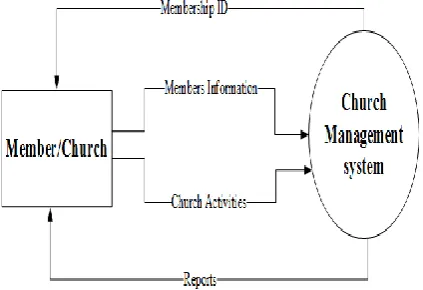
The context diagram is the relationship of the various entities that flows in and out of the whole system such as entry of members details into the system and the system generate reports . This is represented in figure 1.1.
Figure 2 Context diagram of the system
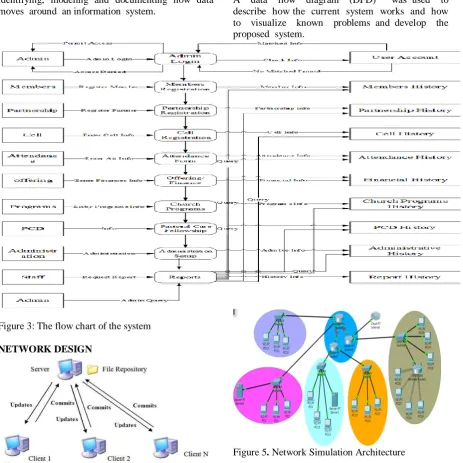
DATA FLOW DIAGRAM
39 identifying, modeling and documenting how data moves around an information system.
A data flow diagram (DFD) was used to describe how the current system works and how to visualize known problems and develop the proposed system.
Figure 3:The flow chart of the system
NETWORK DESIGN
Figure 4 Network Design Architecture
This design shows how local computers from different stations connect to a single system having the church management software, each of these local clients can update their own records based on privileges assigned them.
The Cisco Packet tracer was used to simulate the network architecture which illustrated how files can be shared and accessed over the internet.
Figure 5. Network Simulation Architecture
This architecture is used to simulate how packets or information moves from one system to the others.
Church Selection Form
40 Administrators, Pastors and Coordinators used this form to select their respective churches before login-in.
Login Form
The login system ensure security of the system, that is, who is responsible for a particular action within the system
To ensure security of the system, some requirements are imperative. These include Access, Identification, Authentication, and Authorization:
Access is the ability to permit or deny the use of an information asset, resource or facility
Identification is a mechanism that allows users to identify themselves to a resource. The most common identification mechanism used is the Username or Login ID, composed of a combination of letters from the users first and last names for user identification and accountability.
Authentication allows the user to prove his identity to the satisfaction of the resource. Many different authentication mechanisms exist, but they were all based on three main principles. The user must provide one or more of these elements to the system: Something the user knows (i.e. Username, Password) Something the user is (i.e. Title)
Something the user has (i.e. Token, ID card)
Authorization defines the rights and
permissions on a system. That is to determine rights, roles (who you are in context) and privileges (what you can do) specific to an authenticated identity.
Connect to the internet
Open a network browser
Type the required IP Address
A login screen is displayed.
Type a username and a password
Click Login.
If a correct identification is given, the main form opens and the right form is activated.
Figure 7 Login Form
New Account
A new account is accessed using the following procedures;
Click Users on the side bar
Click on new account on account information form
Click on new user
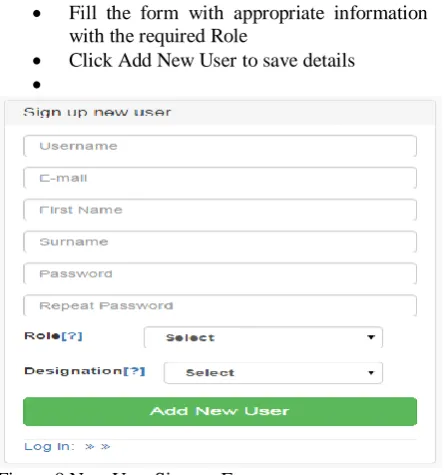
Fill the form with appropriate information with the required Role
Click Add New User to save details
Figure 8 New User Sign up Form
This form is used to sign up a new user; defining his or her role and designation to the system.
User Profile Update
The user profile is updated using the following procedures;
Click Users on the side bar
Click on your profile
Fill the appropriate fields
Click on update user to save changes Note: User Name cannot be edited.
Figure 9: User Profile Update Form
This form is used to modify existing user information such role, email and password.
Registration of Members
The registration of members is done using the following procedures;
Click Member register on the side bar
41
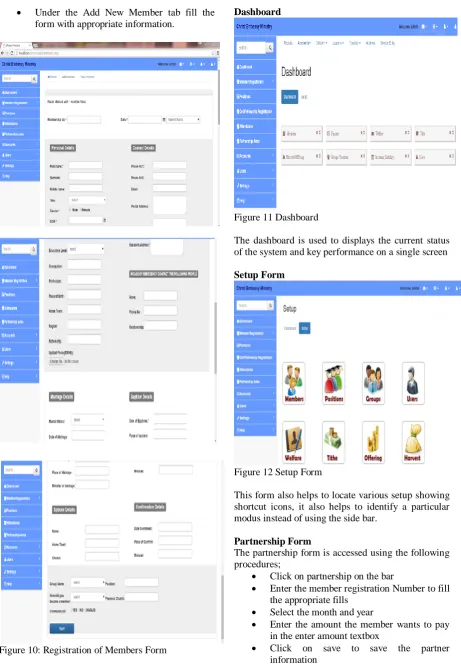
Under the Add New Member tab fill the form with appropriate information.
Figure 10: Registration of Members Form
The Members Registration Form is used to capture all information about a particular church and the particular church he or she belongs to.
Dashboard
Figure 11 Dashboard
The dashboard is used to displays the current status of the system and key performance on a single screen
Setup Form
Figure 12 Setup Form
This form also helps to locate various setup showing shortcut icons, it also helps to identify a particular modus instead of using the side bar.
Partnership Form
The partnership form is accessed using the following procedures;
Click on partnership on the bar
Enter the member registration Number to fill the appropriate fills
Select the month and year
Enter the amount the member wants to pay in the enter amount textbox
42 Figure 13 Partnership Form
The partnership form is used to capture the particular partnership arm and the amount a member has contributed to its effect.
Group Assignment
A member is assigned a particular group using the following procedure;
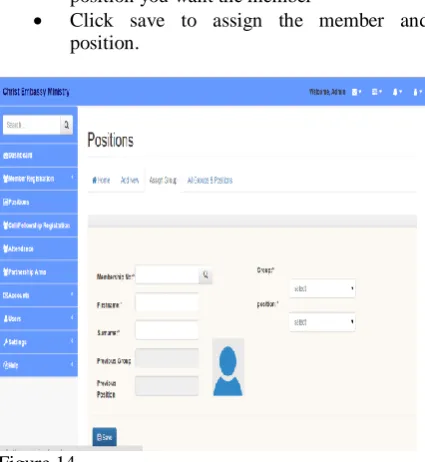
Click on positions on the side bar to load the group assignment form
On the tab click on assign group
Enter the membership id in the search box to pull member information from the database
Click in the group to select the particular group you want to assign the member
Click in the position to select the particular position you want the member
Click save to assign the member and position.
Figure 14
This form is used to assign groups and positions to members of the church. This form can also be used to add new position and view all groups and positions already assigned members in order to know who is responsible for a particular position or group.
Offertory
The offertory form is accessed using the following procedures;
Click on account on the bar
Click on offertory to load the offertory form
Select the particular service ,week and month
Enter the amount
Click on pay to save the offertory
Figure 15 Offertory Form
The offertory form is used to save the offertory for the particular service, week and the current month of the year; it also displays the various service offertories for the current month.
TESTING AND IMPLEMENTATION
The testing of software begun at the moment the program was created; the documentation and related data structures were designed. Software testing was necessary for the correction of errors.
Software testing is the process of checking whether the developed system is performing according to the initial requirements. The system was tested experimentally with the test data so as to ensure that the system worked according to the required specification. The system was later tested with the actual data to verify its performance.
TESTING
Testing was performed to prove that there are no errors in the program. Sequence test used codes in the data and serial numbers to test the software. Implementation of the system includes conversion process. Conversion is the process of changing from the old system to the new system. The four methods of system conversion employed for this work were;
Parallel approach: The old system is operated with the new system.
43
Pilot approach: The working version of the system implemented in one part of the organization based on the feedback, changes are made and the system is installed in the rest of the organization by one of the methods.
Phase-in method: The phase-in method gradually implements the system across all users. The parallel approach was used for the testing of this project. The reason being that the old version cannot be discarded right away since the users are novice in computing.
TESTING METHOD Existence Test
Existence test examines those important fields to determine that they contain data. For example, a students’ database requires a student’s index number for identifying them. A blank in this field is unacceptable and therefore indicates an error.
Combination Test
Combination test validates that several data items jointly have acceptable values; i.e. the value for one element of data determines whether other values are correct. You have to identify combinations of conditions that require special attention.
RESULTS AND ANALYSIS
This chapter describes the data that was gathered from the tests ran on the databases using a computer with a Processor Speed 4.2 GHz, Ram Memory 4 Gigabytes and Operating System. This data was then analyzed, and some conclusions were drawn based upon the trends in the results. Each subsection displays graphs broken down by the time taken to accessed the database and are followed by a detailed analysis of each graph.
Graph 4.1 Packet tracer simulation graph for accessing the database
The run time for moving a packet from one computer to another using standalone, local area network, intranet and wide area network for accessing the database is seen in Graph 4.1. The simulation graph revealed that it took 1 to 3 milliseconds to access a standalone system and receive an acknowledgement depending on the processor speedof the computer used. The local area network took 4 milliseconds to send a packet, received and acknowledgement. Also it took 8 milliseconds to send a packet to another computer on an intranet before receiving an acknowledgement and to the wide area network it took 10 seconds to move a packet to the destination before receiving an acknowledgement.
Graph 4.2 real time graph for accessing the database
The actual run time for completing a transaction using different accessed mode for accessing the database can be seen in Graph 4.1. This information was ultimately the most important result because database system users are only concerned with the speed with which their transactions are processed. The run times that are shown in this graph are average of three test runs for each network, and the maximum milliseconds for accessing MySQL server database of real time was approximately 800 milliseconds.
Therefore, it took 10 milliseconds for a packet to move from one computer to the other using the Wide area network which was the highest time recorded in the simulation event and 200 milliseconds was recorded in the real time event. It can also be noted that running the software using a network shown in graph 4.2 is even faster because of the distributions of networks which makes it possible to use a higher processor in accessing the resource online.
CONCLUSION
44 system was deployed over the internet using Xampp and Apache server to host it. One interesting feature about this system was that it was able to run successfully on a standalone computer, Local Area Network (LAN) and the Wide Area Network (WAN) which breaches the gap between locally installed or desktop application, network application and the web application.
The system allows the church to store all information about their branches including membership, families, groups, cells, partnerships, tithes, attendance, offertory etc which is in conformity with how information was shared using Gilbert Adjin Frimpong (2012),’s E “Ecross Church Management system”; with the additional adv. that it did not require thatthe software has to be installed on every client computer or device connected to LAN or WAN on like “Ecross Church Management system”(Additionally, the use of single language eliminated the language barrier problems encounted with the Yohannes and Cadelina (2014), two Intermixed languages implementation where one language became a barrier to the software)
Also the ability for members to go online to edit their information can also lead to editing information that belongs to other people raising security concern which this work has eliminated. The short falls noted with Vijay Kiran and Ramesh Babu (2003), DOCCAM design where information shared is limited to one location and one computer and that by William David Páez, Luis Felipe Herrera Quintero, Jenny Natalia(2014), which does not have room for upgrade and does not have a web-oriented application have all been addressed.
The local area network took 4 milliseconds to send a packet, received and acknowledgement. Also it took 8 milliseconds to send a packet to another computer on an intranet before receiving an acknowledgement and to the wide area network it took 10 seconds to send a packet to the destination before receiving an acknowledgement. The maximum milliseconds for accessing MySQL server database in real-time was approximately 800 milliseconds. It took 10 milliseconds for a packet to be sent from one computer to the other using the Wide area network which was the longest time recorded in the simulation event and 200 milliseconds was recorded in the real time event
RECOMMENDATION
The data gathered from the churches were not uniform as churches differ in doctrine, hence the work relied on a harmonized data for the development of the software.
For future work, the system should be updated to implements new options and meet the needs of the
church as its resources increases. The database of the system should always be backed up to external devices since the system has a single repository to avoid data loss.
REFERENCES
Kiran, A.V and Babu, B.R, (2003). Design and Development of Database for Church Archival Materials (DOCCAM Package): Inflinets convention proceedings. Caliber In India
Church management system, http://www.churchadministrationsoftware.com, 2004.
Church management software http://www.silentprojectsoftwares.com,
Gilbert, A. F. (2012).Church management
system,”https://www.behance.net/gallery/1650688/ch urch-management-system
php web development, http://www.rapidsofttechnologies.com, 2015 4:30pm
Yohannes, K and Cadelina, C(2014). Development of Church Information System: Bina Nusantara University, Jakarta, 11480, Indonesia, International Journal of Software Engineering and Its Applications Vol. 8, No. 12 (2014), pp. 199-208.