Control Music with Body Instrument Using
Kinect Sensor
Supaporn Bundasak and Vachilavit Prachyapattanapong
Computer Science and Information Technology, Department, Faculty of Science at Sriracha, Kasetsart University Sriracha Campus, Chonburi, Thailand
Email: [email protected], [email protected]
Abstract—Kinect was produced for Xbox 360. It gives more freedom to control without touching and also their real emotion. This program has been developed for entertainment and alternative using in other devices to control the music. Which uses body motion to control the music instead. In present, people do the things mentioned above already.
Index Terms—Kinect sensor, OpenNI, Microsoft Kinect SDK, OpenKinect, virtual DJ, gestural interaction
I. INTRODUCTION
Kinect Sensor is a new game interface for Microsoft’s Xbox 360 game console. This interface enables users to control the console with their natural motion. The image of users and the sound will be capture by the Kinect captute. The users will play with the natural emotion. Since this ‘controller-free’ interface has the ability to extend the degree of freedom and expressiveness of the users, many researchers and developers have tried to apply the interface in such a way that it is not only control the game console, but also control their own applications. [1]-[3]
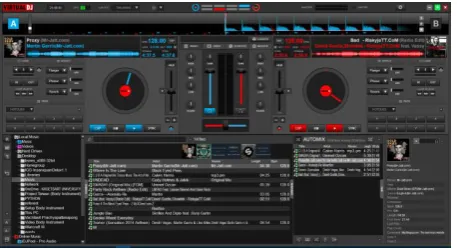
This program acts as a middleware between a Kinect sensor with the Virtual DJ. Which the Virtual DJ is program customize sound that DJ was used (Fig. 1).
Figure 1. Interface of the Virtual DJ.
II. MATERIALS AND METHODS
A. Component of the Kinect Hardware
Microsoft Kinect Sensor is a detection device developed by Microsoft company. The user can control
Manuscript received April 16, 2019; revised August 2, 2019.
and order computer player with gestures and voice instead of another controller. The important composition of Microsoft Kinect Sensor is as following (See it in Fig. 2).
1) Color Camera: The color camera has the ability to capture and stream the color video data. The Kinect camera can capture color stream at frame rate of 30 frames per second (FPS) and detect the red, blue, and green colors. The video stream consists of various image frames with a resolution of 640 x 480 pixels.
2) Infrared (IR) Emitter and IR Depth Sensor: The IR is an IR projector which emits the infrared light on the objects in a "random dot pattern". The infrared light focuses on the object in dot pattern which runs on IR dept sensor. IR depth sensor captures depth information from the dotted light reflected in different objects. This invisible dot information is used to calculate the distance between the sensor and the object from where the IR dot was read and transformed into depth data [4].
3) Tilt Motor: The tilt motor connects the base and body of the sensor with a small motor which has a vertical field of view that ranges from -27° to +27°. Capture can be adjusted kinect sensors by moving up or down 27 degrees, which adds a range of views to capture color and depth data. The motor can be controlled to adjust the elevation angle of the sensor in order to get the best view of the scene or an object [4].
4) Microphone Array and LED: The Kinect uses the four microphones in the sensor bar which are arranged in a linear. It has the ability to detect the audio sound and it can display the angle from the sensor to any sound sources. An LED in the Kinect device is used to indicate the status that the Kinect device drivers have loaded properly. It shows green color when the Kinect is connected to the computer and tells that device is ready for use to create applications [4].
The Model of skeletal tracking that Microsoft Kinect Sensor detects 20 points of skeletal users. The range of detection for the nearest point is 0.8 to 4 meters and the furthest points is 1.2 to 3.5 meters.
Figure 2. Component of the Kinect sensor.
B. Kinect Software Tools
Kinect software refers to the Kinect development library (tool) as well as the algorithmic components included in the library. Currently, Several produced tools are OpenNI, Microsoft Kinect SDK and OpenKinect. Most corresponding components can compare their functions. There are OpenNI and Microsoft Kinect SDK. are functionally comparable. Here, there will be mention a few differences between them. For example, OpenNI’s skeletal tracker requires a user to hold a predefined calibration pose until the tracker identifies enough joints. The calibration time varies greatly depending on environment conditions and processing power. On the contrary, Microsoft SDK does not need a specific pose initialization. However, it is more prone to false positives than OpenNI, especially when the initial pose of a human is too complicated. Which this program uses the libraries Microsoft Kinect SDK development [5].
C. Gestural Technology
The use of gestural technology was rapidly evolving. The problem-solving of gesture based controls on windows music player by webcam, thus adding functionality gestured detection by captured hands and recognized gesture using detect hands and developed algorithms that provided the real-time control music by hand detection [6]. Nowadays, the use of rhythm control music technology is interested with the musicians who want to use gestures while they are playing music with using the techniques of kinaesthetic is awareness. The developments of the prototype with broader nature in gestural control are occurred and found the best way [7]. The gestures were controlled and viewed by the Virtual Environments (VE), which required a receiver taking into an account with the speed at which the transmitted signals were processed [8]. We can develop control tools. It depended on the options of playback positioning and synthesis algorithms [9]. Getting the best of data entry was in control of a large range of parameters that evolve over time with playing music. The hand gesture control information can be converted to MIDI data. Many ways of expressing a gesture with a hand were based on
tracking hand-held devices that it could be used to develop controls music player by gestural technology [10].
III. PROCESS OF WORK
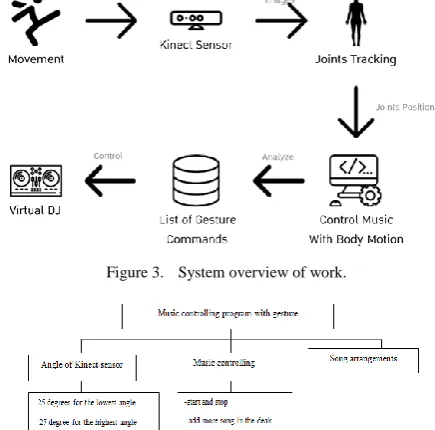
It is such an easy way for the users who can control, play, pause or forward the music more easily. Moreover they can change filter sound, adjust volume and so on. The process which divided to 6 main steps.
1) Movement: The movement in the gesture ranges for control the music. You can move to control the music but movement in the gesture range of the program was defined.
2) Kinect Sensor: You have to move in the view range of the camera and the camera must capture you at least a half body.
3) Joints Tracking: The Kinect sensor detects the joints of the user [2].
4) Control Music With Body Motion: Get positions X, Y from the Kinect sensor and analyze them as gestures.
5) List of Gesture Commands: Give commands to each gesture.
6) Virtual DJ: Control music by gestures via the Virtual DJ.
The system overview presented by Fig 3 when you move Kinect will detect your joints and the Kinect will send joints position into this program.The program will analyze that what is the gesture and then it will control Virtual DJ 8 that is software control music.
Figure 3. System overview of work.
Figure 4. System flow music controlling program with gesture.
the music controlling and the song arrangements (See it in Fig. 4).
IV. RESULTS
There are 2 windows when the program is opened one window for users gesturing the Kinect sensor for controlling the music. The significant data of the window contains the following.
Figure 5. User interface of Control Music with Body Instrument
In the Fig. 5, number 1as “Cross fader” mean volume of music, number 2 as “current angle” mean degree of angle, number 3 as left camera is RGB camera of Kinect Sensor, number 4 Right camera is the position of connecting “Green” fir perfect connection “Red” for incomplete Connection but it will suppose the position and number 5 as bellowed black bar is showing the result and gesture result.
In the Virtual DJ is divided into two audio decks. Which the left side is the tuning sound in the first deck and the right side is the tuning sound in the deck 2.
A. Functions
Virtual DJ8 program is various in qualifies .never the less the user can use through music controlling program with 8 qualifies as the following.
1)Standby: You do not want to focus customize sound anything.
2)‘Load song: You want to change the next song that is in the playlist (Fig. 6).
Figure 6. Load song (right) gesture.
3)Play and Pause: This the first time that it will start playing music but you can repeat it again. It will pause music.
4) Select Effect: The various effect of virtual DJ8 has many qualifies for users. Nevertheless the controlling music with gestures can control only 3 effects. Player ,phaser and reverb with using the left hand to select the first deck of effect and the right hard for choosing the effect of second deck.You want to change the sound effect (Fig. 7). You have 3 effects to choose from: Flanger, Phaser or Reverb. For change next effect that you can repeat the gesture.
Figure 7. Select effect (right) gesture.
5) Adjust Value Effect: If your hand is the same position with shoulder position, the value effect is 0% . But if you hold your hand moves forward until your hand full,the value effect is 100%.
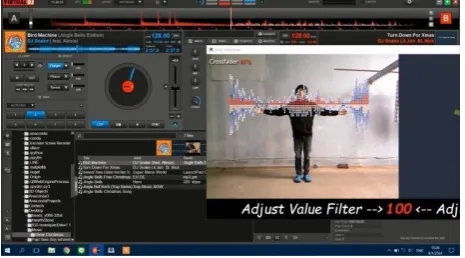
6) Adjust Value Filter: Filter is an allow ancient frequency of volume with limited value. This gesture adjusts the filter in both decks 0% to 100 % is the range 100% extending the arm to increase from 0% to 100% This command will be effective all deck. When you open your arm, the filter value will increase (Fig. 8). On the other hand, when you close your arm the filter value will decrease.
Figure 8. Adjust value filter gesture while value 100%.
volume of second deck will increase but the first deck will decrease.
8)Loop Sound (turn on and turn off): This gesture will be steps for the starting loop sound and the stop loop sound. Loop size is the range for repetition, the loop sound will be started as the mark point and the ending point depending with size of loop. The loop size is large, the ending point is far from the starting point in the other hands, if it is small the starting and the ending point will be closed that the working of loop sound is when the song comes to. The end, the song will be loop back to the starting point as in Fig. 9. When you do for the first time, loop size is 2. If you do again will decrease half loop size.
Figure 9. Loop size 1 and loop size 2.
If you do Loop sound off gesture, loop size will be reset to default and turn off Loop sound (Fig. 10).
Figure 10. Loop sound off (left) gesture.
B. Limitation of Program
When tested in a suitable environment for Kinect. The Kinect will work the best. Despite the more complexity gesture, Kinect still works well. But when used in an inappropriate environment, such as the reflection of the user on the floor.Kinect will detect the joints of users are not accurate(Fig. 11).
Figure 11. Reflection on the floor.
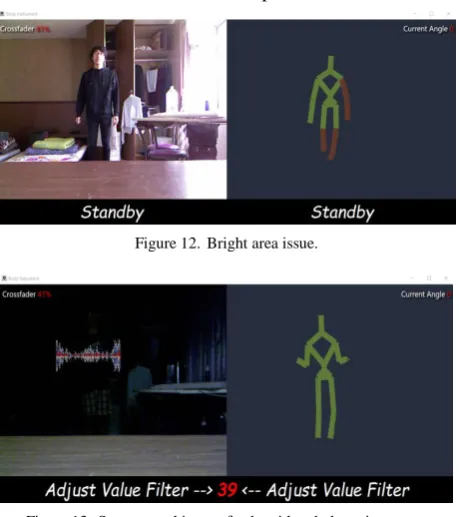
Notify the red circle in the picture, there is a leg shadow appears on the floor (Left of Fig. 11). It has a chance to make, a wrong calculate process (Right of Fig. 11). The shadow area is not appropriate to use and the Kinect sensor has not enough efficient if there is too bright or obstacles as Fig. 11. The brightest area that notify the red circle, the light from the right side (left of Fig. 12) is over it makes the Kinect Sensor cannot catch the right arm (right of Fig. 12). However the Kinect Sensor will be slower in the dark place.
Figure 12. Bright area issue.
Figure 13. System working perfectly with a dark environment.
It appeared that perfect detection of Kinect in the darkness presented by Fig. 13.
V. SYSTEM EVALUATION
The complexity gestures will have less chance of success. The effectiveness of the system of the fourteen gestures used measured distances in between one and four meters that showed the percentages of successes. The results of the experiments are given as a following Table I.
TABLE I. SUCCESS RATE IN EACH GESTURE (TEST AT SUITABLE
ENVIRONMENT)
Nameof Gestures Percentage of Successes
Play and Pause (Left) 100%
Play and Pause (Right) 100%
Load song (Left) 100%
Load song (Right) 100%
Select effect (Left) 73.33%
Select effect (Right) 83.33%
Adjust value effect (Left) 100% Adjust value effect (Right) 100%
Loop sound (Left) 72.22%
Loop sound (Right) 77.77%
Loop sound off (Left) 100%
Loop sound off (Right) 100%
Adjust value filter 100%
The Loop sound (Left) gesture (Fig. 14) had the least chance of success because it was a very complicated gesture. That Loop sound (Left) gesture had 72.22% and another gesture for Select effect (Left) that had 73.33% showed in Fig. 15.
Figure 14. Loop sound off (Left) gesture.
Figure 15. Select effect gesture.
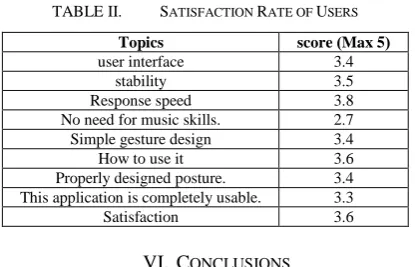
The feedback of user is divided to questions as the following.
a) I think the interface is friendly to me. b) I think this software is stable. c) I think the system responds quickly.
d) I don’t need to know the music skills before I can use this system effectively.
e) I think the command gestures easy to movement. f) I learned the command gestures quickly.
g) I think the command gestures are compatible with control.
h) I think this software provides the complete function.
i) I'm satisfied with it.
The results of the satisfaction rate of user as a following Table II.
TABLE II. SATISFACTION RATE OF USERS
Topics score (Max 5)
user interface 3.4
stability 3.5
Response speed 3.8
No need for music skills. 2.7 Simple gesture design 3.4
How to use it 3.6
Properly designed posture. 3.4 This application is completely usable. 3.3
Satisfaction 3.6
VI. CONCLUSIONS
This program is a small program that used to control some of the properties of the Virtual DJ which the
program is middleware. This project used the Kinect Sensor to detect the gesture of the user and it had the average of accuracy all gestures of 76.86%. For gestures that was a problem that were “Loop Sound” and “Select Effect”. Such as gestures of Select effect and gestures of loop sound Look as the red cycle that it overlapping of joint
.
In the future, the program will improve as following. The program can design new gestures for easy movement, by adding features to control the Virtual DJ and design new interface for easy operation.
ACKNOWLEDGMENT
National Central University, Taiwan provided research support with Microsoft Kinect Sensor.
REFERENCES
[1] M. A. Livingston, J. Sebastian, Z. Ai, and J. W. Decker, “Performance measurements for the Microsoft Kinect skeleton,”
IEEE Virtual Reality, 2012.
[2] J. Han, L. Shao, D. Xu, and J. Shotton, “Enhanced computer vision with Microsoft Kinect sensor: A review,” IEEE
Transactions on Cybernetics, vol. 43, no. 5, October 2013.
[3] K. D. Mankoff and T. A. Russo,“The Kinect: A low-cost,
high-resolution, short-range 3D camera,” Earth Surface Processes and
vol. 38, pp. 926-936, 2013.
[4] K. Sharma, “Kinect sensor based object feature estimation in depth images,” International Journal of Signal Processing, Image
Processing and Pattern Recognition, vol. 8, no. 12, pp. 237-246,
2015.
[5] G. Azzari, M. L. Goulden, and R. B. Rusu, “Rapid characterization of vegetation structure with a Microsoft Kinect sensor,” Sensors, vol. 13, pp. 2384-2398, 2013.
[6] J. Junhao, M. Junji, and J. Yiye, “Computer music controller based on hand gestures recognition through web-cam,” EE 368 Final Project Proposal, Department of Electrical Engineering, Stanford University, 2012.
[7] M. Mary and B. Kirsty, “Body as instrument – Performing with gestural interfaces,” presented at the International Conference on New Interfaces for Musical Expression, Baton Rouge, Louisiana, USA, May 31-June 3, 2015.
[8] P. Abin, K. Hitesh, and K. J. Singh, “Music controller based on hand gestures using webcam,” International Journal on Computer
Science and Engineering, vol. 4, no. 11, pp. 1836-1842, Nov.
2012.
[9] F. Ivan, P. Madan, and Q. D. Torre, “The airstick: A free-gesture controller using infrared sensing,” presented at International Conference on New Interfaces for Musical Expression, Vancouver, BC, Canada, May 26-28, 2005.
[10] B. Axel, W. Simon, and H. Aristotelis, “Hand gestures in music production,” presented at International Computer Music Conference, 12–16 September 2016.
Supaporn Bundasak was born in Chonburi, Thailand in November 1974. She received her BSc. degree in Computer science from Burapha University, Thailand in 1997 and received her MSc. degree in Computer science from Kasetsart University, Thailand in 2004. She works as a Lecturer at Computer Science and Information Technology Department of Kasersart University Sriracha campus. Her current research interests include recommendation systems, machine learning, data mining, deep learning, big data analytics and data science.