University of New Orleans University of New Orleans
ScholarWorks@UNO
ScholarWorks@UNO
University of New Orleans Theses and
Dissertations Dissertations and Theses
Fall 12-20-2013
Dynamic User Defined Permissions for Android Devices
Dynamic User Defined Permissions for Android Devices
Christopher D. Stelly [email protected]
Follow this and additional works at: https://scholarworks.uno.edu/td
Recommended Citation Recommended Citation
Stelly, Christopher D., "Dynamic User Defined Permissions for Android Devices" (2013). University of New Orleans Theses and Dissertations. 1775.
https://scholarworks.uno.edu/td/1775
Dynamic User Defined Permissions for Android Devices
A Thesis
Submitted to the Graduate Faculty of the University of New Orleans
in partial fulfillment of the requirements for the degree of
Master of Science in
Computer Science
by
Christopher Stelly
B.S. University of Louisiana Lafayette, 2011
December 2013
Acknowledgements
I’d like to thank my adviser, Dr. Vassil Roussev, as well as my committee members Dr. Golden Richard III, Dr. Irfan Ahmed, and Dr. Christopher Summa. I offer my sincere
appreciation for the learning experiences over the past year. Life management tips were at times more significant than guidance on the research, and were more important than you know.
My completion of this project would never have been realized without the indefatigable support offered by my parents since day one. Likewise, I wouldn’t be where I am today without the support of an undergraduate pal turned lifelong friend. Thank you.
Finally, and most importantly, for my loving and supportive wife:
Table of Contents
List of Figures ... v
Abstract ... vi
1. Introduction ... 1
Android Permissions Framework ... 1
Problems with Android Permissions Framework ... 1
2. Prior Solutions ... 6
MockDroid ... 7
FlaskDroid ... 8
Dr. Android and Mr. Hide ... 10
Drawbacks ... 11
3. New Approach: Aspect-Oriented Programming ... 13
Instrumentation for Dynamic Permissions ... 19
4. Results ... 24
General Usage ... 24
Case Studies ... 25
5. Critique of Methods ... 32
6. Conclusion ... 33
Future Work ... 33
References ... 34
List of Figures
Figure 1-1 Simple Flashlight App ... 2
Figure 1-2 Permissions Requred (Partial Listing) ... 3
Figure 2-1 Android Architecture ... 6
Figure 2-2 Prior Solutions ... 7
Figure 2-3 MockDroid... 7
Figure 2-4 FlaskDroid ... 9
Figure 2-5 Dr. Android Mr. Hide ... 10
Figure 3-1 Code to implement when accessing contacts ... 14
Figure 3-2 Pointcut Breakdown ... 14
Figure 3-3 Contact Blocking Aspect ... 15
Figure 3-4 AppSanitizer ... 16
Figure 3-5 Sanitation Pipeline ... 17
Figure 3-6 Contacts Aspect ... 20
Figure 3-7 System Service Aspect... 21
Figure 3-8 Dynamic Permission Setting ... 22
Figure 4-1 Sanitizer GUI ... 24
Figure 4-2 Sample Sanitization ... 25
Figure 4-3 DW Contacts ... 26
Figure 4-4 DW Contacts ... 26
Figure 4-5 Notification contacts were accessed (Instrumented) ... 27
Figure 4-3 DW Contacts with fictitious contacts (instrumented) ... 28
Figure 4-4 Permissions required for installation of "Super Bright LED Flashlight" ... 29
Figure 4-5 Super-Bright LED Flashlight (Unmodified) ... 30
Figure 4-6 Logcat Output: Device ID being given to an ad service, along with other encrypted strings ... 30
Abstract
Mobile computing devices have become an essential part of everyday life and are becoming the primary means for collecting and storing sensitive personal and corporate data.
Android is, by far, the dominant mobile platform, which makes its permissions model responsible for securing the vast majority of this sensitive data.
The current model falls well short of actual user needs, as permission assignments are made statically at installation time. Therefore, it is impossible to implement dynamic security policies that could be applied selectively depending on context. Users are forced to unconditionally trust installed apps without means to isolate them from sensitive data.
We describe a new approach, app sanitization, which automatically instruments apps at installation time, such that users can dynamically grant and revoke individual permissions. The main advantage of our technique is that it runs in userspace and utilizes standard aspect-oriented methods to incorporate custom security controls into the app.
1.
Introduction
The introduction of the first iPhone in 2007 marked the transition of mobile devices, such as cell phones, from specialized platforms into general purpose computers whose functionality can be extended by installing third-party applications (a.k.a. apps). Over time, the Android platform became the dominant standard with over a billion devices currently in active use and over a million applications are available from the Google Play app store [18]. Installing any of these applications requires a certain level of trust on part of the user, as most apps are given access to sensitive user information.
The user is given some control over the process as apps need explicit permission to access various data and hardware resources on the device, such as contact information, GPS location, microphone, camera, etc. Unfortunately, the Android permissions model does not provide users with enough control over the installed apps, which can easily result in loss of privacy, and has potentially serious security implications in corporate
environments.
Android Permissions Framework
With few exceptions, Android applications are written in Java and executed by a special virtual machine (VM) known as Dalvik. The Dalvik VM consumes bytecode that is in a proprietary format; however, it can also be translated to and from standard Java bytecode format.
For an application to gain access to protected data or resources on a device, a
permission must be obtained from the system [23]. Each application uses its manifest file to
declare at installation time the permissions it needs; during the installation process, the user is given the choice of agreeing to the requested permissions on an all-or-nothing basis. That is, either the application is installed with the full complement of permissions it
requested, or not at all. Once permissions are granted, the application has them for life and the user is never consulted again. The only way to revoke a permission is to uninstall the application altogether.
A permission can be defined by individual developers, but normally exists in a set contained within the stock Android operating system. If these are not included in the metadata, but the application attempts to use a resource under their jurisdiction anyway, a security exception is thrown and access is denied. Once agreed, the application can use the set of application programming interfaces (APIs) within the Android OS to access protected resources. At access time, the Package Manager is utilized by the API to perform
application authentication for the specified resource. It is notable that no check is necessary on the developer’s part—Android automatically handles the permission enforcement on every access.
Problems with Android Permissions Framework
respect to security and privacy. To understand these problems, we representative use cases and show
Over-provisioned applications
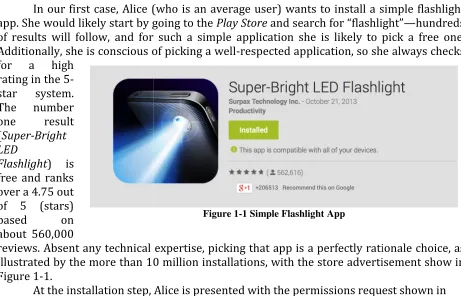
In our first case, Alice (who is an average user) app. She would likely start by going
of results will follow, and for such a simple application she is likely to pick a free one. Additionally, she is conscious of picking a well
for a high rating in the 5-star system. The number one result
(Super-Bright
LED
Flashlight) is
free and ranks over a 4.75 out of 5 (stars) based on about 560,000
reviews. Absent any technical expertise, picking that app is a perfectly rationale choice, as illustrated by the more than 10 million installations
Figure 1-1.
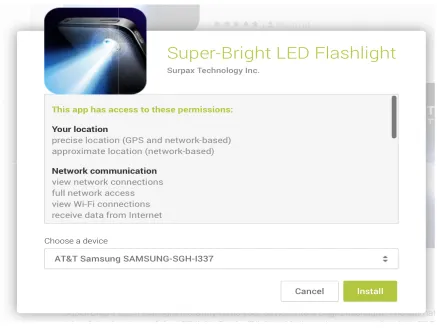
At the installation step, Figure 1-2:
security and privacy. To understand these problems, we consider several show the resulting problems.
provisioned applications
(who is an average user) wants to install a simple start by going to the Play Store and search for “flashlight”
llow, and for such a simple application she is likely to pick a free one. Additionally, she is conscious of picking a well-respected application, so she always checks
Absent any technical expertise, picking that app is a perfectly rationale choice, as illustrated by the more than 10 million installations, with the store advertisement show
At the installation step, Alice is presented with the permissions request
Figure 1-1 Simple Flashlight App
consider several
simple flashlight and search for “flashlight”—hundreds llow, and for such a simple application she is likely to pick a free one. respected application, so she always checks
Absent any technical expertise, picking that app is a perfectly rationale choice, as with the store advertisement show in
At this point, our average user is more than likely to grant the permissions requested as she probably does not fully understand the
permissions grab. The only criterion she can rely
technical expertise gets substituted for trustworthiness. From a technical perspective,
required for the stated purpose of the application is functionality is built into the app has
judge. We can surmise that most of it is tied to identifying and tracking the device, and to presumably serve targeted ads
Over-provisioning is root developer’s perspective, there are
their hands on; advertisers live and die on attention to, and any information attainable
user’s lack of recourse empowers developers’ mindsets when asking for permissions. Unfortunately, Google—
advertiser influence as the compan
surprising, then, to learn that 70% of all apps collect data
Figure
At this point, our average user is more than likely to grant the permissions
as she probably does not fully understand the egregious nature of the requested The only criterion she can rely on is reputation, which in the absence technical expertise gets substituted for trustworthiness.
rom a technical perspective, the app is over-provisioned as the only permission purpose of the application is ‘control flashlight’; whatever other into the app has a different purpose that users are ill-equipped to We can surmise that most of it is tied to identifying and tracking the device, and to
serve targeted ads—the source of income for the developer.
provisioning is rooted amongst several possible causes. From the app
developer’s perspective, there are monetary incentives to ask for everything they can get live and die on the ability to deliver ads the user will pay
tion attainable that might aid that purpose. Additionally, recourse empowers developers’ mindsets when asking for permissions. —the owner of Android—has no incentive to minimize advertiser influence as the company is driven on an advertisement business
70% of all apps collect data irrelevant to the main function of
Figure 1-2 Permissions Requred (Partial Listing)
At this point, our average user is more than likely to grant the permissions
nature of the requested on is reputation, which in the absence of
the only permission ; whatever other
equipped to We can surmise that most of it is tied to identifying and tracking the device, and to
From the app
ng they can get the ability to deliver ads the user will pay
Additionally, recourse empowers developers’ mindsets when asking for permissions. minimize
the application [17]; one advertisement library alone is installed on over 350,000 unique applications [10]. While no law governs the disclosure of a user’s personal information in this manner, most users do not understand the amount of data that apps collect on them.
Even supposing it is the case that users and developers fully understand and accept this permissions framework (along with its implications), malicious applications take advantage of this state of affairs. These second order consequences are serious threats, as demonstrated with malware designed to hijack an application and redelegate their access to a different, arbitrary application [14]. This type of attack is able to utilize the inter-application communications infrastructure to perform a privileged task without the attacking application having such privileges.
The net effect of over-provisioned apps is twofold: an increased attack surface, and an increased exposure of personal information. These problems are exacerbated both by the user’s lack of recourse and the static way in which permission policies are
implemented.
Static policy assignment
Consider Bob, who, working as a manager, has access to important company information; additionally, he uses his mobile phone to conduct everyday business actions. If Bob were to install an application that had access to the camera and/or microphone, as well as network access, that application could surreptitiously record audio and/or take pictures and send them to unknown parties. Since Bob works with company trade secrets, this scenario is especially serious as anything within line of sight to the phone can be captured and important conversation could be eavesdropped upon.
This proof of concept attack has been successfully demonstrated on Android devices [15]. Any application (including completely legal and well-respected apps) asking for camera rights could carry out this attack. The attack vector involves taking pictures of the user’s surroundings, without his knowledge, and sending the images to the remote
attacker; in turn, the images are combined into a visual 3D model of his environment. Other sophisticated attacks utilize the device’s built-in accelerometers to capture keystrokes when the phone is placed near a keyboard. Furthermore, and as discussed earlier, applications are vulnerable to permission redelegation, further increasing the attack surface.
The cause of these problems is not that the application has been over-provisioned; instead the simple fact is that permissions are being abused. The inability for users to do anything about this is because of the static manner in which these permissions have been assigned.
A static permissions model means that once an application has been given a
Alternatively, dynamic permissions would allow the users to enable or disable permissions on a per application basis. Using our process, users must initially accept everything the application asks for. However, they can then turn on/off individual permissions for individual applications through an easy to understand user interface. In addition, information resources (such as contacts) can be faked, which will allow the application to function as normal but with completely false data.
Confusing and coarsely-grained permissions
Users are presented with a synopsis of needed permissions when installing an app. Presupposing that users take the time to read the explanation for each permission, it is doubtful whether they understand the implications behind each one. Specifically, users exhibit problems caused by confusing category headings, disparities between permissions and risk, inability to reason about the absence of permissions, and warning fatigue [19].
Confusing Category Headings Overly broad category headings manifest
themselves in many cases. In particular, the READ_PHONE_STATE permission, under the heading “Phone Calls”, leads some users to believe companies have permission to market their number to telemarketers. The READ_CONTACTS permission under “Personal
Information” leads other users to believe that the application would have access to their stored passwords. Asked whether or not a given application had permissions to read their text messages, users are able to accurately answer only 38% of the time.
Unclear Risks of making Resources Available Connecting warnings to risk is troublesome for users as well, even if the terms of the warnings in the permission are understood. For example, the warning that an application can have “full Internet access” leaves much to the imagination – the user must draw their own conclusions as to the risks involved with accepting that statement.
Absence of Permissions Because of the over 100 default permissions possible for the application to ask for, users lose track of or even forget permissions exist. Thus, when one is missing, they are not likely to notice. This leads to assessing a similar permission, which is asked for, as overly broad in scope.
Warning Fatigue Warning fatigue is unavoidable and contributes to the challenge of securing personal data. Instead of meeting this challenge with improved warnings or reducing low-risk warnings, it is better to change the model altogether by offering the user the option to give or take permissions individually. The user should be presented with a list of permissions the application asks for, with a checkbox (defaulted to ‘unchecked’) for each one, indicating if the application should have access to that particular resource. This way, the user is forced to think about what she is giving up instead of blankly accepting a risk she is tired of thinking about.
With a dynamic permissions model these issues would be circumvented if not rendered invalid. Additionally, we can specify our own permissions in as fine grain a
2.
Prior Solutions
Previous solutions have been presented which implement additional protection, giving users control of protected resources. There are three general approaches when implementing additional resource protections: 1) return the resource unaltered, 2) deny any access to the resource, and 3) return fictitious or masked versions of the resource. Trusted apps can be given access to personal information, while untrusted apps can be fed fictitious data. The ability to return fictitious data is important as applications are expecting to have access to resources for which they were originally designed to use; with a denial of access, the app may behave erratically.
These solutions all wrest control from the application at various points in the control flow in order to implement additional security measures.
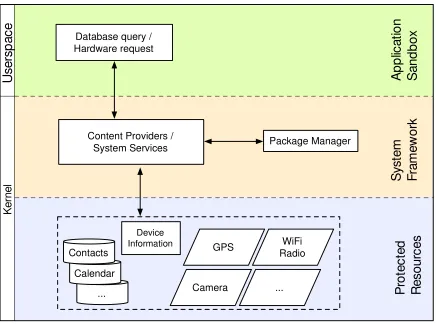
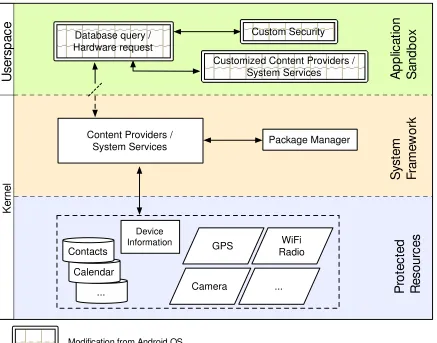
Figure 2-1 Android Architecture
In this representation of Android’s architecture (Figure 2-1), there are several modules involved in executing an application's call for data. Each one of them is a control point that can be used to incorporate a custom security mechanism. Figure 2-2 lists the control points used by previous solutions:
Database query / Hardware request ... Calendar Contacts GPS Camera WiFi Radio
... Pro
te c te d R e s o u rc e s S ys te m F ra m e w o rk A p p lic a tio n S a n d b o x
Control point Solution
Content Providers/System Services MockDroid, TISSA Android’s Package Manager FlaskDroid
Application layer (user-space) Dr. Android & Mr. Hide
Figure 2-2 Prior Solutions
MockDroid
MockDroid intercepts the control flow at the System Framework level, within the
kernel. Developed by Beresford et al. [1], it provides false information to apps if the user declares them untrusted. For example, they are able to return a constant, ‘false’, device id when an untrusted application attempts to read the device id.
Figure 2-3 MockDroid
This approach relies on modifying both the security checks as well as the content provider libraries. The package manager service is the central node for Android security. Because every API interfacing sensitive data accesses the package manager, this is a perfect opportunity to intercept control flow.
Database query / Hardware request ... Calendar Contacts GPS Camera WiFi Radio
... Pro
te c te d R e s o u rc e s S ys te m F ra m e w o rk A p p lic a ti o n S a n d b o x
Content Providers / System Services K e rn e l U s e rs p a c e Device Information
Modification from Android OS
MockDroid implements application access verification within Android’s package manager class. If the decision is made to ‘mock the data’, the customized package manager returns control to the content providers, indicating the user’s decision.
When a content provider receives a request from an application for which the user declares untrusted, an empty data set will be returned. If, on the other hand, the user has only allowed the application to have ‘mocked’ data, “plausible but incorrect” results, such as a falsified last names, are returned to the application.
This approach implements dynamic permissions; however, it involves low level modification within the kernel. Rewriting part of an operating system, although providing a robust solution, is not without drawbacks, and we revisit the issue later in this chapter. Furthermore, MockDroid was not demonstrated to be effective for several types of sensors and data; only one or two types of data are protected with this system.
FlaskDroid
At the 2013 USENIX Security Symposium, a group of researchers presented their work on an improved Android security architecture. This work was realized as a
framework dubbed FlaskDroid [5].
FlaskDroid is an implementation of the Flask architecture [21], with heavy
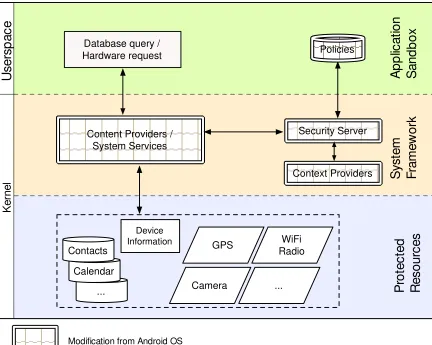
Figure 2-4 FlaskDroid
In this architecture, the major change is the way in which access policies are implemented. There are three central components that constrict application access to a minimum: Context Providers, a Security Server, and a Policy Database. These are in addition to modifications to kernel components such as content providers.
When a system library such as a content provider queries for data, it first reaches the newly implemented user-space security server. This server implements policy
decisions based on input previously received from the user. Depending on the outcome of that verification, the calling app is allowed access to the data.
In addition to the standard resource APIs, this approach also takes into
consideration a malicious application that has gained root access. To protect against such a threat, policy checks are enforced at the syscall level. This means that were a malicious application to attempt a MAC level query, FlaskDroid would be able to intercept the call and respond appropriately.
The vetted nature of the Flask operating system, and by extension the FlaskDroid operating system, provides for a sound approach to policy management. In addition, FlaskDroid protects from malware with root access.
Database query / Hardware request ... Calendar Contacts GPS Camera WiFi Radio
... Pro
te c te d R e s o u rc e s S ys te m F ra m e w o rk A p p lic a ti o n S a n d b o x
Content Providers / System Services K e rn e l U s e rs p a c e Device Information
Modification from Android OS
Context Providers Security Server
The major drawback this approach exhibits is consistent with other work – extensive modification of the operating system is required.
Dr. Android and Mr. Hide
Dr. Android and Mr. Hide are two processes that work together to intercept control flow of the app within the Application layer and execute entirely in user space [16].
Figure 2-5 Dr. Android Mr. Hide
Dr. Android and Mr. Hide instrument target applications. Instrumentation is the act of modifying a program’s bytecode representation without having access to the source code. This is possible because strongly-typed interpreted languages use an intermediate representation, known as bytecode, which retains all necessary symbolic information, allowing additional code to be spliced in.
The instrumented version of the app is almost exact replica of the original application, except that calls using privacy-related APIs are replaced with calls to a modified implementation of the API. This duplicate API, loaded into userspace, will cause
Database query / Hardware request ... Calendar Contacts GPS Camera WiFi Radio
... Pro
te c te d R e s o u rc e s S ys te m F ra m e w o rk A p p lic a ti o n S a n d b o x
Content Providers / System Services K e rn e l U s e rs p a c e Device Information
Modification from Android OS
Package Manager Custom Security
the application to exhibit a new behavior when utilizing methods within it. For example, the duplicated API might block network access if the request is to a known malicious URI.
Written in OCaml, the instrumentation mechanisms are non-trivial to use for the average Java developer. Additionally, this approach relies on up-to-date Android APIs, which are continuously updated over time. Finally, this method does not provide dynamic control of permission revocation.
Drawbacks
These methods presented have achieved securing sensitive data and resources on the Android platform. However, to implement these features in most of the methods above, a modification of Android source code is required. The fallout from this simple fact is far reaching. Some of these disadvantages include:
• Recompilation of the Android operating system is necessary
• Custom ROM is needed to install the new version of the operating system
• Future updates released for the Android operating system are not likely to be folded into the custom operating system
o Future updates released for the Android operating system could break the way these modifications work
• Technical knowledge is needed to flash ROMs and reinstall operating systems on mobile devices
Since Android is open source, developers can easily change source code and recompile the system. However, the sheer size and complexity behind operating systems can inhibit kernel hackers from doing this in a robust manner. Modifications to such complex systems are likely to have unintended, unsafe, and insecure consequences. For this reason, warranties on mobile devices are generally voided upon installation of such changes.
These devices are, by design, resistant to installation of unverified software; a user must first overwrite such built-in security mechanisms. This process includes flashing new Read Only Memory (ROM) to the device, which in turn disables verification of the update being pushed. If the user then trusts the source of the new operating system, he will be able to install the operating system. Should any step in this dubious process fail, it is possible for the device to become ‘bricked’, effectively rendering the device useless. In these situations, and if it is possible in the given situation, the user usually resorts to restoring the device to the as-purchased state. The majority of Android users cannot be expected to exhibit this level of technical knowledge.
Another drawback of using a custom operating system is that updates to the original operating system are not necessarily going to be installed on the device. This fact alone should discourage installation of unsupported constructs. Should the custom operating system implement updates from Android, it is possible that updates to any part of the kernel interfere with the customizations made, making the device more unstable if usable at all.
ensuring that protection is not circumvented. In particular, if malware were to gain root access on the device, it is still possible to protect the resources. Separately, apps can be run as-is with no need for modification.
Dr. Android and Mr. Hide, while providing the advantage of making all modifications solely in userspace, does not allow for a dynamic permissions model. In addition, it must continuously update its libraries to match that of the current API release. Finally, the instrumentation must be written in OCaml, which would have a relatively steep learning curve.
3.
New Approach: Aspect-Oriented Programming
We have developed a methodology to transform applications such that users can control how these applications access protected resources. The idea is similar to the one proposed by Jeon et al. [16], in that it uses bytecode instrumentation as a means to
intercept the control flow of the application within user space. However, instead of using a custom bytecode instrumentation tool (written in OCaml), we utilize an aspect-oriented
programming (AOP) approach, which allows us to write the control code in Java, and splice
it into the original application using the de facto standard Java AOP implementation,
AspectJ [8]. The benefits of the approach are threefold: a) developers of the access control
enforcement point can utilize the Android environment; b) our implementation does not require the tracking and replication of the rapidly evolving Android SDK capabilities; and c) it reduces access-control-induced latency by performing the checks inside the application’s process.
Bytecode instrumentation with AspectJ
As discussed earlier, Android applications are compiled into a series of instructions prior to execution. These instructions – the bytecode – are then interpreted by the Dalvik virtual machine. Instrumentation is the act of modifying these instructions. For instance, we can modify every instruction accessing personal data to instead return an empty data set. Aspect oriented programming gives us the ability to find every set of such instructions.
Suppose we wish to modify a query into the contacts database. The normal call is of the form:
query
public final Cursor query(Uri uri,
String[] projection, String selection, String[] selectionArgs, String sortOrder)
Query the given URI, returning a Cursor over the result set.
Parameters:
uri - The URI, using the content:// scheme, for the content to retrieve. projection - A list of which columns to return.
selection - A filter declaring which rows to return. selectionArgs - The values will be bound as Strings. sortOrder - How to order the rows
Returns:
AspectJ can modify the query prior to execution yet after arguments have been assigned values. We will selectively modify the query
changing the query’s selection criteria
The code shown in Figure 3 passes a conditional branch, line 33, the query’s criteria. When the program database, it will necessarily find
proceedfunction is how an aspect
control flow to resume as normal; in this case, the query will execute and return its result to the application.
Now that we have the code we want to run, we find all points in the
access the contacts database. Aspect oriented programming is the ideal paradigm to in this case. With it, we are able to crosscut
(additional or modified behavior) at all application code) we specify.
Our join point for contacts looks like the following:
The name of the pointcut is used when defining the advice type later in the aspect. The type ‘call’ is used to weave when the function is cal
return type can be used to more exactly filter what methods we want to weave throughout the target program. With the wildcard
the function, here ‘query. This specifies the name of the function(s) we want to weave. While this supports wildcards, as well as classpath filtering, we limit our weave points to the function name. The last part of the pointcut to defi
our example, we allow any number of arguments.
Figure
3-can modify the query prior to execution yet after arguments have been We will selectively modify the query to return an empty cursor
changing the query’s selection criteria.
e code shown in Figure 3-1 will, conditionally, shut off access to a database. If it a conditional branch, line 33, it will append a false condition, “where 0
. When the program executes the query to get a cursor to the find nothing – a cursor pointing to an empty dataset function is how an aspect hands control back to the application in order for low to resume as normal; in this case, the query will execute and return its result
Now that we have the code we want to run, we find all points in the application that Aspect oriented programming is the ideal paradigm to
With it, we are able to crosscut the entire application, applying advice (additional or modified behavior) at all join points (specified locations within the
Our join point for contacts looks like the following:
Figure 3-2 Pointcut Breakdown
The name of the pointcut is used when defining the advice type later in the aspect. The type ‘call’ is used to weave when the function is called within the original program.
return type can be used to more exactly filter what methods we want to weave throughout the wildcard ‘*’, it will match any return type. Next is the name of . This specifies the name of the function(s) we want to weave. While this supports wildcards, as well as classpath filtering, we limit our weave points to the function name. The last part of the pointcut to define is the argument specification. In
number of arguments.
-1 Code to implement when accessing contacts
can modify the query prior to execution yet after arguments have been n empty cursor by
shut off access to a database. If it
where 0”, line 36, to a cursor to the contacts a cursor pointing to an empty dataset. The
in order for low to resume as normal; in this case, the query will execute and return its result
application that Aspect oriented programming is the ideal paradigm to follow
advice within the
The name of the pointcut is used when defining the advice type later in the aspect. The cut led within the original program. The return type can be used to more exactly filter what methods we want to weave throughout
Next is the name of . This specifies the name of the function(s) we want to weave. While this supports wildcards, as well as classpath filtering, we limit our weave points to
The final step remaining combines the code we want to execute at the pointcuts we specify within a single object. This object is known as an aspect.
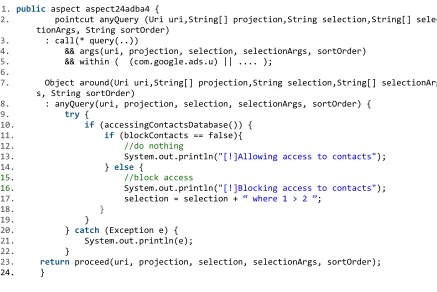
This aspect, show in Figure 3-3, will utilize a pointcut to capture all calls within the application’s code matching the function name “query” (line 3). Additional requirements are imposed on the pointcut, assuring that any matched functions both have specified arguments and exist within a specified classpath. These additional restrictions allow us to specify what classes we weave into; without8 them, we could potentially instrument more bytecode than we wish to. Lines 7 and 8 declare that the following code should be applied
around all found pointcuts matching the criteria. The ‘around’ advice is used when we want
to modify the functionality at weaving point; alternative types of advice can modify control flow either before or after the weaving point.
A graphical representation of this flow is represented with Figure 3-4.
1. public aspect aspect24adba4 {
2. pointcut anyQuery (Uri uri,String[] projection,String selection,String[] selec tionArgs, String sortOrder)
3. : call(* query(..))
4. && args(uri, projection, selection, selectionArgs, sortOrder) 5. && within ( (com.google.ads.u) || .... );
6.
7. Object around(Uri uri,String[] projection,String selection,String[] selectionArg s, String sortOrder)
8. : anyQuery(uri, projection, selection, selectionArgs, sortOrder) { 9. try {
10. if (accessingContactsDatabase()) { 11. if (blockContacts == false){ 12. //do nothing
13. System.out.println("[!]Allowing access to contacts"); 14. } else {
15. //block access
16. System.out.println("[!]Blocking access to contacts"); 17. selection = selection + “ where 1 > 2 ”;
18. }
19. }
20. } catch (Exception e) { 21. System.out.println(e); 22. }
23. return proceed(uri, projection, selection, selectionArgs, sortOrder);
24. }
Figure 3-4 AppSanitizer
After applying aspects to the application, the requests going to the system
framework (denoted with the ‘1’ and intercepted control line), have been weaved based on our advice. Instrumenting bytecode in this fashion leaves both the application and
operating system agnostic to the fact that we’ve gained control.
Automation
We have built a process to automatically perform bytecode instrumentation. Database query /
Hardware request ... Calendar Contacts GPS Camera WiFi Radio
... Pro
te c te d R e s o u rc e s S ys te m F ra m e w o rk A p p lic a ti o n S a n d b o x
Content Providers / System Services K e rn e l U s e rs p a c e Device Information
Modification from Android OS
Policy Manager
Calendar Contacts Fictional Data
The first step in the process is attaining the target application file. While the routine method involves visiting Google’s Play Store, .apks can be installed from any source. For our purposes, we utilized open source libraries that crawl the Play Store, downloading apps as if it were an Android device. This was successful in downloading about 100 applications before being blocked by Google’s servers. A more effective method, although not autonomous involves a third party extension
for Google Chrome
ApkDownloader.
Once the .apk has been downloaded, we begin the process of implementing additional security measures. The format of an .apk archive allows us to unzip the file and gain access to the bytecode. This code is in an Android specific format, Dalvik bytecode. In order to utilize well-established tools, convert the Dalvik bytecode back to Java bytecode thereby granting use of tools made specifically to study, modify, and rebuild Java bytecode (such as AspectJ). This conversion process is performed with the Dex2Jar suite of tools, and the output is in Java’s .class format.
We could immediately begin applying aspects to Java’s bytecode, however, to minimize the amount of work done when recompiling the instrumented bytecode, we first want to get a list of all classes
finding all classes that contain a particular function call. Obfuscation would normally present a barrier to this method, however since w
API we can be sure the function
that make these targeted API calls as additional criteria when applying our aspects. The first step in the
process is attaining the target While the routine method involves visiting Google’s n be installed For our purposes, we utilized open crawl the Play Store, downloading apps as This was successful in downloading about 100 applications before being blocked by Google’s effective method, lthough not autonomous, extension for Google Chrome,
Once the .apk has been begin the of implementing The format of an .apk archive allows gain This code is in an Android specific format, . In order to we ik bytecode back thereby granting use of tools made specifically to and rebuild Java This conversion process is performed suite of tools, .class
We could immediately begin applying aspects to Java’s bytecode, however, to work done when recompiling the instrumented bytecode, we first classes we want to weave into. Bash level tools can
contain a particular function call. Obfuscation would normally present a barrier to this method, however since we are only weaving calls to the
be sure the function definitions remain unchanged. We add all found class targeted API calls as additional criteria when applying our aspects.
Figure 3-5 Sanitation Pipeline
We could immediately begin applying aspects to Java’s bytecode, however, to work done when recompiling the instrumented bytecode, we first Bash level tools can be utilized for contain a particular function call. Obfuscation would normally calls to the Android We add all found classes targeted API calls as additional criteria when applying our aspects.
The aspects are then ready to be applied. The AspectJ tool suite includes a special compiler, AspectJ compiler, or ajc. We provide ajc with the aspects we’ve defined as well as all .class files derived from the original Android application. Ajc will apply the aspects to the bytecode and output a new .jar archive. Still in the Java format, we use another tool in the Dex2Jar toolchain, jar2dex, to get back to our desired Android format, Dalvik bytecode. This bytecode, output as a .dex file, replaces the .dex file within the original application’s archive. With the new bytecode inside its archive, the .apk is ready to be resigned and reinstalled.
Instrumentation for Dynamic Permissions
In the Android API, there are only a few ways to utilize or access protected
resources, and we have broken these down by what archetype of resource they are most closely related to. We focus on Sensors, which includes the camera, network radio, and GPS radio, as well as Databases, which include contact information, calendar, and account information. While the functions of resources within these archetypes are not necessarily similar, the methods to access them through the API are exactly the same; we take
advantage of this fact when applying aspects.
Databases
Databases are used to store many kinds of information within the device. Of paramount importance to privacy is the contacts database, which stores names, phone numbers, addresses, photos, and other information. To intercept requests for this data, we configure our aspects to match the method within the Android API matching ‘cursor
query(Uri uri, String[] projection, String selection….)’. The first argument in this method
defines what database to pull from by use of a URI. Contact information, for example, is accessed with the URI “android.provider.ContactsContract.Contacts.CONTENT_URI".
Remaining arguments are used for further defining the query, such as the columns to select from and the criteria the results must match. When weaving, we only apply additional security measures to target URIs.
Databases also offer a unique opportunity in that we can provide the calling application with fake information. We achieve this by copying a database to the device’s storage that, while identical in schema, has falsified information in it. Within the aspect, we instead generate a cursor, the Android handler for queries, to the falsified database. When the cursor is returned to the application, it would have no knowledge it is instead looking at false information.
1.public aspect aspectba818d3 {
2. private final String NoChange = "0";
3. private final String Block = "1";
4. private final String FakeIt = "2";
5. SanitizedAppData sad = new SanitizedAppData(); 6.
7. pointcut anyQuery (Uri uri,String[] projection,String selection,String[] selectionArg s, String sortOrder)
8. : call(* query(..))
9. && args(uri, projection, selection, selectionArgs, sortOrder); 10.
11. Object around(Uri uri,String[] projection,String selection,String[] selectionArg s, String sortOrder)
12. : anyQuery(uri, projection, selection, selectionArgs, sortOrder) { 13. System.out.println(" -- Sanitizer has reached our Weaved Code --"); 14. sad.initialize();
15.
16. try {
17. if (uriHelper.contactsUri()) {
18. System.out.println(" -- Sanitizer has matched the target URI --"); 19. System.out.println(" -- 'SAD' setting: " + sad.contactsSetting()); 20. if (sad.contactsSetting().equals(NoChange)){
21. //do nothing
22. System.out.println("Allowing access to Contacts"); 23. } else if (sad.contactsSetting().equals(Block)) {
24. //block it by making database query which will break
25. System.out.println("Blocking Access to Contacts Database"); 26. selection = selection + " and 1 > 2";
27. } else {
28. System.out.println("
Attempting to get into the second database.. --");
29. Cursor myCursor = fakeContactData(uri, projection, selection, se lectionArgs, sortOrder);
30. return myCursor; 31. }
32. }
33. } catch (Exception e) { 34. System.out.println("
Sanitizer has reached our Weaved Code, but failed to successfully interrupt the sys tem call --");
35. System.out.println(e);
36. proceed(uri, projection, selection, selectionArgs, sortOrder); 37. }
38. return proceed(uri, projection, selection, selectionArgs, sortOrder); 39. }
40.
41. public Cursor fakeContactData(Uri uri,String[] projection,String selection,Strin
g[] selectionArgs, String sortOrder) {
42. System.out.println("-- Opening Database to /sdcard/contacts2.db --"); 43. SQLiteDatabase myDB = SQLiteDatabase.openOrCreateDatabase("/sdcard/contacts2
.db", null);
44. return myDB.query("view_contacts", projection, selection, selectionArgs, nul l, null, null, null);
45. } 46. }
Figure 3-6 contains an entire aspect. Combining both the pointcut, lines 7 through 9, and the advice, lines 11 through 49. The net effect of this aspect is to splice into the
application at any point a ‘query’ function is called with the following logic: a) if the target database is the contacts database, then b) proceed by following user’s selection by allowing access to the database, denying access to the database, or returning a cursor to the
alternative database with fake information, and finally c) return the cursor to application, thereby conceding control back to its original state.
Sensors
The GPS radio is a sensor attached to Android devices. This peripheral is one of the most unnecessarily requested by applications; ad supported apps generally require it. In order to activate the radio within code, developers use the high-level procedure
getSystemService(String name), where name is, in this instance, “location”. The returned
object is a LocationManager, which has callback functions for when it is updated. Crafting a malformed LocationManager, and returning that in place of what the application is
expecting, prevents the application from receiving any kind of update.
An HTTP Download service is built into the API for managing downloads from the internet. To utilize this method, developers use the same getSystemService(String name) method, but provide “download” to the procedure. The resulting returned object is of type DownloadManager. Weaving into this point, we can similarly craft a response preventing the DownloadManager from completing its download.
1.public aspect aspect262fac6 {
2. pointcut systemServiceCut(String theString) 3. : call(* getSystemService(..))
4. && args(theString)
5. && within(com.QrBarcodeScanner.Encode.*); 6.
7. Object around(String theString) 8. : systemServiceCut(theString) {
9. System.out.println(" -- Sanitizer has reached our Weaved Code --"); 10. if (theString.equalsIgnoreCase("download")) {
11. if (sad.httpDownload().equals(NoChange)){ 12. //do nothing
13. System.out.println("Allowing access to HTTP Download"); 14. } else if (sad.httpDownload().equals(Block)) {
15. //block it by returning a bad service
16. System.out.println(" -- Blocking Download --"); 17. return proceed(" ");
18. } 19. }
20. return proceed(theString); 21. }
22. }
In order to grant the user
allow access, to deny access, or in some application on the device to write
resource, the SD card is an easy way to share information between the settings application and the instrumented application.
however this method requires the settings application to be
background as a service. While providing the advantage of no read/write operations to the SD card, the drawbacks include that Android can kill background
low on memory.
To make these decisions, w
Using the application demonstrated in Figure 3 permissions on a per-application basis.
Location Based Permissions
In addition to allowing the user to selectively grant and revoke permissions, a location based access policy is useful.
installations, for instance, no pictures should be taken
employees in corporate environments will have a smartphone on or near them; were a
Figure 3
In order to grant the user the ability to dynamically choose what action to take allow access, to deny access, or in some cases provide fake information – we install an application on the device to write user decisions to the SD card. Acting as a shared
resource, the SD card is an easy way to share information between the settings application and the instrumented application. Alternatively, broadcasts and intents could be used, however this method requires the settings application to be constantly running in the background as a service. While providing the advantage of no read/write operations to the SD card, the drawbacks include that Android can kill background =services when running
To make these decisions, we provide the user a simple GUI.
the application demonstrated in Figure 3-8, the user can grant and application basis.
the user to selectively grant and revoke access to individual permissions, a location based access policy is useful. Within sensitive government
allations, for instance, no pictures should be taken by any applications. Likewise, orporate environments will have a smartphone on or near them; were a
Figure 3-8 Dynamic Permission Setting
the ability to dynamically choose what action to take - to we install an Acting as a shared
resource, the SD card is an easy way to share information between the settings application Alternatively, broadcasts and intents could be used,
constantly running in the background as a service. While providing the advantage of no read/write operations to the
services when running
grant and revoke
access to individual Within sensitive government
4.
Results
To study the effectiveness of
‘AppSanitizer’, and conducted several case studies.
General Usage
Assuming that we have attained a copy of the apk we wish to process by dropping the file into our pipeline.
There are several options for sanitization. While the default is to cut across the entire application, we provide the option to reduce the amount of instrumentation done to the source application. Upon sanitization
To study the effectiveness of our process, we built a proof of concept , and conducted several case studies.
Assuming that we have attained a copy of the apk we wish to ‘sanitize’, we begin the process by dropping the file into our pipeline.
here are several options for sanitization. While the default is to cut across the the option to reduce the amount of instrumentation done to anitization, we see output similar to the following
Figure 4-1 Sanitizer GUI
we built a proof of concept process named
, we begin the
here are several options for sanitization. While the default is to cut across the the option to reduce the amount of instrumentation done to
Case Studies
DW Contacts
DW Contacts is a free application aimed at enhancing or replacing the standard phone application packaged within Android [22]. Most features advertised relate to accessing and communicating contacts quickly and efficiently, whether via SMS, MMS, email, or a normal phone conversation.
This application was chosen due to its large volume of downloads (up to 5 million) as well as an easy way to show the ability to provide fake information
58:Sanitizer cdstelly$ SanitizeAPK.py -c true -a DWApp.apk [*] Beginning Sanitization
[-] Cleaning the working directory [-] Decompiling the APK
dex2jar DWApp.apk -> outJar.jar [-] Generating random class name [-] Aspect Name: aspectd138229
[-] Finding the classes which call: "query" [-] Preparing the environment...
[-] Weaving aspect from just .class files..: [-] 8 warnings
[-] Now we have the jar.. let's generate a dex!
[-] jar2dex ./target/classes/post-compile-time/output.jar -> classes.dex [-] call com.android.dx.command.Main.main[dex, no-strict,
--output=/Users/cdstelly/Code/Android/Thesis/Sanitizer/classes.dex,
/Users/cdstelly/Code/Android/Thesis/Sanitizer/target/classes/post-compile-time/output.jar]
[-] updating: classes.dex
[-] zip warning: Local Entry CRC does not match CD: classes.dex (deflated 60%)
[-] Signing the apk
[-] sign DWApp.apk -> DWApp-signed.apk
[-] Removing the currently installed application.. [-] * daemon not running. starting it now on port 5037 * [-] * daemon started successfully *
[-] Success
[-] Installing the modified version.. 2151 KB/s (3255732 bytes in 1.477s)
pkg: /data/local/tmp/DWApp-signed.apk [-] Success
In Figure 4-3, we see normal operation of the application – loading of contact names. After instrumenting the application’s bytecode, launching the application results in the screen presented in Figure 4-4. The user has been notified with the standard Android notification system; optionally, an alert is fired, and an icon appears in the top left of the status bar.
Upon inspection of the notification (i.e., pulling down the notification bar), the following selection is presented to the user (Figure 4-5).
Figure 4-3 DW Contacts (Unmodified)
the app has cached.
If she selected the option to fake all contact information for DW Contacts, time she runs the app he could
Figure 4-5 Notification contacts were accessed (Instrumented)
Three options are displayed: Allow, Fake, and Deny. Selecting notification itself take the user
SanitizerSettings application, where
select to allow, fake, or block data.
As show
previously with 3, the user
modify the privacy settings of any sanitized app he has installed. saving, he should restart the app sh
modify the settings of. This is not strictly necessary, but should be done to clear
she selected the option to fake all contact information for DW Contacts, expect to see the image in Figure 4-6.
5 Notification contacts were accessed (Instrumented)
Three options are displayed: Allow, Fake, and Deny. Selecting the notification itself will the user to the SanitizerSettings application, where he can select to allow, fake, or block data.
As show
previously with Figure 3-, the user is able to modify the privacy of any sanitized he has installed. After he should restart the app she is trying to modify the settings of. This is not strictly necessary, but should be done to clear anything
Fictitious data has been given to the application. This will ensure that even though we are modifying the application to protect our privacy, the application will continue to behave as normal.
As the fictitious data resides in userspace, it could be modified at any time. Thus, it is possible to populate the database with ‘masked’ data, which could prove to be a useful middle ground between privacy and application usability. Masked data could take the form of contacts which last names were all replaced with a mask character, such as the letter ‘x’.
Super-Bright LED Flashlight
In our case studies used to describe the permissions issue, we looked at the ‘Super-Bright LED Flashlight’ app [20]. Since it has been installed up to 500 million times, or one in five Android devices worldwide, it is worth a deeper look.
Prior to download, the following permissions are required:
The number of permissions is too many – there is only one required for a flashlight app, and that is “control flashlight”. With network and camera access, this application has the facility to execute the PlaceRaider attacks as discussed earlier. The application is ad-supported, however, and as such can reasonably require network access. On the other hand, the application also has the ability to upload information with ‘full network access’. Clearly, this application is over-provisioned.
Your location
precise location (GPS and network-based) approximate location (network-based) Network communication
view network connections full network access
view Wi-Fi connections receive data from Internet Phone calls
read phone status and identity Storage
modify or delete the contents of your USB storage Your applications information
retrieve running apps Camera
take pictures and videos Development tools
change system display settings System tools
modify system settings
test access to protected storage Affects Battery
control flashlight
prevent device from sleeping
We immediately notice the ads at the bottom
Internet permissions. However, without doing anything remotely close to network traffic analysis, one can simply look at the
running to see that it is sending off the device id and several kinds of private information off to an ad service.
Figure
Figure 4-6 Logcat Output: Device ID being given to an
We immediately notice the ads at the bottom - this is the plausible cause
. However, without doing anything remotely close to network traffic analysis, one can simply look at the standard debugging output of the application when running to see that it is sending off the device id and several kinds of private information
Figure 4-5 Super-Bright LED Flashlight (Unmodified)
Logcat Output: Device ID being given to an ad service, along with other encrypted strings
cause for full . However, without doing anything remotely close to network traffic
lication when running to see that it is sending off the device id and several kinds of private information
This is in addition to several encrypted strings appearing in the standard output. We do know that the app requires exact GPS location permissions, so it is possible that it is encrypting your location (for use with the ads, hopefully).
Applying the same sanitization process to the flashlight apk, we were able to block all network access. The effects of this are at least twofold: 1) the application cannot upload any information about the device, and 2) ads are no longer displayed.
This application is a prime example of why these kinds of apps should have a more versatile permissions model. When we trust an application with any combination of
permissions including full network access, we must be wary of the possible consequences.
5. Critique of Methods
While we achieve the goal of implementing dynamic privacy controls, we have discovered drawbacks with our method. These include:
• Advanced obfuscation techniques inhibit ability to recompile some applications
• To install these apps, we must resign other people’s work
• If the device’s available memory runs low, the permission watching service could be killed and the user will not be notified until restarting the service or device
• When Android eventually implements required permissions to read/write the SD card, we will have to add that permission to the application’s manifest
• Many apps are advertiser based; this method can prevent ads from running
Many developers obfuscate their application’s code prior to release. This is an effective way to prevent reverse engineers from immediately realizing the purpose of a given method. Our design takes this into account as we consider the fact that Android API calls cannot be obfuscated – to utilize certain functionality, you must use the methods provided. What was unaccounted for, however, was the inability for our decompilation and recompilation tool (dex2jar) to handle obfuscation techniques. The dex2jar suite works well in most cases of obfuscation, but for some apps (such as Google Chrome), the
recompilation process did not work as planned. Although the decompilation and weaving processes worked as intended, more research into this, or perhaps a future update of the dex2jar tool, are required to provide a completely robust solution.
One consideration our work brings to light is that in order to install the modified application, we must re-sign the original developer’s work as any modifications break the original developer’s signature. From a functional standpoint, this is no problem. However, original developers can be understandably displeased with such actions.
In order to utilize the run-time warnings that notify the user when a sensitive resource is active, we deploy a service that runs in the background processes of the device. Once the aspect is accessed, the warning comes from this service vice weaved code. As all devices are constantly trying to conserve battery, they periodically kill inactive services. While this behavior was not witnessed when testing, the shutdown of the service would prevent the user from being warned their information was being accessed. However, the aspects would continue to function as normal and would follow any settings already set in place.
6. Conclusion
Mobile devices are increasingly trusted with information of both corporate and personal varieties. The largest platform by far, Android, has not even come close to
implementing an exemplary security model with regards to protection of this information. Likewise, protection for hardware sensors on Android devices has fallen by the wayside. The lack of protection falls well short of user needs while simultaneously presents a serious security threat.
A variety of causes contribute to the lack of protection. Statically assigned permissions, which must be agreed upon prior to application installation, cannot be changed at any time. Rampant numbers of apps are over-provisioned, each asking for ludicrous access to personal information or completely unrelated hardware sensors.
This is a well-known set of problems, and prior solutions have approached it from the ground up; that is, they have focused on implementing reasonable security policies within Android’s open source kernel. While these solutions have achieved the goals of improving Android with such security policies, they are severely hampered by the way in which they have implemented them; the re-writing of operating system source code is unnecessary and burdensome.
Alternatively, other prior work has implemented improvements to the security model at the application layer, within userspace, bypassing the excessive drawbacks caused by operating system modification. This prior work, however, could be improved upon by use of standard, well-understood technologies, as well as expansion of goals and implementation.
Our research, instantiated in the form of AppSanitizer, provides an ideal solution for implementation of reasonable security policies within Android. These policies revert the static nature of permission assignment, while simultaneously giving the user the power to grant and revoke individual permissions on a per-application basis. For permissions that access information, such as contacts, AppSanitizer can reliably return fictitious data. AppSanitizer is also automated, providing an additional advantage for this approach.
The main benefit of this work is the grant to a user the ability to control whether or not an application can access a protected resource, post-install time, without modifying the operating system.
Future Work
Future work could implement the sanitization process on the device itself,
bypassing the need for ad-hoc installation and instrumentation. Because this solution likely requires root access of the device, an alternative may be to provide the sanitation of apps as a web service.
References
[1] MockDroid http://www.cl.cam.ac.uk/~acr31/pubs/beresford-mockdroid.pdf
[2] AppFence
http://homes.cs.washington.edu/~pjh/pubs/hornyack_appfence_ccs2011.pdf
[3] TISSA http://www.cs.ncsu.edu/faculty/jiang/pubs/TRUST11.pdf
[4] SAINT http://www.patrickmcdaniel.org/pubs/acsac09a.pdf
[5] FlaskDroid
https://www.tk.informatik.tu-darmstadt.de/fileadmin/user_upload/Group_TRUST/PubsPDF/flaskdroid_tr.pdf
[6] Statistics on number sold http://mobithinking.com/mobile-marketing-tools/latest-mobile-stats/a#smartphone-shipments
[7] Number of android devices http://techcrunch.com/2013/08/07/android-nears-80- market-share-in-global-smartphone-shipments-as-ios-and-blackberry-share-slides-per-idc/
[8] Introduction to AspectJ http://www.eclipse.org/aspectj/doc/next/progguide/starting-aspectj.html#advice
[9] TaintDroid http://static.usenix.org/events/osdi10/tech/full_papers/Enck.pdf
[10] Selling Secrets Of Phone Users To Advertisers. (2013, October 6) New York Times, p. 1, 4
[11] Mobile Market Share, http://techcrunch.com/2013/08/07/android-nears-80-market-share-in-global-smartphone-shipments-as-ios-and-blackberry-share-slides-per-idc/
[12] QR Reader for Android
https://play.google.com/store/apps/details?id=uk.tapmedia.qrreader&hl=en
[13] Seven+ WP7 Calculator
https://play.google.com/store/apps/details?id=com.tombarrasso.android.wp7calculator
[14] Permission Re-Delegation: Attacks and Defenses
https://www.usenix.org/legacy/event/sec11/tech/full_papers/Felt.pdf
[15] PlaceRaider http://arxiv.org/pdf/1209.5982v1.pdf
[17] Cambridge Price of Free http://www.cam.ac.uk/research/news/what-is-the-price-of-free
[18] 1 million Android apps http://www.gazelle.com/thehorn/2013/08/14/google-play-store-hits-million-apps-milestone/
[19] Felt et al. Android Permissions: User Attention, Comprehension, and Behavior
[20] Flashlight App
https://play.google.com/store/apps/details?id=com.surpax.ledflashlight.panel
[21] Flask: Android Security Kernel https://www.cs.utah.edu/flux/flask/
[22] DW Contacts
https://play.google.com/store/apps/details?id=com.dw.contacts&hl=en
[23] Android Security Overview
http://www.acumin.co.uk/download_files/WhitePaper/android_white_paper_2.pdf