Chapter 11
Learning objectives
• After this lecture, you will be able to:
– define the difference between analysis and design
and the overlap between them;
– synthesise the relationship between good design
and good-quality information systems;
– define the way relational databases are designed;
– evaluate the importance of the different elements
Management issues
• From a managerial perspective, this lecture
addresses the following questions:
– What different types of design need to be
conducted for a quality BIS to be developed?
– What are the key aspects of design for an
e-business system?
Systems design
•
Systems design
: The design phase of the
lifecycle defines how the finished information
system will operate.
• This is defined in a design specification of the
best structure for the application and the best
methods of data input, output and user interaction
via the user interface.
• The design specification is based on the
Current design challenges
• Delivering web-based applications over intranet,
extranet and internet
• Integration of data from disparate sources (ERP)
• Providing access to unstructured information
Aims of system design
• Design a good-quality information system that
– is easy to use;
– provides the correct functions for end-users;
– is rapid in retrieving data and moving between
different screen views of the data;
– is reliable;
– is secure;
Technical constraints on design
• Hardware platform (PC, Apple or Unix workstation).
• Operating system (Windows XP, Apple or Unix/Linux).
• Web browsers to be supported (different versions of
Microsoft Internet Explorer and open source rivals such as
Opera, Mozilla, Firefox etc.).
• Data links required between the application and other
programs or a particular relational database such as
Oracle or Microsoft SQL Server.
• Design tools such as CASE tools.
• Methodologies or standards adopted by the organisation,
such as SSADM.
Technical constraints on design
(continued)
• System development tools or development environments
for programming, such as open source technology or
proprietary tools such as Microsoft Visual Studio.
• Number of users to be supported concurrently and the
performance required.
•
Scalability
: The potential of an information system, piece
of software or hardware to move from supporting a small
number of users to a large number of users without a
marked decrease in reliability or performance.
• Plus, of course, user and business needs from
Hofer – three stages of design strategy
•
Design Strategy
: A high-level statement about the approach to
develop an information system. It includes statements on the
system’s functionality, hardware and system software platform,
and the method of acquisition.
• 1.
Dividing requirements
(from the analysis phase discussed
in the previous chapter) into sets of essential requirements and
optional requirements which may be built into future versions.
• 2.
Enumerating different potential implementation
environments
(hardware, system software and network
platforms discussed in Chapters 3, 4 and 5).
• 3.
Proposing different ways to source or acquire the various
sets of capabilities
. For example, outsourcing, purchase of
The relationship between analysis and
design
• There is often a considerable overlap between analysis and design
• A distinction is often made between the logical representation of
data or processes during the analysis stage and the physical
representation at the design stage
• For example the entity relationship diagram of the analysis phase
will be turned into a physical database table definition at the design
phase.
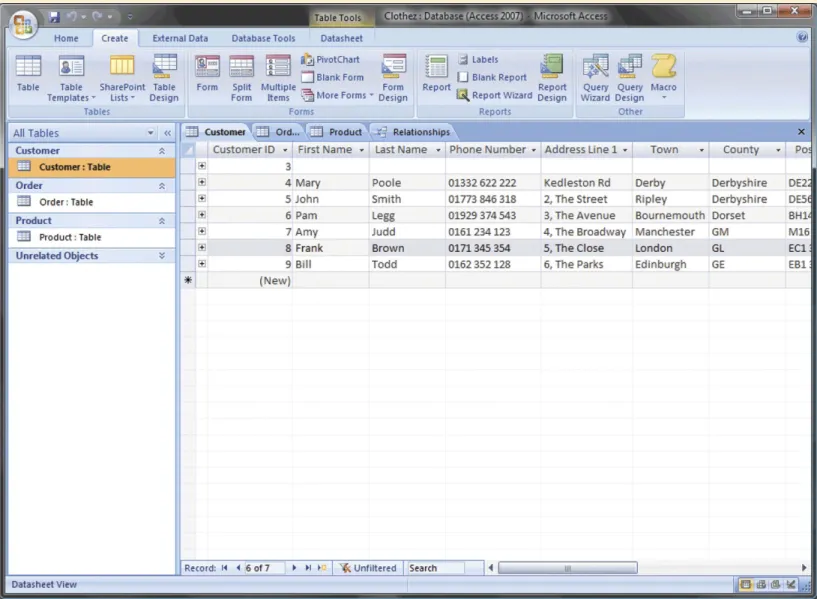
• A logical entity ‘customer’ will be specified as a physical database
table ‘Customer’ in which customer records are stored. Similarly,
the dataflow diagram will be transformed into a structure chart
Design types
•
Top-down design
: The top-down approach to design
involves specifying the overall control architecture of the
application before designing the individual modules.
•
Bottom-up design
: The bottom-up approach to design
starts with the design of individual modules, establishing
their inputs and outputs, and then builds an overall design
from these modules.
•
Validation
: This is a test of the design where we check
that the design fulfils the requirements of the business
users which are defined in the requirements specification.
•
Verification
: This is a test of the design to ensure that the
Process and data modelling
•
Process modelling
: Involves the design of the
different modules of the system, each of which is a
process with clearly defined inputs and outputs and a
transformation process. Dataflow diagrams are often
used to define processes in the system.
•
Data modelling
: Data modelling involves considering
how to represent data objects within a system, both
logically and physically. The entity relationship
Major elements of design
1.
Overall design or system design
: What are the best architecture
and client/server infrastructure? The overall design defines how
the system will be broken down into different modules and how the
user will navigate between different functions and different views
of the data.
2.
Detailed design of modules and user interface components
:
This defines the details of how the system will operate. It will be
reviewed by looking at user interface and input/output design.
3.
Database design
: How to design the most efficient structure using
normalisation.
4.
User interface design
: How to design the interface to make it
easy to learn and use. For web-based systems this includes the
information architecture.
1. System design
•
System or outline design
: A high-level definition of
the different components that make up the
architecture of a system and how they interact.
–
Systems architecture
: The design relationship
between software applications, hardware, process and
data for an information system.
•
Detailed or module design
: Detailed design involves
the specification of how an individual component of a
system will function in terms of its data input and
System and detailed design
Design function
System design
Detailed design
Architecture
Specification of different
Internal design of modules
modules and communication
between them; specification
of hardware components and
software tools
User interface
Flow of control between
Detailed specification of input
different views of data
forms and dialogues
Database
Data modelling of tables
Normalisation
File structure
Main file types and contents
Detailed ‘record and field structure’
2. Detailed or module design
• Module design includes:
– how the user interface will function at the level of individual
user dialogues;
– how data will be input and output from the system;
– how information will be stored by the system using files
or a database.
• Detailed design is sometimes divided further into
external and internal design.
– External design refers to how the system will interact with
users.
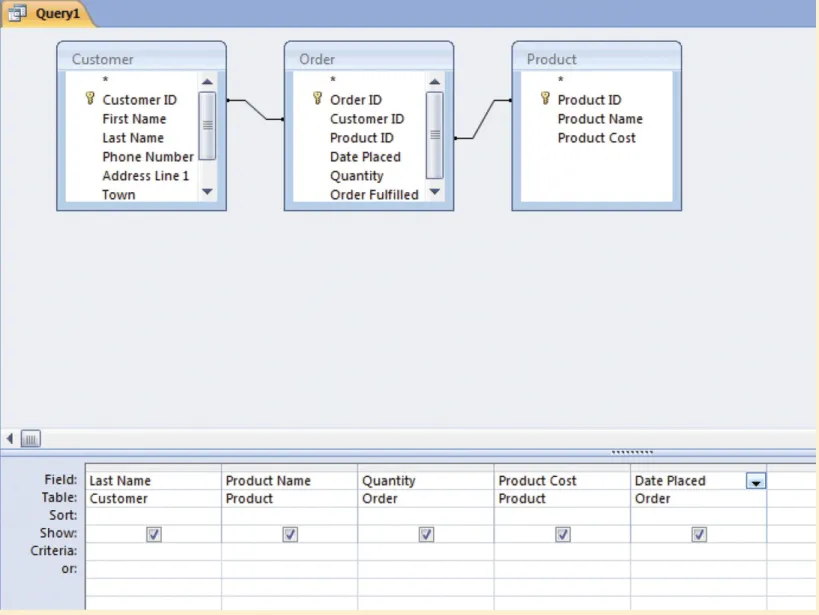
3. Database design
1.
Database
: All information for one business application
(normally made up of many tables). Example:
sales order
database.
2.
Table
: Collection of records for a similar entity. Example:
all customers of the company within the sales order
database. Other tables in the database are
product
and
order
.
3.
Record
: Information relating to a single instance of an
entity (comprising many fields). Example: single customer
such as
Poole
.
4.
Field
: An attribute of the entity. Example:
customer name
Key fields
•
Key field
: This is a field with a unique code for each
record. It is used to refer to each record and link
different tables.
•
Primary key fields
: These fields are used to
uniquely identify each record in a table and link to
similar secondary key fields (usually of the same
name) in other tables.
•
Secondary or foreign keys
: These are used to link
tables by referring to the primary key of another
Rules for assessing keys
1.
Primary keys
• The primary key provides a unique identifier for each
record.
• There is usually one primary key per table (unless a
compound key of several fields is used).
• The name of the field is usually the name of the entity or
table followed by code, reference, identifier or id.
2.
Secondary key
• The secondary key always links to a primary key in another
table(s).
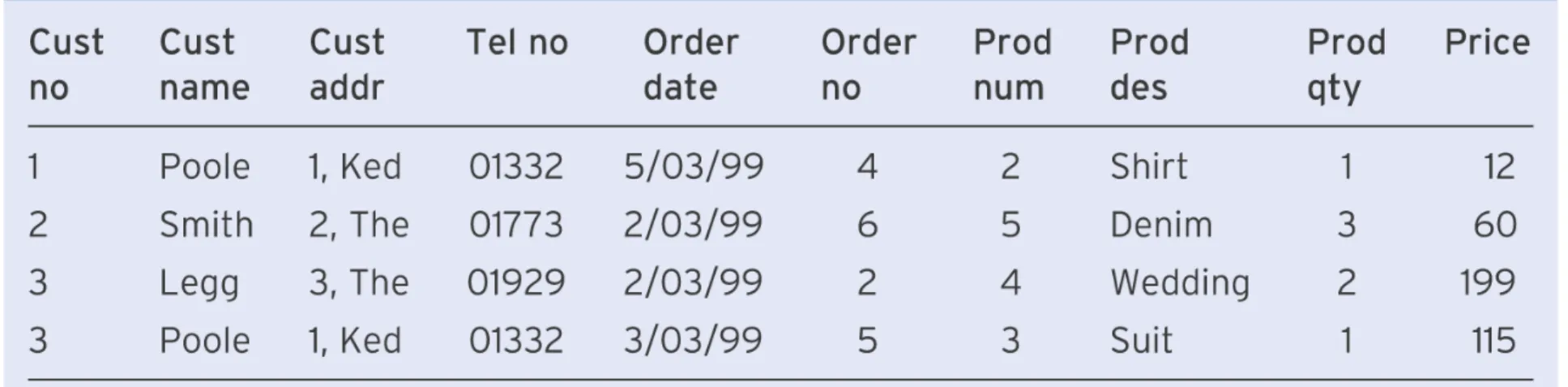
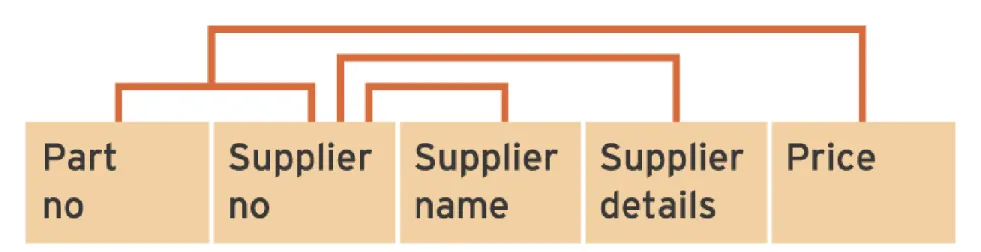
Normalisation concepts
Example anomalies
File access methods
4. User Interface design
• User Interface design involves:
– Defining different views of the data through input forms
and output tables
– Defining how the user moves from one view to another
– Providing options for the user
5. Security design
•
The four main attributes of security which must be achieved through design:
•
Authentication
: Authentication ensures that the sender of the message, or the
person trying to access the system, is who they claim to be. Passwords are
one way of providing authentication, but are open to abuse – users often tend
to swap them. Digital certificates and digital signatures offer a higher level of
security. These are available in some groupware products such as Lotus
Notes.
•
Authorisation
: Authorisation checks that the user has the right permissions to
access the information that they are seeking. This ensures that only senior
personnel managers can access salary figures, for example.
•
Privacy
: In a security context, privacy equates to scrambling or encryption of
messages so that they cannot be easily decrypted if they are intercepted
during transmission. Credit card numbers sent over the Internet are encrypted
in this way.
•
Data integrity
: Security is also necessary to ensure that the message sent is
the same as the one received and that corruption has not occurred. A security
system can use a checksum digit to ensure that this is the case and that the
data packet has not been modified.
Object-oriented design
•
Object-oriented design (OOD)
: This is a design
technique which involves basing the design of software on
real-world objects which consist of both data and the
procedures that process them rather than traditional design
where procedures operate on separate data.
•
Characteristics
1. An object consists of
data
and
methods
that act on them.
2. Objects communicate using
messages
which request a particular
service from another object, such as a ‘print current balance’
OOD characteristics (continued)
• Objects provide
encapsulation
– an object can have
private elements that are not evident to other objects. This
hides complex details and gives a simple public object
interface for external use by other objects.
•
Abstraction
refers to the simplified public interface of the
object.
• Objects can be grouped into classes which share
characteristics. Classes can share characteristics with
other classes in the hierarchy, which is known as
inheritance
. This refers to the situation when an object
inherits the behaviour of other objects.