Unit III: Introduction to Graphics 3.1 Introduction to graphics
While the term 'image' refers to a real world picture usually taken by a camera and later on digitized for computer usage, a 'graphic' denotes something which is hand-drawn. A traditional graphic would be a drawing or sketch on paper by an individual, which can range from simple line drawings like charts and architectural drawings to complex color portraits which can almost resemble an image, e.g. Mona Lisa. Hence, 'graphics' implies a synthetic pictorial representation.
When represented digitally a graphic can be broadly categorized into two types: raster graphic and vector graphic.
A raster graphic has similar properties to an image, i.e. it is replaced internally as a collection of pixels. An example would a drawing on paper subsequently digitized using a scanner. The input, editing and output stages of a raster graphic would be almost identical to that of an image..
Vector graphics are generated using computer software tools and hence, belong to the digital domain from the beginning, i.e. does not need to go through a digitization phase. Moreover instead of being a collection of pixels, these graphics are internally represented as vectors or mathematical relations, e.g equations of lines, circles, polygons, etc. Such a representation has a lot of advantages, for example, they have small file sizes and can be scaled to any size without degradation in quality.
Moreover software can be used to automatically change their parameters and hence, their appearance. This makes them ideally suited for animation. To display graphics on a monitor screen requires a graphics interpreter which can interpret the mathematical relations and generate pixels to render the objects on the screen. To locate graphical objects accurately on the screen requires a coordinate system consisting of a pair of perpendicular axes and a pair of coordinates for each point on the object
3.2 Advantages & Uses of Graphics ADVANTAGES OF GRAPHICS
A vector representation of graphics provides a number of advantages.
represented as two concentric circles with a number of straight lines radiating outwards from the center for the spokes.
Second, a graphic has the ability to adapt to varying magnification scales or zoom factors. An image (or raster graphic) is composed of a collection of fixed number of pixels determined by the size of the image, e.g. 200 pixels by 150 pixels. Sometimes we need to display the same image in different sizes by zooming in or out, e.g. charts, maps, logos. An image when magnified would still contain the same number of pixels but should now cover a larger area of the screen. Hence, the image pixels are also magnified and the distance between them increases As it is magnified more and more, at some point the image loses its continuous texture and seems to be made up of rectangular blocks, the blocks actually representing the image pixels This leads to a degradation of the image quality and is referred to as pixelation of the image. A graphic however does not undergo pixelation, no matter how much it is magnified, it still retains its crisp and smooth look throughout
Third, is the scope of interactivity. Since the graphic is generated using software tools, an application has the complete knowledge of what values and relations have been used to create the graphic,
Fourth, creation of patterns based on inputs from the user. A user can input mathematical relations and entities and ask the system to create graphical objects to represent than pictorially. This is the basis for plotting charts and graphs based on user specified data. The data may be specified either by a relation, or by a table of values which the system can be asked to plot and even find out a fitting relation.
Fifth, since the graphics are compact in size, a number of such them can be displayed one after another to create small animation sequences. These can be used to depict dynamic moving elements on the screen but at a much reduced size compared to a video. Widespread use of animated graphics in web pages have been possible due to this. File formats like Flash SWF have been developed to exploit this feature.
Sixth, extensions of simple two dimensional graphics by including the third dimension have led to the generation of 3D graphics and animation. These graphical objects are defined using 3D geometry which enables them to be mated and viewed from any angle in 3D space. These have been widely used in computer aided design (CAD) applications as well as in the film and computer gaming industry. File formats like 3D Studio MAX have been developed to exploit this capability.
USES OF GRAPHICS
User Interfaces Allows creation of point-and-click items of a graphical user interface like menus, button, windows, selection lists, etc. Complex tasks can be achieved by clicking or dragging the cursor over items in the GUI.
Office Automation With the advent of desktop publishing, the pictorial representation of data like charts, graphs, logos, histograms, tables, etc. have found increasing use in office automation applications.
Design and Drafting Tools Application software now allow users to design and create their own graphical 2D and 3D models using CAD tools. This has found extensive use in architectural, mechanical, electrical, electronic and computer science related designs.
Simulation and Animation Graphical animations are used increasingly nowadays to study topics related to atomic structure and nuclear reactions, fluid flow, chemiail molecular transformations, physical phenomena pertaining to optics, acoustics, etc. astrophysics, physiological systems and organ function. Simulation packages are used for training, e.g flight simulations for pilots, as well as for studying phenomena which is difficult to replicate physically, e.g. radioactivity, nuclear fission. Process control applications use simulation of power plants, steel fabrications, missile guidance, etc.
3.3 Audio-Introduction
3.4 Components of Audio System
An elementary sound system is where we can record, manipulate and playback sound. it consists of a number of major components. The microphone is responsible for input of sound to the audio system. Sound cannot be processed in its original form, it needs to be converted into a more suitable form. Since most of our processing equipments are electrical in nature, one of the most convenient forms for processing is that of the electrical signal, i.e. as voltage or current.
The microphone converts the environmental sound into electrical form, i.e. conversion of sound energy into electrical energy. Once converted the electrical signals can then be recorded onto magnetic material like audio tape in an audio recording system. However before that is done; we need another component called the amplifier to boost the levels (i.e. amplitude) of the electrical signals. Signals generated from the microphone are quite small in their amplitudes because of the small size of the electrical equipments inside the portable microphone, and is not much of a use in its original form. Thus, they need to be increased in an amplifier before they are recorded to achieve a better quality; Sometimes the amplifier is part of the recording system. Nowadays the audio recording system can be a personal computer which can record the sound on its hard disk instead of an audio cassette. Once recorded, the sound can be played back from the recording media by convening it back to environmental sound. This is done in a speaker (or loud-speaker). The speaker functions just opposite to that of the microphone, i.e. it converts electrical energy back into sound energy. Sometimes the speaker can also amplify the electrical signals before convening them, producing a louder sound. In some situations like a public addressing system, the sound may not be recorded at all, but can be directly sent from the amplifier to the speaker. In this case the conversion from acoustic to electrical and back to acoustic energy occurs in real-time.
3.5 Digital Audio Processing
This section discusses techniques for processing digital audio using MATLAB. Audio is considered to be a vector with each element representing a sample value.
Basic Operations
» [x,fs]=wavread('tutor.wav');
The vector x contains the audio samples while fs Is a scalar denoting the sampling rate and In this case has a value 44100 Hz. To play back the sound, the sampling rate needs to be mentioned: »wavplay(x, (s);
The vector x contains values scaled to within the range [0,1]. The total number of samples contained can be displayed using the size function, which returns the value 220507.
»size(x)
The plot of the vector provides a visual representation of the sound wave. The X-axis contains the number of samples and the Y-axis contains the value of each sample.
» plot(x); xlabel('Samples'); ylabel(‘Amplitude’);
Since the total number of samples is 220507 and the sampling rate is 44100, the total duration of the sound is (220507 44100) = 5 seconds. It might be more useful to plot the sound wave against time instead of samples. See Fig. 5.26(b).
3.6 Audio file formats
An audio file format is a file format for storing audio data on a computer system. It can be a raw bitstream, but it is usually a container format or an audio data format with defined storage layer. The general approach towards storing digital audio is to sample the audio voltage which, on playback, would correspond to a certain level of signal in an individual channel with a certain resolution—the number of bits per sample—in regular intervals (forming the sample rate). This data can then be stored uncompressed, or compressed to reduce the file size
Types of formats:
It is important to distinguish between a file format and a CODEC. A codec performs the encoding and decoding of the raw audio data while the data itself is stored in a file with a specific audio file format. Most of the publicly documented audio file formats can be created with one of two or more encoders or codecs. Although most audio file formats support only one type of audio data (created with an audio coder), a multimedia container format (as MKV or AVI) may support multiple types of audio and video data.
There are three major groups of audio file formats:
Uncompressed audio formats, such as WAV, AIFF, AU or raw header-less PCM;
Formats with lossless compression, such as FLAC, Monkey's Audio (filename extension APE), WavPack (WV), Shorten, TTA, ATRAC Advanced Lossless, Apple Lossless, MPEG-4 SLS, MPEG-4 ALS, MPEG-4 DST, WMA Lossless.
UNIT – IV : VIDEO - INTRODUCTION 4.1 & 4.2 INTRODUCTION, MOTION VIDEO
Motion video is a combination of image and audio. It consists of a set of still images called frames displayed to the user one after another at a specific speed, known as the frame rate measured in number of frames per second(fps). The frame rate should range between 20 and 30 for perceiving smooth realistic motion. The recording and editing of sound has long been in the domain of the PC. This is because of the enormous file size required by video. Thus, a 20 minute clip fills up 32 GB of disk space.
The only solution to this problem is to compress the data, but compression hardware and software were very expensive in the early days of video editing. Motion video is conceptually similar to but physically different from motion picture. Motion picture is recorded on celluloid film and displayed in cinema theaters by projecting on a screen, whereas motion video is represented in the form of electrical signals as an output from video cameras. Motion video is also conceptually similar to animation, the difference being that while video represents a sequence of real world images captured by a movie camera.
4.3 ANALOG VIDEO CAMERA
Analog video cameras are used to record a succession of still images and then convert the brightness and color information of the images into electrical signals. The tube type analog video camera is generally used in professional studios and uses electron beams to scan in a raster pattern, while the CCD video camera, using a light-sensitive electronic device called the CCD, is used for home/office purposes where portability is important.
Monochrome Video Camera:
The target is almost an insulator in the absence of light. The electrons migrate towards a positive potential applied to the lens side of the target. This positive potential is applied to a thin layer of conductive but transparent material. The vacant energy states left by the liberated electrons, called holes, migrate towards the inner surface of the target. Thus, a charge pattern appears on the inner surface of the target that is most positive where the brightness or luminosity of the scene is the greatest.
The charge pattern is sampled point-by-point by a moving beam of electrons which originates in an electron gun in the tube. Excess electrons are turned back towards the source. The exact number of electrons needed to neutralize the charge pattern constitutes a flow of current in a series circuit. It is this current flowing across a load resistance that forms the output signal voltage of the tube.
Color Video Camera:
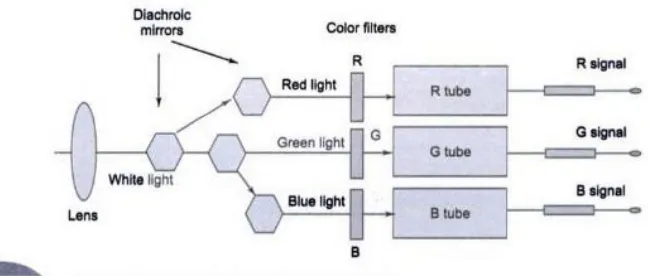
Fig. shows a block diagram of a color TV camera. It essentially consists of three camera tubes in which each tube receives selectively filtered primary colors. Each camera tube develops a signal voltage proportional to the respective color intensity received by it. Light from the scene is processed by the objective lens system. The image formed by the lens is split into three images by glass prisms. These prisms are designed as diachronic mirrors. A diachronic mirror passes one wavelength and rejects other wavelengths. Thus, red, green and blue images are formed. This generates the three color signals Vr,Vg,Vb the voltage levels of which are proportional to the intensity of the colored light falling on the specific tube.
4.4 DIGITAL VIDEO
Analog video has been used for years in recording/editing studios and television broadcasting. For the purpose of incorporating video content in multimedia production, video needs to be converted into the digital format.
which required a lower bit-rate to transfer them over communication buses. Nowadays video is rarely viewed in the uncompressed form unless ther is specific reason for doing so e.g., to maintain the high quality, as for medical analysis. The capture card is usually installed at the PC end. Alternatively the capture card can be inside a digital video camera which is capable of producing a digital video output and recording it onto a tape. The digital output from a digital video camera can also be fed to a PC after necessary format conversion.
4.5 Digital Video Processing 4.6 Storage Formats
4.7 Video File Formats
AVI (Audio/Video Interleaved)
The native video file format on the Windows platform is AVI or audio-video interleaved. The name implies that in the same file both audio and video media is stored, since a video clip can contain both types of media. The term 'interleaved' means that within the file the video data and the corresponding audio data are kept in small chunks instead of widely separate blocks. The reason for this is when a part of the video is played back from the file, the disk heads should be able to quickly access the corresponding audio portion without much delay. To avoid delay due to head seek time, the audio data is kept as close to the video data as possible, otherwise synchronization between the visual and audio media would be disturbed. This architecture is called Video for Windows. AVI is an un-compressed format, i.e. the image frames and audio are stored without any type of compression, and hence, the sizes of AVI files could be large. An AVI file is played back on Windows by using the Windows Media Player or by a Web browser. MOV (QuickTime Movie)
The Quicklime movie format is developed by Apple for both the Windows and the Macintosh platforms. These files have an extension MOV and requires a program called Movie Player for playback, which is freely downloadable from the Apple website [www.apple.com/quicktime]. MOV is a compressed format and supports a number of CODECs (see Chapter 10 for more details). It is widely used by Web developers to create cross-platform video clips that can be downloaded from the Internet. In 1998, the ISO approved the Quicklime file format as the basis of the MPEG-4 file format
MPEG (Motion Pictures Experts Group)
provides an efficient method of object-oriented content based storage and retrieval of multimedia content. MPEG-7 is a scheme for description of the multimedia content through a set of standardized descriptors so that media objects may be retrieved using queries.
Real Video
The RM file format was developed by Real Networks for playing video files from Web pages. It supports streaming which means that the video file starts playing even before they are fully downloaded from the Internet A program called Real Player is required to play back a RM file, which is freely downloadable from the Real Networks web site. Helix is RealNetworks' open source and commercial source code media framework. The code is released under dual licenses: the commercial Real-Networks Community Source License and the open source RealNetworks Public Source License.
H.261
The H.261 was developed by ITU-T in 1993 for video telephony and videoconferencing applications in an ISDN environment. The target bit rates are from 64 to 1920 Kbps. 11.261 is quite similar to the MPEG-1 standard, it uses the CIF or QCIF formats and uses the DCT based algorithms to remove intraframe redundancy and motion compensation to remove interframe redundancy.
H.263
The H.263 was approved in 1996, and was specifically designed for very low bit rate applications like, video telephony, video conferencing, interactive games, surveillance video, below 64 Kbps for use over wireless and public switched telephone networks.
Indeo Video Interactive
This CODEC by Intel is used for video distributed over the Internet for computers with MMX or Pentium II processors. This CODEC includes features like flexible keyframe control, chroma keying, on-the-fly cropping that reduces data load. Also this CODEC employs a progressive download feature that adapts to different network bandwidths. Full use of these features requires utility software available separately from Intel [www.intel.com]. There are currently two main versions of WI: version 4 is included in Quicklime while version 5 supports the Video for Windows architecture. Version 5 uses an improved wavelet based algorithm for better compression.
Cinepak
now using Cinepak at higher (and lower) datarates than it was originally designed for, and making ever-larger movies. Cinepak's quality/datarate was amazing when it was first released, but does not compare well with newer codecs available today. There are higher-quality (and lower-datarate) solutions for almost any application.
Sorenson Video
This CODEC supported by the Quick time architecture is useful for compressing 24-bit video intended for CD-ROM applications and downloadable WWW video files. Similar to Cinepak, the newer CODEC is designed for high quality at data rates under 200 laps. It is capable of better picture quality and smaller files than Cinepak, but requires more compression time and so suitable for final export and not for editing It supports a temporal scalability feature which lets a movie exported for a high-end computer playback smoothly on a low-end computer: VDOLive
VDOLive is a architecture for web video delivery, created by VDOnet Corporation. VDOLive is a server-based, 'true streaming' architecture that actually adjusts to viewers' connections as they watch movies. Thus, true streaming movies play in real-time with no delays for downloading. For example, if you clicked on a 30 second movie, it would start playing and 30 seconds later, it would be over, regardless of your connection, with no substantial delays.
DivX
DivX is a video CODEC created by DivX Inc. (formerly DivXNetworks Inc.) known for its ability to compress lengthy video segments into small sizes A typical feature-length movie on DVD is around 7 gigabytes in size; with DivX this can be compressed to around 700 megabytes which fits on a CD-ROM with minimal loss in quality. Various programs are available which can produce a DivX file from a normal video DVD (this process is known as 'ripping). The resulting file can then be stored on hard disk, burned on optical media, or be shared on peer-to-peer networks. DivX 4 was released in July 2001.
XviD
XviD is a GPL open source MPEG-4 video CODEC. Originally based on OpenDivX, XviD was started by a group of volunteer programmers after the OpenDivX source was closed. XviD features MPEG-4 advanced simple profile features such as b-frames, quarter pixel motion compensation, global motion compensation, and H.263, MPEG and custom quantisation matrices.
3ivx
3ivx is a video CODEC created by 3ivx Technologies. 3ivx (pronounced Thriv-ex) is a CODEC suite that allows the creation of MPEG-4 compliant data streams. It has been designed around a need for decreased processing power for use mainly in embedded systems. 3ivx provides plugins and filters that allow the MPEG-4 data stream to be wrapped by the Microsoft *.asf and *.avi transports, as well as Apple's Quicktime transport It also allows the creation of elementary *.mp4 data streams and provides an audio codecs for creation of AAC audio streams, also known as Dolby Digital 2.
Nero Digital
Nero Digital is a software product that uses MPEG-4-conforming compression technology, with support for two MPEG-4 video coding algorithms and two forms of MPEG-4 AAC audio. Nero Digital was developed by Nero AG of Germany, and Ateme of France. It implements CODECs that conform to the MPEG-4 ISO/IEC standard except for the way it handles chapters and subtitles, but these aspects may be changed in the future to use ISO/IEC MPEG-4 standard technology. Nero Digital also uses the ISO/IEC standard *.mp4 file format container, unlike other MPEG-4 based CODECs that use the *.avi or *ad container.
FFmpeg
FFmpeg is a set of open source computer programs that can record, convert and stream digital audio and video. It includes 'libavcodec', a leading audio/video codec library. FFmpeg is developed under Linux, but it can compile under most operating systems, including Windows. Ogg Theora
Ogg Theora is a video CODEC developed by Xiph foundation. Based on On2 Technologies' VP3 CODEC, Ogg Theora competes with MPEG-4 (XviD and DivX), RealVideo and Windows Media Video (WMV). It is still in the developmental stage with four alpha releases : I and 2 in 2002, 3 and 4 in 2004. Some of the players that can play Ogg Theora files are RealPlayer, Windows Media Player, Mplayer and Xine.
Windows Media Video (WMV)