*Corresponding author: Vishal Gupt
ISSN: 0976-3031
Research Article
ANDROID APPLICATION MANAGEMENT AND ENCHANCEMENT
Vishal Gupta., Dhikhi T., RupamHalder., Siddharth Shankar Sharma
and Sanjeev Mudaliar R
Department- CSE, SRM Institute of Science & Technology, Chennai, India
DOI: http://dx.doi.org/10.24327/ijrsr.2018.0909.2774
ARTICLE INFO ABSTRACT
The paper presented discusses the revolutionary Android Apps, its effect on the Android smart phones and disadvantages of having apps running in background along with some suggested improvement. The android apps are made from scratch using Java as a basic language, but apart from that, a particular App may use other components of the smartphone like the various CPU, GPU, RAM, and Battery. The apps are capable to run in background also. This enhances the multi-tasking feature of the android operating system, but the major disadvantage of this feature is that the apps running in background starts accumulating and thereby consuming excess RAM & memory. Due to this, there is a shortage of the necessary amount of RAM and as a result, the processor slows down ultimately resulting to app crashes and increased processor temperature. The abnormal heating eventually causes battery drainage at a higher rate.
INTRODUCTION
Android Mobile Applications are the backbone of the today’s smartphones. These apps have different categories like ecommerce, travel related, logistics messaging and some other utilities app. The increased number of different android apps in the market has given rise to the problem of system failures in android apps causing quicker battery drainage, Lower RAM availability causing the phone to slow down and internal memory shortage. All these causes ultimately result in phone to heat up enormously and end up crashing all the apps. The proper understanding of different aspects of these android apps will help us to optimize the usage of the phone memory and processor.
File Storage in Android
Android provides many options to save the app data. The solution we choose depends on our needs, such as how much data we requires, what kind of data we want to store, and whether the data is needed to be private or accessible to the user and other apps . There are different types of data storage available on Android and they are:
Internal file storage: It store app-private files in the file system.
External file storage: It store files in the shared external file system. This is generally used for shared user files, such as photos.
All of these options are available for app-private data, to share some files with other apps, you should use the File Provider API. To expose app's data to other apps, we must use a Content Provider. Content providers give us full control of what read/write access is available to other apps.
Internal storage in android
By default, files which are saved in the internal storage are generally private to the app, and other apps cannot access them. This makes internal storage a ideal place for internal app data that the user doesn't need to access directly. The system provides a private directory for each app where we can organize any files which our app needs.
When the user uninstalls the app, the files saved on the internal storage are deleted. Because of this we should not use internal storage to save anything that user expects to persist independently of the app.
External Storage in Android
Every Android device have a shared "external storage" space that where we can save files. It's not a guaranteed to be
International Journal of
Recent Scientific
Research
International Journal of Recent Scientific Research
Vol. 9, Issue, 9(E), pp. 28987-28991, September, 2018
Copyright © Vishal Gupt et al, 2018, this is an open-access article distributed under the terms of the Creative Commons Attribution License, which permits unrestricted use, distribution and reproduction in any medium, provided the original work is properly cited.
DOI: 10.24327/IJRSR
CODEN: IJRSFP (USA)
Article History:
Received 13th June, 2018
Received in revised form 11th
July, 2018
Accepted 8th August, 2018
Published online 28th September, 2018
Key Words:
28988 |
P a g e
accessible to this space. This storage is physically removable (such as an SD card). Files stored in external storage are world-readable and changes can be made by the user when they enable USB mass storage to transfer data on a computer. So before we try to access a file in external storage in our app, we should check for the availability of the files we are trying to access. We should use external storage for user data that must be accessible to other apps and saved in memory even when the user uninstalls the app. The system has standard public directories for these kinds of files, so the user has a location for all of their, ringtones, music, etc. We can store data to the external storage in an app-specific directory that the system deletes when the app is uninstalled. This can be a useful alternative to internal storage if we need more space, but there is no guaranteed that file will be accessible because the user can remove the SD card anytime.
Shared Preferences in Android
Shared Preference is used when we don't need to store a lot of data. The APIs of Shared Preferences allow us to read and write persistent key-value pairs of primitive data types like Booleans, floats, ints, longs, and strings. The key-value pairs are written on the XML files that persist across user sessions, even when the app is killed or forced to stop. We can specify a name for the file or use per-activity files to save to data. The "shared preferences" named APIs is a bit misleading because the API is not for saving "user preferences," we can use Shared Preference to store or save any simple data. However, if we do want to save user preferences for the app, then we should know how to create a settings UI, which uses Preference Activity to make a settings screen.
Databases
SQLite databases have full support by android. Database which we create is accessible only by our app. However, instead of using SQLite APIs directly we should create and interact with the databases with the library. The Room library use to provide an object-mapping abstraction layer that permits the fluent database access while using the full power of SQLite. Even when we can save data directly with SQLite, the SQLite APIs require a huge amount of time and effort to use. For raw SQL queries there is no compile-time verification. When our schema changes, we manually need to update the affected SQL queries. This will be time consuming .We have to write lots of boilerplate code to convert SQL queries into Java data objects.
Overview of Memory Management
Paging and memory-mapping is used by the Android Runtime (ART) and Dalvik virtual machine use to manage memory. This means that whenever any memory an app modifies-whether by touching mapped pages or by allocating new objects-remains resident in RAM. The only way to release memory from an app is to release object references that is hold by the app and ensuring the memory is available to the garbage collector. But there is one exception: any files mapped in without modification, like code, can be paged out of RAM if the system decide to use that memory in different place.
Garbage collection
The ART or Dalvik virtual machine, keeps track on every memory allocation. Once a piece of memory is not needed by a program, it come back to the heap. The system for claiming
unused memory in a managed memory environment is known as garbage collection. Garbage collection has basically two goals: find data objects in a program which cannot be accessed in the future; and reclaim the resources which is used by those objects. In android’s memory there are different buckets of allocations that it tracks, based on the assumed life and size of an object being allocated. When an object remain active long enough, it can become an older generation, followed by permanent generation. Every heap generation has its own upper limit on the amount of memory that objects can occupy. Whenever a generation starts to fill up, the system executes a garbage collection to free some memory. The duration of the garbage collection depends on the generation of objects and how many active objects present in each generation. Even though garbage collection can be very fast, it can still affect performance of the app. The system has some rules for determining when to perform garbage collection. When it satisfy all the rules, the system starts garbage collection. If garbage collection occurs between a processing loop like an animation or during music playback, it will increase processing time. For efficient and smooth frame rendering 16ms threshold is taken in usage
Share memory
To fit everything it required in RAM, the RAM pages is being shared across processes. It can be done in the following ways: When the system boots and loads common framework code and resources (such as activity themes) the Zygote process starts. The system forks the Zygote process then loads and runs the app's code in the new process, by doing this a new app process will start Most static data is mapped into a process. This technique make sure the data is shared between processes, and when needed it is allowed be paged out. Example of static data include: Dalvik code, app resources, and traditional project elements. In most of the places, Android use to shares the same dynamic RAM across processes using explicitly allocated shared memory regions. The extensive use of shared memory, determine how much memory a app required to run. Allocate and reclaim app memory The Dalvik heap determine the virtual memory range for each app process. This defines the logical heap size, which can grow but only up to a limit that the system determine. The physical memory used by the heap is not the same as the logical size of the heap. While inspecting the app's heap, Android use to computes a value called the Proportional Set Size (PSS), which accounts for both dirty and clean pages that are shared with other processes-but only in an amount that's proportional to how many apps share that RAM. This PSS is your physical memory footprint.
Restrict app memory
Switch Apps
Android keeps apps that are not foreground when users switch between apps, Cache memory plays a important role in switching app. If a app has a cached process and it occupied some memory which it does not need, then even when the app is not in used affects the system's overall performance. As the system runs low on memory, it kills processes in the LRU cache starting with the process which spend most of the time in cache .The system also control the processes that occupy most memory and can terminate them to free up RAM
Battery Consumption
Batteries of all the newer generation of smartphones have a certain life known as charge cycles. These batteries can be charged to 100% and discharged only a certain number of times only, after which, the battery starts to degrade its performance and quickly discharging. These are experimental results obtained with the testing of android under monitored circumstances. [1] There are many factors draining the batter from android.
GPS
The global positioning system or better known as GPS keeps a track of the current position of the smartphones. Many apps use this feature to locate the current location of the phone and provide the optimized results. These apps include cab booking and travelling apps. The GPS constantly drains battery and keeping it activated for longer hours results in lower performance and higher rate of battery drainage. The GPS consistently uses mobile data and keeps updating the coordinates of the smartphone every second to ensure the current and updated position. This is a useful feature of Android Smartphones but keeping it on for unnecessary uses or when not in use may prove to be harmful for phone battery life.
Mobile Data & Screen Turn - On Time
Mobile data ensures that the smartphones are connected to the internet through any network provider service. The internet is used in many apps. Therefore, it is necessary that mobile data is turned on whenever an internet access is required. But, keeping the smartphone connected to the internet has its own disadvantages of draining the battery. The smartphone screen remains on whenever an app is being used. The screen of a smartphone is responsible for the most amount of battery drainage. The Led lights remain on during the whole duration
of keeping the apps running which further contributes towards battery drainage
Suggested Enhancements Disadvantages of Existing System
Though the existing system of installing every application in the respective device is quite trending, and is practiced by nearly every user, there are still some disadvantages of the existing system that is quite hard to neglect. Some of the disadvantages include:
Excessive allocation of internal storage by different categories of installed APKs.
Due to excessive allocation of internal storage, the buffered storage on which the corresponding device is working on, contracts and due to this, any operation of device slows down, which results in poor performance.
Most of the applications installed in device are populating the space, and due to this crowding, RAM allocation is high, since more applications in device results in more background operations, which is usually done in the presence of RAM.
More availability of RAM results in more efficient operation of applications on devices. But if RAM gets crowded by several applications installed inside the device, then the operation becomes less efficient and gets slower after time.
Also, due to the reason that the internal storage and RAM allocation is populated by various applications installed, the operation increases with more time complexity, and the performance is less efficient. This results in draining of battery. Even with battery saving mode, the performance of battery is decreased as compared to the device having less applications installed.
Need for Proposed System
The existence of current system is growing at a good scale. In order to overcome the drawbacks of the existing system, the paper presents a proposed system, which can cover all the demerits of the existing system which has been listed.
The proposed system is needed for the following reasons:
Due to the drawbacks of existing system, the device gets slower.
Consumption of RAM and internal storage increase.
Battery usage is increased due to more operations of specific applications. To overcome these drawbacks, the system needs a solution where the consumption of RAM, internal storage as well as battery consumption is relatively lesser than the original performance.
28990 |
P a g e
Module Description
The modules in the app can be described as follows:
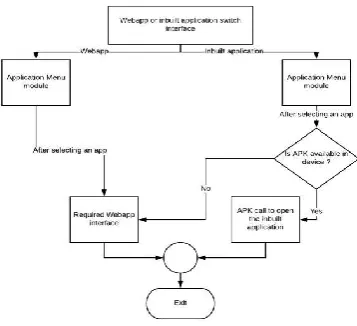
Webapp or Inbuilt application switch interface: This module consists of choosing either of the two options i.e., if the application user wanted to open is inside a Webapp, or the user directly opens the installed application through APK call.
Application menu module: This module displays a list of applications categorised according to the purpose. For example, Travelling and tourism categories include Make My Trip, Goibibo, IRCTC app, trivago, etc., Transport facilities include Uber, Ola, Taxi For Sure, etc., Online food orderings include zomato, swiggy, uber EATS, foodpanda, etc., E-commerce websites include flipkart, amazon, ebay, etc., and many more.
Webapp Module: This module has an interface of Webapp, that opens a website inside an application, with all the configurations needed. A website link is entered inside this webapp module, and then with the access to internet permission (Declared inside the app’s Manifest file), the interface will open the website along with the supported extensions (like JavaScript, jQuery extensions, etc.)
If the selected option in the start is APK call of inbuilt application, then it will first check if the application selected is installed in the respective device. If it is, then it will directly call the app through the APK call. If not, then the application will automatically open the Webapp module, with the required link of the application. After using the Webapp, the application can be directly closed wotout saving the data or it can be minimized.
Introduction to proposed system
As we all know that in today’s world there many kinds of android applications present for a particular department. Let’s consider in case of shopping section there are many applications available like Amazon, flipkart, Snapdeal, etc. In case of particular section for clothes there applications like Myntra, Club factory etc. For Booking of taxi Ola, Uber etc. are available.
Hence from the above explanation we can observe that there are multiple applications present for a different kind of section. Now in case of user, they have to install different applications
for different types of sections like ola or uber for cab booking, amazon or flipkart for shopping etc. Now due to the installation of different types of applications in the user’s device they take up most of the memory space of the device as well as put extra pressure on the device.
By studying the current studies, it can be observed that the more number of applications installed in the device, the greater amount of storage it takes in the device as well as it increases the pressure on RAM. Keeping the above factors in mind we can design an application which can act as a platform to aggregates 35+ different apps in one place, across categories like cabs, food, recharge, bill payment, news, cricket, horoscopes and more. The basic plan is to design the application in such a way that it can give the user, the access to multiple applications but also to arrange the allocation in a well-organized manner.
The main aim of the application will be supporting the user by providing access to multiple applications in a well-organized manner which will help the user to check different application for a particular section.
Keeping the demerits of the current situation of keeping several applications in single device, a solution can be brought to existence where a user have to download a single application which can be severed a replacement for multiple application in a single device.
The application can create access to multiple application and hence prevents the user from downloading multiple applications.
Due to the fact that it can create access to multiple applications, It reduces the memory consumption of the device due to the presence of multiple application present in the device. As we know that in today’s world the memory management of the device is an important factor of every application. Hence with the help of this application the user can preserve a lot of space which could have been occupied due to the presence of multiple application.
The presence of a greater number of applications also increase the pressure on the RAM which makes the device slower and sometimes even causes lag in the device. Since the application provides access to multiple application hence it will prevent the user to download application separately. Hence this will reduce the pressure on RAM as well as prevents the device from lagging.
The access to every application is arranged in a well-organized manner such that the user will face no difficulty in finding the desired application as well as can access the application easily.
Apart from providing access to application, the designed application also provides access to then website of the corresponding application in option with the help of which the user can also check the website of the particular application based on their choice.
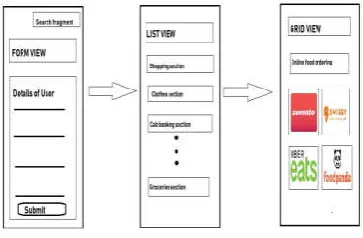
Application UI
This module basically consist of the interface of the application with which the user interacts
Form View-: This format basically contains a form with a new user interacts for new registration and gives their details as input or a registered user gives their id and passwords as input.
List View-: This view format basically consists of the list of different kinds of sections like shopping section, groceries section or the taxi booking section. Etc.
Grid view-: This view format consist a grid view of all the application present in a particular section like the ola, uber etc. are present in the taxi booking section etc.
Search Section-:In this section we provide the user a direct search access where he can directly search for the application he is looking for.
CONCLUSION
The Android apps require the inter collaboration of the smartphones hardware along with kernel support. These apps leave the room for more improvement for further enhancement there by easing human effort and advancing in technology.[3] With proper management of setting in the background process helps in bringing down effective application loading time. This idea is very helpful to access patterns that do not change frequently. If the same cluster of applications will be reused then definitely it will help in better loading times of applications hence improving the overall experience of a smartphone user.
References
1. Joon-Myung Kang, Joon-Myung Kang, James Won-Ki Hong (December 2011) “Personalized Battery Lifetime Prediction for Mobile Devices Based on usage pattern”, Journal of computing science and engineering, vol 5, no 4.
2. Myungsun Kim, Jinkyu Koo, +1 author James R. Geraci, “Memory Management Scheme to Improve Utilization Efficiency and Provide Fast Contiguous Allocation without a Statically Reserved Area”, Published 2015 in ACM Trans. Design Autom. Electr. Syst, DOI: 10.1145/2770871
3. Kumar Vimal, Aditya Trivedi,” A Memory Management Scheme for Enhancing Performance of Applications on Android”, 2015 IEEE Recent Advances in Intelligent Computational Systems (RAICS) | 10-12 December 2015
4. Paul, K., &Kundu, T. K. (2010). Android on Mobile Devices ”Android on mobile device: An Energy Perspective”,. 2010 10th IEEE International Conference on Computer and Information Technology. doi:10.1109/cit.2010.416
5. Kim, H., Lee, M., Han, W., Lee, K., & Shin, “Aciom: Application Characteristics-aware Disk and Network I/O Management on Android Platform”. Proceedings of the Ninth ACM International Conference on Embedded Software - EMSOFT ’11.
Figure 3 Model Representation of Application UI
How to cite this article:
Vishal Gupt et al.2018, Android Application Management and Enchancement. Int J Recent Sci Res. 9(9), pp.28987-28991. DOI: http://dx.doi.org/10.24327/ijrsr.2018.0909.2774