© 2018 IJSRST | Volume 4 | Issue6 |Print ISSN: 2395-6011 | Online ISSN: 2395-602X
National Conference on Smart Computation and Technology in Conjunction with The Smart City Convergence 2018
Augmented Reality: Map with information using Unity-3D
Mr. Anurag Kumawat*, Ms. Asha Kumawat, Ms. Shikha S. SarkarDepartment of Computer Engineering, Poornima Inst. of Engg. & Technology, Jaipur, India
ABSTRACT
This paper explores the use of Unity3D Vuforia packages to make an application in Augmented Reality for any small area, buildings including colleges, monuments etc. It is described that how map is created in AR along with the information. Results shows that created application is accurate enough to show the information of target image and scanned text in real time environment also able to show the path between source to destination through camera in AR.
Keywords: Unity3D, Vuforia, Target Image, Augmented Reality, Navigation, Map, 3D, A* Algorithm, Mapbox
I.
INTRODUCTION
Augmented reality is the integration of digital information with the user's environment in real time. Unlike virtual reality, which creates a totally artificial environment, augmented reality uses the existing environment and overlays new information on top of it[1]. Basically AR is a technology in which registration of 3D objects are done. With this technology user can use their personal mobile device, head mounted display to produce interesting AR environment in 3D around devise in real time. Otherwise AR technology has a broad range of applications including medical, creating 3D model, map navigation, showing information of 3D objects. there are several ways to implement AR applications. This paper uses Unity-3D and vuforia AR packages to establish 3D world, 2D image correspondences (for image target).
This paper describes the implementation of three different modules of an AR application. In which user will be able to use their personal mobile phones to see 3D objects in real world through camera also able to get the detailed information of that object, written text, image and move to destination according to path which is navigated by application in AR.
The rest of the paper is structured as follows: "Background" presents the use of vision-based
methods for augmented reality and gives examples from the literature making use of Augmented Reality. “Methodology used” describes a method for creating complete application.
“Method to detect image target” detailed explanation of image target detection. “Method to scan text” describes a method of Text recognition, in this module we have to recognise written text (OCR). “Method to create navigation” describes for navigation use of unity Navigation and Path finding feature and A* algorithm, while "Results" assesses the effectiveness of the A* algorithm and presents the results of augmentation. Finally, conclusions are drawn in for the implemented work.
Figure 1 (a)Image target (b)3D View
II.
BACKGROUND
“A Survey of Augmented Reality” by Ronald T. Azuma [8] -
virtual environment and cannot feel real world as in AR, where he can interact with real world. AR bridges or glues virtual and real world. The paper is arranged surveying the combination of VE and AR, interaction of user in real time and registration of 3D space. The AR is widely applicable in many areas. Most useful application which he discusses is Medical (surgery and visualization aid), Machines (assembling, maintaining and repairing), robotics, entertainment etc. He had discussed about the characteristics of virtual environments and in comparison to AR stated rendering process for virtual objects is quiet easy in AR as compared to VE because in virtual environment all the objects need to be rendered virtually whereas in AR only few objects need to superimposed with real world. Example, AR for text, annotation applications etc. The hardware requirements of AR is low but more stringent in case of sensing or tracking applications. The reason for this is registration problem means, two objects must be properly aligned which is the serious need of few applications.
“Recent Advances in Augmented Reality [9]” -
The same author along with others, discussed in this paper about how recent advancements in technology demands AR to be deployable on mobiles and web technologies. As to make extensive use of AR possible to maximum users. He discussed the research contribution of Mohring and Wagner on usage of phones for computer vision in sensing and tracking. He studied about characteristics of web 2.0 and AR 2.0 and compared them. He concluded how AR can be deployed with handheld devices, to generate and share information or user content with others users. But till 2001, the problem of registration was an issue.
The main problem in already existing 2D navigational system that you have to check screen simultaneously with real world so there is a big problem, many time accident happens due to this, and 2nd problem is that you don't have gps system for small colleges and building and you required a guide if you want any
information about anything, many time there is language barrier, understanding problem.
So to resolve all these problems we can use Augmented reality. We will use two type of augmented reality, marker less augmented reality and marker based augmented reality, for showing information‟s we use Marker based augmented reality, which is basically having following characteristics: 1. Combination virtual environment and real world. 2. Real time interaction.
3. Register in 3 Dimension [2]
A. Combination of real and virtual environment After image detection we have to show outputs, to show output we used 3D object to show any information on image or text also. So for this we have to combine real and virtual environment, which is the main feature of augmented reality.
B. Real time interaction
In this we gather all information of real world using mobile camera or head mounted device using our application in android / iOS, this is cross platform application so we can use any mobile device. We designed gui to interact in real time we have used virtual button which is use gesture detection to interact with application and give input to application.
C. Register in 3 Dimension
will check coordinates and compares both coordinates and then show navigation.
III.
METHODOLOGY USED
We have used augmented reality with unity 3d (to design gui and use package ) and Vuforia AR package to use Augmented reality prefabs and objects. Here are our all module of project:
A. Method to detect image target
Our first module is image target detection, in this module we have to detect our target image, for this we have to enter image in vuforia database then vuforia will change image in black and white image and set marker for image and make a database package and we will use that package as a database and then we design environment for image target detection for that we have to import ar camera, and image target and then we have to set desire output on each image detection. To use this module user have to select image target option and then he have to point his camera to object/ image , then app will convert that image and set marker then compare those marker to all image in database and then load object according to that image.
B. Method to scan text
Our second module is Text recognition, in this module
Figure 2. Target image in Vuforia database
we have to recognise written text (OCR). For this we are using text recognition engine of vuforia package. The Vuforia text recognition engine will acknowledge text that's written or rendered in most of the unremarkably occurring line and fount fonts. The
supported text designs embody designs that square measure plain, bold, and italic.
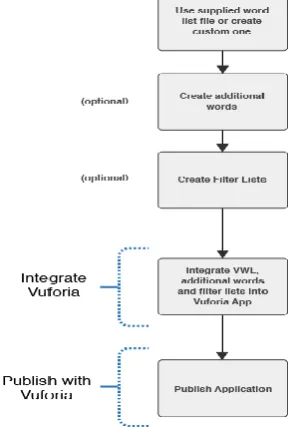
We use a glossary, Word lists can even be filtered victimization filter lists to exclude sure words from being detected (using black-list filters), or to permit solely specific words to be detected (using whitelist filters). A set of words is outlined by filter, that the filter is longing for, whereas the filter mode tells Vuforia the way to use those outlined words for filtering. More specifically, two filter modes defines by Vuforia:
A. Black-list mode: If this mode is about, Vuforia
can notice all the words within the current
thesaurus except those per the filter list.
B. White-list mode: If this mode is about, Vuforia detects solely those words that area unit enclosed at constant time within the current glossary and within the filter list.
Once we recognise text then we can set any output on word found. So if user want to recognize text then he have to point the camera to text and then app will recognize text and check in database for corresponding output. And show it in 3d on screen.
Figure 4 and 5. Showing database in AR
C. Method to create navigation
Our third module is navigation, so for navigation we are using unity Navigation and Pathfinding feature and A* algorithm along with mapbox. For destination and source we are using gps coordinates and to find best , shortest route we are using A* algorithm.
Mapbox
Mapbox is the area information stage for versatile and web applications. We give building pieces to include area highlights like maps, inquiry, and route into any experience you make[5].Mapbox project offered a way to get a reliable facing direction relative to true north so all that was left was to just place the objects in the world[6]. In the case of Mapbox, we do the following [7]:
1) Geospatial data: Mapbox utilizes tilesets as a geospatial information arrange while showing maps. Tilesets are a lightweight stockpiling group for both raster and vector information. When you transfer information to Mapbox, it is put away as a tileset.
2) Styling rules: When you characterize how your information ought to be styled in the Mapbox Studio style editorial manager, this
data is put away in a JSON report that fits in with the Mapbox Style Specification.
3) Display: Whether you utilize the Mapbox Maps SDK for iOS or Android on versatile or Mapbox GL JS on the web, we utilize a device assembled Mapbox GL to put the style JSON and the tilesets utilized as a part of the style and draw your guide.
D. A* algorithm
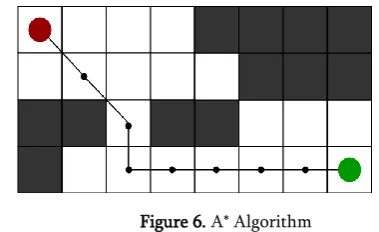
A* Search algorithm is one of the best and most popular technique to find path between two nodes and for graph traversal. It is mostly used to approximate the shortest path between nodes in real-life situations, like- in google maps, games where there can be many hindrances. To better understand this method we can assume a 2D Grid having several obstacles in the path and want to move from a source cell (coloured red below) to destination cell (coloured green below)
Figure 6. A* Algorithm
In A* Search rule at every step it picks the node per a value-„a‟ that may be a parameter adequate to the add of 2 alternative parameters – „b‟ and „c‟. At every step it picks the node/cell having the bottom „a‟, and method that node/cell.
We merely outline „b‟ and „c‟ as below b = the movement value to maneuver from the supply purpose to a given sq. on the grid, following the trail generated to urge there.
c = the calculable movement value to maneuver from that given sq. on the grid to the ultimate destination.
Algorithm: [4]
Step2. Perform closed list initialization on the open list,put the starting node
(you can leave its a at zero) Step3. whereas the open list isn't empty
a) notice the node with the smallest amount a on the open list, decision it "q"
b) pop letter of the alphabet off the open list
c) generate q's eight successors and set their folks to letter of the alphabet
d) for every successor
i) if successor is that the goal, stop search successor.b = q.b + distance between successor and letter of the alphabet successor.c = distance from goal to
successor (This is done mistreatment several ways, we'll discuss 3 heuristics-
Manhattan, Diagonal and euclidean Heuristics) successor.a = successor.b + successor.c
ii) if a node with an equivalent position as successor is within the OPEN list that incorporates a lower a than successor, skip this successor
iii) if a node with an equivalent position as successor is within the CLOSED list that has a lower a than successor, skip this successor otherwise, add the node to the open list finish (for loop)
e) on the closed list, push q finish (while loop)
And for destination and source we are using gps coordinates and to find best, shortest route we are using.
IV.
RESULT
Successful creation of an application can be seen in this paper through which the user will be able to view the information of any 2-D image in AR environment. An individual will be able to scan any text or word and then will fetch the detailed information of the same along with 3-D objects if required. The only condition with is application is that the text should be written in plain, bold, and italic.
V.
CONCLUSION
It is clear that the Unity3D has great potential in AR applications for creating 3D environment and mapbox to create AR map with its API‟s. It can also be used in creating an interaction device tracking the path. In this paper, we displayed an application to demonstrate 3D data or principally proposed an approach to consolidate join every one of the scenes utilizing scene administration. This application will be useful to demonstrate route progressively, which can be utilized on huge scale in future. AR guide can converge with google delineate better utilize.
Limitations
● Required a device to use this
● Only able to show details about data which is stored in database
VI.
REFERENCES
[1] Thomas Caudell (Boeing researcher), A description to use of head-mounted displays (1990)
[2]
http://whatis.techtarget.com/definition/augmented-reality-AR
[3] Vikas Tiwari, Vijay Prakash Tiwari, Dhruvesh
Chudasama, Prof. Kumkum Bala, “Augmented Reality and Its Technologies”, International Research Journal of Engineering and Technology (IRJET), 2016.
https://www.irjet.net/archives/V3/i4/IRJET-V3I4280.pdf
[4] Vuforia Developer Library
https://library.vuforia.com/articles/Training/Text-Recognition-Guide
[5] https://www.geeksforgeeks.org/a-search-algorithm/
[6] https://www.mapbox.com/about/
[7]
http://www.instructables.com/id/Placing-AR-Objects-at-GPS-Coordinates-i n-Augmented/
[8] https://www.mapbox.com/help/studio-manual/
[9] https://www.cs.unc.edu/~azuma/ARpresence.pdf
Ronald T. Azuma, Malibu,In Presence: Teleoperators and Virtual Environments 6, 4 (August 1997), 355-385
[10]http://ieeexplore.ieee.org/document/963459/Nov/Dec20