Devising An Application to Decrease Procrastination
Felianne Teng
1*, Yu Sun
21Troy High School, 2200 Dorothy Ln, Fullerton, CA, 92831, USA.
2Computer Science Department, California State Polytechnic University, Pomona, Pomona, CA, 91768, USA.
* Corresponding author. Tel.: +1(909)662-7178; email: [email protected] Manuscript submitted January 6, 2019; accepted March 8, 2019.
doi: 10.17706/jcp.14.3.152-160
Abstract: As an issue that increases stress and decreases work quality worldwide, procrastination requires easily accessible solutions. In order to create one, I designed and implemented a mobile application that enforces healthy work habits. The application contains a text editor that can be locked while the user is working, preventing the user from leaving the app until he or she inputs a set number of words. It also connects to a physical locker, which locks while the app is locked. The app also contains a task manager, allowing the user to manage his or her tasks effectively. Overall, the application prevents the user from becoming distracted from outside sources and keeps him or her focused on the required work.
Key words: Android, mobile development, procrastination, Raspberry Pi.
1.
Introduction
Procrastination is a large problem in the work lives of many people. It can be defined as the practice of putting off work for a later time because of an unwillingness to do it. Procrastination has several negative results associated with it. Studies have shown that it tends to lead to poorly done work and higher stress levels, likely a result of the work being done in a shorter amount of time [1]. Two major causes of procrastination are the fear of failure and the reluctance to complete certain tasks. The fear of failure is when people may not begin working because they believe their work is not adequate enough to satisfy others, often indicating a low self-esteem. But more common is the averseness to completing work, which is when people try to delay work because they do not enjoy it [2]. They do not want to have to do the task, so they try to keep from doing it as long as possible.
Conversely, even when people do try to work on their tasks, their devices or social media may distract them. This leads again to more work piling up and more stress alongside it. With the amount of distractions and forms of entertainment found in the world today, it can be difficult to stay focused.
devices or objects that may draw away attention while occupied. The application and the locker are locked concurrently. The application also contains a task manager to keep record of tasks outside of writing in order to reduce stress from the enormity of a task. This feature prevents users from forgetting what tasks need to be completed. In general, the application is targeted towards both students and people in work fields requiring typed documents that find that their attentions become preoccupied with disturbances while working. For instance, students writing reports may use the application to maintain focus while working. The physical locker is meant for users who may find that they need more aid in keeping them from becoming distracted.
The rest of the paper is structured with Section II discussing a motivating example for the development of the application, Section III identifying the problems to be solved by this project, Section IV discussing the implementation of the project, Section V describing how the results of the project, Section VI relating previous works to this project, and Section VII summarizing the report and applying it to future situations.
2.
Motivating Example
Personally, as a student, I generally receive a combined large amount of classwork from all of my classes. At times, assignments may be given several weeks in advance of their due date. For these assignments, I often assume that I have plenty of time to complete them, so I put them off to do at a later time. Then, when their due date approaches, I tend to feel overwhelmed by the increased amount of work I have given myself as opposed to spreading it out over a longer period of time. Additionally, while completing my course work, I can become distracted easily by text messages and notifications from my devices, leading me to take more time in completing my work and getting less sleep as a result. Increased stress levels and less time to do the assignments leads to poor work quality and health as a whole.
Upon speaking to my peers, I found that such a problem is not unique to me. Many students at my school sleep very few hours, if at all, often due to procrastination and other distractions. Our negligence leads to poor health and increased levels of stress. Thus, I designed a project that would help to solve the problem of procrastination due to distractions.
3.
Challenges
3.1.
Challenge 1: Distractions from Outside Sources Impeding Work
Distractions can come from a variety of sources for people attempting to work. For someone working on his or her computer, the Internet and other applications are likely candidates. Alternatively, a nearby device such as a mobile phone could display notifications of text messages to divert attention. These disturbances tend to draw away focus, prolonging a task beyond its expected completion length.
3.2.
Challenge 2: Putting off Tasks due to Their Scale
During periods when a lot of tasks must be completed, one might feel overwhelmed by the amount of work. In such cases, the worker might delay the tasks in order to worry about them later because of the seemingly endless amount of them. Completing them all may seem like an impossible task. Unfortunately, this only leads to a reduced amount of time to complete the tasks and greater stress later on.
3.3.
Challenge 3: Motivation for Completion of Tasks
they have to do the work either way, increasing reluctance to complete it.
4.
Solution
The application created to help solve the problem of procrastination consists of two main features. The primary feature is a text editor. While using the text editor, the user has the ability to choose a word limit based on however many words he or she needs to type for his or her work. The user then can start a lock using a button on the text editor screen. During the lock, the user will be unable to leave the application on his or her device. The locking mechanism used in the software itself is the “Screen Pinning” feature found in Android devices. The feature restricts the user to using solely the text editor application and blocks notifications from other applications. In addition, the application can communicate with a physical locker so that when the application is locked, the locker locks as well. The application becomes unlocked when the number of words typed by the user reaches the chosen word limit, and at that point, the user can leave the application and the physical locker will become unlocked.
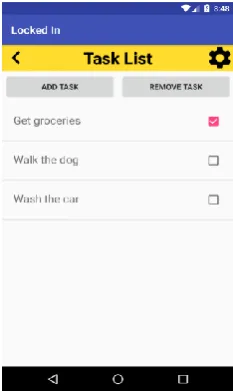
The secondary feature of the application is a task manager. The user can document the tasks that he or she needs to complete by adding them to a list in the application, which can help him or her remember what needs to be done. Each task displayed has a check box, which helps the user keep track of which tasks have already been completed. The tasks can also be deleted at the user’s discretion.
Development of the application was done using Android Studio with Java [3]. It has four functional screens: the main menu, the text editor, the task manager, and the settings. Each screen has a corresponding activity for its functionality and a .xml file for its layout. The Butter Knife library was used to bind the UI components to the references in the code [4]. The main menu screen contains buttons leading to the other three screens as well as the title of the application, “Locked In”. It is the default screen that opens when the application is first started. Upon starting the application for the first time on a particular device, the application creates a random six character user ID for the user and stores it in the Shared Preferences of the device as persistent data. For subsequent boots of the application, the same user ID will be retrieved, rather than newly generated. The application checks if it should create a new user ID by checking if there is already an existing ID in the Shared Preferences when opening.
Fig. 1. Code snippet of saving and retrieving the user ID in shared preferences.
Fig. 2. Image of the main menu screen.
Fig. 3. Image of the text editor screen.
The task manager screen consists of navigation buttons to the settings page and main menu, two buttons for adding and removing tasks respectively, and a ListView of individual tasks. Each task is an object of class Task with the properties Description, a String, and Completed, a Boolean value. A separate layout file was created to represent each Task object, with Text to display the Description and a check box to represent the Completed value. A subclass of the ListAdapter was then used to connect the layout file and the Task class, so that it could be added to the ListView. When the user clicks on the “Add Task” button, a custom Dialog Fragment window opens, prompting the user to enter a name for the task. Once the user enters a description, the task is added to the ListView. Whenever the user taps on a task, the app keeps track of which task was last clicked on, and upon clicking the “Delete Task” button, the currently selected task will be removed from the list.
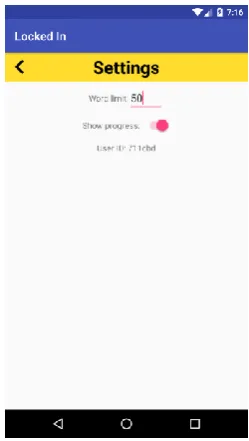
Finally, the settings screen contains a button to return to the screen that the settings page was accessed from, options to change the word limit and show or hide the word count on the text editor screen, and text displaying the user’s ID. This screen can be accessed from any other screen in the application. While the application is locked, the word limit cannot be changed, to prevent the user from intentionally changing it to a lower amount to unlock the app. All of the settings and data from the application are stored both locally when the app is running and in an online database in order to store them persistently. The data include the words typed in the text editor, the current word count, the current set word limit, whether the application is locked, whether the word count in the text editor screen is visible, and the tasks in the task manager. The user ID, which is stored in the device’s local storage, is used to uniquely identify each user of the application in the online database, and the data are stored under that ID. The online database used is Google Firebase, and data are called from it each time the application is opened [5]. If it is the first time the user opens the app, the data will be assigned default values. The data in Firebase are updated every time the application is closed or the data are changed. The local copies of the data are saved throughout the app using the Intent class to pass them to the next screen whenever the screen is changed.
Fig. 5. Code snippet of saving data to Firebase.
the locker. The process is done wirelessly through the Internet, so there is no need to connect the locker to an exterior device. Connection with another computer is only necessary when first setting up the locker. Upon obtaining the physical locker, the user must set it up by connecting it to his or her wifi network through and entering his or her specific user ID. The command line is used set up the Raspberry Pi. The amount of power remaining in the battery can be determined through the number of lights remaining in the battery indicator, with four being the maximum. The battery can be charged through a micro-USB connection.
Fig. 6. Image of the settings screen.
Fig. 7. The physical locker exterior.
Fig. 9. Code snippet for the Raspberry Pi to lock and unlock the locker by sending commands to the Servo motor.
5.
Empirical Results
The application addresses the previously mentioned problems as follows:
5.1.
Challenge 1: Distractions from Outside Sources Impeding Work
The application limits the user to solely using it while the lock is activated in the text editor. The user cannot use any of the menu buttons commonly found on an Android device to leave the application. This prevents the user from becoming distracted by notifications or other applications on the device itself. Also, for the physical locker, the user can store other distracting devices such as a phone or tablet, so he or she will be unable to use them during the duration of the lock. By restricting access to other devices and applications, the developed software limits attention drawn to other materials while working.
5.2.
Challenge 2: Putting off Tasks due to Their Scale
The task manager feature of the application helps to solve this problem. By using a list to write out each individual task that must be completed, the user can see what needs to be done in a visual form. Having each step and task laid out allows the user to engage the work step by step, making the overall responsibility less overwhelming. The user can easily decompose larger tasks into smaller ones. Additionally, the ability to check off completed tasks is an easily visible indicator for keeping track of what tasks have been and still need to be completed.
5.3.
Challenge 3: Motivation for Completion of Tasks
As the user can place anything he or she wishes into the physical locker, the locker can be used as a reward system as well. Rather than merely putting distracting devices into the box, for instance, the user can place candy or food into the box before locking it through the application. The user will not be able to access the food until he or she is finished with his or her work, allowing for a reward system and motivation for completing work. The user will have a reason for finishing the necessary tasks beyond simply because they are required.
6.
Related Work
habits to some extent [7]. The research conducted in my study aims to accomplish the same task, reducing procrastination in work, but it is more accessible to people of all age groups because it is a mobile application, rather than a college level course. The class offered more personal guidance for the students, who were allowed to research procrastination and think more deeply about how it affected them. Students could engage in discussion about the topic among themselves and their instructors.
Other mobile applications exist to combat the same issue as well. For instance, the mobile application Procraster for iOS offers similar features to the app I developed. It aims to prevent procrastination by letting the user input his or her reasoning to why he or she is procrastinating, and offers personalized advice to ameliorate work habits. Its various features include a task manager, a timer, and statistics for productivity [8]. Rather than being the actual interface where the user works, this app serves as a tracker for the user’s duties and productivity levels. In contrast, for my app, users work directly within the application utilizing the provided text editor. Also, although Procraster contains a timer, it does not prevent the user from leaving the app nor does it have a physical locker for other devices. Users may still be distracted by outside sources and can leave the app to respond to notifications at anytime, thus rendering the problem of unproductivity unresolved. It focuses more on the task manager portion, having more advanced sorting features for tasks and allows the user to set notifications for each task. As a whole, my application is more forceful in persuading the user to work on the given task, because it keeps him or her engaged in his or her work.
The application Flipd for Android and iOS also aims to solve the issue of distractions from devices. While the app is in use, the user can set a timer that locks the user from using his or her phone completely for a given duration of time [9]. Such a feature is comparable to the one I implemented. The lock on this app depends on the amount of time set rather than the number of words typed, however. It is more effective to have a lock based on a word limit because the user is then required to finish the actual number of words needed, rather than be able to stall until the time limit is finished, as is the case with the timed lock. Flipd also only locks the phone or device used, rather than a physical locker as well, so the distractions are only limited from the single device. Similar to Procraster, the user does not do work inside the app, as it only serves as a motivator for the user to complete his or her work, unlike the text editor in my app. Flipd has a social network component that allows users to join communities and discuss their work with others, which my app does not contain. By examining existing applications and methodologies for reducing procrastination, my application aims to add to the study through the involvement of an external locker, a feature not found in similar software.
7.
Conclusion and Future Work
command line prompt on a separate computer, making it tedious and difficult to connect properly. Thus, a more user-friendly user interface for the physical locker will also be implemented, allowing users to configure the locker more easily, and directions for setting it up will be included within the application.
References
Felianne Teng was born in 2001 in Southern California. She is currently a 12th grade student at Troy High School in Fullerton, California, USA. She worked as a research assistant in the California State Polytechnic University, Pomona in the field of mobile application development. Her research interests lie in the fields of software development and machine learning.
Yu Sun was born in China in 1984. He received his Ph.D at the University of Alabama at Birmingham in 2011, and is an assistant professor in the Department of Computer Science at Cal Poly Pomona, USA. His research interests are in areas related to software engineering, mobile computing, and cloud computing.
[1] Tice, D., & Baumeister, R. (1997). Longitudinal study of procrastination, performance, stress, and health: The costs and benefits of dawdling. SAGE Journal, 8(6). Retrieved August 04, 2018, from http://citeseerx .ist.psu.edu/viewdoc/download
[2] Solomon, L., & Rothblum, E. (1984). Academic procrastination: Frequency and cognitive-behavioral correlates. Journal of Counseling Psychology, 31(4). Retrieved July 25, 2018, from https://s3.amazonaws.com/
academia.edu.documents/33049484/AcademicProcrastinationFrequency.pdf
[3] Android Developers. Android Studio. (2018). Retrieved from https://developer. android.com/studio/ [4] Wharton, J., & Butter, K. (2013). Retrieved from http://jakewharton.github.io/ butterknife/
[5] Google. Firebase. (2018). Retrieved from https://firebase.google.com [6] Joan2937. Pigpio. (2018). Retrieved from http://abyz.me.uk/rpi/pigpio/
[7] Hedin, B. (2012). Teaching procrastination – A way of helping students to improve their study habits.
Presented at the LTHs 7:e Pedagogiska Inspirationskonferens. Retrieved August 06, 2018, from http://www.diva-portal.org/smash/get/diva