267 |
P a g e
CREATING CUSTOMIZED EMBEDDED LINUX
DISTRIBUTION FOR BEAGLE BONE
Anantha Krishnan.D
1, Diana Emerald Aasha.S
21
PG scholar, Embedded System Technology, SRM University, Chennai, (India)
2
Assistant professor (OG), Department of ECE , SRM University, Chennai),(India)
ABSTRACT
Many commercial embedded linux distributions are tied to specific CPU Manufacturers, Peripheral vendors
restricting customers to use their predefined hardware for their Application. Thus restricting the real freedom of
Linux to Product Manufacturers. This Paper presents how to build a new customized embedded Linux
Distribution from scratch, for BeagleBone Board. This Embedded Linux Distribution enables software
developers to more easily customize their software stack and add product differentiating features.
Keywords: Embedded Linux, Device Driver, BSP, BeagleBone
I. INTRODUCTION
Creating customized embedded linux distribution is not so easy. Much of the complexities resides in build system, BSP development, building the kernel, Bootloader, Filesystem, Applications with minimal footprint and finally booting the kernel. Building wrongly will result in system crash. TI BeagleBone is a barebone development board with ARM Cortex A-8 processor running at 720 Mhz, 256 mb of RAM, two 46-pin extension connectors, on-chip Ethernet, a microSD slot, and a USB Host port and multipurpose device port which includes low-level serial control and JTAG hardware debug connections, so no JTAG emulator is required for which customized embedded linux distribution is created.
II. BSP/KERNEL DEVELOPMENT
A BSP contains a bootloader and kernel with the suitable device drivers for targeted hardware. BeagleBone uses AM3358/9 SOC. Toolchain which runs on GNU/Linux workstation generates code for Intel x64 architecture. To generate code for ARM architecture, cross compiling toolchains generally used. OpenEmbedded build automation is used in this project.
2.1 Device Drivers
268 |
P a g e
must be enabled during Linux Kernel Configuration (.config). Drivers can be loaded dynamically at runtime by using insmod.Make modules_install is used in embedded development, as it installs many modules and description files. Make INSTALL_MOD_PATH=<dir>/modules_install
The INSTALL_MOD_PATH variable is needed to install the modules in the target root file system instead of host root file system.
2.2 Kernel build system and configuration
One amazing thing about linux is that the same code base is used for a different range of computing systems, from supercomputers to very tiny embedded devices. For this reason it’s very important to be able to choose what code you want to compile (or not ) in a linux kernel. The infrastructure to manage this building the kernel image and its module is known as the Kernel Build System (Kbuild). The Linux kernel build system has four main components: config symbols, Kconfig files, .config files, Makefile.
1. Config symbols: Compilation option that can be used to compile code conditionally in source files and to decide which objects to include ina kernel image ir its modules.
2. Kconfig files define each config symbol and its attributes, such as its types, description and
dependencies. Programs that generate an option menu tree ( foreg, make menuconfig ) read the menu entries from these files.
3. Config files: Stores each config symbols selected value. This file can be edited manually, or by using any configuration editors, such as menuconfig, xconfig that call specialized programs to build tree like menu and automatically update and create the .config file
4. Makefile normal GNU makefiles that describe the relationship between source files and the commands needed to generate each make target, such as kernel images and modules.
2.3 Building U-Bootloader and Kernel
U-bootloader provides early initialization code and is responsible for initializing the board so that other programs can run. This early initialization code is almost always written in the processor’s native assembly
language. After the bootloader has performed this basic processor and platform initialization, its primary role is fetching and a booting full blown Linux kernel. U-Bootloaderperforms its operation in two stages. U-Boot 1st stage runs from SRAM. Initializes the DRAM, the NAND or MMC controller, and loads the secondary bootloader into RAM and starts it. No user interaction possible. File Called MLO. U-Boot second runs from RAM. Initializes some other hardware devices ( network, usbetc ). Loads the kernel image from storage or network to RAM and starts it.
1. Get the U-boot source code from website and uncompress it. Wgetftp://ftp.denx.de/pub/u-boot/u-boot-latest.tar.bz2 tar –xjf u-boot-latest.tar.bz2
269 |
P a g e
2. U-Boot must be configured before being compiled.ARCH=arm CROSS_COMPILE=arm-linux-gnueabi- Make beaglebone.cfg
The main result is a u-boot.bin file which is the u.boot image.U-Boot image is installed in NAND flash memory to be executed by hardware. The device tree is a data structure for describing hardware. Rather than hard coding every detail of a device into an operating system, many aspect of hardware can be described in a data structure that is passed to the operating syatem at boot time. The kernel no longer contains the description of the hardware, it is located in a separate binary the device tree blob. DTB located in arch/arm/boot/dts.After the bootloaders boots linux kernel into RAM. Linux kernel takes over the system completely and bootloader no longer exists.
1. Get the linux sources from http://kernel.org
2. Adding settings specific to embedded system
Make menuconfig ARCH=arm CROSS_COMPILE=arm-linux-gnueabi –j4 Which generates the .config file
3. Finally buid the kernel by using
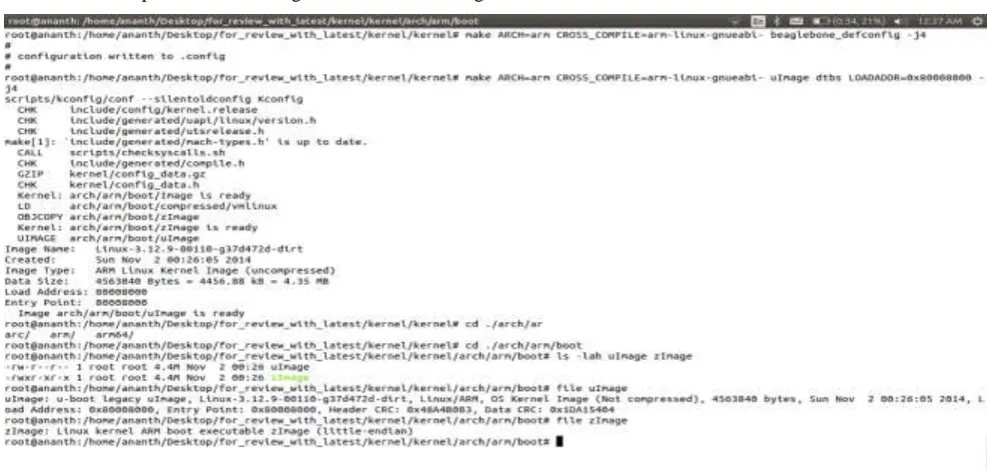
Make ARCH=arm CROSS_COMPILE=arm-linux-gnueabi –uImagedtbsLOADADDR=0x80008000 – j4
The result is compressed kernel image arch/arm/boot/uImage.
Fig 1 Compiled Kernel and U-Bootloader result
III. ROOT FILE SYSTEM CREATION
Creating the root filesystem involves selecting files necessary for the system to run. The root file system is mounted at he root of the file system hierarchy and is referred to as /. The ext3 file system adds journaling on top of the ext2 file system for better data integrity and system reliability.
270 |
P a g e
2. Dd if=/dev/zero of=rootfs.imgbs=1k count=400
3. Formatting this file for the ext3filesystem 4. Mkfs.ext3 –I 1024 –F rootfs.img
3.1 COMPILING BUSYBOX
BusyBox is software that provides several stripped down tools in a single executable file. It was specifically created for embedded operating systems with limited resources.BusyBox can significantly reduce the size of root file system image. To initiate the BusyBox configuration, the command is the same as that used with the Linux Kernel for the ncurses library-based configuration utility.
1. Get the souces from http://busybox.net
2. Configure busybox make xconfig
3. Compilebusyboxby using make
4. Pre installing busybox (in the –install/subdirectory) Result a 500k size executable implementing all the commands.
3.2 Populating root file system
When a suitable root file system has been mounted, start up scripts launch a number of programs and utilities that the system requires. These programs often invoke other programs to do specific tasks, such as spawn a login shell, initialize the network interface and a launch a user’s application. Each of these programs
has specific requirements often called dependencies that must be satisfied by other components in the system therefore dozen of files must be populated in an appropriate directory structure on a root filesystem. The steps are as follows
1. Creating a mountpointmkdir /mnt/ 2. Mounting a root file system image 3. Mount –o loop rootfs.img /mnt/rootfs
4. Copying the busybox file structure into into the mounted image 5. Rsync –a busybox/-install /mnt/rootfs/
6. Chown –R root:root /mnt/rootfs
7.
Flushing the changes into the mounted file system imageIV.CONCLUSION
271 |
P a g e
REFERENCES
[1] DongyuZhang Phys. &Electr. Inf. Coll., Langfang Teachers Coll., Langfang, China Computer-Aided Industrial Design & Conceptual Design (CAIDCD), 2010 IEEE 11th International Conference on (Volume:2 ).
[2] Chun-yueBi Sch. of Comput. Sci. & Inf. Technol., Zhejiang Wanli Univ., Ningbo, China Yun-peng Liu ; Ren-fang Wang, Computer Application and System Modeling (ICCASM), 2010 International Conference on (Volume:8 ).
[3]Hongfei Zhang,MingyuGao, Dept. of Electron. Inf., Hangzhou Dianzi Univ., Hangzhou, China Published in: Electrical and Control Engineering (ICECE), 2011 International Conference.
[4]McLoughlin, I. Sch. of Comput. Eng., Nanyang Technol. Univ., Singapore Aendenroomer, A. Published in: Parallel and Distributed Systems, 2007 International Conference on (Volume:2 )