IN THIS CHAPTER
.BCM .Version 1.0 .Version 1.2 .Version 3.0 .Current (4.0).What Dynamics Means to Microsoft
CHAPTER
3
The Evolution
of Microsoft
Dynamics CRM 4.0
T
hat Microsoft Dynamics CRM is arguably one of the easiest-to-use CRM applications on the market should come as no surprise to anyone. Combined with the need for most businesses to have a CRM solution and the market domi-nance of Windows (and, specifically, Outlook), this gives Microsoft a significant edge on integration and ease of use. Although Microsoft Dynamics CRM is designed around Outlook, initial versions suffered problems with installation and compatibility/functionality. Thus, the road toMicrosoft Dynamics CRM 4.0 was not without some difficulties.
This chapter explains the history of Microsoft Dynamics CRM 4.0 and offers an insight into Microsoft’s goals with CRM. Additionally, for users considering Microsoft
Dynamics CRM 4.0 who might be using a previous version of Microsoft CRM or Microsoft Business Contact Manager, this chapter provides reasons as to the benefits of upgrad-ing to Microsoft Dynamics CRM 4.0.
BCM
Microsoft introduced Business Contact Manager (BCM) with Office 2003 as a tool for the small business owner to manage contacts and accounts in ways similar to a full-blown CRM system.
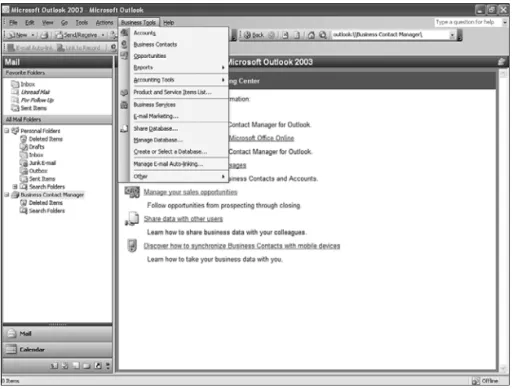
BCM shares many similar features with CRM. As you can see from Figure 3.1, BCM offers the capability to track accounts and contacts, as well as the capability to manage opportunities and to create and manage product and service item lists.
FIGURE 3.1 Business Contact Manager.
However, the area where BCM really comes up short is its inability to integrate Workflow for the automation of routine and/or necessary tasks.
Some other weaknesses of BCM include these:
. Outlook is required. BCM is considered an Outlook plug-in, so if you’re interested in just the BCM components, or if you have objections to working with Outlook, you’re out of luck. (While Microsoft Dynamics CRM 4.0 is also an Outlook plug-in, italsois available [with full functionality] via the Internet Explorer client.)
. No Remote Access is enabled. This is a problem if you need ready access to your BCM data via your web-enabled e-mail interface (such as Outlook Web Access).
. Data mining is limited. It lacks many of the easy-to-use “find” features in Microsoft Dynamics CRM 4.0 that give users information on demand.
Note, however, that our goal is not to sell BCM short in this context. Many businesses start with BCM and migrate to Dynamics CRM as their needs increase. However, BCM clearly lacks the capability to extend full-featured CRM functionality across an entire organization.
Refer to Chapter 6, “Data Migration and Conversion,” for more information related to BCM and migration to CRM from BCM.
Version 1.0
In early 2003, Microsoft Business Solutions CRM hit the U.S. market. Its market adoption was not significant (certainly when compared with other products in the Microsoft product line) because it was cumbersome to use and set up, had technical problems and limitations, and required customizations for almost every installation. Additionally, although it integrated with Outlook, it did not perform as expected.
Version 1.1 was slated for release later in 2003 with more international language support (Version 1.0 was released with English only), but it was upgraded and re-released as Version 1.2.
Version 1.2
By the end of 2003, Microsoft Business Solutions released the next version of CRM, Version 1.2. It increased its language offerings (up to nine, including International English, U.S. English, French, Italian, German, Danish, Dutch, Spanish, and Brazilian Portuguese), and it offered a number of service and product enhancements, including a somewhat easier setup and more reporting options.
Unfortunately, even with the changes, it suffered from usage and setup problems that made it less than ideal from a user and system administrator’s perspective. Microsoft real-ized that it needed to step up development efforts on the CRM platform for its next release and devoted many more resources toward the next version.
Version 3.0
Version 2.0 was originally slated for the first quarter of 2004. However, an overhaul of the reporting engine (it was moved from Crystal Enterprise to SQL Server Reporting Services [SRS]) and a major user interface redesign allowed Microsoft to skip directly to Version 3.0 in mid-2005. Additional offerings included support for 23 languages and a more intuitive setup process.
To address the continued problematic setup with CRM, Version 3.0 included a better version of an environmental diagnostics wizard, which did a “precheck” of most of the required settings and systems, alerting the user about problems before the system contin-ued. (Previous versions of the diagnostic wizard overlooked several key issues, resulting in failed and/or aborted installations.)
Microsoft Service Providers (MSPs) began to offer CRM 3.0 as a service shortly after its release as service providers could license it on a monthly basis. However, because of the way Microsoft CRM 3.0 works with organizations and Active Directory, this option required a dedicated server instance for each version of CRM. As a result, the monthly price associated with Microsoft CRM for even a few users was high.
In late 2005, Microsoft released SQL Server 2005, which was of great benefit to Microsoft CRM primarily because of the enhancements it brought to reporting services. Users with SQL Server 2005 could now leverage a SQL Server Reporting Services (SRS) application
Version 3.0 25
that was substantially easier to set up, configure, and maintain. In addition, they enjoyed the benefits of SQL Server 2005 (greater scaling, sizing, and administration).
At about the same time, the Microsoft Business Solutions division was undergoing the rename to Dynamics, and the new release (combined with its suite of other enterprise accounting packages) allowed Microsoft to showcase all Dynamics offerings under one division.
By the fourth quarter of 2007, Microsoft Dynamics CRM 3.0 was readily accepted by users and companies with more than 500,000 users. There were many add-ons and tools for download/purchase to extend its functionality, and there are many forums, blogs, and newsgroups related to the product that make for helpful deployment, troubleshooting, and extending functionality.
Current (4.0)
When Microsoft announced the release of Microsoft Dynamics CRM 4.0 in January 2008, it promised customers the “power of choice.” Microsoft has delivered on that promise by providing a host of new services and features to Microsoft CRM 4.0.
Although some of the new features of Microsoft Dynamics CRM are outlined in Chapter 1, “New Features of Microsoft Dynamics CRM,” the following represent some of the core improvements:
. Multitenancy—Multiple organizations can exist within a single CRM implementa-tion.
. Report Creation Wizard—Unlike previous versions of CRM that required use of Visual Studio to build and manage reports, you can design, create, and deploy reports from within the CRM system via the Report Creation Wizard.
. Different server roles—From a scaling standpoint, the capability to have different servers performing different functions results in dramatically higher performance. The different roles are listed here:
. Application server role—Provides Microsoft CRM 4.0 web user interface and services.
. Platform server role—Provides services such as the Workflow and Bulk E-mail services (asynchronous services) to separate computers.
. Specific server roles—Individual services such as HelpServer or WebService can be deployed individually or grouped on one or multiple servers to increase performance. (See Chapter 5, “Setting Up CRM 4.0,” for more information related to server roles.)
. Microsoft Dynamics CRM 4.0 Connector for SQL SRS—This resolves a common authentication problem when trying to access and run reports in previous versions of Microsoft CRM, referred to as “the Kerberos double-hop authentication issue.”
4.0 user interfaces in different languages than the base language. Additionally, users can display Help in a language that differs from either the base language and the language displayed in the Microsoft Dynamics CRM 4.0 user interface.
. Multicurrency—Multiple currencies are now supported for transaction-based records.
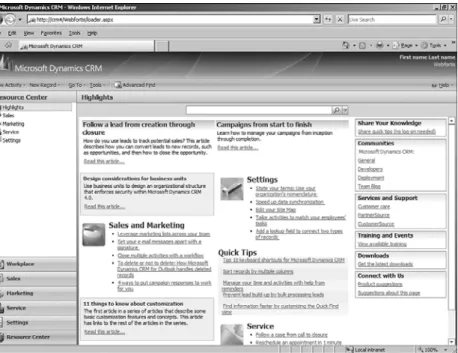
. Resource Center—Both users and administrators can use the Resource Center as a location where they can share and use information related to Microsoft CRM 4.0 (see Figure 3.2).
FIGURE 3.2 Microsoft CRM 4.0 Resource Center.
Current (4.0) 27
3
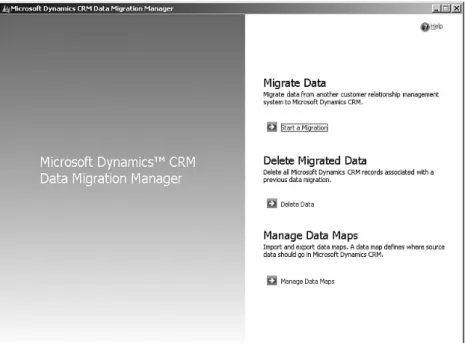
. The Data Migration Manager (see Figure 3.3) enables users to easily perform migra-tions previously reserved for system integrators and/or system implementers.
. Workflow(see Figure 3.4) has been dramatically redesigned to allow access to the Workflow tool from the CRM interface instead of having a separate application that the user would need to access to create and manage Workflow.
. Finally, the E-mail Routerhas been upgraded and provides seamless integration with the latest version of Exchange and its 64-bit requirements. Additionally, Exchange is no longer a required component to enable CRM e-mail functionality.
FIGURE 3.4 Microsoft CRM 4.0 workflow screen.
With the release of Microsoft CRM 4.0, Microsoft has given customers an assortment of choices regarding which platform to use and how they want to work with Microsoft CRM 4.0. This is important because Microsoft CRM leverages existing Microsoft architecture and integrates easily into it. Users who have existing Microsoft Windows servers and related technology will (in most cases) be able to easily add Microsoft CRM 4.0 into
their systems.
However, if there is little or no existing Microsoft infrastructure, adding Microsoft CRM 4.0 requires adding services and components such as Active Directory, SQL Server, SQL Reporting Services (SRS) and Internet Information Services (IIS). Allof these must be installed, running, and configured before running Microsoft CRM 4.0 (see Chapter 4, “Requirements for CRM 4.0”).
Microsoft recognizes that some companies don’t have the necessary infrastructure for Microsoft Dynamics CRM 4.0 and have directly addressed that issue by offering a number of new ways to use Microsoft Dynamics CRM 4.0.
Microsoft Dynamics CRM Online (previously CRM Live)
NOTE
Information for the Microsoft Dynamics CRM Online service included in this chapter is prerelease information and valid at the time of press. Be sure to check the Microsoft Dynamics CRM Online website for updated information.
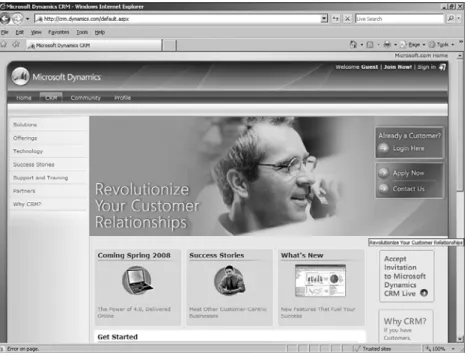
Microsoft Dynamics CRM Online is shown in Figure 3.5. This is a monthly service from Microsoft that grants access to Microsoft CRM 4.0 from Microsoft servers.
FIGURE 3.5 Microsoft Dynamics CRM Online.
Current (4.0) 29
3
of Microsoft’s fiercest competitors in the CRM market, Salesforce.com. As with Salesforce. com, Microsoft is offering the CRM service as a SaaS, or Software as a Service. The
customer has no software to buy or servers to worry about because Microsoft is managing the customer relationship software. The customer simply accesses the data from
Microsoft-provisioned servers via a secure login and has the fully functional CRM 4.0 interfaces to work with. The client requirements for using the Microsoft Dynamics CRM Online service are the same as the client requirements for the On Premise version, with the addition of a Windows Live ID.
The CRM Online option is currently offered in two different ways:
. Professional Edition
. Professional Plus Edition
Professional Edition offers the complete online sales, service, and marketing business suite with point-and-click system and workflow customization options.
Professional Plus Edition includes all the options in Professional Edition, with additional system customization and integration options, as well as offline data access and synchro-nization options not available in Professional Edition.
Although final pricing has yet to be determined, both options will likely offer pricing based on a per user/per month model with 12- and 24-month contracts and different support options available. The support is based on online and telephone support with varying response times (up to 24 hours for Professional Edition and 8 hours for the Professional Plus Edition). Note that there is also a mechanism set up for a business criti-cal support problem, such as the server being down and users unable to log in. Upon contract completion, users can renew their contract or go to a month-to-month option. Other contract specifics follow:
. The billing is monthly, based on the date of initial signup on a 30-day cycle.
. New/additional users can be added any time, and the cost will be prorated based on the date of addition.
. Although users can be changed with no charge, canceling a user will result in a cancelation fee. Canceling a user will not, however, cancel the CRM Online subscription.
. Users can start with the Professional Edition, then upgrade to the Professional Plus Edition.
. Users can start with the Live version, and then migrate to the On Premise version. Additional features of CRM Online include an unlimited number of users (at a per user cost, of course), a free 30-day trial, credit card payments, and support in both English and French.
To sign up for Microsoft Dynamics CRM Online, users can sign up online, via the 800 number, within retails stores, and via a partner referral. Note that Partner referrals are not
the same as Partner Hosted also discussed in this chapter. Rather, it is a method whereby Microsoft partners refer customers to the Microsoft Dynamics CRM Online service and usually provide customization services and support (outside of the included Microsoft Dynamics CRM Online support options).
Microsoft Dynamics CRM Online can be reached at the CRM Online website located at http://
crm.dynamics.com/.
When considering Live, here are some of the pros and cons:
Pros:
. It’s backed by Microsoft. Customers can feel secure knowing that Microsoft is dedi-cating the most state-of-the-art technology for the infrastructure and that it’s using advanced monitoring tools to ensure maximum uptime. Additionally, Microsoft handles all security updates, so there’s never any need to worry about whether your data can be compromised because of the failure to install a necessary update.
. Pricing and security provide excellent proof of concept when considering Microsoft CRM 4.0 as your CRM. Instead of investing capital in testing and evaluating systems, prospective businesses and users can test Microsoft CRM 4.0 through Live access. They can then easily migrate their data to On Premise servers and continue to use the same interfaces when they commit to Microsoft CRM 4.0 as their CRM system. Because the interfaces, access, and data are the same, they can perform the transition very easily. Microsoft supports these transitions as migrations and waives the cancellation fee related to the Live service.
Cons:
. Data storage is limited, and Microsoft Dynamics CRM clients are based on the selected package. With the Professional Edition, users have 5GB of data storage and 20GB with the Professional Plus Edition. These are relatively large numbers, however, so unless your organization has a huge amount of data and users, either should be acceptable. Additional storage can be purchased if necessary.
. Workflow has customization restrictions depending on the version. The Professional Edition limits you to 100 custom entities and 200 custom attributes, whereas Professional Plus Edition has double that limit: 200 custom entities and 400 custom attributes. Additionally, you are limited to a combined total of 100 workflow processes in Professional and 200 in Professional Plus. (Workflow processes are workflows [custom], assignment-based rules, notification rules, and stage-based processes.)
. Live has code restrictions. Viewed by most as a con, both versions of Live are served and managed by Microsoft, and there is a limit to the system customization and integration that a customer can perform. Microsoft will not let errant code run on servers because it could adversely affect the performance of other customers. So although functionality is limited to what Microsoft delivers, you can be sure that
Current (4.0) 31
other users on the system will not affect your capability to use Microsoft CRM 4.0. However, customers might want to extend functionality beyond what CRM Online allows them to do; Chapter 16, “Configuration and Customization Tools,” explains several of these further. The On Premise edition is available for this reason.
If you do go with CRM Online and later cancel your subscription, be sure to take advan-tage of its backup service offered at the time of cancellation, as all data is deleted 90 days after the cancellation date. (You can technically resume your service within 90 days of cancellation; however, it is better to be safe when working with your data, just in case.) Backing up your CRM Online data will allow you to store it locally for later deployments and/or internal reasons.
On Premise
On Premise is the version of CRM that customers purchase, (without recurrent licensing costs), and, usually, although not always, host from their servers. Although a customer’s servers can be located anywhere, the idea is that they will be located at one of the loca-tions’ premises, hence the term On Premise (or, in Microsoft parlance, On Prem).
Microsoft On Premise CRM is available in the following versions:
. Workgroup—This version is limited to five or fewer users. It can be installed on Microsoft Windows Small Business Server 2003 R2 Premium Edition, any of the supported Microsoft Windows Server 2003 editions, or Microsoft Windows Server 2008. This version is limited to a single organization and a single server computer.
. Professional—Similar to the CRM Online Professional version in functionality, the On Premise version does not have the same user limit. This version is limited to a single organization, but it can be installed on more then one computer.
. Enterprise—This version has no user limit. Additional features include support for multiple organizations, multiple server instances, and role-based service installation.
TIP
Microsoft has a 90-day trial for these versions available on the Microsoft website. You can install the trial version and then upgrade without losing any data.
As its name implies, you host the CRM at your location, or premise. Because you own the software, you control what you want it to do, how it is accessed, and how it interacts within your corporate infrastructure. As with the previous version of CRM, you have complete access for any kind of system customization and/or integration. This includes both supported and unsupported customizations (see Chapter 19, “Customizing Entities”).
Partner Hosted
The third option to using Microsoft Dynamics CRM 4.0 is Partner Hosted. The Partner Hosted option enables Microsoft partners to deliver Microsoft Dynamics CRM 4.0 over the Web, similar to CRM Online (that is, as SaaS). However, the partner, not Microsoft, sets pricing and access. Additionally, no relationship exists between the customer and Microsoft; the relationship is between the customer and the partner.
For a number of reasons, users might prefer the Partner Hosted option over the CRM Online services:
. Specific industry and/or regional solutions not offered from and/or by Microsoft. This is the biggest reason for organizations to consider Partner Hosted solutions for Microsoft CRM 4.0. Microsoft tends to think in broad terms when it comes to service solutions, and in a number of vertical areas, partners are better suited at providing solutions. Verticals can include healthcare (with specific security require-ments governing who can view what data), manufacturing (integrated systems might be offered as part of the service offering), or industries such as not-for-profit organizations.
. Customization options that the Partner Hosted service provides that the CRM Online services doesn’t, such as support for plug-ins.
. Varied pricing and cancellation options.
. Whereas Microsoft Dynamics CRM Online is only available in the U.S. and Canada, Partner Hosted services are available in other countries and languages.
Of course, the following issues should be considered when evaluating the Partner Hosted solution:
. Reliability can vary. Because the CRM system is accessed from the partner service provider, if the partner loses connectivity to the Internet (because of power failure, because their Internet or servers go down, or, worse, because they go out of busi-ness), you don’t have access to your CRM data. Obviously, the same can be said of the CRM Online service, but the CRM Online service is managed by Microsoft and has a robust architecture to protect against failure.
. Pricing irregularities that might not be obvious when signing up. Other well-known CRM service companies offer what appears to be great pricing, but when you realize that you want and/or need access to advanced features (which you didn’t think you would need when you signed up), the price increases significantly.
. You don’t “own” your data. Although this isn’t entirely true, it might be. Because your data is hosted on the partner’s infrastructure rather than your own, you merely access it. This can create a host of concerns for potential customers that mostly center on security questions.
What Dynamics Means to Microsoft 33
We’re not saying that you shouldn’t use or trust the Partner Hosted solutions, but be sure to check any potential service provider when considering this solution. Partners should have a very clear policy that addresses these issues so that you don’t have any doubts about their reliability, pricing, or security.
What Dynamics Means to Microsoft
Under the Dynamics division, Microsoft aligns its development efforts toward a common direction and goal set. In Chapter 27, “Other Microsoft Dynamics Products,” we discuss integration options between the applications. Furthermore, Microsoft has indicated that it will one day have a single product from the Dynamics division: Dynamics. It will feature everything in one product and give the customer the benefit of a single integrated appli-cation with a common platform.
When CRM Version 1.2 was released, the Microsoft Business Solutions division had only three solutions: CRM, Axapta, and Navision. As of publication of this book, it has the following:
. Customer Relationship Management (CRM)
. Axapta (AX)
. Navision (NAV)
. Great Plains (GP)
. Solomon (SL)
. Retail Management Systems (RMS)
. Point of Sale
The Dynamics division enables customers to leverage the familiar Office and Windows platform that they already have and are comfortable with by delivering enterprise applica-tions that work with them.
For a complete and current list of products that are covered under the Dynamics division, visit www.microsoft.com/dynamics/. When visiting the Dynamics website, two links are available to customers or partners:
. CustomerSource
. PartnerSource
CustomerSource is available to current customers and provides a wealth of information to customers. Some of the resources there include these:
. Knowledge Base articles
. Support communities
PartnerSource is the resource for Microsoft partners that is involved with Dynamics support, sales, and customizations, and they must have different skills and certifications than a regular Microsoft partner to access this area. The PartnerSource area has the same resources as CustomerSource (listed previously), as well as tools for managing Dynamics customers.
Summary
As should be apparent, Microsoft has fully supported Microsoft CRM to become the mature product that Version 4.0 is. Additionally, although Microsoft CRM is part of the Dynamics division (and receives all the benefits from that, including CustomerSource and PartnerSource), the CRM application development budget actually resides internally within Microsoft under the same umbrella as Microsoft’s flagship product, Microsoft Office. Because of that, Dynamics CRM can not only leverage Office integration and inter-operability, but it also can utilize the resources dedicated for Office development to make it a truly great product.
Summary 35