Extracting Development Tasks
to Navigate Software Documentation
Christoph Treude, Martin P. Robillard and Barth ´el ´emy Dagenais
Abstract—Knowledge management plays a central role in many software development organizations. While much of the important technical knowledge can be captured in documentation, there often exists a gap between the information needs of software developers and the documentation structure. To help developers navigate documentation, we developed a technique for automatically extracting tasks from software documentation by conceptualizing tasks as specific programming actions that have been described in the documentation. More than 70% of the tasks we extracted from the documentation of two projects were judged meaningful by at least one of two developers. We present TaskNavigator, a user interface for search queries that suggests tasks extracted with our technique in an auto-complete list along with concepts, code elements, and section headers. We conducted a field study in which six professional developers used TaskNavigator for two weeks as part of their ongoing work. We found search results identified through extracted tasks to be more helpful to developers than those found through concepts, code elements, and section headers. The results indicate that task descriptions can be effectively extracted from software documentation, and that they help bridge the gap between documentation structure and the information needs of software developers.
Index Terms—Software Documentation, Development Tasks, Navigation, Auto-Complete, Natural Language Processing
F
1
I
NTRODUCTION ANDM
OTIVATIONT
HE knowledge needed by software developers is captured in many forms of documentation, typically written by different individuals [53]. Despite the best efforts of documentation writers [14], there often remains a mismatch between the needs of docu-mentation consumers and the knowledge provided in developer documentation. This mismatch can be ob-served whenever developers struggle to find the right information in the right form at the right time [28], [43].Many software development organizations and open-source projects attempt to address this challenge by creating web pages that collect the most impor-tant information. For example, the home page of the Python web framework Django1 links to three dif-ferent documentation sources: an installation guide, a tutorial, and a full index. At the time of writing, the complete index contained a total of 132 links to documentation resources, including: an FAQ, guide-lines for designers, and developer documentation for everything from design philosophies to APIs.
• C. Treude is with the Departamento de Inform´atica e Matem´atica
Aplicada, Universidade Federal do Rio Grande do Norte, Natal, RN, Brazil. This work was done while Treude was a postdoctoral researcher at McGill University. E-mail: [email protected]
• M. P. Robillard is with the School of Computer Science, McGill
University, Montr´eal, QC, Canada. E-mail: [email protected]
• B. Dagenais is with Resulto, Montr´eal, QC, Canada. E-mail:
1. https://www.djangoproject.com/
For most projects, simply collecting the links to all documentation resources in one web page is not a particularly usable or scalable solution. For example, developers at our industry partner Xprima, a web development company, found it difficult to navigate their documentation, and mentioned to us that they often “forgot to look elsewhere [for documentation or] did not know where to look”. Although documentation usually follows a hierarchical structure with sections and subsections, this kind of organization can only enable effective navigation if the headers are ade-quate cues for the information needs of developers. However, these information needs can be impossible to anticipate. How can we support effective navigation through rapidly-growing and continually changing free-form technical documentation?
Automatically discovering emergent navigation structure using statistical techniques [12], [13] is gen-erally not possible because the documentation of soft-ware projects rarely includes a large enough corpus to extract meaningful patterns. Basic search functionality is also insufficient because it requires users to know what they are looking for and have the vocabulary to express it. Most web search engines use complete to close this vocabulary gap [33], and auto-complete has received high satisfaction scores from users [49]. However, query completion in web search engines is usually based on query stream mining [6] or ontologies [33]. For customized search systems in a corporate environment, query logs are either not available or the user base and the number of past queries is too small to learn appropriate models [8]. In those cases, researchers have attempted to populate
Fig. 1. Satchmo documentation for subscription prod-ucts
the auto-complete field with concepts extracted from the corpus using n-grams [8].
To provide improved support for searching doc-umentation in the context of rapidly-evolving tech-nological environments, we investigated whether the concept oftaskcould be an effective means to narrow the gap between the information needs of developers and existing documentation resources. We define a task as a specific programming action that has been described in the documentation. For example, a task for a developer creating a web site with Django could be “display date fields on templates”. We note that our definition of task is the implementation of a small and well-defined technology usage scenario, in con-trast to the complete resolution of a bug or feature request [27], [36], [54].
Our main idea was to automatically analyze a documentation corpus and detect every passage that describes how to accomplish some task. We call this processtask extraction. We developed a task extraction technique specialized for software documentation. Our technique integrates natural language processing (NLP) techniques, statistical methods, and the analy-sis of syntactical features of the text (Section 3).
To experiment with task-based navigation, we de-veloped an interactive auto-complete interface called TASKNAVIGATOR(Section 4). In addition to tasks, this
browser-based interface surfaces common concepts and code elements extracted from the documentation using recognized techniques, as well as the original titles found in the documentation. TASKNAVIGATOR
and the underlying task extraction engine requires no machine learning and is able to deal with heteroge-neous and continually changing documentation.
We evaluated the accuracy of the preprocessing steps and the task extraction algorithm using a bench-mark of sentences and their corresponding tasks (Sec-tion 5.1), and we compared the relevance of the task-based auto-complete suggestions to the relevance of auto-complete suggestions derived from an n-gram baseline (Section 5.2). To evaluate whether the ex-tracted tasks are meaningful to developers, we con-ducted an evaluation of the tasks extracted from the documentation of two projects with 10 profes-sional software developers (Section 6.1). The evalua-tion showed that more than 70% of the extracted tasks
TABLE 1
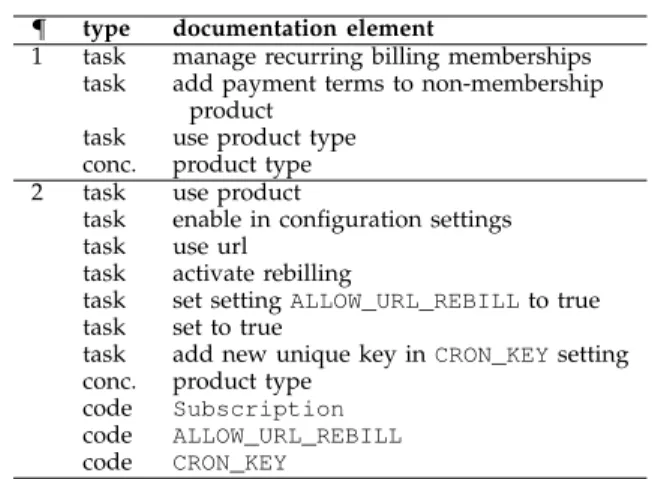
Documentation elements extracted from Satchmo’s documentation for subscription products
¶ type documentation element
1 task manage recurring billing memberships task add payment terms to non-membership
product task use product type conc. product type 2 task use product
task enable in configuration settings task use url
task activate rebilling
task set settingALLOW_URL_REBILLto true task set to true
task add new unique key inCRON_KEYsetting conc. product type
code Subscription code ALLOW_URL_REBILL code CRON_KEY
were meaningful to at least one of two developers rating them.
We then conducted a field study in which six pro-fessional software developers used TASKNAVIGATOR
for two weeks as part of their ongoing work (Sec-tion 6.2). Based on 130 queries and 93 selected search results in the field study, we found search results identified through development tasks to be signifi-cantly more helpful to developers than those found through code elements or section titles (p < .001). Search results found through concepts were rarely considered by the participants. The results indicate that development tasks can be extracted from soft-ware documentation automatically, and that they help bridge the gap between the information needs of software developers, as expressed by their queries, and the documentation structure proposed by experts.
2
M
OTIVATINGE
XAMPLESatchmo2 is an open source eCommerce platform based on Django, which allows users to configure various types of products. Currently, a developer in-terested in learning about a particular type of product, such as memberships with recurring payments, would either have to know that Satchmo refers to these prod-ucts assubscription products (see Figure 1 for the first two paragraphs of the corresponding documentation), or rely on full text search. A search for“membership”
on the Satchmo website returns four results: The first result links to a description of the Satchmo directory structure, where “membership” is mentioned in the short description of an optional Satchmo app. In the second result on pricing, “membership” is mentioned as part of an example on different pricing tiers. The third result links to the section shown in Figure 1, and the fourth result only mentions“membership”in a source code comment. The number of results requires
TABLE 2
Descriptive corpus statistics
Xprima Satchmo Django
documents 209 22 120 sentences 11,134 2,107 17,448 tokens 71,274 18,266 220,694 tasks 1,053 844 1,209 concepts 131 13 648 code elements 4,256 686 5,161
the user to browse the different search results until they find the right one.
The approach described in this paper aims to make it easier for developers to navigate the doc-umentation by automatically associating tasks with each paragraph, and by suggesting them in an auto-complete list. For the example in Figure 1, our ap-proach associated three tasks with the first para-graph, and seven tasks with the second paragraph (see Table 1). In addition, both paragraphs are associ-ated with the automatically-detected concept“product type”. The second paragraph also contains three code elements:Subscription,ALLOW_URL_REBILL, and CRON_KEY. These are detected through a set of regular expressions. With TASKNAVIGATOR in operation, as soon as the user starts typing the word “member-ship”, two tasks would be suggested in auto-complete:
“manage recurring billing memberships” and “add pay-ment terms to non-membership product”.
3
E
XTRACTINGD
EVELOPMENTT
ASKSFor our purposes, we conceptualize references to tasks in software documentation as verbs associated with a direct object and/or a prepositional phrase. For example, all of the following could be tasks: “add widget” (verb with direct object),“add widget to page”
(verb with direct object and prepositional phrase), and “add to list” (verb with prepositional phrase). To extract tasks from software documentation, we make use of the grammatical dependencies between words, as detected by the Stanford NLP parser [30] (see Section 3.2).
To compare the usefulness of development tasks for navigating software documentation to the usefulness of other elements, we extract concepts and code ele-ments using recognized techniques (see Sections 3.3 and 3.4). The idea of extracting concepts is to isolate and surface recognizable phrases that could help users search for information. As for code elements, they play a central role as evidenced by the multitude of tools to find source code examples, such as Strath-cona [23] or PARSEWeb [51].
We developed and evaluated the approach using documentation from three web development projects. The focus on web development was motivated by our industry partner’s work with web development projects. We used two corpora to guide our devel-opment of the approach: the documentation of the Django-based eCommerce platform Satchmo and the
documentation of the web development platform of our industry partner, Xprima. The documentation of the Python web framework Django was used as eval-uation corpus. Table 2 shows the size of each corpus in terms of number of documents, sentences, and tokens (i.e., words, symbols, or code terms) as well as how many tasks, concepts, and code elements the approach extracted.
3.1 Preprocessing
To enable the extraction of development tasks, the documentation corpus of a project is preprocessed by transforming HTML files into text files. In this step, most of the HTML mark-up is removed while keeping the linebreak information. In the next step, redundant information that is repeated on each page of the documentation, such as summaries, headers, and footers, is removed from the files.
The only meta-information kept during preprocess-ing is whether a paragraph represents an HTML header (i.e., is surrounded by eitherh1,h2, orh3tags) and whether text is explicitly marked up as code (i.e., surrounded bytttags). Code blocks as indicated by pre tags are removed from the files. Which HTML tags are considered in the different steps is easily configurable.
We parse the resulting text files and split them into sentences and tokens using the Stanford NLP toolkit [30]. Each paragraph is processed separately to ensure that sentences do not span several paragraphs. Because software documentation has unique char-acteristics not found in other texts, such as the pres-ence of code terms and the systematic use of in-complete sentences, the input has to be preprocessed before invoking the NLP parser to ensure the sen-tence structure is identified correctly. For example, in the sentence “It is possible to add small tools to a page by using the <tt>include</tt> template tag”, the Stanford part-of-speech tagger does not tag the last few words correctly by default:include is tagged as a verb,template as an adjective, and only tag is tagged correctly as a noun. However, by taking advantage of the information that include is a code term (as indicated by the tttags), the part-of-speech tagging can be improved. Tagging code terms as nouns was also suggested by Thummalapenta et al. [50].
To generalize this approach, we replace all code el-ements in the original text with a temporary mask (ce
followed by a serial number), and the part-of-speech tagger is configured to tag all words that consist ofce
followed by a serial number as nouns. Subsequently, the original code terms are put back into place. In ad-dition to code terms explicitly tagged withtttags in the original HTML, all words that match one of about 30 regular expressions are masked as code terms. The regular expressions were handcrafted based on the Xprima and Satchmo corpora to detect code terms
using typographical features such as camel-casing, all-upper-case words, and annotations.3
In addition, we manually created a list of domain terms that should always be tagged as nouns. For the three corpora used in this work (containing a total of more than 300,000 tokens), this list contained 25 terms, such as “template”, “slug”,4 and “file”. The complete list is also in our on-line appendix.
To ensure the correct parsing of incomplete sentence structures commonly used in software documenta-tion, such as “Returns the next page number”, we add further customizations. First, we add periods to the end of paragraphs that do not end with a period, because the Stanford part-of-speech tagger is sensi-tive to punctuation. Parts of a paragraph that are enclosed in parentheses are removed. This is done for two reasons: First, in our development corpora, we rarely found complete sentences in parentheses, which would make it difficult to process the content using natural language processing techniques. Sec-ond, content in parentheses rarely contained verbs that could indicate development tasks.
In addition, if the sentence starts with a verb in present tense, third person singular such as returns,
sets, or computes, the sentence is prefixed with the word this to ensure that partial sentences are tagged correctly. If the sentence starts with a verb in present participle or gerund (e.g., “adding”, “removing”), im-mediately followed by a noun, the sentence is prefixed with the word for to ensure the correct tagging of partial sentences, such as“Displaying data from another source”.
We manually created a benchmark using 376 sen-tences from the Django documentation to intrinsically evaluate the accuracy of the preprocessing steps (see Section 5.1).
For each sentence identified by the NLP toolkit, the tokens and the grammatical dependencies between tokens are stored for the following steps. In addition, files that are unlikely to contain development tasks or relevant concepts can be explicitly excluded from the analysis. In our case we excluded automatically-generated indexes, release notes, and download in-structions.
3.2 Task Extraction
We define a task in software documentation as a specific programming action that has been described in the documentation. Given that the central intuition underlying our approach is to use grammatical clues to detect tasks in free-form text, we needed to recover the relationships between verbs, objects, prepositions, and prepositional objects. Using part-of-speech tag-ging would not be sufficient for determining these
3. The list of regular expressions is available in our on-line appendix at http://cs.mcgill.ca/∼swevo/tasknavigator/.
4. In Django, the term“slug”refers to a short label for something, generally used in URLs.
links because part-of-speech tags (e.g., verb) do not indicate how words are related to each other. Using the order of words as indicator is also insufficient as the order can be reversed, e.g., both“add widget”and
“widget is added” refer to the same task. To discover relationships between words, we make use of the grammatical dependencies that are detected by the Stanford NLP parser. These dependencies provide a representation of grammatical relations between words in a sentence [32].
Much experimentation was required to align gram-matical dependencies identified through an NLP parser with software development tasks. This is a challenging problem because tasks can be described in software documentation in a multitude of ways. For example, the simple task of adding a widget to a page can be described as“add widget”,“adding widget”,
“widget is added”, “widget that is added”, or “widget added”, to name a few. In addition, context might be important, e.g., whether the widget is being added to a page, a sidebar, or whether the documentation instructs the user to “not add widget”. Furthermore, the widget might be specified using additional words, such as “clock widget” or “custom widget”. A task extraction engine for software documentation must account for all these subtleties. The rest of this sec-tion describes the extracsec-tion technique, and how it addresses some of the main text interpretation chal-lenges we faced.
Dependency Extraction. A grammatical
depen-dency is simply a relation between one word of the text and another. A trivial example is “add widget”, where the noun“widget”is related to the verb “add”
because widget is the object being added. After ana-lyzing our development corpora and conducting some exploratory experimentation, we identified nine types of grammatical dependencies that could be useful for (software development) task extraction. Table 3 explains these dependencies following the definitions of de Marneffe and Manning [32]. Table 4 shows examples for these dependencies from the Satchmo corpus. Most of the dependencies relate a verb to other tokens, following our assumption that verbs are critical anchors for detecting the mention of tasks. The first step of our technique is to extract these dependencies from the text, in each case recording the verb and its dependents.
Task Identification.We consider each verb involved
in a dependency with an object or with a prepositional phrase (or both) as a candidate for a task. In this step, we also account for tasks that are intertwined. For example, consider the sentence “This can be used to generate a receipt or some other confirmation”. In addition to“generate receipt”, it contains the task“generate other confirmation” as indicated by the conjunction “or”. To address this case, we add additional tasks for all conjunctions (and and or) that exist for verbs, direct objects, and prepositions.
TABLE 3
Grammatical dependencies used in this work, descriptions taken from de Marneffe and Manning [32]
dependency description
direct object (dobj) The noun phrase which is the (accusative) object of the verb.
prepositional modifier (prep) Any prepositional phrase that serves to modify the meaning of the verb, adjective, noun, or even another preposition.
agent (agent) The complement of a passive verb which is introduced by the preposition “by”and does the action.
passive nominal subject (nsubjpass) A noun phrase which is the syntactic subject of a passive clause. relative clause modifier (rcmod) A relative clause modifying the noun phrase.
negation modifier (neg) The relation between a negation word and the word it modifies. phrasal verb particle (prt) Identifies a phrasal verb, and holds between the verb and its particle. noun compound modifier (nn) Any noun that serves to modify the head noun.
adjectival modifier (amod) Any adjectival phrase that serves to modify the meaning of the noun phrase.
TABLE 4
Examples of grammatical dependencies considered during task extraction
dependency sentence matched words tasks
dobj This can be used togeneratea generate, receipt generate receipt
receiptor some other confirmation. generate other confirmation
nsubjpass The thumbnailsizeisset set, size set thumbnail size in templates in your templates.
rcmod It allows you to set oneratethat multiplied, rate multiply rate
ismultipliedby the number of set rate
items in your order.
prep There are a couple of different ways integrate, checkout integrate with Google Checkout
tointegratewith GoogleCheckout.
Context Resolution. To capture specific tasks such
as“add widget to page”instead of“add widget”, we keep prepositions and prepositional objects that belong to each verb or direct object. For example, the phrase“set thumbnail size” in the sentence “The thumbnail size is set in your templates”is connected to the prepositional object“templates” via the preposition “in”. If a given verb or direct object is connected to more than one prepositional object, we create a separate task for each prepositional object. Our approach does not account for tasks that span multiple sentences, but we present a workaround to this shortcoming, adjacent noun phrases, in Section 4.2.
Task Refinement.Because grammatical
dependen-cies only exist between individual words, further dependencies have to be analyzed for each part of a task to make tasks as specific as possible. For example, in the sentence “The thumbnail size is set in your templates”, thepassive nominal subjectdependency only connects the words “set” and “size” and thus results in the arguably unspecific task “set size in templates”. To make tasks as specific as possible given the information included in the documentation, all
noun compound modifier and adjectival modifier depen-dencies are followed for each direct object and for each prepositional object. In the example, the noun compound modifier adds the word “thumbnail” to the direct object“size”. Similarly, in the sentence“This can be used to generate a receipt or some other confirmation”, theadjectival modifieradds the word“other” to the di-rect object“confirmation”(see Table 3 for definitions of these dependencies). Two dependencies are followed for each verb:negation modifierandphrasal verb particle. The former is used to add negation words, such as
“not”, to a verb, the latter adds related particles, such as the word“in” in“log in”.
Task Filtering. To ensure that general verbs such
as “contain” are not used to define a task, all tasks for which the verb is not a programming action are excluded. We have handcrafted a list of about 200 programming actions based on the Xprima and Satchmo corpora.5 Even though this list has only been tested on three corpora so far, we believe that it is generalizable to other projects as it contains very few domain specific verbs and consists mostly of generic programming actions, such as “access”,
“acquire”,“activate”,“add”, and“adjust”. This list was developed based on the two development corpora used in this work. A similar but much smaller list is used to exclude tasks for which the direct object is too generic.5 This filter is intended to remove tasks such as “add that”, “remove it”, or “modify this”. The list does not contain any domain-specific terms.
Task Normalization.In the final step, we generate a
normalized representation of the task. This represen-tation contains the base form of the verb followed by the direct object (if there is one) and the prepositional phrase (if there is one). Verbs without direct objects and prepositional phrases are not considered as tasks. Note that in some cases, the order of words in the normalized task description is different from the one observed in the original source, as shown by the sentence “The thumbnail size is set in your templates”: the sequence “thumbnail size is set” is changed into
“set thumbnail size”.
3.3 Concepts
As a baseline for assessing the usefulness of devel-opment tasks for navigating software documentation, we extract concepts from a documentation corpus by following the approach for identifyingcollocations de-scribed by Manning and Sch ¨utze [29, Chapter 5]. We explain the details in this section for reproducibility, but we do not claim concept extraction as a contribu-tion. Collocations are detected by finding sequences of words that co-occur more often than they would be expected to by chance. First, all sequences of two or three words (bigrams or trigrams) are identified, making sure that they do not cross sentence bound-aries. To filter out meaningless collocations, such as
“of the”, part-of-speech filters are used, as suggested by Juesteson and Katz [25]. Using these filters, only bigrams and trigrams that follow a given part-of-speech pattern, such asadjectivefollowed bynoun, are considered. Table 5 shows all part-of-speech patterns we used along with an example from the Satchmo corpus for each pattern. Because none of the patterns contain a verb, our implementations ensure that there is no overlap between tasks and concepts extracted us-ing our approach. Concepts contain at least one noun and optionally adjectives and prepositions, whereas tasks are verbs associated with a direct object and/or a prepositional phrase.
Collocations are then filtered using Pearson’s chi-square test. The test compares the observed frequen-cies to the expected frequenfrequen-cies for the distributions of each word and its co-occurrences in a bigram or trigram. For example, for the bigram “custom prod-uct”, the observed and expected frequencies for the following four situations are compared: “custom” fol-lowed by “product”,“custom” followed by something other than “product”, “product” preceded by some-thing other than“custom”, and bigrams that start with a word other than“custom” and end in a word other than“product”. We only kept as concepts collocations with χ2 ≥ 10 to ensure that all collocations were
statistically significant at p < .05 for bigrams. In addition, we discarded collocations where any of the observed values is below 4 to satisfy the expected cell count of Pearson’s chi-square test [38].6 Table 5 shows the χ2-value and the p-value for two of the
bigrams from the Satchmo corpus. We did not find any trigrams that were statistically significant.
3.4 Code Elements
In addition to concepts, we extract code elements from documentation. Given the preprocessing steps (Sec-tion 3.1), the extrac(Sec-tion of code elements is straightfor-ward. We consider as code elements all text explicitly tagged as code in the original HTML documents
6. The expected cell count for Pearson’s chi-square test is usually set to five, but we found through experimenting with our develop-ment corpora that a threshold of four gave better results.
TABLE 5
Part-of-speech patterns used for concepts
pattern example
adjective noun custom product
(χ2= 77.98,p < .0001)
noun noun product type
(χ2= 95.04,p < .0001) adjective adjective noun new unique key
adjective noun noun new configuration section noun adjective noun payment specific display noun noun noun store mailing address noun preposition noun number of items
TABLE 6
Example of an index entry
key value
category task
element add payment terms to non-membership product
sentence A subscription product is a product type that can be used to manage recurring billing memberships or to add payment terms to a non-membership product. title Subscription Product
link product.html synonyms –
adjacent non-membership product, product type, recurring billing memberships, subscription product
and all content identified through regular expressions. However, domain terms that were masked as nouns during the preprocessing phase are not considered as code elements. As an example, Table 1 shows all tasks, concepts, and code elements that our approach extracts from the two paragraphs of text shown in Figure 1.
4
S
EARCHI
NTERFACEWe built an auto-complete user interface, called TASKNAVIGATOR, that surfaces the extracted tasks, concepts, and code elements to help developers nav-igate documentation. TASKNAVIGATOR suggests the extracted documentation elements and the section headers from the original documentation and asso-ciates them with documents, sections, and paragraphs of the documentation.
4.1 Index Entries
TASKNAVIGATOR uses as input a set of index entries, where each index entry is an instance of a documen-tation element (a task, a concept, a code element, or a section title). Each index entry contains meta data to indicate its category (e.g., task), the sentence where the instance was found, the title of the corresponding section, and a link to the corresponding document.
In addition, it is possible to define sets of syn-onyms. For the evaluation of TASKNAVIGATOR, 17 such synonym sets were handcrafted by professional
software developers working for Xprima, the com-pany where part of the evaluation was conducted. Twelve of the synonyms sets were not domain-specific and contained groupings such as (“remove”,“delete”), (“insert”,“add”), and (“parameter”, “param”). We plan to integrate automatically-constructed synonym sets specific to software development, such as the work by Howard et al. [24] and Tian et al. [52], in future work.
Table 6 shows an example of an index entry based on the first paragraph of the documentation section shown in the motivating example (cf. Figure 1).
4.2 Adjacent Noun Phrases
The extraction of documentation elements described in Section 3 works on a sentence-by-sentence basis, so the approach can only index information that is contained in a single sentence. Consider the query
“activate rebilling for subscription product”, intended to locate the documentation shown in Figure 1. This query would not match any index entry because the task “activate rebilling” is not mentioned in the same sentence as “subscription product”. To mitigate this problem, we automatically detect all noun phrases in a paragraph (using the Stanford NLP toolkit), and associate them asadjacent noun phrases with all index entries generated from the same paragraph. This fea-ture supports queries that span sentence boundaries. The following section shows an example for the use of adjacent noun phrases.
4.3 Search Process
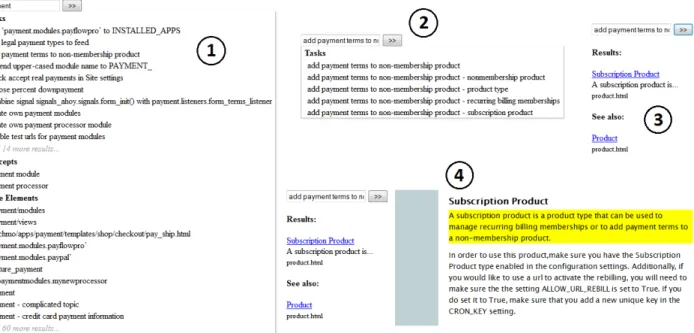
Figure 2 shows four screenshots outlining the search process enabled by TASKNAVIGATOR. When the user
starts typing, an auto-complete list opens and shows documentation elements that contain all words that have been typed so far. The words do not have to ap-pear in the order in which they have been typed, and synonyms are considered. As shown in Figure 2–1, the suggestions are grouped by tasks, concepts, code el-ements, and titles.7Within each category, suggestions are ordered alphabetically. If the user selects an entry from the list, all related adjacent noun phrases are shown to support query refinement (see Figure 2–2).
Once the user runs the search query, results are displayed on the left side of the screen (Figure 2–3). For each result, the title of the corresponding section is displayed as a link, the sentence that matched the query is displayed underneath the title, and the link is shown in a smaller font. If there is more than one result, they are displayed in the same order as they appear in the original source. In addition, a see-also section is displayed which contains all section headers from the documentation corpus for which the words in the header are a subset of the words in the query.
7. Titles are not shown in the screenshot.
TABLE 7
Causes for tasks missed by the approach
issue freq.
verb at beginning of sentence tagged incorrectly 8 verb tagged as noun:“use”(3),“display”(2) 5 adjective tagged as verb:“ordering”(2) 2 dependencies not resolved correctly 2
noun tagged as numeral:“404” 1
parsing error 1
sum 19
For example, the screenshot in Figure 2–3 shows the section on“Product”in the see-also section because the query “add payment terms to non-membership product”
contains the word“product”.
When the user selects a result by clicking on the link, the corresponding document is opened on the right side of the screen (see Figure 2–4). The para-graph that matched the query is highlighted, and the document is automatically scrolled to that paragraph.
5
A
CCURACY OF THEA
LGORITHMSBecause real-world documentation is messy and full of surprises, and because NLP involves a certain amount of approximation, we conducted a separate evaluation of the accuracy of the preprocessing steps and the task extraction algorithm using a benchmark of sentences and their corresponding tasks. In addi-tion, we compared the relevance of the task-based complete suggestions to the relevance of auto-complete suggestions derived from an n-gram base-line.
5.1 Accuracy of the Task Extraction
To evaluate the accuracy of the task extraction algo-rithm, we randomly selected 376 sentences out of a total of 17,448 sentences from the evaluation corpus, the documentation of Django. The first author man-ually annotated each sentence with the tasks that we expected to be extracted based on our theoretical def-inition of the task extraction process. The annotation resulted in a total of 255 tasks for the 376 sentences. Most sentences (57.4%) did not describe any task, while some sentences contained as many as five tasks. For 90.7% of the sentences (95% CI[.878, .936]), the tasks that the approach extracted matched the tasks in the benchmark. For the remaining 35 sentences, some of the tasks were missing (19 tasks) or wrong (26 tasks). However, even for those 35 sentences, the majority of tasks that the approach extracted (38 out of 64, i.e., 59%) were still correct.
Table 7 shows the causes for the 19 tasks that the approach missed. Despite the preprocessing steps, in some cases, the NLP toolkit still was not able to resolve sentences correctly if they started with a verb. The verbs “use” and “display” were occasion-ally tagged as nouns, and the adjective“ordering” in
Fig. 2. Screenshots of the interface. (1) Auto-complete, (2) query refinement, (3) results, (4) one result
TABLE 8
Causes for tasks incorrectly extracted
issue freq.
dependencies not resolved correctly 20
adjective tagged as verb: 4
“ordering”(2),“loading”,“rendering”
verb at beginning of sentence tagged incorrectly 1
parsing error 1
sum 26
“ordering constraints” was tagged as a verb, which resulted in the incorrect task “order constraints”. In a few other cases, a complex sentence structure resulted in an incorrect resolution. In addition,“404”was not resolved as a noun, and we encountered one parsing error.
Table 8 lists the causes for the 26 tasks that were extracted incorrectly. In most cases, grammatical de-pendencies were resolved incorrectly due to complex sentence structures. Four times, an adjective was in-correctly identified as a verb. For example, the phrase
“loading and rendering system”produced the tasks“load system”and “render system”.
The comparison with the benchmark showed that the algorithm works correctly for more than 90% of the sentences in the benchmark. In addition, out of the 262 automatically extracted tasks, fewer than 10% were wrong and fewer than 7.5% of tasks were missed.
5.2 Relevance of Auto-Complete Suggestions
To evaluate the relevance of TASKNAVIGATOR’s auto-complete suggestions, we compared its suggestions to the suggestions produced by various n-gram based
baselines in terms of precision, recall, and the number of suggestions generated.
We created a list of 33 software development tasks relevant to the Xprima corpus by selecting all tasks documented in a file called “Common Tasks for Inte-grators”. This file was intended to be the main entry point to the documentation and linked to many other files in the documentation. At the time of our study, it contained 36 sections, each describing a common task encountered by the company’s HTML integrators.8 We only considered tasks explicitly mentioned in the section headings, discounting three sections because their title did not describe a task (e.g., “Common Variables”). For the remaining 33 tasks, we manually created a gold set of paragraphs relevant to each task. Nineteen out of the 33 tasks were associated with exactly one paragraph, while other tasks were associated with as many as four paragraphs. In total, the Xprima corpus contained 1,565 paragraphs.
We entered each of the 33 task descriptions into TASKNAVIGATORand inspected the index entries that TASKNAVIGATORsuggested in auto-complete and the paragraphs that these index entries pointed to. Given the gold set of paragraphs for each task, we deter-mined the average precision and recall of the para-graphs returned by TASKNAVIGATOR. Figure 3 shows precision, recall, and F-measure after each typed char-acter. For example, after typing 10 characters of a task (such as “generate t” of the task “generate translation files”), TASKNAVIGATOR returned paragraphs with a precision of 0.39 and recall of 0.96 on average, which results in an F-measure of 0.55. We decided to evaluate
8. HTML integrators are programmers who use HTML template tools and stylesheets to create web sites.
0.0 0.2 0.4 0.6 0.8 1.0
number of letters typed
Precision, Recall, and F−measure
3 4 5 6 7 8 9 10 11 12 13 14 15 16 17 18 19 20 precision recall f−measure
Fig. 3. Precision, recall, and F-measure after each typed character 0.0 0.2 0.4 0.6 0.8 1.0
number of letters typed
F−measure 3 4 5 6 7 8 9 10 11 12 13 14 15 16 17 18 19 20 tasks bigrams trigrams 4grams 5grams 6grams 7grams 8grams 9grams
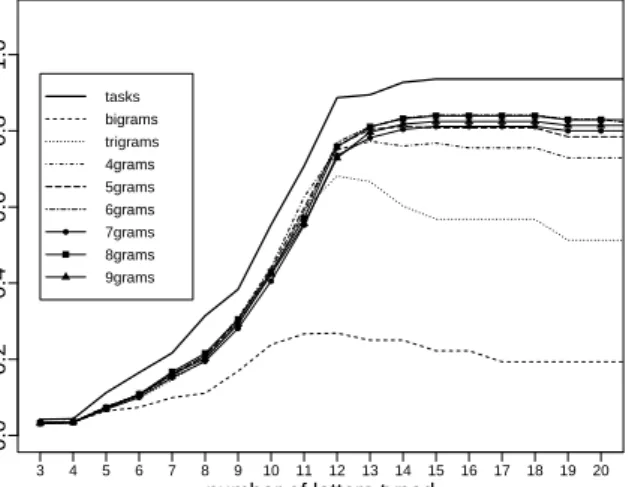
Fig. 4. F-measure for task-based index entries and the various n-gram baselines
precision and recall after each typed character instead of after each typed word because TASKNAVIGATOR
was designed to give feedback after typing only three characters instead of an entire initial query, a char-acteristic which differentiates TASKNAVIGATOR from related work on query expansion [20], [22], [24], [47], [58].
To put these results in context, we created a number of baselines consisting of n-gram based index entries. For all n between two and nine, we indexed each paragraph in the corpus using all the n-grams it contained. For example, for n = 3, all paragraphs were indexed using all trigrams they contained. N-grams were not created across sentence boundaries, and one index entry was created for each sentence that
contained fewer thannwords. During the search, we used the n-grams as potential task descriptions and searched within them the same way we search in our task-based index entries.
Figure 4 shows the F-measure for task-based in-dex entries and the various n-gram baselines. The measure for bigrams never exceeds 0.27, and the F-measure for trigrams never exceeds 0.69. For 4-grams, the best value for the F-measure is 0.78 after 13 typed characters. This is particularly noteworthy because the average length of a development task description in TASKNAVIGATOR for the Xprima corpus is shorter than a 4-gram: 3.71 words. However, as Figure 4 shows, even longer n-grams are not able to achieve the same F-measure as task-based index entries. For long n-grams, the values for precision suffer because longer index entries account for more false positives. For example, the query“use css classes”will match the irrelevant 9-gram“css classes as necessary in the HTML and use”from the sentence “Add as many css classes as necessary in the HTML and use the classes to style the page”. For the same sentence, there is no 8-gram that includes all of the words from the query.
In addition to the better performance of task-based index entries for complete queries, it is important to note that task-based index entries outperform n-gram based index entries after a few typed characters. For example, after eight typed characters, the F-measure for task-based entries is 0.31, and the F-measure for 8-grams (the best performing n-grams) is 0.22. This difference is largely explained by precision: While task-based index entries result in 52 true positives and 225 false positives after eight typed characters (about one relevant suggestion in every five auto-complete suggestions), 8-gram based index entries result in 50 true positives and 360 false positives (about one relevant suggestion in every eight auto-complete suggestions).
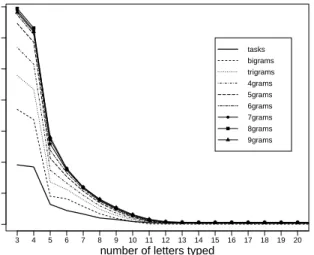
For auto-complete suggestions to be useful, the number of suggestions presented by a tool is also im-portant. While longer n-grams outperformed shorter n-grams in terms of F-measure, longer n-grams make for much longer lists of auto-complete suggestions, as shown in Figure 5. After typing three characters, the task-based index entries produced 96 suggestions on average, while bigrams lead to 185 suggestions, and 8-grams resulted in 347 suggestions. After five char-acters, the task-based index produced 32 suggestions, bigrams lead to 45 suggestions, and 8-grams resulted in 136 suggestions.9
For n-gram based index entries, we observed a tradeoff between relevance and number of sugges-tions: while longer n-grams perform better in terms of their F-measure, they produce many suggestions with low readability which might be impossible for
9. In TASKNAVIGATOR, the list of auto-complete suggestions is truncated to show at most ten suggestions per category, and suggestions are displayed in alphabetical order (see Figure 2).
0 50 100 150 200 250 300 350
number of letters typed
Entr ies in auto−complete 3 4 5 6 7 8 9 10 11 12 13 14 15 16 17 18 19 20 tasks bigrams trigrams 4grams 5grams 6grams 7grams 8grams 9grams
Fig. 5. Number of auto-complete suggestions for task-based index entries and the various n-gram baselines
a developer to parse (e.g., the 9-gram “contain the name of the template used to display”). Task-based index entries outperformed our baselines both in terms of relevance and number of auto-complete suggestions.
6
E
VALUATIONTo evaluate whether the extracted tasks are meaning-ful to software developers, we asked ten professional software developers from two projects to annotate a sample of tasks, and we found that more than 70% of the extracted tasks were meaningful to at least one of the two developers rating them. We asked the same developers to also rate a sample of extracted con-cepts, with similar results. We then conducted a field study in which six professional software developers at Xprima used TASKNAVIGATOR for two weeks.
6.1 Extracted Tasks and Concepts
To evaluate the extracted tasks and concepts, we asked eight Xprima and two Django developers to annotate a sample of tasks and concepts that we had automatically extracted from the respective documen-tation corpora. As discussed in Sections 3.2 and 3.3, concepts are collocations with at least one noun and optionally adjectives and prepositions, whereas tasks are verbs associated with a direct object and/or a prepositional phrase.
Methodology
For Xprima, eight individuals participated in the eval-uation: P1–P4 work as HTML integrators for Xprima, P5–P8 are developers. In terms of seniority, P1, P5, P7, and P8 are considered senior by Xprima (more than four months at the company) and the remaining participants are considered junior. The documentation
in the Xprima corpus was developed by five indi-viduals, including P5 and P8, but none of the other participants. We created a random sample of 196 tasks out of a total of 1,053 tasks that were extracted by the approach. The tasks in the sample were divided up among eight developers, and just over half of the tasks given to one participant (17 out of 33) overlapped with the tasks given to one other participant, allowing us to determine inter-rater agreement while maximizing representativeness. We asked each developer to an-swer the following question for the sampled tasks:
“Does this represent a task (or a subtask) for HTML integrators or developers working on [project]?”
In addition, we created a random sample of 100 concepts out of a total of 131 concepts extracted by the approach. We asked the same eight developers to also answer the following question for the sampled concepts: “Does this represent a meaningful concept for HTML integrators or developers working on [project]?”
Again, just over half of the concepts given to each participant (9 out of 17) overlapped with the concepts given to one other participant to determine inter-rater agreement.
Similarly, for Django, we randomly sampled 36 tasks out of a total of 1,209 extracted tasks and 36 concepts out of a total of 648 extracted concepts. We recruited two Django users through an advertisement on the django-users mailing list,10 and we asked each one to answer the following question for 25 of the sampled tasks: “Does this represent a task (or a subtask) for someone working with Django?” For 13 of the sampled tasks, both participants were asked to annotate them. Each participant was also given the following question for 25 concepts, 13 of which over-lapped between both participants:“Does this represent a meaningful concept for someone working with Django?”
The sample sizes were chosen so that each partici-pant would have to evaluate 50 items in total (tasks and concepts), that at least half the items evaluated by each participant would overlap with the items of one other participant, and that the 95% confidence interval for conclusions about tasks and concepts would be identical. We indicate all confidence intervals in the next section as part of the results.
Results
Table 9 presents the results of the evaluation of ex-tracted tasks and concepts for the Xprima corpus. For each of the eight participants, the table shows how often they answered “yes” or “no” to the question given for each of the 33 tasks and 17 concepts. Out of a total of 264 ratings for tasks, 133 (50%) were positive and 131 (50%) were negative. However, out of the 68 tasks that were rated by two participants, 48 or 71% (95% CI [.60, .81]) received at least one positive response. For those tasks, the proportion of agreement
TABLE 9
Evaluation of Xprima tasks and concepts
task concept
“yes” “no” “yes” “no”
P1 15 18 8 9 P2 29 4 11 6 P3 10 23 9 8 P4 19 14 10 7 P5 16 17 15 2 P6 17 16 13 4 P7 9 24 12 5 P8 18 15 12 5 sum 133 131 90 46 (in %) (50%) (50%) (66%) (34%) TABLE 10
Evaluation of Django tasks and concepts
task concept
“yes” “no” “yes” “no”
D1 4 21 13 12
D2 18 7 18 7
sum 22 28 31 19
(in %) (44%) (56%) (62%) (38%)
between both raters was 47–71% (depending on which pair of raters is considered, median 59%).11
Out of a total of 136 ratings for concepts, 90 (66%) were positive and 46 (34%) were negative. Out of the 36 concepts that were rated by two participants, 28 or 78% (95% CI [.66, .89]) received at least one positive response. The proportion of agreement between raters was 56–100% (median 67%). The difference in ratings between tasks and concepts is statistically significant (Pearson’s chi-square test, p-value <.05).
The results for Django were similar and are shown in Table 10. While 56% of the ratings for tasks were negative, out of the 13 tasks that were annotated by two participants, 11 (85%) received at least one positive vote (proportion of agreement: 23%). For concepts, 62% of the ratings were positive, and out of the 13 concepts annotated by both participants, 10 (77%) received at least one positive rating (proportion of agreement: 54%). The difference in ratings between tasks and concepts is not statistically significant (Pear-son’s chi-square test,p-value>.05).
These results show that the agreement between developers about what is a relevant task or a relevant concept for a software project is low. We conducted a more thorough investigation of the agreements and disagreements that our participants had about tasks and concepts. Table 11 shows the number of agree-ments and disagreeagree-ments for each participant pair for tasks, and Table 12 for concepts.
Our first assumption was that the number of dis-agreements could be related to the role of the par-ticipant since some parpar-ticipants at Xprima work as HTML integrators while other work as developers.
11. We do not report Cohen’s kappa as kappa calculations are limited by the size of the data set. Here, thep-value for the kappa calculation is>.05 for all but one pair of raters.
TABLE 11
Number of agreements and disagreements regarding the meaningfulness of tasks
participants 2 yes yes/no 2 no P1, P2 8 6 3 P3, P4 4 8 5 P5, P7 3 9 5 P6, P8 5 5 7 D1, D2 1 10 2 sum 21 38 22 (in %) (26%) (47%) (27%) TABLE 12
Number of agreements and disagreements regarding the meaningfulness of concepts
participants 2 yes yes/no 2 no P1, P2 2 3 4 P3, P4 4 3 2 P5, P7 7 0 2 P6, P8 5 4 0 D1, D2 4 6 3 sum 22 16 11 (in %) (45%) (33%) (22%)
However, as Table 11 shows, there are as many dis-agreements (14) between HTML integrators (P1–P4) as there are between developers (P5–P8). The numbers for concepts—six disagreements between HTML inte-grators and four disagreements between developers— also do not suggest a strong influence of participants’ roles. Similarly, seniority does not appear to have an effect. In fact, the pairs with slightly more agreement regarding tasks were mixed pairs with one junior participant and one senior participant (P1 and P2, P6 and P8). The data on concepts suggests that seniority could possibly have a positive influence on agreement as the only pair of participants with perfect agreement was a pair of senior developers (P5 and P7).
Next, we investigated specifically for tasks whether the length and nature of the task had an influence on the number of agreements and disagreements be-tween participants. For Xprima, tasks with agreement between participants contained 3.70 words on average (2.67 words for Django), and tasks without agree-ment contained 4.04 words on average (3.80 words for Django). While this might suggest that shorter tasks are easier to agree on, the differences are not statistically significant (Wilcoxon-Mann-Whitney test, p-value >.05).
To explore this further, we analyzed the gram-matical structure of the tasks with agreement and disagreement, respectively. Table 13 shows the results partitioned by tasks with verbs and direct objects (e.g.,
“add widget”), tasks with verbs, direct objects, and prepositional objects (e.g., “add widget to page”), and tasks with verbs and prepositional objects (e.g.,“add to page”). At least the data for Xprima seems to suggest that tasks without prepositions, i.e., tasks that are less specific, are harder to agree on.
TABLE 13
Agreements (=) and disagreements (6=) about meaningfulness of tasks by grammatical structure
grammatical structure Xprima Django
= 6= = 6=
verb, direct obj. 11 13 3 3
verb, direct obj., prep. obj. 17 11 0 5
verb, prep. obj. 12 4 0 2
sum 40 28 3 10
(in %) (59%) (41%) (23%) (77%)
Finally, we conducted a qualitative inspection of all 38 tasks and 16 concepts with disagreements in our data, grouping the data by possible reasons for disagreement. For tasks, we found missing context to be the most likely reason for disagreement (14 tasks). For example, the task“convert data to string”received a positive and a negative response from our partic-ipants. In this case, a developer who knows what specific data the task is referring to might consider it meaningful, while a developer who does not know the context of the task might deem it not meaningful. Nine tasks that our participants disagreed on con-tained code elements. In those cases, the meaning-fulness of a task to a developer might depend on their familiarity with the referred code element. For example, the task “call mark_safe()” led to a dis-agreement. Developers familiar with mark_safe() might consider the task meaningful while others do not. For six tasks, the wording of the task might have confused developers. For example, the task“customize behavior by customizing” was extracted by our ap-proach and led to a disagreement. For the remaining nine tasks, there appears to be no obvious reason why developers would disagree on their meaningfulness. For example, the task“display logo inusedcarlisting”
is clearly relevant to the developers’ work. A possible explanation for the disagreement here is that some developers do not work with theusedcarlisting and therefore consider it not meaningful to them.
Similarly, we conducted a qualitative investigation for the 16 concepts with disagreement. Three of them contained code elements (e.g., “ModelAdmin class”) and their disagreement might be explained by the familiarity of developers with the particular code element. For four concepts, the wording was possibly unclear or missing context (e.g.,“related model”). Five concepts could be considered too general to be useful for the work of the developers (e.g., “Python API”). For the remaining four concepts, there was no obvious reason for disagreement other than that they might not be relevant to the work of all developers on a project (e.g.,“normalized string”).
These results show that it is impossible to make sure that all tasks are relevant to all developers. Thus, we consider elements that received at least one positive rating to be the ones that should be suggested in auto-complete. For tasks and concepts that were rated by
two participants, more than 70% received at least one positive vote both for Xprima and Django.
6.2 TaskNavigator
We evaluated TASKNAVIGATORthrough a field study in which we deployed the tool at Xprima and recorded the interactions of six developers with TASKNAVIGATOR for two weeks. This is an end-to-end evaluation of the approach as it evaluates the extracted tasks, concepts, and code elements as well as the interface that surfaces them.
Methodology
We recruited six developers (P1–P6) to use TASKNAV
-IGATOR for two weeks, one of which (P5) also par-ticipated in a week-long pilot study. All participants were asked to use TASKNAVIGATOR as part of their normal ongoing work at Xprima. We instrumented TASKNAVIGATOR to collect usage data by creating a log message every time an auto-complete suggestion was selected (either through a mouse click, or by pressing the Enter key after navigating to the sugges-tion using the arrow keys), every time a query was submitted, and every time a search result was opened by clicking on the corresponding link. In addition, on every other click on a link for a search result, we asked
“Was this what you were looking for?”through a pop-up window, giving“yes”and“no”as answer options. The objective of the week-long pilot study was to ensure the usability of TASKNAVIGATOR before giving the tool to all participants. The setup for the pilot study was identical to the setup for the field study, with two exceptions: In the pilot study, the pop-up window only appeared on one in every four clicks, and section titles were not yet available as auto-complete sugges-tions. We had initially chosen to only show the pop-up window on one in every four clicks to not overwhelm developers, but the pilot study participant informed us that the pop-up window was less intrusive than we thought and that displaying it on every other click would not interfere with TASKNAVIGATOR’s usability, in his opinion. Thus, we showed the pop-up window more frequently after the pilot study. In addition, the pilot study participant remarked that it would be useful to also have section titles appear as auto-complete suggestions. We added this feature for the field study.
Results
Table 14 shows the results of the field study. For each participant P1–P6 and the pilot study, the second column shows the time elapsed between a partici-pant’s first and last interaction with TASKNAVIGATOR
during the field study. The values range from 2.3 days to 13.1 days with a median of 9.1 days. The third column shows the number of queries that each participant entered. All participants contributed at
TABLE 14
For each participant (part.), the table shows the time elapsed between their first and last interaction with TASKNAVIGATOR(hrs), the number of queries entered (q), and the number of queries for which the query terms
were derived from an auto-complete suggestion, either explicitly or implicitly, partitioned by documentation elements. Each†represents a query containing an adjacent noun phrase. The last part of the table shows the
number of clicks on search results and how often participants deemed a result relevant.
part. hrs q explicit (implicit) from auto-complete clicks (relevant / not relevant)
total tasks conc. code titles total tasks conc. code titles
P1 193 20 12 (0) †5 (0) 0 (0) ††2 (0) 5 (0) 9 (1/2) 3 (1/0) 0 (0/0) 2 (0/1) 4 (0/1) P2 243 19 12 (3) †8 (2) 0 (1) 4 (3) 0 (1) 17 (4/3) 6 (1/1) 0 (0/0) 8 (1/2) 3 (2/0) P3 55 11 1 (4) 1 (3) 0 (0) 0 (2) 0 (2) 16 (4/3) 5 (2/0) 0 (0/0) 8 (2/1) 3 (0/2) P4 307 40 9 (13) †††5 (8) 0 (3) †1 (11) 3 (6) 32 (3/11) 9 (3/1) 0 (0/0) 11 (0/6) 12 (0/4) P5 170 12 3 (5) 0 (4) 1 (2) 2 (3) 0 (4) 5 (2/0) 1 (1/0) 1 (1/0) 3 (0/0) 0 (0/0) P6 143 4 4 (0) 1 (0) 0 (0) 3 (0) 0 (0) 4 (1/0) 1 (0/0) 0 (0/0) 3 (1/0) 0 (0/0) Pilot 145 24 13 (0) †††9 (0) 0 (0) †4 (0) 0 (0) 10 (2/1) 6 (2/0) 0 (0/0) 3 (0/1) 1 (0/0) sum 130 54 (25) 29 (17) 1 (6) 16 (19) 8 (13) 93 (17/20) 31 (10/2) 1 (1/0) 38 (4/11) 23 (2/7)
least 4 queries, with 130 queries in total. The next set of columns shows the number of queries for which the query terms were derived from an auto-complete suggestion, either explicitly or implicitly. We count as explicit selections those in which the partic-ipant either selected the auto-complete suggestion by clicking on it or by navigating to it and selecting it using keyboard input. Implicit selections are those for which the participant typed a query where the exact query terms (or a superset) were shown as an auto-complete suggestion while the participant was typing. The number of auto-complete suggestions shown in the table is partitioned by documentation element: tasks, concepts, code elements, and section titles. The total of implicit selections from auto-complete is not necessarily the sum of the implicit selections from the different documentation elements because an entry in auto-complete might appear more than once, e.g., as code element and as section title. Each † represents a query containing an adjacent noun phrase (see Section 4.2).
For about half the queries (42% explicitly plus an additional 19% implicitly), the participants selected an entry from auto-complete for their query. The results also show that tasks were selected from auto-complete almost twice as often as any other documentation element, however, this may be influenced by the fact that tasks are always shown first in auto-complete. We did not observe a learning effect for the developer who also participated in the pilot study (P5).
The last part of the table shows the number of clicks on search results along with how often the answer to “Was this what you were looking for?”was “yes” or
“no”, respectively. A total of 93 search results were selected during the field study, and the participants answered whether the result was what they were looking for in 37 cases.12 17 of the answers were positive and 20 were negative. The results divided
12. Note that the number of answers is not necessarily half of the total clicks as participants were able to close the browser window before answering.
up by the different documentation elements clearly indicate the usefulness of tasks: out of 12 answers about clicks on task-related search results, 10 were positive, while most answers about search results related to code elements and section titles were nega-tive. This difference is statistically significant (Fisher’s exact test, p < .001). The difference between results derived from development tasks and section titles is particularly noteworthy: section titles are meant to help developers navigate the documentation, yet the corresponding results received overwhelmingly negative feedback, while development tasks stood out as the most useful way to navigate software documen-tation. The results also indicate that concepts—often used in other domains for populating auto-complete fields [8]—were hardly considered by the participants in the field study.
To investigate whether the clicks belonged just to a few of the queries, we investigated the distribution of clicks to queries. Across all participants, 60 queries resulted in no click, 58 queries resulted in 1 click, 8 queries resulted in 2 clicks, 1 query resulted in 3 clicks, 2 queries resulted in 4 clicks, and 1 query resulted in 8 clicks. In total, about 54% of all queries led to at least one click, suggesting that developers found a link worth exploring for a majority of their queries.
We also analyzed the data obtained during the field study for common patterns among all participants. The following three patterns suggest that TASKNAVI
-GATOR—in particular its auto-complete component— can help developers find the information that they are looking for.
Unsuccessful query followed by success with
auto-complete. For three participants (P1, P3, and
P5), we found instances where an unsuccessful query without the use of an auto-complete suggestion and without clicking on any of the search results was followed by a successful query with an auto-complete suggestion. P3 reworded “num´ero de t´el´ephone” into the concept“phone number”, and the reworded query resulted in 4 clicks on task-related search results
con-taining the words “phone number”, for two of which we asked whether this was what P3 was looking for. In both cases, the answer was positive.13P5 reworded
“promos make”into“promotion”following a suggestion from auto-complete, and the reworded query resulted in one click on a search result and a positive rating. For P1, the pattern occurred 4 times (e.g., “how to translate” was reworded into “translate menu entry”). In all four cases, the reworded query resulted in one click on a search result. TASKNAVIGATOR did not ask for feedback in two of those cases, and received one positive and one negative response in the other two cases. This pattern helps confirm that our im-plementation of auto-complete suggestions can help developers close the vocabulary gap [33] between their information needs and the information available in the documentation.
Repeated query with auto-complete suggestion.
Three participants (P2, P4, and P5) used the auto-complete function for cognitive support by repeating a query selected from auto-complete on different days. Re-finding is common in web search engines [55], and in the case of TASKNAVIGATOR, it can help developers remember what to search for without the use of bookmarks or other explicit records.
Irrelevant links found when not using
auto-complete.The 20 negative votes belonged to 15
differ-ent queries. One of these queries resulted in two neg-ative responses, and in two cases, one query resulted in three negative votes for different search results. In the case of P3, after selecting three different search results for the query“widget params” and answering
“no”, the last click for the same query resulted in a positive answer.14 In those cases, TASKNAVIGATOR
could possibly be improved by providing more meta data or explanations about each search result. In the case of P4, the topic of the unsuccessful query with three negative votes—“ie8 forms”—was simply not discussed in the documentation. For eight of the 15 search queries that ultimately resulted in negative votes, the query terms did not originate from an auto-complete suggestion. In seven of these eight cases, the query terms do not appear in the documentation corpus and the links that the participants selected originated from TASKNAVIGATOR’s see-also section (see Section 4.3). In cases where the query terms were selected from an auto-complete suggestion, the majority of suggestions selected (four out of seven) were based on code elements. Task-based queries only led to negative responses twice. Another interesting
13. Note that the entire documentation corpus was written in English, but French was the first language of all study participants. This might explain why P3 attempted a search query in French.
14. There was the only one more instance in our data in which a participant indicated both positive and negative feedback for links originating from the same query: P4’s query for “create as many
variables possible”with the adjacent noun phrase“!important
declara-tion”resulted in one positive answer and one negative answer for
different links.
observation is that in the majority of cases (nine out of 15), the participants kept exploring other result links for the same query even after giving a negative vote. We conclude that the negative votes do not necessarily invalidate a specific instance of task-based navigation. Most negative votes were not related to tasks, but merely point at areas where the tooling could be improved further when search terms do not match any index entries. In future work, we also plan to improve our treatment of code search based on work by Bajracharya et al. [5].
6.3 Threats to Validity
The ordering of items in the auto-complete sugges-tions (tasks, concepts, code elements, titles) may have influenced what suggestions were selected. We did not attempt to randomize the order because this would have impacted the usability of TASKNAVIGA -TORtoo much. We mitigated this threat by limiting the
number of suggestions to be displayed per category to 10. While our results indicate that code elements and titles (both ranked lower than tasks) were selected from auto-complete several times (16 code elements, 8 titles), they were not selected as often as tasks (29). However, we do not draw any conclusions about how often different items were selected from auto-complete. Our main source of evidence, judgement about the usefulness of a result, is independent from the ranking of suggestions.
We define concepts as collocations, following the work of Manning and Sch ¨utze [29]. It is possible that another definition of concepts would have yielded better results for concepts in TASKNAVIGATOR. How-ever, n-grams—the basis for collocations—are widely used for the detection of concepts, in particular in related work on auto-complete interfaces for web search engines [8], and we only used concepts as a baseline to assess the usefulness of development tasks. The number of professional software developers who participated in the evaluation of tasks and con-cepts extracted from the Django documentation was low. However, the results were similar to the ones we received for Xprima, and they confirmed that the agreement between developers as to what is a mean-ingful task or concept is low. For an auto-complete interface such as TASKNAVIGATOR, recall is more
important than finding tasks and concepts that all developers agree on. It is also natural for developers with different roles and levels of seniority to disagree on what tasks and concepts are meaningful to them.
7
R
ELATEDW
ORKTASKNAVIGATOR contributes to the large body of work on information extraction from software arti-facts and feature location, but also to the area of task extraction from natural language documents in other