Exchange Server 2007 Common Criteria
Evaluation
Security TargetExchange Server 2007 Team
Author: Amy Blumenfield
Version: 1.38
Date: 2009-09-28
File Name: MS_E12_ST_1.38.doc
Abstract
This document is the Security Target (ST) for Exchange Server 2007 Common Criteria Certification
Keywords
Common Criteria, Exchange, Security, Evaluation, Security Target
Revision History
Date Version Author Edit
Oct-06 0.1 Microsoft Exchange Team Initial Release for evaluators Oct-17 0.2 Microsoft Exchange Team First draft version for kick off meeting Nov-28 0.3 Microsoft Exchange Team Revised draft version for kick off
meeting
Jan-4 0.4 Microsoft Exchange Team Updated SF.CF and rationale Jan-5 0.5 Microsoft Exchange Team Version for next kick-off meeting Jan -25 0.6 Microsoft Exchange Team Incorporated feedback from kick-off
meeting
Feb-1 0.7 Microsoft Exchange Team Minor updates to SF.TC and related parts, minor editorial updates Feb-14 0.8 Microsoft Exchange Team Addressed comments from
evaluation
Feb-22 0.9 Microsoft Exchange Team Addressed comments from evaluation
June-6 1.0 Microsoft Exchange Team General Update after development of FSP and HLD
Sep-07 1.1 Microsoft Exchange Team General Update Nov-27 1.2 Microsoft Exchange Team General Update Dec-4 1.21 Microsoft Exchange Team Minor changes Dec-11 1.22 Microsoft Exchange Team Minor changes Feb-07 1.23 Microsoft Exchange Team Minor changes Feb-26 1.24 Microsoft Exchange Team Minor changes Mar-16 1.25 Microsoft Exchange Team Minor changes Nov-19 1.26 Microsoft Exchange Team SP2 added
Nov-19 1.27 Microsoft Exchange Team FIA_AFL removed
Jan-15 1.28 Microsoft Exchange Team SF.I&A restrictions, OR comments Jan-22 1.29 Microsoft Exchange Team SF.I&A changes
Jan-29 1.30 Microsoft Exchange Team SF.I&A changes Jan-29 1.31 Microsoft Exchange Team Minor changes Feb-03 1.32 Microsoft Exchange Team Minor changes Feb-04 1.33 Microsoft Exchange Team Minor changes April -04 1.34 Microsoft Exchange Team Minor changes May -19 1.35 Microsoft Exchange Team Minor changes Sep-09 1.36 Microsoft Exchange Team Minor changes Sep-10 1.37 Microsoft Exchange Team Minor changes
Sep-28 1.38 Microsoft Exchange Team Added references to guidance documents
Table of Contents
Page 1 ST INTRODUCTION ... 7 1.1 ST Identification ... 7 1.2 ST Overview ... 8 1.3 CC Conformance ... 8 2 TOE DESCRIPTION ... 9 2.1 Product Type ... 92.2 Physical Scope and Boundary of the TOE ... 9
2.3 Logical Scope and Boundary of the TOE ...11
2.3.1 Security Features ...11
2.3.2 Supported Protocols and clients ...11
2.3.3 Excluded features ...12
2.3.4 Important functionality of the environment ...14
3 TOE SECURITY ENVIRONMENT ...15
3.1 Assumptions ...15
3.2 Threats ...17
3.3 Organizational Security Policies ...19
4 SECURITY OBJECTIVES ...20
4.1 Security Objectives for the TOE ...20
4.2 Security Objectives for the Environment ...21
5 IT SECURITY REQUIREMENTS ...24
5.1 TOE Security Functional Requirements...24
5.1.1 Class FDP: User Data Protection ...25
5.1.2 Class FIA: Identification and Authentication ...35
5.1.3 Class FRU: Resource Utilization ...35
5.1.4 Class FMT: Security Management ...36
5.2 TOE Security Assurance Requirements ...39
5.3 Security Requirements for the IT Environment ...40
5.3.1 Class FDP: User Data Protection ...41
5.3.2 Class FIA: Identification and authentication ...42
5.3.3 Class FMT: Security Management ...42
5.4 Minimum Strength of Function (SOF) for the TOE ...45
6 TOE SUMMARY SPECIFICATION ...46
6.1 TOE Security Functions ...46
6.1.1 Security Management (SF.SM) ...46
6.1.2 Access Control (SF.AC) ...48
6.1.3 Connection Filtering (SF.CF) ...49
6.1.4 Message filtering (SF.MF) ...50
6.1.5 Attachment Filtering (SF.AF) ...51
6.1.6 Transport Filtering (SF.TF) ...51
6.1.7 Identification and Authentication (SF.I&A) ...52
6.1.9 Mailbox and public folder quota (SF.QTA) ...53
6.2 Assurance Measures ...54
7 PROTECTION PROFILE (PP) CLAIMS ...55
8 RATIONALE ...56
8.1 TOE Security Objectives Rationale ...56
8.2 Environmental Security Objectives Rationale ...59
8.3 Security Requirements Rationale ...60
8.3.1 TOE SFR Rationale ...61
8.3.2 Environment SFR Rationale ...64
8.3.3 TOE SAR Rationale ...64
8.3.4 TOE SFR and SAR Dependencies Rationale ...65
8.3.5 TOE SOF Claim Rationale ...68
8.3.6 Internal Consistency and Mutually Supportive Rationale ...68
8.3.7 Extended Functional Requirements Rationale ...69
8.4 TOE Summary Specification Rationale ...69
8.4.1 Security Functions Rationale ...69
8.4.2 Assurance Measures Rationale ...73
9 APPENDIX ...74
9.1 Definition of Extended Functional Requirements ...74
9.1.1 Definition of FIA_UAU.8(EXP) ...74
9.1.2 Definition of FIA_UID.3(EXP) ...75
9.2 References ...76
9.3 Conventions, Glossary, and Abbreviations ...76
9.3.1 Conventions ...76
9.3.2 Glossary ...77
List of Tables
Page
Table 1 - Assumptions ...15
Table 2 - Threats to the TOE ...17
Table 3 - Security Objectives for the TOE...20
Table 4 - Security Objectives for the TOE Environment ...22
Table 5 - TOE Security Functional Requirements ...24
Table 6 – TOE Security Assurance Requirements ...39
Table 7 - Security Requirements for the IT Environment ...40
Table 8 - Assurance Measures ...54
Table 9 - Security Objectives Rationale for the TOE ...56
Table 10 - Security Objectives Rationale for the Environment ...60
Table 11 – TOE Objectives to SFRs Rationale ...61
Table 12 – Environment IT Objectives to SFRs Rationale ...64
Table 13 - SFR Dependencies Status ...66
Table 14 - SFR Dependencies Status for the environment ...67
Table 15 – TOE SFRs to Security Functions Rationale ...69
List of Figures
Page Figure 1 – Exchange Server Installation ...10Figure 2 - Component levelling of FIA_UAU.8(EXP) ...74
1 ST Introduction
This chapter presents Security Target (ST) identification information and an overview of the ST. An ST contains the information technology (IT) security requirements of an identified Target of Evaluation (TOE) and specifies the functional and assurance security measures offered by that TOE to meet stated requirements. A ST principally defines:
a) A security problem expressed as a set of assumptions about the security aspects of the environment, a list of threats that the TOE is intended to counter, and any known rules with which the TOE must comply (chapter 3, TOE Security Environment).
b) A set of security objectives and a set of security requirements to address the security problem (chapters 4 and 5, Security Objectives and IT Security Requirements, respectively).
c) The IT security functions provided by the TOE that meet the set of requirements (chapter 6, TOE Summary Specification).
The structure and content of this ST comply with the requirements specified in the Common Criteria (CC), Part 1, Annex C, and Part 3, chapter 5.
1.1 ST Identification
This chapter provides information needed to identify and control this ST and its Target of Evaluation (TOE).
ST Title: Exchange Server 2007 Common Criteria Evaluation Security Target
ST Version: 1.38
Date: 2009-09-28
Author: Amy Blumenfield, Microsoft Corporation
TOE Identification: Microsoft Exchange Server 2007 Enterprise Edition (English) and its related guidance documentation
TOE Version/Build: 08.02.0176.0021
TOE Platform: Windows Server 2003 Enterprise Edition x64 Edition R2 plus SP 2 (English) including IIS 6.0 and Active Directory with patches as listed in the Exchange Server Guidance Addendum
CC Identification: Common Criteria for Information Technology Security Evaluation, Version 2.3, August 2005 and all corresponding final interpretations
Evaluation Assurance Level: EAL4 augmented by ALC_FLR.3
PP Conformance: None
Keywords: Message Collaboration Server, Mail Server, Exchange
1
1.2 ST Overview
The TOE described in this Security Target is the Exchange Server 2007 Enterprise Edition, Service Pack SP2 (English) (hereinafter called Exchange (Exchange 2007) or TOE for simplicity), an e-mail and collaboration server that provides secure access to personal and shared data to a variety of clients using various protocols.
The security functionality of the TOE is based on the previous evaluation of Exchange 2003 but extends the previous evaluation by adding new Security Functions reflecting the further development of the product.
A summary of the TOE, its boundaries, the relationship to its client applications and its security functions can be found in chapter 2, TOE Description. A detailed description of the security functions can be found in chapter 6, TOE Summary Specification.
1.3 CC Conformance
The TOE is CC Part 2 extended - The functional requirements in this ST include functional components not defined in CC Part 2.
The TOE is CC Part 3 conformant - The assurance requirements in this ST are based only upon assurance components in CC Part 3.
2 TOE Description
This chapter provides context for the TOE evaluation by identifying the product type and describing the evaluated configuration.
2.1 Product Type
Exchange Server 2007 is an e-mail and collaboration server that provides secure access to personal and shared data to a variety of clients using various protocols.
The platform for the evaluated version of Exchange is Windows Server 2003 Enterprise Edition x64 Edition R22 plus SP 2 (English) operating system with patches as listed in the Exchange Server Guidance Addendum, which includes Internet protocol support using the Internet Information Services (IIS) component in Windows and the Active Directory for directory services.
2.2 Physical Scope and Boundary of the TOE
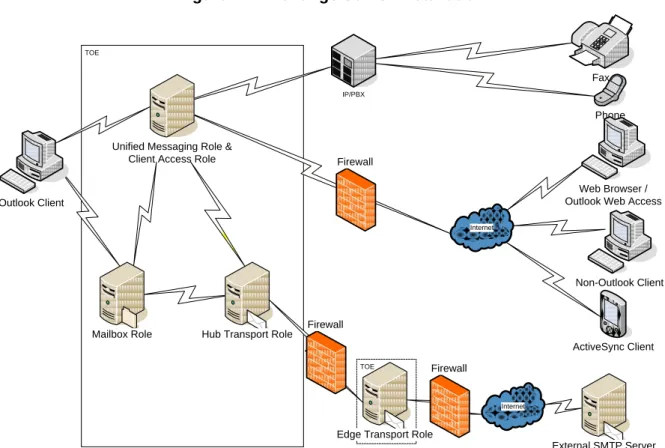
The TOE comprises software installed on Windows servers and its related guidance documentation. An installation of the TOE can be found in figure 1 and consists of the following server roles components:
Mailbox Server Role
The Mailbox server role hosts mailbox and public folder databases. The administrator manages e-mail Lifecycle folders and policies from a Mailbox server. The mailbox server role, in conjunction with the environment, provides access control for users, mail, fax, and voice messages.
Client Access Server Role
This is the server that hosts the client protocols. The Client Access Server also exposes a Web Services interface for application developers.
The Client Access server role accepts connections to the Exchange 2007 server from a variety of different clients. Please see chapter 2.3.2 for more details on client applications and protocols.
Unified Messaging Server Role
Unified Messaging combines voice messaging, fax, calendaring and e-mail, which are accessible from a telephone or a computer. Exchange Server 2007 Unified Messaging integrates Exchange Server with telephony networks and brings Unified Messaging features to the core of Exchange Server. Outlook Voice Access (OVA) is a feature of the Unified Messaging Role and lets users access their mailbox using telephone communication. OVA can optionally be secured by the Transport Layer Security Protocol (TLS).
Hub Transport Server Role
This is the mail routing server that routes mail within the Exchange organization. The Hub Transport server role handles all mail flow inside the organization, applies transport rules,
applies journaling policies, and delivers messages to the recipient's mailbox. Messages that are sent to the Internet are relayed by the Hub Transport server to the Edge Transport server role that is deployed in the perimeter network.
Edge Transport Server Role
This is the mail routing server that sits at the perimeter of the network topology and routes mail into and out of the Exchange organization. The Edge Transport server role handles the following scenarios:
Mail Flow
The Edge Transport server role accepts mail coming into the Exchange Server 2007 organization from the Internet and routes all outbound messages to the Internet. Filtering
The Edge Transport server role helps protect the Exchange Server 2007 organization from spam by filtering inbound messages as they arrive and before they are delivered to the internal private network.
All roles, with the exception of the Edge Transport Server, can be installed on a single machine; however, for reasons of performance, in medium and large organization installations, these roles may be installed on more than one physical server. The TOE roles communicate in the same way, whether they are installed on one server or many servers. More information about the installation of the TOE will be provided in the related guidance documents.
Figure 1 – Exchange Server Installation
TOE
Internet
TOE
Internet
Edge Transport Role
External SMTP Server Phone Fax ` Non-Outlook Client ActiveSync Client Mailbox Role
Unified Messaging Role & Client Access Role
Hub Transport Role ` Outlook Client Firewall IP/PBX ` Web Browser / Outlook Web Access
Firewall
The following guidance documents and supportive information belong to the TOE:
Exchange Server Help file (as of August 2009) [AGD]: This is the general guidance documentation of the TOE.
Exchange Server Guidance Addendum [AGD_ADD]: The guidance addendum describes the specific aspects of the evaluated version. It extends the general guidance of the Exchange Server.
The website https://secure.tuvit.de/ provides both guidance documents and additional information about the TOE and its evaluated configuration. It shall be visited before using the TOE.
2.3 Logical Scope and Boundary of the TOE
The logical scope of the TOE can be defined by its Security Functions, the provided protocols, the excluded features and the functionality of the Operating System the TOE relies on.
2.3.1 Security Features
The TOE logical boundary is defined by the following security functions provided by the TOE:
Security Management (SF.SM) – provides administrative functionality for the TOE. Access Control (SF.AC) – protects mailboxes and public folders from unauthorized
access.
Connection Filtering (SF.CF) – protects from unwanted spam or Unsolicited Commercial E-mail (UCE) by blocking messages from specified IP addresses.
Message Filtering (SF.MF) – filters potential spam messages based on Administrator
configured SMTP filters, including local and third party block/allow lists.
Attachment Filtering (SF.AF) – provides a mechanism to filter potentially harmful attachments from external networks.
Transport Filtering (SF.TF) – Allows the administrator to define mail policies to
prevent specific internal and/or external users from emailing each other.
Identification and Authentication (SF.I&A) – Provides an identification and
authentication mechanism for the Outlook Voice Access functionality in cases where Outlook Voice Access is not secured by the use of the TLS protocol.
Distribution Group Restriction (SF.DGR) – requires users sending mail to a distribution group to be successfully authenticated and to be authorized.
Mailbox and public folder quota (SF.QTA) – allows Administrators to set quotas on the size of mailboxes and public folders.
2.3.2 Supported Protocols and clients
RPC for applications like Outlook 2007
SMTP for generic clients and servers sending e-mail to the TOE
HTTP for Web Browsers (using Outlook Web Access) and for Active Sync clients
RPC tunneled over http
Web Services Application Programming Interface (API) for In-house applications
SIP/RTP for Outlook Voice Access (OVA).
Outlook Voice Access (OVA) can optionally be secured by enabling the TLS protocol with mutual authentication for SIP/RTP. In this case, the identification and authentication of OVA users is not done by the TOE but is the sole responsibility of the TLS authenticated application which is part of the IT environment.
Those protocols can be used to connect to the TOE by different clients. Clients can be categorized into the following groups:
Generic Client (also known as Internet Client):
A client of this type could be any mail client that uses SMTP to connect to the TOE or a web browser that uses HTTP or Web Services to connect to the TOE.
Outlook client:
In contrast to the generic clients, an Outlook client uses RPC (or RPC over http) to connect to the TOE.
In addition to the above clients, the TOE allows users to connect using a standard or IP telephone via Outlook Voice Access. To use standard telephones, a PBX must be connected to the TOE. A PBX may also forward IP calls.
The Unified Messaging server role in Exchange 2007 lets users access voice mail, e-mail, fax messages, and calendar information located in their Exchange 2007 mailbox from an e-mail client such as Microsoft Outlook or Outlook Web Access, from a mobile device that has Microsoft Exchange ActiveSync enabled, such as a Windows Mobile® powered smartphone or a personal digital assistant (PDA), or from a telephone.
Further, the SMTP protocol can be used by a SMTP server to connect to the TOE.
The scope of the TOE ends at the interfaces where it provides its services and does not include any functionality of any client.
2.3.3 Excluded features
The following protocols are included in the Exchange product, but outside the logical scope of the TOE:
IMAP4
POP3
Further, all clients that can be used to connect to the TOE (see previous chapter) are not addressed during the evaluation.
For features of the TOE that rely on the use of external lists for filtering of email messages it should be noted that the way these external lists are compiled and transferred to the TOE are out of scope of the evaluation.
2.3.4 Important functionality of the environment
The following security functionality of the TOE environment is used by the TOE:
Identification and Authentication – the TOE enforces the identification and
authentication of users only in cases the users connect to OVA over a connection which is not TLS secured. All other I&A functionality that the TOE depends on (to implement its access control policy) is part of the IT environment:
The TOE relies on Active Directory authenticating users when they attempt to access the TOE via RPC (MAPI), HTTP (including HTTP-DAV and Web Services) or SMTP interfaces. After Windows performed the identification and authentication tasks, it provides information about the corresponding user ID and attributes to the TOE. On the basis of this information, the TOE decides whether access is granted or denied.
When users attempt to access the TOE via SIP/RTP over a mutually authenticated TLS connection the platform may authenticate the connecting application using the provided certificate. The trusted application (e.g., a PBX or an Office Communication Server) will identify and authenticate the users and provide the identity of the user to the TOE.
TOE Data Protection – provided by Windows discretionary access control. During
common operation it is necessary to restrict access to TOE items such as binaries, configuration data, and user data (mailboxes and public folder items). This is essential to maintain the confidentiality of the stored objects that are managed by the TOE and to prevent the TOE from unauthorized access. For each of these objects, the administrator can define who is allowed to access (e.g. to read or change the files) on the operating system level. The discretionary access control of Windows is needed to protect the binaries and configuration files of the TOE itself as well as its stored data from unauthorized access even if a user has access to the system on an operating system level.
TOE Data Management – for the TOE data that is stored using functionality of the
Operating System, the Operating System provides adequate default values, management functionality and restricts the management functionality to certain roles.
3 TOE Security Environment
As an e-mail and collaboration server, Exchange may be used in many different environments. The assets to be protected (such as an employee’s mailbox and messages included in it) therefore may vary in their sensitivity, depending on the organization Exchange is used in. Therefore, it is impossible to determine the values of the information assets beforehand. As a consequence, the motivation of possible attackers could scale with the importance, sensitivity and value of the information assets, and the attack potential could range from low to high.
This TOE is explicitly intended for use cases and environments where a low attack potential is present due to either the low value of the assets or additional protection measures in the environment. By itself, the TOE is not intended to provide appropriate protection when mid- or high-level protection of the assets is needed; in these cases it should be combined with additional environmental protection measures.
3.1 Assumptions
This chapter describes the security aspects of the intended environment for the evaluated TOE. This includes information about the physical, personnel, procedural, connectivity, and functional aspects of the environment.
The operational environment must be managed in accordance with the delivered guidance documentation. The following specific conditions are assumed to exist in an environment where this TOE is employed:
Table 1 - Assumptions
Assumption Description
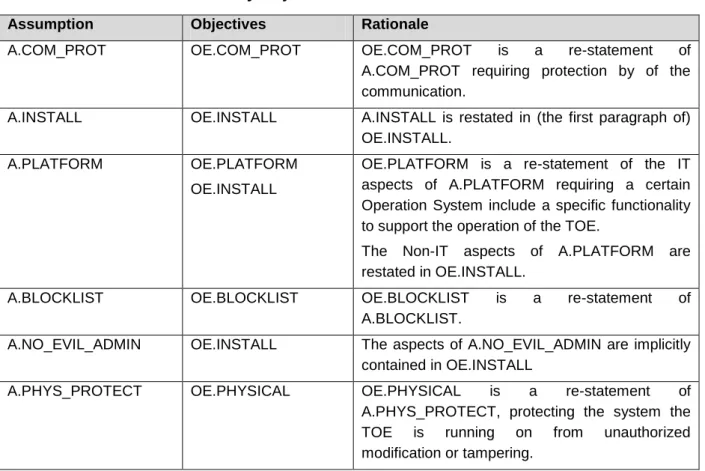
A.COM_PROT It is assumed that the communication channels between all server roles are appropriately secured against eavesdropping and manipulation by physical protection of the wire or by using encryption.
Any internet connection to a server role is assumed to be appropriately secured by a firewall.
Finally, it is assumed that the connection between the TOE and the user (connecting to the Unified Messaging role, the Mailbox Role, the Hub role, or the Client Access Server role) is appropriately secured by a physical protection of the wire or by using encryption to avoid eavesdropping or manipulation of the communication.
A.INSTALL It is assumed that the TOE will be delivered, installed, configured and set up in accordance with documented delivery and installation/setup procedures.
Assumption Description
A.PLATFORM The platform upon which the TOE resides is Windows Server 2003 Enterprise Edition x64 Edition R23 plus SP 2 (English). The platform provides:
Access Control to restrict modification to TOE executables, the platform itself, configuration files and databases (mailboxes and public folders) only to the authorized administrators.
Functionality for supporting and enforcing Identification and Authentication of users. It is assumed that the platform ensures the identification and authentication of users except for the case that they connect via a non TLS encrypted Outlook Voice Access connection.
Methods to store and manage TSF data for the TOE. Further, the platform will provide a role concept for administrative roles and restrict the access to TSF data where necessary.
Beside the software necessary for the management and operation of the TOE (e.g. management tools) it is assumed that no untrusted software is installed on the machines the TOE is installed on.
The administrator(s) ensure – during TOE installation and operation - that the platform the TOE is running on allows the secure operation of the TOE.
A.BLOCKLIST Block/allow lists from third parties - which are used to evaluate email messages - have to be of sufficient quality and trustworthy. Therefore it is assumed that only third party block/allow lists from trustworthy sources will be used and that the download of these block/allow lists is appropriately secured with respect to the integrity and authenticity of the block/allow lists
A.NO_EVIL_ADM There will be one or more competent administrator(s) assigned to manage the TOE, its platform and the security of the information both of them contain.
The administrator(s) are not careless, willfully negligent, nor hostile, and will follow and abide by the instructions provided by
3
It should be noted that Windows Server 2003 Enterprise Edition x64 Edition R2 plus SP 2 (English) has been evaluated according to Common Criteria (see [WIN_ST]) and the functionality that is required by this assumption was part of this evaluation. However, for the context of this evaluation there is no need to install and configure the Operating System exactly in its certified version as this would limit the operation of the TOE to an unacceptable extent.
Assumption Description
the administration documentation.
A.PHYS_PROTECT The TOE and its platform will be located within facilities providing controlled access to prevent unauthorized physical access.
3.2 Threats
Table 2 identifies the threats to the TOE. As stated above, this TOE is explicitly intended for use cases and environments, where a low attack potential is present and therefore attackers are not considered to possess access to the resources necessary to perform attacks like cryptanalysis on the algorithms used or disassembling and reverse engineering the TOE. The potential attackers of the TOE are considered to be users with public knowledge of how the TOE operates. The attackers have only network access to the TOE, not physical access (see A.PHYS_PROTECT).
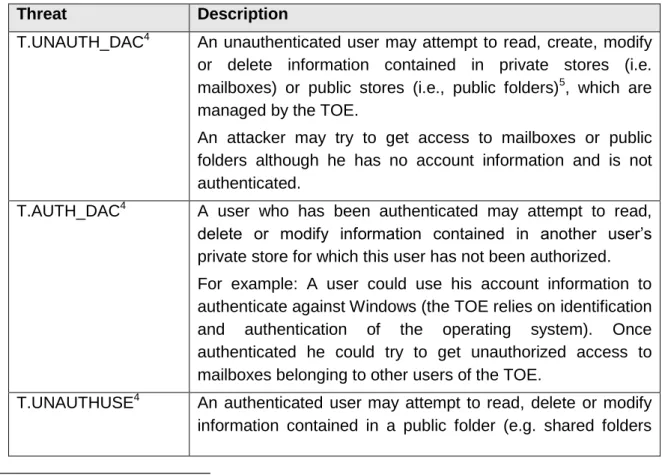
Table 2 - Threats to the TOE
Threat Description
T.UNAUTH_DAC4 An unauthenticated user may attempt to read, create, modify or delete information contained in private stores (i.e. mailboxes) or public stores (i.e., public folders)5, which are managed by the TOE.
An attacker may try to get access to mailboxes or public folders although he has no account information and is not authenticated.
T.AUTH_DAC4 A user who has been authenticated may attempt to read, delete or modify information contained in another user’s private store for which this user has not been authorized. For example: A user could use his account information to authenticate against Windows (the TOE relies on identification and authentication of the operating system). Once authenticated he could try to get unauthorized access to mailboxes belonging to other users of the TOE.
T.UNAUTHUSE4 An authenticated user may attempt to read, delete or modify information contained in a public folder (e.g. shared folders
4
Exchange Server 2007 has two kinds of data stores: mailboxes – also known as a private store – that are specific to an individual mailbox-enabled user and public folders for shared folders and documents. Please find more details about the access control of the TOE in chapter 6.1.2 of this document.
5
The access to public folders is usually restricted to one or more users or user groups. Public folders usually do not provide unrestricted access to the folder for all users (authorized as well as unauthorized users) since they are usually used by specific work groups in an organization.
Threat Description
and documents) that belongs to a group the user is not a member of or is not authorized to use.
This scenario is similar to the scenario described in T.AUTH_DAC but in this case the authenticated user tries to get unauthorized access to a public folder instead of a private store, although he is not a member of a group that is allowed to access the folder or is not authorized to use.
T.SPAM An attacker could send Unsolicited Commercial email (UCE or spam) through the TOE, and have it delivered to mailboxes controlled by the TOE.
The threat is an external entity that may send unsolicited messages to TOE users consuming TOE resources or delivering unwanted information to TOE users. For example, this unwanted information may result in an attempt to obtain financial information from the end-user (a ―phishing‖ attack) T.DL_MISUSE An unauthenticated user or an authenticated but unauthorized
user may send messages that consume TOE resources by delivering inappropriate email, such as UCE to a distribution group6.
A distribution group may be restricted in a way that only authenticated and authorized users shall be allowed to send messages to a distribution group. An attacker may attempt to send mail for such a distribution group although he is not allowed to deliver email to this distribution group.
T.OVERFLOW An attacker may attempt a denial of service attack by attempting to overflow a server’s storage space by sending a large amount of mail to an individual’s mailbox or a mail-enabled public folder.
Furthermore regular users that keep all of their received messages could cause an overflow of the mail system. In the course of time the storage of all of their mail may result in mailboxes of exorbitant size.
The consequences of the above threats would be a failure of the TOE to deliver mail to other users due to a lack of system resources (e.g. lack of hard disk space).
6
A distribution group may be either a statically defined group of recipients in the Active Directory, or created dynamically based on a LDAP query.
3.3 Organizational Security Policies
An organizational security policy is a set of rules, practices, and procedures imposed by an organization to address its security needs. This chapter identifies the organizational security policies the TOE shall comply with.
Policy Description
OSP.MAIL_FLOW Administrators shall be able to control email flow within their organization. The administrator shall be able to prevent email flow between specific senders and recipients based on the flowing characteristics of an email:
Sender Recipients Subject Classification Header Attachment Name Attachment Size
Attachment MIME type
Importance
Keywords contained in the subject or body
The Administrators should also be able to prevent specific attachments from being sent to, from or around the organization.
4 Security Objectives
The purpose of the security objectives is to detail the planned response to a security problem or threat. Threats can be directed against the TOE or the security environment or both therefore, the CC identifies two categories of security objectives:
Security objectives for the TOE, and
Security objectives for the environment.
Objectives are also used to ensure that assumptions and organizational security policies are met.
4.1 Security Objectives for the TOE
This chapter identifies and describes the security objectives of the TOE.
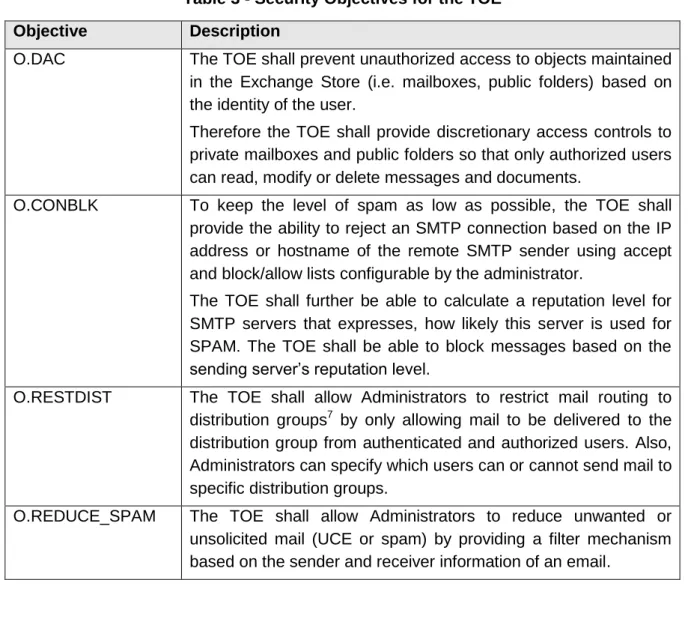
Table 3 - Security Objectives for the TOE
Objective Description
O.DAC The TOE shall prevent unauthorized access to objects maintained in the Exchange Store (i.e. mailboxes, public folders) based on the identity of the user.
Therefore the TOE shall provide discretionary access controls to private mailboxes and public folders so that only authorized users can read, modify or delete messages and documents.
O.CONBLK To keep the level of spam as low as possible, the TOE shall provide the ability to reject an SMTP connection based on the IP address or hostname of the remote SMTP sender using accept and block/allow lists configurable by the administrator.
The TOE shall further be able to calculate a reputation level for SMTP servers that expresses, how likely this server is used for SPAM. The TOE shall be able to block messages based on the sending server’s reputation level.
O.RESTDIST The TOE shall allow Administrators to restrict mail routing to distribution groups7 by only allowing mail to be delivered to the distribution group from authenticated and authorized users. Also, Administrators can specify which users can or cannot send mail to specific distribution groups.
O.REDUCE_SPAM The TOE shall allow Administrators to reduce unwanted or unsolicited mail (UCE or spam) by providing a filter mechanism based on the sender and receiver information of an email.
7
A distribution group may be either a statically defined group in the Active Directory, or created dynamically based on a LDAP query.
Objective Description
O.MAIL_FLOW The TOE shall allow Administrators to control email flow within their organization. The to TOE will provide the administrator with filters to prevent email flow between specific senders and receivers based on the flowing characteristics of an email:
Sender Recipients CC: Subject Classification Header Attachment Name Attachment Size Importance
Keywords contained in the subject or body
Also, the TOE will allow Administrators to prevent specific types of attachments (characterized by the extension or the MIME type of the attachment) from being sent to, from or around the organization.
O.QUOTA The TOE shall allow Administrators to restrict the size of user mail boxes and public folders to avoid denial of service (here: resource overflow) attacks against the Exchange storage.
If a user’s mailbox reaches a size defined by the Administrator, the delivery of further mails will be stopped and the user informed about the actual mailbox size. In this case, only the user whose mailbox has exceeded the quota is not able to receive mail. Other users are not affected and receive mail as usual.
If a public folder reaches a size defined by the Administrator, new items cannot be created in this folder.
O.I&A The TOE shall provide an identification and authentication mechanism for users using Outlook Voice Access in cases the access is not secured by TLS8. The resulting information about the identity of the user is then used by other policies of the TOE.
4.2 Security Objectives for the Environment
The security objectives for the TOE Environment are defined in Table 4.
8
In case of a connection that is secured via a mutually authenticated TLS channel the environment will be responsible for the identification and authentication of the user
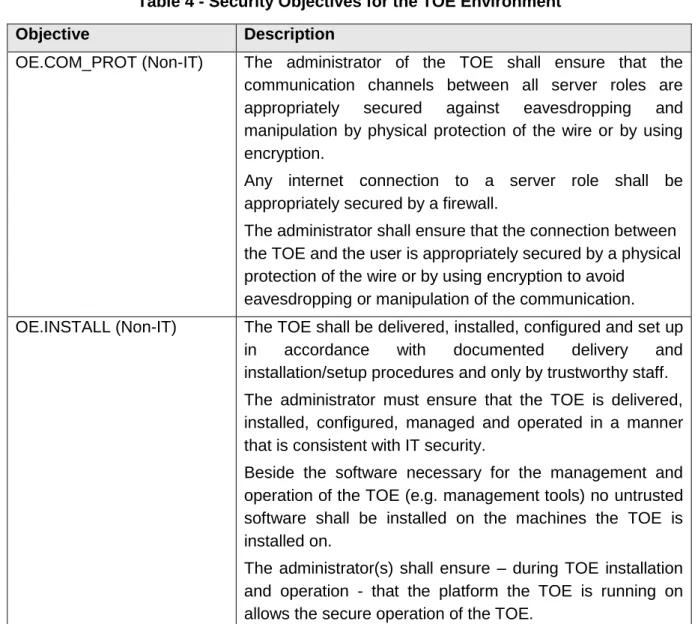
Table 4 - Security Objectives for the TOE Environment
Objective Description
OE.COM_PROT (Non-IT) The administrator of the TOE shall ensure that the communication channels between all server roles are appropriately secured against eavesdropping and manipulation by physical protection of the wire or by using encryption.
Any internet connection to a server role shall be appropriately secured by a firewall.
The administrator shall ensure that the connection between the TOE and the user is appropriately secured by a physical protection of the wire or by using encryption to avoid
eavesdropping or manipulation of the communication. OE.INSTALL (Non-IT) The TOE shall be delivered, installed, configured and set up
in accordance with documented delivery and installation/setup procedures and only by trustworthy staff. The administrator must ensure that the TOE is delivered, installed, configured, managed and operated in a manner that is consistent with IT security.
Beside the software necessary for the management and operation of the TOE (e.g. management tools) no untrusted software shall be installed on the machines the TOE is installed on.
The administrator(s) shall ensure – during TOE installation and operation - that the platform the TOE is running on allows the secure operation of the TOE.
Objective Description
OE.PLATFORM ( IT)
The platform upon which the TOE resides shall be Windows Server 2003 Enterprise Edition x64 Edition R2 plus SP 2 (English).
The platform provides:
Access Control to restrict modification to TOE executables, the platform itself, configuration files and databases (mailboxes and public folders) only to the authorized administrators.
Functionality for supporting and enforcing Identification and Authentication of users. The platform shall ensure the identification and authentication of users except for the case that they connect via a non TLS encrypted Outlook Voice Access connection.
Methods to store and manage TSF data for the TOE. Further, the platform will provide a role concept for administrative roles and restrict access to TSF data where necessary.
OE.BLOCKLIST (Non-IT) Block/allow lists from third parties - which are used to evaluate email messages - have to be of sufficient quality and trustworthy. Therefore, the administrator shall ensure that only third party block/allow lists from trustworthy sources will be used and that the download of these block/allow lists is appropriately secured with respect to the integrity and authenticity of the block/allow lists
OE.PHYSICAL (Non-IT) The administrators shall ensure that those parts of the TOE and its platform that are critical to security policy are protected from any physical attack.
5 IT Security Requirements
This chapter defines the IT security requirements that shall be satisfied by the TOE or its environment:
The CC divides TOE security requirements into two categories:
Security functional requirements (SFRs) (such as, identification and authentication, security management, and user data protection) that the TOE and the supporting evidence need to satisfy to meet the security objectives of the TOE.
Security assurance requirements (SARs) that provide grounds for confidence that the TOE and its supporting IT environment meet its security objectives (e.g., configuration management, testing, and vulnerability assessment).
These requirements are discussed separately within the following subchapters.
5.1 TOE Security Functional Requirements
The TOE satisfies the SFRs delineated in Table 5. The rest of this chapter contains a description of each component.
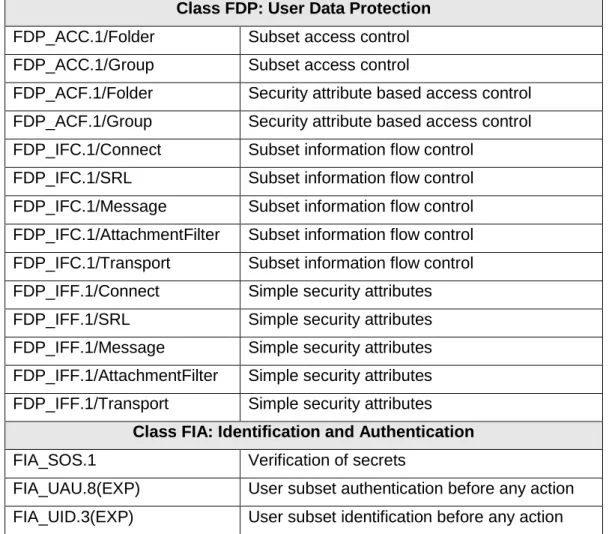
Table 5 - TOE Security Functional Requirements Class FDP: User Data Protection
FDP_ACC.1/Folder Subset access control FDP_ACC.1/Group Subset access control
FDP_ACF.1/Folder Security attribute based access control FDP_ACF.1/Group Security attribute based access control FDP_IFC.1/Connect Subset information flow control
FDP_IFC.1/SRL Subset information flow control FDP_IFC.1/Message Subset information flow control FDP_IFC.1/AttachmentFilter Subset information flow control FDP_IFC.1/Transport Subset information flow control FDP_IFF.1/Connect Simple security attributes FDP_IFF.1/SRL Simple security attributes FDP_IFF.1/Message Simple security attributes FDP_IFF.1/AttachmentFilter Simple security attributes FDP_IFF.1/Transport Simple security attributes
Class FIA: Identification and Authentication
FIA_SOS.1 Verification of secrets
FIA_UAU.8(EXP) User subset authentication before any action FIA_UID.3(EXP) User subset identification before any action
FIA_USB.1 User-subject binding
Class FRU: Resource Allocation
FRU_RSA.1/Mail Maximum quotas
FRU_RSA.1/Public Maximum quotas
Class FMT: Security Management
FMT_SMF.1 Specification of management functions FMT_MSA.1/Folder Management of Security Attributes FMT_MSA.3/Folder Static attribute initialization
FMT_MSA.3/Group Static attribute initialization FMT_MSA.3/Connect Static attribute initialization FMT_MSA.3/SRL Static attribute initialization FMT_MSA.3/Message Static attribute initialization FMT_MSA.3/AttachmentFilter Static attribute initialization FMT_MSA.3/Transport Static attribute initialization
5.1.1 Class FDP: User Data Protection
FDP_ACC.1/Folder Subset access control
FDP_ACC.1.1/Folder The TSF shall enforce the [Discretionary Access Control SFP] on [ subjects – processes acting on behalf of users
objects – mailbox and public folder items9
and (sub)folders
mailbox operations – List folder; Create subfolder, Create item, Read item, Edit item, Delete item, Modify folder permissions, Send item
public folder operations – List Folder, Create subfolder, Create item, Read item, Edit item, Delete item, Modify folder permissions].
9
Mailbox and public folder items include all objects that are stored in a mailbox or public folder (e.g. emails, contacts or certificates)
FDP_ACF.1/Folder Security attribute based access control
FDP_ACF.1.1/Folder The TSF shall enforce the [Discretionary Access Control SFP] to objects based on the following: [
Object Attributes - Access Control Lists that exist for every folder, Owner of the folder
subject attribute –ID10 of the user and its corresponding groups].
FDP_ACF.1.2/Folder The TSF shall enforce the following rules to determine if an operation among controlled subjects and controlled objects is allowed: [
The operation is allowed if the operation is explicitly allowed and not explicitly denied by an entry in the ACL of the folder that the object resides in].
FDP_ACF.1.3/Folder The TSF shall explicitly authorize access of subjects to objects based on the following additional rules: [none].
FDP_ACF.1.4/Folder The TSF shall explicitly deny access of subjects to objects based on the following additional rules: [none].
10
The ID of the current user is provided by the Windows Operating System or by the authentication policy as expressed in FIA_UAU.8.(EXP) (only when the user is connected via non-TLS secured Outlook Voice Access).
FDP_ACC.1/Group Subset access control
FDP_ACC.1.1/Group The TSF shall enforce the [Distribution Group Restriction SFP] on [ subjects – users sending e-mail
objects – distribution groups
operation – use, i.e. send messages to a distribution group].
FDP_ACF.1/Group Security attribute based access control
FDP_ACF.1.1/Group The TSF shall enforce the [Distribution Group Restriction SFP] to objects based on the following: [
subject attribute – ID of the user and its corresponding group, FROM: field of the RFC 2821 payload envelope
object attributes (distribution groups) – restricted access flag, Access Control Lists (each distribution group has one ACL to allow users and one to deny users)].
FDP_ACF.1.2/Group The TSF shall enforce the following rules to determine if an operation among controlled subjects and controlled objects is allowed: [
The operation is allowed, if
1) a) the restricted access flag is cleared or
b) the restricted access flag is set and at the same time the subject is authenticated (i.e. the corresponding ID is available), and
2) a) no Access Control List is configured or
b) the Access ACL that is configured to contain only explicitly allowed IDs contains the ID of the sending user
or
c) the Access ACL that is configured to contain only explicitly denied IDs, does not contain the ID of the sending user].
FDP_ACF.1.3/Group The TSF shall explicitly authorize access of subjects to objects based on the following additional rules: [none].
FDP_ACF.1.4/Group The TSF shall explicitly deny access of subjects to objects based on the following additional rules: [none].
Application Note: It should be noted that the ACLs for this Security Function can only contain the IDs of local users (i.e. users in the Active Directory). If an email is sent to a distribution group by an unauthenticated user, the sending user has no ID and the checks in 2b) and 2c) of FDP_ACF.1.2/Group will lead to the result that the user is not contained in the ACL.
FDP_IFC.1/Connect Subset information flow control
FDP_IFC.1.1/Connect The TSF shall enforce the [Connection Filtering SFP] on [
Subjects – External SMTP Servers, Edge Transport Server Role Information – email messages
Operations – email transfer].
FDP_IFF.1/Connect Simple security attributes
FDP_IFF.1.1/Connect The TSF shall enforce the [Connection Filtering SFP] based on the following types of subject and information security attributes: [
subject attributes – IP address of the external SMTP server, allow/block lists of the Edge Transport Server Role, list of exceptional recipients of the Edge Transport Server Role
information attributes – recipients of the e-mail ].
FDP_IFF.1.2/Connect The TSF shall permit an information flow between a controlled subject and controlled information via a controlled operation if the following rules hold: [none]
FDP_IFF.1.3/Connect The TSF shall enforce the additional ordered rules: [
1. If the IP address of the sending external SMTP server is listed on a local allow list, the message will be accepted
2. If the IP address of the sending external SMTP server is listed on a local block list, the message will be rejected
3. If the IP address of the sending external SMTP server is listed on a remote allow list, the message will be accepted
4. If one of the recipients of the e-mail is on the local list of exceptional recipients the message will be accepted
5. If the IP address of the sending external SMTP server is listed on a remote block list, the message will be rejected
6. Else the message will be accepted].
FDP_IFF.1.4/Connect The TSF shall provide the following additional SFP capabilities:
[none].
FDP_IFF.1.5/Connect The TSF shall explicitly authorize an information flow based on the following rules: [none]
FDP_IFF.1.6/Connect The TSF shall explicitly deny an information flow based on the following rules: [none].
Application Note: This functionality utilizes the following kinds of allow and block lists:
1. Local allow and block lists maintained by Administrators
2. Remote allow and block lists retrieved from external service providers (so called ―block list service providers‖)
3. A local list of exceptional recipients.
The remote lists are not considered to be Security Attributes in the context of this policy as they are not stored locally (The necessary characteristics of those block/allow lists are ensured via A.BLOCKLIST).
FDP_IFC.1/SRL Subset information flow control
FDP_IFC.1.1/SRL The TSF shall enforce the [Sender Reputation SFP] on [ subjects: External SMTP Servers, Edge Transport Server Role information: email Messages
Operations: Mail Transfer].
FDP_IFF.1/SRL Simple security attributes
FDP_IFF.1.1/SRL The TSF shall enforce the [Sender Reputation SFP] based on the following types of subject and information security attributes:[ subject attributes - Sender Reputation Level (SRL) of the external SMTP server (calculated by the TOE), SRL Threshold and the local list of SRL values from the Edge Transport Server Role
information attributes: None].
FDP_IFF.1.2/SRL The TSF shall permit an information flow between a controlled subject and controlled information via a controlled operation if the following rules hold: [none].
FDP_IFF.1.3/SRL The TSF shall enforce the additional rules: [
- If the local list of SRL values contains an entry for the external SMTP server with a SRL value greater than or equal to the SRL threshold or
- The SRL value (calculated by the TOE) for the external SMTP server is greater than or equals the SRL Threshold
the server will be added to the local block list of FDP_IFF.1/Connect for an Authorized Administrator configurable period of time].
FDP_IFF.1.4/SRL The TSF shall provide the following additional SFP capabilities: [ Calculation of the SRL after an e-mail message has been received from an external SMTP server11].
FDP_IFF.1.5/SRL The TSF shall explicitly authorize an information flow based on the following rules: [none].
FDP_IFF.1.6/SRL The TSF shall explicitly deny an information flow based on the following rules: [none].
FDP_IFC.1/Message Subset information flow control
FDP_IFC.1.1/Message The TSF shall enforce the [Message Filtering SFP] on [
subjects: External SMTP Servers, Edge Transport Server Role information: email messages
Operations: email transfer].
FDP_IFF.1/Message Simple security attributes
FDP_IFF.1.1/Message The TSF shall enforce the [Message Filtering SFP] based on the following types of subject and information security attributes: [
subject attributes – sender and recipient filtering lists from the Edge Transport Server Role, local address book12 from the Edge Transport Server Role
information attributes – MAIL FROM: field of the RFC 2821 envelope, RFC 2822 header, RCPT TO: field of the RFC 2821 envelope].
11
Please note that the SRL is only calculated after at least 20 messages have been received from a server. 12
FDP_IFF.1.2/Message The TSF shall permit an information flow between a controlled subject and controlled information via a controlled operation if the following rules hold: [
The e-mail will be accepted unless:
a) the sender listed in the MAIL FROM: field of the (RFC 2821) message envelope is on the sender filtering list or
b) the sender in the FROM header of the message (RFC 2822) is on the sender filtering list or
c) the MAIL FROM: field of the RFC 2821 message envelope is blank13 and the FROM header of the message (RFC 2822) does not contain a valid e-mail address14 or
d) the recipient listed in the RCPT TO: field of the RFC 2821 message envelope is on the recipient filtering list or e) the recipient does not exist in the local address book]. FDP_IFF.1.3/Message The TSF shall enforce the additional rules: [none].
FDP_IFF.1.4/Message The TSF shall provide the following additional SFP capabilities:
[The TOE shall be able to evaluate the SPF record of the domain of the sender and stamp the result on the message].
FDP_IFF.1.5/Message The TSF shall explicitly authorize an information flow based on the following rules: [none].
FDP_IFF.1.6/Message The TSF shall explicitly deny an information flow based on the following rules: [none].
13 As this field can never be completely empty, the term ―blank‖ refers to a so called null address which is a MAIL FROM field that contains the characters "<>"
14
FDP_IFC.1/AttachmentFilter Subset information flow control
FDP_IFC.1.1/AttachmentFilter The TSF shall enforce the [Attachment SFP] on [ subjects: External SMTP Servers, Edge Transport Server Role information: email messages
Operations: email transfer].
FDP_IFF.1/AttachmentFilter Simple security attributes
FDP_IFF.1.1/AttachmentFilter The TSF shall enforce the [Attachment SFP] based on the following types of subject and information security attributes: [
subject attributes - Attachment Policy of the Edge Transport Server Role
information attributes - MIME Type and extension of the attachment ].
FDP_IFF.1.2/AttachmentFilter The TSF shall permit an information flow between a controlled subject and controlled information via a controlled operation if the following rules hold: [
The information flow is permitted if not explicitly prohibited by the Attachment policy]
FDP_IFF.1.3/ AttachmentFilter The TSF shall enforce the additional rule: [ Attachments will be stripped or emails containing attachments will be blocked in accordance with the Attachment policy].
FDP_IFF.1.4/ AttachmentFilter The TSF shall provide the following additional SFP capabilities: [none].
FDP_IFF.1.5/ AttachmentFilter The TSF shall explicitly authorize an information flow based on the following rules: [none].
FDP_IFF.1.6/ AttachmentFilter The TSF shall explicitly deny an information flow based on the following rules: [none].
Application Note: The attachment policy as defined in FDP_IFF.1/AttachmentFilter comprises a set of ordered rules that are defined by the administrator of the TOE. These rules are evaluated in order to determine how an e-mail attachment shall be handled. The MIME type and Attachment extension information attributes are used by these rules to define whether a rule shall be applied to an attachment. Each rule is comprised of:
A) A set of criteria that defines the attachments to which the rule shall apply (based on MIME type and Attachment extension). B) A set of exceptions to which the rule shall not be applied.
C) An action to perform when an attachment meets the rule criteria.
FDP_IFC.1/Transport Subset information flow control
FDP_IFC.1.1/Transport The TSF shall enforce the [Hub Transport SFP] on [ subjects: Hub Transport Server Role
information: email messages Operations: email transfer].
FDP_IFF.1/Transport Simple security attributes
FDP_IFF.1.1/Transport The TSF shall enforce the [Hub Transport SFP] based on the following types of subject and information security attributes: [ subject attributes – Hub Transport Policy of the Hub Transport Server Role Information attributes – Sender Recipients CC: Subject Classification Header Attachment Name Attachment Size Attachment extension Importance
Key words in Subject or email body].
FDP_IFF.1.2/Transport The TSF shall permit an information flow between a controlled subject and controlled information via a controlled operation if the following rules hold: [none].
FDP_IFF.1.3/Transport The TSF shall enforce the following additional rule: [ For each email the Hub Transport policy shall be evaluated and each rule that fits to the email shall be applied].
FDP_IFF.1.4/Transport The TSF shall provide the following additional SFP capabilities: [none].
FDP_IFF.1.5/Transport The TSF shall explicitly authorize an information flow based on the following rules: [none].
FDP_IFF.1.6/Transport The TSF shall explicitly deny an information flow based on the following rules: [none].
Application Note: The Hub transport policy as defined in FDP_IFF.1/Transport comprises a set of ordered rules that are defined by the administrator of the TOE. The rules are evaluated in order to determine how an e-mail message shall be handled. Each rule is comprised of:
A) A set of criteria that define the mails to which the rule shall be applied (based on the information attributes). B) A set of exceptions to which the rule shall not be
applied.
5.1.2 Class FIA: Identification and Authentication
FIA_SOS.1 Verification of secrets
FIA_SOS.1.1 The TSF shall provide a mechanism to verify that secrets meet [Outlook Voice Access PIN quality metrics as defined by the administrator including an Outlook Voice Access PIN of at least 8 digits].
Application Note: The Outlook Voice Access PINs are the only secrets maintained by the TOE in the context of this requirement.
FIA_UAU.8(EXP) User subset authentication before any action
FIA_UAU.8(EXP).1 The TSF shall require each user connecting via [non TLS-secured Outlook Voice Access] to be successfully authenticated before allowing any other TSF-mediated actions on behalf of that user.
FIA_UID.3(EXP) User subset identification before any action
FIA_UID.3(EXP).1 The TSF shall require each user connecting via [non TLS-secured Outlook Voice Access] to identify itself before allowing any other TSF-mediated actions on behalf of that user.
FIA_USB.1 User-subject binding
FIA_USB.1.1 The TSF shall associate the following user security attributes with subjects acting on the behalf of that user: [
ID (user’s identity)
Group Memberships].
FIA_USB.1.2 The TSF shall enforce the following rules on the initial association of user security attributes with subjects acting on the behalf of users: [none].
FIA_USB.1.3 The TSF shall enforce the following rules governing changes to the user security attributes associated with subjects acting on the behalf of users: [none].
5.1.3 Class FRU: Resource Utilization
FRU_RSA.1/Mail Maximum quotas
FRU_RSA.1.1/Mail The TSF shall enforce maximum quotas on the following resources: [mailbox size] that an individual user can use simultaneously.
FRU_RSA.1/Public Maximum quotas
FRU_RSA.1.1/Public The TSF shall enforce maximum quotas on the following resources: [public folder size] that subjects can use simultaneously.
5.1.4 Class FMT: Security Management
FMT_MSA.1/Folder Management of security attributes
FMT_MSA.1.1/Folder The TSF shall enforce the [Discretionary Access Control SFP] to restrict the ability to query, modify the security attributes [Access Control Lists of folder, Owner of the folder] to [Authorized Administrator and the owner of the folder].
Application Note: While the management of attributes of security policies and their default values is usually done by the Operating System (see chapter 5.3.3) the TOE controls the ability to query and modify the Access Control Lists of folders.
FMT_MSA.3/Folder Static attribute initialization
FMT_MSA.3.1/Folder The TSF shall enforce the [Discretionary Access Control SFP] to provide [the following] default values for security attributes that are used to enforce the SFP: [
- for mailboxes, default ACLs allow full access for the corresponding Folder Owner,
- for public folders, default ACLs allow full access for the corresponding Folder Owner, allow other users to read and create items and subfolders.]
FMT_MSA.3.2/Folder The TSF shall allow the [nobody] to specify alternative initial values to override the default values when an object or information is created.
FMT_MSA.3/Group Static attribute initialization
FMT_MSA.3.1/Group The TSF shall enforce the [Distribution Group Restriction SFP] to provide permissive default values for security attributes that are used to enforce the SFP.
FMT_MSA.3.2/Group The TSF shall allow the [nobody] to specify alternative initial values to override the default values when an object or information is created.
Application Note: Here ―permissive‖ means that no Access Control Lists are specified and the restricted access flag is set.
FMT_MSA.3/Connect Static attribute initialization
FMT_MSA.3.1/Connect The TSFshall enforce the [Connection Filtering SFP] to provide permissive default values for security attributes that are used to enforce the SFP.
FMT_MSA.3.2/Connect The TSF shall allow the [nobody] to specify alternative initial values to override the default values when an object or information is created.
FMT_MSA.3/SRL Static attribute initialization
FMT_MSA.3.1/SRL The TSF shall enforce the [Sender Reputation SFP] to provide permissive default values for security attributes that are used to enforce the SFP.
FMT_MSA.3.2/SRL The TSF shall allow the [nobody] to specify alternative initial values to override the default values when an object or information is created.
Application Note: Here ―permissive‖ means an SRL threshold of ―7‖.
FMT_MSA.3/Message Static attribute initialization
FMT_MSA.3.1/Message The TSF shall enforce the [Message Filtering SFP] to provide permissive default values for security attributes that are used to enforce the SFP.
FMT_MSA.3.2/Message The TSF shall allow the [nobody] to specify alternative initial values to override the default values when an object or information is created.
FMT_MSA.3/AttachmentFilter Static attribute initialization
FMT_MSA.3.1/AttachmentFilter The TSF shall enforce the [Attachment SFP] to provide restrictive default values for security attributes that are used to enforce the SFP.
FMT_MSA.3.2/AttachmentFilter The TSF shall allow the [nobody] to specify alternative initial values to override the default values when an object or information is created.
FMT_MSA.3/Transport Static attribute initialization
FMT_MSA.3.1/Transport The TSF shall enforce the [Hub Transport SFP] to provide permissive default values for security attributes that are used to enforce the SFP.
FMT_MSA.3.2/Transport The TSF shall allow the [nobody] to specify alternative initial values to override the default values when an object or information is created.
Application Note: In the context of this ST, the functionality required by FMT_MSA.3.2/x shall be seen in the way that the TOE does not provide any functionality to change the default values rather than restricting the access to such functionality.
FMT_SMF.1 Specification of management functions
FMT_SMF.1.1 The TSF shall be capable of performing the following security management functions: [
a) Management of security attributes for the Discretionary Access Control SFP (FDP_ACC.1/Folder)
b) Management of security attributes for the Distribution Group Restriction SFP (FDP_ACC.1/Group)
c) Management of security attributes for the Message Filtering SFP (FDP_IFF.1/Message)
d) Management of security attributes for the Connection Filtering SFP(FDP_IFF.1/Connect)
e) Management of security attributes for the Sender Reputation SFP (FDP_IFF.1/SRL)
f) Management of security attributes for the Attachment SFP (FDP_IFF.1/AttachmentFilter)
g) Management of security attributes for the Hub Transport SFP (FDP_IFF.1/Transport)
h) Management of maximum values for quotas on mailbox and public folder sizes (FRU_RSA.1/Mail and FRU_RSA.1/Public).
i) Management of attributes for authentication via Outlook Voice Access (FIA_UAU.8(EXP))
j) Management of quality metric for user PINs (FIA_SOS.1)].
5.2 TOE Security Assurance Requirements
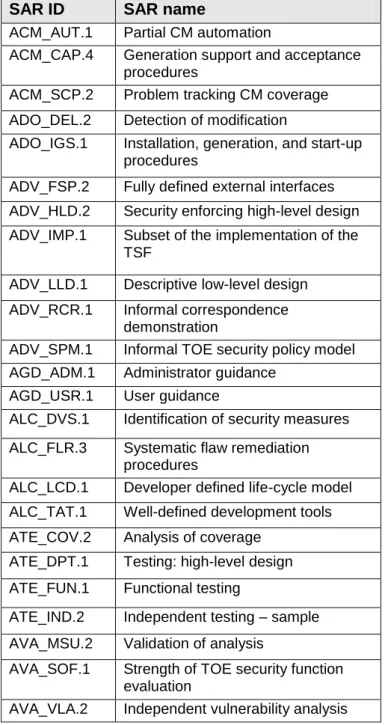
Table 6 identifies the security assurance components drawn from CC Part 3. It is evaluation assurance level EAL4 augmented by ALC_FLR.3. The SARs are not iterated or refined from Part 3.
Table 6 – TOE Security Assurance Requirements
SAR ID SAR name
ACM_AUT.1 Partial CM automation
ACM_CAP.4 Generation support and acceptance procedures
ACM_SCP.2 Problem tracking CM coverage ADO_DEL.2 Detection of modification
ADO_IGS.1 Installation, generation, and start-up procedures
ADV_FSP.2 Fully defined external interfaces ADV_HLD.2 Security enforcing high-level design ADV_IMP.1 Subset of the implementation of the
TSF
ADV_LLD.1 Descriptive low-level design ADV_RCR.1 Informal correspondence
demonstration
ADV_SPM.1 Informal TOE security policy model AGD_ADM.1 Administrator guidance
AGD_USR.1 User guidance
ALC_DVS.1 Identification of security measures ALC_FLR.3 Systematic flaw remediation
procedures
ALC_LCD.1 Developer defined life-cycle model ALC_TAT.1 Well-defined development tools ATE_COV.2 Analysis of coverage
ATE_DPT.1 Testing: high-level design ATE_FUN.1 Functional testing
ATE_IND.2 Independent testing – sample AVA_MSU.2 Validation of analysis
AVA_SOF.1 Strength of TOE security function evaluation
5.3 Security Requirements for the IT Environment
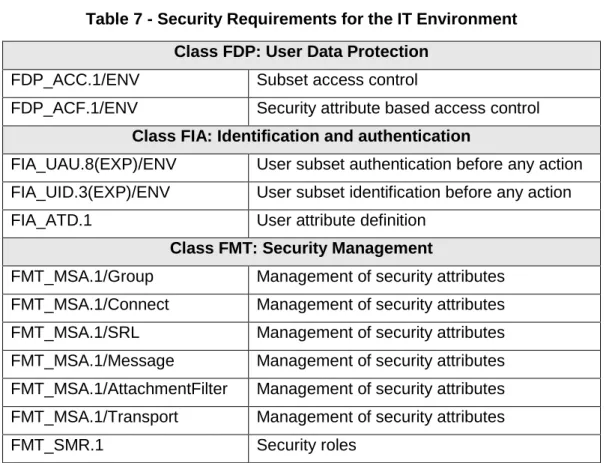
The environment satisfies the SFRs delineated in Table 7. The rest of this chapter contains a description of each component. The environment also has to fulfill all dependencies resulting from these requirements, but these will not be traced in this security target.
Table 7 - Security Requirements for the IT Environment Class FDP: User Data Protection
FDP_ACC.1/ENV Subset access control
FDP_ACF.1/ENV Security attribute based access control
Class FIA: Identification and authentication
FIA_UAU.8(EXP)/ENV User subset authentication before any action FIA_UID.3(EXP)/ENV User subset identification before any action
FIA_ATD.1 User attribute definition
Class FMT: Security Management
FMT_MSA.1/Group Management of security attributes FMT_MSA.1/Connect Management of security attributes FMT_MSA.1/SRL Management of security attributes FMT_MSA.1/Message Management of security attributes FMT_MSA.1/AttachmentFilter Management of security attributes FMT_MSA.1/Transport Management of security attributes
5.3.1 Class FDP: User Data Protection
FDP_ACC.1/ENV Subset access control
FDP_ACC.1.1/ENV The IT environment shall enforce the [Windows discretionary access control policy] on [
subjects – processes acting on behalf of users
objects – NTFS files and/or NTFS directories (i.e. TOE executables, configuration files, message stores that store user mailboxes and public folders) and registry and Active Directory objects
operations– all operations among subjects and objects covered by Windows discretionary access control policy].
FDP_ACF.1/ENV Security attribute based access control
FDP_ACF.1.1/ENV The IT environment shall enforce the [Windows discretionary access control policy] to NTFS files and/or NTFS directories (i.e. TOE executables, configuration files, message stores that store user mailboxes and public folders) and registry, ADAM and Active Directory objects based on [
subject attribute –security ID of the user and its corresponding group IDs
object attributes – Access Control List].
FDP_ACF.1.2/ENV The IT environment shall enforce the following rules to determine if an operation among controlled subjects and controlled objects is allowed: [
If the operation is explicitly allowed and not explicitly denied by an entry in the Access Control List for the accessing subject, the accessing subject is able to perform the specified operation].