An Empirical Evaluation of a Testing and Debugging
Methodology for Excel
Jeffrey Carver
Dept. of Computer Science and
Engineering
Box 9637
Mississippi State, MS 39759
+1-662-325-0004
Marc Fisher II
Dept. of Computer Science and
Engineering
256 Avery Hall
University of Nebraska – Lincoln
Lincoln, NE 68588
Gregg Rothermel
Dept. of Computer Science and
Engineering
360 Avery Hall
University of Nebraska – Lincoln
Lincoln, NE 68588
ABSTRACT
Spreadsheets are one of the most commonly used types of programs in the world, and it is important that they be sufficiently dependable. To help end users who create spreadsheets do so more reliably, we have created a testing and debugging methodology and environment for use in spreadsheets, known as the WYSIWYT methodology. Our prior experiments with WYSIWYT show that users can utilize it to ensure that their spreadsheets are more dependable, but these experiments to date have considered only an unfamiliar prototype spreadsheet environment, and have not involved spreadsheet creation tasks. In this work we conducted a controlled experiment that addresses these limitations. The results of this study indicate that the use of WYSIWYT did not affect the correctness of spreadsheets created by users, but it did significantly reduce the amount of effort required to create them. Further, the subjects’ evaluation of the help provided by WYSIWYT was very positive. Our results provide several insights into the use of the WYSIWYT methodology by end users.
Categories and Subject Descriptors
D.2.5 [Software Engineering]:Testing and Debugging – Testing tools; H.4.1 [Information Systems]: Information Systems Applications – Spreadsheets
General Terms
Reliability, Experimentation, Human Factors, Verification.
Keywords
End-user software engineering, Empirical Study, Human Subjects
1.
INTRODUCTION
Spreadsheets are used by a wide range of non-professional programmers to perform many important tasks, such as managing retirement funds, forecasting revenues, and even assessing the quality of batches of pharmaceutical products. Evidence shows,
however, that spreadsheets often contain faults, and that these faults can have severe consequences. For example, a formula error caused the stocks of Shurgard Inc. to be devalued after employees were overpaid by $700,000 [28], and a cut-and-paste error in a bidding spreadsheet cost Transalta Corporation 24 million dollars through overbidding [12].
To address this problem, researchers have been pursuing various approaches for providing help to end users, including unit inference and checking systems [1-3], visualization techniques [10, 11, 27], interval analysis techniques [4, 9], and automatic generation of spreadsheets from models [13]. Commercial spreadsheet systems such as Microsoft Excel have also incorporated several tools for assisting with spreadsheet dependability, including dataflow arrows, anomaly detection heuristics, and data validation facilities.
In our own prior research, we have created an integrated family of approaches to help end users improve the dependability of their spreadsheets. At the core of these approaches is a dataflow testing methodology that helps spreadsheet users address potential problems in cell references -- a prevalent source of spreadsheet errors [19, 20]. This WYSIWYT (What You See Is What You Test) methodology [22, 23] uses visual devices to provide feedback about test coverage of the spreadsheet relative to a dataflow adequacy criterion. The methodology also incorporates techniques for automated test case generation [14], fault localization [21, 25, 26], test reuse and replay mechanisms [15], and the use of assertions [5, 9].
We have performed several empirical studies considering various aspects of the WYSIWYT methodology (for details see Section 2). Overall, these studies suggest that the WYSIWYT test adequacy criterion and fault localization devices can be effective, and end users without specific training in the underlying testing theories can use the methodology.
Results such as these are encouraging; however, to date, all of our research and studies of the WYSIWYT methodology and other spreadsheet dependability mechanisms have been performed using the research spreadsheet environment Forms/3 [7], an environment unfamiliar to participants. In addition, our studies of human subjects have always involved spreadsheets given to the subjects, rather than spreadsheets created by the subjects. These factors pose threats to both the external and internal validity of the conclusions drawn about the efficiency and effectiveness of the WYSIWYT methodology.
In this research, therefore, we have performed a controlled experiment to investigate the abilities of end-user programmers to
Permission to make digital or hard copies of all or part of this work for personal or classroom use is granted without fee provided that copies are not made or distributed for profit or commercial advantage and that copies bear this notice and the full citation on the first page. To copy otherwise, or republish, to post on servers or to redistribute to lists, requires prior specific permission and/or a fee.
Conference’04, Month 1–2, 2004, City, State, Country. Copyright 2004 ACM 1-58113-000-0/00/0004…$5.00.
Figure 1: Grades spreadsheet in WXYCEL
use the WYSIWYT methodology implemented in Excel. We investigate the effectiveness and efficiency of these users in performing a spreadsheet creation task.
The remainder of this paper is organized as follows. Section 2 provides background information on the WYSIWYT methodology and on prior empirical studies related to this work. Section 3 describes our experiment, including subjects, tasks, design, and procedures. Section 4 presents and analyzes our data. Section 5 describes threats to the validity of our study, and Section 6 provides more qualitative discussion of our results. Finally, Section 7 concludes and discusses future work.
2.
BACKGROUND
The current state of the WYSIWYT methodology is the culmination of a large amount of research and empirical work. In Section 2.1 we describe the basic WYSIWYT methodology, and in Section 2.2 we review the previous empirical work.
2.1
The WYSIWYT Methodology
The “What You See Is What You Test” (WYSIWYT) methodology (hereafter referred to simply as “WYSIWYT”) attempts to bring the benefits of formal white-box testing and fault localization strategies, originally created for traditional programming languages, to end users using spreadsheet languages. WYSIWYT has been developed as an integrated family of techniques that support testing [22, 23], fault localization [21, 25, 26], test case generation [14], test reuse and replay [15], and the use of assertions [5, 9]. WYSIWYT has been prototyped in two spreadsheet languages. The first, Forms/3, is a research spreadsheet language designed to explore boundaries of the spreadsheet paradigm [7, 23]. More recently, a prototype, WYXCEL, has been developed for Microsoft Excel, the most commonly used spreadsheet environment [16]. The remainder of this discussion focuses on the testing and fault localization features of WYXCEL, the features and environment that we will be using for our study.
Figure 1 displays a simple “Grades” spreadsheet loaded in WYXCEL. WYSIWYT uses simple graphical devices displayed on top of the spreadsheet to guide the user’s testing and debugging efforts. In this example, notice that several of the cells have colored borders (ranging from gray to black in the figure) along the right or bottom edges, checkboxes, and shaded interiors. The colored borders serve two purposes. First, they group together cells that have similar formulas (e.g. cells M2:M6 in Figure 1); each such group shares a border along its right and bottom edge [8, 16]. This grouping allows the methodology to scale to large spreadsheets that have many duplicated cell formulas. The second purpose of the borders is to indicate how “tested” (i.e. how much coverage has been achieved in terms of a data-flow coverage criterion [16, 22, 23]) the cells are. This
“testedness” is displayed using a continuous color range from red (0% tested, shown as gray in Figure 1) to blue (100% tested, shown as black in Figure 1).
The checkboxes in the cells indicate places where a user can make testing decisions. When the user clicks on a checkbox, they see two choices: a checkmark or an x-mark (see cell M4 in Figure 1). If the user determines that the current value in the cell is correct relative to the current inputs, he or she can click on the checkmark. This action causes all of the underlying data-flow edges that reach that cell’s value to be marked as covered, increasing the testedness values of the cells that contribute to the value in the cell marked. If the user decides that the current value is incorrect, they can click the x-mark. When an x-mark is placed on the spreadsheet, the interiors of the cells that contributed to the bad value are shaded pink or red (various shades of gray in Figure 1) to indicate that they have contributed to the calculation of an incorrect value [21, 25, 26]. The shade of red is based on the number of x-marks and checkmarks that the cell contributed to, with the darkest shaded cells (e.g. cell L3 in Figure 1) indicating the cells most likely to contain a fault.
2.2
Previous Empirical Work
There has been considerable work concerned with end-user programming in a variety of environments (e.g. [17, 29]). There have also been a large number of studies concerned with the correctness of spreadsheets and the errors people make when working with spreadsheets (see [20] for an overview of many of these studies). This work has focused on discovering causes and numbers of errors in spreadsheets, and has led to a great deal of research into tools and techniques for reducing errors in spreadsheets [1, 3, 4, 10, 13]. Aside from our own work evaluating aspects of WYSIWYT, however, there has been very little evaluation of these techniques with actual spreadsheet users. The earliest WYSIWYT studies focused on the testing features of WYSIWYT. The first of these studies considered the fault detection capabilities of the underlying data-flow coverage criterion in Forms/3 without considering actual users. The study showed that test suites that covered the data-flow relationships in the spreadsheet exposed more seeded faults than ad hoc test suites of the same size [23].
The next important study of the WYSIWYT testing features focused on computer science students using WYSIWYT to test Forms/3 spreadsheets that were provided to them by the researchers. This study showed that subjects who used WYSIWYT tested the spreadsheets better (in terms of data-flow coverage) and more efficiently (in terms of redundancy) than subjects who did not use WYSIWYT. It also showed that WYSIWYT reduced the subjects’ overconfidence in the correctness of the spreadsheets (a commonly cited problem) [24].
The third major study of WYSIWYT’s testing features examined the ability of business students, without significant programming experience, to use WYSIWYT to perform simple maintenance tasks on Forms/3 spreadsheets. This study showed that these students were able to use WYSIWYT’s testing features while performing their tasks, that the subjects using WYSIYWT displayed significantly more testing activity than subjects not using WYSIWYT, and that subjects with WYSIWYT performed the task more accurately than subjects without WYSIWYT [18]. In addition to the foregoing studies of WYSIWYT’s testing features, there have also been two studies of the fault localization features of WYSIWYT. These studies focused on the ability of different fault localization techniques to find errors in Forms/3 spreadsheets. The studies used simulations and did not use actual human subjects, although transcripts from other studies with human subjects were used to simulate human testing and debugging behavior. These studies showed that the fault localization techniques employed by WYSIWYT could find errors in the spreadsheets, and revealed important trade-offs between the different techniques [25, 26].
Beyond these studies, there have been numerous studies examining features of WYSIWYT other than testing and fault localization [5, 9, 14]. WYSIWYT has also been used as an environment for studying user motivation [30] and gender differences in problem solving [6].
These prior studies have gradually refined our understanding of WYSIWYT and its use. However, these studies have suffered from two major shortcomings. First, all of these studies have been performed in the Forms/3 environment, an environment unfamiliar to the subjects participating in the studies, and with significant differences from more traditional spreadsheet environments such as Excel. Second, in all of these studies the participants used spreadsheets that were given to them by the researchers rather than spreadsheets they had created themselves. To address these limitations, further studies in which the subjects use a more traditional spreadsheet environment and create their own spreadsheets are needed.
3.
Study Design
The goal of this study was to determine whether the WYSIWYT methodology can assist end users in creating correct spreadsheets, when those users work in a traditional (and familiar) spreadsheet authoring environment. In particular we posed the following hypotheses:
H1: The use of WYSIWYT will improve the correctness of end users’ spreadsheets.
H2: End users will be able to create spreadsheets more quickly when using WYSIWYT.
H3: End users will be able to understand and use the WYSIWYT methodology.
3.1
Subjects
In this study, we had 38 students from three business technology courses at Mississippi State University participate as subjects. Two of the courses were sophomore-level design and analysis of spreadsheet courses, one with 14 students and the other with 10, and the other course was a senior-level office information systems course with 14 students. The majority of the students (27) were Business Information Systems majors. There were 17 males and
21 females. In terms of experience creating spreadsheets, only 8 subjects had previously created spreadsheets in a professional (business) environment.
3.2
Variables and Measures
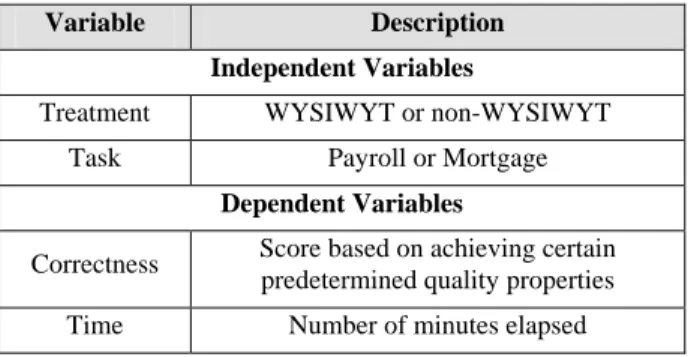
To understand the impact of the WYSIWYT methodology, we identified a specific set of variables and data to collect. (The variables are summarized in Table 1.)
3.2.1
Independent Variables
There were two independent variables that could have an impact on the outcome of the study. The first variable, the variable of greatest interest, was whether the subjects used the WYSIWYT methodology (WYSIWYT vs. No-WYSIWYT). We refer to this variable as the Treatment.
In order to allow each student to use both approaches, we developed two spreadsheet creation tasks. For each of these tasks, participants were given a written task description similar in format and style to those they were familiar with from their course textbook (see Appendix A). The tasks were designed to be similar in difficulty, with the same number of required conditionals in each task and a similar number and overall complexity of formulas. We pilot-tested the tasks prior to the study and were confident that they were of relatively equal difficulty (see Section 3.3). The first task (Mortgage Task) was to create a spreadsheet that, given various input parameters, would compute a mortgage interest rate, closing costs, and estimated payment. The second task (Payroll Task) was to create a simple payroll spreadsheet that, given a pay rate, hours worked and number of allowances, would compute income tax, social security tax, Medicare tax and net pay. We refer to this variable as the
Task variable.
3.2.2
Dependent Variables
In order to compare the performance of the students who fell into the various groups created by the independent variables, we identified a set of dependent variables and metrics to be collected during the study. We were interested in making two types of comparisons among the students. First, we wanted to compare the
Correctness of the spreadsheets they created. We computed this variable by scoring each spreadsheet with a predetermined answer key and point value. The second variable was the amount of Time
taken to complete the task. This variable allowed us to understand whether the WYSIWYT method required more effort from the subjects than their use of no methodology.
Table 1 – Study Variables
Variable Description
Independent Variables
Treatment WYSIWYT or non-WYSIWYT Task Payroll or Mortgage
Dependent Variables
Correctness Score based on achieving certain predetermined quality properties Time Number of minutes elapsed
3.3
Pilot Studies
Prior to conducting this study we piloted WYSIWYT in two different settings. We were most interested in verifying two properties. First, we wanted to ensure that the subjects would be able to understand and implement the two spreadsheet tasks and that the tasks were of equivalent difficulty. Second, because this was the first study that used the WYSIWYT plug-in with Excel, we wanted to verify both that it was usable and that its use did not cause any instability in Excel (i.e. Excel did not crash).
After some initial testing of the WYSIWYT plug-in by some computer science graduate students, our first pilot study was conducted using business technology students at Mississippi State University who were enrolled in a course on spreadsheets. This pilot study gave us a chance to determine whether the task descriptions would be understandable to wider group of subjects and to test the WYSIWYT plug-in in a more realistic environment. The results of this pilot study showed that the tasks were too complex. Based on this result, we simplified the tasks, primarily by removing some conditionals in the functions. The results also showed that some users had trouble with the WYSIWYT plug-in, especially in terms of the Excel software crashing. We documented these cases and determined the causes so that the WYSIWYT plug-in could be improved.
After some modifications and improvements to the WYSIWYT plug-in and the tasks, we conducted a second pilot study. In this pilot study, graduate students and office staff from the Computer Science and Engineering Department at the University of Nebraska participated. The goal of this pilot study was to have skilled computer users perform the study tasks just as the regular subjects would. In this pilot study, the feedback from the subjects indicated that the tasks were understandable and comparable in difficulty. Furthermore, none of the subjects experienced any problems with understanding how to use the improved version of the WYSIWYT plug-in or with its stability (i.e. Excel did not crash).
Based on these results, we were confident enough in the procedure and the WYSIWYT plug-in to proceed with the full scale study described in this paper.
3.4
Study Procedure
In designing this study we considered two approaches, a between subjects design and a within subjects design. In all of our previous WYSIWYT work we have used the between subjects design. This design allows researchers to easily compare the performance of subjects from two (or more) groups, using different treatments. In addition, this design simplifies the execution of the study because each study session can be shorter (i.e. subjects only have to perform one treatment). On the other hand, this design has several drawbacks, especially in a classroom setting. First, it requires a large number of subjects to adequately populate all of the treatments. Second, this design requires the partitioning of the class into multiple groups and training these groups separately, which may result in effects due to training differences. Third, it is difficult to ensure that the subjects who are placed into each group will have similar abilities, leading to a potential threat to validity. Finally, from an educational point of view, it is not fair to teach only half of the students the new technique.
Similar to the between subjects design, the within subjects design also has benefits and drawbacks. The main drawback is that
because the subjects perform two treatments in succession, there is a possibility that the subjects’ experience in the first treatment will affect their performance on later treatments. This problem is especially true in cases where a structured methodology is being compared to an ad hoc methodology. Because it is not possible for subjects to “unlearn” the structured methodology and return to an ad hoc methodology, the experimental treatment must always be done second. There are, however, several, benefits to this within subjects approach. First, because each subject performs both (or all) of the treatments, he or she can act as his or her own control (combating one of the problems with a between subjects design). Second, by allowing all subjects to receive equivalent training, we can control for training differences. Third, this design requires fewer subjects than the between subjects design, which is helpful for a classroom environment. Finally, because all subjects are trained in the new approach, a within subjects design fits well with the educational goals of the course instructors.
Given this assessment of tradeoffs, together with the availability of subjects and the goals of the course instructors, we selected the within subjects design for the study.
The study was performed during a regularly scheduled class meeting for each course. The students in the class were given full credit for the lab that day for participating in the study. As the participants arrived for the study, they were given a background questionnaire to complete.
After the questionnaires were completed and collected, the participants were led through the process of installing the WYSIWYT plug-in for Excel on the computer at their desk. Once the plug-in was installed, each student was given one of the two task descriptions (Payroll or Mortgage) and asked to create the spreadsheet without using WYSIWYT. In order to control for effects related to task order, half the students were assigned the Payroll task first while the other half were assigned the Mortgage task first. The students were given up to 20 minutes to complete the task. After completing the task, they were given a short questionnaire.
The next step was to give the students a short tutorial on WYSIWYT. This tutorial walked the students through the task of testing the Grades spreadsheet shown in Figure 1. During the tutorial we demonstrated the features of the WYSIWYT plug-in. Specifically, we walked through an example in which three checkmarks and two x-marks were placed on the spreadsheet. Using the information displayed in response to these markings, we located an error in the formula used to compute the average, which we then corrected.
After the tutorial, each subject received the task description they had not yet seen. There were again given up to 20 minutes to create spreadsheets, this time with the WYSIWYT features enabled. At the conclusion of this exercise, the students were given another questionnaire.
4.
DATA ANALYSIS
In this section, we organize our results around the three hypotheses posed in Section 3. For each hypothesis we present a statistical analysis of the data collected during the study and draw conclusions based on those results. Before presenting the analysis, we make a few comments about the data in general.
First, despite our efforts after the pilots, the WYSIWYT plug-in for Excel is still not completely stable. There are two primary issues that affected the stability of the WYSIWYT prototype. First, Excel has a wide range of features and provides limited programmability. These issues led to unexpected interactions that caused Excel or our prototype to crash in some instances. In addition, there appear to be bugs in Excel that caused it to crash when performing some standard operations on some system configurations with our plug-in loaded. These bugs caused there to be differences in behavior even on machines that were supposedly configured with identical hardware and software. During our study, several of our subjects were affected by these problems, resulting in unusable data. Having those subjects start over would not have provided accurate data because 1) they would have knowledge of how to solve the problem when they started the second time and 2) they would not have the full 20 minutes to complete the exercise if needed. Furthermore, because the timing continued until the subject clicked on the end task button, some students appear to have worked longer than 20 minutes. We have also excluded the data for subjects who took longer than the 20 minutes allotted.
With these two stipulations, out of the 38 subjects who participated, only 13 were able to complete both tasks without Excel crashing and in the allotted time. An additional 12 completed only the non-WYSIWYT task in the allotted time and an additional 8 completed only the WYSIWYT task in the allotted time. Therefore, in the analysis of results we provide two analyses, first using only the 13 subjects who completed both tasks and second comparing the 25 who completed the non-WYSIWYT task to the 21 who completed the non-WYSIWYT task. We partition the data analysis into 2 sections. In Section 4.1 we report on the statistical analysis comparing the spreadsheets created using WYSIWYT to those created without WYSIWYT. Then, in Section 4.2 we present the analysis of the post study survey where the students were asked to rate the usefulness of the different “tools” included in the WYSIWYT plug-in.
4.1
WYSIWYT vs. non-WYSIWYT Analysis
To properly analyze the influence of the two independent variables (Treatment and Task), we chose the 2-way ANOVA test. We also investigated each of the two dependent variables (Correctness and Time). For each of these combinations, we report the analysis when conducted using only the eight subjects who completed both tasks and for all subjects who completed at least one task.
4.1.1
Correctness Analysis
The first set of ANOVA tests deals with the Correctness
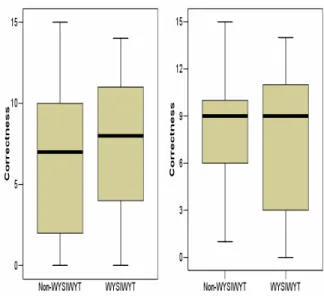
variable. We ran two 2-way ANOVAs to compare the two independent variables. The first ANOVA test was run using only the 13 subjects who completed both tasks. The results of this analysis showed there was a non-significant 2-way interaction (p = .114). Furthermore, neither variable showed a significant main effect (Treatment: p = .699; Artifact: p = .773)
When the same analysis was done with all subjects who completed either of the tasks, the results were similar. Again, the 2-way interaction was not significant (p = .288). Similarly, neither variable showed a significant main effect (Treatment: p = .576; Artifact: p = .367)
These two results indicate that overall there was no significant difference between the subjects who used WYSIWYT and those that did not use WYSIWYT in terms of the correctness of their spreadsheets. These results are shown graphically in Figure 2.
4.1.2
Time Analysis
We performed a similar analysis for the Time variable. In this case, for the eight subjects who completed both tasks, the 2-way interaction was not significant (p = .799), neither was the main effect of the Treatment (p = .066). When using all subjects, the 2-way interaction was not significant (p = .482), but the main effect of the Treatment was significant (p < .001) as well as the main effect for Artifact (p = .047). Figure 3 shows the box plots for both sets of subjects. After examining these box plots, we ran a t-test to compare the time for the 13 subjects who completed both tasks and the results did show a significant difference (p = .055). Examining this figure, we can see that the subjects who used WYSIWYT took significantly less time to complete the task (a) All subjects (b) Subjects who completed
both tasks
Figure 2 – Correctness scores
(a) All subjects (b) Subjects who completed both tasks
than those not using WYSIWYT.
4.2
Ratings of WYSIWYT tools
After completing both tasks, the students were given a survey to help us understand how useful the six features of WYSIWYT that they might have utilized were. Because all subjects completed the post-study survey regardless of whether Excel crashed or not during their tasks, the responses from all subjects who returned the survey (35/38) are included in this analysis. The six features we asked about were:
1. Checkmarks 2. X-marks 3. Cell border 4. Cell interiors
5. Overview bar (amount of testedness) 6. Tool tips
The subjects were asked to rate each of these features as “Very Unhelpful”, “Unhelpful”, “Neither”, “Helpful”, or “Very Helpful”.
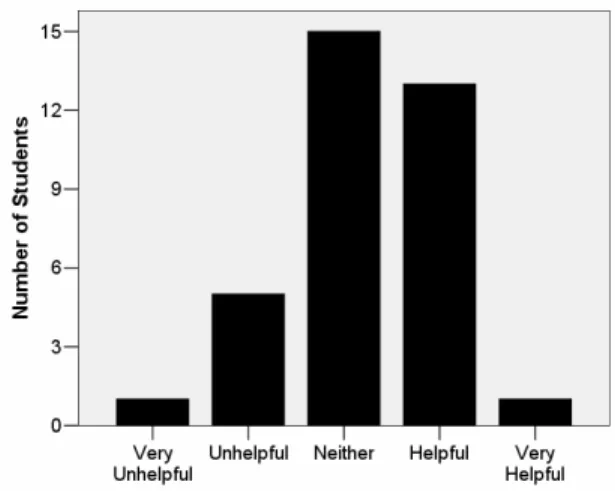
The first feature we examine is the checkmarks. This feature allows the subject to indicate whether a value in a cell was correct and allows the WYSIWYT plug-in to update the testedness of the cells in the spreadsheet. Figure 4 shows that most common response was that the checkmarks were “helpful” and overall there were many more positive (“very helpful” and “helpful”) than negative (“very unhelpful” and “helpful”) responses.
The next feature we examine is the x-marks. Similar to the checkmarks, the x-marks allowed the subject to indicate whether a value in a cell was incorrect, and let the WYSIWYT plug-in help them determine where to look to correct the problem. In this case, Figure 5 shows that the largest number of students did not view the checkmarks as being positive or negative (response of “neither”), but was closely followed by those who said it was helpful. Again, overall there were many more positive responses than negative responses.
The next feature we consider is the cell borders. These group together cells with similar formulas, and indicate how tested each group of cells is, indicating the portions of the spreadsheet that should be looked at by the user. The results shown in Figure 6 are
very similar to those for the x-marks (i.e. largest number of students responded “neither” followed closely by those that responded “helpful”). The fact that there were more positive responses than negative responses again indicates that this feature was viewed as useful.
The next feature we consider is the cell interiors. The cell interior colors show up after the user places an X-mark, and indicate cells that contribute to the production of values marked as incorrect by the user. These colors also prioritize the cells, through degree of shading, in terms of the number of correct and incorrect values to which they contribute. The results shown in Figure 7 are not as strong as for the previous features. The largest number of response here was “neither” and there are still more positive response than negative responses, but the difference is not as large as it is for the previous features.
The next feature we consider is the overview bar. The overview bar shows how tested the entire spreadsheet is, letting the user know when more testing is required. The results shown in Figure 8 are similar to those for the cell interiors (i.e. most students had no preference and there were a few more positives than negatives).
Figure 4 – Helpfulness of the Checkmarks
Figure 5 – Helpfulness of the X-Marks
The last feature we consider is the tool tips. Our system relies on tool tips on our user interface devices to inform the user of the meaning of the various user interface devices and to suggest actions that the user could take to help with testing and debugging the spreadsheet. The results shown in Figure 9 are most similar to those for the checkmarks. The majority of the students had a positive response to the tool tips.
5.
THREATS TO VALIDITY
Like all studies, there are various threats that could affect the validity of our results. These threats can be broken down into the following categories: internal, external, construct, and conclusion. The largest threats to this experiment are internal. We used a within subjects design, requiring each subject to create two spreadsheets, one without the treatment and one with. One drawback of this design is that it does not allow us to address maturation effects that could influence our results. These effects could be either learning effects (after creating the first spreadsheet, it might have been easier to create the second) or
motivation effects (after completing the first task, the subjects could have been tired or bored). On the other hand, unlike in previous studies of WYSIWYT that use a between subjects design, this within subjects design allowed us to use each subject as his or her own control, preventing innate differences between the treatment groups from affecting the results.
One of the primary goals of this experiment was to reduce the threats to external validity. Toward that end, we used a more representative spreadsheet environment (Excel vs. Forms/3) than has been used in prior experiments, and had the participants create their own spreadsheets rather than evaluate spreadsheets provided by the researchers. The tasks given to the participants were selected to resemble tasks that might be seen in real world applications, but were simplified to fit within the allotted time. The time constraints and the classroom setting must be considered as threats to the external validity.
Threats to construct validity include the possibility that the two different tasks were not similar enough in difficulty for direct comparison and that the subjects knew what the treatment was and could easily guess our hypothesis. To mitigate the first, we used pilot studies to assess the comparability of the tasks. In addition, we found no significant difference in correctness of time taken between the between the two tasks.
Threats to conclusion validity include several factors. The correctness measure was based on a human evaluation of the spreadsheets. To improve the reliability of this measure, we used a list of requirements for the spreadsheets, and attempted to map spreadsheet formulas back to requirements for comparison. Another threat was posed by the stability (or lack thereof) of the WXYCEL prototype as different subjects could have been exposed to slightly different environments. To mitigate the effects of this, in our analysis we considered those subjects who experienced no known problems with the prototypes separately from those who had problems. Finally, we have no way to judge whether mortality (losing subjects because of a program crash) affected our conclusions.
6.
DISCUSSION
Based on the results discussed in Section 4, we now revisit our original hypotheses and draw some conclusions. The first hypothesis was:
H1: The use of WYSIWYT will improve the correctness of end users’ spreadsheets
Based on the data discussed in Section 4.1.1 it does not appear that in this study the use of WYSIWYT had an affect on the correctness of the spreadsheets produced. Although the results did differ between the two artifacts, there is not a consistent trend that will allow us to draw any other conclusion than to reject this
Figure 7 – Helpfulness of Cell Interiors
Figure 8 – Helpfulness of Overview Bar
hypothesis. It is important to note that the negation of the hypothesis is also not true. From our results the correctness scores are not significantly different regardless of which approach is used.
The second hypothesis was:
H2: End users will be able to create spreadsheets more quickly when using WYSIWYT
Examining the data from Section 4.1.2, we are able to conclude that the students who used the WYSIWYT plug-in completed their tasks in significantly less time than those that did not use WYSIWYT. This result suggests that the facilities provided by the WYSIWYT plug-in allowed the students to reach a conclusion that they had performed enough validation activity on their spreadsheet more quickly than without it.
Finally, our third hypothesis was:
H3: End users will be able to understand and use the WYSIWYT methodology
Section 4.2 showed the subjective opinion of the subjects on the usefulness of the features of the WYSIWYT plug-in. The features were seen as helpful overall, with the tool tips receiving the most positive response. In fact, all features received more positive ratings than negative ratings. These results suggest that the students found WYSIWYT to be helpful.
7.
CONCLUSIONS & LESSONS LEARNED
Based on the analysis of the results in Section 4, and the discussion of the hypotheses in Section 6, we can now draw some conclusions.
The overall results of this study indicate that use of the WYSIWYT plug-in did not improve the correctness of spreadsheets, but it did significantly reduce the amount of time required to create a spreadsheet. Note, however, that the resulting spreadsheets were also not significantly less correct than the spreadsheets created without WYSIWYT. Taken together these results suggest that the use of WYSIWYT might allow end users to create spreadsheets to a certain level of dependability using less effort than might be required without WYSIWYT. In this respect, our results are consistent with the results of the earlier study [24], described in Section 2.2, in which computer science students working within Forms/3 were more efficient in terms of testing activity when working with WYSIWYT.
This study was unique in that it represents the first attempt to evaluate the WYSIWYT methodology in the context of a commercial spreadsheet environment (Excel), using end-user participants assigned a spreadsheet creation task. The use of these two innovations in study setting have raised several issues regarding the conduct of future studies, that need to be addressed in order to support future work in this area. In particular, the stability of the WYSIWYT plug-in needs to be improved. In addition, to help with robustness we disabled some of the features in Excel. We did not believe these features would be needed during the study, but one of the course instructors disagreed. In future studies, this issue needs to be addressed in more detail. Finally, we need to better understand Excel configuration problem that led to some unreproducible erroneous behavior in the WYSIWYT plug-in.
Beyond the immediate WYSIWYT context, this study illustrates several issues with respect to studies of end-user programmers
that need to be considered by researchers working in this area.
First, the ability to find subjects who have experience with these type of spreadsheet creation tasks, via the course they were enrolled in, is important. Second, when working in this classroom environment, it is important to ensure that all subjects receive the same training (i.e. having a control group is only possible if they are trained in the new technology after performing the study. Finally, we again highlight the importance of conducting pilot studies. In our case, even after conducting two pilot studies, we still encountered unexpected problems during the execution of the study.In highlighting these lessons learned, we hope that it may pave the way for further empirical work in the area of “end-user software engineering”, an area of research that clearly requires such work, and cannot afford to be further neglected.
8.
ACKNOWLEDGEMENTS
This work was supported in part by the EUSES Consortium via NSF Grant ITR-0325273. We would like to thank the course instructors, Teri Brandenberg, Matilda Miller and Ling Ling for allowing us to conduct the study in their course. We would also like to thank the students who participated in the study.
9.
REFERENCES
[1] Abraham, R. and Erwig, M. "Header and Unit Inference for Spreadsheets through Spatial Analyses". In Proceedings of IEEE Symposium on Visual Languages and Human-Centric Computing. Rome, Italy. Sep., 2004 p. 165--172
[2] Ahmad, Y., Antoniu, T., Goldwater, S., and Krishnamurthi, S. "A Type System for Statically Detecting Spreadsheet Errors". In Proceedings of International Conference on Automated Software Engineering. Oct., 2003 p. 174--183 [3] Antoniu, T., Steckler, P., Krishnamurthi, S., Neuwirth, E., and
Felleisen, M. "Validating the Unit Correctness of Spreadsheet Programs". In Proceedings of 26th International Conference on Software Engineering. Edinburgh, Scotland, UK. May, 2004 p. 439--448
[4] Ayalew, Y. and Mittermeir, R. "Interval-Based Testing for Spreadsheets". In Proceedings of International Arab Conference on Information Technology. University of Qatar, Qatar. Dec., 2002 p. 414--422
[5] Beckwith, L., Burnett, M., and Cook, C. "Reasoning About Many-to-Many Requirement Relationships in Spreadsheets". In Proceedings of IEEE Symposium on Human Centric Computing Languages and Environments. Arlington, VA USA. Sept., 2002 p. 149--157
[6] Beckwith, L., Burnett, M., Wiedenbeck, S., Cook, C., Sorte, S., and Hastings, M. "Effectiveness of End-User Debugging Software Features: Are There Gender Issues?" In
Proceedings of ACM SIGCHI Conference on Human Factors in Computing Systems. Portland, OR USA. Apr., 2005 p. 869--878
[7] Burnett, M., Atwood, J., Djang, R., Gottfried, H., Reichwein, J., and Yang, S., Forms/3: A First-Order Visual Language to Explore the Boundaries of the Spreadsheet Paradigm.
Journal of Functional Programming, 2001. 11(2): p. 155--206.
[8] Burnett, M., Sheretov, A., Ren, B., and Rothermel, G., Testing Homogeneous Spreadsheet Grids with the ``What You See Is What You Test'' Methodology. IEEE Transactions on Software Engineering, 2002: p. 576--594.
[9] Burnett, M., Cook, C., Pendse, O., Rothermel, G., Summet, J., and Wallace, C. "End-User Software Engineering with Assertions in the Spreadsheet Paradigm". In Proceedings of 25th International Conference on Software Engineering. Portland, OR USA: IEEE-CS. May, 2003 p. 93--103
[10] Clermont, M. "Analyzing Large Spreadsheet Programs". In
Proceedings of 10th Working Conference on Reverse Engineering. Victoria, BC, Canada. Nov., 2003 p. 306--315 [11] Clermont, M. and Mittermeir, R. "Auditing Large
Spreadsheet Programs". In Proceedings of International Conference on Information Systems Implementation and Modelling. Apr., 2003 p. 87--97
[12] Cullen, D., Excel Snafu Costs Firm $24 Million, in The Register. 2003.
[13] Erwig, M., Abraham, R., Cooperstein, I., and Kollmansberger, S. "Automatic Generation and Maintenance of Correct Spreadsheets". In Proceedings of 27th International Conference on Software Engineering. St. Louis, MO USA. May, 2005 p. 136--145
[14] Fisher II, M., Cao, M., Rothermel, G., Cook, C., and Burnett, M. "Automated Test Case Generation for Spreadsheets". In
Proceedings of 24th International Conference on Software Engineering. May, 2002 p. 241--251
[15] Fisher II, M., Jin, D., Rothermel, G., and Burnett, M. "Test Reuse in the Spreadsheet Paradigm ". In Proceedings of International Symposium on Software Reliability Engineering. 2002 p. 257--268
[16] Fisher II, M., Rothermel, G., Creelan, T., and Burnett, M.
Scaling a Dataflow Testing Methodology to the Multiparadigm World of Commercial Spreadsheets. TR-UNL-CSE-2005-0003. University of Nebraska -- Lincoln: Lincoln, NE USA.2005.
[17] Ko, A.J. and Myers, B.A. "Designing the Whyline: A Debugging Interface for Asking Questions About Program Failures ". In Proceedings of ACM SIGCHI Conference on Human Factors in Computing Systems. Vienna, Austria. Apr., 2004 p. 151--158
[18] Krishna, V., Cook, C., Keller, D., Cantrell, J., Wallace, C., Burnett, M., and Rothermel, G. "Incorporating Incremental Validation and Impact Analysis into Spreadsheet Maintenance: An Empirical Study". In Proceedings of International Conference on Software Maintenance. Florence, Italy: IEEE-CS. Nov., 2001 p. 72--81
[19] Panko, R. and Halverson, R. "Spreadsheets on Trial: A Survey of Research on Spreadsheet Risks". In Proceedings of Hawaii International Conference on System Sciences. Jan., 1996 p. 326-335
[20] Panko, R., What We Know About Spreadsheet Errors.
Journal of End User Computing, 1998: p. 15--21.
[21] Reichwein, J., Rothermel, G., and Burnett, M. "Slicing Spreadsheets: An Integrated Methodology for Spreadsheet Testing and Debugging". In Proceedings of 2nd Conference on Domain Specific Languages. Austin, TX USA. Oct., 1999 p. 25--38
[22] Rothermel, G., Li, L., and Burnett, M. "Testing Strategies for Form-Based Visual Programs". In Proceedings of 8th International Symposium on Software Reliability Engineering. Albuquerque, NM USA: IEEE-CS. Nov., 1997 p. 96--107
[23] Rothermel, G., Burnett, M., Li, L., DuPuis, C., and Sheretov, A., A Methodology for Testing Spreadsheets. ACM Transactions on Software Engineering and Methodology, 2001: p. 110--147.
[24] Rothermel, K., Cook, C., Burnett, M., Schonfeld, J., Green, T., and Rothermel, G. "Wysiwyt Testing in the Spreadsheet Paradigm: An Empirical Evaluation ". In Proceedings of 22nd International Conference on Software Engineering. Limerick, Ireland: ACM. June, 2000 p. 230-239
[25] Ruthruff, J., Creswick, E., Burnett, M., Cook, C., Prabhakararao, S., Fisher II, M., and Main, M. "End-User Software Visualizations for Fault Localization". In
Proceedings of ACM Symposium on Software Visualization. San Diego, CA USA: ACM. June, 2003 p. 123--132
[26] Ruthruff, J., Burnett, M., and Rothermel, G. "An Empirical Study of Fault Localization for End-User Programmers". In
Proceedings of 27th International Conference on Software Engineering. St. Louis, MO USA. May, 2005 p. 352--361 [27] Sajaniemi, J., Modeling Spreadsheet Audit: A Rigorous
Approach to Automatic Visualization. Journal of Visual Languages and Computing, 2000. 11(1): p. 49-82.
[28] Scott, A., Shurgard Stock Dives after Auditor Quits over Company's Accounting, in The Seattle Times. 2003.
[29] Wiedenbeck, S., Zila, P.L., and McConnell, D.S. "End-User Training: An Empirical Study Comparing on-Line Practice Methods". In Proceedings of ACM SIGCHI Conference on Human Factors in Computing Systems. Denver, CO USA. May, 1995 p. 74--81
[30] Wilson, A., Burnett, M., Beckwith, L., Granatir, O., Casburn, L., Cook, C., Durham, M., and Rothermel, G. "Harnessing Curiosity to Increase Correctness in End-User Programming". In Proceedings of ACM SIGCHI Conference on Human Factors in Computing Systems Ft. Lauderdale, FL USA: ACM. Apr., 2003 p. 305--312
Appendix A: Task Descriptions
ABC Mortgage Calculator
You work for a small lender, ABC Mortgages, and you have been asked to build a simple mortgage closing cost, interest rate and payment calculator. This spreadsheet will be used to calculate mortgages for a variety of customers. Therefore, you have not been provided with specific values for your spreadsheet. Your spreadsheet should function correctly when any values are entered for Purchase Price, Down Payment, Points, Mortgage Length, and Base Interest Rate.
The spreadsheet should be structured as follows (you can insert cells for intermediate calculations if needed):
Purchase Price $200,000
Down Payment $20,000
Loan Amount ---
Points 1
Mortgage Length (years) 30
Base Interest Rate 5%
Closing Costs ---
Interest Rate ---
Estimated Monthly Payment ---
Purchase Price and Down Payment can be any dollar amount.
Mortgage Length can be 15 or 30 years.
Loan Amount is computed as: Purchase Price - Down
Payment.
Points can be a number between 0 and 2.
Base Interest Rate can be any percentage.
Estimated Monthly Payment is computed as follows:
• Monthly Interest Rate is Interest Rate/12. Number of Payments is Length x 12.
• Estimated Monthly Payment is PMT(Monthly Interest Rate, Number of Payments, Loan Amount).
Closing Costs is computed as follows:
• The Loan Origination Fee is Points/100 x Loan Amount. • Closing Costs is $1300 + Loan Origination Fee.
Interest Rate is computed as follows:
• For each Point there is 0.5% discount (Points Discount). • If the Mortgage Length is 15 years, there is a 1% discount
(Mortgage Length Discount).
• If the Down Payment is 0, there is a 1% penalty, otherwise if the Down Payment is less than 20% of the Purchase Price, there is a 0.5% penalty (Down Payment Penalty). • The Interest Rate is the Base Interest Rate plus the
Down Payment Penalty and minusthe discounts.
Diane’s Feed and Tack Payroll Task
Diane’s Feed and Tack has 5 employees who are paid on a weekly basis. Diane has hired you to create an Excel spreadsheet that she can use each week to compute their gross and net pay. She wants to be able to use the same spreadsheet each week to do the payroll. Therefore, she has not provided you with specific values for your spreadsheet. Your spreadsheet should function correctly when any values are entered for Allowances, Hourly Pay, and Hours Worked.
The spreadsheet should be structured as follows (you can insert extra columns for intermediate calculations if needed):
Name SSN Allowances Hourly
Pay Hours Worked Gross Pay Federal Income Tax Social Security Tax Medicare Tax Net Pay Emp 1 000-00-0000 0 $10.00 20 --- --- --- --- --- Emp 2 000-00-0000 1 $10.00 50 --- --- --- --- ---
Gross Pay is computed as follows:
• Regular Pay is Hourly Pay x Hours Worked (For the first 40 hours)
• Overtime Pay is 1.5 x Hourly Pay x Hours Worked (For hours after the first 40) • Gross Pay is Regular Pay + Overtime Pay
• Social Security Tax is 5% of Gross Pay. • Net Pay is Gross Pay minus the 3 tax amounts. • Federal Income Tax is computed as follows:
• Compute Adjusted Gross by subtracting $60 from the Gross Pay for each Allowance
• Federal Tax Percent is:
• Federal Income Tax is Adjusted Gross x
Federal Tax Percent
• Medicare Tax is 2% of Gross Pay.
If Adjusted Gross is over… But is not over… Then Federal Tax Percent is…
$ 200 10%
$ 200 $ 500 20%