Computer Networks and the Internet
Wolfgang Schreiner
Research Institute for Symbolic Computation (RISC-Linz) Johannes Kepler University
[email protected] http://www.risc.uni-linz.ac.at/people/schreine
Contents
•
Computer Networks.
•
Protocol Layering.
•
The Internet.
•
IP Addresses.
•
IP Datagrams.
•
IP Routing.
Computer Networks
Information technology: computer plus communication.
•
Computer networks
.
– Multiple connected autonomous computers.
•
Connection: exchange of information possible.
– Copper wire, fiber optics, micro waves, . . .
•
Autonomy: individual operation possible.
– Computer with printer and scanner is not a computer network.
•
Distributed systems
.
– Networks of computers that cooperate to fulfill a common task.
– System software handles distribution of subtasks to computers.
Transmission Technologies
•
Broadcasting networks
.
– Single transmission channel shared by all network participants (hosts).
– One machine sends short messages (packets).
– Broadcasting: all other machines receive the packages sent.
– Multicasting: a subset of the machines receives the packages.
Communication Medium
Transmission Technologies
•
Point-to-point networks
.
– Multiple connections between individual pairs of machines.
– Message from one machine to another.
– Message must be routed from source to destination.
Point to Point Connection
Range of Networks
•
Local Area Network (LAN):
– Room (10 m), building (100 m), campus (1000 m).
•
Metropolitan Area Network (MAN).
– City (10 km).
•
Wide Area Network (WAN).
– Country (100 km), continent (1000 km).
•
Internetwork.
– Combination of networks.
– Planet (10000 km)
Local Area Networks (LANs)
•
Private network within building or complex of buildings.
– Connection based on cables to which hosts are attached via network cards.
•
Transmission speed 10–1000 Mbps.
– Mbps = Megabit per second = 1.000.000 Bit.
•
Bus-based technologies (e.g.,
Ethernet
)
Metropolitan Area Networks (MANs)
•
Connect hosts in multiple buildings distributed across city.
– Data and/or voice.
•
Large version of LAN.
– Transmission speed: 1–155 Mbit/s.
– Similar technologies.
– Also: wireless transmission.
•
Operated privately or by public.
– Telecommunication provider.
Wide Area Networks (WANs)
•
Connects multiple LANs across a country.
– Hosts connected to LANs.
– LANs connected to WANs by packet switches.
LAN Packet Switches
•
Switches connected by point-to-point lines.
Internetworks
•
Connects multiple WANs/LANs across the globe.
Routers WAN
LAN WAN
LAN
•
Each attached network may have different
protocol
.
– Protocol = language spoken by computers on network.
– Router translates packets from one language to another.
•
Universal communication service.
– Any computer in any network can communicate with any other computer in any other network independently of physical network technologies.
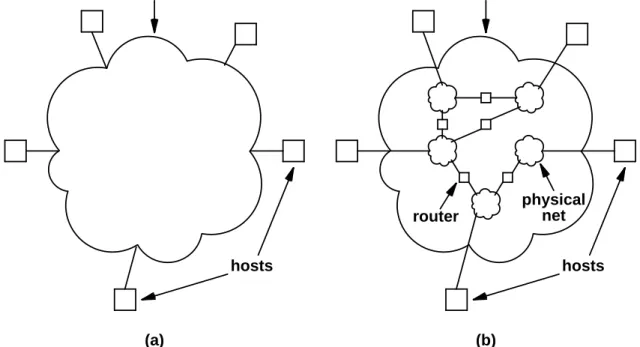
User View versus Physical View
A single logical network but multiple physical networks.
internet hosts internet hosts (a) (b) physical net router
The Internet
•
The Internet.
– A worldwide internetwork that uses the TCP/IP protocol.
– TCP/IP = Transmission Control Protocol/Internet Protocol.
•
Various groups of networks.
– Backbones: large networks for interconnecting other networks (NFSNET in the US, EBONE in Europe, commercial backbones).
– Regional networks: networks connecting universities and colleges (ACONET in Austria).
– Commercial networks: privately owned networks for paying subscribers or for the internal use of commercial organizations (EUNET).
– Local networks: e.g. campus-wide university networks (FH Hagenberg).
•
Numerous services.
History of the Internet: The Early Days
•
Late 60s: numerous networks based on different technologies.
– No single network technologies can satisfy all needs.
– Users want universal communication.
•
Early 70s: DARPA funded activities on internetworking.
– US Defense Advanced Research Projects Agency.
– 1978: TCP/IP in its current form.
•
1980: ARPANET begins conversion to TCP/IP.
– Research network of the ARPA connecting research centers, military bases and government locations.
– 1983: conversion completed; network splits into MILNET (military sites) and ARPANET (research sites).
History of the Internet: The Academic Network
•
1983: TCP/IP for the operating system BSD Unix.
– Berkeley Software Distribution (University of California at Berkeley)
– TCP/IP spreads among universities and research centers.
•
1986: NFSNET becomes Internet backbone in the US.
– NFS: US National Science Foundation.
– Interconnection of supercomputer centers and research institutions.
– Connection with ARPANET and EBONE (Europe).
– Three backbone upgrades until 1992.
•
1993: World Wide Web.
– Service on top of the Internet.
History of the Internet: The Commercial Network
•
1995: Commercialization of the Internet.
– Migration of backbone traffic to commercial providers.
– NFSNET reverts to being a network for research community.
•
End of 1990s: Internet2.
– Frustration in research and academic community because of growing congestion of NFSNET.
– Next Generation Internet (NGI) initative sponsored by US government.
– 180 participating universities in the US.
– New networking technologies as the basis for advanced network-based applications.
•
2000: Internet as a universal medium.
– 100.000 networks.
– 10.000.000 computers.
Organization
Who takes care of the Internet’s technical development?
•
Internet Architecture Board (IAB)
– Internet Research Task Force (IRTF): long-term research.
– Internet Engineering Task Force (IETF): short-term engineering problems, standardization.
THE IAB ORGANIZATION
THE BOARD IRTF IRSG . . . research groups IETF IESG area 1 . . . area n . . . working groups . . .
Standardization
•
Internet Engineering Task Force (IETF):
– http://www.ietf.org
– Directed by Internet Engineering Steering Group (IESG).
– Organized in areas and working groups.
– Decisions about protocols, procedures, conventions used in or by the Internet.
•
Internet Standards Process
– Specification submitted to IESG.
– Publication as an Internet draft (ID).
– Discussed and decided by IESG.
– If approved, published as a Request For Comments (RFC).
Request for Comments (RFCs)
Series of reports that defines the (history of) the Internet protocols.
•
Numbered in sequence.
– Once assigned a number, the content is not changed any more.
– Newer RFC may update or obsolete an older RFC.
•
An RFC is in one of the states:
– Standard: official Internet protocol.
– Draft standard: likely standard, testing and feedback desired.
– Proposed standard: base for future standard, revision likely.
– Experimental: only used for specific experiments.
– Informational: standard issued by other organization.
Internet Standards
Indexing scheme that defines the official Internet protocols.
•
Standard number (STD)
– References one or more RFCs that define a current standard.
– When standard is updated, STD number stays the same but other RFCs are referenced.
•
Example “Domain Name System”: STD 13.
– Described today in RFCs 1034 and 1035.
– Referenced as “STD-13/RFC1034/RFC1035”.
– May be in distant future described in RFCs 9996 and 9997.
Protocol
Set of rules for the conversation of two machines over a network.
•
Protocol stack:
– To reduce complexity, a protocol is organized in a stack of multiple protocol layers.
– A protocol on layer n (the service provider) offers via a defined interface operations and services for the protocols on layer n + 1 (the service user).
Layer 5 Layer 4 Layer 3 Layer 2 Layer 1 Host 1 Layer 4/5 interface Layer 3/4 interface Layer 2/3 interface Layer 1/2 interface Layer 5 protocol Layer 5 Layer 4 Layer 3 Layer 2 Layer 1 Host 2 Layer 4 protocol Layer 3 protocol Layer 2 protocol Layer 1 protocol Physical medium
Example: Philosopher/Interpreter/Secretary
Protocol on layer
n
hides
all layers less than
n
from the protocols on
layers greater than
n
.
I like rabbits Location A 3 2 1 3 2 1 Location B Message Philosopher Translator Secretary Information
for the remote translator
Information for the remote secretary L: Dutch Ik hou van konijnen Fax #---L: Dutch Ik hou van konijnen J'aime les lapins L: Dutch Ik hou van konijnen Fax #---L: Dutch Ik hou van konijnen
Example: Five Layered Protocol
Packet on layer
n
is embedded into packet(s) of layer
n
−
1
.
H2 H3 H4 M1 T2 H2 H3 M2 T2 H2 H3 H4 M1 T2 H2 H3 M2 T2 H3 H4 M1 H3 M2 H3 H4 M1 H3 M2 H4 M H4 M M M Layer 2 protocol 2 Layer 3 protocol Layer 4 protocol Layer 5 protocol 3 4 5 1 Layer
The OSI Reference Model
Abstract protocol model in seven layers.
Physical Layer
Transmit bits on the physical hardware.
•
Representation of bits by physical states.
– What kind of transmission medium (cable) is used?
– How are the pins at the network plug used?
– How many Volt for bit 0, how many for bit 1?
– How many microseconds per bit?
– How is connection established, how is it terminated?
•
Example: modem protocols, ISDN, ADSL, GSM.
Data Link Layer I
Avoid bit transmission errors.
•
Bits of input stream are organized in
data frames
.
– Fixed number of bits (several hundred or thousand).
– Special bit pattern at beginning and end.
•
Sender
– Decomposes data from higher layer into a sequence of frames.
– Forwards frame as a sequence of bits to physical layer.
– Checks acknowledgement from receiver and retransmits frame on error.
•
Receiver
– Receives sequence of bits from physical layer.
Data Link Layer II
•
Flow control
– Sender must not transmit data faster than receiver can process them.
•
Broadcast medium: access control.
– How can access to shared medium be controlled?
– MAC sublayer: Medium Access Control.
•
Example: Ethernet, SLIP, PPP, ATM.
Network Layer
Deliver packet to correct destination.
•
Routing:
– Receive package from upper layer.
– Read address of package .
– Determine network route and select output port.
– Pass package to data link layer on that port.
•
Congestion Control:
– Adapt routing decisions to network load.
•
Example: Internet Protocol.
– IP, ICMP, ARP, RARP.
Transport Layer
Construct/combine packages.
•
Transform user data into packages and vice versa.
– Sender: decompose message into packages.
– Receiver: compose messages to packages.
•
Offered services:
– Connection-oriented: provide connection for sequence of packages.
– Connection-less: send packages individually to network.
•
Example: TCP and UDP
– TCP: Transmission Control Protocol.
– UDP: User Datagram Protocol.
Session Layer
Construct user sessions between remote machines.
•
Authentification.
– User login on remote machine.
•
Dialogue control.
– Which side can send, which one receive.
•
Check pointing.
– Save session state.
– After interruption, session can be continued with saved state.
Presentation Layer
Translate data encodings across systems.
•
Character encodings (ASCII or EBCDIC).
•
Number encodings (IEEE floating point).
•
Data structure encodings.
Application Layer
Provide services for end user.
•
Name resolution (DNS).
•
Remote login (telnet, rlogin/rsh, ssh).
•
Remote file transfer (FTP, SFTP, NFS).
•
Email (SMTP).
•
World Wide Web (HTTP).
Data Transmission in the OSI Model
Application layer Session layer Transport layer Network layer Data link layer Physical layer Presentation layer Application layer Session layer Transport layer Network layer Data link layer Physical layer Presentation layer Network protocolActual data transmission path Transport protocol Session protocol Presentation protocol Application protocol Data Data Data Data Data Data Data Bits AH PH SH TH NH DH DT Sending Process Receiving Process
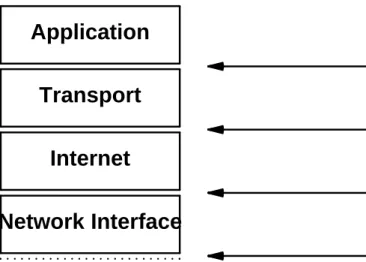
The Internet Reference Model
Model based on five layers.
Hardware . . . .... . .. . . .. . . . . . . . . . . . . . . . . . . . . . . . . .. . . .. . .. . Network Interface Internet Transport Application
Conceptual Layer Objects Passed
Between Layers
Network-Specific Frames IP Datagrams
Transport Protocol Packets Messages or Streams
OSI and TCP/IP
TCP/IP is simpler than the OSI model.
TCP/IP OSI Application Presentation Session Transport Network Data link Physical 7 6 5 4 3 2 1 Application Transport Internet Host-to-network Not present in the model
Internet Protocols
•
Core protocols: IP, TCP, UDP.
•
Application protocols.
ARPANET Protocols Networks TELNET TCP UDP Transport LAN DNS ApplicationLayer (OSI names)
Packet radio Physical + data link SMTP SATNET FTP IP Network
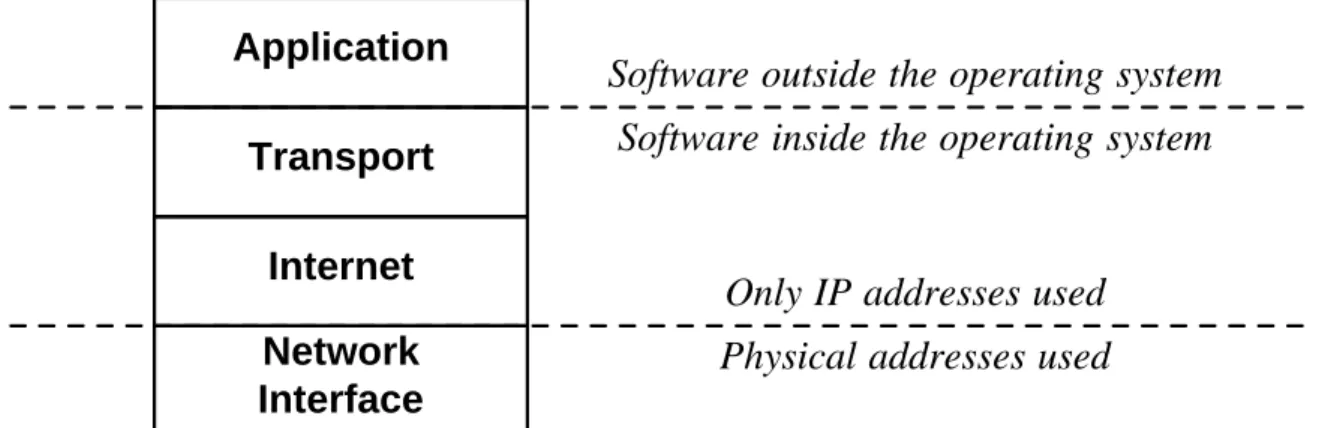
Important Boundaries
•
From the internet layer, only IP addresses are used.
•
The application layer is outside the operating system.
Network Interface Internet Transport Application Hardware . . . ... . . . . . . .. . . . . . . . . . . . . . . . . . . . . . . . . . .. . . . . . . . .
Conceptual Layer Boundary
Only IP addresses used Physical addresses used
Software outside the operating system Software inside the operating system
Figure 11.9 The relationship between conceptual layering and the boundaries
Routing in the Internet Model
Routing takes place at the Internet layer.
Application Transport Internet Network Interface Network Interface Internet Network Interface Internet Transport Application
Physical Net 1 Physical Net 2
Host A Host B Router R identical message identical packet identical frame identical frame identical datagram identical datagram
Internet Protocol
•
IP is a standard protocol (STD 5).
Also includes ICMP (Internet Control Message Protocol) and IGMP (Internet Group Man-agement Protocol).
•
Creates virtual network view.
– Hides underlying physical networks.
•
No delivery guarantuees:
– Unreliable: packages may be lost, duplicated, reordered.
– Best-effort: however, we do our best to deliver a package.
– Connection-less: no end-to-end connection is established for delivery.
IP Addressing
RFC 1166: Internet Numbers.
•
An IP address is a 32 bit unsigned integer.
– There exist 232 ≈ 4 billion IP addresses.
•
Representation in dotted decimal notation.
– X.X.X.X
– Each X is a decimal number that represents a byte of the address.
•
Example: 128.10.2.30
– 10000000 00001010 00000010 0001110
Class-based IP addresses
•
IP addresses are organized in five classes.
– Class determined by first bits of the address.
0 prefix suffix
1 0 prefix suffix
1 1 0 prefix suffix
1 1 1 0 multicast address
1 1 1 1 reserved for future use
Class A Class B Class C Class D Class E bits 0 1 2 3 4 8 16 24 31
Class-based IP Addresses
•
Addresses of classes A, B, C have two parts:
– Prefix: network address.
– Suffix: host address.
•
The network address identifies a physical network.
– Issued by a global Internet addressing authority.
•
The host address identifies a host in the network.
– Issued by the network administrator.
Class Prefix Networks Suffix Hosts
A 7 128 24 16777216
B 14 16384 16 65536
C 21 2097152 8 256
Address Ranges
IP addresses form consecutive ranges within classes:
Class Lowest Address Highest Address
A
1.0.0.0
126.0.0.0
B
128.1.0.0
191.255.0.0
C
192.0.1.0
223.255.255.0
•
A: 1-126
•
B: 128-191
•
C: 192-223
Other IP Addresses
•
Class D: multicast addresses.
– Group of hosts that can be sent information by a single address.
– E.g., video or audio broadcasting.
•
Class E: future use.
– When is the future?
•
Broadcast addresses:
– 255.255.255.255: broadcast in local network.
– A-net.255.255.255: broadcast to remote class A network.
– B-net.255.255: broadcast to remote class B network.
– C-net.255: broadcast to remote class C network.
•
Special address:
Internet Addressing Authority
Who issues the network addresses?
•
Global:
ICANN
– Internet Corporation for Assigned Names and Numbers.
– Assigns ranges of network addresses to Regional Internet Registries (RIRs).
•
European RIR:
RIPE
– Reseaux IP Europe.
– Assigns ranges of network addresses to local Internet Service Providers (ISP).
•
Internet Service Provider.
– Assigns one or more network addresses to its customers.
– Only class C networks are assigned any more.
Example
prefix 128.10 prefix 128.211 prefix 10 prefix 192.5.48 128.10.0.1 128.10.0.2 128.211.6.115 128.211.28.4 10.0.0.37 10.0.0.49 192.5.48.3 192.5.48.85 routerRouters and IP Addresses
An IP address identifies a connection between a host and a network.
•
Most hosts have a single network connection.
– A single IP address identifies the host.
•
A router has multiple network connections.
– Multiple physical networks are connected to a router.
– From the point of view of each network, the router is part of this network.
– A router has an IP address for each connected network.
Example
Ethernet 131.108.0.0 / 16
Token Ring
223.240.129.0 / 24
WAN 78.0.0.0 / 8
223.240.129.2 131.108.99.5 78.0.0.17 223.240.129.17router
IP Subnets
•
The original IP class scheme became too unflexible.
– For each physical network, an address range has to be allocated from the ISP.
– Installing new networks or splitting existing networks becomes organizationally cumbersome.
– IP address range is badly utilized.
•
Solution: IP subnetting.
– Entire network appears as single IP network to the outside world.
– Assignment of subnets is done locally.
•
Idea:
h
host address
i ⇒ h
subnet address
i
:
h
host address
i
– IP address: hnetwork addressi:hsubnet addressi:hhost addressi.
– Implementation by subnet masks.
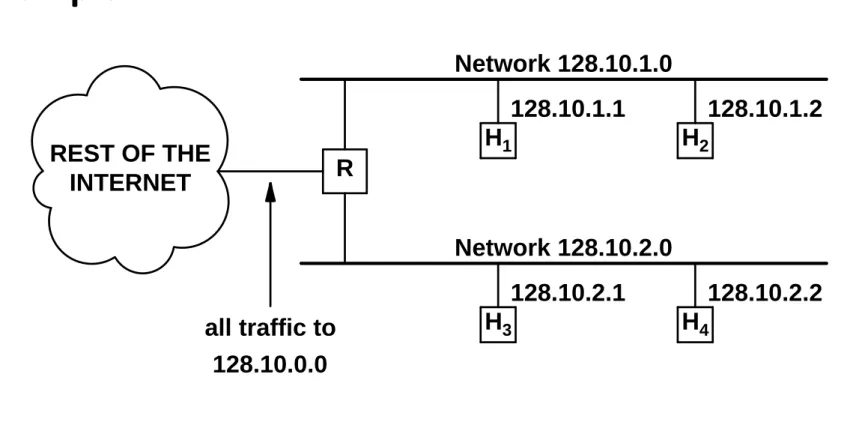
Example
REST OF THE INTERNET R H1 H2 H3 H4 Network 128.10.1.0 Network 128.10.2.0 128.10.1.1 128.10.1.2 128.10.2.1 128.10.2.2 all traffic to 128.10.0.0Figure 10.3 A site with two physical networks using subnet addressing to
la-bel them with a single class B network address. Router R ac-cepts all traffic for net 128.10.0.0 and chooses a physical net-work based on the third octet of the address.
Subnet Masks
•
For each subnet, a 32 bit
subnet mask
is chosen:
– Bit 1 in mask: corresponding bit in address is part of (sub)network address.
– Bit 0 in mask: corresponding bit in address is part of host address.
•
Example: 11111111 11111111 11111111 00000000
– Class C network.
•
Example: 11111111 11111111 0011000 01000000
– Host 1: 11111111 11111111 0111101 01110001
– Host 2: 11111111 11111111 1111100 11011111
•
Size of subnetwork determined by numbers of bits 0 in mask.
– n bits 0: 2n hosts.
IP Addresses with Subnets
Without subnet:
Splitting a Network
Given a class C network: 193.170.37.000
•
Want to split the 256 host network into seven subnetworks.
– Two subnetworks with 64 hosts.
– Three subnetwork with 32 hosts each.
– Two subnetworks with 16 hosts each.
•
Not arbitary network sizes possible.
– Can only split a network into subnetworks of equal size.
– Subnetworks may be split further in the same way.
– Size of address range of a subnetwork is always a power of 2.
Determine Subnet Masks
256 = 64+64+32+32+32+16+16.
•
Class C network with 256 hosts.
11111111 11111111 11111111 00000000
•
Two subnetworks with 64 hosts.
11111111 11111111 11111111 11000000
•
Three subnetworks with 32 hosts.
11111111 11111111 11111111 11100000
•
Two subnetworks with 16 hosts.
Split Network
193.170.37.000 = 110000001 10101010 00100101 00000000
•
256 host network:
– Network address: 00000000.
– 64 host network mask: 11000000
– Four networks: 00000000, 01000000, 10000000, 11000000.
– Ranges: 0–63, 64–127, 128–191, 192–255.
•
Split third 64 host network:
– Network address: 10000000
– 32 host network mask: 11100000
– Two networks: 10000000, 10100000.
Split Network
•
Split fourth 64 host network:
– Network address: 11000000
– 32 host network mask: 11100000
– Two networks: 11000000, 11100000.
– Ranges: 192–223, 224–255.
•
Split second 32 host network:
– Network address: 11100000
– 16 host network mask: 11110000
– Two networks: 11100000, 11110000.
Results
• Network 1: – Address: 00000000; Mask: 11000000. – 64 hosts, addresses 0–63. • Network 2: – Address: 01000000; Mask: 11000000. – 64 hosts, addresses 64–127. • Network 3: – Address: 10000000; Mask: 11100000. – 32 hosts, addresses 128–159. • Network 4: – Address: 10100000; Mask: 11100000. – 32 hosts, addresses 160–191. • Network 5: – Address: 11000000; Mask: 11100000. – 32 hosts, addresses 192–223. • Network 6: – Address: 11100000; Mask: 11110000. – 16 hosts, addresses 224–239. • Network 7: – Address: 1111000; Mask: 11110000. – 16 hosts, addresses 240–255.Network Setting
Network 6:
•
Class C address: 193.170.37.000
•
Subnetwork address: 11100000 (= 224).
•
Subnetwork mask: 11110000 (= 240).
Configuration of host 225 in this network with router address 238:
•
IP address: 193.170.37.225
•
Subnetwork mask: 255.255.255.240
•
Gateway: 193.170.37.238
The IP Address Exhaustion Problem
IP addresses are a scarce resource.
•
Number of networks has been doubling annually for a long time.
– Most class B networks assigned in the late 1980s.
– May 1996: all class A addresses allocated or assigned, 62% of class B addresses, and 34% of class C addresses (assigned: really in use; allocated: reserved by some RIR).
•
Today there are strict rules for assigning network addresses.
– Practically only class C addresses are assigned any more.
– Large organizations: range of consecutive class C addresses.
•
Sooner or later the address range is exhausted.
– Pervasive computing: an IP address for all sorts of devices.
Intranets: Private IP Addresses
RFC 1918: address allocation for private Internets.
•
Not every IP address is globally unique.
– Some address ranges can be used by everyone.
– May be only used internally in an organization; are not forwarded by routers.
– Example: class A network 10.0.0.0.
•
How to connect an Intranet to the global Internet?
– Network Address Translation (NAT).
– If an Intranet host wants to communicate over the Internet, it is temporarily assigned a global Internet address from a pool of reserved addresses.
– Intranet: 5000 hosts, NAT address pool: 256 addresses: only 256 of the 1000 hosts at a time can communicate with the Internet.
IP Datagram
The packages sent via the Internet are called
datagrams
:
Header Data Area
•
Header
– Source and destination address and other information.
– (Essentially) fixed size.
•
Data Area
– The payload carried by the datagram.
Datagram Header
Version IHL Type of service Total length Identification
Time to live Protocol
Fragment offset Header checksum Source address
Destination address
Options (0 or more words) D
F M
F 32 Bits
Datagram Header: Word 1
Version (4 bit)
constant 4 (
IPv4
).
• Sender, receiver, and routers must agree on IP version.
• All IP software must check field before processing the datagram.
IHL (4 bit)
header length (number of words).
• 5 + x words, most common: IHL=5.
Type of Service (8 bit)
• At what priority does the datagram travel, how should the transport be treated? • Used by router to determine best route for datagram.
Total Length (16 bit)
• Number of bytes in the datagram. • Maximum length: 65536 bytes.
Type of Service
Precedence (3 Bits)
• Routine, priority, immediate, flash, flash override, critical, internetwork control, network con-trol.
Type of Service (5 Bits)
• Normal service, minimum delay, maximum throughput, maximum reliability, minimum mone-tary cost.
• RFC 1349.
Datagram Header: Word 3
Time to Live (TTL) (8 bit)
• Initially set by sender host to some maximum value.
• Decreased by (at least) 1 by each router/host that processes datagram.
• Datagram is removed when TTL expires; error message is sent back to source. • At most TTL routers can be passed: “hop limit” rather than time limit.
Protocol (8 bit)
• Which transport protocol created the package? • TCP, UDP , ICMP, . . . (later).
Header Checksum (16 bit)
• Ensure integrity of header by recognizing transmission errors. • Add all other 16 bit words in header, take binary complement. • Sum of all 16 bit words in header (including checksum) must be 0.
Datagram Header: Words 4–6
Source Address (32 bit)
• IP address of (original) sender host.
Destination Address (32 bit)
• IP address of (ultimate) recipient host.
Options (
x
*32 bit)
• Usually not used (x = 0).
• Otherwise: first byte is the option code.
• Datagram/network control, debugging, measurements.
Datagram Encapsulation
What about word 2 in the datagram header?
•
Datagram has at most
2
16
= 65536
bytes.
– Larger messages must be broken into multiple datagrams.
– This is a protocol limit but there are also more fundamental physical limits.
•
Datagram must be transported by physical network(s).
– IP datagram must be mapped to physical (OSI layer 2) network frames.
– For efficiency, each IP datagram should be encapsulated in a distinct network frame.
FRAME
HEADER FRAME DATA AREA
DATAGRAM
Datagram Size and Fragmentation
•
Ideal case: entire IP datagram fits into physical frame.
– Efficient transmission across physical net.
•
Problem: different networks have different maximum frame sizes.
– MTU: maximum transfer unit.
– Ethernet: MTU = 1500 bytes.
– FDDI: MTU = 4470 bytes.
– MTU may be as small as 128 bytes or less.
•
Consequence: IP should
adapt
to different MTUs.
– Choose convenient initial datagram size.
– Divide datagrams when they traverse network with smaller MTU.
Example
Net 2 MTU=620 R1 R2 Host A Host B Net 1 MTU=1500 Net 3 MTU=1500Figure 7.8 An illustration of where fragmentation occurs. Router R1
frag-ments large datagrams sent from A to B; R2 fragments large da-tagrams sent from B to A.
Fragmentation
IP Header original datagram data area
IP Hdr 1 data 1 IP Hdr 2 data 2 IP Hdr 3 data 3
. . . . . . . . . .
Fragmentation
DATAGRAM HEADER data1 600 octets data2 600 octets data3 200 octets . . . . . . . . . . . . . . . . . . FRAGMENT 1 HEADER FRAGMENT 2 HEADER FRAGMENT 3 HEADER data1 data2 data3 Fragment 1 (offset 0) Fragment 2 (offset 600) Fragment 3 (offset 1200) (a) (b)Figure 7.9 (a) An original datagram carrying 1400 octets of data and (b) the
three fragments for network MTU of 620. Headers 1 and 2 have the more fragments bit set. Offsets shown are decimal octets; they must be divided by 8 to get the value stored in the fragment headers.
Reassembly of Fragments
•
Reassembly performed by
final
host.
– Each fragment travels as a separate datagram to ultimate destination.
– Intermediate routers need not store or reassemble fragments.
– Each fragment may take a separate route to destination.
•
Reassembling process:
– Receiving machine starts reassembly timer when receiving the first fragment.
– If timer expires before all fragments arrive, receiver discards all fragments: datagram is lost.
•
Size of fragments determined by network with
minimum
MTU.
– Network MTUs: 1500 → 620 → 4470.
– Arriving fragments have size: 620.
Datagram Header: Word 3
Control of fragmentation and reassembly of datagrams.
Identification (16 bit)
• Unique integer that identifies datagram.
• Copied into each fragment when datagram is fragmented.
Flags (8 bit)
• Do not fragment bit: datagram should not be fragmented. • More fragments bit: is it the last fragment of a datagram?
Fragment Offset (16 bits)
• Offset of data in fragment from original data (in bytes).
• Example: datagram size 4000, fragment size 1500, offsets: 0, 1500, 3000.
Routing of IP Datagrams
•
Routing
: choosing a path for forwarding a package.
– Router: a host that forwards packages.
– Dedicated (high-speed) routers.
– Normal hosts with additional routing capabilities.
•
IP forwarding
(
IP routing
)
– Forwarding of IP datagrams. HOST R1 R2 path to some destinations path to other destinationsFigure 8.1 An example of a singly-homed host that must route datagrams.
Direct Delivery
Transmission of packages within a physical network.
•
Both sender and recipient are in same physical network.
– IP address of sender and receiver have same network prefix.
•
IP datagram is embedded into a physical frame.
•
IP addresses are mapped to physical network addresses.
– Address resolution: ARP protocol.
•
Frame is sent to the receiver.
Indirect Delivery
Transmission of packages across different physical networks.
•
Sender and receiver are in different physical networks.
•
Sender forwards package to router.
– There must be at least one router in same physical network.
– Direct delivery of package from sender to router.
•
Router identifies next router to forward package to.
– Construction of a path of routers.
•
Final router is in same physical network as receiver.
– Direct delivery of package from router to receiver.
IP Routing Tables
•
Two basic questions:
– How can a router know where to send each datagram?
– How can a host know which router to use for a given destination?
•
Answer:
IP routing table
– Information about possible destinations and how to reach them.
– Impossible to store information for each individual destination.
– Need technique to keep only minimum information.
•
How to organize data in a routing table?
Next-Hop routing
•
Routing table entry:
(
N, R
)
– N is IP address of destination network.
– R is the IP address of the “next” router along the path to N.
– R is called the next hop.
•
Next hop routing:
– Datagram is ready to leave host M.
– Extract the network address of the destination IP address.
– Lookup routing table to determine R to send datagram to.
Example
Network 10.0.0.0 Network 20.0.0.0 Network 30.0.0.0 Network 40.0.0.0 Q R S 10.0.0.5 20.0.0.6 30.0.0.7 20.0.0.5 30.0.0.6 40.0.0.7 20.0.0.0 30.0.0.0 10.0.0.0 40.0.0.0 DELIVER DIRECTLY DELIVER DIRECTLY 20.0.0.5 30.0.0.7 TO REACH HOSTS ON NETWORK ROUTE TO THIS ADDRESS (a) (b)Routing Table Information
•
Size of routing table depends on number of networks in Internet.
– Independent of the number of individual hosts in the internet.
•
All traffic destined for a given network takes the same path
– Multiple paths cannot be used concurrently.
– All types of traffic follow same path without regard to delay/throughput of physical networks.
•
Only final router knows whether host exists and is operational.
– Router needs to inform original source when delivery problems occur.
•
Each router forwards traffic independently.
– Datagrams from host A to host B may follow a different path than datagrams traveling from host B to host A.
Default Routes
Can compress routing table even further.
•
Default route:
– Router first looks into routing table for destination network.
– If no route appears in table, default route is chosen.
•
Application:
– Host computer is attached to single physical network and can reach only one router leading to remainder of Internet.
– Information: address of local network and a default route pointing to the only router.
Host-Specific Routes
•
Most routing software allows per-host routes as a special case.
– Table has individual routes for special hosts.
– LAN administrator has more control over network use.
– Testing and debugging of network.
IP Routing Algorithm
RouteDatagram(Diagram, Routing Table):
extract destination IP address D from datagram and determine network prefix N;
if N matches any directly connected network address then deliver datagram to D over that network;
else if table contains a host-specific route for D send datagram to next-hop specified in table; else if table contains a route for network N then
send datagram to next-hop specified in table; else if table contains a default route then
send datagram to default router specified in table; else
declare a routing error; end if
Handling Incoming Packages
•
IP datagram arrives at host.
– Network interface software delivers datagram to IP processing software.
– If datagram’s destination address matches host’s IP address, the datagram is accepted and passed to the high-level protocol layers.
•
What if the destination address does not match?
– Normal host: must discard datagram.
– Router: must forward package according to routing algorithm.
∗ Direct delivery.
Summary
IP uses routing information to forward datagrams; the computation consists of deciding where to send a datagram based on its destination IP address. Direct delivery is possible if the destination machine lies on a network to which the sending machine attaches; we think of this as the final step in datagram transmission. If the sender cannot reach the destination directly, the sender must forward the datagram to a router. The general paradigm is that hosts send indirectly routed datagrams to the nearest router; the datagrams travel trough the internet from router to router until they can be delivered directly across one physical network.
When IP software looks up a route, the algorithm produces the IP address of the next machine (i.e., the address of the next hop) to which the datagram should be sent; IP passes the datagram and next hop address to network interface software. Transmission of a datagram from one machine to the next always involves encapsulating the datagram in a physical frame, mapping the next hop internet address to a physical address, and sending the frame using the underlying hardware.
The internet routing algorithm is table driven and uses only IP addresses. Although it is possible for a routing table to contain a host-specific destination address, most routing tables contain only network addresses, keeping routing tables small. Using a default route can also help keep a routing