A Combination of a Dynamic Geometry
Software With a Proof Assistant for
Interactive Formal Proofs
Tuan Minh Pham
1Yves Bertot
2Inria Sophia Antipolis
Abstract
This paper presents an interface for geometry proving. It is a combination of a dynamic geometry software, Geogebra[11] with a proof assistant, Coq[8]. Thanks to the features of Geogebra, users can create and manipulate geometric constructions, they discover conjectures and interactively build formal proofs with the support of Coq. Our system allows users to construct fully traditional proofs in the same style as the ones in high school. For each step of proving, we provide a set of applicable rules verified in Coq for users, we also provide tactics in Coq by which minor steps of reasoning are solved automatically.
Keywords: interactive geometric proofs, Coq, proof assistant, dynamic geometry
1
Introduction
Nowadays, dynamic geometry software (DGS) plays an important role and has highly influenced mathematics education. Students can use it to construct geomet-ric objects, observe how these objects change when moving free points or applying euclidian transformations, and they can discover conjectures. There are numerous applications for interactive geometry on the market with a variety of features, many of them are really used in classroom in many countries. However, these uses are usu-ally limited at the level of discovering conjectures. Some DGS provide proof feature by combining with automated geometry theorem proving (GTP) and allow users to verify conjectures. They rely on several efficient automatic proof methods, such as Gr¨obner bases method[13], Wu’s method[4], the area method[5] and the full-angles method[6]. The first two methods are algebraic methods which use polynomials to solve problems, they do not give us human-readable proofs. The last two ones can
1 Email: [email protected] 2 Email: [email protected]
Available online at www.sciencedirect.com
Electronic Notes in Theoretical Computer Science 285 (2012) 43–55
1571-0661 © 2012 Published by Elsevier B.V.
www.elsevier.com/locate/entcs
doi:10.1016/j.entcs.2012.06.005
produce human-readable proofs, nevertheless these proofs are not fully traditional proofs, they do not rely on the geometric knowledge as taught in high school.
We aim at constructing a tool for students to prove geometric theorems inter-actively. Students can reason step-by-step in the style taught in high school. This style may involve backward and forward proof reasoning, it may also involve the construction of auxiliary lines. We present GeoCoq, an interface for interactive ge-ometry proving which is a combination of Geogebra with Coq. Reasoning steps are built by mouse clicks and are sent to Coq. For its part, Coq executes the reasoning steps, the response is sent back to the user to continue their proof. The logical steps and the knowledge are given by a library that was developed with the help of a high-school teacher.
With the support of a proof assistant like Coq, reasoning steps are verified and the correctness of proofs is guaranteed. This is an advantage in using Coq because geometry reasoning usually uses tacit assumptions based on visual evidence without verification.
We also developed automatic tactics that help users solve minor steps of rea-soning. Users do not have to delve into details that lead to technical proofs and are not adapted to their level of abstraction. In addition, with the formalization of automatic proof methods as tactics in Coq (such as the area method which is formalized by J.Narboux[14]), users can use these methods to check the fact before proving it, or alternatively use them in steps of constructing proofs.
This paper is organized as follows. In section 2, we give a short description about Geogebra. The Coq system, the communication using Pcoq, and a brief description about the library for geometry are described in section 3. Section 4 presents the interface and provided features for proofs. The next section deals with our implementations. We mention some related work in section 6 and the last section is for our conclusions and perspectives.
2
Geogebra
Geogebra is a free dynamic geometry software for education in schools. It was started by Markus Hohenwarter in 2001 in his master and PhD work[11]. It is im-plemented in Java and thus available for multiple platforms. It provides a new kind of tool for mathematics by joining geometry, algebra and calculus. It received several international educational software awards and is applied in education at schools in different countries. Like other dynamic geometry systems, Geogebra provides basic geometric objects such as points, vectors, straight lines, circle, and more complex constructions such as midpoint, parallel lines, circumcircle. . . Users can construct geometric objects and manipulate them. Geogebra also allows students to undo or redo constructions at anytime. By moving free points in figures students can find out conjectures and check theirs correctness, checks are limited to simple relations of 2 objects at the moment.
A strong point of Geogebra which makes it different from other DGSs is the connection of Dynamic Geometry and Computer Algebra System (CAS). Geogebra
can profit both from visualization capabilities of CAS and dynamic changeability of DGS. It encourages students to discover mathematics in a bidirectional experimental way. Students can investigate equations corresponding to drawn objects and they can also investigate the figures corresponding to given equations.
By combining Geogebra and Coq, we would like to provide an interface which allows students to have many points of view on a geometric problem.
3
Coq communication and Geometry library
Coq is a proof development system, which allows users to define functions or predi-cates, state mathematical theorems and interactively develop formal proofs. Coq is not an automated theorem prover, however it provides a tactic language letting users define their own proof method and it also includes tactics for automatic theorem proving and decision procedures. So Coq is adapted to our needs in interactively constructing proofs.
Some integrated development environments (IDE) can be used to communicate with Coq. Here, we are interested in Pcoq which is a graphical user-interface for Coq[1]. Using Pcoq to communicate with Coq offers some benefits. Pcoq is im-plemented in Java, the same programming language as Geogebra, so this makes it easy to be integrated in Geogebra. Pcoq manipulates all formulas and commands as tree-like structures (also known as abstract syntax trees) rather than plain text. This makes it easy to attach special mathematical notations to some functions, and to attach sentences in natural language to geometrical statements. Furthermore, this provides an easy access to the structure of information (hypotheses, goals) that we receive from Coq.
In order to be able to reason in Coq, we still need a geometry library, in which geometry basic notions and their properties are formalized, geometry rules that we want to provide for users are verified. An interesting formalization was developed by F.Guilhot for the French high school curriculum[12]. It is based on providing a new axiom system that is more adapted to the knowledge of students. It covers a large portion of basic notions of plane geometry, properties and theorems. Moreover, proofs are traditional, they are formalized in the manner of reasoning suitable to the capacity of high school students. Among the classic theorems which are proved in this library, we can cite Menelaus, Ceva, Desargues, Pythagoras, Simson’s line. . .
4
The interface
Our interface is a combination of Geogebra with Pcoq. We integrate Pcoq as a view of Geogebra (figure1). Like other views, it can be shown, hidden, dragged around to modify its position, and opened as an external window.
Two main sub windows of Pcoq are the command window and proof window. The command window is used to display all Coq commands which state and prove theorems. The proof window allows users to construct proofs, they can see hypothe-ses, and goals need to be proved for each step of geometry reasoning in this window.
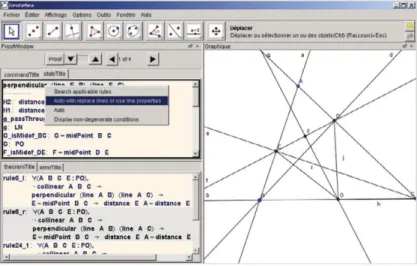
Fig. 1. A screen-shot of GeoCoq GUI. Pcoq is integrated as the windows in the left
In addition, other sub windows are used to display applicable rules for a goal, to ap-ply rules by giving values for their parameters, and to announce errors. . . We detail the interface and its features by showing how users can state and prove theorems. The following theorem will be used as an example for the rest of this section: Example 4.1 Let BD and CE be two altitudes of triangle ABC and points G and F be the midpoints of BC and DE respectively. It holds that GF⊥ DE.
4.1 Stating theorems
4.1.1 Constructing diagrams
Geogebra provides common geometry construction tools for users to construct dia-grams. Geometry objects are created one by one by using appropriate construction tools and selecting existing objects. Users can move free points, and dependent constructions will be updated, this can help users discover conjectures.
To construct a diagram corresponding to the above example, users draw a tri-angle ABC, construct perpendicular lines d⊥ AC such that B∈ d and e⊥ AB such that C∈e, take intersection points E and D, and complete the figure by taking midpoints G and F of BC and DE respectively and joining them.
Each construction is translated into commands in Coq (figure 1). Adding new geometry objects or removing existing geometry objects implies adding or removing corresponding hypotheses. In most geometry theorem provers, a predicate form is used to describe geometric statement, i.e. hypotheses and conclusion are represented by geometry predicates. Our tool is not an exception, however in the phase of stating theorem, we have geometric statement in constructive form (left column of table
obtain the corresponding geometric predicates (right column of table1) using our tactics in Coq to unroll definitions in hypotheses.
Constructive form Predicate form
M = midPoint (A, B) collinear (A B M) ∧MA = MB
M = intersectPoint (l1, l2) l1 ∦l2 ∧M∈l1 ∧M∈l2
l = line (A, B) A= B ∧A ∈l∧B ∈l
l = parallelLine (A, m) A∈l ∧l m
l = perpendicularLine (A, m) A∈l ∧l ⊥m
Table 1
Constructive and predicate form of some constructions
4.1.2 Discovering conjectures
Once a diagram is completely constructed, users easily see free points that do not depend on other constructions as these points are highlighted using a different color. Users can move these free points by drag-and-drop, dependent constructions are updated, and users can observe relationships between geometry objects, traces of points. . . If they see that a conjecture seems to be true, they can decide to prove it. We can pre-verify the correctness of conjecture to ensure that users are going to prove a fact. This pre-verification can be performed using Geogebra feature with the support of its CAS, or using an automatic proof method in Coq (such as the area method). For our example, users can move points A, B and C, they find out perpendicularity of GF and DE (GF⊥DE). They select these lines and right click, a dialog appears to confirm this perpendicularity, and ask users to prove it (figure
2). Once users decide to prove the conjecture, we can go to theorem proving phase in the next section.
4.2 Theorem proving
We start this section by discovering geometric predicates from the construction. Our implementation allows users to get geometric predicates automatically or manually. Users can select a geometric object definition in hypotheses and get its properties using mouse-clicks, they can also unroll all definition in hypotheses at the same time. The corresponding tactics are automatically sent to Coq. The following tactics collects the hypotheses that define new points (like M is the intersection point of lines a and b) and creates new hypotheses that enumerate the given properties of the new points (like M∈a, M∈b and a∦b).
Ltac u n r o l l A l l D e f i n i t i o n := match g o a l w i t h |H: ?M = i n t e r s e c t i o n P o i n t ? a ?b |− =>
l e t H1 H2 H3 := f r e s h ” i n t e r s e c t i o n P o i n t P r o p e r t y ” i n d e s t r u c t ( @ u n r o l l i n t e r s e c t i o n P o i n t M a b )
Fig. 2. Users find and add a conclusion
a s [ H1 [ H2 H3 ] ] ; a u t o ;
r e v e r t H; c l e a r H; u n r o l l A l l D e f i n i t i o n ; i n t r o H end .
Once this tactic is applied, geometric object definitions are replaced by the corresponding predicates in the second column of table1.
Some predicates such asl1 ∦l2, A= B. . . may be considered as non degeneracy conditions for the existence of objects. With many definitions of geometric objects, we implicitly add non degeneracy conditions in hypotheses. These conditions are very important for reasoning, sometimes resolving a problem in degenerate cases is more complex than resolving the original problem. The same diagram with different way of construction will have different non degeneracy conditions.
4.2.1 Searching and Applying rules
Here, we present a backward-chaining approach for geometry reasoning. This ap-proach progresses from the conclusion to the hypotheses, i.e. we need to prove ∀GeometricElements, Hyp1∧. . .∧Hypn →Goal. We search in a rule set to find a rule of the following form ∀GeometricElements, G1 ∧. . .∧Gn → Goal. The problem evolves into proving the subgoalsG1, . . . , Gn. This process is repeated for each subgoal until the subgoal is in the hypotheses or is an axiom.
Searching applicable rules in our interface is implemented using Search com-mands. It is strong enough to find out all rules in a database which lead to a goal given by a pattern. From the proof window of the interface, users can search all applicable rules for the current goal. A list of applicable rules will be displayed, allowing users to select an appropriate rule. After giving values for parameters of this rule which usually are points, lines. . . , users can update statement of the rule
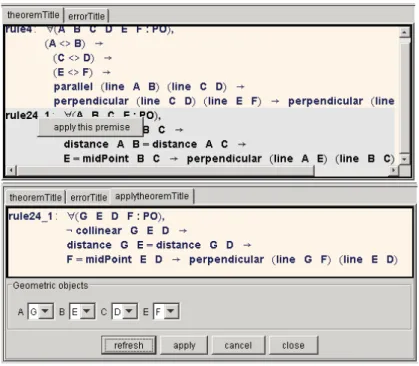
Fig. 3. Applicable rules are displayed at the bottom, users select values to apply the rule
with given values, the system checks correctness by verifying its hypotheses. Returning to our example 4.1, to prove that GF ⊥ DE, we need to find rules which have conclusion in the form of perpendicularity of 2 lines. A variant of Search
command is sent to CoqSearchPattern ( ⊥ ) inside ModuleName
With a list of applicable rules (the upper figure of figure 3), we can select the following rule to apply.
Lemma isosceles perp: ∀A B C M :Point, B= C→A= M→AB = AC→M
= MidPoint(B,C)→AM ⊥ BC.
Using the four points G, D, E and F as values for its parameter respectively, we have an instance of this rule (the lower figure of figure3)
D = E →G = F→GD = GE→F = MidPoint(D,E) →GF⊥ DE.
By construction of F, we have F = MidPoint(D,E), so applying this
rule is reasonable, it is performed by command apply isosceles perp with
(A:=G)(B:=D)(C:=E)(M:=F). Now, we have to prove that GD = GE instead of
proving that GF⊥DE.
4.2.2 Adding new properties
Generally, we can not use only backward reasoning to solve problems, an alternative way is to use forward-chaining. This process aims at generating new properties from the hypotheses by applying given rules. These properties are used as hypotheses in the next steps of the process. The process finishes when it can generate the goal. If we need to prove that∀GeometricElements, Hyp1∧. . .∧Hypn →Goal. And in the base of rules we have∀GeometricElements, Hj1 ∧. . .∧Hjm →Goalj, with {Hj1, . . . , Hjm}are a subset of{Hyp1, . . . , Hypn}, so we can addGjas a hypothesis
of theorem.
Our system provides a variant of forward-chaining, allowing users to add new properties while proving theorems. A property is used as an hypothesis if it is proved. In our example, to prove that GD = GE, users try to prove that GD = GC and GE = GC. For the first, users select 2 segments GD and GC in the figure, with a right click users can find out their equal relation. The system asks users to add this equation to the current proof. To prove GD = GC, we will use the following rule:
Lemma rightTriangle midPoint: ∀A B C M :Point, A= B→A= C→line(A,B)
⊥ line(A,C)→M = MidPoint(B,C) →MA = MB∧MA = MC.
With the configuration of the 4 points D, B, C and G from our example, we have:
A = B → A = C → line(A,B) ⊥ line(A,C) → M = MidPoint(B,C) → MA =
MB∧MA = MC.
It is the same way for the second one GE = GC. It remains to prove that line(B,D) ⊥ line(C,D) and line(C,E) ⊥ line(B,E). They are proved thanks to the construction of points D, E and using automatic tactics that we will present later.
4.2.3 Drawing auxiliary lines
Sometime, users need to add lines, ray, segment. . . to a diagram during their proofs. It is quite important to ensure the existence of these objects. In the theorem proving phase, each created object exists only under some conditions. So when users create a new object, they need to verify its conditions before using this object. The following commands are sent to Coq when users create the intersection point M of 2 linesl1 andl2.
l e t H:= f r e s h ” i s I n t e r s e c t i o n P o i n t ” i n
a s s e r t (H: e x i s t s M, M = I n t e r s e c t i o n P o i n t l 1 l 2 ; a p p l y e x i s t s\ i n t e r s e c t i o n P o i n t .
Coq requests to prove l1 ∦ l2 to guarantee existence of M. Once this condition is verified, the point M will be displayed in drawing window, and the commanddestruct H as [M, H] automatically is sent to Coq to have M = IntersectionPoint(l1,l2)) in hypotheses.
4.2.4 Automatic tactics
Proving geometry with the support of Coq gives a high level of confidence, each reasoning step is verified. However, it also complicates the process of proving. Users not only decide which rule will be applied but also prove many minor goals which lead to tedious proofs and is not suitable for a pedagogical setting. So, to avoid overwhelming users in proof details, we try to provide tactics to automatically solve these problems.
For example, we present a tactic to solve problems of line and points on the line. In our example, we have to prove that line(B,D) ⊥ line(C,D) while we have c = line(A,C), d = perpendicularLine(B,c), D = IntersectionPoint(c,d). This proof in
Fig. 4. Users can use automatic tactics in popup menu
Coq is detailed. From c = line(A,C) we have C∈c. From D = IntersectionPoint(c,d) we have D∈c. So we have line(C,D) = c. We also have line(B,D) = d. From the hypothesis d = perpendicularLine(B,c) we have d ⊥ c, and we get line(B,D) ⊥ line(C,D).
This complexity comes from the distinction of lines in Coq. For example, if we have that a line l pass through points M N P, we easily have line(M,N) = line (N,P) = line (M,P) = l. But these lines can not automatically be replaced each other by the system. We provide the following tactics to solve this problem by discovering all relation of points and lines and replacing all instance of line(M,N) by line l if it finds M∈l and N∈l in hypotheses. Ltac r e p l a c e a u t o L i n e s := u n r o l l A l l D e f i n i t i o n ; match g o a l w i t h |− c o n t e x t [ l i n e ?M ?N] => match g o a l w i t h | H1 : l i e s O n L i n e M ? l |− => match g o a l w i t h | H2 : l i e s O n L i n e M l |− => t r y ( r e p l a c e ( l i n e (M,N) ) w i t h l i n ∗; a u t o ) ; r e p l a c e A l l L i n e I n s t a n c e s end end end .
For each particular goal, corresponding tactics are provided in a popup menu (figure4).
5
Implementation
Geogebra is implemented in Java, its architecture is clear and organized in separate layers and modules. In the last version (v3.3.69), each view of Geogebra (such as
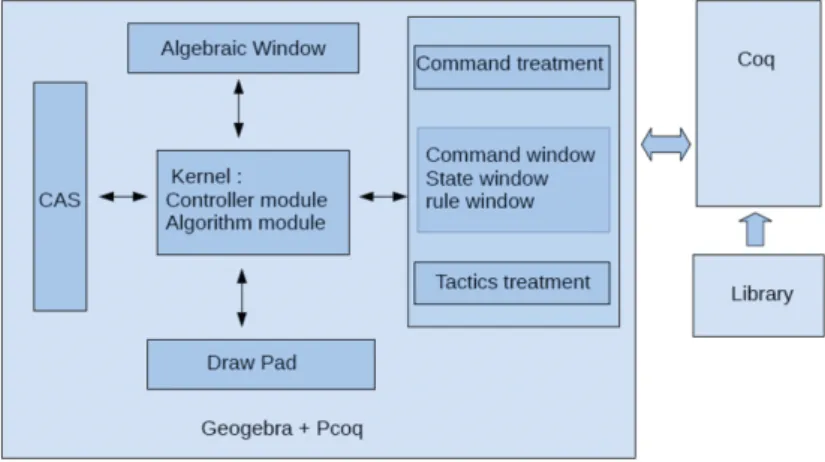
Fig. 5. The system architecture.
drawing pad, algebra view, CAS view, Spreadsheet view) is independently imple-mented by extending a JPanel class of Java and implementing a View interface. Hence, some features are provided that allow users to show or hide these views, drag around to modify their position, and open them in an external window as well.
p u b l i c i n t e r f a c e View{
p u b l i c v o i d add ( GeoElement geo ) ; p u b l i c v o i d remove ( GeoElement geo ) ; p u b l i c v o i d update ( GeoElement geo ) ;
. . . }
These views work in synchronized mode thanks to a controller module. This notifies every change of geometric objects to all system view by calling the corre-sponding functions in each view interface.
Our integration of Pcoq in Geogebra respects this architecture (figure5. Pcoq is implemented as a view of Geogebra. Once it receives a notification, the corre-sponding commands are produced and sent to Coq. As we said, communicated information are in tree format, so a module to produce tree format commands from a construction is necessary. The following code lines is an example for adding a midpoint in theorem stating phase:
p r i v a t e Tree [ ] commandMidPoint ( GeoElement geo ){
// t h i s f u n c t i o n i s t o p r o d u c e commands f o r a m i d p o i n t Tree [ ] c o n t e n t s=n u l l ; AlgoElement p a r e n t A l g o = geo . g e t P a r e n t A l g o r i t h m ( ) ; GeoElement p o i n t 1 = p a r e n t A l g o . g e t I n p u t ( ) [ 0 ] ; GeoElement p o i n t 2 = p a r e n t A l g o . g e t I n p u t ( ) [ 1 ] ; c o n t e n t s = new Tree [ 2 ] ;
c o n t e n t s [ 0 ] = TreeFormat . addVar ( geo . g e t L a b e l ( ) , TreeFormat . P o i n t ) ; c o n t e n t s [ 1 ] = TreeFormat . a d d H y p o t h e s i s ( ” Hyp MidPoint ” ,
TreeFormat . a s s i g n V a r i a b l e ( geo . g e t L a b e l ( ) , TreeFormat . f u n c t i o n ( TreeFormat . MidPointAB ,
p o i n t 1 . g e t L a b e l ( ) , p o i n t 2 . g e t L a b e l ( ) ) ) ) ; r e t u r n c o n t e n t s ;}
In our implementation, we continue the notion of ”proof by pointing”[3] which has been already approached in Pcoq. It allows users to guide precisely the proof process using the mouse in the user-interface of proof assistants i.e., the gestures of pointing at a subexpression of goals or assumptions is enough to synthesize appro-priate commands for the system.
While proof-by-pointing in Pcoq relies on analyzing formulas and understanding the meaning of logical symbols, this notion in our system is realized by the geometric signification of formulas. For each reasoning step, by finding out the signification of subgoal, hypotheses that users selected, the system can provide appropriate tactics in a popup menu to guide users to solve the problem. For example, we determine if the selected goal has the format of ( = line ), ( = perpendicularline ) or ( = parallelLine ), in this case the system provides replace auto Lines tactics to solve it.
6
Related Work
DGSs are more and more used in education. Many works have been performed to provide combinations of DGS and GTP. Some of them use automatic methods, allow users to prove geometry theorems. We will cite here several systems that can generate readable proofs.
Geothms[16] with a web interface uses the GCLC prover which is based on the area method. With the support of repository of geometry theorems, users can store theorem statements and their proofs.
MMP/Geometer[10] and GeoExpert[9] are strong systems which implement Wu’s method, the area method, the full-angles method (for GeoExpert), and es-pecially the deductive database method[7]. The last method relies on a set of basic rule, and allows to find out traditional proofs. GeoExpert allows users to visually understand each step in generated proof.
Geometry Explorer[17] also implements the full-angles method. However, it can automatically generate novel diagrammatic proofs corresponding with reasoning used by its GTP. It is a good illustration for proofs.
Geoproof[15] is very close to our system. Reasoning in Geoproof is performed by Coq and based on formalization of the area method in this proof assistant[14]. Since Geoproof also uses Coq, so we will have some similar points in stating phase. The main differences lie on theorem proving phase and the way the system connects to Coq. Geoproof only allows users to construct theorem statements, send them to a CoqIDE and check this fact by apply the area method. It does not allow users to construct their own proofs step-by-step and does not provide interactions between DGS and Coq.
Another one which combines a DGS with Coq is GeoView[2], but this tool works in the opposite direction. It produces a diagram in a DGS namely GeoPlan from a theorem statement in Coq.
7
Conclusion and Future Work
In this paper, we present our interface which allows users to interactively construct traditional proofs in Geometry. Reasoning methods at high school level such as forward method, backward method, and drawing auxiliary lines as well are pro-vided. Steps of reasoning are verified by a proof assistant hence the correctness is guaranteed.
Integrating a proof assistant in a dynamic geometry software offers a novel way in learning geometry. It allows users to additionally have a logic view in solving geometric problems. Users know what they have in hypotheses, what they have to prove, which rules they can apply. . . By which, they can take good decisions and thoroughly understand reasoning steps.
Some features need to be improved to allow users to easily use our tool. Dynami-cally constructing diagram from statement of rules is an example. With constructed diagram of a rule, users easily find points, lines that their configuration conforms with this diagram. Then users can drag and drop these objects to apply this rule. The second one is how we can organize and manage the set of applicable rules and the set of tactics while adapting to user levels.
References
[1] Amerkad, A. and Y. Bertot and L. Pottier and L. Rideau: 2001,Mathematics and Proof Presentation in Pcoq. Workshop Proof Transformation and Presentation and Proof Complexities in connection with IJCAR
[2] Bertot, Y. and F. Guilhot and L. Pottier: 2004,Visualizing Geometrical Statements with GeoView. Electronic Notes in Theoretical Computer Science 103:49-65
[3] Bertot, Y. and G. Khan and L. Th´ery: 1994, Proof by pointing. Theoretical Aspects of Computer Software, LNCS 789:141-160
[4] Chou, S.-C.: 1988, An introduction to Wu’s method for mechanical theorem proving in geometry. Journal of Automated Reasoning 4:237-267
[5] Chou, S.-C. and X.-S. Gao and J.-Z.Zhang: 1994,Machine proofs in geometry: Automated production of readable proofs for Geometry Theorems. World Scientific
[6] Chou, S.-C. and X.-S. Gao and J.-Z.Zhang: 1996, Automated generation of readable proofs with geometric invariants. Theorem proving with full-angles. Journal of Automated Reasoning 17:349-370 [7] Chou, S.-C. and X.-S. Gao and J.-Z.Zhang: 1996,A deductive database approach to automated geometry
theorem proving and discovering. Journal of Automated Reasoning 25:219-246
[8] Coq development team,The Coq proof assitant reference manual.http://coq.inria.fr/refman/ [9] Gao, X.-S.: 2000,Geometry Expert, Software Package.http://www.mmrc.iss.ac.cn/~xgao/gex.html [10] Gao, X.-S. and Q.Lin: 2002,MMP/Geometer - a software package for automated geometry reasoning.
Proceedings of Automated Deduction Geometry 44-46
[11] Geogebra development team,Introduction to GeoGebra.http://www.geogebra.org/book/intro-en/ [12] Guilhot, F.: 2005, Formalisation en Coq et visualisation d’un cours de g´eom´etrie pour le lyc´ee.
[13] Kapur, D.: 1986, Using Gr¨obner Bases to reason about geometry problems. Journal of Symbolic Computation 2:399-408
[14] Narboux, J.: 2004,A Decision Procedure for Geometry in Coq. Proceedings of Theorem Proving in Higher-Order Logics,LNCS 3223
[15] Narboux, J.: 2007,A Graphical User Interface for Formal Proofs in Geometry. Journal of Automated Reasoning 39:161-180
[16] Quaresma, P. and P. Janiˇci´c: 2007,GeoThms — a Web System for Euclidean Constructive Geometry. Electronic Notes in Theoretical Computer Science 174:35-48
[17] Wilson, S. and Jacques D. Fleuriot: 2005, Combining Dynamic Geometry, Automated Geometry Theorem Proving And Diagrammatic Proofs. Proceedings of the European Joint Conferences on Theory and Practice of Software (ETAPS) Satellite Workshop on User Interfaces for Theorem Provers (UITP)