KaspersKy
security for
Business
Renewals and UpgRades:
A Migration Guide
Which level is right for you?
Current Kaspersky customers will realise immediate value when migrating to this new family
of products and features. There are several options depending on your existing Kaspersky licence.
This guide will help you determine the optimal solution for your environment and situation.
if your licence is nearing expiration, you can choose to:
• Table 1:
Renew — and upgrade to newer features, stronger protection and IT optimisation
• Table 2:
Renew — and maintain a similar, but enhanced set of features compared to your current
Kaspersky solution
Kaspersky values our customers! Ask your reseller for specially discounted renewal options.
if your licence is not approaching expiration — there are options, too!
• Table 3
: Upgrade — and experience Kaspersky’s new features for protection and IT optimisation
• Table 4:
Upgrade — to the new Kaspersky endpoint engine and maintain a similar level of features
IntRodUcIng KaspeRsKy’s secURIty foR BUsIness softwaRe
lIcencIng pRogRaMMe.
Kaspersky’s latest endpoint release boasts many new features. Furthermore, Kaspersky’s new
management console has an even more intuitive GUI with refined menus — which puts you in a position
to take advantage of future enhancements.
New additions to our award-winning family of technologies include:
• Encryption — protect against data loss from lost or stolen machines and removable devices
• Mobile Device Management — securely configure and deploy mobile devices
• Systems Management — optimise system rollouts and patch management
total
anti-malWare WeB controlapp, device, securitymoBile encryptiondata managementsystems collaBorationmail, WeB,
advanced
select
core
taBle 1: Renew and UpgRade to IncReased pRotectIon
and It effIcIency featURes
Are you looking for something more specific? Consider these solutions targeted to your unique needs:
• Security for File Server
• Kaspersky Security for Mobile
• Kaspersky Systems Management
• Kaspersky Security for Virtualization
• Kaspersky Anti-Virus for Storage
• Kaspersky Security for Collaboration
• Kaspersky Security for Mail
• Kaspersky Security for Internet Gateway
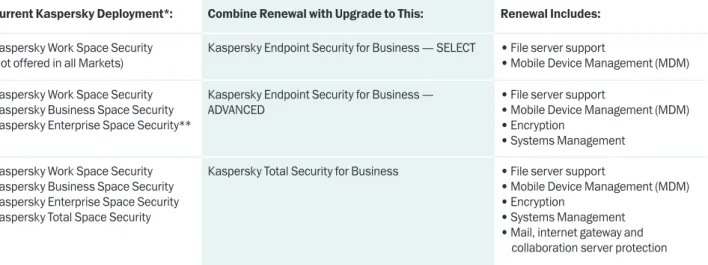
Current Kaspersky Deployment*: Combine Renewal with Upgrade to This: Renewal Includes:
Kaspersky Work Space Security (not offered in all Markets)
Kaspersky Endpoint Security for Business — SELECT • File server support
• Mobile Device Management (MDM) Kaspersky Work Space Security
Kaspersky Business Space Security Kaspersky Enterprise Space Security**
Kaspersky Endpoint Security for Business —
ADVANCED • File server support• Mobile Device Management (MDM) • Encryption
• Systems Management Kaspersky Work Space Security
Kaspersky Business Space Security Kaspersky Enterprise Space Security Kaspersky Total Space Security
Kaspersky Total Security for Business • File server support
• Mobile Device Management (MDM) • Encryption
• Systems Management • Mail, internet gateway and
collaboration server protection * With endpoints running Kaspersky Endpoint Security 8 for Windows
** When migrating to ‘Select’ or ‘Advanced’, current Enterprise Space customers must add Kaspersky Security for Mail for continued mail server protection
taBle 2: Renew wIth eqUIvalent featURes
Current Kaspersky Deployment*: Renew and Maintain Similar Features? Renew with: What New Features are Gained?
Kaspersky Work Space Security
(not offered in all markets) Kaspersky Endpoint Security for Business — SELECT • File server support • Mobile Device Management (MDM) Kaspersky Business Space Security Kaspersky Endpoint Security for Business — SELECT • Mobile Device Management (MDM) Kaspersky Enterprise Space Security** Kaspersky Endpoint Security for Business — SELECT
Plus
Kaspersky Security for Mail
offered at a special discount when sold with select or advanced tiers!
contact your reseller for details.
• Mobile Device Management (MDM)
Kaspersky Total Space Security Kaspersky Endpoint Security for Business — SELECT
Plus
• Kaspersky Security for Mail • Security for Internet Gateway • Security for Collaboration
each offered at a special discount when sold with select or advanced tiers!
contact your reseller for details.
• Mobile Device Management (MDM)
* With endpoints running Kaspersky Endpoint Security 8 for Windows
upgrading to neW features prior to the reneWal of your licence term is easy!
Waiting until your renewal period to experience Kaspersky’s increased protection could put your
organisation at risk! You can upgrade and add features today.
1. Determine which new features you need.
• Visit the configuration tool at
www.kaspersky.com/business, or
• Consult the feature list in this guide.
• Always consider moving to a higher tier rather than adding targeted solutions — it may be more
cost effective.
2. Notify your reseller or dealer that you wish to “co-terminate” your new features with your existing
Kaspersky licence.
• Provide your existing licence number.
• Kaspersky and your reseller will calculate the price difference, if any.
3. Place a purchase order for the new, pro-rated amount to your reseller.
4. Once your order has been processed and approved, you can download and install your new
Kaspersky security products.
5. Install the new licence or activation code. You are protected!
taBle 3: UpgRade to new featURes (
non-renewal
)
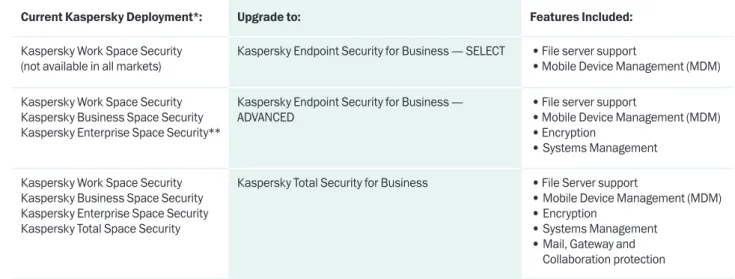
Current Kaspersky Deployment*: Upgrade to: Features Included:
Kaspersky Work Space Security
(not available in all markets) Kaspersky Endpoint Security for Business — SELECT • File server support • Mobile Device Management (MDM) Kaspersky Work Space Security
Kaspersky Business Space Security Kaspersky Enterprise Space Security**
Kaspersky Endpoint Security for Business —
ADVANCED • File server support • Mobile Device Management (MDM) • Encryption
• Systems Management Kaspersky Work Space Security
Kaspersky Business Space Security Kaspersky Enterprise Space Security Kaspersky Total Space Security
Kaspersky Total Security for Business • File Server support
• Mobile Device Management (MDM) • Encryption
• Systems Management • Mail, Gateway and
Collaboration protection * With endpoints running Kaspersky Endpoint Security 8 for Windows
** When migrating to ‘Select’ or ‘Advanced’, current Enterprise Space customers must add Kaspersky Security for Mail for continued mail server protection
Are you looking for something more specific? Consider these solutions targeted to your unique needs:
• Security for File Server
• Kaspersky Security for Mobile
• Kaspersky Systems Management
• Kaspersky Security for Virtualization
• Kaspersky Anti-Virus for Storage
• Kaspersky Security for Collaboration
• Kaspersky Security for Mail
Kaspersky encourages you to upgrade to the newest version of the scanning engine and management
console, even if you’re not nearing your renewal period.
taBle 4: UpgRade to new endpoInt engIne and
contRol panel, MaIntaIn exIstIng featURes (
non-renewal
)
Current Kaspersky Product Upgrade with Equivalent Functionality into New Programme
Kaspersky Work Space Security Kaspersky Business Space Security Kaspersky Enterprise Space Security Kaspersky Total Space Security
Active licence keys or activation codes from Kaspersky Open
Space products will function within the new Kaspersky Security
for Business Core, Select, Advanced and Total Security endpoints
and console. Only those features and applications presently
licenced in Open Space will appear or function.
To maintain your current functionality, there is no need
to purchase a new licence as long as your existing licence
for those features is active.
Example:
if your existing open space deployment includes file
server support, that function will also be activated under the
new programme using your existing licence.
• Kaspersky Security for File Server • Kaspersky Security for Mobile • Kaspersky Systems Management • Kaspersky Security for Virtualization • Kaspersky Security for Storage • Kaspersky Security for Collaboration • Kaspersky Security for Mail
• Kaspersky Security for Internet Gateway
Existing versions of all active targeted solutions will continue
to function until their licence expiration. No new licence keys
are required during their term.
If there is a particular Kaspersky technology you’d like to add to your security portfolio, the list below
can help you understand which Kaspersky solution contains this functionality.
acqUIRIng new featURes and technologIes:
Feature
Description
WhichProduct includes this Feature? Available as a Targeted Solution? Application
Control Allow, deny or restrict the behaviour of applications running in your environment. Application control technology is not sold separately and is available only in the products/tiers listed on the right.
• Select • Advanced • Total No Cloud Based Protection — Kaspersky Security Center
Kaspersky’s cloud-assisted, urgent detection system. Significantly reduces the window of vulnerability to zero-day threats. This technology is included in many components of Kaspersky Security for:
• Workstations
• File, mail and collaboration server • Vulnerability scanning and patching • Application and web control
All N/A
Collaboration
Protection Comprehensive protection for SharePoint servers. Security for Collaboration provides an anti-malware barrier to protect the
entire SharePoint deployment from infected uploads and downloads.
Also enables policy enforcement by file type and text content.
Security for Collaboration is included in the Total Security tier, but is also available separately. When sold with Select or Advanced tiers,
a special add-on discount applies. Consult your reseller for details.
• Total Yes
Device Control Protect important data and improve employee productivity
by restricting connected peripherals. Set policies by device type,
serial number, time of day and connection bus.
Device control technology is not sold separately and is available only
in the products/tiers listed on the right.
• Select • Advanced • Total
No
Encryption Ensure critical data can’t be compromised, even if it falls into the wrong hands. Choose from file/folder or full-disk encryption for Windows-based workstations.
Kaspersky Lab’s data encryption technology is not sold separately and is available only in the products/tiers listed on the right.
• Advanced
• Total No
File Server
Security Protection for Windows-based, Netware, and Linux file servers is a key component of any effective security programme.
File server protection is included in the Select, Advanced and Total Security tiers. It is also available separately as a Targeted Solution.
• Select • Advanced • Total
Yes
System
Provisioning Create, deploy and store operating system and software images for users at a central location. Images can also be cloned or updated quickly, saving the administrator valuable hours.
This feature is a component of Kaspersky Systems Management, which is included in the Advanced and Total Security tiers, but is also sold separately as a Targeted Solution.
• Advanced
Feature
Description
Which Product includes this Feature? Available as a Targeted Solution? hardware and software inventoriesA feature which provides an administrator with valuable reporting that lists hardware and software in use on the network. These reports can be automatically compared to known, exploitable vulnerabilities — and patches can be suggested and prioritised.
This feature is a component of Kaspersky Systems Management, which is included in the Advanced and Total Security tiers, but is also sold separately as a Targeted Solution
• Advanced
• Total Yes
licence
management Ensure your organisation is compliant with software licence usage. Track usage and report on infractions and non-compliant users.
Save money by paying only for those licences which are in use. This feature is a component of Kaspersky Systems Management, which is included in the Advanced and Total Security tiers, but is also sold separately as a Targeted Solution
• Advanced
• Total Yes
mail server
security Protection for Exchange, Linux or Lotus/Domino mail servers. Email communication is enhanced with anti-malware and anti-spam technology.
Security for Mail is included in the Total Security tier, but is also available separately. When sold with Select or Advanced tiers,
a special add-on discount applies. Consult your reseller for details.
• Total Yes
Mobile Device
management (mdm)
A must-have for any organisation with mobile employees — particularly
if operating a bring-your-own-device initiative. MDM enables
centralised, secure configuration of mobile devices (smartphones
and tablets) to ensure corporate data on those devices is protected by appropriate settings. MDM does not require a separate administration console; it is accessed via the Kaspersky Security Center.
MDM is available only as a component of Kaspersky Security for Mobile,
which also includes an endpoint security agent for applicable devices.
This bundle is sold separately as Kaspersky Security for Mobile, or is included in the Select, Advanced and Total tiers.
Mobile licencing examples:
1) A Select, Advanced, or Total Business licence
for 100 nodes includes:
• Security for 100 of any type of endpoint node (either workstations, file servers, or mobile devices) • MDM for up to 100 mobile devices.
2) 100 nodes of Kaspersky Security for Mobile (as a separate, Targeted Solution) includes:
• Security agent for 100 mobile devices • MDM for 100 mobile devices
Special Notes:
• MDM will manage both configuration and security on devices
using the mobile agent application.
• MDM will manage only configuration on devices without the
mobile endpoint agent application.
• There is no endpoint agent for iOS devices.
• Select • Advanced • Total
Feature
Description
Which Product includes this Feature? Available as a Targeted Solution? Mobile security agent (a security agent loaded onto the smartphone or tablet)Mobile workers with smartphones or tablets are at risk for exposing
corporate data if they lose their devices. Encrypted containers,
Selective Remote Wipe, GPS Find, and jailbreak notification ensure the security of corporate data. Settings can be sent to the device via SMS, email, or tether.
The mobile agent is available only as a component of Kaspersky
Security for Mobile, which also includes MDM. This bundle is sold separately as Kaspersky Security for Mobile, or is included in the Select, Advanced and Total tiers.
For licencing examples and special notes, see Mobile Device Management (MDM), above. • Select • Advanced • Total Yes network
admission control Manage data access and network policies for both guest and employee machines. Includes a password protected captive portal that automates the visitor access process, which saves the administrator time. Network Admission Control is accessed via the
Kaspersky Security Center.
This feature is a component of Kaspersky Systems Management, which is included in the Advanced and Total Security tiers, but is also sold separately as a Targeted Solution
• Advanced
• Total Yes
patch
management Using real-time cloud reports of software and hardware vulnerabilities, Kaspersky Lab will identify and prioritise those patches needed across your network
This feature is a component of Kaspersky Systems Management, which is included in the Advanced and Total Security tiers, but is also sold separately as a Targeted Solution
• Advanced
• Total Yes
storage
protection Kaspersky Security for Storage (including EMC Celerra) provides anti-malware to detect and remove infected files which may be shared on networks. • Kaspersky Anti-Virus for Storage Only systems
management Several powerful and useful tools designed for IT process optimisation. Kaspersky Systems Management includes: • System Provisioning
• Remote Software Installation • Remote Troubleshooting • Licence Management • Vulnerability Scanning • Patch Management • Network Admission Control
All components are accessed via the Kaspersky Security Center
administration console.
Kaspersky Systems Management is included in the Advanced and Total Security tiers, but is also available separately as a Targeted Solution.
• Advanced
• Total Yes
remote software
installation From a central location, administrators can push out and install new software or updates to users either manually or on a schedule. Remote offices can have an appointed updater on site to reduce network traffic.
This feature is a component of Kaspersky Systems Management, which is included in the Advanced and Total Security tiers, but is also sold separately as a Targeted Solution.
• Advanced
Feature
Description
Which Product includes this Feature? Available as a Targeted Solution? remoteTroubleshooting When users experience system problems, administrators can use the familiar Kaspersky Security Center to log into the user computer
remotely to perform troubleshooting measures.
This feature is a component of Kaspersky Systems Management, which is included in the Advanced and Total Security tiers, but is also sold separately as a Targeted Solution
• Advanced
• Total Yes
virtualisation
security In conjunction with VMware, Kaspersky has adapted our award-winning security software to operate within the vCloud Ecosystem Framework. Anti-malware scanning on virtual machines is offloaded to a virtual appliance. This saves significant resources and eliminates
AV Scanning ‘Storms’ and ‘Instant-on Gaps’. A single management
console allows for policies to be applied to virtual and physical machines, alike. • Kaspersky Security for Virtualization Only Vulnerability
scanning Identify hidden vulnerabilities across the network by first running a hardware and software inventory and comparing the results against real-time data from numerous databases. Kaspersky Lab aids the administrator by prioritising threats and providing recommended solutions, when available.
This feature is a component of Kaspersky Systems Management, which is included in the Advanced and Total Security tiers, but is also sold separately as a Targeted Solution
• Advanced
• Total Yes
Web / Internet
gateway security Kaspersky Lab’s protection for ISA/TMG, Proxy, and Checkpoint often provides the first line of defense in a layered security approach.
Superior anti-malware scanning is critical at this level.
Internet Gateway protection is included in the Total Security tier, but is also available separately as a Targeted Solution. When sold with Select or Advanced tiers, a special add-on discount applies. Consult
your reseller for details.
• Total Yes
Web Control Securely enable users to surf within policy. Kaspersky Lab Web
Control provides the tools to control and restrict surfing based on URL, category, schedule or user. Integration with the Kaspersky
Security Network provides real-time identification of infected URLs
or newly created, prohibited sites.
Web control technology is not sold separately and is available only in the products/tiers listed on the right.
• Select • Advanced • Total
No
Whitelisting Kaspersky Lab makes whitelisting easy — even when implementing
a “default deny” posture. Our Dynamic Whitelisting technology ensures
legitimate updates to software are identified and incorporated into
your policy in real time. Built-in wizards walk the administrator through
setup of this highly effective protection mechanism.
Dynamic Whitelisting technology is enabled within the Application Control
module of Kaspersky’s endpoint control technologies. It is not sold separately and is available only in the products/tiers listed on the right.
• Select • Advanced • Total
© 2013 Kaspersky Lab ZAO. All rights reserved. Registered trademarks and service marks are the property of their respective owners.
Kaspersky Lab UK & Ireland
97 Jubilee Avenue, Milton Park, Abingdon, Oxfordshire, OX14 4RW www.kaspersky.co.uk
All about Internet security: www.securelist.com Find a partner near you: www.kaspersky.com/buyoffline