Technical report, IDE1108, March 2011
Mobile One Time Passwords and RC4 Encryption
for Cloud Computing
Master’s Thesis in Computer Network Engineering
Mobile One Time Passwords and RC4 Encryption for Cloud Computing
School of Information Science, Computer and Electrical Engineering Halmstad University
Box 823, S-301 18 Halmstad, Sweden
Preface
We would like to express our admiration to Halmstad University, which brings this opportunity for us to improve our knowledge in a proper way. This thesis has been supervised by Yan Wang. We would like to thank her, for her suggestions and guidelines for the thesis that led to a successful conclusion.
Finally, we would like to thank our friends and families for their support throughout the master program.
Markus Johnsson & A S M Faruque Azam Halmstad University, January 2011
Abstract
Cloud services have grown very quickly over the past couple of years, giving consumers and companies the chance to put services, resources and infrastructures in the hands of a provider. Therefore removing the need of providing these services themselves. This can for example lead to
cost savings, better resource utilization and removing the need of technical expertise for the
customers.
There is big security concerns when using cloud services. Security is very important in cloud computing since people and companies store confidential data in the cloud. It must also be easy to use the services provided, since cloud services have so many users with different technical background. Since the control of services and data needed for the everyday-run of a corporation is being handled by another company, further issues needs to be concerned. The consumer needs to trust the provider, and know that they handle their data in a correct manner, and that resources can be accessed when needed.
This thesis focuses on authentication and transmission encryption in cloud services. The current solutions used today to login to cloud services have been investigated and concluded that they don't satisfy the needs for cloud services. They are either insecure, complex or costly. It can also be concluded that the best encryption algorithm to use in a cloud environment is RC4, which is secure and at the same time a fast algorithm. Compared to AES, which together with RC4, are the most common encryption methods used over the Internet today, RC4 is the better choice.
This thesis have resulted in an authentication and registration method that is both secure and easy to use, therefore fulfilling the needs of cloud service authentication. The method have been implemented in a fully working finished solution, that use a regular mobile phone to generate one time passwords that is used to login to cloud services. All of the data transmissions between the client and the server have been configured to use RC4 encryption.
The conclusions that can be drawn is that the security proposal implemented in this thesis work functions very well, and provide good security together with an ease of use for clients that don't have so much technical knowledge.
List of Figures
Figure 1. Google Apps Two-step verification ... 19
Figure 2. Example of typical static password login ... 20
Figure 3. Top 20 passwords ... 21
Figure 4. Packet captured in Wireshark ... 22
Figure 5. Authentication with mOTP ... 27
Figure 6. Authentication with Challenge-Response ... 28
Figure 7. Bar-code generated ... 29
Figure 8. Authentication with Optical Challenge-Response ... 30
Figure 9. First implementation of registration ... 31
Figure 10. Registration process ... 33
Figure 11. Experiment topology ... 36
Figure 12. Authentication process ... 37
Figure 13. Database containing user credentials ... 38
Figure 14. Login screen ... 38
Figure 15. Registration start ... 40
Figure 16. The registration database ... 40
Figure 17. Partial output of source code, with Init-secret marked ... 41
Figure 18. Private key ... 41
Figure 19. Key generation ... 42
Figure 20. Created certificate in web browser ... 43
Figure 21. Encryption in use ... 43
Figure 22. Packet captured in Wireshark ... 44
Figure 23. Security warning for fake certificate ... 46
List of abbreviations
AES Advanced Encryption Standard
ARC4 Alleged RC4
ARCFOUR Alleged RC4
API Application Programming Interface
ATM Automated Teller Machine
AWS Amazon Web Service
CRM Customer Relationship Management
FTP File Transfer Protocol
HEX Hexadecimal
HTTP Hypertext Transfer Protocol
IaaS Infrastructure-as-a-service
IMAP Internet Message Access Protocol
Init-Secret Initialization Secret
IP Internet Protocol
IT Information Technology
LAN Local Area Network
MD5 Message-Digest algorithm 5
mOTP mobile One Time Password
OTP One Time Password
PaaS Platform-as-a-Service
PIN Personal Identification Number
POP Post Office Protocol
RC4 Rivest Cipher 4
RSA Rivest, Shamir & Adleman
SaaS Software-as-a-Service
SMS Short Message Service
SP Service Provider
SSL Secure Sockets Layer
StaaS Storage-as-a-service
TLS Transport Layer Security
URL Uniform Resource Locator
USD United States Dollar
VM Virtual Machine
Contents
PREFACE ... 3 ABSTRACT ... 4 LIST OF FIGURES ... 5 LIST OF ABBREVIATIONS ... 6 1. INTRODUCTION ... 101.1APPLICATION AREA AND MOTIVATION ... 10
1.2PROBLEM ... 10
1.3APPROACH CHOSEN TO SOLVE THE PROBLEM ... 11
1.4THESIS GOALS AND EXPECTED RESULTS ... 11
2. BACKGROUND ... 12
2.1CLOUD COMPUTING ... 12
2.2AUTHENTICATION ... 15
2.3ENCRYPTION ... 17
3. AUTHENTICATION IN CLOUD SERVICES ... 18
3.1AUTHENTICATION USED BY CLOUD PROVIDERS ... 18
3.2STATIC PASSWORDS ... 20
3.3TWO-FACTOR AUTHENTICATION WITH OTP ... 23
4. PROPOSED SECURITY SOLUTION ... 26
4.1AUTHENTICATION SOLUTIONS ... 26
4.2REGISTRATION SOLUTIONS ... 31
4.4SUGGESTED ENCRYPTION ... 35
5. TEST AND IMPLEMENTATION OF SOLUTION ... 36
5.1THE AUTHENTICATION SYSTEM ... 36
5.2THE REGISTRATION SYSTEM ... 40
5.3ENCRYPTION ... 41
6. RESULTS ... 44
7. CONCLUSIONS AND FUTURE WORK ... 48
8. REFERENCES ... 49
APPENDIX... 51
1. Introduction
1.1 Application area and motivation
Cloud computing have developed rapidly over the past few years. The ability for private users and companies to put expertise and infrastructure in the hands of a third-party provider is by many considered as the way for the future.
The cloud can offer consumers access to a number of different services, it's just the cloud provider‟s imagination and resources that set the limit. Providers today offer for example expensive software's, “unlimited” file storage, sophisticated platforms and high computing calculation power for research projects. The beauty of cloud services is that all of the different services and resources is in the hands of the provider. The end customer no longer needs the technical knowledge or the money to set up a similar system on their own. Therefore, money can be saved as you are only being charged by what you use; a certain amount of gigabytes for file storage, licence for a specific software or time using a service.
However, cloud services also present a couple of issues. Since the resources are put under another provider, the customer will have no control over the situation. You don't know how your data is treated in the cloud, how sensitive data is encrypted, how do the provider‟s handle redundancy and backup of your data, can the resources always be accessed etc. There is also morally and political issues. What is the reputation of the provider and can our company be connected with them, in what country is the provider situated and what is the political situation in that country, what effect will that country's laws have on our data. This is examples of the issues and questions that needs to be asked.
One of the bigger issues is the security part, and one of the most important part for a company that is thinking of moving services to the cloud. They need to know that their data is safe, both at the provider‟s site and during transmissions between the host and server. Furthermore, the authentication procedure must be very secure, the best encryption algorithms in the world will not protect the data if someone has figured out your password.
Since cloud computing is a quite new subject, most of the cloud providers have not yet tighten up their security and still use insecure or complicated login methods. The authentication part of cloud computing must be easy and flexible for the millions of user that it has, but at the same time be very secure to protect the data that it stored in the cloud. At the same time the encryption method used during transmissions must also be very secure and, since the cloud's vast amount of users, a fast algorithm that doesn't require much computer power and processing.
1.2 Problem
The most common login form used today, not only for cloud services, is to use static passwords. Many can agree that static password have a lot of security problems. Static passwords is often very easy to crack, since users prefer non-complex passwords. The users also rarely change their passwords or use the same password to access multiple services. Therefore, different cloud
providers have lately started with one time password with two-factor authentication. The problem
with their solutions is that it cost money, for the user or the provider, it can be complicated to use, or that the user have to carry a separate authentication device with him at all time.
1.3 Approach chosen to solve the problem
This thesis propose that by using the user's mobile phone as an authentication device presenting a one time password for the user, and assuming most people always carry their phone with them, the problem with a separate authentication device for two-factor authentication is solved. As the mobile gives the user a one time password, the problem with static passwords for logins is also solved. Furthermore, by using open source code in both the mobile phone and at the authentication server, the security solution is absolutely free of charge. That solves the problem of providing a free of charge security solution.
1.4 Thesis goals and expected results
The goal with this thesis is to implement a working authentication solution, that can be used in cloud services. The authentication method will be two-factor authentication with a mobile phone as the authentication device, that presents the user a password that is only valid one time for a certain amount of time. The password will only be given to the user after a successful 4-digit PIN input in the mobile phone software.
This thesis also present a solution to securely register new users over the Internet, without compromising the security of the mobile application. Appropriate encryption methods to use with cloud service, which most be a fast and secure encryption algorithm, will be discussed and implemented.
The results of the authentication solution is evaluated and compared to other providers' current solution. Furthermore, the two big encryption methods used for Internet transmissions today, AES and RC4, will be compared and evaluated to find which algorithm that best suits the needs for cloud services.
2. Background
2.1 Cloud Computing
Cloud computing is a universal word for anything that involves distributing hosted services over the web or Internet. It can be an internet-based computing infrastructure that allows users to access different level of IT resources remotely through internet based client-side software as if it were installed locally in users own computer. Where the IT resources include server, storage, service, application, network and so on. These resources are associated in a large computer network which is owned by a company (Both privately and publicly). Cloud computing also provides services to others devices (such as smart-phones) on demand over the Internet [35][36]. Companies, business organizations, academic or commercial researchers and any individual can be user of cloud computing. Nearly every cloud computing infrastructures be made of services distributed through common centres and built on servers. The main cloud service providers are Amazon, Salesforce and Google. Examples of large and well reputed IT firms that are dynamically involved in cloud
computing are Microsoft, Fujitsu, Hewlett Packard (HP),IBM, Dell and VMware [35].
2.1.1 Cloud Service Models
According to service model, cloud computing can be categorized into three main categories: Infrastructure-as-a-Service (IaaS), Platform-as-a-Service (PaaS) and Software-as-a-Service (SaaS) [36][38]. Apart from this another cloud service is Storage as a Service (StaaS) which allows user to store their data and access these anytime via internet. Example: Amazon S3, Nirvanix etc. Any cloud service provider can provide any one of the services or all three services together.
Infrastructure-as-a-Service (IaaS)
This type of cloud computing distributes a full computer infrastructure via the web or Internet. Most popular IaaS provider like Amazon Web Services offers virtual server instances with unique IP addresses and block of storage on demand. Here customers usually use the service provider„s (SP) application program interface (API) to start, stop, access, modify and configure their virtual servers and storage as is needed [36]. In the enterprise, cloud computing allocates services to a company to pay for only as much facility as is required, and bring more flexible tools online as soon as required. Because this pay-for-what-you-use model is similar to the way water, electricity and fuel are consumed; it's occasionally referred to as utility computing [36].
Platform-as-a-Service (PaaS)
This type of cloud computing offers a full or partial product development tools or environment that users can access and utilize online, even in collaboration with others and hosted on the provider's infrastructure [36]. In PaaS developers create applications on the service provider's platform over the Internet or web. PaaS service providers may use Application Program Interfaces (APIs), gateway software or website portals installed on the customer's premises. GoogleApps and Force.com (an outgrowth of Salesforce.com) are good examples of PaaS. At present in cloud computing there is no standards for interoperability or data portability for developers [36].
Software-as-a-Service (SaaS)
This type of cloud computing model offers users the hardware infrastructure, the software product and interrelates with the users through a front-end gateway or portal. Here a provider authorizes an application to clients either as a service on demand in a "pay-as-you-go" model or at no charge by a subscription [36]. Nowadays SaaS is very popular and it has a very broad market and commonplace for many business tasks including web-based email to inventory control and database processing. Customer Relationship Management (CRM), ERP software, content management, accounting software, invoicing, computerized billing, human resource management, financials, collaboration, document management, and service desk management are very well known example of SaaS [36].
2.1.2 Cloud Deployment Services
According to deployment model, cloud computing can be categorized into four categories [38]:
Public Cloud
A public cloud or external cloud is one base on the usual mainstream model, in which service provider makes resources, such as storage and application, obtainable to the general public over the Internet or via web applications/web services. Maybe public cloud services are free or offered on a “pay-as-you-go” model. In public cloud hardware, application and bandwidth costs are covered by the service provider so it is easy and inexpensive set-up to the user. Using „pay-as-you-go‟ model it may save resource from wasting [35][36]. IBM's Blue Cloud, Sun Cloud, Google AppEngine, Windows Azure Services Platform, Amazon Elastic Compute Cloud (EC2) are good example of public clouds [36].
Private Cloud
The term „Private Cloud‟ is also referred to as internal cloud or corporate cloud. Here the provider provides services to a limited number of users behind a firewall or users‟ access is limited to mitigate the security risk [35][36]. For proprietary computing architecture it could be a marketing term where marketing media uses the words “private cloud” to offer organization that needs more control over their data than using a third-party hosted service [36]. Private cloud is good for companies' own privacy policies however, from up-front capital cost, it is not that much beneficial “still it cost money to buy, build and manage” [35]. Amazon‟s Elastic Compute Cloud (EC2) or Simple Storage Service (S3) is example of Private Cloud [36].
Hybrid cloud
A hybrid cloud environment is the combination of public and private cloud where the infrastructure partially hosted inside the organization and externally in a public cloud [35]. For example, an organization might use Amazon Simple Storage Service (Amazon S3) as public cloud service to records their data but at the same time continue in-house storage for instant access operational customer data. Hybrid storage clouds are often valuable for record keeping and backup function. It is a good approach for a business to take advantage of the cost effectiveness and scalability [36].
Community cloud
A community cloud can be recognized where a number of organizations have comparable necessities and very willing to share infrastructure so as to take in the benefits of cloud computing. Here costs increase than a public cloud and sometimes can be more expensive but may offer a higher level of privacy and security. Google's "Gov Cloud" is a good example of community cloud [35].
2.1.3 Existing problems in Cloud Computing
Cloud computing has turned into a standard information technology operation for many small or large businesses. It offers many considerable advantages, including probable expenditure savings. There are, however, major risk and disadvantages related with cloud computing.
Its dislocated nature is a benefit in many cases however can also be disadvantageous because the user has no supreme control over the software applications including secret data. Client has to depend on the provider to update, upgrade maintain and administer it. The user does not have direct access to the software to fix the problems while something goes wrong in any application and must rely on the service provider. The user can experience significant problems when the cloud provider is uncaring or incapable to fix the problem quickly. For example, your company is using cloud based payroll software and it goes out of order before the monthly payment date and payroll is due. These problems would rapidly turn into more serious if the cloud provider is reluctant or not capable to fix the problem and consistent backup services are unavailable.
In the same way, if a company becomes reliant on cloud-based services and the provider is unable to continue with their services, you will rapidly run into trouble. This trouble would quickly turn into much worse if the provider was not sincere to give any prior notice in time to allow your business to take an alternative cloud service. In today‟s unstable economic climate, cloud providers may face financial problems or impoverishment which could critically spoil or remove the provider‟s name from cloud provider list. These kinds of financial problems may come suddenly and company will often have inadequate alternative in these situations.
Cloud computing can also mean big risks in the integrity, privacy areas and also greatly in users authentication. Using a cloud system, company‟s susceptible data and information will be stored on third-party servers, and user will possibly have very inadequate understanding or control regarding this information. If the provider has insufficient security, or a violation of encryption systems or procedures are performed for different reasons, thus compromised company‟s private and confidential data. This could have devastating consequences, and could cause lawful problems for company if third party private information (for example, customer information) is negotiated. Entrepreneurs and small firms face special problems when using the cloud systems. Small size and limited resources of these companies make these much more vulnerable to the risks related with cloud use. For example, if a cloud service provider unable or won‟t be willing to provide service, the user‟s best option may be urgent legal action. Many small companies are not competent to activate their lawyers effectively in this way and thus they may not be capable to promptly mitigate such service interruption by the provider. Same fact is for the privacy and security risks that have been mentioned above – a small company can rapidly get into significant difficulty if a security violation occurs from use of cloud-based systems and they may not have the assets to effectively tackle such a situation. [29]
There are several problems in cloud computing and this thesis work is mainly focused on authentication based security issues in cloud computing and how it can be mitigated, the remaining part of the paper describes about this.
2.2 Authentication
In general authentication is the act of creating or validating something (or someone) as authentic and claims made about the topic are true. This might engage proving the identity of a person, guarantee that a product is what it‟s wrapping and tagging claims to be, tracing the origins of a relic, or assuring that a computer program is a trusted one.
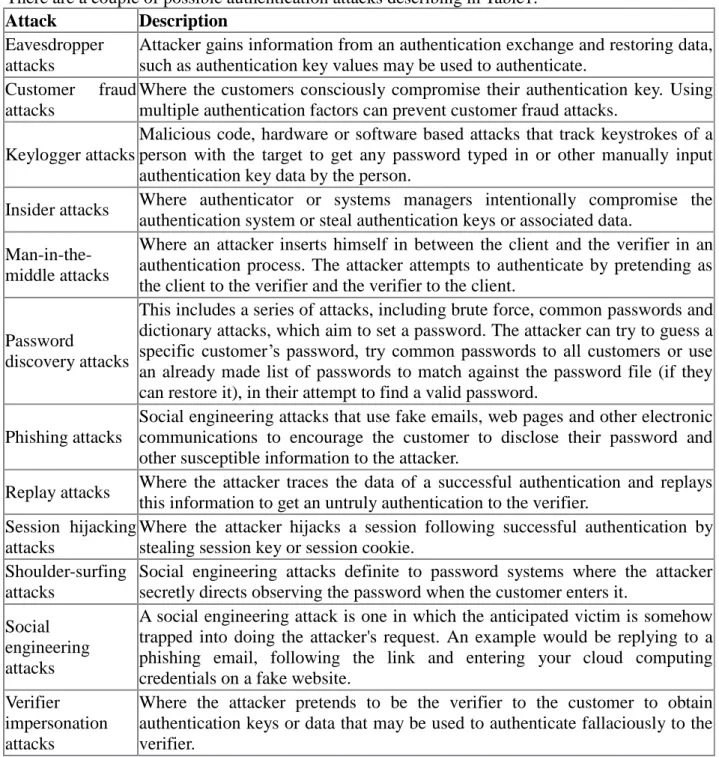
In computer networks and Internet or any web based services; authentication is usually done using the login password. Knowledge of the password is adopted to ensure that the user is authentic. Each user registers first or get registered by someone else and using an assigned or self-stated password. On each subsequent use, the user must know and use the previously declared password. The weakness of this system is that passwords can often be stolen, unintentionally revealed or forgotten. There are a couple of possible authentication attacks describing in Table1.
Attack Description
Eavesdropper attacks
Attacker gains information from an authentication exchange and restoring data, such as authentication key values may be used to authenticate.
Customer fraud
attacks
Where the customers consciously compromise their authentication key. Using multiple authentication factors can prevent customer fraud attacks.
Keylogger attacks
Malicious code, hardware or software based attacks that track keystrokes of a person with the target to get any password typed in or other manually input authentication key data by the person.
Insider attacks Where authenticator or systems managers intentionally compromise the
authentication system or steal authentication keys or associated data.
Man-in-the-middle attacks
Where an attacker inserts himself in between the client and the verifier in an authentication process. The attacker attempts to authenticate by pretending as the client to the verifier and the verifier to the client.
Password
discovery attacks
This includes a series of attacks, including brute force, common passwords and dictionary attacks, which aim to set a password. The attacker can try to guess a specific customer‟s password, try common passwords to all customers or use an already made list of passwords to match against the password file (if they can restore it), in their attempt to find a valid password.
Phishing attacks
Social engineering attacks that use fake emails, web pages and other electronic communications to encourage the customer to disclose their password and other susceptible information to the attacker.
Replay attacks Where the attacker traces the data of a successful authentication and replays
this information to get an untruly authentication to the verifier. Session hijacking
attacks
Where the attacker hijacks a session following successful authentication by stealing session key or session cookie.
Shoulder-surfing attacks
Social engineering attacks definite to password systems where the attacker secretly directs observing the password when the customer enters it.
Social engineering attacks
A social engineering attack is one in which the anticipated victim is somehow trapped into doing the attacker's request. An example would be replying to a phishing email, following the link and entering your cloud computing credentials on a fake website.
Verifier impersonation attacks
Where the attacker pretends to be the verifier to the customer to obtain authentication keys or data that may be used to authenticate fallaciously to the verifier.
Table 1. Authentication attacks
protect the cloud computing services from authentication attacks, it must need a very secure and strong authentication system therefore secure authentication in cloud computing is significantly important.
2.3 Encryption
Encryption is the core basis in cryptography system. It can be defined as the process of transforming information (usually plaintext) using cipher algorithm to make it unreadable to anyone without using the inverse decryption process [33].
In many perspectives, the word encryption also utterly refers to the reverse process called
decryption. Any encryption software can usually also perform decryption, to return the encrypted information readable form (unencrypted) with the help of the encryption process, typically referred to as a key. Encryption system is an extremely essential method to protect the information from assailants. When an intruder captures the encrypted information, s/he can only be able to get the cipher text, which is tough to understand and unreadable. Nowadays widely using two encryption systems are AES and RC4.
Generally the most prominent cloud providers are using RC4 encryption. Between these two
encryption systems, one encryption mechanism to combine with proposed authentication system for cloud computing, so that no information during authentication process remains open and insecure.
2.3.1 AES (Advanced Encryption Standard)
Advanced Encryption Standard (AES) is a symmetric key encryption technique which is securing files, e-mails, secure communication for LANs, hard drives, operating systems and other same related data. It works on multiple network layers simultaneously. [28]
The technique comprises three block ciphers taken from a larger set originally published as Rajndael. Each of these ciphers has a 128-bit block size with three dissimilar key sizes of 128, 192 and 256 bits.
The AES cipher accomplishes a number of alteration rounds cyclically which alters the input plaintext into the last output of ciphertext. Each round consists of numerous processing steps together with one that relies solely on the encryption key. A set of opposite directional rounds are applied to convert ciphertext back into the original plaintext by using the same encryption key. To encrypt and decrypt data, AES encryption only uses one 128-bit key. [28]
2.3.2 RC4
RC4 is accepted as the most frequently employed stream cipher in the world of cryptography. It is also recognized by two other names, ARC4 and ARCFOUR which means Alleged RC4. It is used in Secure Sockets Layer (SSL) (Internet traffic security) and WEP (wireless networks security). [30] RC4 is applicable in both encryption and decryption whereas the data stream goes through XOR among a series of generated keys. Random lengths keys produce pseudo arbitrary numbers. After this XOR operation is applied on the output together with the stream of data to generate a new encrypted data. Therefore, a particular RC4 key would never be used again when encrypting two new data streams. The outstanding uniqueness that made RC4 accepted amongst many cloud providers are its faster processing speed in the software as well as its simplicity. Nevertheless, RC4 also has its debilitated points just like any other things in this kind of technology. [30]
3. Authentication in Cloud services
There are different ways for a user to authenticate against a service in cloud, one of the most common ways is to login at the cloud provider's web page through a web browser. The purpose of authentication is to provide proof that the users is who she says she is, and therefore gain access to privileges and services associated with that user.
3.1 Authentication used by cloud providers
The current security solutions of four major cloud providers, with focus on authentication and transmissions encryption, will be discussed in this chapter. The cloud provider's examined in this chapter is:
Offer PaaS in Google App Engine, and Saas in Google Apps to the customers. Google also have a
SAS-70 Type 2 certificate [16], which means that independent sources evaluate how the company
control data that is stored in their servers. They also have a Cloud Security Alliance certificate [17],
stating that Google have sufficient knowledge in security in cloud computing.
• Amazon
Offer Iaas to the customers. Just like Google, Amazon have a SAS-70 Type 2 certificate [16].
• Windows Azure
Provide PaaS.
• Salesforce
Provide both PaaS and Saas. Gives the customer's the ability to configure security setting levels.
Have certified license in TRUSTe Web Privacy Seal and TRUSTe EU Safe Harbor Seal.[20]
Authentication
Login with username and password in a web browser. In September 2010, Google Apps launched a two-step verification authentication service for enterprises, and in the coming months the service will be introduced to individual users as well.
It doesn‟t require any special tokens or devices. After the user enters his password, a verification code is sent to the user's mobile device via SMS, voice calls, or generated on an application you can install on your Android, BlackBerry or iPhone device. [13]
Encryption
SSL supported for Google Apps Premier and Education Editions and Google App Engine for Business. Encrypted traffic with RC4 128 bits. [15]
Amazon Web Services
Authentication
Login with username and password in a web browser. The user can also use a single-use 6-digit code from a physical device together with username and password for enhanced security.
Note: Amazon Web Service (AWS) offers authentication devices sold for $12.99 USD; it is a Time Token OTP device for use with individual AWS accounts. Once activated, it generates a random password every 30 seconds for a user's AWS login. It does not affect the encryption keys used with AWS accounts. [14]
AWS also use Key pairs, X.509 Certificates and Access Keys to access different services. These keys are generated after the user logs in to his profile management. [18]
Encryption
SSL between the users using RC4 128 bit encryption.
Windows Azure
Authentication
Login with username and password in a web browser.
Encryption
Control messages in the platform encrypted using TLS 128 bit cryptographic keys. Customer option to apply this encryption for traffic between end-users. [19]
Salesforce
Authentication
Login with username and password in a web browser.
Encryption end-to-end
Encrypted using SSL-technology with RC4 128 bit encryption.
3.2 Static passwords
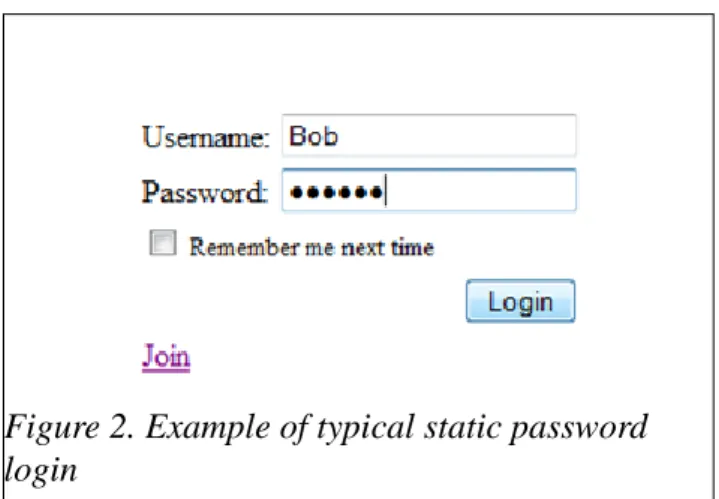
A static password is the usual way that a user authenticate when log in to a service is needed. The password is usually a secret word or phrase picked by the user and used together with the user's username. It can be used when logging in to your own personal computer, an e-mail system, an online community etc. Even though static passwords is used almost everywhere, from a security point of view it has a lot of problems.
The main weakness with static passwords is the human interaction when choosing the secret pass phrase. If the password is to simple, it will be exposed to different kinds of threats where an attacker will try to crack it, such as social engineering, trojan attacks, password attacks, key loggers or by just trying to guess the password. On the other hand, if the user picks a very hard pass phrase it will be very hard to remember, leading to writing the password down on a piece of paper and store it under the keyboard, which is a big security risk. It can also lead to more work for the IT administrators when users forget their passwords, forcing the administrator to take valued time to reset passwords. [1]
In an article [2] from January 2010, a list of 32 million passwords that got stolen in an attack, have been examined. The number one most popular password used by most users was “123456”, and the top 32 password was all bad from a security point of view.
The password list was further studied in a report [3] from the security company Imperva. In that report it is stated that about 30% of the passwords had a length of six characters or below. Furthermore, 60% of the password only used a limited set of the most common characters and half the passwords on the list was based on names, slang, dictionary word or other forms of simple passwords.
This shows a clear example on how static passwords can't meet today's security standards. The following picture shows the top 20 passwords from the password list:
Figure 2. Example of typical static password login
One other major risk with static passwords is when you use weak passwords, and at the same time use the same password for many different sites and services, without changing it. You can also use different passwords but store the passwords in a place that could be attacked, like verification mails that often contain the password for a particular site. An example of that is when the personal e-mail of an employee at Twitter got compromised by an attacker. From the e-mails stored in the inbox, the attacker got the password to the employee's Google Apps account. Google Apps is a cloud service where you can store and share documents, calendars and other services. The attacker now had access to confidential information regarding Twitter Inc at his disposal. Even though this was not an attack on the cloud itself, an attacker was able to get sensitive information that was stored in the cloud because of bad password management. [4][5]
The previous examples all point to the same basic problem with static passwords, the user never changes it, therefore an attacker can have free access to a user's different account, without the user not even knowing it. A hacker can for example use passive sniffing attacks to gather passwords that are sent in clear text. However its not very common today that sensitive data is sent in clear text, most protocols and services have added encryption, there can still be situations when the user should be careful about what information that is sent. Examples on protocols that don't encrypt the data is TELNET, FTP, POP, IMAP, HTTP (when not using SSL or other technologies, only basic authentication) and various remote access applications. [24]
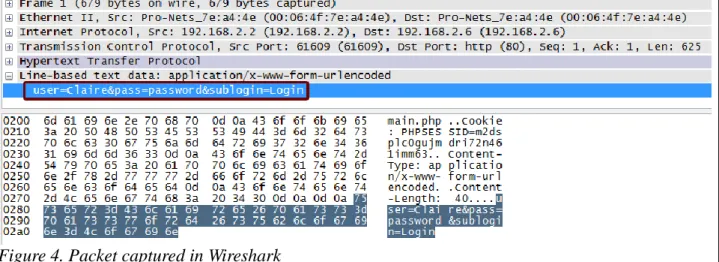
The following figure shows an example of a packet captured in Wireshark, where the user logs in to a HTTP server using basic authentication. However, it's very uncommon today that web servers don't use TLS/SSL encryption. The figure below just shows an example of how easy it can be to sniff passwords.
It's clearly shown that the username is Claire, and she has a password named “password”.
On the other hand, if the login page used encryption, the sniffed packet would not make any sense. It will take a lot of effort, and with the strong encryptions today almost impossible, to crack the encrypted packet. That said, encryption will probably protect the sensitive authentication traffic from network sniffers, but encryption can't do anything about the other problems with static passwords. In order for passwords to provide the necessary security, there is one guideline to follow:
“The password must be impossible to remember and never written down”[6]
That cannot be done with static passwords, therefore different means to authenticate must be available for the user, especially when it comes to authentication with a cloud provider where you might store confidential company data.
3.3 Two-factor authentication with OTP
Since the problems with static passwords, many have now started to use two-factor authentication with one time passwords as the login procedure for different services. One time passwords and two-factor authentication is two separate solutions but are most often used together for a better security solution.
3.3.1 One time passwords
A one time password (OTP) is just what the names implies, a password that is only valid for one login. The benefit of OTPs is that it offers much higher security than static passwords, in expense of user friendliness and configuration issues.
OTPs is immune against password sniffing attacks, if an attacker use software to collect your data traffic, video records you when you type on your keyboard, or use social engineering, it doesn't matter since the password that the attacker gets hold on will not be valid to use. [7]
A OTP can be generated using different methods[7][8], and is often used in conjunction with a device that is synchronized with an authentication server:
Time-based OTPs
In the time-based method, a device with an internal clock generates passwords that is depending on the current time. For example, every minute a new password is generated in the device, and the same password is generated at the authentication server. When the user wants to login to a service or system, the current OTP that is displayed on the device is used.
The device can also use the current time as a factor when creating a hashed OTPs, where the other factors usually is a challenge or a PIN-code (Two-factor authentication).
The main advantage of the time-based method is that the password is only valid for a short period of time, before it expires. This can however lead to problems if the authentication server and the OTP-generating device is not properly synchronized.
Counter-synchronised OTPs
In this method, a counter is synchronised between the authentication server and the device. The principle for when a user wants to login is the same as the time-based method, the user enters the current OTP that is displayed on the device. A new OTP will now be generated that the user can use next time to login, and the counter will advance one step in the device and in the server.
The drawback of this method is that time is not considered when generating the password, making the password available for a long period of time, it will only be changed upon login. This will lead to serious problems if an attacker gets hold of the OTP-generating device.
Seed-chain OTPs
In this method, a previous entered OTP is used as a seed to generate a new OTP, building a chain of passwords that all depend on the previous password. Some Linux distributions have the support of local login using this method. The passwords will be printed out on a piece of paper, and the user will have to follow the list in the correct order to be able to log in. However, this approach is not very safe since it removes the function of the OTP.
Challenge-based OTPs
These kinds of OTPs is used together with two-factor authentication. A user has to put a challenge into the generating device (often a PIN code) in order to generate the OTP. This kind of method is often used when users log in to online banks.
3.3.2 Two factor authentication
must have something you know used together with something you have. For example, when a user
logins to a web page he writes his static password (something you know), and a series of random
numbers from an authentication device (something you have). [9]
The most common implementation of this is when a person withdraws money from an ATM. The user has a bank card that he puts in to the machine, and a PIN code must then be entered before withdrawal is possible. [9]
In most online implementations over the Internet, the static password is a PIN code that you enter into an authenticating device, which will then generate a OTP. The only thing sent over the Internet to authenticate the user is the OTP, which will be of no use of a sniffing attacker.
Over the recent years, three factor authentication has also been introduced. This kind of authentication also needs “something you are”, like a fingerprint or a voice print, together with the password and the physical token. [10]
Two factor authentication together with OTP is much safer than static passwords, when looked at from an access attack perspective, such as sniffing, password cracking and social engineering. However, it cannot protect against two common attacks [11]:
Man-in-the-middle attack
An attacker sets up a fake website, resembling a legitimate site, that the user surfs to in order to log in. The user generates the OTP and sends it to the fake website controlled by the attacker, which can now use this password to login to the real web site.
Trojan attack
A trojan is installed on the user's computer, allowing a hacker to “piggyback” on the session established when the user logins to a website.
These two attacks are best solved by educate users in how to spot web pages with false certificates and how to protect your computer and keep anti-virus software up to date. That is out of the scope of this thesis.
3.3.3 Two factor OTP authentication in cloud services
It is not always convenient, from a user perspective, to over-protect a service. If you make the login process to hard for a user, the user might grow tired of that service. It is a question of what you store or what information is available in a service. It is a big difference if an attacker is able to hack into your Facebook account compared to your Google Apps account where you store confidential company data, perhaps not for the user, but for the companies in the world and the possible revenue and effort from the attacker. It is also important for the cloud providers to have good security standards in order for the common users to trust the cloud, in order for future growth of the cloud technology.
More and more companies and providers have lately seen the flaws of static passwords and started to add different authentication methods. Facebook recently launched a service where you can get an OTP sent to your mobile device [12], in September 2010 Google Apps started with two factor authentication for some of its users [13] and Amazon Web Services offers a time-based OTP solution in order to increase the security for its users. [14]
Amazon Web Services are offering two-factor authentication via an authentication device, at an extra cost for the customers. There are problems associated with their solution:
The user always have to carry the authentication device with him. If, for example, the user is out on a business trip and have forgotten the device at home, it will be very hard to securely connect to the Amazon cloud.
The cost for one device will be 12.99 USD [25], which can get very expensive in the long run for a big company, if every individual gets their own device.
On the other hand, if the authentication device only belong to one person, there is another major risk. If that particular person is disgruntled and leaves the job, what happens if he takes the device with him? It's not wise to put all of the trust in one person. [25]
The authentication device will generate a one-time-password every 30 second that will be used together with a password and e-mail ID [14]. The device doesn't require a PIN code to generate the OTP. This is a major risk if the device is stolen or someone takes a quick peak over the user's shoulder to see the OTP.
Google Apps also have a two-factor authentication solution, where you log in with your username and password, and after that you enter a verification code from your mobile phone to verify the user's identity. The verification code on the mobile phone can come from an app, SMS or a phone call. Problems associated with this solution include:
If the user doesn't have a smart-phone that can run the application, the code will be given via SMS or phone call. In the end this will cost money, either for the company or the user.
Relying on SMS or phone calls can be a risk if the user is in an area with bad reception, or the phone network is currently done.
The user will at first login with a static password solution before the user have to enter the verification code [13]. That means that the user's password will travel over the network, which can be a huge risk. Although an attacker might not be able to log in to user's Google App's account, the compromised password could likely be used for other services associated with the user.
4. Proposed security solution
The previous chapter mentioned the problems with static passwords and also other problems associated with different cloud providers' security solutions, and how it can't be used satisfactory in a cloud environment.
There are ways to have a secure and easy-to-use cloud service that can satisfy these criterias:
1. Provide better password solution for login procedures than the insecure method of static
passwords.
2. Provide better two-factor OTP authentication solution than those discussed in the previous
chapter.
3. Have an easy-to-understand registration system, that at the same time doesn't compromise
the security.
4. Use an encryption algorithm that is secure but also fast, to be able to serve the vast amount
of cloud users.
5. Offer a solution that is free of charge in order to attract more customers to the cloud services.
6. In overall, the security solution for cloud services must be easy to use, but also be very
secure in order to protect the customers' data and gain the trust of the customers.
The solution presented here will be free of charge for both the users and the provider, and at the same time easy and flexible for the clients to download, install and use.
4.1 Authentication
solutions
The criteria for the proposed security solution for cloud services, is that it needs to be secure but at the same time easy to use. The fact that cloud services is a growing market, with millions of user, makes it important that every user understands and knows how to log in to the service.
Proposals 2 and 3 adds extra security components to the system that adds to the complexity for the users. Proposal 1 have sufficient security and at the same time it is easy to use. Proposals 2 and 3 could be added as an option for the more experienced users who have higher demands.
The implementation of proposal 1 can be found in later chapters.
4.1.1 Proposal 1 – Authentication with mOTP
The authentication method used is two-factor authentication with a one-time password, based on [21] and [22] but with modifications.
The user's mobile phone will work as the authentication device, in which the user have to enter a 4-digit PIN code to generate an OTP that can be used for login. This is done by a Java-application running on the phone.
The OTP that is generated on the mobile phone is based on three components which will be hashed together with MD5:
1. The 4-digit PIN code that the user enter.
which is stored in a database, and also the current time. Therefore the password can be verified by the server.
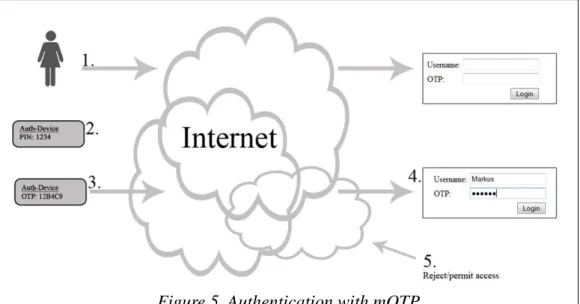
The following example shows a simplified view on how the authentication process is done:
1. A client wishes to log in to a personal account through a web browser, and surfs to the login
page.
2. The client then starts an application on a mobile phone, and enters a PIN code.
3. After PIN input, a OTP is generated and displayed on the phone.
4. The client enters his username and the OTP at the login page, and sends the information to
the authentication server.
5. The server denies or permits access for the client.
This solution offers greater benefits than other types of authentication solutions:
The only crucial information sent over the network will be the username and the OTP. Since the OTP is only valid for one time during a period of three minutes it will be of no value for an attacker.
The OTP needs a private PIN code to be generated on the mobile phone, a PIN code that only the user knows.
The cost will be absolutely free for both user and provider, since this is an open source solution.
No need to carry any extra authentication device, the user only have to carry his mobile phone with him.
Easy registration process where everything can be done from home, no need to order an external authentication device or get the device from a local office.
Easy to remove users mobile phones from the authentication database.
4.1.2 Proposal 2 – OTP with Challenge-Response
This proposal is similar to the first proposal, except that one additional security parameter is added to the system, called a challenge.
This technique is very common in use among banks all over the world, when a customer of a bank wants to log in to his/hers online account through a web browser. The customer still uses a OTP to login, but before the OTP can be generated the customer will get a challenge from the authentication server that must be entered into the authentication device. This will add a little more security to the system.
Different providers use different methods to implement this in a system. Following is a simple
example on one method on how this is done, based on the login procedureat a bank:
1. A client wishes to log in to a personal account through a web browser, and surfs to the login
page.
2. At the login page, a challenge is presented to the client. This can be a text string, image (see
proposal 3), a random number etc.
3. The client enters the challenge into an authentication device, and then the personal PIN code
into the same device.
4. From these two values, an OTP is generated, based on an algorithm, and presented to the
client.(Often time or a counter is also added to the algorithm).
5. The client enters the OTP and sends it over the Internet to the authentication server.
6. The server denies or permits access for the client.
The benefits with this solution is the same as for proposal 1, but with an extra security feature in the
challenges and responses, instead of the usual text-strings or number-combinations. The bar-codes can store information that is processed by different software's. In the figure below, the bar-code contains a URL to http://www.hh.se. The bar-code was generated using [37].
This solution is not yet commercially spread, but research is being made. For example, [32] has a working system up and running where the client use a web-cam and the camera on a mobile phone to successfully authenticate with bar-codes that contain authentication information.
The following example is one way to authenticate users with the use of bar-codes and cameras, based on the work in [32]. In order for this to work, the user need to install an application on the mobile phone that can process the images. Furthermore, the mobile phone must have a camera, and the user needs to connect a web-cam to a computer. As you will notice, the procedure for
authentication is the same as in proposal 2, but with images instead of text.
Figure 7. Bar-code generated
1. A client wishes to log in to a personal account through a web browser, and surfs to the login page.
2. The client is presented with a challenge in the form of a 2-dimensional code. The
bar-code is calculated by the server from an amount of random numbers.
3. The client starts an application on a mobile phone, and takes a photo of the bar-code, i.e.
takes a photo of the computer screen.
4. From the taken picture, the phone application calculates a hash response based on the
challenge. The response will be in the form of a bar-code and will be displayed in the mobile phone.
5. The client holds the phone in front of a web-cam, which will capture the response bar-code.
6. The response code is sent to the authentication server which will deny or permit access for
the client.
The benefits of this solution is the same as for proposal 2, but with extra security since the bar-codes might bring more security than by sending crucial information as a text string.
4.2 Registration solutions
How can cloud providers in a flexible and cheap way register clients to their authentication databases? In order for a user to log in to the cloud service using the proposed security solution, three statements is needed in a database on the server:
1. The mobile phone's Init-Secret value
2. A unique user name
3. A 4-digit PIN-code
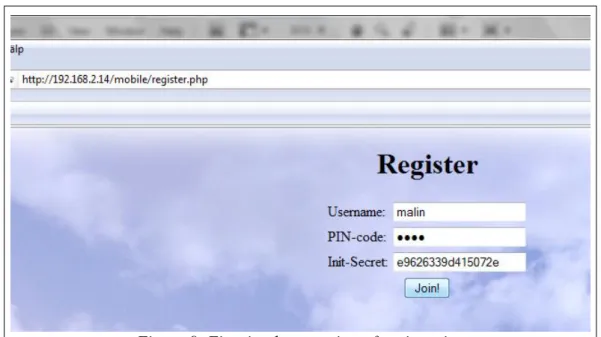
In the first implementation, the registration form showed in figure 11 was used.
However, there are problems with this solution. All of this information will be sent over an insecure network where someone might sniff the packet. Even if the packet is encrypted through TLS/HTTPS, there is a possibility that a hacker can decrypt the information and get full access to the user's account, especially since he don't have any time limit and can decrypt the packet offline. One more point, even though all the packets will be encrypted, the user will not be protected against Man-in-the-middle attacks, that can direct the user to a page with a fake certificate where the attacker can gather all of the information that the user provide during the registration part. [23] To protect against Man-in-the-middle attacks, people need education on how to spot a fake certificate, and is out of the scope of this thesis.
In order to provide a safe method to registrar to a service, these guidelines must be followed:
1. The Init-Secret can NEVER at ANY point travel over the network.
2. Since this is a cloud provider that customers will access through a web browser, the
registration should be simple and at low or no cost.
3. The registration customers should be able to do the whole registration process over the
Internet, not like the banks' system where the user go to the local office to get the authentication device. That will not be flexible and possible for a cloud solution.
Given the proposals discussed below and their pros and cons, the best registration proposal for this
kind of security system, with respect to cost and flexibility, will be Proposal 3. See chapter 5.3 for
more information on how this proposal was implemented in the author's system.
4.2.1 Proposal 1
The Init-secret is generated by pressing 25 random numbers on the mobile phone with the client software installed. The server can present this 25 random numbers to the user at the registation page, telling him to use those numbers to generate the Init-secret. The server uses the same numbers on the server side to generate the Init-secret. So both the server and the client have generated the same Init-secret but it has not been sent over the network.
Pros
The Init-secret is not sent over the network.
Cons
Instead the random numbers will be sent, which can be sniffed and the attacker can generate the same Init-secret, leading back to the starting point.
4.2.2 Proposal 2
Reprogram mOTP and put in a static Init-secret, then send the application to client's phone by email. The client only register with username, PIN-code and an email address. The client must then wait for a file-attachment in an email.
Pros
No crucial login information is sent over the network.
If the encrypted username and PIN-code is cracked it will not matter, since a hacker can't login without the correct Init-secret. And today's best encryptions (AES, RC4) have not been cracked yet.
The Init-secret will be safe inside an application. If someone tries to manipulate the application along the way it can be detected by hash-function.
No configurations needed for the client, the application is ready-to-go.
Cons
Harder to implement, more work for the server.
If the process is not automated it can take a long time to get the server response.
If a hacker already has access to the client's email-account, he will also have access to the application.
Harder for users to install on the phone when they must first transfer the application from the computer. (If they don't access email via the mobile phone directly)
4.2.3 Proposal 3
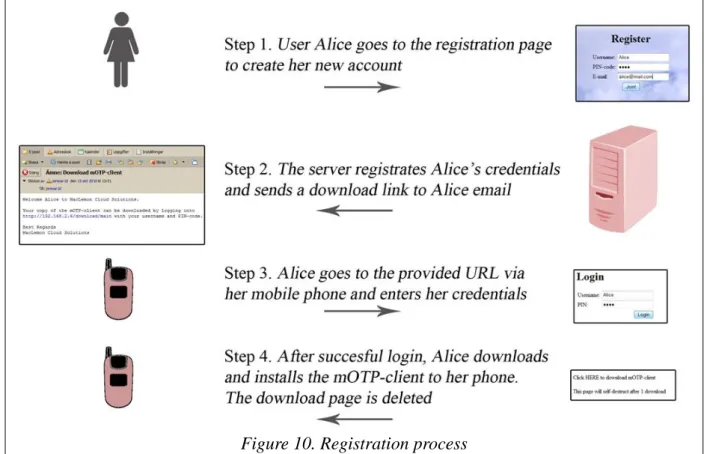
Same as Proposal 2 but instead of sending the application, the email contains an URL-link, that the
user enter via the mobile phone, where the application can be downloaded. The page requires a login with username and PIN-code for extra security.
The following picture presents the registration process for user Alice:
Pros
No crucial login information is sent over the network.
If the encrypted username and PIN-code is cracked it will not matter, since a hacker cant login without the correct Init-secret. And todays best encryptions (AES, RC4) have not been cracked yet.
The Init-secret will be safe inside an application. If someone tries to manipulate the application along the way it can be detected by hash-function.
No configurations needed for the client, the application is ready-to-go.
Application downloaded and installed directly to the mobile phone, no need for user to connect the phone to the computer first.
Extra security by requiring authentication to the download page.
The download page can be deleted after 1 download, that way only one copy of the application/Init-secret will exist.
Extra security by using two devices. If the client's computer is compromised and the traffic is being monitored by an attacker, perhaps your mobile phone will be safe.
Cons
Harder to implement, more work for the server.
4.4 Suggested Encryption
The most important variation between AES and RC4 would probably be their type. AES is using a fixed key and a formula as block cipher that operates on discrete blocks of data whereas RC4 is a stream cipher that uses a key-stream of pseudo-random bits that combine the data using an exclusive OR (XOR) operation. It can use block ciphers as stream ciphers and vice versa, but it is pretty well known that RC4 is not very useful when used as a block cipher. The most important reason why RC4 is very accepted is the fact that it is simple and it can be faster. This is already being moderated since AES implementations in hardware are becoming very acceptable as it offers speed advantages over software implementations.
RC4 is much business oriented as AES makes the system slower (compared to RC4), leading to the risk that customers might have to wait too long because the encryption/decryption algorithm takes more time, and the customer might choose another provider. Cloud provider Google.com, Social networking portal Facebook.com (Billions of users) etc providers use RC4.
Pros of AES:
• AES is extremely secure.
• AES is publicly available and can be freely used.
Cons of AES:
• AES implementation depends on hardware.
• It is a complex encryption standard.
• AES is slower compared to RC4.
Pros of RC4:
• RC4 is a simple encryption standard.
• It is faster compared to AES.
• Software based implementation is possible therefore no limitation on its frequent application.
Cons of RC4:
• It is not considered to be as secure as AES is.
• RC4 is not very effective when used as a block cipher.
Although RC4 is not as secure as AES but its straightforwardness and faster processing capability make this proposed authentication system more secure and it will acceptable to the users.
5. Test and implementation of solution
The solution of using mobile OTP and RC4 encryption to provide a safe connection to the cloud service, and how it is implemented in a real system is described in this chapter.
Experiment topology
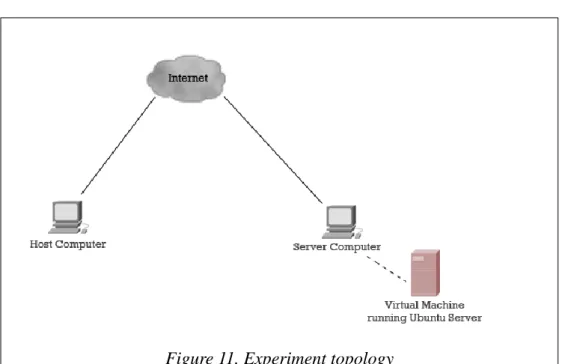
When using a cloud service, the user usually connect through a web browser to a server running somewhere which is probably unknown to the user. Based on this assumption, the experiment will consist of two computers that connect to each other over the Internet. No attention is given to the infrastructure beyond and what is running in the path between these two computers.
The server-computer will run VMWare to create a virtual machine (VM) with Ubuntu Server 10.04.
The VM will run Apache2 web server.
Experiment scenario
The purpose of the experiments is to build up the security solution that has been discussed in previous chapters. The scenario is this experiment simulates a major cloud provider that want to offer a secure, fast and easy way for customers to login and registrar for their services, and all should be done through a web browser.
The purpose is to try to find the best security solution, from a client's point of view, when connecting to a cloud. In the experiments a private cloud will be built, but this techniques can also be applied to a public cloud. And not only security when connecting to a cloud, it can be applied to any kind of server-client operation. However, in a cloud there is usually a lot of clients who simultaneously is connected to a server. This must also be taken into account – You can build a super secure network but you must also be able to use the services. For example, if a customer have to wait to long because the encryption/decryption algorithm takes to long, the customer might
In the client's mobile phones, the mOTP Java application from [21] is running. At the server side, a basic php-script checks the username and OTP received from the client, and also calculates its own OTP. The server's OTP is based on the client's PIN code and Init-secret, which are both retrieved from a MySQL database.
The figure below shows a simplified view of the authentication process used in this system. The
user Alice will type in her PIN code, “1234”, in the mOTP application running on her mobile phone
device.
The mobile phone will send the PIN code, an Init-secret (a unique random number generated during application initialization) and the current time to a MD5 hash function. The first six numbers of the
hash will serve as the OTP, “7253ab”.
Alice will then use her username and the OTP at the login page in a web browser, and send it to a server. The server will use the received username to gather Alice's PIN code and Init-secret from a database, and together with the current time calculate an OTP. This calculated OTP will then be compared to the received OTP. If they match, authentication is successful and Alice will be sent to the members page.
The figure below shows an extract from the MySQL database at the server side.
NOTE: The information in the database is here stored in plain-text, which will probably not be the case in a real life situation.
Another function of the php-scripts at the server side is to write used OTPs, e.g. OTPs used in successful logins, to a csv-file. The script will then consult this file when it receives OTPs from a client that tries to authenticate. If the password has already been used, authentication can't be successful.
Except the script that checks the two OTPs, from the client and the server's, there is other php-scripts that build up the web page and database connection, creating the login screen showed in
figure 15.
Figure 13. Database containing user credentials
Scripts building the system
In order for the system to work, six php-scripts is used at the server side. For the source code to these scripts, see Appendix A1. The scripts are accessed through Apache2 web server, running on Ubuntu Server 10.04. All the scripts are located in the /var/www folder,
login.php
This script contains the HTML code building up the start page, showed in figure X. It also contains functionality that takes the client's input, the username and OTP, and retrieves the PIN code and Init-secret from a MySQL database. It first checks if the OTP has been used before. After that the script calculates the server's OTP and compares it with the OTP from the client.
database.php
This script makes the connection to the MySQL database that contain usernames, PIN codes and Init-secrets.
approve.php
Checks if the client is successfully authenticated. If so, this script forwards the user to members.php. If not, the user is sent to login.php (the start page).
members.php
A script that requires approve.php. The page the user gets to after successful login.
logout.php
Script that enables the user to log out, and kills all session with this user. The user is then sent to login.php.
register.php
Enables users to register to the cloud service directly over the network. Contains function to validate unique username, and write new users to the database.
5.2 The registration system
The registration system is based on proposal 3, found in chapter 4.3. The user will register an username, a PIN code and an e-mail address. See the figure below.
The information provided here is not vital information, if an attacker gets hold of the packet containing these data, it will not matter.
The information entered during the registration is stored in a database, see figure 18. Now this user needs the mobile application with a unique Init-secret, and the Init-secret needs to be added to the
users database in Figure 14at the server side.
An URL link will be sent to the e-mail address stored in the database. The process of compiling, uploading the application, store the Init-secret and sending the URL link can be manual or
automatic, depending on the number of users of the cloud service. See figure 19 for a partial output
of the mobile application's source code, containing the Init-secret.
Figure 16. The registration database Figure 15. Registration start
The URL link e-mailed to the user directs the user to a place where the mobile application can be downloaded. Before downloading, the user is needed to enter the username and PIN code that is stored in the database in Figure 18. This adds an extra bit of security.
After the user has downloaded the application, it will not longer be possible to download the same application. The purpose of this is that the Init-secret should be unique and only exist in one copy. This can be done be either removing the user from the registration database after the download is complete, preventing further login for that user, or by creating a temporary page that stores the application and that will be deleted after one download.
5.3 Encryption
The following text describes the process of adding RC4 128 bit encryption to the cloud service. The reason for choosing RC4 encryption can be found in chapter 4.4. In order to generate keys and certificates, OpenSSL was used on the Ubuntu Server.
The first thing needed is to generate a key pair on the server, creating a public and a private key that will be used in the authentication/encryption process. In a terminal, the following command will create the private key for the server:
sudo openssl genrsa -out server.key 1024
This creates a file called server.key. If opened in a text editor the private key will be displayed:
The next step is to generate a certificate that will authenticate the server when the client browse to the web page. The certificate contains information about the web page, and the public key for the server. Once again in the server's terminal, executing the following command will generate the certificate:
sudo openssl req -new -key server.key -x509 -da
![Figure 1. Google Apps Two-step verification. Source [13]](https://thumb-us.123doks.com/thumbv2/123dok_us/1210902.2663129/20.892.177.698.89.379/figure-google-apps-step-verification-source.webp)
![Figure 3. Top 20 passwords. Source [3]](https://thumb-us.123doks.com/thumbv2/123dok_us/1210902.2663129/22.892.151.738.83.331/figure-top-passwords-source.webp)