Published with license by Taylor & Francis ISSN: 1941-126X print / 1941-1278 online DOI: 10.1080/1941126X.2013.785289
MANAGING LIBRARY ELECTRONIC RESOURCES USING
GOOGLE SITES
Karen Jensen
After attempting to use a home-grown Drupal database to administer electronic resources and later a vendor-provided electronic resources management (ERM) system, the University of Alaska Fairbanks Libraries created a Google Site that quickly proved to be more efficient than either previous system. Although this new system may not be a permanent solution, as ERM software continues to evolve, this original answer to a complex problem streamlines workflow, allows for further innovation and development and, best of all, comes with a Google mail account, and no formal training is needed.
KEYWORDS ERM, ERMS, Google Sites, academic libraries, acquisitions, electronic re-source management system
Many libraries have implemented electronic resource management (ERM) software pro-grams to address the complexities of organizing the ever-increasing number of digital resources. Some ERMs are commercial software; others include disparate resources cob-bled together to support the workflow or are open-source tools. None of these solutions currently resolves all electronic resource issues for libraries. At the University of Alaska Fairbanks (UAF), the Rasmuson Library acquisitions department abandoned previous inef-ficient tracking systems, canceled a well-known vendor ERMS, and created a Google Site Web page feature to support the e-resources workflow. This paper explores ERM functional requirements and this home-grown system’s ability to meet them, harnessing the power of a Google search to make it an effective and streamlined short-term solution.
LITERATURE REVIEW
The sheer number of articles on an ERMS is astounding, with dozens of papers in the scholarly literature starting in the early 2000s and continuing unabated as libraries struggle to create efficient workflows for all aspects of managing electronic resources. The volume of publication on this topic highlights the complexity of the problem, the desire
©Karen Jensen
Address correspondence to Karen Jensen, University of Alaska Fairbanks, 310 Tanana Loop, Fairbanks, AK 99775. E-mail: [email protected]
This article and our library’s ERM would not be possible without Head of Acquisitions and Technical Services, Natalie Forshaw, who designed and continues to modify the Google Site ERM system. Credit also goes to Kathleen Shannon, Library Technician for Electronic Resources, who contributes to the development and regularly uses the ERM in her daily work. Ilana Kingsley, our Web Librarian, helpfully set up the initial Drupal database for use to improve our efficiency, and introduced the use of blogs, wikis, and more to the UAF Libraries.
for and lack of a single effective solution, and the continuing dependency of libraries on legacy procedures. The software component of the problem is only one facet; as libraries adopt ERMSs or hybrid solutions, multiple library employees are involved, with varying skill sets and sometimes less-than-clear job descriptions. The lack of a software solution demonstrates the incomplete transition most libraries have experienced when migrating from print resource formats and print-based workflows to the digital emphasis now routine in academic libraries. Library staff must find ways to ensure the timeliness of all steps in the e-resources management workflow and hope to find software that helps that process along. As with the integrated library system (ILS), libraries are looking for a single computer program to resolve their problems with ERM and thereby improve efficiency. And just like the ILS, the library literature shows that an integral solution has not yet been found.
Denise Pan at the University of Colorado, in her 2009 article in this journal, sum-marizes many of the more recent articles on ERM implementation, noting that none of the authors really claim total effectiveness of their ERM solution, nor do they detail how the day-to-day work of resources maintenance is accomplished. “In stark contrast to the implementation literature, there is very little written on managing e-journal holdings with an ERMS” (Pan, 2009, p. 282). She then describes her library’s ERM implementation procedure, which demonstrates the difficulty of moving to a new system and discovering the flaws in the system only after adoption. Her conclusion states the experience shared by other libraries using vendor products; none really work to resolve the multi-part problem. “The ERS team does not believe that the ERM is a one-size-fits-all solution for the entire workflow process of electronic resources” (Pan, 2009, p. 291).
Nat Gustafson-Sundell (2011) expresses the amount of dedication required to imple-ment a new system, saying that one “risk of ERMS impleimple-mentation” is that “to maintain a new system would outweigh the value of the added functionality” (Gustafson-Sundell, 2011, p. 128). Perhaps libraries end up spending more time and effort sustaining ERM systems than they would expend simply maintaining the electronic resources using a streamlined but already existing workflow. The UAF libraries’ experience demonstrates this risk in the vendor system attempted and later abandoned; it provided some of the promised function-ality but lacked search capabilities essential to efficient system use. Staff spent many hours setting up this vendor system and trying to make it work for the UAF libraries, despite being able to automatically populate much of the database. Vendor field limitations did not allow for linking multiple products from the same publisher or switching products when publishers or vendor ownership changed, something that is more and more common in the library resource world and is an absolute requirement for a well-designed system.
Polly Khater, in a presentation for the North American Serials Interest Group, writ-ten up for Serials Librarianin 2012, describes library computer systems as “good only when they satisfy needs for those institutions and cultures,” (Khater, 2010, p. 250). The development of the Smithsonian Institution’s home-grown ERMS for electronic journals is described in detail in this article; it underlines the technical nature of ERMS, in this case requiring “a lot of higher-level staff time and energy for its maintenance,” (Khater, 2010, p. 254). The level of staffing at the UAF Libraries simply could not support such a highly technical end product, whether locally developed or vendor-based.
Perhaps librarians are expecting too much from a single system. Do functional re-quirements need to be scaled back a bit? Adam Murray (2008) lists two primary functions of ERM systems in the abstract for his article in this journal: They are “to collocate informa-tion about electronic resources and to facilitate communicainforma-tion between the employees of a library that handle e-resources” (Murray, 2008, p. 156). He makes the case that commercial
ERMSs have “too much functionality to be practical, particularly for libraries that do not need all the bells and whistles,” (Murray, 2008, p. 158). The UAF Library’s experience with a vendor system mirrored this statement; there were some functions that were simply not needed at all, while other critical ones were not included or simply did not work as ad-vertised. However, libraries also need more than a simple electronic bulletin board, or else the professional literature, conference presentations and listserv posts would not be so ex-tensive. Indeed, Murray later describes many aspects of resource management activity that require support from some kind of system, well beyond mere workplace communication.
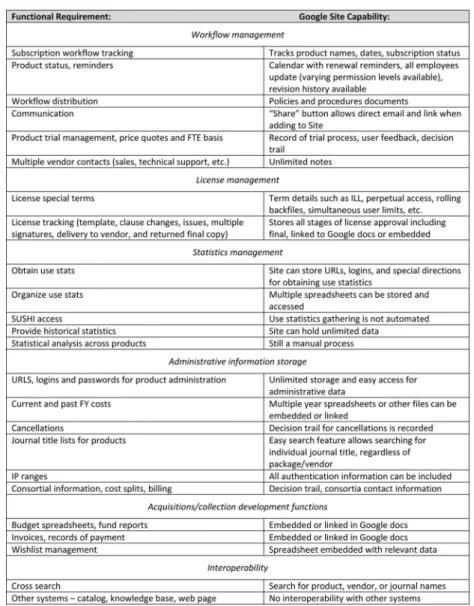
In a 2011Library Journalarticle, Collins and Grogg list six e-resource management functions librarians hope to get from an ERMS: workflow management, license manage-ment, statistics managemanage-ment, administrative information storage, acquisitions functionality, and interoperability across automated systems (Collins & Grogg, 2011, p. 23). The article’s summary of the current state of interoperability restates the current lack of an ERMS solu-tion; existing software programs simply do not interoperate with all of the tools libraries use to trial, gather feedback, obtain price quotes, record purchases, license, activate, catalog, publicize, and monitor electronic resources. Collins’s table of available ERMSs is fairly current as of this writing, and she sums up the situation well in her overview: “No one single system currently available—commercial, open-source, or homegrown—can possibly meet all needs” (Collins and Grogg, 2011, p. 28). This was the conclusion at UAF as well after some research and experimentation, leading us to develop our own ERM solution, one that provides, if not all, then at least the most highly prioritized functions.
LIBRARY BACKGROUND AND FIRST “LIGHTWEIGHT” ERM SOLUTION The UAF Rasmuson Library is the largest library in the state of Alaska, with approxi-mately 2 million physical items, an uncounted number of electronic resources, and a staff of about 75, including professional librarians and classified staff. Despite our size within the state, there are only a few librarians and staff involved with and/or dedicated to electronic resources. Unlike larger institutions, we have not created a specialized “electronic resources librarian” position to manage all aspects of e-resources but rather have divvied up electronic resource tasks among existing positions including several acquisitions staff members, the Web librarian, and the department heads of acquisitions and collection development. As the workflow evolves and personnel changes occur, ERM functions move around to become the responsibility of other employees; all of these employees will interact with an ERMS.
In addition to staffing and workflow considerations, UAF uses a wide variety of tools to accomplish e-resource management, including an A–Z list of resources, a Web database for public access to e-resources by subject, an ILS for cataloging some e-resources, spreadsheets for budget tracking and use statistics, and a shared network computer system for storing documents such as licenses, quotes, and invoices. Library employees working with electronic resources had hoped for an ERMS to tie it all together in a nice neat and easy-to-use package, one that would streamline searching for documents, reduce duplication of information and confusion among departments, and improve turnaround time at all stages of e-resource management.
Late in 2009, library staff in multiple departments including collection development, technical services, and the Web librarian got together to work on the problem of an ERMS. After reviewing the existing commercial systems, the group concluded that none of the vendor or open-source systems available at the time were sufficiently mature to warrant adoption; they all lacked essential functionality as outlined by Collins’s article (Collins &
Grogg, 2011, p. 26) and our library’s priorities. Instead, the Web librarian used Drupal, an open-source content management system, to create small ERMSs on the library’s website. Functionality of this database was limited to vendor contact and technical information, interlibrary loan restrictions, and access to statistics Web pages, as well as notes for site administrators. Budget data were still kept in department spreadsheets, and workflow from trial through implementation was still mostly on e-mail exchanges among department employees with different tasks. The database was fairly easy to use but required the expertise of the Web librarian to do any further development. With many other higher Web-page priorities, the Drupal database became static. While better than nothing, this solution still did not provide the ideal functionality listed by Collins (Collins & Grogg, 2011, p. 23) such as greater interoperability, and it did not eliminate the errors and delays inherent in our ERM process. The Drupal database was helpful, but it was not as integrative or searchable as we needed for a more comprehensive solution, although it could have been more dynamic if the group put more effort into its development.
Our Commercial ERM: Pros and Cons
In 2011, the UAF libraries opted to move to a major vendor system, after seeing that this system had been more fully developed than upon our first review and we hoped for a more mature product. This vendor could use our existing knowledge base to populate the ERM database, eliminating at least some of the setup work on our end. We also had a successful history of working with this vendor and received a price discount based on the number of other products we subscribed to, so pricing seemed reasonable. While this ERM seemed successful at the outset, acquisitions staff encountered multiple problems that the vendor did not address, despite suggestions and requests for technical support. For example, the searching of this ERM was centered on the knowledge base, so if a vendor’s invoice called a product X, but the knowledge base had it listed as Y, the ERM would not find it. We attempted to use “notes” fields to connect product names with specific vendors and then found that these fields were not searchable, a major design flaw. The publisher field was not searchable either, so products would be hidden even if contained in the ERM database, if the publisher name on a bill or on the resource itself were not the one already included in the database.
Another example involved the storage of product administration information. In this case, the URLs, user names, and passwords used by library staff to manage a product and obtain usage reports were stored at the vendor level in the ERMS, so every product owned by that vendor defaulted to one set of administrative data for the vendor. However, some vendor products have different administration sites, separate from the main vendor website; this happened increasingly often as we used the ERMS because vendors constantly acquire and add products but take longer to update administration pages for those products. This issue is illustrated by our subscription to Safari Tech Books Online through ProQuest. ProQuest has a specific administration URL for most of its databases. Safari Tech however, has its own unique administration URL separate from ProQuest, but this information could not be added to the commercial ERM because the system was designed to replicate vendor/provider data onto each resource subscribed through that vendor; the information could not be edited. This was a frequent and highly annoying issue and one that made the entire system less usable overall; we still needed to maintain a separate list for these non-standard resources, of which there are many. The limitations of the knowledge base and the lack of search capability in the design made the system cumbersome.
Renewal functions in the vendor ERM were also less useful than we had hoped. The renewal “alerts” did not actually notify staff of upcoming renewals; instead, a report had to be run monthly to show the upcoming renewals. This feature provided no advantage over a product spreadsheet sorted by date, which is a simpler, more straightforward method already in use prior to ERM implementation.
Licenses could not be stored and easily searched in this ERM system, nor was the licensing workflow assisted in any way by the system. E-mails and license files still needed to be transferred from Acquisitions to Collection Development to University Procurement and back through to the vendor, then saved and maintained separately. License restrictions could be listed, but the ERM offered no particular advantage over a website containing the same information. The statistics-management function was also not automated in this system at the time we were using it, and there was no easy feature available for summarizing statistics analyses for quick review, for example, comparing numerous products’ “cost-per-full-text-download” simultaneously.
Finally, we found that the vendor ERM did not actually include all our electronic resources but was limited to products included in the knowledge base. Even populating the database was not as streamlined as we had hoped; so many of our resources were not included in the vendor knowledge base that data entry became an enormous task, nullifying the overall usefulness of a commercial ERM solution.
In sum, of the functions listed by Collins (Collins & Grogg, 2011, p. 23), not a single one was completely addressed by this system, and the time involved in maintaining it was not rewarded by workflow efficiencies elsewhere. As indicated by many of the articles on ERMSs, the commercial system seems to target one or two of Collins’ “top 6 ERM priorities” (Collins & Grogg, 2011, p. 23) but fails entirely on the rest, thereby saving no time for busy library staff. This system attempted to meet all priorities but met none of them completely. When our acquisitions head decided to try something new, library employees at all levels were more than enthusiastic to cancel the commercial ERM.
University of Alaska Fairbanks’ ERM Solution: Google Sites
The UAF Libraries have been active in trying and adopting open-source software solutions for a number of years, thanks to our Web librarian and internal computing support from several employees. Library staff began using wikis and blogs early on for workplace communication, news alerts, workflow changes, and project management. A wiki was used for many years for maintaining desired electronic resource “wishlists” as well as summaries of trials and feedback received. When the campus moved to a Google mail system several years ago, the library moved many collaborative documents from our shared drives to Google Documents. It was no great stretch, then, for our head of acquisitions and technical services to experiment with how well Google Sites might work to address some of our ERMS needs. She had initially learned about the use of Google calendar for acquisitions at the 2011 Charleston Conference (Tofanelli, Major, & Carroll, 2011). She subsequently created a Google calendar for resource renewals and used Google docs for storing licenses, quotes, and spreadsheets that needed to be accessed among multiple employees across library departments. Finding these tools to be easy to design and edit, she then created an experimental Google Site for most e-resources acquisitions functions. The goals of the site were to have a centrally located place where all acquisitions information could be stored and made easily accessible; to have a highly searchable tool so that invoicing, licensing, fiscal, and administrative data (including statistics) are easy to find; and to assist with the
Figure 1 Screenshot of ERM site main page.
purchase and renewal process, eliminating multiple steps and the flood of e-mail with every action. In addition, since all UAF employees use campus Google mail, making view-only or edit access to specific areas of the acquisition site would be relatively simple. Site changes are made visible in the revision history, in case of question. In essence, elements of all top six ERM priorities cited by Collins (Collins & Grogg, 2011, p. 23) could be incorporated into this system.
The acquisitions site is accessed through campus Google email by clicking “Sites;” all relevant employees are given access. The main site appears quite basic but functional (Figure 1).
A list of vendors appears on the left-side panel, a monthly renewal calendar on the main page, and most important, a Google search feature is located on every page. Pages on policies and procedures, lists of liaisons and assigned subjects, the “wishlist” of desired resources, and an overview of statistics for e-resources are linked from the main page. A “who does what” in the procedures section clearly delineates responsibility for e-resources acquisitions, collection development and outreach, as well as troubleshooting. Each person who performs some function in the e-resource management process updates the Google site with his or her unique information as needed.
Links to embedded acquisitions spreadsheets and the site map also appear in the left column. Any vendor can be selected from the panel or searched directly using the Google search engine. Likewise, products can be searched by name if the user does not remember the vendor. For example, a user searching forLinguistics and Language Behavior Abstracts
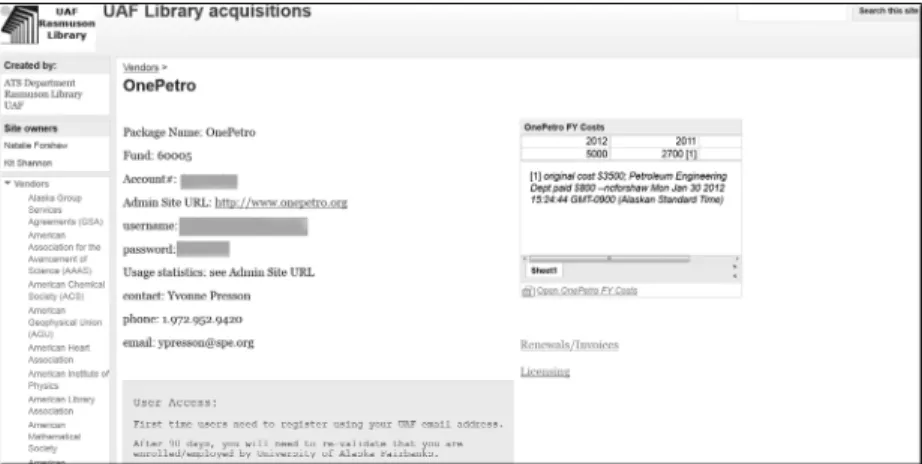
and expecting to find it under “CSA,” where it was long located, can do a simple search on “linguistics” and bring up the database, now recorded under ProQuest. This may seem a minor point, but it is really essential functionality as vendors purchase, sell, or discard products with increasing frequency and librarians look for the most economical products from different vendors. The lack of searchable fields was a major drawback to our other vendor system, which had a more hierarchical structure that did not allow easy linking, searching, or making needed changes. See Figure 2 for an example of the varied products under a single vendor.
On the typical e-resource record in the search results are included multiple years’ worth of price, accounting, and fund information, copies of recent renewal and invoice paperwork, completed and digitized licenses if applicable, and statistics spreadsheets. Information related to a vendor can be added by any employee; acquisitions personnel add
Figure 2 ERM sample vendor record.
entries to the site and any price quotes, renewal, and invoice information. Liaisons can put in trial data or add to product wish lists with notes on special requests, and collection-development personnel contribute completed licenses and usage statistics. Logins and passwords to administrative websites are included, along with technical notes about access issues. Not all vendors follow standards in database access methods or statistics, with most requiring IP or proxy authentication but some still insisting on logins and passwords, individual registrations, and/or simultaneous user limits; all of this exceptional information is included in product records (Figure 3).
Because of the ease of page creation and editing, little to no training is involved for employees using the site. Users can add any kind of information in almost any format, creating some interoperability, although not to the degree outlined by Collins (Collins & Grogg, 2011, p. 23) and wished for by many library employees. No programming languages or code are needed by users, although more sophisticated pages are possible if developers have ability. An ideal addition would be an integration of Sushi or other statistics-harvesting software, which this solution does not yet address. Other institutions also struggle with statistics collection and analysis; McQuillan describes the experiences of
Figure 4 Google site ERM elements.
a number of libraries thus challenged, noting that some have tried home-grown solutions, later purchased vendor products, then moved to open-source solutions, and are still without an efficient process (McQuillan, Fattig, Kemp, Stamison, & England, 2010, p. 112).
Time involved in setting up the site was considerable, since it was not directly loaded from a knowledge base, but it required no programming or other highly technical expertise. The acquisitions librarian spent many hours learning Google Sites functionality and then applying it to the ERM solution devised, and while her skill level is high, she has no formal programming or computer science background. With her prior experience implementing a vendor ERM product and extensively using the library’s open-source database system, she was able to develop the site to meet most of our most immediate ERM system needs, with far less cost and greater ease of use than either previous system. In Figure 4 is a list of the
six functions as outlined by Collins (Collins & Grogg, 2011, p. 23) and the ways in which this simple but practical solution surpasses the vendor ERM at the time of our subscription. The feature that really makes this Google Site ERM system work for the UAF Libraries is the ever-powerful Google search, which can tie together the disparate pieces of the ERM and make them easily accessible.
CONCLUSION
Libraries continue to purchase vendor products to manage electronic resources, de-spite the fact that these programs necessitate revising workflows to meet the needs of the product, rather than the product meeting the existing needs. Unlike standard vendor prod-ucts, this original solution utilizes existing workflow systems such as budget spreadsheets and license documents, which can be uploaded directly into Sites or linked to Google Docs with a minimum of mouse clicks or time lag and the Google search engine for maximum flexibility. How long will the UAF Libraries use this home-grown ERM? Any new ERM options, open-source or vendor-based, will have to be weighed against this system’s current functionality, ease of use, and any additional costs incurred by adoption of the new system, including both financial costs and employee time considerations. As Khater said in her 2010 article inSerials Librarian, “A good system. . .can be revised or altered to continue to serve that institution as needs evolve” (Khater & Appleton, 2010, p. 255). So far, our unique system appears to be very good indeed.
REFERENCES
Collins, M., & Grogg, J. E. (2011). Building a better ERMS.Library Journal,136(4), 22–28. Gustafson-Sundell, N. (2011). Think locally: A prudent approach to electronic resource management
systems.Journal of Electronic Resources Librarianship,23(2), 126–141.
Khater, P., & Appleton, B. (2010). Using a local electronic resource management system to manage e-journals: Can it get any better than this?Serials Librarian,58(1–4), 250–256.
McQuillan, B., Fattig, K., Kemp, R., Stamison, C., & England, D. (2010). Electronic resource
man-agement system integration strategies: Opportunity, challenge or promise?Serials Librarian,
58(1–4), 106–116.
Murray, A. (2008). Electronic resource management 2.0: Using Web 2.0 technologies as cost-effective
alternatives to an electronic resource management system.Journal of Electronic Resources
Librarianship,20(3), 156–168.
Pan, D. (2009). Not a one-size-fits-all solution: Lessons learned from implementing an electronic
resources management system in three days.Journal of Electronic Resources Librarianship,
21(3–4), 279–292.
Tofanelli, J., Major, C., & Carroll, J. (2011). Electronic resource assessment: Adventures in