P
pp
FLEX
NET
L
ICENSING
E
ND
U
SER
G
UIDE
Product Version 11.4
Document revision 01
Copyright Notice
Copyright © 2006 Macrovision Corporation and/or Macrovision Europe Ltd. All Rights Reserved.
This product contains proprietary and confidential technology provided by and owned by Macrovision Europe Ltd., UK, and Macrovision Corporation of Santa Clara, California, U.S.A. Any use, copying, publication, distribution, display, modification, or transmission of such technology in whole or in part in any form or by any means without the prior express written permission of Macrovision Europe Ltd. and Macrovision Corporation is strictly prohibited. Except where expressly provided by Macrovision Europe Ltd. and Macrovision Corporation in writing, possession of this technology shall not be construed to confer any license or rights under any of Macrovision Europe Ltd. and Macrovision Corporation’s intellectual property rights, whether by estoppel, implication, or otherwise.
ALL COPIES OF THE TECHNOLOGY and RELATED INFORMATION, IF ALLOWED BY MACROVISION CORPORATION, MUST DISPLAY THIS NOTICE OF COPYRIGHT AND OWNERSHIP IN FULL.
Trademarks
Macrovision, AdminStudio, DemoNow, DemoShield, FLEXenabled, FLEXlm, FLEXnet, FLEXnet Certified, FLEXnet Connector, FLEXnet Manager, FLEXnet Publisher, Globetrotter, Hawkeye, InstallFromTheWeb, InstallShield, InstallShield Developer, InstallShield DevStudio, InstallShield Professional, It All Starts Here, OneClickInstall, Package For The Web, QuickPatch, ReadySell, RipGuard, SafeCast, Trymedia Systems, and Zero G Software are registered trademarks or trademarks of Macrovision Corporation in the United States of America and/or other countries. All other brand and product names mentioned herein are the trademarks and registered trademarks of their respective owners.
Restricted Rights Legend
The software and documentation are “commercial items,” as that term is defined at 48 C.F.R. §2.101, consisting of “commercial computer software” and “commercial computer software documentation,” as such terms are used in 48 C.F.R. §12.212 or 48 C.F.R. §227.2702, as applicable. Consistent with 48 C.F.R. §12.212 or 48 C.F.R. §227.2702-1 through 227.7202-4, as applicable, the commercial computer software and commercial computer software documentation are being licensed to U.S. government end users (A) only as commercial items and (B) with only those rights as are granted to all other end users pursuant to the terms and conditions set forth in the Macrovision Corporation standard commercial agreement for this software. Unpublished rights reserved under the copyright laws of the United States of America.
Disclaimer
Information in this document is subject to change without notice. Companies, names, and data used in examples herein are fictitious unless otherwise noted. The provision of such information does not represent any commitment on the part of Macrovision Corporation. Macrovision makes no warranty of any kind with regard to this material, including, but not limited to, the implied warranties of merchantability and fitness for a particular purpose. Macrovision shall not be liable for errors contained herein or for incidental or consequential damages in connection with the furnishing, performance, or use of this material.
Contents
Introduction to
FLEXnet Licensing End User Guide
. . .
9
Documentation Conventions . . . 10
Welcome to Macrovision
. . .
13
Macrovision Solutions . . . 13
Macrovision Professional Services . . . 14
Technical Support Resources . . . 16
Contacting Macrovision Corporation . . . 17
1
License File Basics
. . .
21
Specifying Location of the License File . . . 21
Setting the Path with an Environment Variable . . . 22
License File Format Overview . . . 23
Types of License Files. . . 24
Floating (Concurrent) Licenses . . . 24
Node-Locked Licenses. . . 25
Mixed Node-Locked and Floating Licenses. . . 25
2
Managing Licenses from Multiple Vendors
. . .
27
Overview of Multiple License Management Strategies . . . 27
Contents
Starting the License Server System . . . 28
One Machine with Multiple License Server Systems . . . 29
Starting the License Server System . . . 30
One Machine with One License Server System and Multiple License Files . . . 30
Starting the License Server System . . . 31
Managing Multiple License Files . . . 32
Additional Considerations . . . 33
Combining license files . . . 33
Starting the License Server System . . . 34
Criteria for Combining License Files . . . 34
How to Combine License Files . . . 35
Version Component Compatibility . . . 36
3
Selecting License Server Machines
. . .
37
Resources Used by the Server . . . 37
Sockets . . . 37
CPU Time . . . 38
Disk Space . . . 38
Memory . . . 38
Network Bandwidth . . . 38
Remote Mounted Disks . . . 39
Redundant License Server Systems. . . 39
Redundancy via License-File List . . . 40
Three-Server Redundancy . . . 40
Comparing Three-Server to License-File List . . . 41
Counted vs. Uncounted Licenses . . . 41
4
License Administration Tools
. . .
43
Running Administration Tools . . . 44
Universal lmutil Arguments . . . 45
lmborrow . . . 45
Initiating Borrowing . . . 45
Clearing the Borrowed License Setting . . . 46
Determining Borrowed License Status . . . 47
Returning a Borrowed License Early . . . 47
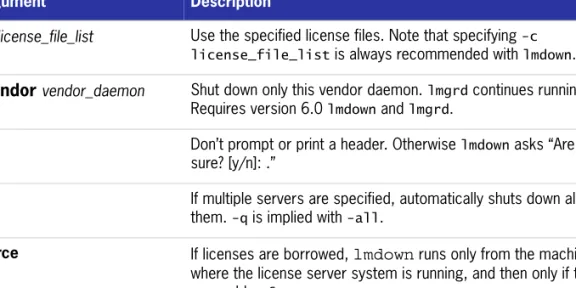
Contents lmdown . . . 49 lmhostid . . . 50 lminstall . . . 51 lmnewlog . . . 52 lmpath . . . 53 lmremove. . . 54 lmreread . . . 56 lmstat . . . 57 lmswitch. . . 59 lmswitchr . . . 60 lmver . . . 61
License Administration Tools—LMTOOLS for Windows . . . 61
Configuration Using License File . . . 62
Configuration Using Services . . . 62
5
The Options File
. . .
63
Creating an Options File . . . 64
Options File Syntax. . . 64
BORROW_LOWWATER . . . 68 DEBUGLOG. . . 69 EXCLUDE . . . 69 EXCLUDE_BORROW. . . 70 EXCLUDE_ENTITLEMENT . . . 71 EXCLUDEALL . . . 71 FQDN_MATCHING . . . 72 GROUP . . . 74 GROUPCASEINSENSITIVE. . . 74 HOST_GROUP . . . 75 INCLUDE . . . 75 INCLUDE_BORROW . . . 76 INCLUDE_ENTITLEMENT . . . 77 INCLUDEALL . . . 77 LINGER. . . 78 MAX . . . 79 MAX_BORROW_HOURS . . . 79 MAX_OVERDRAFT . . . 80
Contents
NOLOG. . . 80
REPORTLOG . . . 81
Reporting on Projects with LM_PROJECT. . . 81
RESERVE . . . 82
TIMEOUT . . . 83
TIMEOUTALL. . . 83
How the Vendor Daemon Uses the Options File . . . 84
Rules of Precedence in Options Files. . . 84
Options File Examples . . . 85
Simple Options File Example . . . 85
Limiting Access for Multiple Users . . . 85
EXCLUDE Example . . . 86
EXCLUDE_ENTITLEMENT Example . . . 86
INCLUDE Example . . . 87
INCLUDE_ENTITLEMENT Example . . . 87
6
Mobile Licensing
. . .
89
Node-Locked to a Laptop Computer . . . 90
Node-locked to a FLEXid (Windows Only) . . . 90
Node-Locked to a FLEXid with FLOAT_OK (Windows Only) . . . 90
Initiating FLEXid with FLOAT_OK . . . 91
Returning a FLEXid with FLOAT_OK License. . . 92
FLEXid with FLOAT_OK Example . . . 92
License Borrowing with BORROW . . . 93
Initiating License Borrowing . . . 93
Application Interface . . . 93
Running the lmborrow Utility . . . 93
Setting the LM_BORROW Environment Variable Directly . . . 94
Borrowing a License . . . 95
Clearing the Borrow Period . . . 95
Checking Borrow Status. . . 95
Returning a Borrowed License Early . . . 96
Support for License Borrowing . . . 96
Node-locked to a User Name . . . 97
Contents
7
Hostids for FLEXnet Licensing: Supported Platforms
. . .
99
Hostid Formats . . . 99
FLEXnet Licensing Hostids . . . 99
Special FLEXnet Licensing Hostids . . . 101
8
License File Format
. . .
103
License File Syntax. . . 104
SERVER Lines . . . 104
Three-Server Redundant Configurations. . . 106
VENDOR Lines . . . 107 USE_SERVER Line . . . 109 FEATURE/INCREMENT Lines . . . 109 Order of Precedence . . . 113 PACKAGE Lines. . . 114 UPGRADE Lines. . . 116 Decimal Format . . . 117
License File Order . . . 117
9
The License Server Manager
. . .
119
lmgrd Command-Line Syntax . . . 119
Starting the License Server Manager on UNIX Platforms . . . 121
Manual Start . . . 121
Automatical Start . . . 122
Starting the License Server Manager on Windows . . . 123
Manual Start from the Command Line . . . 123
Configuring the License Server Manager as a Windows Service . . . 123
Manual Start from LMTOOLS . . . 125
Automatic Start at System Start Up . . . 126
A
Troubleshooting Guide
. . .
129
General Troubleshooting Hints . . . 129
FLEXLM_DIAGNOSTICS . . . 130
Level 1 Content. . . 130
Level 2 Content. . . 131
Contents
B
FLEXnet Licensing Environment Variables
. . .
133
How to Set Environment Variables . . . 133
Registry . . . 133
Precedence . . . 134
Environment Variables . . . 134
C
FLEXnet Licensing Error Codes
. . .
137
Error Message Format . . . 137
Format 1 (short) . . . 138
Format 2 (long—version 6.0 and later) . . . 138
Error Code Descriptions . . . 138
D
The Report Log File
. . .
147
Managing Report Log Output . . . 147
Enabling Report Log Output for a Vendor Daemon . . . 148
Redirecting Report Log Output for a Vendor Daemon. . . 148
E
The Debug Log File
. . .
149
Managing Debug Log Output. . . 149
Capturing Debug Log Output for a License Server System . . . 150
Capturing Debug Log Output for a Particular Vendor Daemon . . . 150
Redirecting Debug Log Output for a Running Vendor Daemon . . . 150
Limiting Debug Log Output for a Vendor Daemon. . . 150
Debug Log Messages . . . 151
Informational Messages . . . 151
Configuration Problem Messages . . . 153
Daemon Software Error Messages . . . 154
F
FLEXnet Licensing Versions
. . .
155
Version Compatibility with FLEXnet Licensing Components. . . 155
Determining the License File Version. . . 156
Version Summary . . . 156
Introduction to
FLEXnet
Licensing End User Guide
This manual, FLEXnet Licensing End User Guide, describes the basic concepts of FLEXnet Licensing, license models, and concepts for designing license policies. It contains the following chapters:
Table 1: Help Navigation Table
Topic Content
Introduction to FLEXnet Licensing End User Guide
Provides an overview of the FLEXnet Licensing End User Guide, including Help Library conventions and usage.
Welcome to Macrovision Provides an overview of Macrovision Corporation, including information about Technical Support, online communites, and other Macrovision products.
Chapter 1, License File Basics Contains basic information license files and their proper usage.
Chapter 2, Managing Licenses from Multiple Vendors
Provides an overview of license file administration, including several scenarios of different, successful license
management strategies. Chapter 3, Selecting License
Server Machines
This chapter helps you determine which machines to use as license server machines.
Chapter 4, The Options File Explains what options files are how they allow the license administrator to control various operating parameters of FLEXnet Licensing.
Introduction to FLEXnet Licensing End User Guide
Documentation Conventions
Documentation Conventions
In this documentation, reader alert and style conventions are used to bring your attention to specific information or help you identify information.
Chapter 5, License Administration Tools
Provides descriptions of the different license administration utilities as well as procedural information regarding their use.
Chapter 6, Mobile Licensing Provides descriptions of and explanations of correct usage for different types of mobile licensing.
Chapter 7, Hostids for FLEXnet Licensing: Supported Platforms
Provides information about the various platforms supported by FLEXnet Licensing.
Chapter 8, License File Format Provides information about license file format and syntax within FLEXnet Licensing.
Chapter 9, The License Server Manager
Discusses license server administration. Includes correct command-line syntax and procedural information about how to start the license server manager on different platforms. Appendix A, Troubleshooting
Guide
Provides basic troubleshooting information for FLEXnet Licensing.
Appendix B, FLEXnet Licensing Environment Variables
Provides a complete listing and definitions of all FLEXnet Licensing environment variables. Includes procedural information as to how they should be set.
Appendix C, FLEXnet Licensing Error Codes
Provides all error codes found within FLEXnet Licensing.
Appendix D, The Report Log File Explains how to use the Report Log file and manage its output.
Appendix E, The Debug Log File Explains how to use the Debug Log file and manage its output.
Appendix F, FLEXnet Licensing Versions
Discusses how FLEXnet Licensing supports licenses that allow one of several kinds of mobile licensing, including node-locked licenses.
Table 1: Help Navigation Table
Introduction to FLEXnet Licensing End User Guide
Documentation Conventions
Reader Alert Conventions
Reader alerts are used throughout this documentation to notify you of both
supplementary and essential information. The following table explains the meaning of each alert.
Style Conventions
The following style conventions are used throughout this documentation. Table 2: Reader Alert Conventions
Image Alert Name Description
Note Notes are used to draw attention to pieces of information that should stand out.
Important Note Important notes are used for information that is essential for users to read.
Caution Cautions indicate that this information is critical to the success of the desired feature or product functionality. Tip Tips are used to indicate helpful information that could assist
you in better utilizing the desired function or feature. Best Practices Best Practices alerts instruct you on the best way to
accomplish a task.
Security Security alerts identify security issues.
Procedure The Procedure graphic indicates that procedural instructions follow.
Table 3: Style Conventions
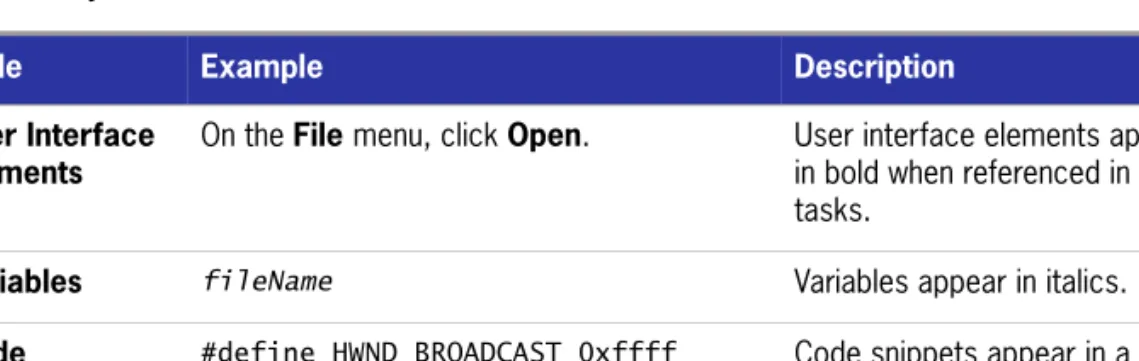
Style Example Description
User Interface Elements
On the File menu, click Open. User interface elements appear in bold when referenced in tasks.
Variables fileName Variables appear in italics. Code #define HWND_BROADCAST 0xffff Code snippets appear in a
Introduction to FLEXnet Licensing End User Guide
Documentation Conventions
User Inputted Text
Type $D(install). Text that is to be entered as a literal value is displayed in a monospace typeface, in bold, and in blue.
File Name and Directory Paths
My files are located in the
C:\MyDocuments\SampleCode directory.
File names and directory paths are presented in a monospace typeface.
Command-Line Statements
To run the installation silently, enter: Setup.exe /s /v/qn
Command-line statements and parameters are presented in a monospace typeface.
Environment Variables
Set the value of the windir environment variable to your
Environment variables are presented in a monospace typeface.
Examples Create two groups, one called Admins and the other called General.
Examples are presented in bold.
Functions FeatureAddItem adds a new feature to a script-created feature set.
Functions are presented in presented in bold.
Properties In the Name property, enter a name for this custom control that is unique among all of the controls in your project.
Properties are presented in bold.
Screen Output If you type an incorrect parameter, the message The system cannot find the path specified. is displayed.
Screen output (from a log file or from the console) is displayed in a monospace typeface, and in blue.
Table 3: Style Conventions (cont.)
Welcome to Macrovision
Company Information
Macrovision Corporation is the market leader in electronic licensing, installation, and digital rights management (DRM) technologies. Over 50,000 software vendors and virtually all of the Fortune 1,000 companies use Macrovision’s technologies to maximize the value of their software. Software Value Management solutions bridge the gap between pricing and packaging software on the development side, and purchasing and managing that software on the enterprise side. Macrovision markets the FLEXnet Software Value Management platform, which includes the InstallShield suite of software installation, repackaging, and update solutions; these solutions are deployed on more than 500 million desktops worldwide. Macrovision holds more than 910 software licensing, DRM, and content protection patents worldwide. Macrovision is headquartered in Santa Clara, California, and has offices worldwide.
Macrovision Solutions
Maximize the Value of Your Software
Software Value Management is a set of best practices that allows software vendors and their enterprise customers to maximize the value of the software applications they create, use, and maintain.
Once an application is developed by the engineering department, publishers use Software Value Management tools to maximize its revenue potential. These tools include installers and licensing tools that help publishers flexibly package, price, and protect their products. Their enterprise customers use Software Value Management
Welcome to Macrovision
Macrovision Professional Services
tools to maximize the productivity that they get from the software they purchase. These tools enable corporate IT staff to repackage applications, resolve potential conflicts, optimize license purchases, and manage updates.
Try a Macrovision Solution Today!
Evaluation copies of Macrovision solutions are available from the Macrovision Web site or from our sales staff. Visit us online at http://www.macrovision.com, or call today at (1) (800) 809-5659 (North America) or (44) (117) 903- 0650 (Europe, Middle East, and Africa).
Macrovision Professional Services
Macrovision offers more than industry-leading software. We also provide training, technical support, and consulting services that solve all your software installation, updating, and enterprise application management needs.
Expert Training Services
Whether you’re a novice or an experienced user wishing to refine your skill set, Macrovision’s training courses are the answer.
Table 1: Macrovision Software Technologies Group Solutions
Industries & Activities FLEXnet Software Value Management Solutions Software Vendors: z Market Software z Sell Software z Distribute Software z Service Software z Renew Software
z InstallShield—Tools for authoring installations and software management for any operating system. z FLEXnet Publisher—Price, package, protect their
product, and manage software licenses throughout their lifecycle to better meet market needs and maximize revenue.
Enterprise IS and IT: z Buy Software
z Prepare & Deploy Software z Maintain Software
z Renew Software
z InstallShield—Tools for authoring installations and software management for any operating system. z FLEXnet Publisher—Price, package, protect my
product, and manage software licenses throughout their lifecycle to better meet market needs and maximize revenue.
z FLEXnet AdminStudio—Application packaging, customization, testing, and workflow management for the enterprise.
z FLEXnet Manager—Maximize the value of your software assets through accurate usage reporting and centralized license management.
Welcome to Macrovision
Macrovision Professional Services
Macrovision’s professional trainers are authorities on installation engineering, updating, enterprise software packaging, software licensing, and license management. They will teach you the skills you need to become an expert.
Only Macrovision offers classes run by Macrovision-certified trainers. Every class features hands-on training for solving real-world issues.
Private, on-site courses customized to your company’s needs are also available. Visit http://www.macrovision.com/education today to find out more or fill out our online form.
Product Support Services
Whenever you need assistance, Macrovision’s technical support staff can answer any question that you have and help you overcome any issue that you face.
Besides the many award-winning support resources on the Macrovision Web site, Macrovision offers a number of annually renewable maintenance plans to meet your specific needs.
Choose the maintenance plan that best fits your needs and budget.
Get personalized assistance from Macrovision’s senior engineers and support technicians.
Visit http://www.macrovision.com/support/index.shtml today to find out more.
Expert Consulting Services
Macrovision is the premier source for installation engineering, updating, enterprise software packaging, software licensing, and license management services worldwide. Get the additional expertise you need to complete your projects on time and on
budget.
Get professional results without tying up your company’s internal resources. Work alongside our experts to learn invaluable techniques and best practices. Visit http://www.macrovision.com/consulting today to find out more or fill out
Welcome to Macrovision
Technical Support Resources
Additional Contact Information
Technical Support Resources
Macrovision’s Product Support Services team offers a set of comprehensive resources to help you find the answers you need. Comprehensive user documentation for your Macrovision product can be found in the product help library. Also, online resources such as our Knowledge Base provide quick access to years of experience at no cost, while maintenance plans give you more robust support with our expert engineers. Take a look at your options below and see which solution is right for you.
Knowledge Base
The Knowledge Base is located in the Support section of the Macrovision Web site at http://www.macrovision.com/support/index.shtml. It contains answers to many commonly asked questions and includes new information about FLEXnet Licensing that may not appear in the documentation. You can use the Knowledge Base search engine to search articles by phrases, numbers, platforms, and version.
Support Site
In addition to enabling you to search the Knowledge Base, the Macrovision Support site at http://www.macrovision.com/support/index.shtml enables you to:
Obtain FLEXnet Licensing updates. Submit FLEXnet Licensing feedback. View webinars.
Perform FLEXnet Licensing registration.
Obtain FLEXnet Licensing white papers, case studies, marketing materials, and training materials.
Obtain object libraries and sample projects.
Table 2: Additional Contact Information for Macrovision Professional Services
Location Telephone Number
The Americas, Australia, New Zealand (1) (847) 466-6000 Europe, Middle East, Africa (44) (0) (117) 903-0650
Welcome to Macrovision
Contacting Macrovision Corporation
Online Communities
The online communities are another excellent resource when you have questions about using FLEXnet Licensing. In these communities, users like you share tips and ideas and help each other get the most out of FLEXnet Licensing. Visit the
communities in the Support section of our Web site, available at http://
community.macrovision.com. You can also visit the Centralized Enterprise Licensing User Group community, which can be found at http://celug.com.
Contacting Macrovision Technical Support
Macrovision offers a variety of maintenance plans to fit the individual needs of all of our customers. Please visit http://www.macrovision.com/support/
maintenance.shtml to find the plan that suits you best.
Contacting Macrovision Corporation
You may contact us from anywhere in the world by visiting the Macrovision Web site at http://www.macrovision.com.
United States
Table 3: United States Contact Information
Office Address Telephone
Corporate Headquarters Santa Clara Office Video and Music Technologies FLEXnet Publisher Macrovision Corporation 2830 De La Cruz Blvd. Santa Clara, CA 95050 Tel: (408) 562-8400 Fax: (408) 567-1800 Email: corpinfo@ macrovision.com Macrovision Chicago Office
Licensing Technologies InstallShield, InstallAnywhere, FLEXnet AdminStudio, FLEXnet Manager Macrovision Corporation 900 National Pkwy., Suite 125 Schaumburg, IL 60173
Tel: (847) 466-4000 Toll Free (800) 374-4353 Sales: (847) 466-6000 Sales Toll Free: (800) 809-5659
Order Fax: (847) 619-0788 Macrovision San Francisco
Office
Games Technologies
Macrovision Corporation 795 Folsom Street, 2nd Floor - Suite 200 San Francisco, CA 94107 Tel: (415) 255-3060 Fax: (415) 255-0910 Email: gamesales@ macrovision.com
Welcome to Macrovision
Contacting Macrovision Corporation
Macrovision New York Office
Information Commerce Group,
eMeta, eRights Suite, RightAccess,
RightCommerce, eRightsWEB
Macrovision Corporation 81 Franklin Street, Suite 500 New York, NY 10013
Tel: (212) 219-4400 Toll Free: (800) 804-0103 Fax: (212) 219-4401 Table 3: United States Contact Information (cont.)
Welcome to Macrovision
Contacting Macrovision Corporation
Europe, Middle East, and Africa Region
Table 4: Europe, Middle East, & Africa Contact InformationOffice Address Telephone
Macrovision UK Maidenhead Office Macrovision UK Ltd. Malvern House 14-18 Bell Street Maidenhead Berkshire, SL6 1BR United Kingdom Tel: (44) (870) 871 1111 Fax: (44) (870) 871 1161 Macrovision UK/Europe Cheshire Office FLEXnet Publisher, FLEXnet Manager Macrovision Corporation Vision House, Priory Court Preston Brook, Cheshire, WA7 3FR United Kingdom Tel: (44) (870) 873 6300 Fax: (44) (192) 870 6329 Macrovision UK/Europe Cheshire Office InstallShield, InstallAnywhere, Update Service, FLEXnet AdminStudio Macrovision Corporation Vision House, Priory Court Preston Brook, Cheshire, WA7 3FR United Kingdom Tel: (44) (117) 903 0650 German: (44) (192) 870 6315 French: (44) (192) 870 6314 Spanish: (44) (192) 870 6311 Fax: (44) (192) 870 6329 Macrovision France FLEXnet Manager Macrovision Corporation 33 rue de Galillée 75016 Paris France Tel: (33) 1 44 43 53 44 Fax: (33) 1 44 43 53 91
For all InstallShield and AdminStudio inquiries, please call (44) (192) 870-6314 Macrovision Netherlands FLEXnet Publisher, FLEXnet AdminStudio, FLEXnet Manager Macrovision Corporation Busitel 1, Orlyplein 85 1043 DS Amsterdam The Netherlands Tel: (31) (0) 20 403 7673 Fax: (31) (0) 20 403 7676 Macrovision Alicante Office Games Technologies Macrovision Corporation Av. Jaime I El Conquistador 1-3 Bajo El Campello Alicante 03560 Spain Tel: (34) 956 107 771 Email: gamesales@ macrovision.com
Welcome to Macrovision
Contacting Macrovision Corporation
Asia Region
Table 5: Macrovision Asia Region Contact Information
Office Address Telephone
Macrovision Corporation Greater China Office
Macrovision Corporation Unit 301B, 3/F
Malaysia Building
50 Gloucester Road, Hong Kong
Tel: (852) 2868-5131 Fax: (852) 2850-6690 Email: Eric.So@ macrovision.com Macrovision Japan and Asia
K.K. Japan Office Macrovision Corporation Takaha Building 2F 6-18-5, Jingumae, Shibuya-ku Tokyo 150-0001 Japan Tel: (81) (3) 5774- 6253 Fax: (81) (3) 5774- 6269
Macrovision Korea Office Macrovision Corporation Suite 417,
Korea City Air Terminal B/D 159-6 Samsung-dong, Kangnam-ku, Seoul 135-728 Korea Tel: (82) (2) 6241- 5700 Fax: (82) (2) 6241- 5701 Mobile: (82) (11) 779- 0445 Macrovision Corporation Taiwan Office Macrovision Corporation 6F-13, No. 12, Lane 609, Sec. 5 Chung-Hsin Rd., San-Chung Taipei, Taiwan 241 Tel: (886) (2) 2999- 7979 Fax: (886) (2) 2999- 7575 Email: Keith.Lien@ macrovision.com
1
License File Basics
The license file contains information required by FLEXnet Licensing to manage licenses for a FLEXenabled application. This information includes:
License server system names and hostids
Vendor names and paths to vendor daemon executables Feature information
In general, the license file, or a copy of it, must be accessible to every machine that runs a FLEXenabled application, and to each machine designated as a license server machine.
Specifying Location of the License File
Software vendors often recommend a specific location for your license file. If you are running the application on multiple machines, you have these options for making your licenses available on all the machines:
Place the license file in a partition which is available to all machines in the network that need the license file.
Copy the license file to all of the machines where it is needed.
Set the LM_LICENSE_FILE or VENDOR_LICENSE_FILE (where VENDOR is the vendor daemon name) environment variable to port@host, where host and port come
from the SERVER line in the license file. Alternatively, if the license file SERVER line specifies a TCP/IP port in the default port range (27000–27009) or does not specify a port (thereby allowing the system to choose one from the default range), use the shortcut specification, @host.
Chapter 1: License File Basics
Specifying Location of the License File
For three-server redundant server configurations, use a comma separated list of three port@host specifiers denoting the three-server redundant configuration.
For example,
port1@host1,port2@host2,port3@host3
specifies the three-server redundant configuration composed of host1, host2, and host3.
Table 1-1shows some examples of LM_LICENSE_FILE and VENDOR_LICENSE_FILE environment variable settings.
On Windows, if the application cannot find the license file, the user is presented with a dialog that asks the user to specify the license file location, the license server system, or license fulfillment from the internet.
Since the vendor daemon keeps track of license usage, and since the license file contains encrypted data to protect it against modification, you may move and copy the license file as much as necessary.
For counted licenses, no matter which option you choose, you must first copy lmgrd and the vendor daemon to a location accessible by the FLEXenabled application.
Setting the Path with an Environment Variable
Most applications specify a location where they expect to find the license file and install it automatically. However, you can change the license file location by setting the LM_LICENSE_FILE environment variable to a license_file_list. Wherever
license_file_list is specified, it can consist of the following components: Table 1-1: Environment Variable Specification Examples
SERVER Line
LM_LICENSE_FILE or
VENDOR_LICENSE_FILE Setting
SERVER myserver 17007ea8 40000 where: z host = myserver
z port = 40000
40000@myserver
SERVER myserver 17007ea8 27001 where: z host = myserver
z port = 27001, within the default range
@myserver
SERVER myserver 17007ea8 where: z host = myserver
z port = none specified, uses a default TCP/IP port number in the range of 27000-27009
Chapter 1: License File Basics
License File Format Overview
the full path to the license file
a directory containing one or more license files with a .lic extension
a port@host setting, where port and host are the TCP/IP port number and
host name from the SERVER line in the license file. Alternatively, use the shortcut specification, @host, if the license file SERVER line uses a default TCP/IP port or
specifies a port in the default port range (27000–27009).
A comma separated list of three port@host specifiers denoting a three-server
redundant configuration. For example, port1@host1,port2@host2,port3@host3
specifies the three-server redundant configuration composed of host1, host2, and host3.
Applications accept an environment variable (or Windows Registry) named VENDOR_LICENSE_FILE, where VENDOR is the vendor daemon name, for example, MVSN_LICENSE_FILE. This environment variable’s scope is limited to just those applications from vendor VENDOR. On UNIX, the license-file list components are separated by colons; on Windows, the components are separated by semicolons. With lmgrd and lmutil (lmstat, lmdown, and so on), the -c option overrides the setting of the LM_LICENSE_FILE environment variable.
Note:Some applications do not recognize the LM_LICENSE_FILE environment variable. FLEXenabled Java applications, in particular, do not recognize it.
See Also
Managing Multiple License Files for more information about LM_LICENSE_FILE.
Environment Variables
Default TCP/IP port number range introduced in version 6.0 of lmgrd. License file location dialog introduced in version 6.0 of the client library.
License File Format Overview
License files usually begin with a SERVER line (or three lines for three-server redundant servers) followed by one or more VENDOR lines, followed by one or more FEATURE or INCREMENT lines. In some cases the license file requires no SERVER line and no VENDOR line.
You can modify these elements in the license file: Host names on the SERVER lines
TCP/IP port numbers on the SERVER lines Paths on the VENDOR lines
Chapter 1: License File Basics
Types of License Files
Options file paths on the VENDOR lines
Optional TCP/IP port numbers on the VENDOR lines (for firewall support only) USE_SERVER line
Values in keyword=value pairs on FEATURE lines, if keyword is specified in
lowercase See Also
Redundant License Server Systems Counted vs. Uncounted Licenses
License File Format for details on each one of these components. USE_SERVER introduced in the version 5.0 client library.
VENDOR lines are known as DAEMON lines in version 6.0 and earlier lmgrd and vendor daemon.
Types of License Files
License files are created by the software vendor. License files specify floating
(concurrent) usage, node-locked (both counted and uncounted), or any combination of floating, counted, and uncounted.
Floating (Concurrent) Licenses
A floating license means anyone on the network can use the FLEXenabled application, up to the limit specified in the license file (also referred to as concurrent usage or network licensing). Floating licenses have no hostids on the individual FEATURE lines. Floating licenses requires an lmgrd and a vendor daemon to be running to
count the concurrent usage of the licenses.
An example of a license file that provides floating licenses is: SERVER lulu 17007ea8
VENDOR sampled
FEATURE f1 sampled 1.00 1-jan-2005 2 SIGN=signature1
FEATURE f2 sampled 1.00 1-jan-2005 6 SIGN=signature2
FEATURE f3 sampled 1.00 1-jan-2005 1 SIGN=signature3
This license file specifies that two licenses for feature f1, six licenses for feature f2, and one license for feature f3 are available anywhere on the network that can access the license server machine lulu. lmgrd uses one of the default FLEXnet Licensing TCP/IP ports.
Chapter 1: License File Basics
Types of License Files
Node-Locked Licenses
Node-locking means the FLEXenabled software can only be used on one machine or a set of machines. A node-locked license has a hostid on any FEATURE line that is node-locked to a particular host. There are two types of node-locked licenses: uncounted and counted.
If the number of licenses is set to 0 (or uncounted), then the license is uncounted and unlimited use is permitted on the specified machine. This configuration does not require an lmgrd or a vendor daemon because it is not going to count the concurrent
usage of the features.
The following license file allows unlimited usage of feature f1 on the machines with hostids of 17007ea8 and 1700ab12:
FEATURE f1 sampled 1.000 1-jan-2005 uncounted SIGN=signature1 \
HOSTID=17007ea8
FEATURE f1 sampled 1.000 1-jan-2005 uncounted SIGN=signature2 \ HOSTID=1700ab12
Alternately, these two FEATURE lines could have been issued by your software vendor with a hostid list:
FEATURE f1 sampled 1.000 1-jan-2005 uncounted SIGN=signature \ HOSTID="17007ea8 1700ab12"
If these were the only FEATURE lines in this license file, no lmgrd daemon is necessary and you do not need to start one.
The following license file provides three licenses for feature f1, locked to the machine with hostid 1300ab43. Since the license server system and licenses are locked to the same machine, the daemons run on the same machine that runs the FLEXenabled application.
SERVER lulu 1300ab43 1700 VENDOR sampled /etc/sampled
FEATURE f1 sampled 1.00 1-jan-2005 3 SIGN=signature \
HOSTID=1300ab43
Mixed Node-Locked and Floating Licenses
Uncounted node-locked and concurrent usage licenses can be mixed in the same license file.The following license file allows unlimited use of feature f1 on machines 17007ea8
and 1700ab12, while allowing two other licenses for feature f1 to be used anywhere else on the network:
SERVER lulu 17001234 1700
VENDOR sampled C:\flexlm\sampled.exe
FEATURE f1 sampled 1.00 1-jan-2005 uncounted SIGN=signature1 \
HOSTID=17007ea8
Chapter 1: License File Basics
Types of License Files
HOSTID=1700ab12
FEATURE f1 sampled 1.00 1-jan-2005 2 SIGN=signature3
This configuration requires an lmgrd and a vendor daemon because the concurrent
2
Managing Licenses from
Multiple Vendors
Since more than 2,500 vendors have chosen FLEXnet Licensing for their licensing management, chances are good that you have to administer FLEXnet Licensing licenses from more than one vendor.
Overview of Multiple License
Management Strategies
When you are running FLEXenabled products from multiple vendors, you may need to take steps to prevent licensing conflicts during installation. There are several strategies to accomplish this, three of which are presented herein:
Multiple machines, each running one lmgrd, one vendor daemon, and using one license file.
One license server machine running multiple lmgrds, each of which running one vendor daemon and using one license file.
One license server machine running one lmgrd, multiple vendor daemons each of which using its own license file. License files share a common directory.
These strategies are ordered from most to least independence among vendors. In the first option mentioned above, you have the most license server machines to monitor; in the third option you have only one server and one license file to administer. Each of these three strategies is described in detail in the following sections. Variations are mentioned in Additional Considerations.
Chapter 2: Managing Licenses from Multiple Vendors
Multiple Machines
Multiple Machines
In this scenario, each distinct vendor daemon and its associated license file or files is located on a separate server machine. Each machine serves licenses just for its vendor daemon and runs its own local copy of lmgrd. Figure 2-1 shows this arrangement.
Figure 2-1: Multiple Server System Machines
Advantages
The license files for each vendor are independent from one another. Machines are maintained separately. If one machine goes down, the other
machines continue to serve licenses for their vendors. Each server has its own debug log.
Licensing load is distributed.
Disadvantages
Administrative overhead is the highest.
If one machine goes down, licensing for the vendor’s product associated with that machine is down.
Starting the License Server System
Task To start the license server system: Invoke the license server manager on each machine: lmgrd -c server_machine_n_license_list
Chapter 2: Managing Licenses from Multiple Vendors
One Machine with Multiple License Server Systems
where server_machine_n_license_list is a license-file list as described in
Managing Multiple License Files. Each lmgrd starts the vendor daemon referred to in its license files.
One Machine with Multiple License
Server Systems
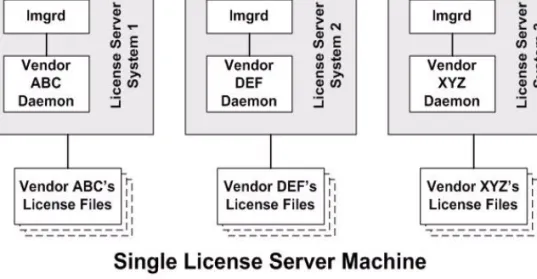
In this model, each vendor daemon and its associated license file or files is served by its own lmgrd process, and everything is contained in one server machine. Figure 2-2 depicts this scheme.
Figure 2-2: Multiple lmgrds, Multiple License Files
When maintaining separate license server systems on the same machine, keep in mind:
If the TCP/IP port number is specified on the SERVER line, it must be different for each license server system. Use a standard text editor to change the TCP/IP port number in each license file so that they are all different. If you are running 10 license server systems or less, you can omit all port numbers and lmgrd will
choose unique ones for you within the default range of 27000–27009.
You must make sure that you are using a compatible version of lmgrd for each
particular license file. This is done by using an explicit path to lmgrd. See Version Component Compatibility.
The number of license server systems is limited only by the CPU memory and networking of the machine.
Chapter 2: Managing Licenses from Multiple Vendors
One Machine with One License Server System and Multiple License Files
Advantages
The license files for each vendor are independent from one another.
License server systems are maintained separately. If one server goes down, the other servers continue to serve licenses for their vendors.
Each server has its own debug log.
Disadvantages
Administrative overhead is high.
If the machine goes down, all licensing is disabled. Licensing load is concentrated to one machine.
Starting the License Server System
Task To start the license server system: Invoke each license server system:
a. For Server 1: lmgrd -c vendor_ABC_license_dir_list b. For Server 2: lmgrd -c vendor_DEF_license_dir_list c. For Server 3: lmgrd -c vendor_XYZ_license_dir_list
where vendor_nnn_license_list is a license-file list as described in Managing Multiple License Files. Each lmgrd starts the vendor daemon referred to in its license files.
One Machine with One License Server
System and Multiple License Files
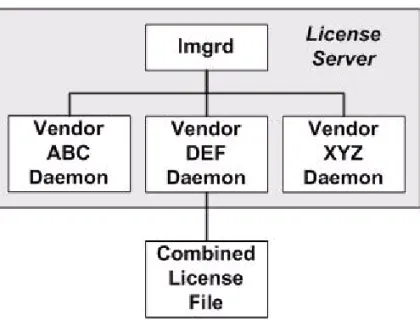
In this scenario, one lmgrd process runs on the server machine and serves one or more vendor daemons, each with one or more license files; the license files usually are in the same directory. The standard filename extension for license files is .lic. The number of vendor daemons is not limited by FLEXnet Licensing. Figure 2-3 illustrates this scenario.
Chapter 2: Managing Licenses from Multiple Vendors
One Machine with One License Server System and Multiple License Files
Figure 2-3: One lmgrd, Multiple License Files
Advantages
The license files can be maintained separately. Reduced administrative overhead.
Disadvantages
One lmgrd serves all vendor daemons. If lmgrd goes down, all licensing is disabled. If the machine goes down, all licensing is disabled.
Output from all vendor daemons goes into one common debug log unless separate debug logs are specified with DEBUGLOG in each vendor’s options file. Having one common debug log makes it harder to debug a single vendor daemon’s problem.
Maximizes licensing load to one machine and one lmgrd process.
Starting the License Server System
Task To start the license server system:Chapter 2: Managing Licenses from Multiple Vendors
Managing Multiple License Files
lmgrd -c common_license_directory
lmgrd processes all files with the .lic extension in common_license_directory and starts all vendor daemons referred to in those files, so there is no need to
enumerate each license file name on the lmgrd command line. See Also
Managing Multiple License Files
Capturing Debug Log Output for a Particular Vendor Daemon
Ability for one lmgrd to process multiple license files introduced in version 6.0 lmgrd.
Managing Multiple License Files
You can manage multiple license files that are on the same server machine via a license-file list. A license-file list is specified two ways:
By using the -c option to lmgrd
lmgrd -c license_file_list [other lmgrd options]
By defining the LM_LICENSE_FILE environment variable within the scope of the lmgrd process’s environment.
Install the license files in convenient locations on the server machine and then define the license_file_list.
Wherever license_file_list is specified it consists of a list of one or more of the following components:
the full path to the license file
a directory containing one or more license files with a .lic extension
a port@host setting, where port and host are the TCP/IP port number and
host name from the SERVER line in the license file. Alternatively, use the shortcut specification, @host, if the license file SERVER line uses a default TCP/IP port or
specifies a port in the default port range (27000–27009).
A comma separated list of three port@host specifiers denoting a three-server
redundant configuration. For example, port1@host1,port2@host2,port3@host3
specifies the three-server redundant configuration composed of host1, host2,
and host3.
Note:Use a colon (:) to separate the license file names on UNIX; on Windows, use a semicolon (;). lmgrd builds up an internal file list when it starts up by parsing each license-file list component in the order listed.
Chapter 2: Managing Licenses from Multiple Vendors
Additional Considerations
Some scenarios where a license-file list is used include those described in Multiple Machines, One Machine with Multiple License Server Systems, or One Machine with One License Server System and Multiple License Files.
See Also
Setting the Path with an Environment Variable Redundancy via License-File List
FLEXnet Licensing Environment Variables
Additional Considerations
Combining license files
If you have two or more products whose licenses are intended for the same machine, as specified by their SERVER lines, you may be able to combine the license files into a single license file. The license files for the models described in One Machine with Multiple License Server Systems and One Machine with One License Server System and Multiple License Files could be combined if they met certain criteria. See Criteria for Combining License Files. Figure 2-4 shows one possible scenario using a combined license file.
Figure 2-4: One lmgrd, One License File
Advantages
Chapter 2: Managing Licenses from Multiple Vendors
Additional Considerations
Once the files are combined, there is low administrative overhead.
Disadvantage
Careful planning must be given in combining license lines from multiple vendors into one file, initially and over time.
Starting the License Server System
Task To start the license server system:
Invoke the license server manager once on the server machine. lmgrd -c combined_license_file
Criteria for Combining License Files
Your product’s license files define the license server machines by host name and hostid in the SERVER lines in the license file. License files are candidates for combining under the following conditions:
The number of SERVER lines in each file is the same.
The hostid field of each SERVER line in one file exactly matches the hostid field of each SERVER line in the other file.
Some possible reasons license files may not be compatible are:
License files are set up to run on different server machines, so hostids are different.
One file is set up for a single server system (has only one SERVER line), the other is set up for a three-server redundant license server configuration (has multiple SERVER lines).
Hostids for the same machine use different hostid types. For example, the SERVER line in one license file uses INTERNET= for its hostid type and the other file uses the ethernet MAC address for its hostid type.
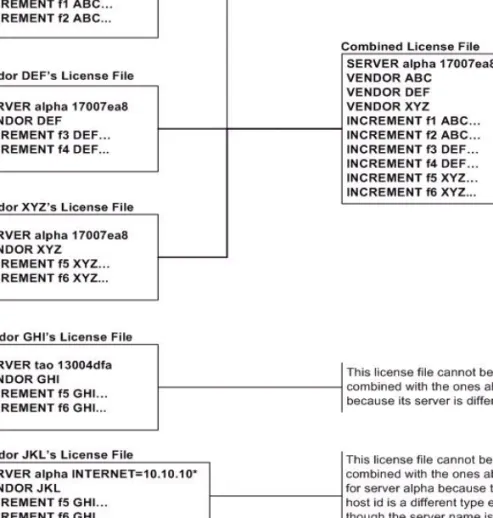
If your license files are compatible as described above, then you have the option of combining license files as summarized in Figure 2-4 and below in How to Combine License Files. Note that you are not required to combine compatible license files. There is no performance or system-load penalty for not combining the files.
Chapter 2: Managing Licenses from Multiple Vendors
Additional Considerations
How to Combine License Files
If your license files are compatible, use any text editor to combine them. To combine license files, read all of the compatible license files into one file, then edit out the extra SERVER lines so that only one set of SERVER lines remains. Save the resulting data, and you have your combined license file. Figure 2-5 shows an example of combining license files.
Chapter 2: Managing Licenses from Multiple Vendors
Additional Considerations
Version Component Compatibility
When one lmgrd process manages multiple vendor daemons, it may be the case that those vendor daemons do not use the same version of FLEXnet Licensing. By observing the FLEXnet Licensing version compatibility rules described in Version Compatibility with FLEXnet Licensing Components you are assured that all of your FLEXnet Licensing components are compatible.
For specific FLEXenabled applications, use either the new or the old version (of course, the vendor daemon for that application must be at least as new as the application itself).
3
Selecting License Server
Machines
This chapter helps you decide which machines to use as license server machines.
Resources Used by the Server
This section discusses the resources used by the license server system. When you select a server machine, you may need to take into account the system limits on these resources. For small numbers of licenses (under about 100), most of these system limits are not a problem on any workstation.
Sockets
When using TCP/IP ports, each FLEXenabled application connected to a license server system uses one or more sockets. The number of sockets any one FLEXenabled application requires is dependant on FLEXnet Licensing implementation details; consult your vendor for this information. The number of sockets available to the license server system is defined by the per-process system limit for file descriptors. The total number of sockets used by the license server system is slightly larger than the total number needed by the FLEXenabled applications which are served by it. If the number of sockets required by the license server system on a single machine becomes excessive, then it’s probably good to split the license file into more than one file, onto different servers, to lighten the networking traffic (which requires the vendor to agree to issue new licenses). FLEXenabled applications then check out licenses from multiple servers using a license-file list via the LM_LICENSE_FILE
Chapter 3: Selecting License Server Machines
Resources Used by the Server
CPU Time
For small numbers of clients, the license server systems use very little CPU time. The servers might have only a few seconds of CPU time after many days.
For a large number of clients (who are each exchanging heartbeat messages with the server), or for high checkout/checkin activity levels (hundreds per second), the amount of CPU time consumed by the server may start to become significant, although, even here, CPU usage is normally not high. In this case, you may need to ensure that the server machine you select has enough CPU cycles to spare.
Disk Space
The only output files created by the license server systems are the debug and report log files. The report log files are used to generate accurate usage reports by FLEXnet Manager. If you have a lot of license activity, these log files grow very large. You need to consider where to put these files and how often to rotate and archive them. The license administrator has the option to suppress log file output if disk space is at a premium.
It is recommended that the log files are local files on the server machines to avoid networking dependencies.
See Also
Setting the Path with an Environment Variable
Starting the License Server Manager on UNIX Platforms The Report Log File
The Debug Log File
Memory
The FLEXnet license server system uses little memory. On SunOS, lmgrd uses approximately 2 MB, and the vendor daemons use approximately 2 MB each, although memory usage increases in the vendor daemon with the size of the license file, size of the options file, and the number of concurrent users.
Network Bandwidth
FLEXnet Licensing sends relatively small amounts of data across the network. Each transaction, such as a checkout or checkin, is typically satisfied with less than 1 KB of data transferred. This means that FLEXnet Licensing can be effectively run over slow networks (such as dial-up SLIP lines) for small numbers of clients.
Chapter 3: Selecting License Server Machines
Redundant License Server Systems
For a large number of FLEXenabled applications (hundreds), each of which exchange heartbeat messages with the vendor daemon, the network bandwidth used may start to become significant. In this case, run the FLEXenabled application and server on the same local area network, which may require splitting licenses between two files for two servers. Users can use a license-file list in the LM_LICENSE_FILE environment variable to have effective access to both servers.
See Also
Specifying Location of the License File
Remote Mounted Disks
Macrovision recommends that you do not use remote mounted disks when you run the license server system. In other words, it is recommended that lmgrd, the vendor
daemons, the license file, and the debug and report log files are all on locally mounted disks. If any of these files is on a remote mounted disk, you double the points of failure which could lead to a temporary loss of all of your licenses. When all files are mounted locally, the licenses are available as long as the server machine is up; but when the files are on a different machine, then the loss of either the license server machine or the file server machine causes the licenses to be unavailable.
Redundant License Server Systems
If you wish to use redundant license server systems, select stable machines; in other words, do not pick machines that are frequently rebooted or shut down for one reason or another. Redundant license server machines are any that support a license server system.
FLEXnet Licensing supports two methods of redundancy:
via a license-file list in the LM_LICENSE_FILE environment variable via a set of three redundant license server systems
With LM_LICENSE_FILE list redundancy, each one of a group of license server systems serves a subset of the total licenses. The end user sets LM_LICENSE_FILE to a list of license files, where each license file refers to one of the license server systems. The application then tries each server in the list, in order, until it succeeds or gets to the end of the list.
With three-server redundancy, if any two of the three license server systems are up and running (two out of three license server systems is referred to as a quorum), the system is functional and serves its total complement of licenses.
See Also
Chapter 3: Selecting License Server Machines
Redundant License Server Systems
Redundancy via License-File List
This is best explained by example. If ten licenses are desired for both f1 and f2, the vendor issues two sets of licenses with a count of five for each of f1 and f2. The server machines (unlike three-server redundancy) can be physically distant.
The license files look like:
License 1 for “chicago”
SERVER chicago 17007ea8 1700 VENDOR sampled /etc/mydaemonFEATURE f1 sampled 1.000 01-jan-2005 5 26C7DD9C0186 FEATURE f2 sampled 1.000 01-jan-2005 5 8CE46C57041D
License 2 for “tokyo”
SERVER tokyo 17a07e08 1700 VENDOR sampled /etc/mydaemon
FEATURE f1 sampled 1.000 01-jan-2005 5 16BE40E1D98D FEATURE f2 sampled 1.000 01-jan-2005 5 6DB6F3E402DF The user in Chicago could set LM_LICENSE_FILE to: 1700@chicago:1700@tokyo
The user in Tokyo could set LM_LICENSE_FILE to: 1700@tokyo:1700@chicago
Remember to separate the license file names with a colon (:) on UNIX and with a semicolon (;) on Windows. The application attempts the first server in the list, and if that fails for any reason, the second server is tried.
Three-Server Redundancy
The machines that comprise a three-server redundant configuration are required to have excellent communications. This form of redundancy requires that the servers exchange heartbeats periodically, and poor communications can cause poor
performance. Avoid configuring redundant servers with slow communications or dial-up links.
Three-server redundancy is designed to provide hardware fail-over protection only and does not provide balancing. Use LM_LICENSE_FILE list, instead, if load-balancing is desired. This is because with three-server redundancy, only one of the three servers is master, capable of issuing licenses. Since all clients must contact the
master, all clients must have reliable networking to a single machine. For more details, see Three-Server Redundant Configurations.
Chapter 3: Selecting License Server Machines
Counted vs. Uncounted Licenses
Comparing Three-Server to License-File List
Are there any drawbacks to using the license-file list for
redundancy?
Yes. By default, once a FLEXenabled application has successfully checked out a license from a given license server system, all subsequent license requests from the same application must be satisfied from the same server system. In the event that the application makes subsequent license requests and no more licenses are available from that server system, the license request is denied even though licenses may exist on another server. An application can bypass this restriction if it is coded with the use of multiple FLEXnet license jobs. Only your publisher knows if their application is programmed in this manner.
If the application supports license queueing, all licenses are queued only from the first license server system on the list rather than the request moving to another server on the list.
Finally, if one server becomes unavailable, some licenses are unavailable.
When is it recommended to use a license-file list for
redundancy rather than three-server redundant servers?
When there is less system administration available to monitor license serversystems.
When load-balancing is needed for FLEXenabled applications located far apart, for example, London and Tokyo, make servers available locally, with remote servers available as backup.
License-file list is more forgiving if you lose quorum.
License-file list is not limited to three servers (any number work).
Clients do not require reliable networking to a single machine with license-file list, so this is recommended where networking itself requires redundancy.
Counted vs. Uncounted Licenses
The license file determines whether a license server system is needed. If all the FEATURE (or INCREMENT) lines have a license count of 0 (unlimited) or uncounted, then no server is needed. This type of license is called uncounted. Alternatively, if any FEATURE lines have a non-zero license count, then a server is required to count those licenses. If a vendor wants to use FLEXnet Licensing without a server, they must issue uncounted licenses.
The license server system is able to serve uncounted licenses as well. This is done so that:
Chapter 3: Selecting License Server Machines
Counted vs. Uncounted Licenses
transactions can be logged into the report log for all license requests, which can then be reported on by FLEXnet Manager
options file constraints can be applied to the licenses
To have uncounted licenses served, include a SERVER line in the license file, and put the USE_SERVER line immediately after the SERVER line. The vendor daemon serves the uncounted licenses, and the USE_SERVER line indicates to applications that requests must go to the license server system for authorization.
4
License Administration Tools
FLEXnet Licensing provides utilities for the license administrator to help manage the licensing activities on the network. Always use the newest version of the utilities as possible; they are available for download from www.macrovision.com. Table 4-1 lists these utilities.
Table 4-1: License Administration Utilities Utility Description
lmborrow Supports license borrowing.
lmdiag Diagnoses license checkout problems.
lmdown Gracefully shuts down selected license daemons (both lmgrd and all vendor daemons) on the license server machine (or on all three machines in the case of three-server redundant servers).
lmhostid Reports the hostid of a system.
lminstall Converts license files between different formats.
lmnewlog Moves existing report log information to a new file name and starts a new report log file with existing file name.
lmpath Allows users direct control over license file path settings.
lmremove Releases a hung license to the pool of free licenses.
lmreread Causes the license daemon to reread the license file and start any new vendor daemons.
Chapter 4: License Administration Tools
Running Administration Tools
The lmpath utility introduced in the version 7.0 utilities. The lmborrow utility introduced in the version 8.0 utilities. The lmswitch utility introduced in version 8.0 vendor daemon. The lmswitchr utility introduced in version 5.0 vendor daemon.
Running Administration Tools
All FLEXnet Licensing utilities are packaged as a single executable called lmutil. lmutil is either installed as individual commands (either by creating links to the individual command names, or making copies of lmutil as the individual command names), or as a wrapper that runs the individual command as lmutilcommand. For example, lmutil lmstat or lmutil lmdown.
On Windows systems, the lmutil command form of the commands are available. There is also a graphical user interface available for these commands—see License
Administration Tools—LMTOOLS for Windows.
lmstat Displays the status of a license server system.
lmswitch Controls debug log location and size.
lmswitchr Switches the report log to a new file name.
lmver Reports the FLEXnet Licensing version of a library or binary file. Table 4-1: License Administration Utilities (cont.)
Chapter 4: License Administration Tools
Universal lmutil Arguments
Universal lmutil Arguments
The following are valid arguments for most lmutil utilities:
VENDOR_LICENSE_FILE environment variable honored in utilities starting with version 7.0 utilities.
-verbose option introduced in version 6.0 of the utilities.
lmborrow
lmborrow supports borrowing of licenses that contain the BORROW attribute. It must be run on the machine where licenses are borrowed. It is used to perform the
following:
Initiating borrowing by setting the borrow period Clearing the borrow period
Determining borrow status
Returning a borrowed license early
Initiating Borrowing
To initiate borrowing, the user sets the borrow period by running lmborrow from the
command line or through LMTOOLS: Table 4-2: lmutil Valid Arguments
Argument Description
-c license_file_path Most lmutil utilities need to know the path to the license file. This is specified with a -c license_file_path argument, or by setting the LM_LICENSE_FILE environment variable. Otherwise, the default location is used. The utilities also honor all VENDOR_LICENSE_FILE environment variables. Some utilities take more than one license file path in a license-file list separated by colons on UNIX and semicolons on Windows.
Pathnames that include spaces must be enclosed in double quotes. -help Displays usage information and exits.
-v Displays the FLEXnet Licensing version of the utility and exits. -verbose Displays longer description for all errors found.