Cookbook
eCarmed
Version 1.01
This document is provided to you free of charge by the
eHealth platform
Willebroekkaai 38
38, Quai de Willebroeck
Table of contents
Table of contents ... 2
1 Document management ... 3
1.1 Document history ... 3
2 Introduction... 4
2.1 Goal of the service ... 4
2.2 Goal of the document ... 4
2.3 eHealth document references ... 4
2.4 External document references ... 5
2.5 Service history ... 5
3 Business and privacy requirements ... 6
3.1 Certificates ... 6
3.2 eHealth contact ... 6
4 Global overview ... 7
5 Step-by-step ... 8
5.1 Technical requirements ... 8
5.1.1 Use of the eHealth SSO solution ... 8
5.1.2 Security policies to apply ... 8
5.2 Description of xml-message ... 9
5.2.1 ConsultCarmedInterventionRequest ... 9
5.2.2 ConsultCarmedInterventionReply ... 12
6 Risks and security ... 16
6.1 Security ... 16
6.1.1 Business security ... 16
6.1.2 Web service ... 16
6.1.3 The use of username, password and token ... 16
7 Test and release procedure ... 17
7.1 Project application ... 17
7.2 Certificates ... 17
7.3 Procedure ... 17
7.3.1 Initiation ... 17
7.3.2 Development and test procedure ... 17
7.3.3 Release procedure ... 17
7.3.4 Operational follow-up ... 18
7.4 Test cases ... 18
1
Document management
1.1
Document history
Version Date Author Description of changes / remarks
1.0 22/08/2010 eHealth First version
2
Introduction
2.1
Goal of the service
In the context of medical assistance, CPAS & SPP IS (OCMW & POD MI) can intervene in medical costs of people experiencing financial distress or unable to pay these fees. Part of this intervention is supported by the federal state represented by the POD MI. In general, the workflow of medical assistance is as follows:
The person in distress applied for financial aid for the payment of medical expenses from the OCMW which he depends on. This request should be done before granting care (in some cases urgent requests for assistance may be made after the granting of aid). The OCMW must conduct a social survey to ascertain whether the conditions for granting medical assistance are met.
The OCMW will make a decision in determining the duration of the intervention, the level of care and medical benefits covered - for example care co-payments or care not included in the nomenclature of the RIZIV (INAMI). This decision will be achieved by a medical card and the system eCarmed.
Then, when the beneficiary of the medical card goes to a health care provider, the health care provider should be able to see whether the patient is covered for the care requested through the eCarmed system. If the patient is covered, the invoice will be sent to the HKZIV (CAAMI). If the invoice is admissible, the HKZIV will pay part of the POD MI and transmit the invoice to the appropriate OCMW so it can pay the remaining portion under the terms of the electronic card.
The goal of the eCarmed service provided by eHealth is to give the health care providers the means to consult the financial coverage of a patient and obtain an agreement number that guarantees payment.
2.2
Goal of the document
This document is not a development or programming guide for internal applications. Instead it provides functional and technical information and allows an organization to integrate and use the eHealth service. But in order to interact in a smooth, homogeneous and risk controlled way with a maximum of partners, eHealth partners must commit to comply with the requirements of specifications, data format and release processes described in this document.
Technical and business requirements must be met in order to allow the integration and validation of the eHealth service in the client application.
2.3
eHealth document references
All the document references can be found in the support section of the eHealth portal1. These versions or any following versions can be used for the eHealth service.
ID Title Version Date Author
1 Glossary 1.0 01/01/2010 eHealth
2 Certificate agreement for software firms 1.1 18/05/2010 eHealth
3 Procedure to obtain a certificate for
acceptance 1.0 30/07/2012 eHealth
4 Mandate form to get a certificate on
behalf of an organization 1.0 12/09/2011 eHealth
5 Procedure to request an eHealth
certificate 3.0 30/07/2012 eHealth
6 Cookbook STS 1.0 31/08/2010 eHealth
2.4
External document references
All documents can be found through the internet. They are available to the public, but not supported by eHealth.
ID Title Source Date Author
1 2012_eCarmed_TSS.pdf (v1.2) KSZ/BCSS 16/08/2012 KSZ/BCSS
2.5
Service history
This chapter contains the list of changes made to the service with respect to the previous version. Previous version Previous release date changes
3
Business and privacy requirements
3.1
Certificates
An eHealth certificate is used to identify the initiator of the request. If you don’t have one, see: Dutch version:
https://www.ehealth.fgov.be/nl/support/basisdiensten/ehealth-certificaten French version:
https://www.ehealth.fgov.be/fr/support/services-de-base/certificats-ehealth
3.2
eHealth contact
• eHealth contact center:02 / 788 51 55 or via mail on [email protected]
• For users in production please contact Dutch version
https://www.ehealth.fgov.be/nl/neem-contact-met-de-openbare-instelling-eHealth-platform French version
https://www.ehealth.fgov.be/fr/contactez-institution-publique-plate-forme-eHealth
• For users in acceptation, please contact [email protected]
4
Global overview
Figure 1
The eCarmed service is secured with the SAML Holder-of-Key (HOK) policy. Therefore, prior to calling the service, a SAML token must be obtained at the eHealth Secure Token Service (STS). The obtained token must be then included in the header of the request message (2), together with the timestamp, where the timestamp and the body must be signed with the certificate as used in the Holder-Of-Key profile of the SAML token (see also more detailed technical description further in the cookbook). The body contains the eCarmed request (ConsultCarmedIntervention). The eHealth ESB verifies the security (authentication, authorization, etc.) and forwards the request to the WSP. The service can return an xml response (4), or the response can be formatted as "flat" – dependently on the called operation (ConsultCarmedInterventionResponse).
You can find more information about the first step in the STS Cookbook found on the eHealth portal (see Section 2.3). Next we will describe step 2 in further detail.
5
Step-by-step
5.1
Technical requirements
In order to implement a web service call protected with a SAML token you can reuse the implementation as provided in the "eHealth technical connector". Nevertheless, eHealth implementations use standards and any other compatible technology (web service stack for the client implementation) can be used instead.
Dutchversion: https://www.ehealth.fgov.be/fr/support/connectors French version: https://www.ehealth.fgov.be/fr/support/connectors
Alternatively, you can write your own implementation. The usage of the Secure Token Service (STS) and the structure of the exchanged xml-messages are described in the eHealth STS cookbook.
Dutch version: https://www.ehealth.fgov.be/nl/support/sts-secure-token-service French version: https://www.ehealth.fgov.be/fr/support/sts-secure-token-service
5.1.1
Use of the eHealth Single Sign On (SSO) solution
The complete overview of the profile and a step-by-step implementation to start protecting a new application with SSO @ eHealth is described in the eHealth SSO cookbook.
This section specifies how the call to STS must be done to have access to the web service. You must precise several attributes in the request. In certain cases, the attributes we need are the following
(AttributeNamespace="urn:be:fgov:identification-namespace"):
• The NIHII number of the hospital: urn:be:fgov:ehealth:1.0:certificateholder:hospital:nihii-number and
urn:be:fgov:ehealth:1.0:hospital:nihii-number
You also have to precise which information must be validated by eHealth. To have access to the web service, the following data must at least be validated
(AttributeNamespace="urn:be:fgov:certified-namespace:ehealth"):
• The NIHII number of the hospital (namespace: urn:be:fgov:identification-namespace):
urn:be:fgov:ehealth:1.0:certificateholder:hospital:nihii-number and
urn:be:fgov:ehealth:1.0:hospital:nihii-number
• The hospital must be a recognized hospital with a nihii hospital (AttributeNamespace:
urn:be:fgov:certifiednamespace:ehealth): urn:be:fgov:ehealth:1.0:hospital:nihii-number:recognisedhospital:nihii11
• To have access to the eCarmed web service, the hospital must be a recognized hospital (AttributeNamespace: urn:be:fgov:certifiednamespace:ehealth):
urn:be:fgov:ehealth:1.0:certificateholder:hospital:nihii-number:recognisedhospital:boolean
To access the eCarmed web service, the response token must contain “true” for all of the boolean certification attributes.
If you obtain “false”, contact eHealth to verify that the requested test cases were correctly configured.
5.1.2
Security policies to apply
We expect that you use SSL one way for the transport layer. As web service security policy, we expect:
• A timestamp (the date of the request), with a Time to live of one minute (if the message doesn’t arrive during this minute, it shall not be treated).
• The signature with the certificate of
o the timestamp, (the one mentioned above); o the body (the message itself);
o the binary security token: an eHealth certificate or a SAML token issued by STS.
This will allow eHealth to verify the integrity of the message and the identity of the message author. A document explaining how to implement this security policy can be obtained at eHealth.
The STS cookbook can be found on the eHealth portal:
Dutch version: https://www.ehealth.fgov.be/nl/support/sts-secure-token-service French version: https://www.ehealth.fgov.be/fr/support/sts-secure-token-service
5.2
Description of xml-message
Steps 2 in Figure 1 are described in more detail hereafter.
5.2.1
ConsultCarmedInterventionRequest
Field name Descriptions
InformationCustomer See 6.2.1.1: InformationCustomer InformationCbss See 6.2.1.2: InformationCBSS
LegalContext This should always be “rights eCarmed” SelectionCriteria See 6.2.1.3: ConsultCarmedData
5.2.1.1
InformationCustomer
Field name Descriptions
Ticket The ticket number can be used as reference for the request. It is not mandatory. When used, it should match the following regular expression: [0-9,a-Z]{0,36}
TimestampSent This is a Timestamp indicating when the request was sent. (E.g. 2012-08-22T09:30:47.0Z)
CustomerIdentification CustomerIdentification can have a CbeNumber or a Sector and Institution. The CbeNumber is the CBE number identifying the enterprise or business unit. It consists of a 10 digit string.
Sector and Institution must both be numbers ≤ 999
5.2.1.2
InformationCbssType
The InformationCbssType provides transaction information and should not be used in the
ConsultCarmedInterventionRequest. For more info see the 2012_eCarmed_TSS.pdf (v1.2) document (cfr. section 2.4).
5.2.1.3
ConsultCarmedData
The ConsultCarmedData should contain the patient details (BySsin).
Field name Descriptions
ECarmedNumber Should not be used
5.2.2
ConsultCarmedInterventionReply
The reply returns the active decision that met the search criteria. The content of the decision is limited to the different coverages and interventions supported by the POD MI. The POD MI can also limit the coverages further down to the list provided by the OCMW. For interventions, a registration number is provided. The Id attribute can be used in case you are communicating errors to our helpdesk.
Field name Descriptions
Status See Section 6.2.2.2
InformationCustomer Contains the same info as sent in the request. (See Section 5.2.1.1) InformationCBSS Contains date-time information about the treatment of the request.
LegalContext “rights eCarmed”
Enduser See Section 6.2.2.1
SelectionCriteria Contains the same info as sent in the request
BackendMessages See documentation 2012_eCarmed_TSS.pdf (v1.2) (cfr 2.4)
Result See documentation 2012_eCarmed_TSS.pdf (v1.2) (cfr 2.4)
5.2.2.1
EndUserType
This part is the information regarding the
BySsin
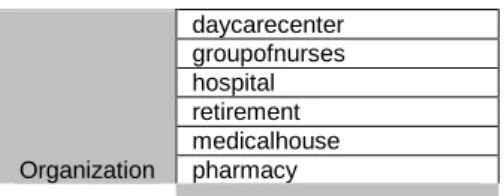
element sent in the original request. An EndUser can represent 1 to 10 medical entities. Each medical entity is either care professional or an organization. For each medical entity, a MedicalCategory can be associated (see Figure 2 URN - MedicalCategory). For now, only nihii number will be present. If for one urn, multiple values are present, all the values can be found in the NihiiNbr element.Remark: For now, only hospital will be supported.
medicalCategory Professionnal doctor pharmacist dentist midwife nurse physiotherapist dietist podiatrist logopedist orthoptist orthopedist bandagist implantprovider occupationaltherapist opticien audicien biologistpharmacist psychologist
Organization daycarecenter groupofnurses hospital retirement medicalhouse pharmacy
Figure 2 URN - MedicalCategory
5.2.2.2
StatusType
Summary of the status of the treatment of the service. If there is a technical error, a SOAP error message is returned (see section 8). Be aware that a code 200 doesn’t mean that all necessary data was found. You should see the element ReturnInfo for more info (see next section).
Field name Descriptions
Code 200 in the case no error occurred.
5.2.2.3
ReturnInfo (StatusType)
Technical errors will always return SOAP fault. Business errors will return the additional fields description or
information. For extra information see Section 2.4 2012_eCarmed_TSS.pdf.
Field name Descriptions
Value Global status of the result.
status/value Signification
DATA_FOUND Requested information was found. NO_DATA_FOUND The requested information was not
all found:
See the information field for more info.
NO_RESULT The request could not be handled: See the description field for more info.
Code The code of the result. MSG00000 for a successful handling of the request. MSG00001 in case of ‘NO_RESULT’.
Description A short description of the status. Only present if value is equal to ‘NO_RESULT’. The values can be: ERROR[n], WARNING[n’] or INFORMATION[n’’] where n, n’ and n’’ > 0.
6
Risks and security
6.1
Security
6.1.1
Business security
In case the development adds an additional use case based on an existing integration, eHealth must be informed at least one month in advance with a detailed estimate of the expected load. This will ensure an effective capacity management.
In case of technical issues on the web service, the partner may obtain support from the contact center that is responsible for this service.
In case eHealth finds a bug or vulnerability in its software, the partner is advised to update his application with the newest version of the software within 10 business days.
In case the partner finds a bug or vulnerability in the software or web service that eHealth delivered, he is obliged to contact and inform eHealth immediately and he is not allowed to publish this bug or vulnerability in any case.
6.1.2
Web service
Web service security used in this manner is in accordance with the common standards. Your call will provide:
• SSL one way;
• Time-to-live of the message: one minute;
• Signature of the timestamp, body and binary security token. This will allow eHealth to verify the integrity of the message and the identity of the message author.
• No encryption on the message.
6.1.3
The use of username, password and token
The username, password and token are strictly personal and are not allowed to transfer.
Every user takes care of his username, password and token and is forced to confidentiality of it. Every user is also responsible of every use which includes the use by a third party, until the inactivation.
7
Test and release procedure
This procedure explains the complete process to integrate a web service. Starting from the initial demand just until it’s put in production.
7.1
Project application
The first step to start a project is the start up phase. Here, the partner asks eHealth to integrate a certain service in their software.
The request must be sent to the project team ([email protected]). eHealth and the partner make a business description with the goals and an estimate of the number of users.
If, in the business description, it’s mentioned that medical data is used, a request must be sent to the
commission of the protection of privacy. More info can be found on http://www.privacycommission.be. When this is approved, the partner can continue development.
7.2
Certificates
First steps to get access to the secured eHealth environment are the eHealth certificates.
7.3
Procedure
The rest of this chapter explains the procedures for testing and releasing an application in acceptation or production.
7.3.1
Initiation
If you intend to use the eHealth service, please contact [email protected]. The Project department will provide you with the necessary information and mandatory documents.
7.3.2
Development and test procedure
You have to develop a client in order to connect to our web service. Most of the required integration info to integrate is published in the technical library on the eHealth portal.
In some cases eHealth provides you with a mock-up service or test cases in order for you to test your client before releasing it in the acceptance environment.
7.3.3
Release procedure
For further information and instructions, please contact: [email protected].
7.3.4
Operational follow-up
Once in production, the partner using the eHealth service for one of its applications will always test first in the acceptance environment before releasing any adaptations of its application in production. In addition, he will inform eHealth on the progress and test period.
7.4
Test cases
In order to test the service, a test case must be created first by the eHealth development team. The rules to access the eCarmed web service are the same in test as in production.
Access rules:
• authentication with a hospital’s certificate (see section 4.1) All test cases have to be configured by the eHealth development team.
Before doing any test, request your test cases from the eHealth development team ([email protected]) using the template “request.testcases.ecarmed.webservice.xls”.
The template must be completely filled out. If you have any question about the template, you can send an e-mail to [email protected].
8
Error and failure messages
Error codes originating from the eHealth platform:These error codes first indicate a problem in the arguments sent, or a technical error.
Error code Description
SOA-00001 Service error
SOA-01001 Service call not authenticated SOA-01002 Service call not authorized
SOA-02001 Service temporarily not available. Please try later SOA-02002 Message must be SOAP
SOA-03001 Malformed message SOA-03002 Message must be SOAP
SOA-03003 Message must contain SOAP body SOA-03004 WS-I compliance failure
SOA-03005 WSDL compliance failure SOA-03006 XSD compliance failure