Manuale di installazione
e manutenzione per porte
basculanti a molle e
sezionali.
Installation and maintenance
manual for spring balanced
up and over door and
sectional overhead doors.
Manuel d’installation et
d’entretien pour portes
basculantes a ressort et
sectionneles.
Montage und
Wartungsanleitung für
Garagentorantriebe.
Manual de instalaciòn
y mantenimiento para
puertas basculante de
resortes y seccionales.
Manual de instalação e
manutenção para portas
basculantes a molas e
seccionadas.
GLOBE
IP1839 - rev. 2006-07-24
P
E
D
F
GB
I
DITEC S.p.A.Via Mons. Banfi, 3 - 21042 Caronno Pertusella (VA) - ITALY Tel. +39 02 963911 - Fax +39 02 9650314
RX - 4x0.5 mm² TX - 4x0.5 mm² 7 5 6 8 4 9 1 2 12 3 10 11 9
124
490
208
500
10
20
30
3
Fig. 1 Fig. 2 Fig. 31 2 3 4
370
205
370
205
X X X X Fig. 4Stringere!
Fig. 5a Fig. 5b Fig. 5c
Y
K
3000
Fig. 5e Fig. 6E
H
1÷2 mm
Fig. 5dGLOBEGF - GLOBEGA
E
H
Fig. 5f30 10÷100 M Fig. 7a 30 min. 680
min. 900
GLOBEC
Fig. 7b30
min. 20
max. 210
GLOBEC
E
H
1÷2 mm
Fig. 7c Fig. 8a Fig. 7dmax. 200
20÷100
G
L
J
H E
M
DOOR TYPE YEAR OF MANUFACTURE VOLTAGE SUPPLY SERIAL NUMBER Fig. 8bGLOBESI
30
8
75
42
220
30
8
75
42
220
YES
NO
Fig. 10a Fig. 9G
P
P
G
Fig. 8c Fig. 8d Fig. 10b Fig. 10cGENERAL SAFETY PRECAUTIONS
This installation manual is intended for professionally competent personnel only.
Installation, electrical connections and adjustments must be performed in accordance with Good Working Methods and in compliance with applicable regulations. Before installing the product, carefully read the instructions. Bad installation could be hazardous.
The packaging materials (plastic, polystyrene, etc.) should not be discarded in the environment or left within reach of children, as these are a potential source of hazard. Before installing the product, make sure it is in perfect condition.
Do not install the product in an explosive environment and atmo-sphere: gas or inflammable fumes are a serious hazard risk. Before installing the motors, make all structural changes relating t o safety clearances and protection or segregation of all areas where there is risk of being crushed, cut or dragged, and danger areas in general.
Make sure the existing structure is up to standard in terms of strength and stability.
The motor manufacturer is not responsible for failure to use Good Working Methods in building the frames to be motorised or for any deformation occurring during use.
The safety devices (photocells, safety edges, emergency stops, etc.) must be installed taking into account: applicable laws and directives, Good Working Methods, installation premises, system operating logic and the forces developed by the motorised door or gate.
The safety devices must protect any areas where the risk exists of being crushed, cut or gragged, or where there are any other risks generated by the motorised door or gate. Apply hazard area notices required by applicable regulations.
Each installation must clearly show the identification details of the motorised door or gate.
Before making power connections, make sure the plate details correspond to those of the power mains.
Fit an omnipolar disconnection switch with a contact opening gap of at least 3 mm. Make sure an adequate residual current circuit breaker and overcurrent cutout are fitted upstream of the electrical system. When necessary, connect the motorised door or gate to a reliable earth system made in accordance with applicable safety regulations. During installation, maintenance and repair, interrupt the power supply before opening the lid to access the electrical parts.
To handle electronic parts, wear earthed antistatic con-ductive bracelets.
The motor manufacturer declines all responsibility in the event of component parts being fitted that are not compatible with the safe an correct operation.
For repairs or replacements of products only original spare parts must be used.
The installer shall provide all information relating to automatic, manual and emergency operation of the motorised door or gate, and provide the user with operating instructions.
MACHINERY DIRECTIVE
Pursuant to Machine Directive (98/37/EC) the installer who mo-torises a door or gate has the same obligations as a machine manufacturer and shall:
- prepare technical documentation containing the documents indicated on Schedule V of the Machine Directive;
(The technical documentation shall be kept and placed at the disposal of competent national authorities for at least ten years starting on the date of manufacture of the motorised door);
- draw up the EC declaration of conformity according to Sche-dule II-A of the Machine Directive;
- affix the CE mark on the motorised door pursuant to para. 1.7.3 of Schedule I of the Machine Directive.
For more details, refer to the “Guidelines for producing technical documentation” available on Internet at the following address: www.ditec.it
OPERATING INSTRUCTIONS
Service class: 3 (minimum 30 cycles a day for 10 years or 60 cycles a day for 5 years)
Use: FREQUENT (for multi-family entrances or small condomi-niums with frequent car or pedestrian transit)
- The operating performance specifications refer to the re-commended weight (about 2/3 of maximum allowed weight). Use with maximum allowed weight could reduce the above performance specifications.
- The service class, operating times and number of conse-cutive cycles are merely approximate. These have been statistically determined in average conditions of use and are not certain for each single case. They refer to the pe-riod when the product operates without the need for special maintenance.
- Each automatic entrance features variable factors such as: friction, balancing and environmental conditions that can substantially change both the duration and operating quality of the automatic entrance or part of its components (including automatic system). It is up to the installer to adopt adequate safety coefficients for each single installation.
MANUFACTURER’S DECLARATION
(Directive 98/37/EC, Schedule II, part B) Manufacturer: DITEC S.p.A. Address: via Mons. Banfi, 321042 Caronno P.lla (VA) - ITALY
Declares that the automatic system for spring balanced up and over doors and sectional overhead doors of the GLOBE series: - is manufactured to be incorporated into a machine or to be
assembled with other machines to make a machine considered by Directive 98/37/EC;
- is in conformity with the conditions of the following other EC directives:
R&TTE Directive 1999/5/EC,
Electromagnetic compatibility directive 89/336/EEC; Low-voltage directive 73/23/EEC;
and further certifies that the machine shall not be commissioned until the machine into which it is to be incorporated or of which it is to become a component part has been identified and has been declared in conformity with the conditions of the Directive 98/37/EC and the transposing national legislation.
Caronno Pertusella, Fermo Bressanini
GB
1. TECHNICAL DETAILS
GLOBE7 GLOBE7J GLOBE10
Power supply 230 V~ / 50-60 Hz 120 V~ / 50-60Hz 230 V~ / 50-60 Hz
Absorption 0,7 A 1,4 A 1,2 A
Fuse F1 F1,6A F3,15A F1,6A
Thrust 500 N 500 N 900 N
Max stroke 2500 mm 2500 mm 2500 mm
Max load 7 m² 7 m² 10 m²
Opening speed 0,15 m/s (chain)
0,18 m/s (belt) 0,15 m/s (chain)0,18 m/s (belt) 0,12 m/s (belt + 71RC1)0,15 m/s (chain) 0,18 m/s (belt) Closing speed 0,10 m/s (chain)
0,12 m/s (belt) 0,10 m/s (chain)0,12 m/s (belt) 0,10 m/s (chain)0,12 m/s (belt) Service class 3 - FREQUENT 3 - FREQUENT 3 - FREQUENT Intermittence S2 = 30 min / S3= 50% S2 = 30 min / S3= 50% S2 = 30 min / S3= 50% Temperature -20° C / +55° C -20° C / +55° C -20° C / +55° C
Degree of protection IP10 IP10 IP10
Control Panel 70R 70R 71R (71RC1)
2. REFERENCE ILLUSTRATIONS AND ACCESSORIES
The given operating and performance features can only be gua-ranteed with the use of DITEC accessories and safety devices.2.1 Standard installation references (fig. 1)
[1] Radio [2] Drive unit [3] Retention bracket [4] Slide [5] Release cord [6] Guide [7] Guide coupling [8] Transmission [9] Photocells [10] Sensitive edge [11] Transmitter support
[12] Connect the power supply to an omnipolar switch with contact opening distance of at least 3 mm (not supplied by us) or by means of power plug. Connection to supply mains must be carried out in an independent ra-ceway separate from control connections and safety device connections.
2.2 Accessories
BATK1 Battery kit
GLOBEC Adapter for up and over doors with counterweights ASB1 External release kit with cord and lock L=900 mm ASB2 Cord release device L= 2000 mm
GLOBEL Extension set for 1120 mm chain
GLOBELV Extension set for 1120 mm belt (for steel guide only) GLOBEFM Additional close stop
GLOBESI Intermediate support GLOBEGF Iron track L=3000 mm GLOBEGA Aluminium track L=3000 mm
3. INSTALLATION
3.1 Chain type GLOBE assembly (fig. 4)
- Extend the chain.- Fit the coupling [1] as far as the guide stop. Fit the guide [2] as far as the stop. Fit the coupling [3] as far as the guide stop [2]. - Superimpose the guide [4] on the coupling [3], correctly fit
the transmission in the guide [4]: lift the guide as shown in the detail to permit fitting the transmission.
- Move the coupling [3] towards the transmission as far as the guide stop [4].
Note: the guides must be fitted in a specific direction (see stops [x] shown in illustration).
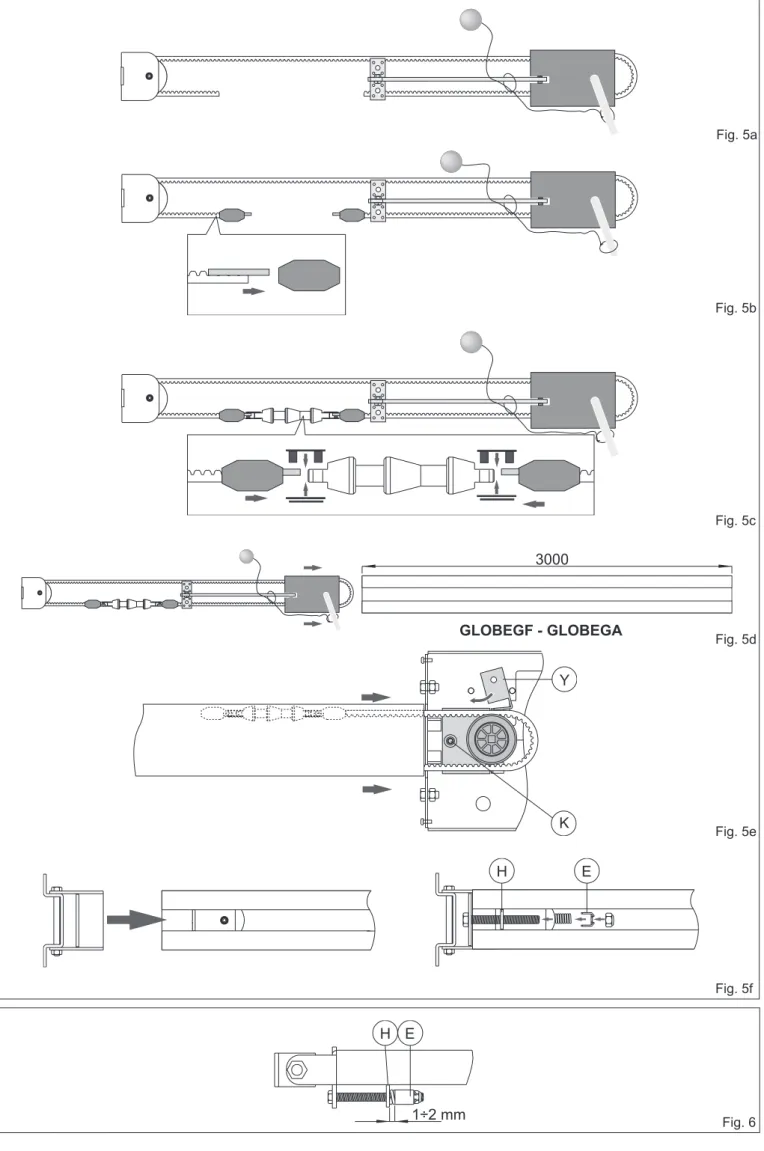
3.2 Belt type GLOBE assembly (fig.5)
- (fig. 5a) Fit the belt to the transmission and slide. - (fig. 5b) Fit the belt stop as shown in the illustration. - (fig. 5c) Fasten the two ends of the belt to the release pin
by means of the couplings keeping to the pin direction shown in the illustration.
- (fig. 5d) Fit the drive pin (belt - transmission - slide) in the guide. - (fig. 5e) Pass the belt around the pulley and secure by
means of the pin [Y]. Fit the guide as shown in fig. 3, lock in the drive unit as far as the stop and tighten screw [K]. - (fig. 5f) Push the transmission towards the outside of the
guide and fasten the retention bracket to the wall.
3.3 Chain or belt tensioning (fig.6)
- Correct tensioning is achieved by leaving 1÷2 mm between the spring retainer [E] and stop [H] to enable the spring [E] to work in the best possible way.
Attention: over-tightening could affect proper operation of the automatic system.
3.4 GLOBE installation (fig. 7-8)
- Establish and trace the retention point of the guide on the wall and ceiling (fig. 7a).
Attention: in the case of spring balanced up and over doors with counterweights use GLOBEC (fig. 7b). With the off-board drive unit, fit the guide to the wall using the transmission bracket (fig. 7c). (fig. 7d) Fit the bracket [3] and secure using the screws
provided. Lift the unit and bend the brackets to measure (if necessary eliminate the excess parts), then fasten to the ceiling. Attention: (fig. 8) to fully open sectional doors with special heights, the arm [M] can be shortened and the coupling point [L] can be moved from 20 mm to 100 mm further in than [G]. If necessary, fit a shim [J] (not supplied by us, max 200 mm) between the wall and the tightener [L]. This way the stroke of the slide will be increased by exploiting all the available guide. - Manually release (see OPERATING INSTRUCTIONS)
and move the slide up to the closed door, then fit the re-tention bracket [G] on the top edge, possibly interposing the supplied reinforcing angular [P] (fig.8c-d); afterwards, re-lock the slide by moving the door manually.
- (Fig. 9) Fit the stop in the guide and secure in the desired opening position.
- (Fig. 10) For stronger fastening the intermediate support GLOBESI can be installed.
GB
-M
24 V~
ENC
+M
BAT
Luce di cortesia Courtesy light POWER ALARM SIG ANT SAF1
Nero / Black Blu / Blue Motor 24V= TRANSF.OPEN
BATK1 COMBIXMR2 JR4 SO JR3 JR270R-71R
Only GLOBE10 Only GLOBE10 PRG ON OFF1 2 3 4 5 615 14
13
0 1 5 8 9
R1
TC
Lampada / Lamp Lampeggiante / Flashing light Elettroserratura / Electric lock Passo-passo / Step by step Sicurezza di inversione /Reversal safety contact
Stop Uscita / Output 24 V= / 0,3 A Alimentazione Power supply
4. ELECTRICAL CONNECTIONS
ATTENTION: Make a jumper all the N.C. contacts if not used. Use only DITEC accessories and safety devices.
Control Function Description
1 5 N.O. STEP-BY-STEP With DIP1=OFF the closure of the contact activates the sequence: open-stop-close-open.
Note: if automatic closing is enabled, the STOP is not permanent but at a time that is set by TC.
OPEN WITH
AUTOMATIC CLOSING With DIP1=ON and the automatic closure on, the closure of the contact activates an opening operation. OPEN WITHOUT
AUTOMATIC CLOSING With DIP1=ON and TC=MAX, the closure of the contact activates an opening operation. With the automation idle, the closure of the contact performs the operation opposite to that prior to the stop.
1 8 N.C. REVERSAL SAFETY CONTACT The closing of the contact during the closure manoeuvre causes the movement to invert (re-opening).
1 9 N.C. STOP The opening of the contact causes the movement to stop and the auto-matic closure to be disabled.
Resetting the command, the door remains still until a 1-5 command or a radio command is received.
GB
Output Value Description
1 +
0 - 24 V= / 0,3 A (nominal)24 V= / 0,5 A (peak)
Accessories power supply. External accessories power supply output. 0 14 24 V= / 30 W max. Flashing light (LAMPH). It is activated both on opening and on closing. 24 V= / 25 W Courtesy light. It is activated for 3 minutes on every opening and closing
com-mand.
BAT Battery operation. An optional battery kit is available (BATK1). With power supply on, the batteries are kept charged. Without power supply, the panel is powered by the batteries until power returns or until battery power falls below the safety threshold. In this latter case, the control panel goes off.
Attention: to allow recharging, the batteries kit must always be connected to the control panel. Periodically, verify the battery efficiency.
Note: the operating temperature of the rechargeable batteries is +5°C/+40°C approximately. To ensure proper battery operation rooms should be air-conditioned.
0 15 24 V= / 1,2 A max Electric lock. It is avtivated at each opening command given from closed door. 0 15
8,2 Ω / 5 W 12 V / 15 W Electric lock. activated at each opening command given from closed door.With a 12 V electric lock, connect the 8,2 Ω / 5 W resistor. It is 1 13 24 V= / 3 W Open door light (analogic output). Light comes on and only goes off when door
is closed.
4.2 Output and accessories
Output Description
TC
MIN=0 s MAX=disabled
120 s
Automatic closing time. From 0 to 120 s, with TC<MAX. With TC=MAX automatic closing is disabled.
The count starts with door stopped for time set with TC.
After the intervention of a safety (1-8), the countdown begins with the open door and lasts for the whole time set with TC.
With TC=MAX or contact 1-9 open, automatic closing is disabled.
If disabled with 1-9, automatic closing is re-enabled, once the contact 1-9 has been closed again, only after a control 1-5 or a remote control.
R1 Obstacle thrust adjustment. The control panel is equipped with a safety device that stops the opening operation and stops and inverts the closing operation in the presence of an obstacle.
With R1=MIN there is maximum obstacle sensitivity (minimum thrust). With R1=MAX the detection function is deactivated (maximum thrust).
5. SETTINGS
5.1 Trimmer
71R
GB
Description OFF ON
DIP1 Control 1-5 function. Step by step. Opening.
DIP2 Selection of direction. Opening towards gearmotor. Closing towards gearmotor. DIP3 Disengagement on the closing
stop with JR2=ON 2 mm 0,5 mmNote: use this selection to prevent an in-complete closing of the sectional doors. Disengagement on the closing
stop with JR2=OFF 5 mm
DIP4 State of door at start.
Indicates how the electronic panel considers the door at the time of start.
Open.
With DIP1=OFF the first control 1-5 closes the door.
With DIP1=ON the first control 1-5 opens the door.
Close.
The first control 1-5 opens the door. Note: automatic closing cannot be the first control even if enabled.
DIP5 Electric lock release. Disabled. Enabled.
Before opening from closed door, a thrust is included in closing to facilitate electric lock release.
DIP6 Pre-flashing light. Disabled during opening.
Enabled only with automatic closure with TC>3 s.
Enabled for both opening and closing.
5.4 Signals
LED ON Flashing
POWER ALARM 24 V= power supply. Encoder / automation fault. SA Indicates that at least one of the N.C. safety
con-tacts is open. Upon starting the LED flashes indicating the count of the operations which have been carried out: each quick flashing = 1000 operations
each slow flashing = 10000 operations SIG During radio transmitter enabling/storing phase. During radio transmission reception.
71R
5.2 Dip-Switches
Description OFF ON
SO Safety operation. The opening of contact 1-8 with door stopped enables opening manoeuvre. In the last 30 mm before closing stop, this causes stop.
The opening of contact 1-8 with door stopped prevents any operation.
JR2 Automation type. Up and over door with counterweight. Sectional and up and over door with springs. JR3 Maximum limit manoeuvering
forces. Normal closing force.Note: use safety edge.
Reduced closing force. JR4 Built-in radio receiver. Disabled. Enabled.
GB
6. RADIO
The control panel is equipped with a radio receiver with a frequency of 433.92 MHz. The antenna is a 173 mm long rigid wire. The range of the radio receiver can be increased by connecting the external antenna on the flashing light or by installing a tuned BIXAL antenna.
Note: use a RG58 (max 10 m) coaxial cable to connect the external antenna to the control panel. Up to 200 transmitters can be memorised in the BIXMR2 memory.
Consult the L series remote control use instructions for the memorisation, cloning and cancellation of transmitters. From one to four CH buttons of the same transmitter can be memorised on the control panel.
If just one transmitter CH button (any) is memorised command 1-5 (step-by-step/open) is performed.
If from two to four CH buttons of the same transmitter are memorised, the operations associated to the CH buttons are as fol-lows:
- CH1 = command 1-5 step-by-step/open ;
- CH2 = partial opening command, causes the automation to open for 1 min.; - CH3 = courtesy light on/off command ;
- CH4 = stop command, equal to the 1-9 impulsed command.
If the control panel is replaced, the BIXMR2 memory in use can be introduced to the new control panel.
Attention: the insertion and extraction of the BIXMR2 memory must be carried out in the absence of a power supply.
7. STARTING
ATTENTION: The operations relating to 7.3 are performed without safety devices. The trimmer can only be adjusted with the door stopped.
The 70R-71R electronic control panels do not need limit switches as they are provided with an encoder.
After each start, the electronic control panel is RESET and the first operation is carried out at reduced speed (automation position learning).
The automation automatically slows down near the stops. 7.1 Make a jumper between the safety devices 1-8, 1-9. 7.2 Set the TC trimmer and R1 at maximum
7.3 Switch on power: have the closing and opening stops learnt with subsequent step-by-step controls. 7.4 Remove the jumpers and connect the safety devices (1-8) and the stop (1-9) and check correct operation. 7.5 If desired, adjust the automatic closing with the TC trimmer.
7.6 Set the thrust on obstacles with R1.
Check that the manoeuvering force and the scattering force between the door and the obstacle is lower than the values indicated by standards EN12453 e EN12445.
7.7 Connect any accessories and check operation.
8. MAINTENANCE SCHEDULE (every 6 months)
Without 230 V~ and battery power supply:- Clean and lubricate the moving parts (above all the internal edges of the guide where the trolleys run). - Check the stability of the automation system and check the tightness of all the screws.
- Check battery efficiency. Restore the 230 V~ and battery power:
- Check the correct operation of the lock/release system (if fitted).
- Check the stability of the door and that movement is smooth and friction-free. - Check the correct operation of all the control and safety functions.
Note: if the position of the door stops is changed or, more in general, after maintenance operations, interrupt and restore power (batteries included if these are fitted) to repeat the learning process.
GB
Problem Possible cause Remedy
The automation does not open
and close. No power. Check that the control panel is on (the POWER ALARM led must be on).
Accessories in short circuit.
(LED POWER ALARM flashing) Disconnect all the accessories from the terminals 0-1 (24 V= are required) and reconnect these one at a time.
Line fuse burnt out. Replace the fuse F1.
The stop contact is open Check terminal 9 of the control panel The automation opens but does
not close The safety contacts are open.(LED SA on). Check terminal 8 of the control panel. The photocells (if fitted) are triggered.
(LED SA on). Make sure the photocells are clean and working properly. Automatic closing does not work. Check the setting of the TC trimmer
The automation fails to open. The automation is closed and the photocells (if fitted) are operative.
(LED SA on).
Make sure the photocells are clean and working properly.
See jumper SO.
Remote control does not work. Make sure the transmitters have been properly stored on the built-in radio receiver. In case of failure of the radio receiver built in the control panel, the remote control codes can be accessed by extracting the memory module.
Command devices faulty or connections
interrupted. Check opening by means of jumper 1-5 of the terminal board control panel. The external safety devices (if
fitted) fail to operate. Wrong connections between the photocells and the control panel Connect the N.C. safety contacts together in series and remove any jumpers on the terminal board of the control panel.
The automation opens/closes for a short distance and then stops.
Encoder faulty.
(LED POWER ALARM flashing). Replace the encoder. Motor leads reversed.
(LED POWER ALARM flashing). Check the motor leads.
There are frictions. Manually make sure the automation is moving freely.
Encoder not connected. Check the connection.
False encoder contacts. Clean the contacts by engaging and disengaging the encoder plug on the contacts.
R1 set too low. Check R1 adjustment.
The radio remote control has a low range and does not work with the automation in motion.
Radio transmission is hampered by metal
frameworks and reinforced concrete walls. Install the antenna outside. Replace the batteries of the transmitters.
8. TROUBLESHOOTING
OPERATING INSTRUCTION UP AND OVER AND SECTIONAL OVERHEAD DOOR AUTOMATION GLOBE
RELEASE INSTRUCTION
Perform the lock and release operations with the motor stopped. Keep outside the range of action of the door. If released, the door could move in an independent manner.
Note: to disconnect the door, interrupt the power supply and disconnect the batteries (if fitted).
In case of an emergency, to open the up and over door manually, perform the following operations:
- Internal cord release (fig. 1):
pull the cord with a downward movement until the lock release lever is triggered. Keeping the cord pulled, open the door manually. - ASB2 external cord release (fig. 2):
turn the release handle by 90° clockwise or anticlockwise and open the door manually.
- ASB1 external cord release with key (fig. 3):
turn the key by 90° anticlockwise, remove the lock block and pull the cord until the release lever trips and then move the door slightly; fit the block in the lock and turn by 90° clockwise, remove the key and open the door manually.
To restore motor operation, move the door manually: the release mechanism fastens on automatically.
GENERAL SAFETY PRECAUTIONS
The following precautions are an integral and essential part of the product and must be supplied to the user. Read them carefully as they contain important indications for the safe installation, use and maintenace. These instruction must be kept and forwarded to all possible future user of the system. This product must be used only for that which it has been expressely designed. Any other use is to be considered improper and therefore dangerous. The manufacturer cannot be held responsible for possible da-mage caused by improper, erroneous or unresonable use. Avoid operating in the proximity of the hinges or moving mechanical parts. Do not enter the field of action of the motorised door or gate while in motion. Do not obstruct the motion of the moto-rised door or gate as this may cause a situation of danger. Do not lean against or hang on to the barrier when it is moving. Do not allow children to play or stay within the field of action of the motorised door or gate. Keep remote control or any other control devices out of the reach of children, in order to avoid possible involuntary activation of the motorised door or gate. In case of breack down or malfunctioning of the product, disconnect from mains, do not attempt to repair or intervene directly and contact only qualified personnel. Failure to comply with the above may create a situation of danger. All cleaning, maintenance or repair work must be carried out by qualified personnel.
In order to guarantee that the system works efficiently and correctly it is indispensable to comply with the manufacturer’s indications thus having the periodic maintenance of the motori-sed door or gate carried out by qualified personnel.
In particular regular checks are recommended in order to verify that the safety devices are operating correctly. All installation, maintenance and repair work must be documented and made available to the user.
DITEC S.p.A.
Via Mons. Banfi, 3
21042 Caronno Pertusella (VA) - ITALY
Tel. +39 02 963911 - Fax +39 02 9650314
www.ditec.it - [email protected]
Installer: TEAR OFF AND DELIVER T O USER Fig. 2 Fig. 3 Fig. 1 ON OFFQuarto d’Altino (VE) Caronno Pertusella (VA)
Lokeren Oberursel
Palaiseau Balerna
Orlando DITEC S.p.A.
Via Mons. Banfi, 3 21042 Caronno P.lla (VA) ITALY Tel. +39 02 963911 Fax +39 02 9650314 www.ditec.it [email protected] DITEC BELGIUM LOKEREN Tel. +32 (0)9 356 00 51 Fax +32 (0)9 356 00 52 www.ditecbelgium.be DITEC DEUTSCHLAND OBERURSEL Tel. +49 61719141550 Fax +49 61719141555 www.ditec-germany.de DITEC FRANCE PALAISEAU Tel. +33 1 64532860 Fax +33 1 64532861 www.ditecfrance.com DITEC SVIZZERA BALERNA Tel. +41 91 6463339 Fax +41 91 6466127 www.ditecswiss.ch DITEC AMERICA
ORLANDO - FLORIDA - U.S.A. Tel. +1 407 8880699 Fax +1 407 8882237 www.ditecamerica.com DITEC CHINA SHANGHAI Tel. +86 21 62363861 Fax +86 21 62383863 www.ditec.cn