Like J.T., many students with learning disabilities are spending more and more time in the general classroom (Mc-Leskey, Henry, & Axelrod, 1999), where they are exposed to the same wealth and variety of information as their peers. But students like J.T. often face higher expectations of productivity in these inclusive environments than they may have traditionally experienced in separate special education settings. Many students with learning disabilities struggle to be successful with these increased academic demands. One area that is especially problematic for some students with learning disabilities is written expression (Graham, 1990; Houck & Billingsley, 1989; Moran, 1981; Newcomer & Barenbaum, 1991; Thomas, Englert, & Gregg, 1987).
The demands of writing are particu-larly problematic for children with learning disabilities. As writers com-pose, they must juggle not only the ideas that come to mind, but also the many requirements associated with dif-ferent writing formats. They must also consider the audience to whom the work is directed and the purpose of the writing (descriptive, expository, persua-sive, and so forth). Students must know whether they have written “enough” information, and if their ideas are all connected and relevant. They must ensure that neither these ideas nor the vocabulary they use is unnecessarily repetitive, and that their words and
sen-tences have been constructed correctly. Students with learning disabilities in written expression can have particular difficulties with many of these issues as they write.
Assistive technology, in particular computer software, can be a valuable tool for many students with disabilities; and students with learning disabilities in written expression are no exception. Word processing, speech recognition, speech feedback, word prediction, and other varieties of software packages may serve to help students with learn-ing disabilities participate in well-devel-oped classroom writing programs. Research about these tools, however, is limited and has generated mixed results (Lewis, 1998).
The case study described here exam-ines the experience of a single student with learning disabilities in written expression and his use of word predic-tion and speech feedback software dur-ing journal writdur-ing. The results of the study suggest that instruction and instructional feedback play a critical role in student success, regardless of the availability of technology.
J.T.’s Specific Skills and Needs J.T. says he “learns best by listening,” and although he is in the seventh grade, he reads on a preprimer level. J.T. has difficulty with many aspects of the writ-ing process. He writes slowly (but neat-ly) and often reverses letters. He also
TEA CHING Exceptional Childr en , Vol. 34, No. 3, pp. 72-78. Cop yright 200 2 CEC.
How Speech-Feedback and
Word-Prediction Software
Can Help Students Write
Sarah C. Williams
J.T. is an energetic, hard-work-ing, and good-natured seventh-grade student who attends a small K-8 school in a rural town in south central North Carolina. J.T. has identified learning disabilities in reading and written expression and receives all of his instruction in a general education classroom. In North Carolina the primary criterion for identification for services for students with learning disabilities is a 15-point discrepancy between an IQ score and a standardized achievement score. J.T. demon-strated a 30-point discrepancy in reading and a 28-point dis-crepancy in written expression when tested with the WISC-III and the Woodcock Johnson Tests of Achievement. He par-ticipates, with some modifica-tions, in all activities expected of general education students. A special education teacher, however, visits his communica-tion-skills class for 1 hour each day to assist with his specific needs, as well as the needs of other students with learning disabilities in the same class-room.
types slowly, always conscious of keep-ing his fkeep-ingers in the correct key posi-tion.
J.T. once said in an interview that he “like[s] to write without putting any periods or capital letters.” Actually, he seems to have difficulty knowing where either of these writing conventions belongs. J.T.’s reading difficulties, cou-pled with frequent misspellings (often only writing initial sounds correctly) make it almost impossible for him to revisit a piece of writing to share with the class or to revise and edit. He sim-ply cannot read his work once it gets “cold.” As he sorts through the many ideas for writing that he generates, it does not take long for him to “forget” what he has already written (even earli-er in the same papearli-er) and needs it to be reread to him.
Even dictation of the first draft to a scribe, which is an accommodation he often uses, does not generally address his need to have work read and reread aloud frequently if he wishes to do any revising. His dictated papers are often lengthy and detailed, but he only writes a few sentences when working inde-pendently (using word processing or paper and pencil). Despite these diffi-culties, his motivation and willingness to work hard are incredible, and he is a joy to all of his teachers.
The Software
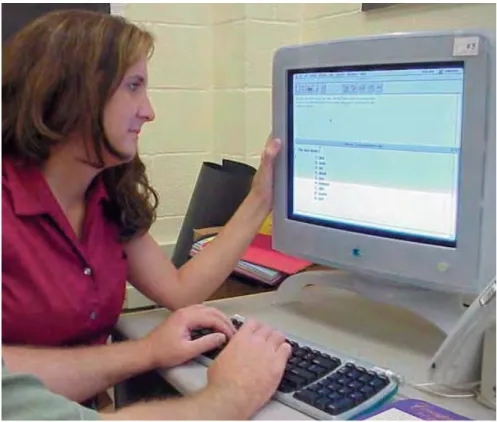
Write:OutLoud© (Johnston, 1994a) has a speech-feedback component that en-ables the computer to “read” selected sections of text to students. Also, the software highlights each word as it is being read aloud (Figure 1). These fea-tures seemed ideal for J.T., in that he could have his written work read aloud for revision purposes (immediate or later), and at the same time focus his reading on the individual, highlighted words being spoken.
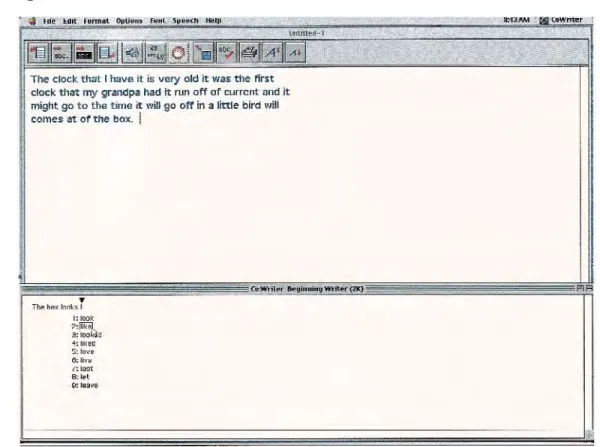
The second tool that J.T. used was Co:Writer© (Johnston, 1994b), specifi-cally for its word-prediction capabilities. After a writer has typed the first letter or letters in a word, the software will “pre-dict” (based on letters presented, type of word that would be grammatically correct at this point in the sentence, word frequency in a body of writing)
what the writer wants to say next. The student can then select (by clicking on the word or typing its corresponding
number from the list) the desired word and continue with the rest of the sen-tence (see Figure 2).
Figure 1. Write:OutLoud Screen
Computer software can offer students immediate spelling assistance and can read aloud what they have written, as an aid to revision.
Originally created as a program to limit the amount of necessary key-strokes for writers with physical disabil-ities, Co:Writer also seemed to hold much potential for J.T. It offered the spelling assistance he needed and capi-talized on his ability to generate initial sounds of words. It provided assistance with capitalization and reduced some of the laborious demands of typing for J.T.
Finally, the predicted choices can be read aloud to students with reading dif-ficulties, which was critical for J.T.’s success.
The Intervention
One of the daily assignments in J.T.’s seventh-grade communication skills class was to write for 20 minutes in a journal in response to a designated prompt. The purpose of this journal time was stated to be primarily to pro-vide frequent opportunities for mem-bers of the class to write. While an enjoyable task for many of the students in the class, this often was laborious and frustrating for those with learning disabilities in written expression. J.T. and five other students with learning disabilities agreed to participate in a study in which they used Co:Writer and Write:OutLoud during these daily jour-nal-writing sessions. J.T., who in many ways experienced the most success when using this software, is highlighted here.
During the time allotted for journal writing, J.T. and the other participants went to the school’s computer lab and used word processing software to write in response to the prompt they were given in class. They were given 20 min-utes to work in their journals, and they returned to class just as the other
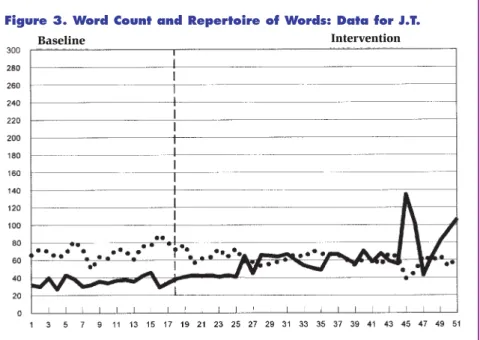
stu-dents were finishing the same task. Results for J.T. Although each stu-dent experienced suc-cess with this soft-ware combination, it seemed to be particu-larly suited for J.T. Figures 3 and 4 show a graph of his per-formance during baseline and inter-vention phases from the study (Williams, 2000).
Number and Variety of Words
During the study, we made a count of the total number of words J.T. typed in each journal entry (depicted in Figure 3 with the solid line). Also, the number of different words (type-token ratio) he used was calculated. This second count, represented in Figure 3 with the dotted line, was taken in an effort to see if J.T. extended the repertoire of words he used in journal entries instead of con-tinuing to rely on the same words over and over.
J.T. used the word prediction capa-bilities of Co:Writer to reduce the key-strokes he needed to type, as well as to assist with his spelling needs. The length of his papers increased from an average of 36.9 words during baseline to an average of 60.28 when using the soft-ware. As should have been expected, in these longer passages, he actually had the opportunity to repeat common words more often, which lowered the type-token ratio. Therefore, he may have been using a larger vocabulary, but it was not captured in this ratio.
Journal entries from each phase of the study were evaluated (by an blind reviewer) using a holistic scoring sys-tem. These scores are represented with the solid line in Figure 4. In addition, the number and type of questions J.T. Figure 2. Co:Writer Screen
Similar supports as those
offered by this technology
can be provided in the
form of personal assistance
to students in classrooms
where technology is not
asked was recorded each day (depicted by the dotted line in Figure 4).
Introductions and Processes
J.T. and his peers were introduced to the software by a brief explanation and demonstration. They then typed a sam-ple journal entry with guidance in respect to their use of the program. One
legitimate concern about introducing word prediction is that the program itself may be difficult to learn and man-age, thus adding an additional burden to the writing process (MacArthur, 1998a). Since the purpose of this soft-ware is to reduce the mechanical demands of writing, it must be relative-ly easy to learn and use by the students.
J.T. began using the software after one brief training session, and experienced little difficulty from then on. He did express disappointment with the speed with which the program worked. The computers in the lab caused the pro-gram to run slowly. While this is not a limitation of the software itself, many schools rely on similar outdated com-puter systems for student use. J.T. rarely had to ask for assistance with this new technology. Actually the average num-ber of questions he asked during journal sessions (primarily for spelling assis-tance throughout the study) decreased from an average of 9 questions per ses-sion during baseline to 3 questions per session.
Comparisons to Nontechnical Writing Support
Similar supports as those offered by this technology can be provided in the form of personal assistance to students in classrooms where technology is not available. For example, J.T. often depended on a scribe to write and read back the content he wanted to include in an essay. Although these supports are available, and used often for students with learning disabilities, the software used here allowed J.T. to work much more independently. He could have his work read aloud as many times as he wanted without having to depend on someone else for this assistance.
Scoring
J.T.’s writing quality scores as measured on a 7-point holistic scoring rubric (from a score of 1, nonscorable, to 7, developed discussion) increased almost 1 full point; from an average score of 2.78 during baseline to an average score of 3.5 with the software. See Figure 5 for an excerpt from J.T.’s writing before (November) and during (February) the study. Although some people might not consider a change of 1 point as dramat-ic, it often takes quite a bit of improve-ment to merit an entire level change on such an evaluation scale. Therefore, for some students with severe writing diffi-culties, this might be an educationally significant change. (Note: I have pre-sented J.T.’s scores for illustration pur-poses only; the complete study shows Figure 3. Word Count and Repertoire of Words: Data for J.T.
Figure 4. Holistic Score and Independence: Data for J.T.
more detailed results of all participants over time.)
One unexpected outcome was J.T.’s ability over time to produce the sounds necessary to spell the words he desired much more quickly. Vowel sounds seemed to be J.T.’s most frequent stum-bling block. We learned together that the majority of words that he wanted were predicted in Co:Writer with the typing of three letters or less. Therefore, if a word he desired was not predicted within three keystrokes with the letters (and vowel) he had tried, he would “back up” and try a different vowel. While using this strategy, he had much practice listening to the way various vowel selections sounded in words, and eventually he was able to type the cor-rect sounds much more quickly and use the program more efficiently.
The Plus of J.T.’s Attitude
Before this study began, J.T. already had an exceptionally positive attitude toward school. He consistently complet-ed assignments, entercomplet-ed into class dis-cussions, and worked diligently in group situations. But he was conscious of the fact that he had to do things dif-ferently from his peers. Although he knew it was a necessity, he disliked the fact that everyone saw him dictating his stories to the teachers.
Once this program was in place, he frequently asked if he could go over to the computer to do his work with the software. He even asked if he could bring his own headphones from home to donate for the classroom computer so that he, and other students, would have a comfortable set. In addition, he vol-unteered to teach others in the class how to use the programs.
When the study was over, one stu-dent, in particular, had been targeted to receive help from J.T. and to begin using the software during class assign-ments. J.T. indicated in an interview that working with the software was “fun,” an adjective that his teachers sel-dom heard him apply to writing before.
J.T.’s enthusiasm remained high through the duration of the study. Implications
The use of software with speech-feed-back and word-prediction capabilities offers promise for students like J.T. who struggle to meet the writing demands of the general classroom. J.T. wrote longer passages that were judged to be of high-er quality with the use of these sup-ports. J.T.’s involvement in the larger study, however, supports the recom-mendation by MacArthur (1998a) that decisions to select these assistive tech-nologies for students must be made on a case-by-case basis. Of the participants in the larger study, J.T. had the most severe difficulty with transcribing his ideas into writing.
Other students with different written expression needs may find little use for this software, and production rate may even be hindered by it (Lewis, Graves, Ashton, & Kieley, 1998). This may be illustrated with a brief description of the performance of other students who par-ticipated in the same study (see box, “Variety of Student Supports”).
As always, these tools can only be as effective as the way in which they are used (MacArthur, 1998b). J.T. and the other participants of this study had access to the software only during daily journal writing sessions. Students had the opportunity to share these entries by reading them aloud in class on a volun-tary basis, but they never received any direct or explicit feedback on what they had written. While there is merit to pro-viding frequent opportunities for stu-dents to write in journals free from eval-uation from teachers or peers (Hillocks, 1984), this may not be the writing situ-ation in which students use these assis-tive technologies to their fullest advan-tage.
During the course of this study, no journal entries were ever extended into a piece of writing that was evaluated by the teacher or shared with other stu-dents for feedback. For writing assign-ments that students did take to a final draft, the intervention software was not made available by the classroom teacher. J.T. continued to utilize a scribe in these situations, and depended
heav-J.T. indicated in an
interview that working
with the software was
“fun.”.
Figure 5. J.T.’s Writing Samples—Before and After
Each day during the study, J.T.’s class received a descriptive writing prompt, and then had 20 minutes to address this prompt in a journal entry. The entries shown here depict a prompt and J.T.’s corresponding journal response. On November 21, J.T. had not been introduced to the features of Co:Writer and was using word processing capabilities Write:OutLoud with the speech com-ponent disabled. By February, J.T. was using the intervention software when he composed his journal entries. This entry is a typical example of the longer entries he generated using Co:Writer and Write:OutLoud.
November 21
Prompt: Describe your idea of the “ideal” thanksgiving dinner
MY FAVORITE FOOD IS A GRILL HOG IN A PUMPKIN IN A ROAST HAM IN A MAYBE A TURKEY my favorite DESSERT food strawberry pie THE END
February 27
Prompt: Describe your favorite clock
The clock that I have it is very old it was the first clock that my grandpa had it run off of current and it might go to the time it will go off in a little bird will comes at of the box. The box look like a house in it has a to pendulums on the bottom of the house inside of the house it has people in it. On the otside it has to door on it in it has to windows the color is color is brown on the top of the clock it is black.
ily on his teachers or peers for reading and spelling assistance. Given the limit-ed use of the journal assignments dur-ing actual writdur-ing instruction, J.T. and his peers had little external motivation to improve the quantity and quality of these writings, especially in respect to mechanics. In this light, the improve-ment that J.T. demonstrated may be considered even more striking.
As is evident from his writing sam-ples, J.T. still has a long way to go to perfect his writing skills. More research must be done to evaluate the use of these tools for long-term assignments. Without the software, J.T. produced very brief drafts of writing, which pro-vided a limited foundation to use for targeted instruction and meaningful feedback. Future research could evalu-ate if the longer, and more legible, pas-sages students like J.T. may produce using assistive technology could facili-tate this critical exploration of the entire writing process.
Assistive technologies such as these hold the potential to be powerful
writ-ing supports for students with learnwrit-ing disabilities. The conflicting evidence provided by research to date may be as much a reflection of the nature of instruction and instructional feedback that accompanies use of the technolo-gies as it is a reflection of the efficacy of the technologies themselves. Regardless of their power, assistive technologies are not a replacement for instruction. J.T. does provide some evidence, however, that just as free writing can have a pos-itive, albeit minimal, effect on the qual-ity of written composition, the mere introduction of technologies to support some children with learning disabilities in written expressions can have a posi-tive effect on written composition. Perhaps most importantly, J.T. was pleased with his ability to express him-self on paper much more effectively than he was without the use of these tools. When some of the mechanical struggles he had with writing were elim-inated, he could focus more on what he had to say, which was certainly worth reading. J.T. has found a tool that he
can use far beyond the walls of the pub-lic schools.
Getting Started in Your Classroom
Software such as that used with J.T. is not intended to teach writing skills. Instead, the technology fits nicely into existing programs and allows students with similar difficulties more access to the benefits of writing instruction and feedback. J.T. and his peers demonstrat-ed that they only nedemonstrat-eddemonstrat-ed a brief intro-duction to the software and its features, as well as an initial practice session before they felt comfortable with these tools.
This software is not just for “writing class”; it can be used for any curriculum area that requires writing. J.T., for example, used the technology later in the year to compose a paper for a sci-ence class. If assistive technology is truly to be viewed and used as a tool by students, they will need to generalize its use to many environments. Therefore, for best results, students would need to have access to the software any time they complete writing assignments, such as essays, reports, and possibly even test questions. Students in this study had access to several computers in the computer lab equipped with the software. The programs were also installed on a classroom computer. If only one or two students in a classroom require this intervention, the classroom computer (or a laptop) may be the ideal set-up, because it would allow students to use the technology without leaving the classroom.
Students can use the features of the software as needed when writing. For example, students may take advantage of the spelling assistance of a word
pre-Variety of Student Supports
All six participants in the study wrote longer papers and expressed less writ-ing apprehension while uswrit-ing Co:Writer and Write:OutLoud. They also quick-ly learned to use the software and capitalize on the features that they needed and to turn off those features that were of little personal assistance.
Before the study began, the special education teacher had rated each stu-dent’s writing skills in relation to the Flower and Hayes (1981) model of the writing process that includes planning, translating, and reviewing. Although all students demonstrated needs in all aspects of the writing process, the two students that exhibited the most improvement overall were the only two stu-dents for whom the special education teacher had rated as having the most need in the area of translation. They had difficulty with spelling and typing, as well as understanding sentence structure, punctuation, and capitalization. Also, the teacher rated both of these students as having relative strengths in the area of planning. She felt that they both frequently had a fairly clear idea about what they wanted to say in mind before they ever began to write, but were unable to effectively get these thoughts on paper.
J.T. was highlighted here because he seemed to fit this description most clearly. For the other four students, who had been rated highest in the area of translating and lowest on planning, the overall results were not as strong. The teacher expressed that these four students engaged more in online planning (they planned as they typed), giving little thought to organization and writing purpose.
This intervention primarily addresses the translation process, so those who need less support for translation and more in other areas will also need strate-gies designed specifically to enable them to plan more effectively.
Computer software can
offer students immediate
spelling assistance and can
read aloud what they have
written, as an aid to
revision.
diction program for an initial draft of writing. Later, as students revisit and revise their work, they may use the “read aloud” features of programs with speech feedback. Indeed, student inter-views from this study indicated that the participants felt they did use Write:OutLoud some for immediate feedback about whether they had “said what they wanted to say,” but that they felt they would use it more often when developing writing beyond a first draft.
Special education often boils down to the word flexibility. Once mastered by a student, speech feedback in pro-grams such as Write:OutLoud can be used in a variety of situations. For example, for students who have reading difficulties, although speech feedback is valuable when proofing their own writ-ing, it can also be useful for reading other materials aloud. Tests and stories can be downloaded and read aloud to students. Students can then use the word prediction features of programs such as Co:Writer to help with spelling and keystroke reduction as they type responses to questions and readings.
Word prediction can also be used in conjunction with programs other than a word processor. For example, Co:Writer can be used with the Inspiration® soft-ware as students create a graphic organ-izer to plan a paper or respond to a class assignment.
The key will be to use these pro-grams not just for the sake of using technology, but to match the character-istics of the software with the needs of the student.
References
Flower, L., & Hayes, J. R. (1981). A cognitive process theory of writing. College
Composition and Communication, 32,
365-387.
Graham, S. (1990). The role of production factors in learning disabled students’
com-positions. The Journal of Educational
Psychology, 82, 781-791.
Hillocks, G. (1984). What works in teaching composition: A meta-analysis of experi-mental treatment studies. American
Journal of Education, 93(1), 133-170.
Houck, C. K., & Billingsley, B. S. (1989). Written expression of students with and without learning disabilities: Differences across the grades. Journal of Learning
Disabilities, 22,561-567.
Johnston, D. (1994a). Co:Writer (Version 2.0) [Computer software]. Wauconda, IL: Don Johnston Inc.
Johnston, D. (1994b). Write:OutLoud (Version 2.0) [Computer software]. Wauconda, IL: Don Johnston Inc. Lewis, R. B. (1998). Enhancing the writing
skills of students with learning disabilities through technology: An investigation of the effects of text entry tools, editing tools,
and speech synthesis(Report No. CFDA 84
180G). San Diego, CA: San Diego State University, Department of Special Education. (ERIC Document Reproduction Service No. ED 432 117)
Lewis, R. B., Graves, A. W., Ashton, T. M., & Kieley, G. L. (1998). Word processing tools for students with learning disabili-ties: A comparison of strategies to increase text entry speed. Learning
Disabilities Research and Practice, 13(2),
95-108.
MacArthur, C. A. (1998a, July/August). From illegible to understandable: How word recognition and speech synthesis can help. TEACHING Exceptional Children, 30,
66-73.
MacArthur, C. A. (1998b). Word processing with speech synthesis and word predic-tion: Effects on the dialogue journal writ-ing of students with learnwrit-ing disabilities.
Learning Disability Quarterly, 21, 151-166.
McLeskey, J., Henry, D., & Axelrod, M. I.. (1999). Inclusion of students with learn-ing disabilities: An examination of data from reports to congress. Exceptional
Children, 66(1). 55-65.
Moran, M. R. (1981). A comparison of formal features of written language of learning disabled, low-achieving and achieving
sec-ondary students(Report No. IRLD-RR-34).
Washington, DC: Bureau of Education for the Handicapped (ERIC Document Reproduction Service No. ED 217 646) Newcomer, P. L., & Barenbaum, E. M. (1991).
The written composing ability of children with learning disabilities: A review of the literature from 1980-1990. Journal of
Learning Disabilities, 24, 578-593.
Thomas, C. C., Englert, C. S., & Gregg, S. (1987). An analysis of errors and strate-gies in the expository writing of learning disabled students. Remedial and Special
Education, 8(1), 21-30.
Williams, S. C. (2000). Effects of software equipped with speech feedback and word prediction on the writing of adolescents
with learning disabilities. Unpublished
doctoral dissertation, University of North Carolina, Chapel Hill.
Sarah C. Williams (CEC Chapter #680), Assistant Professor, Department of Special Education, School of Education, East Carolina University, Greenville, North Carolina. Address correspondence to the author at School of Education, East Carolina University, 232 Speight Building, Greenville, NC 27858 (e-mail: [email protected]). J.T. was a participant in a larger study that was conducted as partial fulfillment of a dis-sertation and graduate work at the University of North Carolina at Chapel Hill. I would like to offer a special note of thanks for the signif-icant assistance and continuous support given by dissertation committee members Drs. David Lillie, W. B. Ware, Karen Erickson, William Burke, and Carl Swartz. Additional acknowledgments go to Drs. David Powers, Patricia Anderson, and Lynne Davis for sup-port and assistance provided at East Carolina University.
TEACHING Exceptional Children, Vol. 34, No. 3, pp. 72-78.
Copyright 2002 CEC.
J.T. volunteered to teach
others in the class how to
use the programs.
Integrating Transition
Planning into
the IEP Process,
Second Edition
Lynda L. West, Stephanie Corbey, Arden Boyer-Stephens,
Bonnie Jones, and Robert J. Miller
Explore ways schools, communi-ty service agencies, private organizations, and families can work together to help students make a smooth transition to adult life. Covers transition plan-ning, self-advocacy, assesment, curriculum for transition, sup-port services, and program eval-uation and follow-up.
#P386S $21.95/ CEC Members $15.95
#P386SA Audio Tape
$21.95/CEC Members $15.95